Walmart Marketplace is no longer a small side channel for sellers. In Q1 FY27, Walmart reported 26% global eCommerce growth, and Marketplace Pulse reported that Walmart Marketplace crossed 200,000 active sellers in 2025. More sellers, more categories, and more competition also mean one thing: account management has become much harder.
For sellers running separate brands or product lines, multiple Walmart seller accounts can make business sense. But they also need to be handled carefully. If two accounts share the same business details, product catalog, login environment, or team workflow, they may look connected even when the stores are meant to be separate. This guide explains how to manage multiple Walmart Marketplace seller accounts without getting them linked, from approval and account separation to daily operations, team access, and browser profile management.
Can You Have Multiple Walmart Seller Accounts?
In most cases, Walmart sellers should not create multiple seller accounts on their own. Walmart usually allows one seller account per business, but it may consider another account if you have a clear business reason, such as operating separate brands, selling different product categories, or serving different customer groups. The key point is simple: a second Walmart seller account should represent a real and separate business need, not just another way to run the same store.
If Walmart approves an additional seller account, each account should stay clearly separate. That means using a different email address, phone number, point of contact, account management setup, and product focus for each store. Your existing seller account should also be in good standing before you request another one. So, yes, you can have multiple Walmart seller accounts in limited cases, but only when the accounts are approved, clearly separated, and supported by a strong business reason.
The Benefits of Multiple Walmart Seller Accounts
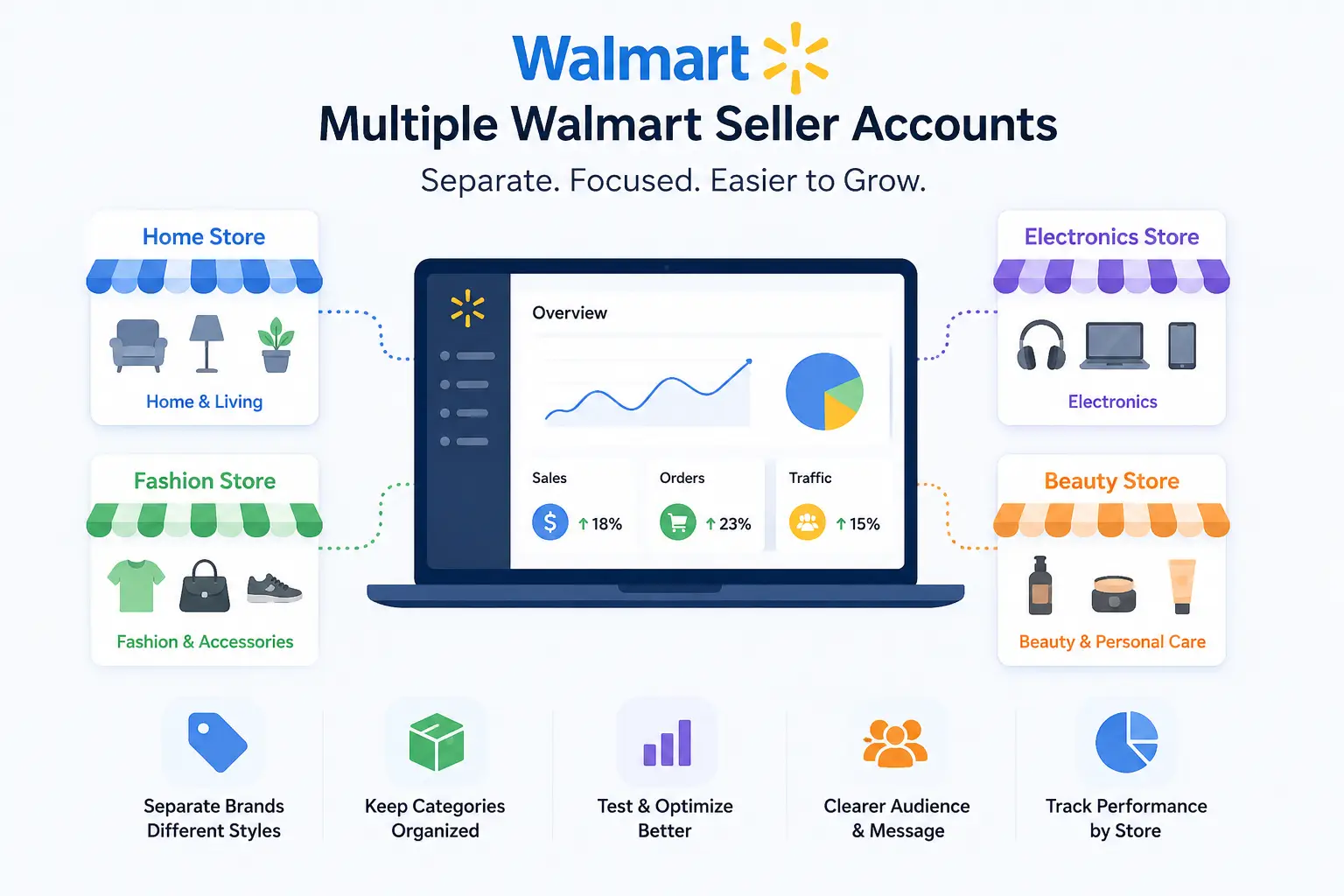
Multiple Walmart accounts can help sellers organize different brands, product lines, or buyer groups more clearly. The value is not in having more accounts. The value is in keeping each store focused and easier to manage.
Multiple accounts may help with:
- Separating different brands with different store names and product styles
- Keeping unrelated product categories from making one store feel messy
- Testing pricing, keywords, or product positioning across different markets
- Giving each store a clearer customer group and brand message
- Tracking which category or brand performs better on Walmart Marketplace
This setup can also make team work easier when each store has its own product focus. A team handling home goods does not need to manage electronics listings at the same time. Reports, product updates, and customer messages can become easier to review when each account has a clear purpose.
How to Request Another Walmart Seller Account
To request another Walmart seller account, treat it as a seller approval process, not a normal Walmart.com account signup. A regular shopper account only needs basic login details, but a Walmart Marketplace seller account needs business information, product details, and approval. If you want a second seller account, prepare the business reason and account separation details before you start.
1. Confirm why you need another seller account
Start by writing down why one Walmart seller account is not enough for your business. A stronger reason may be a separate brand, a different product category, or a new customer group that does not fit your current store. If the new account will sell the same products with the same branding, the reason is much harder to support.
2. Check your current seller account first
Before you request another account, make sure your current Walmart seller account is in good standing. Clean performance, stable operations, and clear account records make the request easier to explain. If your current account has unresolved issues, it is better to deal with those first instead of adding another account.
3. Prepare separate account details
Each seller account should have its own business email, phone number, point of contact, and account management setup. The new account should also have a different product focus from your current store. This separation helps show that the second account is built for a real business purpose.
4. Start the seller application through Walmart Marketplace
For a seller account, do not stop at creating a normal Walmart.com login. Go through the Walmart Marketplace seller application process and provide the required business details. Use the email, contact information, and business information prepared for the new store.
5. Wait for approval and complete registration
After Walmart reviews and approves the application, you should receive instructions to complete registration. Follow the setup form carefully and enter the correct details for the approved business. Keep the new store’s information consistent from the beginning, including email, contact person, phone number, and product plan.
6. Set up the new account as a separate store
Once the account is ready, manage it as its own store, not as an extra copy of your first account. Use a separate product catalog, separate brand assets, and a separate daily management process. This makes it easier to keep the accounts organized and reduces confusion as your Walmart operations grow.
Why Walmart Seller Accounts May Get Linked or Reviewed
Walmart seller accounts may get linked or reviewed when separate stores show the same business, payment, product, login, or management patterns. One shared detail may not always cause a problem, but repeated overlap can make two accounts look like one operation.
Common linking or review signals include:
- Shared business details: Same or similar business name, tax information, phone number, contact person, billing details, bank account, or payout setup.
- Similar return or fulfillment setup: Same return address, packing process, support flow, or customer-facing store details across accounts.
- Repeated login patterns: Same device, browser data, network environment, or unusual changes in login location and access habits.
- Similar device fingerprints: Matching signals such as operating system, browser version, screen size, fonts, or hardware details.
- Overlapping products or listings: Same items, SKUs, titles, images, descriptions, brand assets, or listing templates.
- Unclear team access: Shared logins, mixed account roles, untracked store updates, or no clear record of who changed what.
The safest way to read these signals is as a pattern, not a single checkbox. A shared detail may be easy to explain in some business setups, but several shared details across accounts can create a stronger review risk. If you manage multiple Walmart Marketplace seller accounts, each store should look separate in its business identity, product catalog, login routine, and daily management.
How to Manage Multiple Walmart Seller Accounts Safely
To manage multiple Walmart seller accounts safely, keep each store separate in both setup and daily work. A second account should not just have different login details. It should have its own business reason, product focus, access routine, and management process.
1. Start with approved and clearly separated accounts
Before daily management begins, make sure each seller account has a valid reason to exist. Each store should have a different product focus, brand position, or customer group. If two accounts sell the same products in the same way, they will be much harder to explain as separate stores.
2. Give each account its own working environment
Each Walmart seller account should be managed from its own dedicated browser profile or device setup. A normal browser tab is not enough because cookies, cache, sessions, and device data can still overlap. The goal is to keep each account’s login routine stable and separate, so daily access does not become messy.
3. Keep product catalogs separate from the beginning
Do not build the second store by copying the first store’s catalog. Use different SKUs, product descriptions, images, brand assets, and listing structures where possible. If two stores have a real reason to be separate, their product pages should also show that difference.
4. Use a fixed routine for daily account work
A clean routine helps reduce careless overlap. Open only the correct account in its assigned environment, update the right listings, and avoid switching between stores in a rushed way. For teams, it also helps to define who handles orders, who updates listings, and who reviews account settings.
5. Track important changes across each store
Multiple accounts become risky when no one knows what changed, when it changed, or who changed it. Keep a simple change record for listing updates, pricing changes, user access, return settings, and major account edits. This makes it easier to review problems later if one store gets flagged or performance drops.
6. Review account separation on a regular schedule
Do not wait for a review to check your setup. Review each store’s contact details, product overlap, access routine, permissions, and performance records on a fixed schedule. If you manage multiple Walmart Marketplace seller accounts without getting them linked, the work is not only about opening separate accounts. It is about keeping them separate every day.
How DICloak Helps Manage Walmart Seller Accounts
When you manage multiple approved Walmart seller accounts, each store should have its own stable browser profile. With DICloak Antidetect Browser, you can create a separate profile for each Walmart account and keep its proxy, fingerprint, cookies, and session data apart from other stores.
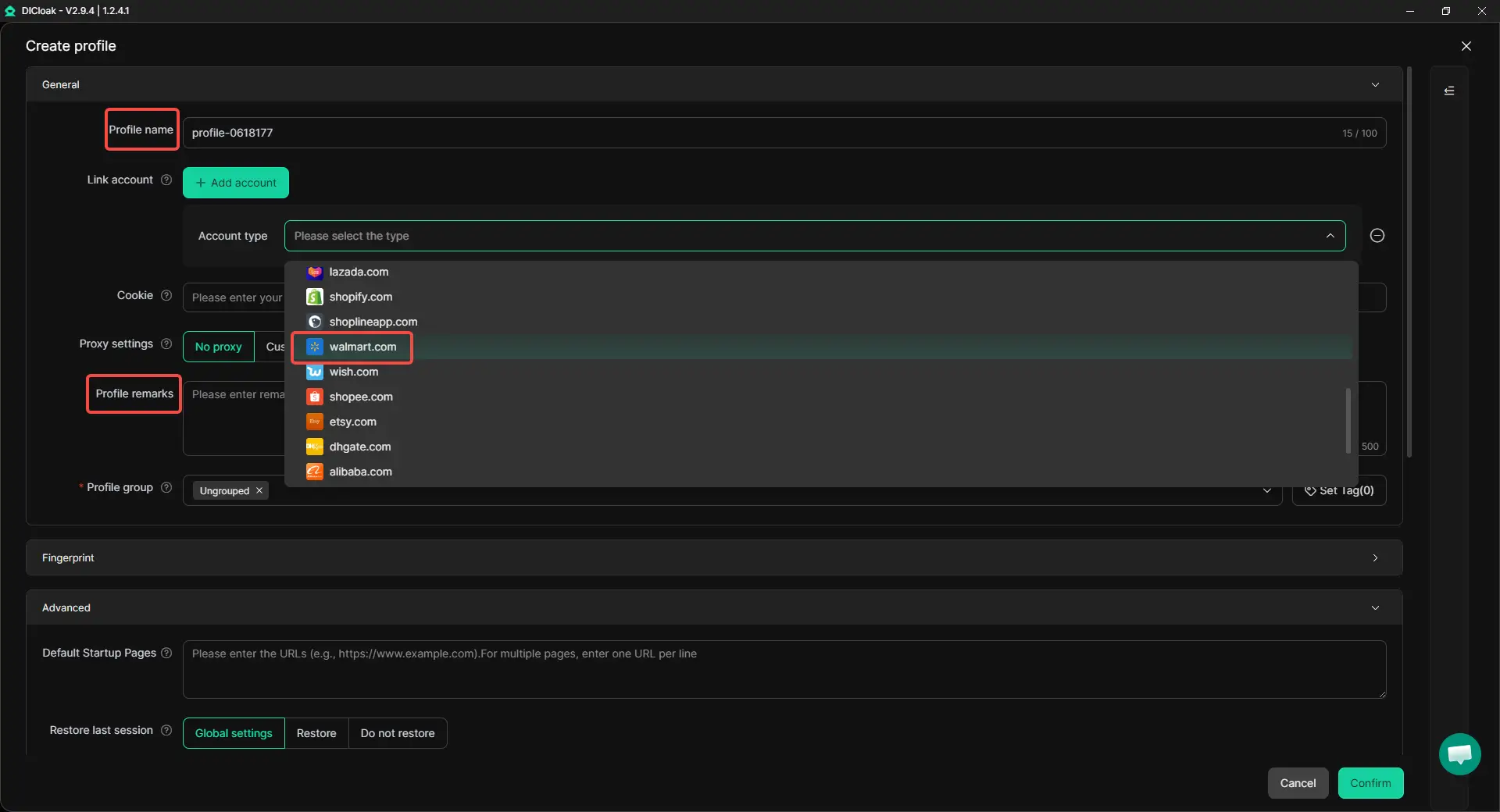
1. Create a new profile for one Walmart account
Create one browser profile for one Walmart seller account. Set the profile name and remark. Then choose walmart.com from the platform list and enter the account information for that store. Use a clear name, such as “Walmart Home Store” or “Walmart Electronics Store,” so your team does not open the wrong profile.
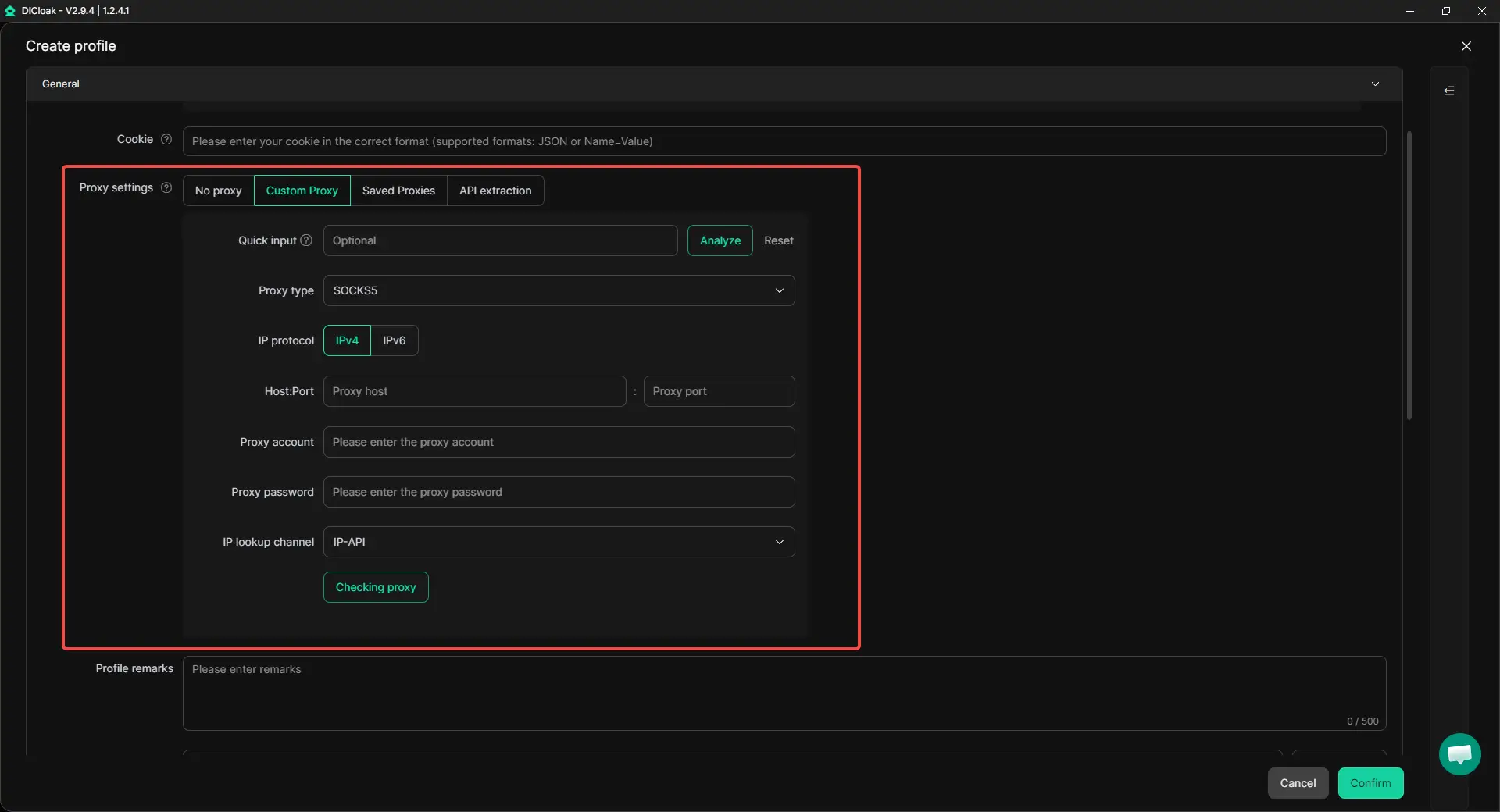
2. Set up the proxy
Add the proxy information prepared for that store. Choose the proxy type and enter the IP details. Keeping one proxy setup tied to one Walmart profile helps make daily login habits more consistent.
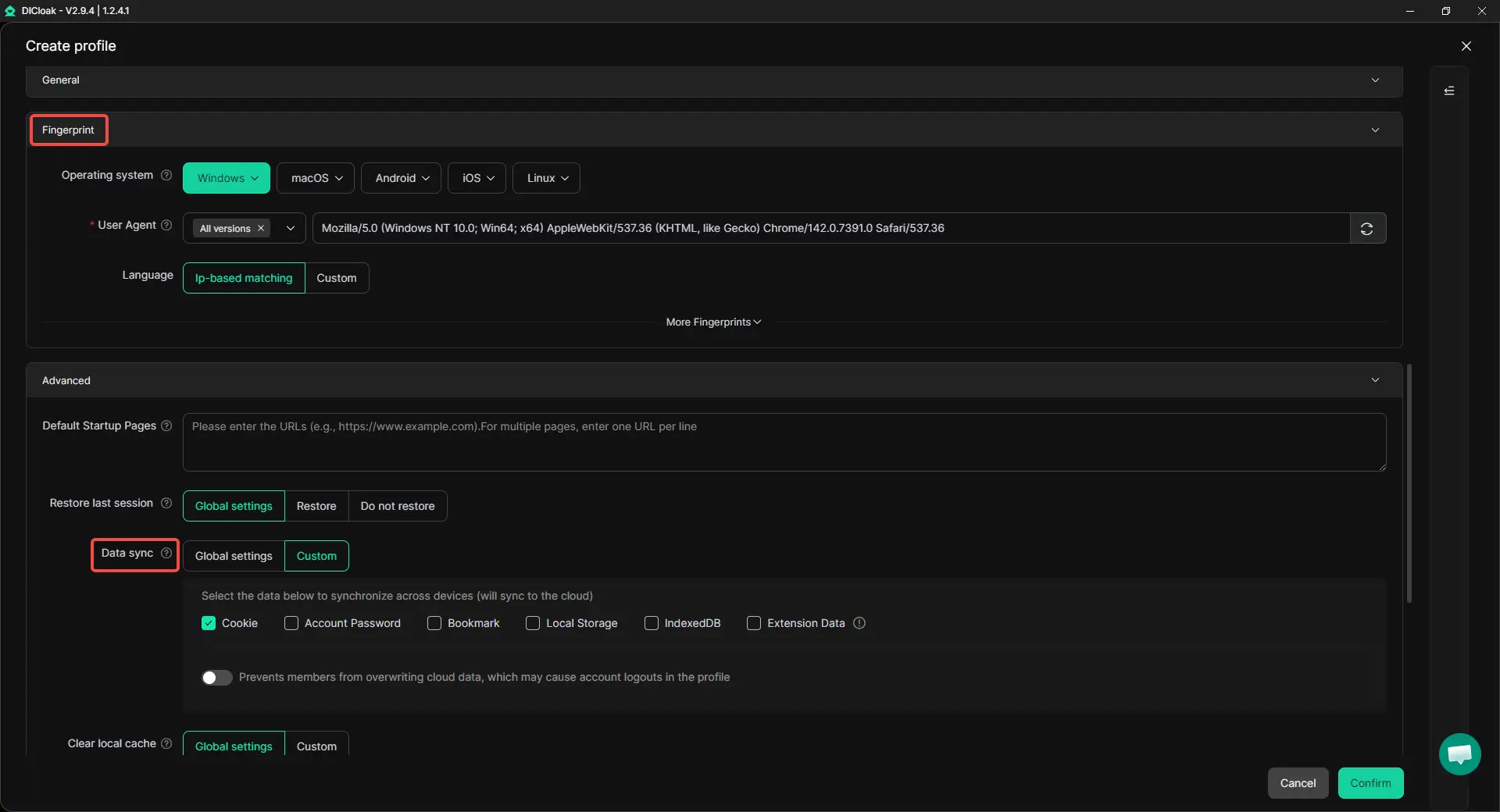
3. Configure the browser fingerprint and data sync
Adjust the browser fingerprint settings and preview the profile before saving it. In Advanced settings, you can also configure data sync based on how your team needs to use the profile. This helps keep the assigned Walmart account profile more consistent when the profile is used across different devices or team members.
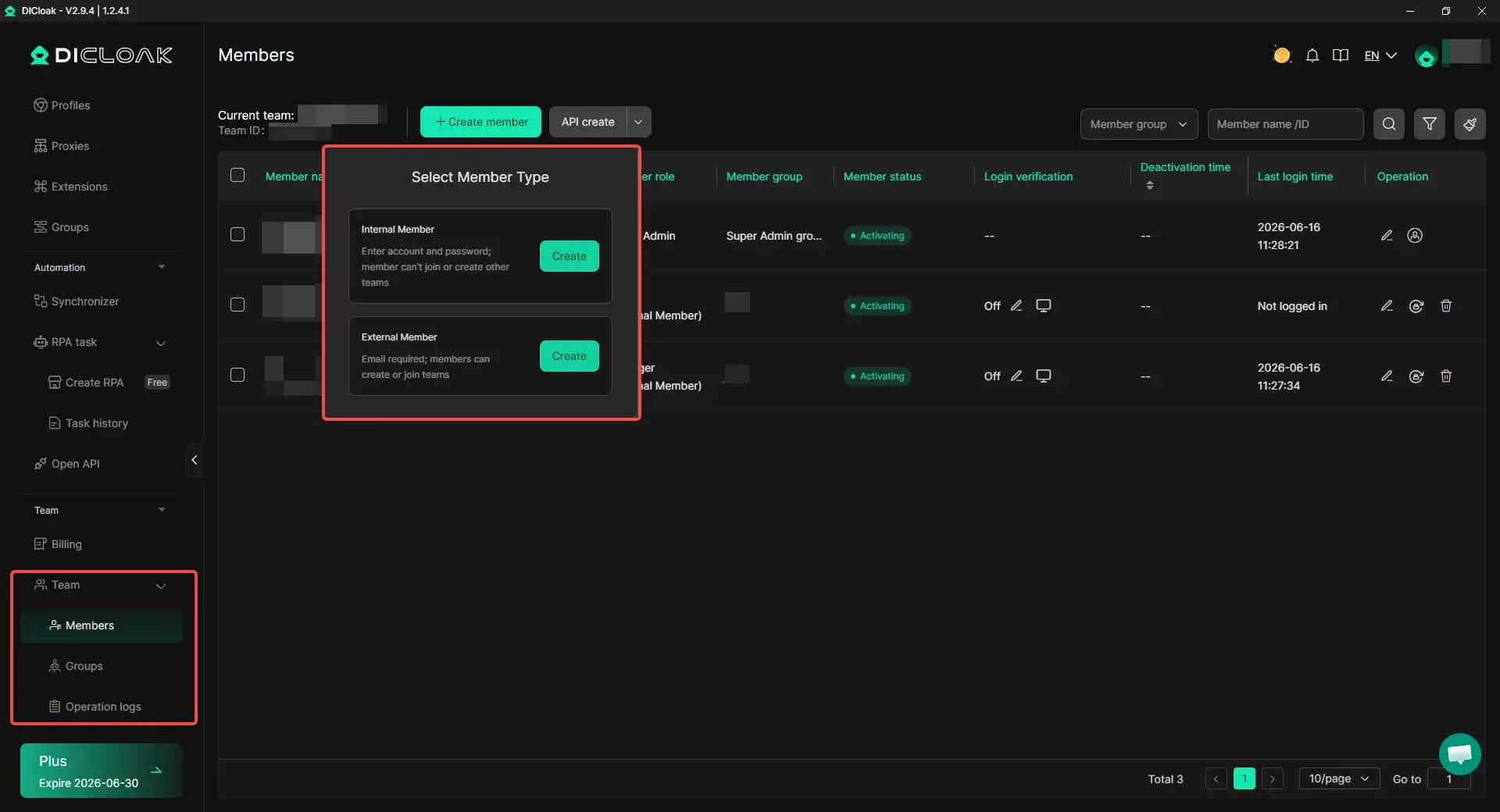
4. Set team permissions
If more than one person helps manage Walmart accounts, assign access based on each member’s role. Team members can be given access to the profiles they need, instead of sharing the same login setup across the whole team. This makes daily work cleaner and helps reduce confusion when different people manage different stores.
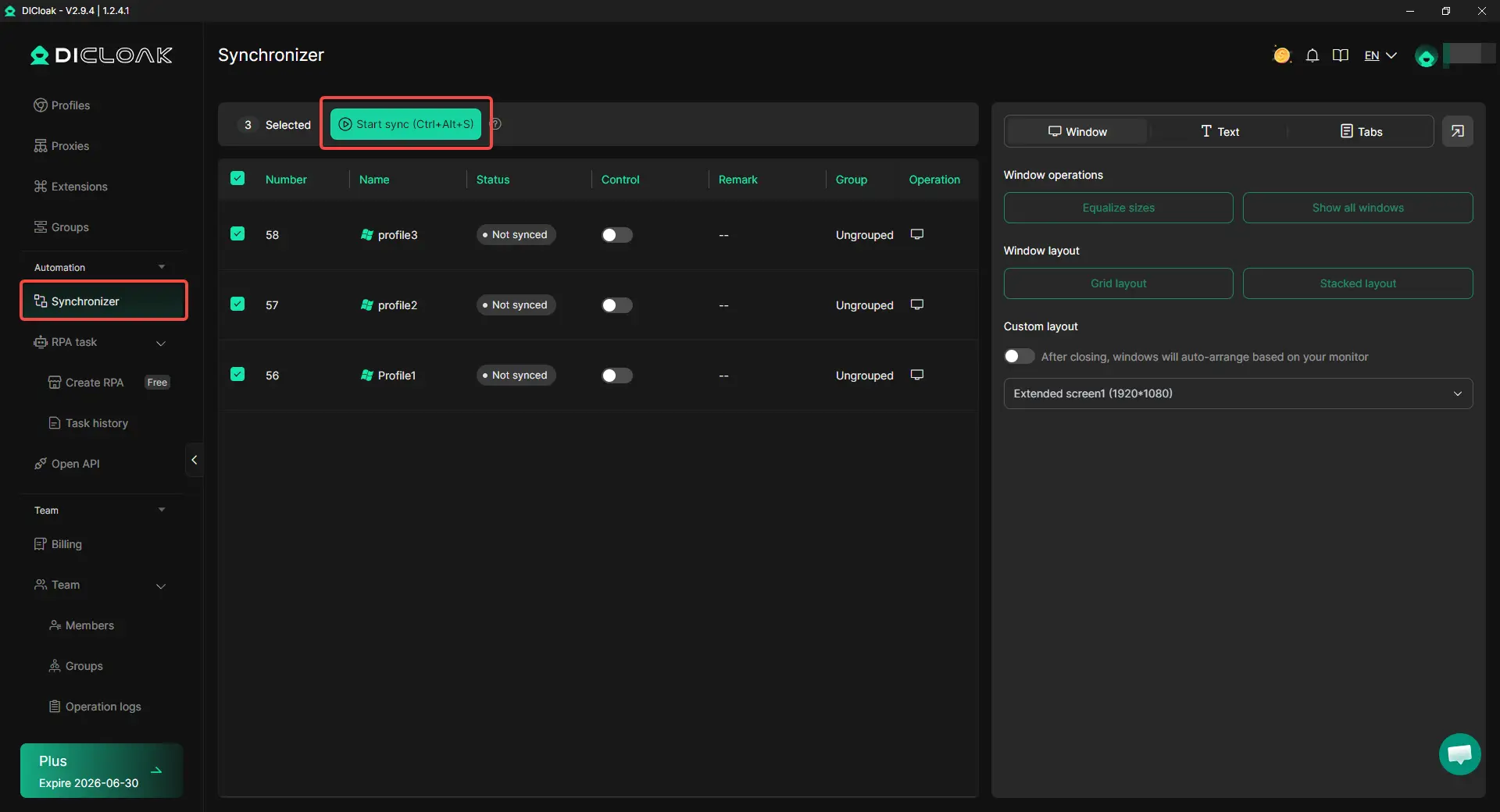
5. Use the synchronizer carefully
For repeated checks across multiple opened profiles, the synchronizer can help you control several windows at the same time. Use it for simple routine work, such as checking pages or comparing account views. Avoid making identical listing edits or repeated actions across stores unless there is a real business reason.
Practical Tips for Managing Walmart Seller Accounts
Managing multiple Walmart seller accounts is not only about setting them up once. The harder part is keeping each store separate, organized, and easy to review over time. A simple weekly check can help you find small overlaps before they become bigger account issues.
Do a weekly account separation audit
Review each store once a week to make sure it still works like a separate business. Check the account details, product catalog, return setup, login routine, team access, and recent changes. Small overlaps can build slowly, especially when different people update listings or account settings.
Your audit can cover:
- Store contact details and account owner information
- Product overlap, copied listings, similar images, or repeated SKUs
- Return address, support process, and fulfillment setup
- Browser profile, proxy setup, and login routine
- User roles, permissions, and recent account changes
Keep a simple change log
A change log helps you see what changed, who changed it, and which store was affected. It can be as simple as the date, account name, change type, team member, and short note. With DICloak Antidetect Browser, operation logs and team permissions can also help teams review profile access and reduce confusion when several people manage different Walmart stores.
Prepare before an account review happens
Keep basic records ready for each store, such as business details, product differences, account contact information, access records, and recent updates. If one account is reviewed, check the facts first instead of rushing to open another account or changing many settings at once. A clear response should focus on records, business separation, and what changed recently.
Know when not to add another Walmart account
A second Walmart seller account is not always the right move. If your current store has unclear branding, weak performance, messy listings, or unstable operations, another account may add more risk than growth. The best time to add another account is when the business reason is clear and your team can manage each store as a separate operation every day.
Frequently Asked Questions About Managing Multiple Walmart Marketplace Seller Accounts
Can I manage multiple Walmart Marketplace seller accounts from one computer?
Yes, but you should avoid treating all accounts like normal tabs in the same browser. Each Walmart seller account should have its own separate working environment, including separate cookies, session data, proxy setup, and browser profile. If several accounts are opened from the same browser setup, they may look connected even when the businesses are different. An antidetect browser like DICloak can help sellers create separate browser profiles for different Walmart accounts, but it should be used together with proper business separation and account approval.
What is the safest way to manage multiple Walmart seller accounts without getting them linked?
The safest approach is to keep each account separate across business identity, product catalog, login environment, and team access. That means using different account details, different product focus, separate browser profiles, stable proxy settings, and clear team permissions. The goal is not only to open separate accounts, but to manage them as separate stores every day. If two accounts share too many details or daily habits, they may still look related.
Can two Walmart seller accounts sell similar products?
Two Walmart seller accounts should not look like copies of each other. If both stores use the same SKUs, titles, images, descriptions, brand assets, or product pages, the accounts may raise more review risk. Similar categories may be easier to explain when each store has a clear brand role, different product line, and separate catalog strategy. A second account is stronger when it serves a different buyer, brand, or product purpose.
What should I do if one Walmart seller account is reviewed?
If one Walmart seller account is reviewed, check your records before making big changes. Review recent account edits, product updates, login routines, team access, return settings, and any overlap with other stores. Do not rush to open another account or change many details at once, because that can make the situation harder to understand. A clear response should focus on business reason, account separation, product differences, and the facts behind recent changes.
Do I need a tool to manage multiple Walmart Marketplace seller accounts?
A tool is useful when your team needs a cleaner way to separate account environments and daily access. For example, with DICloak Antidetect Browser, each Walmart account can be placed in its own profile with its own proxy, fingerprint settings, cookies, and session data. Team permissions and operation logs can also help reduce confusion when several people manage different stores. However, no tool replaces Walmart approval, clean business records, product compliance, or strong account performance.
Conclusion
Managing multiple Walmart Marketplace seller accounts without getting them linked in 2026 comes down to one core rule: each account must have a real business reason and stay separate in daily operation. Sellers should only request another account when they have a clear need, such as a separate brand, different product category, or distinct customer group. Each store should use its own business details, contact information, product catalog, browser profile, login routine, and team access process.
The best way to manage multiple Walmart seller accounts is to treat each one as an independent store, not an extra copy of the first account. Keep catalogs separate, review account access often, track important changes, and prepare records before any review happens. Tools like DICloak Antidetect Browser can help organize separate browser profiles, proxy settings, fingerprint settings, team permissions, and operation logs.
 Web Proxy Tools
 Free Tools
 Cookie Plugin
 UA Generator
 MAC Address Generator
 IP Generator
 IP Address List
 2FA Code Generator
 World Clock
 Anonymous Check
 WebRTC Leak Test
 UUID Generator
 Free Web Proxy Site
 Proxy Checker
 FB Ad Checker
 AI Web Scraping
 Free SMM Tools
 Twitter Shadowban Checker
 Instagram Name Checker
 UTM Generator
 Username Generator
 AI Hashtag Generator
 LinkedIn Headline Generator
 Social Media Image Resizer