Proxiyum is commonly searched as a web proxy tool for opening blocked or restricted websites through a browser. This guide explains what Proxiyum is, how Proxiyum proxy works, whether it is safe, why users also search for Proxyium, and what alternatives to consider when a basic proxy is not stable or private enough.
What is Proxiyum?
Proxiyum is used as a browser-based proxy option for users who want quick access to public websites without changing manual proxy settings. A proxy like Proxiyum sits between the user and the target website, loads the page through a proxy server, and returns the content in the browser. It is useful for simple access needs, but it should not be treated as a complete privacy or security tool.
Proxyium aims to give users a fast, simple, and anonymous way to surf the web. The vision behind Proxyium is to offer a tool that helps people access websites even when those sites are blocked in their region or network. For example, someone might be at school or at work, and certain sites are blocked on that network. With Proxyium, they can bypass those blocks — safely and easily.
Proxyium also tries to protect user identity. When you use it, your real IP address is hidden. Instead, the website you visit only sees the IP address of Proxyium’s proxy server. This makes it harder for websites to track you.
Many people use it because it is free. You don’t pay anything to use the basic service. For casual browsing, this is very convenient.
How Does Proxiyum Work?
When a user enters a URL into Proxiyum, the request is routed through a proxy server instead of going directly from the user’s browser to the destination website. This can help reduce direct exposure to the target site, but the browsing experience may depend on the proxy server, the website’s anti-bot rules, JavaScript requirements, and whether the target website blocks proxy traffic.
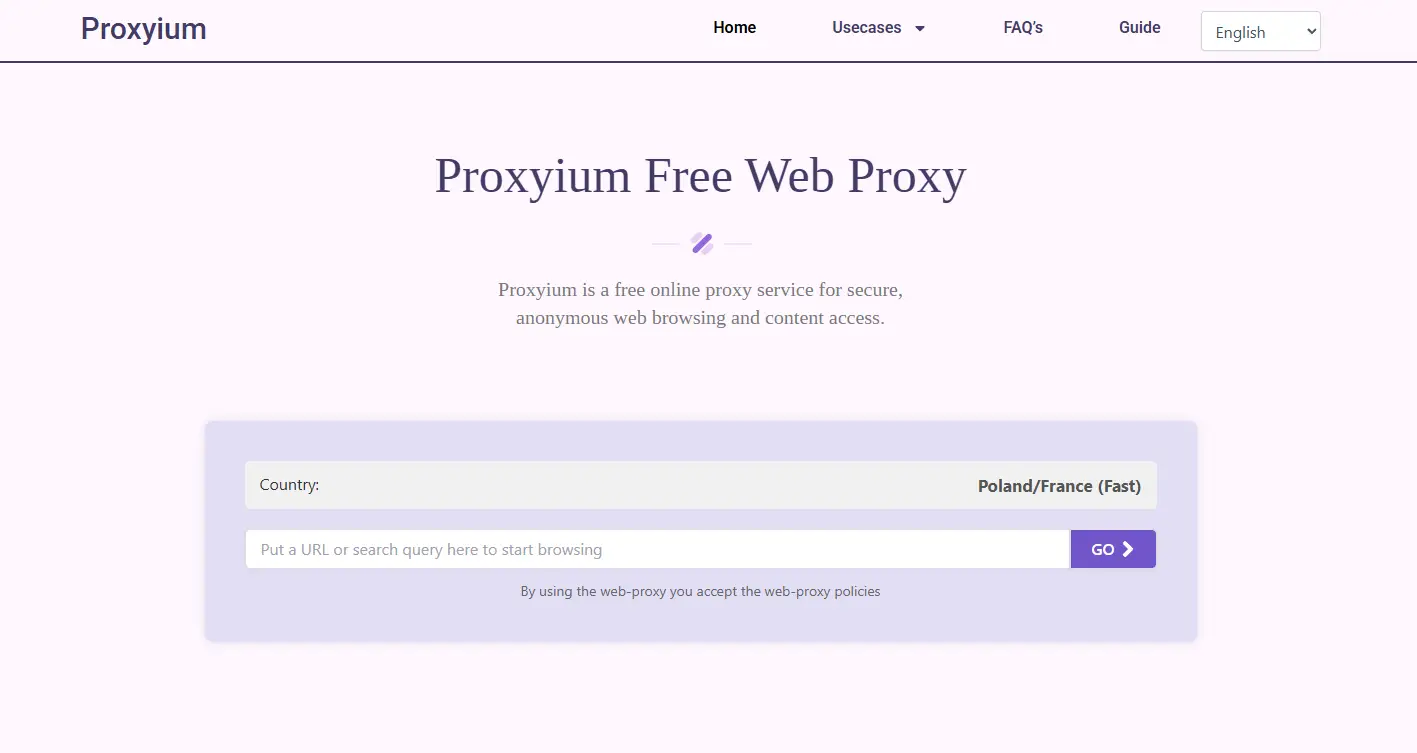
1. Enter the website URL into Proxiyum’s interface. You simply open Proxiyum in your browser, paste the URL of the website you want to visit, and press "Go."
2. Proxiyum sends the request to the website from its servers. Instead of directly reaching out to the website with your own IP address, Proxiyum sends the request using its own servers. This way, the website doesn’t know who you are.
3. The website responds to Proxiyum’s servers. The website sends the content back to Proxiyum’s servers, just as it would with any other visitor. Proxiyum receives all the data you need.
4. Proxiyum delivers the content back to you. Finally, Proxiyum sends the website content back to your browser. You can now browse the site as if there were no restrictions or blocks.
This process ensures that your real IP address stays hidden while you get access to the content you want. Proxiyum also uses SSL encryption to keep your connection secure, preventing spying from other users on the same network, like in public Wi‑Fi spots.
Key Features of Proxiyum
Proxiyum offers several features that make it an excellent tool for secure and private browsing. Below are some key benefits of using Proxiyum:
- Anonymity and Privacy Protection
When you use Proxiyum (via proxyium.com), your real IP address is hidden. The website you visit only sees Proxiyum’s IP address. This keeps your browsing activity anonymous and protects your privacy from websites and potential trackers.
Proxiyum offers multiple server locations around the world. This feature helps you choose a server closer to your location or even access content from other countries. It makes browsing faster and more flexible.
- No Software Installation Required
Unlike other proxy tools, Proxiyum does not require you to install anything on your device. Simply go to proxyium.com and start using it. This saves you time and keeps things simple, especially for users who want a hassle-free solution.
Proxiyum uses SSL encryption to ensure that your data stays secure during browsing. This adds an extra layer of protection, especially when using public Wi-Fi or unsecured networks. You can browse without worrying about your data being intercepted.
One of the standout features of Proxiyum free web proxy is its ability to bypass geo-restrictions. Many websites or streaming services are blocked in certain countries. With Proxiyum, you can access content that would otherwise be unavailable in your region. This makes it an ideal tool for watching videos, reading content, or browsing sites that are restricted by location.
Benefits of Using Proxiyum
Proxiyum offers a range of benefits that make it an attractive tool for anyone looking to enhance their online security and privacy. Here are some of the key advantages:
- Enhanced Privacy and Security
One of the biggest benefits of using Proxiyum (available at proxyium.com) is the added privacy and security it provides. By hiding your real IP address and encrypting your browsing session, Proxiyum protects you from unwanted tracking and monitoring. This is especially useful when browsing sensitive or personal content.
- Protection on Public Wi-Fi
Public Wi-Fi networks, like those found in coffee shops, airports, and hotels, are known to be insecure. Using Proxiyum helps protect your data when connected to these networks. By encrypting your connection, Proxiyum ensures that hackers and other malicious actors cannot intercept your sensitive information.
- Content Access Without Limits
Proxiyum free web proxy allows you to access content without the usual geographic restrictions. Many streaming services and websites limit access based on location. With Proxiyum, you can bypass these restrictions and access content from anywhere in the world, making it perfect for travelers or users in regions with limited access to certain websites.
Unlike many other proxy services, Proxiyum does not impose strict usage limits. You can browse as much as you want, without worrying about hitting data caps or facing slowdowns. This makes Proxiyum ideal for both casual users and those who need to access content regularly.
- Protection Against Malicious Content
Proxiyum helps protect you from malicious websites that could harm your device or steal your data. By acting as a buffer between you and these sites, Proxiyum reduces the risk of exposure to malware, phishing attacks, and other types of online threats.
How to Use Proxiyum
Using Proxiyum is simple and easy. Follow these steps to get started:
1. Visit the Proxiyum Website
The first step is to open your browser and go to the Proxiyum website at proxyium.com. There’s no need to install anything. Just visit the site.
2. Enter Your Desired URL
Once you're on the Proxiyum website, you will see a box where you can enter the URL of the website you want to visit. Paste the URL into this box and press "Go."
3. Select Server Location
Depending on your needs, you can select a server location. This allows you to choose a server in a different country if you want to access region-restricted content. Proxiyum offers several server options to choose from.
4. Start Browsing
After selecting the server, simply click “Start Browsing.” Proxiyum will connect to the website on your behalf, hiding your real IP address while you view the content.
5. End Your Session
When you are finished, you can simply close the browser window or navigate to another website. Proxiyum will automatically end your session, and your browsing activity will not be linked to your real identity.
Is Proxiyum Safe?
Proxiyum can be useful for viewing public pages, but users should be careful with any free proxy service. Do not use Proxiyum for account logins, payment pages, private messages, or confidential business data. A proxy can help with access, but it does not automatically provide full anonymity, account protection, or browser fingerprint isolation.
In many places — like the United States or Canada — using a web proxy is allowed by law. People use proxies for privacy, security, or to access general websites. These uses are usually fine.
But there are some legal factors you must watch:
- What you do with the proxy matters. If you use Proxiyum to browse public websites or read open content, it's generally fine. But if you use it to break into private accounts, steal data, or do anything illegal (like hacking, piracy, or fraud), that is not allowed.
- Platform rules and terms of service. Some websites or streaming platforms forbid the use of proxies or VPNs. If you use Proxiyum to bypass geo‑blocks or location restrictions, you might violate their rules — you could lose access or face account bans.
- Local laws and regulations. In certain countries, proxy use or bypassing censorship might be restricted or illegal.
Beyond legality, there is also a question of security. Research shows many free web proxies can be unstable or risky. For example, a 2024 study found that many free proxies had security vulnerabilities or even altered content delivered to users — exposing users to dangers like malware or data leaks. Because of this, not all free proxies are safe.
If you use Proxiyum or any free web proxy, it is best to follow these safe practices:
- Use it only for ordinary browsing or public content.
- Don’t rely on it for sensitive tasks (like online banking or personal accounts).
- Respect website terms of service.
- Be aware of laws in your country.
Best Proxiyum Alternatives
If Proxiyum is slow, blocked, or unstable, users can try another web proxy for simple public browsing. For repeated browsing tasks, privacy-sensitive workflows, or account separation, a basic proxy is usually not enough. In those cases, users should consider a privacy browser or anti-detect browser solution that provides browser-profile management instead of relying only on a single proxy page.
How to Browse More Safely with DICloak
For users managing repeated browsing tasks, DICloak helps create separate browser profiles, reduce fingerprint linkage, and keep account workflows organized. DICloak is a specialized antidetect browser that ensures your privacy and security during online activities. It’s especially beneficial for users who need to manage multiple accounts or safeguard confidential data. By using DICloak, you can confidently navigate the web, knowing that your browsing actions are hidden from trackers and other invasive monitoring. So, if you want even stronger online privacy, you can use DICloak Antidetect Browser.
Why choose DICloak?
Proxiyum can hides your IP address and helps you bypass blocks. But many websites today use fingerprinting. Fingerprinting means they look at your browser’s settings, device info, and other data to identify you.
So even if your IP changes, your “browser fingerprint” can stay the same. That can let websites still track or block you.
This is where DICloak helps. DICloak gives you two powerful features: profile isolation and proxy setting per profile.
Every browser profile is isolated. Each profile has its own cookies, local storage, cache, and its own browser fingerprint.
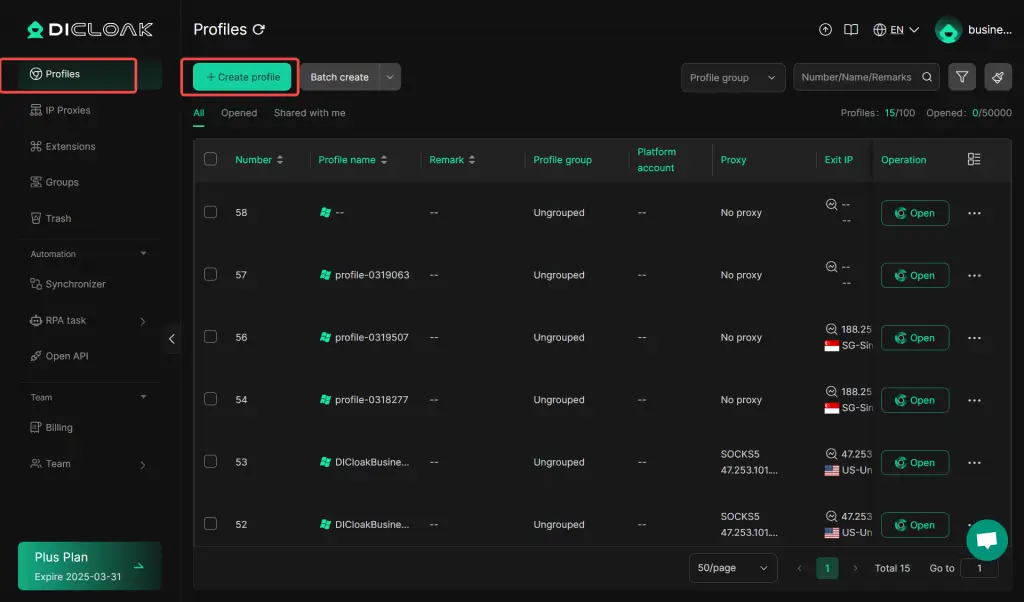
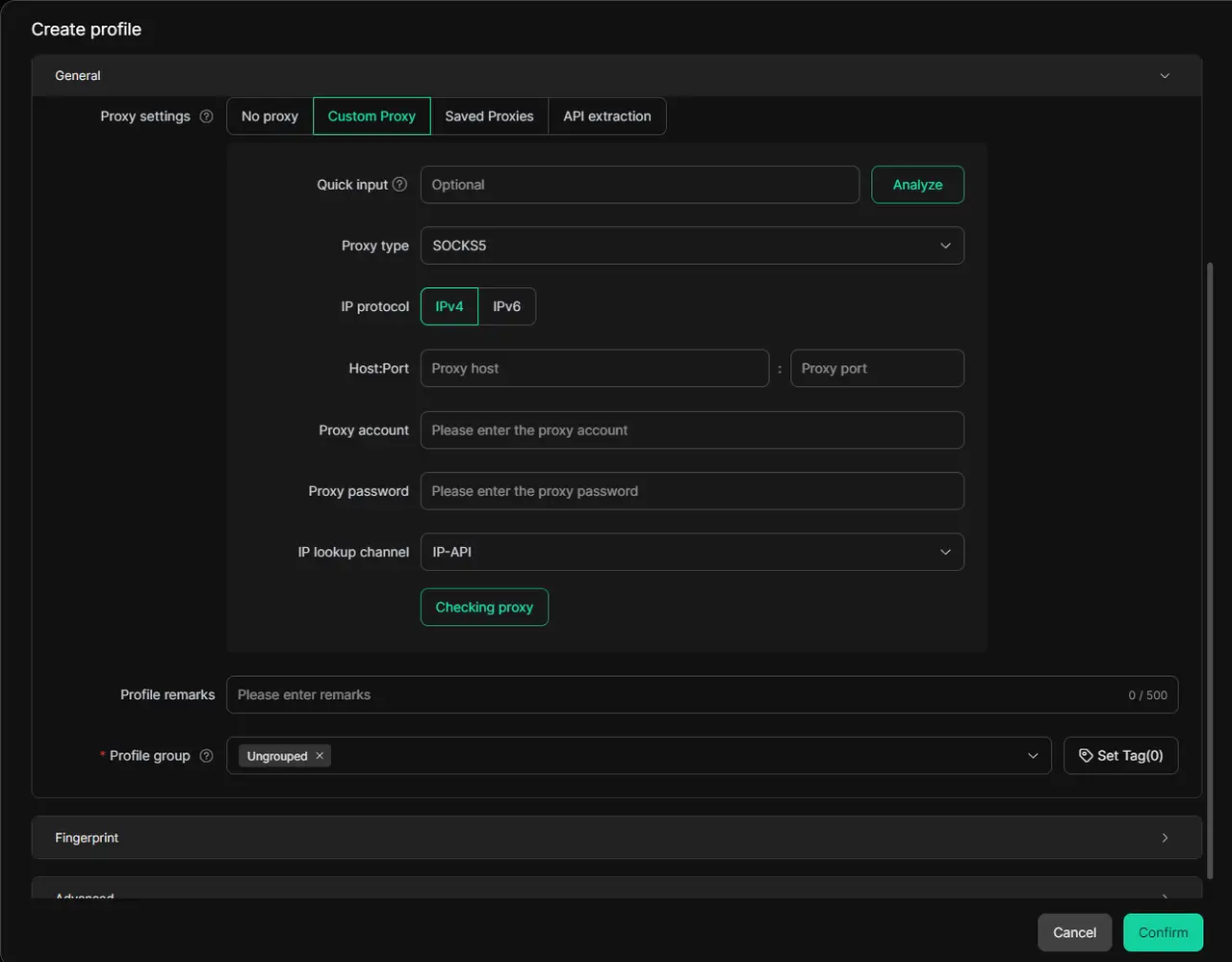
You can assign a proxy from a proxy provider to each profile inside DICloak. Once set up, you can effortlessly switch between various proxies, ensuring secure access to restricted websites.
Additionally, DICloak's Random Proxy Assignment feature enables the random distribution of unused proxies across multiple profiles, offering an efficient and flexible solution for users who need bulk proxy rotation. This ensures that each profile receives a distinct proxy quickly, saving time and reducing the risk of account association.
Conclusion
Proxiyum is a simple and effective tool for secure, anonymous browsing. It helps you hide your IP, bypass geo-restrictions, and protect your online privacy with ease. For even stronger privacy, combine Proxiyum with DICloak Antidetect Browser. Whether you're looking to access blocked content or browse safely, Proxiyum is a reliable choice. Start using it today to enhance your online security!
FAQs About Proxiyum
Q1:Is Proxiyum safe?
A1:Proxiyum may be useful for opening public websites, but it should not be used for sensitive logins, payments, private accounts, or confidential data. Treat it as a lightweight proxy access tool, not a full security solution.
Q2:What is Proxiyum proxy?
A2:Proxiyum proxy is a browser-based proxy service that loads a target website through a proxy server instead of connecting directly from the user’s browser. It is mainly used for quick access to public pages.
Q3:Is Proxiyum the same as Proxyium?
A3:The names are similar, but users should not assume they are the same service. Check the exact domain, avoid suspicious copycat pages, and do not enter sensitive information on unknown proxy websites.
Q4:What are the best Proxiyum alternatives?
A4:For simple public browsing, users can compare web proxy tools carefully. For privacy-sensitive workflows or repeated account usage, browser profile management and fingerprint isolation should be handled as a separate requirement from choosing a web proxy.
 Web Proxy Tools
 Free Tools
 Cookie Plugin
 UA Generator
 MAC Address Generator
 IP Generator
 IP Address List
 2FA Code Generator
 World Clock
 Anonymous Check
 WebRTC Leak Test
 UUID Generator
 Free Web Proxy Site
 Proxy Checker
 FB Ad Checker
 AI Web Scraping
 Free SMM Tools
 Twitter Shadowban Checker
 Instagram Name Checker
 UTM Generator
 Username Generator
 AI Hashtag Generator
 LinkedIn Headline Generator
 Social Media Image Resizer