TikTok is no longer a platform where one account is always enough. Creators may separate personal and brand content, while agencies and cross-border teams often manage client, regional, and product accounts at the same time. The scale is hard to ignore: TikTok’s advertising tools reported a potential global reach of 2.21 billion adults in DataReportal’s mid-year 2026 update, excluding India. That figure measures advertising reach rather than monthly active users, but it shows why brands keep building more TikTok presences across markets.
The problem is that creating more accounts is easy; keeping them organized is not. Shared login details, mixed browser sessions, repeated content, unclear recovery access, and rushed team handoffs can make separate accounts look or behave too similarly. This guide explains how to create and manage multiple TikTok accounts with clearer ownership, cleaner workspaces, and fewer avoidable mistakes without treating every low-view post or login check as proof of a shadowban.
Yes, you can manage multiple TikTok accounts. You may have one account for personal content, another for a brand, or several accounts for different clients, products, or markets. But creating more accounts is not the same as managing them well. Problems can start when accounts share the same login setup, browser session, recovery details, or repeated content patterns. A messy setup can also make it easier to post from the wrong account, lose track of access, or struggle to understand why one account has a login or performance issue. The goal is not to hide normal account ownership. It is to keep each account’s role, login details, workspace, and content plan clear enough that they do not get mixed up during daily work.
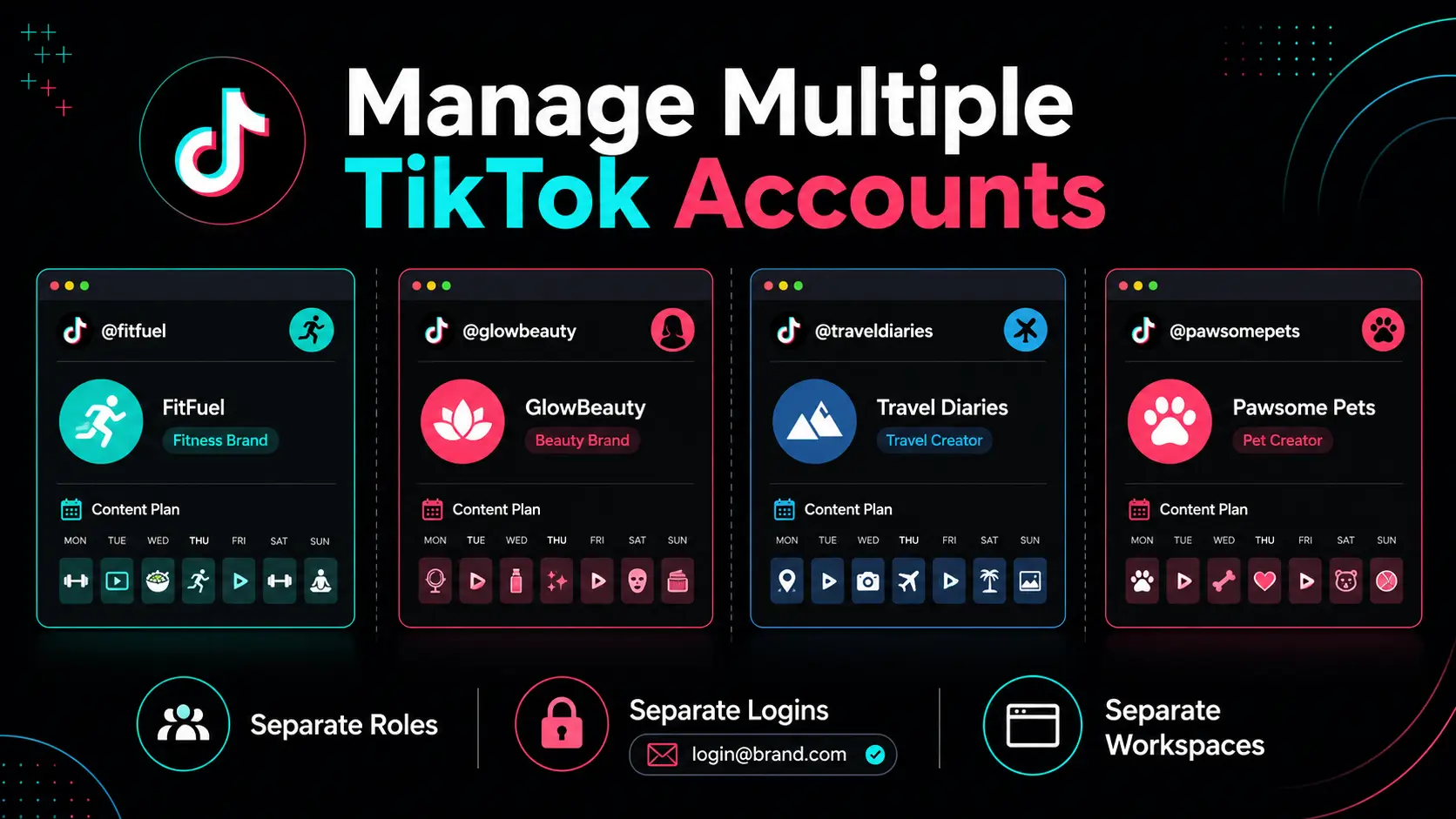
How to Create Multiple TikTok Accounts Safely
You can create multiple TikTok accounts through TikTok’s normal sign-up flow. Before creating each one, decide its purpose, assign its login and recovery details, and plan where it will be managed. TikTok’s sign-up options can vary by region, but the basic flow is to choose a sign-up method and complete the account setup.
1. Prepare Separate Account Details
Give each account its own clear login record. Use a dedicated email address, a unique password, and recovery details that the real account owner can access. For client or brand accounts, do not make one freelancer’s personal inbox the only recovery method.
If TikTok asks for phone verification, use a number that the owner or approved team can reliably access. Avoid temporary or borrowed contact details that may become unavailable later. TikTok recommends linking both an email address and phone number, using different passwords across accounts, and turning on two-step verification.
2. Create the Account Through TikTok’s Normal Sign-Up Flow
Open TikTok, select Sign up, choose an available method, and follow the on-screen steps. Once the account is created, finish the basic profile before posting. Add the correct name, profile image, bio, market, and contact details for that account.
Do not leave the account as an unnamed extra login. Add it to your account list right away with its purpose, owner, recovery method, and content role. This makes it easier to manage later if the account needs a password reset, a content update, or a team handoff.
3. Give Each Account Its Own Daily Workspace
Each account should have one clear place to open and manage it. For two self-owned accounts, TikTok’s built-in account switcher may be enough. For client, regional, or team accounts, use a clearly labeled browser workspace, device user, or other fixed login path.
The goal is to reduce simple mistakes. Separate workspaces help keep saved sessions, drafts, bookmarks, content folders, and client tasks from getting mixed together. They are useful for organized work, not a promise that accounts will never be connected by a platform.
4. Give Each Account a Different Content Role
Do not create extra accounts without a reason. A personal account, a brand account, and a regional account should each serve a different audience or business goal. Otherwise, you may end up reposting the same content, confusing your team, and learning very little from the results.
For example, a founder account may share opinions and behind-the-scenes videos, while the company account publishes tutorials and product updates. A U.S. brand account and a Brazil account may use different creators, customer questions, hooks, and calls to action. Keep normal cross-promotion and approved brand activity clear, but do not use accounts to create artificial engagement for each other.
A new TikTok account should have a clear owner, recovery path, workspace, and content role before it starts publishing. That gives you a cleaner foundation for managing multiple accounts without creating avoidable confusion later.
Why Do Multiple TikTok Accounts Seem Connected?
Multiple TikTok accounts can seem connected when their setup or daily activity overlaps. The usual causes are shared device or browser sessions, reused recovery details, synced discovery settings, and very similar content or behavior.
| Where the overlap starts |
What users may notice |
What to review first |
| Device or browser workspace |
Wrong-account actions, mixed logins, repeated checks |
Saved sessions, cookies, cache, and account labels |
| Login and recovery details |
Confusing verification or account recovery |
Email, password, recovery inbox, and 2-step verification |
| Sync and discovery settings |
A second account is shown to someone you know |
Contact syncing, friend syncing, and suggestion settings |
| Content and activity |
Low views, duplicate-content concerns, unclear results |
Video reuse, captions, posting plans, and account roles |
Shared Devices and Browser Sessions Can Blur Account Boundaries
Using one phone or computer does not automatically create a problem. The issue starts when accounts share saved logins, cookies, cache, drafts, or browser extensions in one messy workspace. That can lead to simple mistakes, such as posting from the wrong account or replying to comments under the wrong brand.
A separate device is the clearest option, but it is not the only way to stay organized. On desktop, each approved account should have one clear browser workspace and one consistent way to open it. Avoid relying on unofficial app clones or improvised copies of the app, since they can make sessions harder to manage and support later.
Reused Credentials Can Turn a Login Issue Into an Ownership Problem
Each TikTok account should have its own email and a clear recovery path. Reusing the same recovery inbox, social sign-in, password, or 2-step verification owner across unrelated accounts can make access problems much harder to fix.
This becomes obvious when a client changes agencies or a contractor leaves. A verification code may go to the wrong person, and nobody can quickly confirm who controls the account. Separate credentials do not promise that accounts will never be associated, but they prevent avoidable recovery and ownership confusion.
Syncing and Repeated Content Can Make Accounts Look Related
Contact syncing, friend syncing, and account suggestion settings can make a second profile easier for people to find. That is a discovery issue, not proof that the accounts share the same workspace or are being treated as one business account.
Content can create another kind of overlap. Reposting the same video file, caption, voiceover, or engagement pattern across several accounts makes the accounts harder to position and measure. A regional or client account should have a real difference, such as a different audience, language, product angle, creator voice, or customer question.
With DICloak, teams can keep approved TikTok accounts in separate browser workspaces instead of handling everything through one crowded browser session. This helps reduce wrong-account actions, mixed saved logins, and unclear team access.
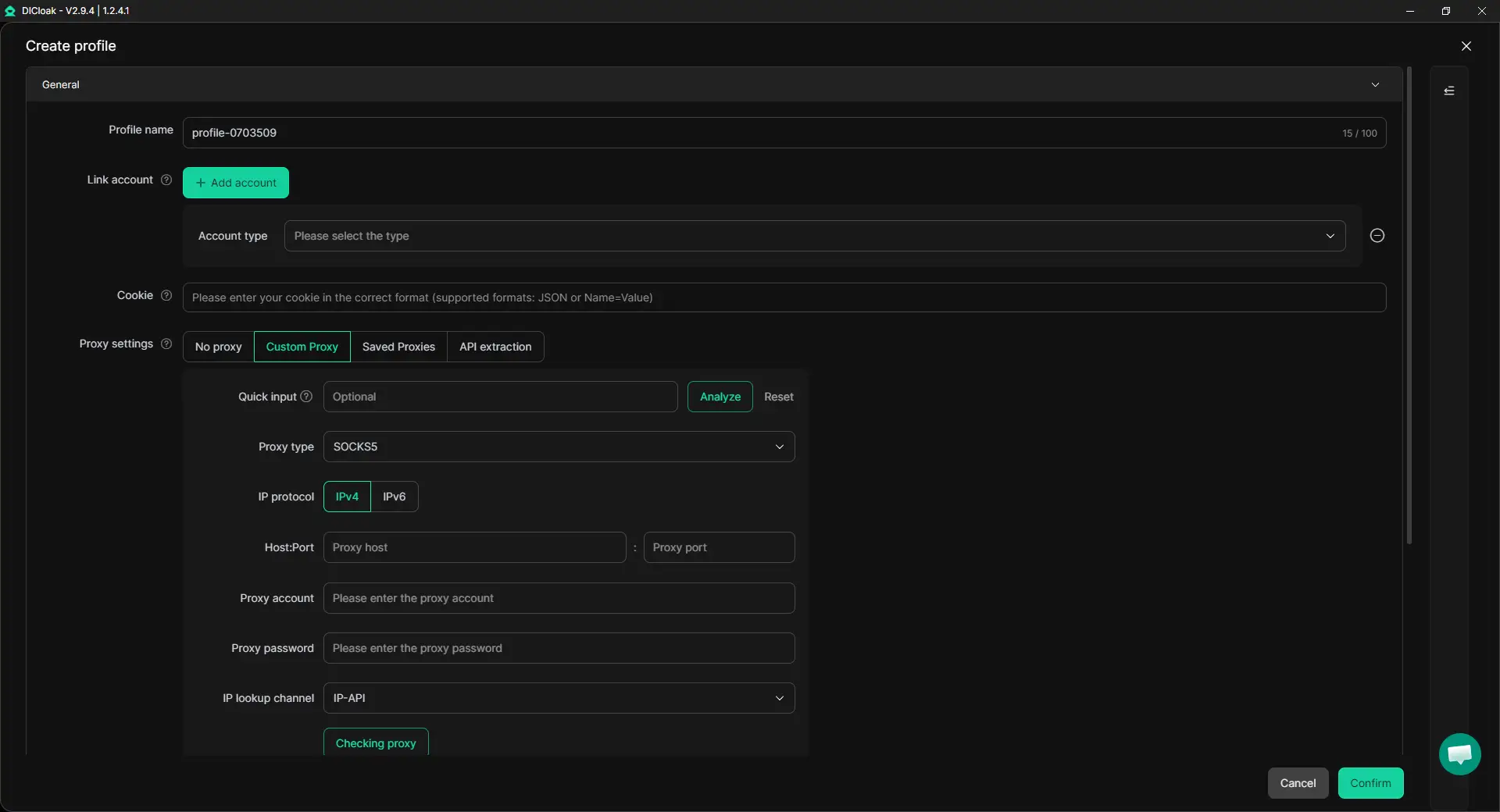
Create One Browser Profile for Each Account
Create one clearly named browser profile for each TikTok account, such as “GlowSkin_US” or “ClientA_Organic.” Each profile can keep its own saved session, bookmarks, extensions, and browser data. This makes it easier to avoid posting from the wrong account or mixing client tasks.
A user-configured proxy can also be assigned when your approved workflow needs a fixed connection setup. Keep the profile label, assigned connection, target market, and content task aligned before launching the account.
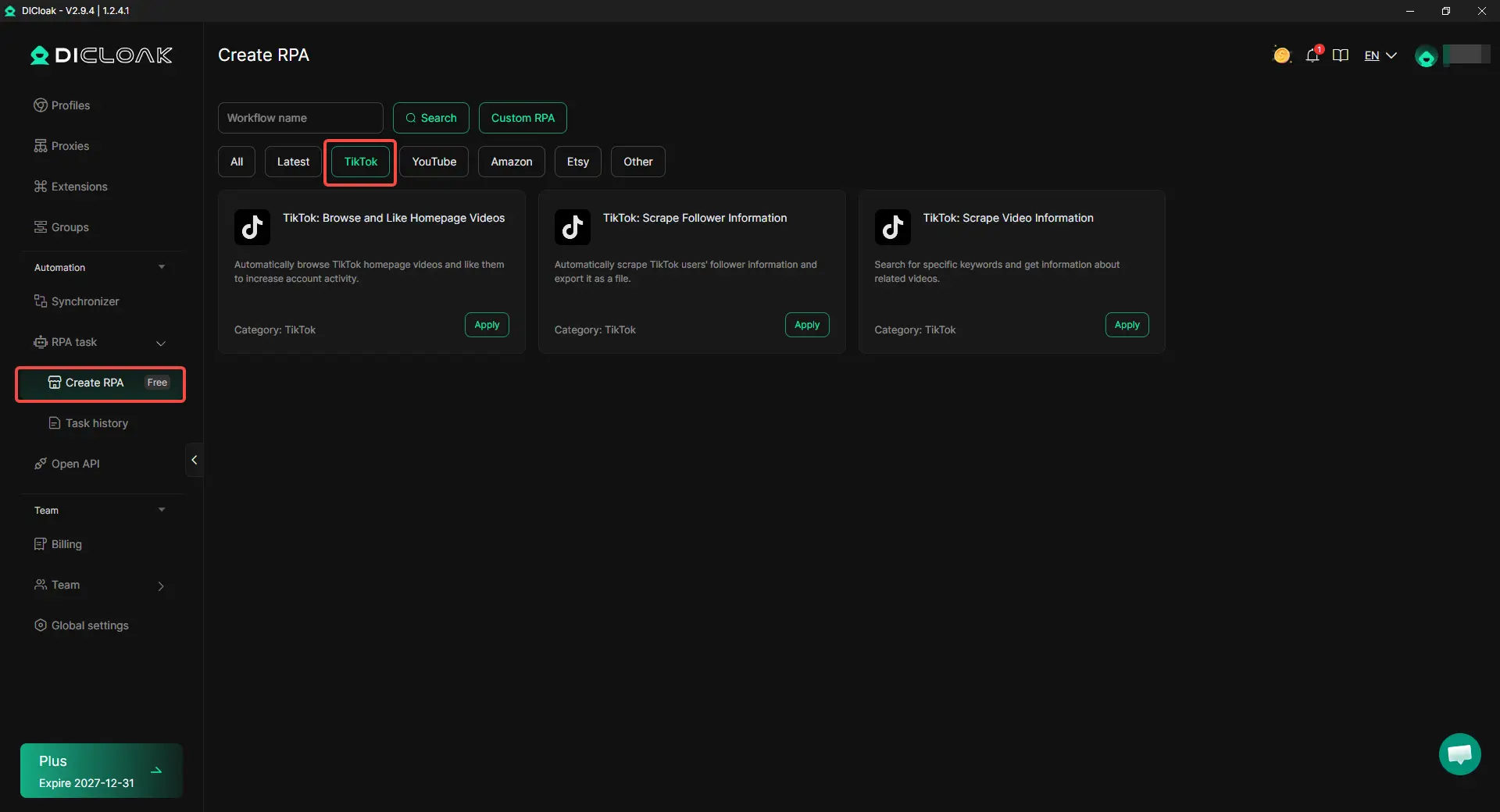
Use RPA for Research and Repetitive Tasks
TikTok RPA templates can help with repeatable research tasks, such as collecting public follower information, reviewing public video details, or finding keyword-related videos. This can support creator research, competitor review, and content planning.
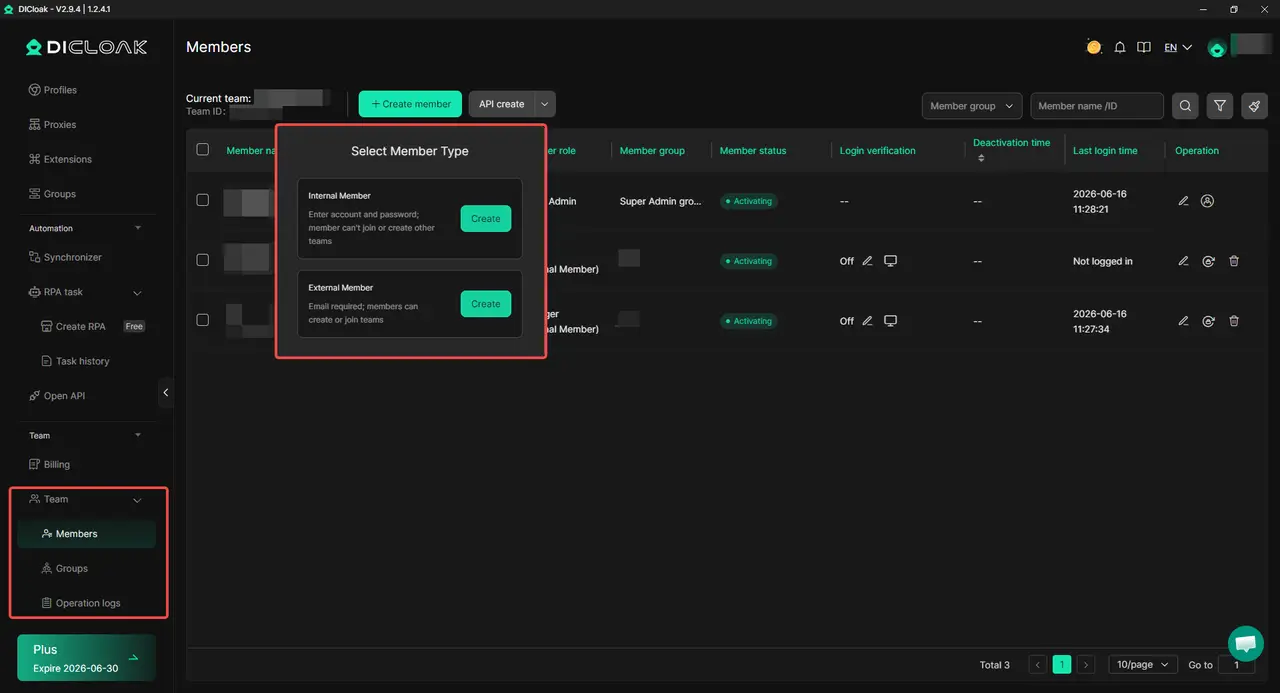
Give Team Members Only the Access They Need
Not every teammate needs every TikTok account. With DICloak, browser profiles can be shared with assigned members, so a regional editor or content manager only accesses the workspaces they handle.
For example, an agency can give one editor access to a U.S. TikTok profile and another editor access to the Brazil profile. The client can still keep control of recovery details, major settings, and final approval.
Tips for Managing Multiple TikTok Accounts Without Creating Avoidable Problems
Managing multiple TikTok accounts works best when each account has a clear role and a stable routine. This will not guarantee views or remove every shadowban concern, but it can reduce the mistakes that make account problems harder to understand.
- Keep account access organized. Each account should have its own password, recovery path, and named person responsible for two-step verification. Do not let a client account depend on one freelancer’s personal email or phone. TikTok’s Security Checkup lets users link and verify email and phone details, turn on two-step verification, review trusted devices, and check recent security activity.
- Do not use accounts to create artificial engagement for each other. Normal cross-promotion can make sense when two accounts genuinely serve related audiences. But repeatedly liking, commenting on, or sharing one account’s posts from another account just to raise numbers creates weak data and can make your activity harder to explain. Each account should have its own audience goal, content role, and reason to engage.
- Keep content different for a real reason. A personal account, a brand account, and a regional account should not all publish the same video with minor edits. Give each account a different angle, such as a local customer question, creator voice, product use case, or content format. TikTok may limit recommendations for content that does not meet For You feed eligibility standards, even when the content is not removed.
- Treat “shadowban” as a diagnosis question, not an automatic answer. Low views, 0-view posts, or login prompts do not prove that your accounts are linked. Check the affected account first, including post visibility, upload status, notifications, and recent access changes. TikTok’s Account Check can show restrictions related to login, posts, comments, profile editing, and direct messages.
A simple routine is usually enough: keep account details clear, avoid mixing daily workspaces, give every account a real content role, and check account status before making rushed changes. That approach helps you manage multiple TikTok accounts with less confusion and fewer avoidable shadowban concerns.
Quick checklist
- Give every account a clear owner and recovery path.
- Use separate passwords and keep 2FA responsibility clear.
- Do not use one account to artificially boost another.
- Build different content roles instead of reposting the same video everywhere.
- Check account notices and post status before deleting, reposting, or changing the full setup.
FAQ About Managing Multiple TikTok Accounts Without Getting Them Linked
Can I use the same email address or phone number for multiple TikTok accounts?
No. A TikTok email address and mobile number can each be linked to only one account. For every new account, prepare a separate email or phone number that the real account owner can access for login and recovery. Keep the recovery details documented, especially for client or team accounts, so the account does not become dependent on one employee’s personal inbox or phone.
Will TikTok link my accounts if I use the same phone or Wi-Fi network?
Using the same phone or network does not, by itself, prove that TikTok has linked your accounts. The more practical concern is workflow confusion, such as mixed saved logins, wrong-account posts, shared passwords, or several people changing access details without records. For a small number of self-owned accounts, keep the setup simple and organized. For client or team accounts, use clear workspaces and access rules so normal account management does not become a mess.
Why was my second TikTok account suggested to someone I know?
Your second account may be suggested through synced contacts, Facebook connections, mutual follows, public interactions, or shared links. This is mainly a discoverability issue, not proof that TikTok treats your accounts as one business account. Check Suggest your account to others, contact syncing, Facebook syncing, and previously synced contacts if you want to reduce unwanted recommendations.
Do low views mean my TikTok accounts were linked or shadowbanned?
Not necessarily. Low views, 0-view posts, or weak For You feed reach can have several causes, including post visibility, upload problems, content eligibility, or an account-level restriction. Check the affected account and post before changing your entire setup. TikTok’s Account Check and recommendation notices can help show whether there is a specific login, posting, or recommendation issue to review.
Do agencies need an antidetect browser like DICloak to manage TikTok accounts?
A small creator managing two self-owned accounts may only need clear passwords, recovery details, and separate content plans. An antidetect browser like DICloak is more useful when an agency or team manages approved client, brand, or regional accounts and needs separate browser profiles, controlled member access, and clearer handoffs. With DICloak, teams can use profile-based access controls and operation logs to manage approved account access more clearly.
Conclusion
Managing multiple TikTok accounts without getting them unnecessarily linked starts with clear account management, not shortcuts. Give each account its own purpose, login and recovery details, daily workspace, and content role. Avoid mixing saved sessions, sharing passwords without clear responsibility, or reposting nearly identical content across accounts. Low views or login prompts do not automatically mean a shadowban or account linking, so check account status, post visibility, recent changes, and content issues before changing your whole setup. For teams, the goal is to keep approved client, brand, and regional accounts organized as they grow. With DICloak, teams can use separate browser profiles, controlled profile access, and RPA tools to reduce wrong-account actions and repetitive work.
 Web Proxy Tools
 Free Tools
 Cookie Plugin
 UA Generator
 MAC Address Generator
 IP Generator
 IP Address List
 2FA Code Generator
 World Clock
 Anonymous Check
 WebRTC Leak Test
 UUID Generator
 Free Web Proxy Site
 Proxy Checker
 FB Ad Checker
 AI Web Scraping
 Free SMM Tools
 Twitter Shadowban Checker
 Instagram Name Checker
 UTM Generator
 Username Generator
 AI Hashtag Generator
 LinkedIn Headline Generator
 Social Media Image Resizer










-03-v14.png?x-oss-process=image/interlace,1/format,webp/quality,q_75)