Seeing the YouTube problem with server 400 can be frustrating, especially when you just want to watch a video and YouTube suddenly stops working. In many cases, this error is linked to cache, cookies, app problems, browser conflicts, or unstable network settings. The good news is that most of the time, it can be fixed with a few simple steps. In this guide, you will learn what causes the error, how to fix it on different devices, and when it may be time to contact YouTube support.
Why Does YouTube Server 400 Error Occur?
If you see the youtube problem with server 400 message, it usually means YouTube or your browser/app received a request it could not handle correctly. In plain words, something in the connection, saved data, or app setup is making YouTube fail before the page or video loads normally.
Common causes behind the error
One common cause is bad local data. For example, old cookies, broken cache files, or stored sign-in data can send a request that no longer matches what YouTube expects. That is why Google often tells users to clear cache and cookies in a browser, or clear the YouTube app cache on Android, then try again.
Another cause is version mismatch. If the YouTube app is outdated, or the browser is old, some requests may fail because the software is not handling newer site behavior well. Google specifically recommends updating the YouTube app, device software, and supported browsers such as Chrome, Firefox, or Safari.
How network issues contribute to the problem
Network trouble is another big reason behind the youtube problem with server 400. A weak or unstable connection can interrupt the request between your device and YouTube. Google says to check internet speed, data usage, and connection stability first when videos or pages fail to load.
This often happens on public Wi-Fi, office networks, or mobile data that keeps switching strength. For example, if your phone moves between Wi-Fi and cellular during loading, YouTube may receive an incomplete or inconsistent request. Google also notes that DNS changes and third-party apps that modify network settings can affect YouTube playback and loading.
App and browser conflicts explained
App and browser conflicts can also trigger errors. A common example is when YouTube opens fine in an incognito window but fails in the normal browser window. That often suggests the main issue is not YouTube itself, but an extension, cookie set, or stored browser setting. Google even suggests testing incognito with extensions disabled to check this.
On mobile phones, the same kind of conflict can happen inside the app. The YouTube app may clash with outdated firmware, corrupted cached files, or other device-level settings.
In most cases, the youtube problem with server 400 comes from one of three areas: broken local data, unstable network conditions, or conflicts inside the browser or app environment. Understanding that makes the next repair steps much easier and more accurate.
Immediate Steps to Resolve YouTube Server 400 Error
Since the youtube problem with server 400 usually comes from bad cached data, unstable connections, or app and browser conflicts, the next step is to fix those areas one by one. You do not need to start with anything complex. In many cases, a few quick checks can solve the problem fast.
Clearing cache and cookies on your device
A good first step is to clear cache and cookies. This matters because old website data can make YouTube send a bad request or load an outdated session. In Chrome on desktop, Google says you can remove browsing data through the browser’s delete browsing data settings. On Android Chrome, Google gives similar steps under Delete browsing data. On iPhone, Apple says Safari users can go to Settings, then Safari, then clear history and website data.
Restarting your internet connection
If clearing data does not help, restart your internet connection next. This step sounds small, but it can solve a lot. A weak Wi-Fi signal, unstable mobile data, or a short router problem can interrupt the request between your device and YouTube. When that happens, the platform may return an error instead of loading the page correctly. Google’s troubleshooting guidance for YouTube issues includes checking your connection and trying again after basic network troubleshooting. A simple test is to switch networks. For example, if YouTube fails on home Wi-Fi, try mobile data. If it fails on mobile data, try another Wi-Fi network.
Updating the YouTube app or browser
Another fast fix is to update the YouTube app or your browser. Old app versions can break after service changes, and old browsers may not handle newer site behavior well. Google’s support materials continue to recommend keeping Chrome and related apps updated when websites or services do not load correctly.
These three steps are worth doing first because they are safe, quick, and easy to understand. In many cases, they solve the youtube problem with server 400 before you need deeper fixes.
Fixing YouTube Server 400 Error on Android Devices
If the youtube problem with server 400 still shows up on Android, the next step is to check the phone itself. On Android, this error often comes from damaged app data, an old system version, or unstable network settings. Google’s current YouTube troubleshooting still recommends restarting the app, updating the app, and checking your connection first.
How to clear app data on Android
Clearing app data is one of the most useful fixes on Android. It removes broken temporary files and resets the YouTube app to a clean state. This can help when the youtube problem with server 400 keeps coming back even after you reopen the app. Google support pages and Android help materials continue to point users to app storage controls for this kind of issue.
Here are the simple steps:
- Open Settings on your Android phone.
- Tap Apps or Apps & notifications.
- Find and tap YouTube.
- Tap Storage or Storage & cache.
- Tap Clear cache first.
- If the error is still there, tap Clear storage or Clear data.
- Open YouTube again and sign in if needed.
A common case is this: YouTube works, then starts failing after an app update or after switching between several Google accounts. In that situation, clearing app data often helps because it removes old session files that no longer match the current app state. That is why this step is usually worth trying early.
Checking for system updates
If clearing app data does not help, check for system updates. Google says Android updates can include bug fixes, security patches, and software improvements. If your phone is behind on updates, YouTube may not work as smoothly as it should.
On most Android phones, you can go to Settings, then System, then Software update. If an update is available, install it and restart the phone. This step is simple, but it matters, especially on older devices or phones that have not been updated in a long time.
Troubleshooting network settings
Network settings can also play a big part in the youtube problem with server 400 on Android. A few easy checks can help here. Turn Wi-Fi off and back on. Try switching from Wi-Fi to mobile data, or from mobile data to Wi-Fi. Restart your router if other apps also load slowly. If the issue seems tied to the phone’s network setup, some Android devices also offer a network reset option under Settings, System, and Reset options.
In many real cases, the error is not caused by YouTube alone. The app may be fine, but the Android device is holding old data or using a weak network path.
Resolving YouTube Server 400 Error on iPhone
If the youtube problem with server 400 is happening on your iPhone, the fix is often simple.
Steps to reset network settings on iOS
Resetting network settings can help when YouTube does not load correctly on Wi-Fi or mobile data. Apple says this reset clears saved Wi-Fi networks and passwords, cellular settings, and VPN and APN settings.
Here are the simple steps:
- Open Settings.
- Tap General.
- Tap Transfer or Reset iPhone.
- Tap Reset.
- Tap Reset Network Settings.
- Enter your passcode if asked.
- Let the iPhone restart, then connect to Wi-Fi again.
Reinstalling the YouTube app on iPhone
If the error stays, reinstalling the YouTube app is worth trying. Apple says you can delete an app by touching and holding it, tapping Remove App, then Delete App. If needed, you can redownload it from the App Store later.
Checking for iOS updates
It is also smart to check for iOS updates. Apple says you can go to Settings, tap General, then Software Update to see whether an update is available. Keeping iOS current helps with bug fixes, security, and overall device stability.
Troubleshooting YouTube Server 400 Error on Web Browsers
If the youtube problem with server 400 only happens in a web browser, the cause is often something inside the browser profile.
How to disable problematic browser extensions
Some browser extensions can break YouTube without making it obvious. This is especially common with ad blockers, privacy tools, script blockers, or download helpers. A simple test is to turn off extensions one by one, then reload YouTube after each change. If the error disappears after one extension is disabled, you will likely found the cause. This is often faster than changing many settings at once.
Incognito mode is a quick way to test whether the problem comes from saved browser data or extensions. If YouTube works in incognito mode but not in your normal browser window, that usually means the youtube problem with server 400 is caused by cookies, cache, or an extension conflict. In that case, the issue is probably local to your browser, not a wider YouTube outage.
Resetting browser settings to default
If the error still stays, resetting the browser can help. It gives the browser a cleaner starting point and can remove hidden changes that keep causing the youtube problem with server 400.
Risks of Ignoring the YouTube Server 400 Error
If the youtube problem with server 400 keeps showing up, it is better not to ignore it. At first, it may seem like a small loading problem. But if it happens again and again, it can affect how you watch videos, use your account, and troubleshoot bigger issues later.
More Frequent Playback Interruptions
One clear risk is that videos may stop loading more often. What starts as one small error can turn into repeated playback failures, slow page loading, or videos that never open properly.
Ongoing Sign-In and Account Access Problems
Sometimes this error is tied to broken session data or account-related conflicts. If you ignore it, you may keep running into login issues, account syncing problems, or trouble switching between YouTube accounts.
Poorer App or Browser Performance
The youtube problem with server 400 can also be a sign that your app cache, browser data, or settings are not working well. If you leave it alone, the app or browser may become slower, less stable, and more likely to show other errors later.
Harder Troubleshooting Later
A small issue is usually easier to fix early. But if you keep using YouTube without checking the cause, old cache files, bad settings, or outdated software can pile up. That can make the problem harder to track later.
Disrupted Daily Use
For many people, YouTube is part of daily work, study, or entertainment. Ignoring the error can lead to wasted time, repeated refreshes, and frustration when you need quick access to videos but the platform does not load as expected.
When to Contact YouTube Support for Server 400 Issues
If the youtube problem with server 400 is still there after you clear cache, check your network, disable extensions, and update the app or browser, it may be time to contact YouTube support or use YouTube’s official feedback tools.
Signs the issue might be server-side
Here are the main signs to watch for:
- The youtube problem with server 400 appears on more than one device.
- The error happens on both Wi-Fi and mobile data.
- The problem continues after clearing cache, cookies, or app data.
- Updating the YouTube app, browser, or system does not help.
- Other users are reporting similar problems at the same time.
- You see the issue while YouTube’s Known Issues page or Help Forum shows related reports. YouTube specifically points users to its Known Issues page and Help Forum for active problems and community troubleshooting.
How to submit a support request to YouTube
On computer:
- Sign in to YouTube.
- Click your profile picture.
- Select Send feedback.
- Describe the issue clearly.
- Add a screenshot if needed.
- Click Send.
On mobile:
- Open the YouTube app.
- Tap your profile picture.
- Tap Settings.
- Tap Send feedback.
- Describe the issue.
- Choose whether to include screenshots and logs.
- Tap the send icon.
You can also check the Help Forum or Known Issues page before sending a report, because the issue may already be under review by YouTube.
What information to include for faster resolution
To make your report more useful, include these details:
- The exact error message, such as youtube problem with server 400
- The device you are using, such as Android phone, iPhone, Windows laptop, or Mac
- Your app version or browser version
- Your system version, such as Android version or iOS version
- When the problem started
- Whether it happens on one network or on all networks
- Whether it happens only when signed in, or even when signed out
- What fixes you already tried, like clearing cache, reinstalling the app, or changing Wi-Fi
- A screenshot of the error page if possible
Using DICloak Antidetect Browser to Secure YouTube Accounts
While many cases of youtube problem with server 400 can be fixed with simple steps, some users face the error in more complex browsing setups. This is especially true for people who switch between multiple YouTube accounts, use shared devices, or manage team access in the same browser.
Ensuring consistent account access with unique fingerprints
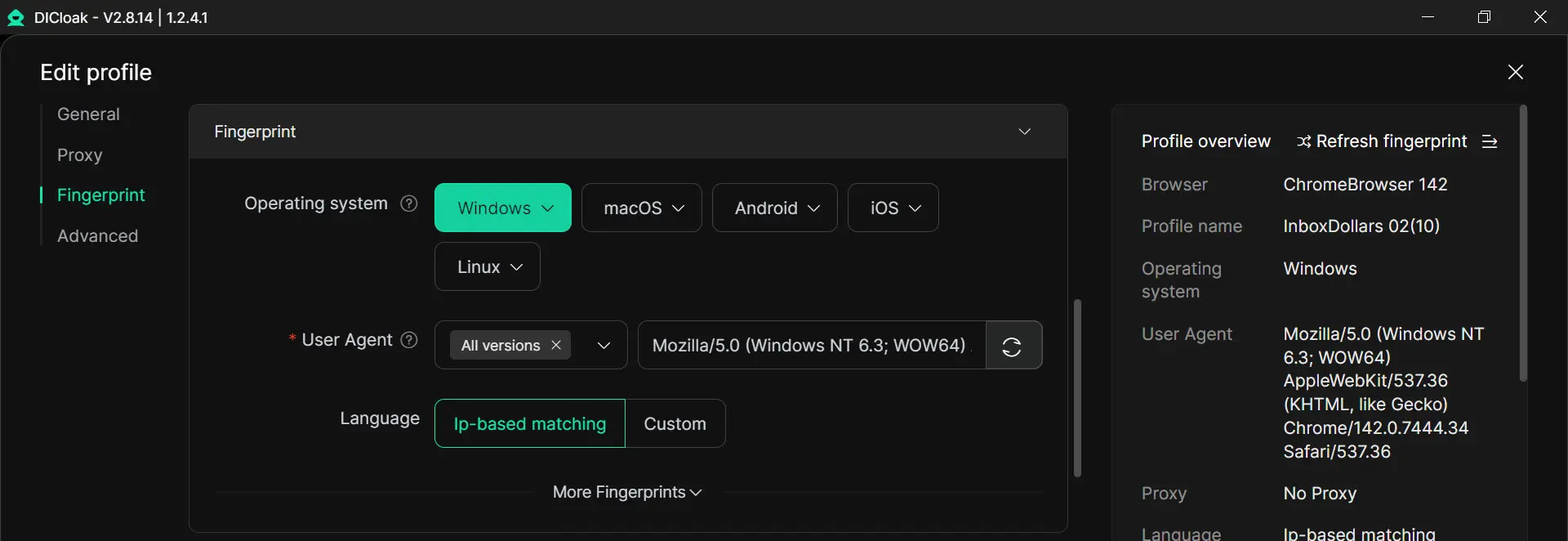
Users can set up a different browser profile for each YouTube account. Each profile can keep its own fingerprint settings, cookies, and local storage. This helps one account stay separate from another. For example, a person who uses one account for work and another for personal use can keep both accounts in different profiles. This can make account access more stable and easier to manage.
Minimizing browser conflicts through custom proxy settings
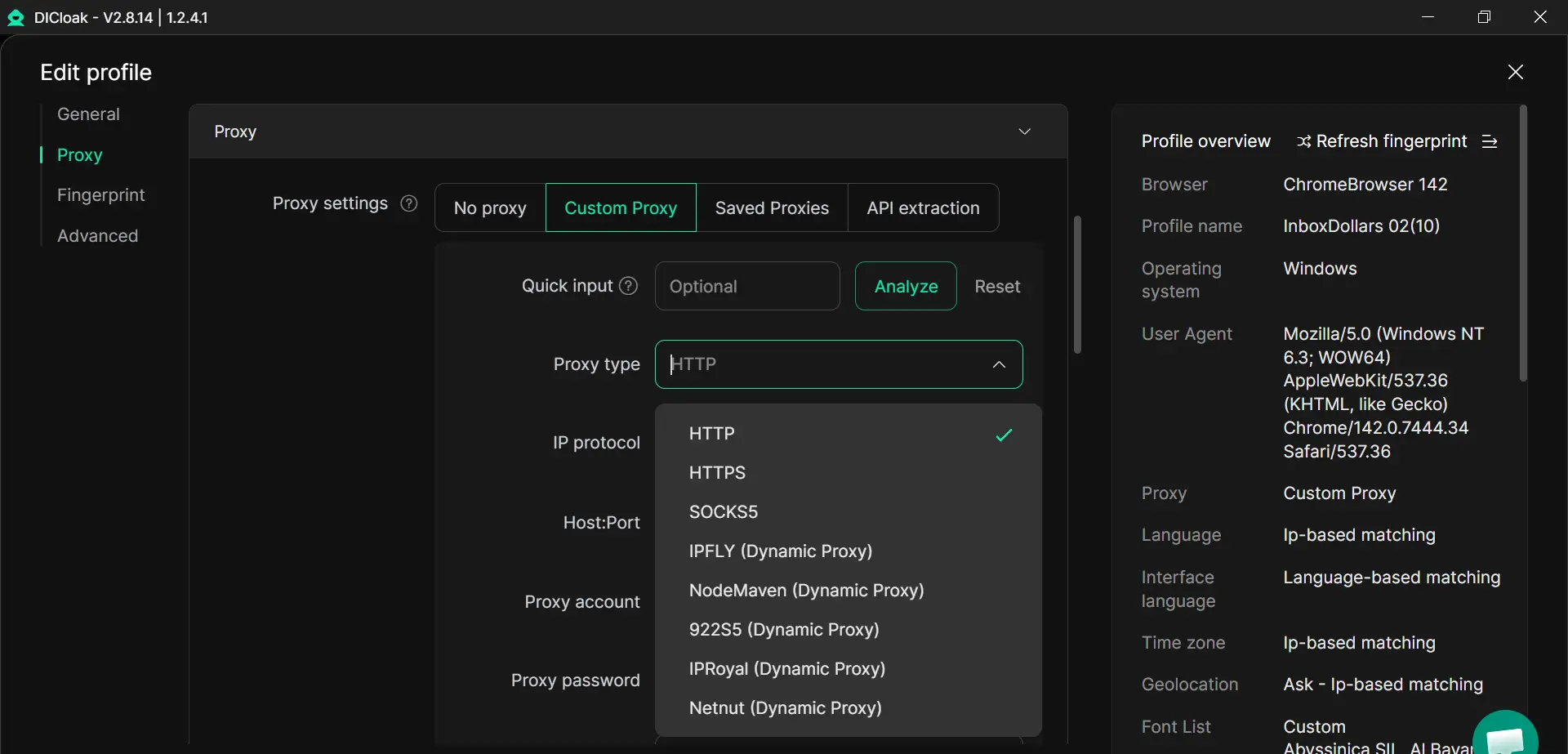
Users can also configure proxy to each profile. This can help them keep a more consistent setup for different accounts, especially if they switch between accounts often. The main value is not just using a different IP. It helps each profile stay more separate, so several accounts do not keep sharing the same browser data and connection pattern. That may help reduce browser conflicts in more complex YouTube use.
Enhancing security for shared devices and team collaboration
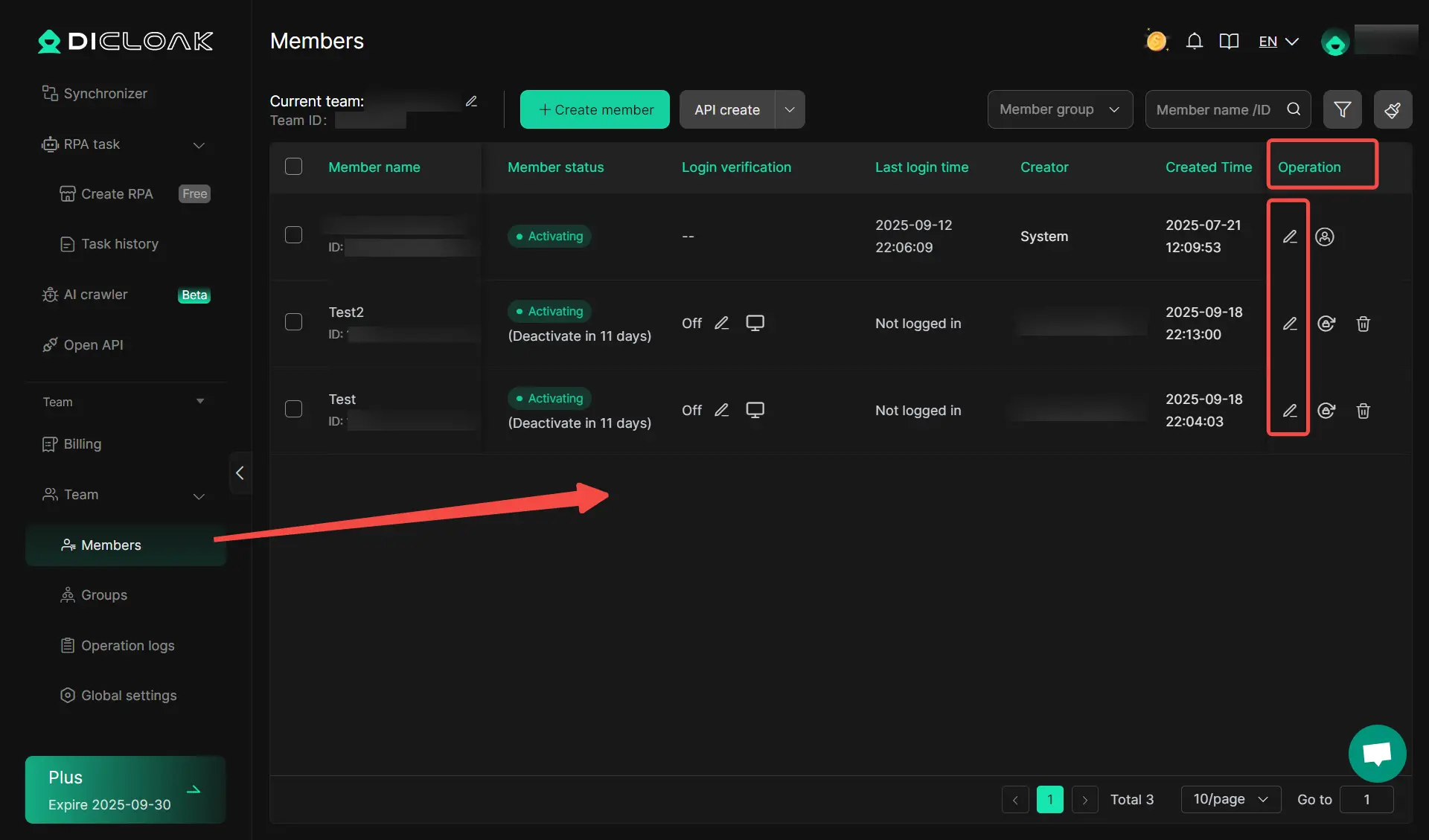
People who share devices or work with team members can also use separate profiles to keep account access more organized. Instead of opening many accounts in one browser window, each person can work in a different profile. This can help protect account data and lower the chance of session confusion. For teams, it can also make daily account management cleaner and more secure.
FAQs About YouTube Server 400 Error
What does "Server 400" mean on YouTube?
A Server 400 message usually means YouTube received a request that it could not process correctly. In many cases, the problem is linked to bad cache, broken cookies, browser conflicts, or unstable network settings rather than a serious device failure. Google’s YouTube Help still recommends checking your connection, clearing cache and cookies, disabling problem extensions, and updating the app or browser.
Can a factory reset fix the error?
A factory reset can fix the error, but it should be the last option, not the first one. Most cases of youtube problem with server 400 are solved with simpler steps like clearing app data, reinstalling the app, restarting the network, or updating the browser or system software. Since a factory reset removes much more from the device, it usually makes sense only after normal troubleshooting fails.
Is the error related to my internet provider?
Sometimes, yes. If your network is unstable, very slow, or using changed DNS settings, YouTube may not load correctly. Google says users should restart the connection, check speed, and confirm that no third-party app has modified DNS settings. But this does not always mean the internet provider is at fault, because the issue can also come from local device or browser settings.
Why does the error keep recurring?
The error often comes back when the root cause is still there. For example, the browser may still have broken cookies, the YouTube app may still have damaged local data, or a browser extension may still be interfering. Google’s troubleshooting guidance points to these repeated causes, which is why users sometimes fix the error for a short time and then see it return later.
Can the error damage my device?
No clear evidence suggests that this error damages your device by itself. It is usually a loading or request problem, not a hardware problem. The bigger issue is inconvenience: videos may not load, sign-in may fail, and troubleshooting may take time. In most cases, the device is fine, and the error is tied to software, browser data, app state, or connection issues.
Conclusion
The youtube problem with server 400 may look serious at first, but it is often caused by common issues like broken app data, browser conflicts, or network problems. By checking the cause step by step, most users can fix it without much trouble. If the error keeps coming back, it is a good idea to look deeper into your device, browser, or account setup. With the right troubleshooting steps, you can usually get YouTube working normally again.
 Web Proxy Tools
 Free Tools
 Cookie Plugin
 UA Generator
 MAC Address Generator
 IP Generator
 IP Address List
 2FA Code Generator
 World Clock
 Anonymous Check
 WebRTC Leak Test
 UUID Generator
 Free Web Proxy Site
 Proxy Checker
 FB Ad Checker
 AI Web Scraping
 Free SMM Tools
 Twitter Shadowban Checker
 Instagram Name Checker
 UTM Generator
 Username Generator
 AI Hashtag Generator
 LinkedIn Headline Generator
 Social Media Image Resizer