If you're looking to expand your Telegram presence or streamline your marketing efforts, managing multiple accounts can quickly become a daunting task. That’s where a Telegram Bulk Account Creator comes in. Whether you're running a business, promoting a product, or simply managing a community, these tools let you create and manage multiple Telegram accounts with ease—saving you time and hassle. In this guide, we’ll walk you through everything you need to know about Telegram Bulk Account Creators, from how they work to the best tools and strategies for managing your accounts effectively. Let's dive in and unlock the power of bulk account management!
What is a Telegram Bulk Account Creator?
A telegram bulk account creator is a tool that helps people make many Telegram accounts fast. Normally, you must open the Telegram download app or use Telegram web, enter a phone number, and wait for a code. This is slow if you need tens or hundreds of accounts. A bulk creator does this work for you in one go. It can save time and effort, especially for marketers or testers. For example, some tools connect to phone number services (like SMS APIs) so the tool can get codes and finish sign‑up automatically.
A good bulk telegram account creator lets you set names, usernames, and passwords automatically. Some advanced tools even use virtual phone numbers so you don’t need real SIM cards.

How Does a Telegram Bulk Account Creator Work?
A bulk telegram account creator works by doing five key steps:
Step1: Prepare phone numbers – The tool uses many phone numbers or SMS‑receive services.
Step2: Connect with Telegram service – It calls the Telegram server, just like a person would.
Step3: Receive verification codes – It gets the SMS code for each account with the phone service.
Step4: Set up profiles – It enters names and usernames automatically.
Step5: Finish registration – The new accounts are ready to use.
For example, a popular tool named “Telegram Kit 1 Reborn” can run many threads at once. That means it can create 20 accounts at the same time with one click. This tool also supports many APIs like 5sim and Smspva to handle SMS codes from over 100 countries.
This process is much faster than doing each account by hand on the Telegram app or Telegram web. But you still need to follow the rules of Telegram and avoid actions that look like spam or automation abuse.
Common Use Cases for Telegram Bulk Account Creator
People use a telegram bulk account creator for many reasons:
- Marketing teams use many accounts to share campaigns in groups and channels. More accounts can reach more people fast.
- Testing software sometimes needs many accounts to check how a bot or service works.
- Community building uses bulk accounts to join groups or boost channel numbers. Tools can even add subs or members automatically.
For example, a small business might need 50 Telegram accounts to test sending messages to different audiences. Manually making 50 accounts would take hours. A bulk creator can finish this in minutes. This helps the business save time and focus on content, not setup.
At the same time, you can still use the normal Telegram download app or Telegram web for personal accounts or small needs. The bulk tool is best when many accounts are needed at once.
Legal and Safety Considerations About Telegram Bulk Account Creator
When you use a telegram bulk account creator, it is important to know what is safe and what could cause trouble.
Understanding the Legality of Using Bulk Account Creators
First, you must know that Telegram has rules you must follow. These rules are in Telegram’s Terms of Service. They say you must not send spam, promote violence, or break the law. If anyone breaks these rules, Telegram can limit or stop the account.
Using a bulk telegram account creator is not automatically illegal. Many tools are just software. But if you use them to break Telegram rules, you can get into trouble. For example, making hundreds of accounts to send spam messages can count as bad behavior under Telegram’s rules.
Imagine you use a bulk account creator to make 100 accounts fast. Then you send the same ad message to thousands of people who did not ask for it. Telegram might see this as spam. Your accounts could be banned. In some countries, sharing spam or unwanted ads can also break local laws. Always check both Telegram rules and local laws before you create many accounts.
Risks and Consequences of Misuse
When people misuse a telegram bulk account creator, many bad things can happen:
- Account bans: Telegram can block accounts that send too many messages at once.
- IP restrictions: If Telegram sees many new accounts from one IP address, it may flag them as suspicious.
- Data or money loss: Some bulk account services ask you to buy virtual phone numbers or tools. If these services are not real, you could lose money.
Best Practices for Safe Usage
You can still use a telegram bulk account creator safely if you follow best practices. Here are some easy steps and real tips:
- Read Telegram rules: Before anything, read the Telegram Terms of Service to know what is allowed and what is not.
- Warm up new accounts: After creating accounts, don’t send lots of messages at once. Start with normal use first to build trust.
- Use Telegram web and Telegram download normally: If you manually log into some accounts via Telegram’s official app or web version, this can look more natural to Telegram’s systems.
- Spread activity over time: Don’t let all accounts behave the same way at the same time. This reduces the chance of being flagged.
- Choose reliable tools: Good creators use verified phone services and respectful automation.
For example, instead of sending 200 messages from 100 accounts on the first day, you could start with a few messages from a few accounts daily. This slow pace helps accounts look like regular users. Marketers often call this “warming up,” and it reduces the chance of bans.
Getting Started with a Telegram Bulk Account Creator
Now that you know how to use a telegram bulk account creator safely, it’s time to learn how to get started with one. This section will guide you step by step.
Installation and Setup Instructions
Before installation, you should prepare your device and tools. Some bulk tools work with emulators or run on Windows computers. Others may be browser‑based and connect to Telegram web or the Telegram API. Below are clear steps you can follow.
System Requirements
Most bulk telegram account creator tools need certain system features to work well. A common example is software that uses emulators and SMS APIs for fast account setup:
- Operating System: Windows 10 or newer (some tools run only on PC)
- RAM: At least 8 GB for good speed
- Internet: A stable connection so you do not lose verification codes or sessions
- Phone Numbers or SMS API: You need many unique phone numbers from services like 5sim, SMS‑Activate, or similar
- Proxy (optional but recommended): To make each Telegram account appear from a separate IP address
Simple system checks like these help you avoid errors during setup. They also make the creation process smoother and faster.
Step‑by‑Step Installation Guide
Here is how you typically install a telegram bulk account creator tool. This example uses a generic setup that many tools follow:
1. Download the Tool:
Get the bulk creator from a trusted source. Avoid unknown sites because they may contain malware.
2. Unzip Files:
Most tools arrive in a folder. Unzip them into a folder you can easily access.
3. Install Dependencies (if needed):
Some tools need extra files like Python, ADB tools, or emulator software. These help the creator sign into Telegram just like a phone would.
4. Set Up Emulator (if used):
If the tool uses an Android emulator like LDPlayer, install it and open one virtual device. This virtual device acts like a phone and lets you run Telegram inside it.
5. Enter Your API Keys:
Many tools ask for Telegram API ID and API Hash. You get these from Telegram’s official website in your developer dashboard. This connects the tool safely to Telegram’s servers.
6. Add Phone Numbers:
Upload or paste the list of phone numbers you prepared. Good tools can automatically pull verification codes from SMS API services without typing them by hand.
7. Click Start:
After setup, press the start or run button. The tool will begin creating accounts automatically.
For beginners, tools like telegram bulk account creator are very useful, with clear menus, proxy support, and phone number integration. These help you finish setup in 10–15 minutes even with no tech skills.
Configuring Software for Optimal Performance
Once you install the telegram bulk account creator, setting it up right helps avoid errors and bans. Here are key things to configure:
Add proxies so each account looks like it comes from a real user on a different network. This reduces the chance of being blocked.
Most tools let you set a delay between each account registration. Adding a small wait time looks more natural to Telegram and lowers the risk of spam detection.
Good tools let you set names, usernames, and bios ahead of time. This means all accounts have unique profiles, not fake or identical ones.
Choose a reliable SMS API service for phone numbers. Paid services usually work better and get verification codes faster than free ones.
Watch the tool logs during registration. If a number fails often or a proxy shows errors, stop and fix it before you create hundreds of accounts with the same problem.
For example, a marketer using a bulk tool for their Telegram campaign set a 5‑second delay between each registration and used rotating proxies. This helped all accounts register without many verifications or bans—and the campaign was ready in minutes rather than hours.
Key Features of Telegram Bulk Account Creators
Now that you know how to install and set up a telegram bulk account creator, it is important to understand the key features that make a good tool stand out.
- Automated Phone Verification
A strong tool should automatically handle phone number verification. Most tools connect to SMS services like 5sim or SMS‑Activate. This saves time so you don’t enter codes manually.
Good tools let you use proxies. A proxy helps each app or automation session look like it comes from a different location or IP address. This reduces the risk of bans when making many accounts.
Top tools let you set names, usernames, bios, and profile pictures as part of the bulk creation. This means each new account looks real and unique.
- Multi‑Threading Capability
Some tools run many processes at the same time. For example, the Telegram Kit 1 Reborn tool can run up to 20 threads at once, which speeds up registration.
- Integration With Emulators
If a tool works with Android emulators like LDPlayer or MEmu, it can install the Telegram app inside it and register accounts more like a real user.
📌 Recommended Telegram Bulk Account Creator Tools
If you need to create and manage multiple Telegram accounts quickly, a telegram bulk account creator can help automate the process. With many tools available, it’s important to choose the right one based on your needs. In this section, we’ll highlight two of the best telegram bulk account creator tools to help you make an informed choice.
1. Telegram Bulk Account Creator (KenzaByte)
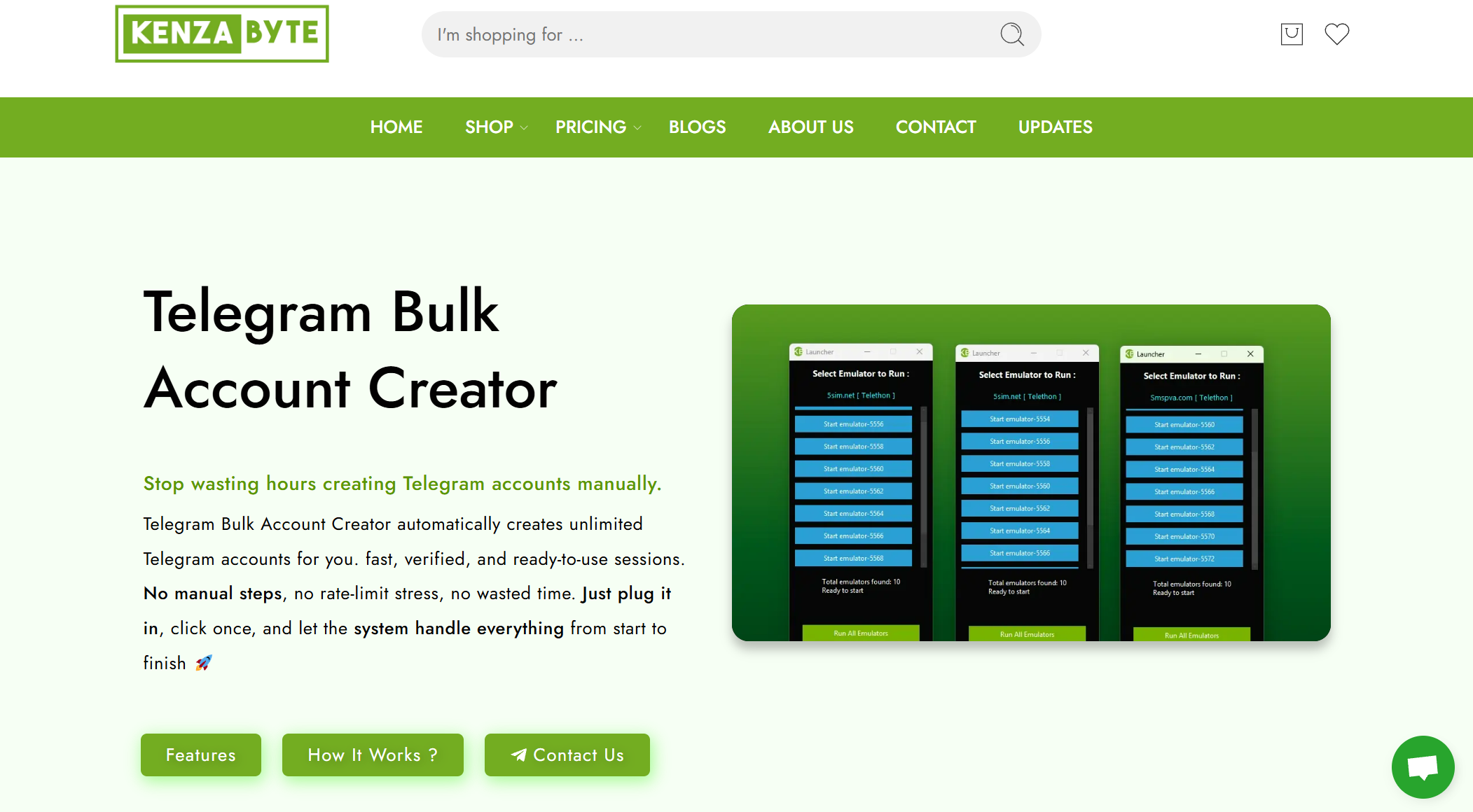
This is a versatile tool available as both an open-source project on GitHub and a more polished version on KenzaByte’s website. It automates the creation of multiple Telegram accounts by using an SMS API service like 5sim.net to receive verification codes automatically.
✅ Pros: Free and open-source version, easy to use ⚠️ Cons: Requires setup and some technical skills for the GitHub version, premium for the commercial version
2. Telegram Kit 1 Reborn
Telegram Kit 1 Reborn is a widely discussed tool in Telegram marketing forums. It focuses on creating multiple accounts quickly and supports automation. It is especially useful for marketers who need to scale Telegram operations.
✅ Pros: Faster account creation, good for automation ⚠️ Cons: Community tool, may lack official support or documentation
Managing Multiple Accounts Effectively
Now that you know about the best telegram bulk account creator tools, it’s important to learn how to manage multiple Telegram accounts well. Creating many accounts is only part of the job. You also need to keep them organized and easy to use. This section will show you real ways to navigate between accounts, handle messages, and stay productive.
How to Manage Multiple Telegram Accounts?
Telegram itself lets you add a few accounts directly in the app or use other ways when you have more than a few. On iPhone and Android, you can add up to three accounts in the Telegram app without extra tools. Just open the menu and tap Add Account, then enter a phone number for each account. You can easily switch between them from the same menu.
If you use Telegram web on your browser, you can open multiple tabs with different accounts logged in at the same time. Open web.telegram.org in one tab for one account, and another tab for another account. This is a quick trick to view many accounts without logging out.
For people who need even more accounts — like businesses or community managers — tools like DICloak multi‑account management can help keep all sessions isolated and smooth. These tools let you organize many accounts in one place, avoid mixing up chats, and reduce the risk that Telegram links the accounts together.
Tips for Switching Between Accounts
Switching many Telegram accounts can be confusing if you do it manually. Here are some simple tips that help:
- Label each account clearly. Use different profile pictures and names so you don’t send a message from the wrong account.
- Use different browsers or browser profiles. With Telegram web, you can open one account in Chrome and another in Firefox or in a private browser window. This keeps profiles separate. Alternatively, tools like DICloak let you easily manage multiple accounts by isolating each one in its own unique browser profile, helping prevent cross-account interference and improving security.
- Keep your profiles logged in. If you don’t log out often, switching is faster and easier.
- Use desktop tricks for many accounts. On a computer, you can even run separate instances of Telegram by copying the program into different folders and opening each copy with its own login — advanced but useful for heavy users.
These tips help you move between accounts faster and avoid mistakes when you use a bulk telegram account creator to make many profiles.
Handling Notifications and Messages
Managing messages from many accounts can feel like chaos if you’re not careful. Here are real ways to stay in control:
1. Customize alerts for each account.
Go into each account’s settings and change the notification tone or mute some accounts. This makes it easier to know which account has new messages without switching constantly.
2. Use a central dashboard.
Tools like Rambox or similar apps let you see notifications from many accounts in one place. This can help you stay focused without flipping between tabs or apps.
3. Check messages regularly.
Set specific times to review chats from each account. This keeps you from feeling overwhelmed and helps you respond promptly.
Why choose DICloak Antidetect Browser for your business?
⚡The DICloak Antidetect Browser has become a global favorite for its unparalleled ability to efficiently and securely manage multiple accounts. Designed for professionals in social media management, affiliate marketing, traffic arbitrage, e-commerce, account farming, airdrops, and more, DICloak offers powerful features like RPA automation, bulk operations, and synchronizer. Additionally, it allows you to customize fingerprints and integrate proxies for each profile, ensuring top-level security and operational efficiency. It’s the ultimate tool for seamless, secure, and scalable operations.

What Makes DICloak Stand Out?
✅ Manage 1,000+ Accounts on One Device: Stop wasting money on extra hardware! DICloak allows you to manage multiple accounts on a single device, cutting costs and boosting efficiency.
✅ Guaranteed Account Safety, No Ban Risks: Every account gets its own isolated browser profile with custom fingerprints and IPs, drastically reducing the risk of bans. Your accounts, your control!
✅ Flexible Proxy Configuration for Maximum Performance: Seamlessly integrate with all major proxy protocols (HTTP/HTTPS, SOCKS5) and manage your proxy pool with bulk operations. No more struggling with IP management—DICloak has you covered.
✅ Streamlined Team Collaboration for Better Results: Easily manage your team with advanced tools like profile sharing, permission settings, data isolation, and operation logs. Your team works smarter, not harder.
✅ Automate the Grind with RPA: DICloak's built-in RPA saves you hours of manual work. Automate repetitive tasks, streamline workflows, and focus on what really matters—growing your business.
✅ Powerful Bulk Tools to Scale Your Operations: Create, import, and launch multiple browser profiles in one click. DICloak makes scaling your business as easy as it gets.
✅ Compatible with All Major Operating Systems: Based on the Chrome core, DICloak supports simulating Windows, Mac, iOS, Android, and Linux operating systems. No matter what platform you need, DICloak has you covered.
🔗 Ready to Get Started?
Visit the DICloak website to explore more details and choose the plan that’s right for you. Start for free today and experience the power of secure, efficient, and scalable multi-account management!
Conclusion
In conclusion, a Telegram Bulk Account Creator is an invaluable tool for businesses, marketers, and anyone managing multiple Telegram accounts. It automates the account creation process, saving time and effort while ensuring each account is unique and secure. By understanding how a Telegram Bulk Account Creator works, exploring key features, and following legal and safety guidelines, you can effectively utilize these tools for various use cases.
Managing multiple accounts becomes much easier with the right tool, and solutions like DICloak Antidetect Browser can provide additional privacy and security. Whether you're just getting started or scaling up your operations, using a Telegram Bulk Account Creator is a powerful solution for managing your Telegram presence.
FAQs About Telegram Bulk Account Creators
What is a Telegram Bulk Account Creator and why should I use it?
A Telegram Bulk Account Creator is a tool designed to automate the process of creating multiple Telegram accounts. It's especially useful for businesses or marketers who need to manage many accounts at once, saving time and effort. By using a bulk account creator, you can quickly generate accounts with unique profiles and avoid the manual setup process.
How does a Telegram Bulk Account Creator work?
A Telegram Bulk Account Creator works by automating the sign‑up process for multiple Telegram accounts. It typically connects to SMS services to receive verification codes, handles profile customization, and manages multiple accounts at once. Some tools even allow you to set up proxies, ensuring that each account appears as if it’s from a different user, which reduces the risk of detection by Telegram.
Is it safe to use a Telegram Bulk Account Creator?
Using a Telegram Bulk Account Creator can be safe if you follow the platform’s rules and guidelines. It’s essential to avoid spamming, violating Telegram’s terms, or engaging in automated activities that could trigger bans. You should always use reputable tools that comply with Telegram’s Terms of Service and take steps to avoid having your accounts flagged as suspicious.
What are the key features to look for in a Telegram Bulk Account Creator?
When choosing a Telegram Bulk Account Creator, look for features like automated phone verification, proxy support for anonymity, the ability to customize profiles (names, usernames, bio), and multi‑threading for faster account creation. These features will ensure that your account creation process is efficient, secure, and scalable.
How can I manage multiple Telegram accounts effectively?
Managing multiple Telegram accounts can be challenging without the right tools. A Telegram Bulk Account Creator simplifies the process by creating accounts in bulk, but managing them effectively requires keeping each account organized. You can use different browsers or profiles, manage notifications, and set up tools like DICloak for better multi‑account management, which ensures each account runs in its own isolated profile.
 Web Proxy Tools
 Free Tools
 Cookie Plugin
 UA Generator
 MAC Address Generator
 IP Generator
 IP Address List
 2FA Code Generator
 World Clock
 Anonymous Check
 WebRTC Leak Test
 UUID Generator
 Free Web Proxy Site
 Proxy Checker
 FB Ad Checker
 AI Web Scraping
 Free SMM Tools
 Twitter Shadowban Checker
 Instagram Name Checker
 UTM Generator
 Username Generator
 AI Hashtag Generator
 LinkedIn Headline Generator
 Social Media Image Resizer