For content creators, marketing agencies, and freelancers, managing multiple YouTube accounts is a common necessity. However, this process is often plagued with challenges, from the constant hassle of switching between accounts to the serious risk of getting all your channels banned due to a single violation. If you're struggling with forced logouts, security verifications, and the fear of a domino-effect suspension, you're in the right place. This guide will walk you through YouTube's native features, expose their critical limitations, and introduce the professional-grade tools you need to manage your accounts with complete security and efficiency in 2026.
Why You Need Multiple YouTube Accounts
Running more than one YouTube account is a legitimate and often necessary strategy for professionals. Here are the most common scenarios where multiple accounts are essential.
1.1. For Influencer and Content Networks
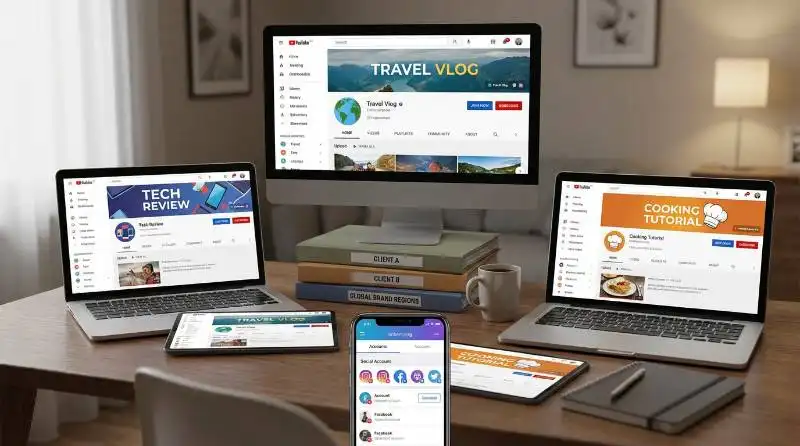
Influencers and creator networks frequently operate multiple channels to target different audiences with niche content, such as separate channels for travel vlogs, tech reviews, and cooking tutorials. This approach also allows them to test YouTube's algorithm effectively. For instance, many creators upload the same Shorts video to different accounts with varied hashtags and titles to see which one the algorithm favors, a strategy known as "multi-channel testing."
1.2. For Agency and Freelancer Client Management
Marketing agencies and freelancers are responsible for handling the YouTube presence of numerous clients. Overseeing ten or more channels with separate logins can quickly become chaotic. While you can be added as a manager, mixing multiple client accounts under a single manager account is messy and poses security risks, as each client rightfully owns their channel and its data.
1.3. For Brands Targeting Different Niches or Regions
A single brand may operate multiple YouTube channels to cater to different languages, regions, or product lines. This allows them to create content that resonates with specific audiences and local trends. However, merging all these brand channels under one Google account is risky. If malicious activity is detected on one channel, it can lead to a ban that affects all other channels linked to that account.
The Challenge of Managing Multiple YouTube Accounts
Managing several YouTube accounts from one device introduces significant risks and daily frustrations. Understanding these challenges is the first step toward solving them.
Understanding YouTube's Tracking: Digital Fingerprints
Google and YouTube meticulously track a device's digital fingerprint. This unique identifier is composed of various elements, including your IP address, MAC address, WebGL rendering, browser cookies, and operating system version. When you access multiple accounts from a device with a single, recognizable fingerprint, YouTube's systems group those accounts together.
The "Domino Effect": How One Banned Account Puts Others at Risk
According to Google’s terms of service, all linked accounts are subject to termination. This means if one of your YouTube accounts is flagged or suspended for a policy violation (like a copyright strike or community guideline infraction), every other account associated with the same device fingerprint is also at risk of immediate suspension or permanent termination. This "domino effect" can wipe out years of work in an instant.
The Daily Hassle: Constant Logins and Security Verifications
Beyond the risk of bans, there's the daily operational friction. When you frequently switch between different Google accounts on the same device, you are often forced to log out and back in, complete annoying CAPTCHAs, and go through re-verification checks to prove your identity. This constant interruption wastes valuable time and disrupts your workflow. This constant friction isn't random; it's a direct consequence of YouTube's system detecting multiple accounts operating from a single, familiar digital fingerprint, forcing you to repeatedly prove you're not a bot.
The Official Method: Using YouTube's Brand Accounts
YouTube provides a native feature called Brand Accounts, which allows you to manage multiple channels under a single email address. While convenient, it's essential to understand its structure and limitations.
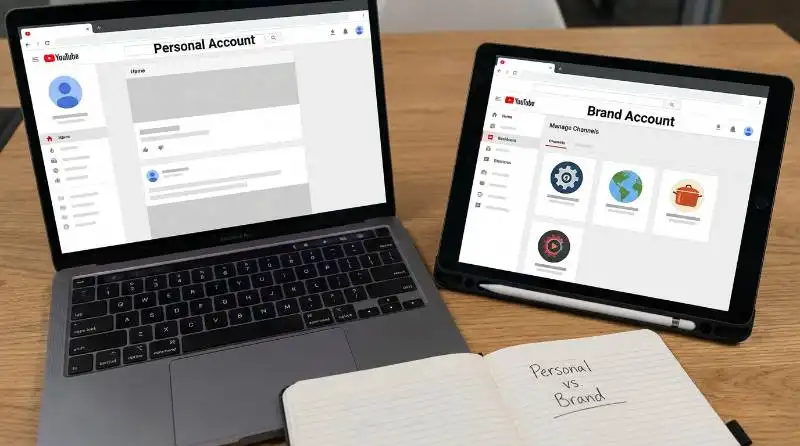
Personal vs. Brand Accounts: What's the Difference?
A clear distinction exists between the two types of accounts YouTube offers.
- Personal YouTube Account: This is the default account automatically linked to your Google email address. You can only have one personal YouTube account per email.
- Brand Account: This is a separate account that can be created and managed from your primary Google account. It's designed for businesses and creators, allowing you to have up to 100 distinct YouTube channels under a single login.
Step-by-Step: How to Create Multiple YouTube Channels with a Brand Account
Follow these steps to create a new channel using a Brand Account:
- Log into your Google Account on YouTube.com.
- Click your profile icon in the top-right corner and select YouTube Studio.
- In the left-hand menu, click Settings.
- Navigate to Channel → Advanced Settings and scroll down to click Manage YouTube Account.
- Under "Your YouTube Channels," select Create a New Channel.
- Enter a name for your new Brand Account channel and click Create.
Benefits and Limitations of Using Only Brand Accounts
Brand Accounts offer a straightforward way to manage multiple channels, but they come with critical drawbacks.
- Benefits:
- Simplified Management: Control all your channels from a single Google account without juggling multiple logins.
- Team Collaboration: Add team members as "Managers" to specific channels without sharing your personal Google password.
- Separate Branding: Each channel can have a unique name, logo, and branding strategy tailored to its niche.
- Limitations:
- Single Point of Failure: This is the most significant risk. Because all channels are linked to one Google account, a policy violation on a single channel can lead to the suspension or termination of all channels associated with that account.
- No Fingerprint Isolation: This method does not solve the digital fingerprint tracking issue. All your activity across all channels is still tied to your one device, making you vulnerable to the "domino effect."
A Safer Solution for Multiple YouTube Accounts: Antidetect Browsers
For professionals who can't afford the risks associated with YouTube's native tools, antidetect browsers are the superior and recommended solution.
An antidetect browser is a specialized tool designed to create completely isolated browsing profiles. Each profile functions as a brand-new, unique physical device. It has its own separate memory, cookies, cache, IP address, and a distinct digital fingerprint, spoofing key elements like WebGL rendering, canvas hashes, geo-location, and operating system to appear completely unique. When you log into a YouTube account from one of these profiles, YouTube sees it as a completely different user on a different computer.
Why This Is the Safest Approach for Professionals
Antidetect browsers directly solve the core problems of managing multiple accounts. By isolating each account in its own unique profile, you eliminate IP conflicts and prevent YouTube from linking your accounts via a shared digital fingerprint. This removes the constant security verifications and, most importantly, completely mitigates the risk of a "domino effect" ban. It also enables secure collaboration with clients and teams, as you can share access to a browser profile without ever needing to exchange sensitive account passwords.
DICloak: The Ultimate Tool for Managing Multiple YouTube Accounts
Among the available solutions, DICloak stands out as the ultimate tool for safely and efficiently managing multiple YouTube accounts.

Creating Isolated profiles for Each YouTube Account
With DICloak, every YouTube account you manage is assigned its own isolated browser profile. This gives each account a unique digital fingerprint and IP address, making them appear to YouTube as completely separate users from different devices and locations. This drastically reduces the risk of linked bans and allows you to securely manage hundreds or even thousands of accounts from a single device with confidence.
Streamlining Team Collaboration and Client Access
DICloak is built for teamwork. You can securely share browser profiles with team members or clients using flexible permissions. For example, an agency can create a DICloak profile, log into the client's YouTube account within it, and then share the profile with the client for review. The client can access their account through DICloak without ever sharing their password, and all session data syncs securely in the cloud.
Enhancing Security and Automating Tasks
DICloak offers top-tier security features, including advanced data encryption and secure cloud synchronization to protect your accounts. It also comes with powerful automation capabilities. Features like the Synchronizer and RPA (Robotic Process Automation) help you streamline repetitive tasks, such as uploading videos or managing comments across multiple accounts, saving you countless hours of manual work.
How to Set Up Multiple YouTube Accounts with DICloak: A Step-by-Step Guide
Getting started with DICloak is straightforward. Here’s how to set up your accounts for maximum security and efficiency.
Step 1: Download and Install DICloak
First, go to the official DICloak website to download the browser. Once installed, sign up for an account to access the dashboard.
Step 2: Create Your First Isolated Browser Profile
From the DICloak dashboard, create a new profile. You can give it a recognizable name (e.g., "Client A - YouTube"). DICloak allows you to customize its unique fingerprint settings, such as the operating system and geolocation, or you can simply use the default settings for a quick start.
Step 3: Launch the Profile and Log In to YouTube
Click the "Run" button to launch your new profile. A new browser window will open that looks and feels like Chrome but is operating as a completely separate device. Navigate to YouTube and log in with one of your accounts.
Step 4: Repeat for All Your Other YouTube Accounts
Repeat the process for each additional YouTube account you manage. Create a new, dedicated DICloak profile for every account. For maximum separation, assign a different proxy or IP address to each profile to ensure they appear to be from different locations.
Common Methods That Fail: Why Standard Approaches Put Your Accounts at Risk
Before settling on an antidetect browser, many professionals try other methods. Here’s a look at why these common approaches are less effective and riskier.
Using Multiple Profiles in a Standard Browser (e.g., Chrome)
Creating different user profiles in a standard browser like Chrome helps separate cookies and history, but it does not solve the core problem. All profiles still use your original device's IP address and a nearly identical digital fingerprint, leaving all of your accounts linked and vulnerable.
Relying Solely on YouTube’s Built-in Channel Permissions
While granting "Manager" access via Brand Accounts is convenient for team collaboration, it provides no true isolation. All management activity is still traced back to the manager's device and its single digital fingerprint, continuing to pose a risk to all associated accounts.
Juggling Multiple Physical or Virtual Devices
Using separate physical computers or virtual machines (VMs) does solve the fingerprint issue, but it is an extremely expensive, inefficient, and impractical solution. It is difficult to scale, consumes massive system resources, and is far more costly than an antidetect browser like DICloak, which provides the same isolation at a fraction of the cost and with much greater speed.
Essential Tips for Managing Your Multiple YouTube Accounts
Once your accounts are set up securely, apply these best practices to ensure they thrive.
Develop a Clear Content Strategy for Each Channel
Treat each channel as a unique brand. Create a distinct content plan and publishing calendar based on its target audience and niche. This consistency will help you build a loyal following for each channel individually.
Maintain Consistent Yet Unique Branding
If multiple channels represent the same parent brand, maintain a consistent tone and style. However, give each channel its own identity with a unique logo, channel banner, and description that speaks directly to its specific audience.
Leverage YouTube Analytics for Each Channel
Regularly dive into the YouTube Studio for each of your channels. Use the detailed insights and performance metrics to understand what’s working and what isn't. This data is crucial for optimizing your content strategy and driving better engagement.
Frequently Asked Questions about multiple YouTube accounts (FAQ)
Can I have multiple YouTube accounts with one email?
Yes, you can create up to 100 YouTube channels under one email using YouTube's Brand Accounts feature. However, if you want separate personal accounts, you need different email addresses. Remember that linking all channels to one Google account carries the risk of a domino-effect ban.
Is it against YouTube's rules to have multiple accounts?
No, it is not against YouTube's rules to have multiple accounts. However, YouTube has very strong automated checks to detect spam, bot activity, and manipulation. To manage your accounts safely and avoid being incorrectly flagged, it is highly recommended to use an antidetect browser like DICloak.
If one of my YouTube channels gets suspended, can it affect my others?
Yes, absolutely. If YouTube detects a serious violation on one channel, it can suspend or terminate all other channels that it can link to the same user. This includes channels under the same Google account and channels managed from the same device or IP address.
How do I give my team access to a channel without sharing my Google password?
You have two main options. The basic method is to use YouTube's Brand Account feature to add them as a "Manager." The more secure and professional method is to use an antidetect browser like DICloak to share access to a pre-configured browser profile, which requires no password exchange and provides complete isolation.
Can I monetize multiple YouTube channels under one email?
Yes, you can link multiple YouTube channels to a single Google AdSense account for monetization. However, each individual channel must independently meet all of YouTube’s monetization eligibility requirements (e.g., subscriber count and watch hours).
Conclusion
While YouTube's Brand Accounts offer a basic solution for managing a few channels, they fall short for professionals who require robust security and efficiency. For agencies, marketers, and serious creators, the risks of linked accounts and the daily friction of managing them are too high. An antidetect browser like DICloak is no longer a luxury but a necessity. It provides the isolation, security, and collaborative features needed to protect your business and scale your operations with confidence.
Ready to take control of your YouTube accounts? Visit the DICloak website and start with their free plan to experience the future of secure multi-account management.
 Web Proxy Tools
 Free Tools
 Cookie Plugin
 UA Generator
 MAC Address Generator
 IP Generator
 IP Address List
 2FA Code Generator
 World Clock
 Anonymous Check
 WebRTC Leak Test
 UUID Generator
 Free Web Proxy Site
 Proxy Checker
 FB Ad Checker
 AI Web Scraping
 Free SMM Tools
 Twitter Shadowban Checker
 Instagram Name Checker
 UTM Generator
 Username Generator
 AI Hashtag Generator
 LinkedIn Headline Generator
 Social Media Image Resizer