Trying to make real cash with Swagbucks is never just about stacking surveys or clicking random offers. Most people hit a wall after the easy points dry up, and that’s when the real question shows up, how do you keep the swagbucks earn money stream going without wasting hours for pennies? Search results are packed with basic “how to earn money on Swagbucks” tips, but those rarely get into what actually works when you’re past the beginner phase.
What trips up even experienced users is the hidden risk: accounts can get flagged or shut down if you push too hard, use the wrong device setup, or try to manage more than one account from a single place. Losing your Swagbucks balance overnight is more common than most forums admit, and getting it back is nearly impossible.
The practical reality is that scaling up, whether that means running multiple accounts, automating routine tasks, or just trying to make Swagbucks pay out more than coffee money, comes down to how you handle device fingerprints, cookies, and proxy setups. Ignore these, and even legit activity starts to look suspicious. Make one wrong move, and you’re locked out with no warning.
So before you try to ramp up your Swagbucks make money routine, check what actually works for steady payouts and what gets people restricted. Here’s what separates the grinders from the people who just get banned.
What Actually Works to Earn Money on Swagbucks in 2026?
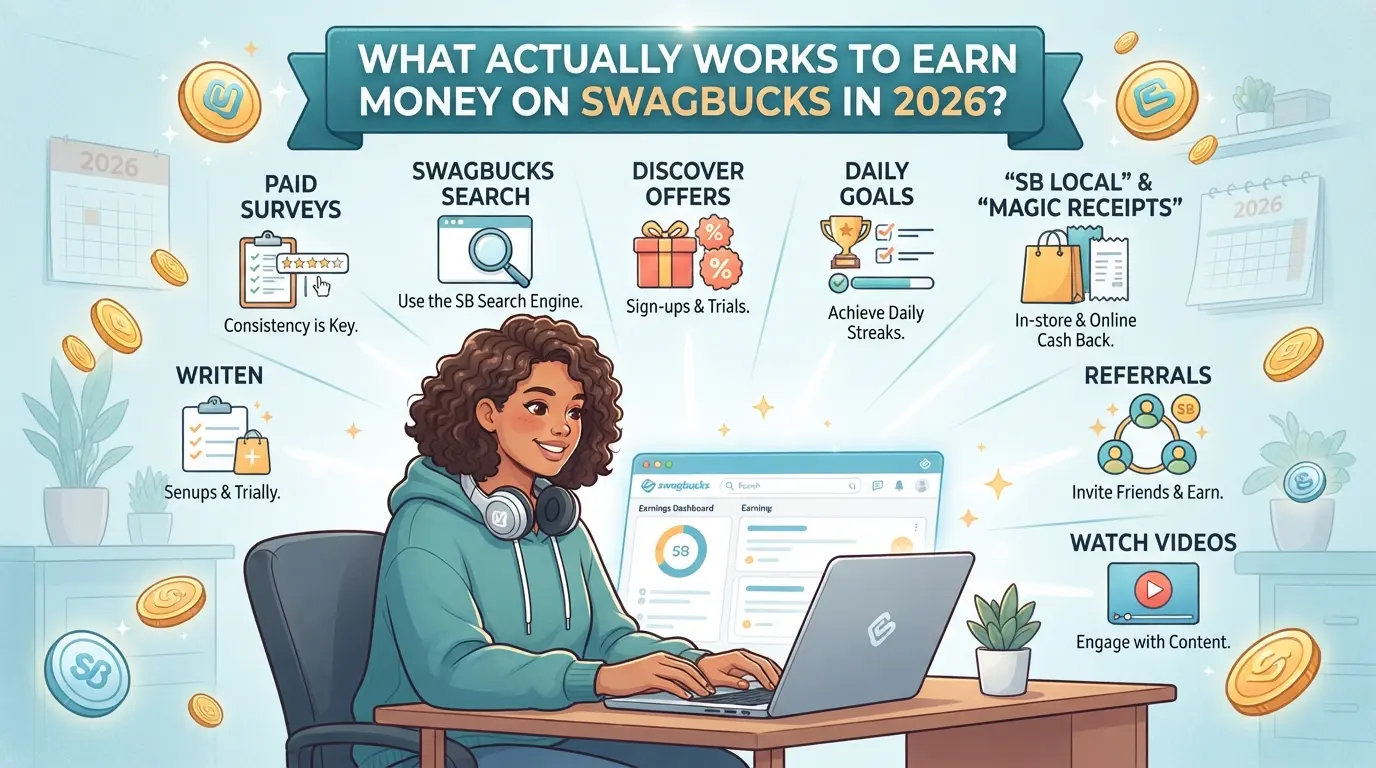
If you’re looking for real payouts, the old advice doesn’t cut it, what worked in 2023 barely pays now, and the easiest methods get you flagged or locked out. The safest way to earn money on Swagbucks in 2026 is to focus on cashback deals and reliable offers, while avoiding time-wasting tasks that look suspicious or rarely pay out.
Are Paid Surveys Still Worth It?
Surveys pay less than they used to, with most topping out at $0.50–$1 per hour. The main problem is qualification, most users spend more time getting screened out than actually earning. If you can’t pass the first few questions, you’ll waste your time for pennies.
How Much Can You Realistically Earn from Cashback and Shopping?
Cashback is the most stable option. Major merchants like Walmart, Target, and Best Buy still offer payouts between 1–5% for qualifying purchases through Swagbucks links, but there’s a catch. Only purchases that match Swagbucks’ tracking rules count, and shopping in-store, using gift cards, or returning items can make you lose your reward. For example, a $300 electronics buy at Best Buy could net $9 in cashback, but if you return one item or use a coupon not tracked by Swagbucks, you might get nothing. Payout timelines are slow, 90 days for some merchants, so plan on waiting. The real risk is losing cashback if you shop for others, use multiple accounts, or trigger fraud checks.
| Merchant |
Cashback Rate |
Typical Payout Time |
| Walmart |
1-3% |
60-90 days |
| Target |
2-5% |
60-90 days |
| Best Buy |
1-2% |
90 days |
Which Other Tasks Pay Best (Games, Offers, Videos)?
- Game and app signups pay well, but require proof of completion, miss a step, and you earn nothing.
- Free trial offers are fast, but forgetting to cancel costs more than you earn.
- Watching videos is mostly filler. The payout is so low (a few cents per hour) that it’s not worth the effort.
Before jumping in, check how the platform tracks your activity and what triggers account reviews. Missing a single step can mean hours wasted with no payout.
What to Check Before You Start Earning with Swagbucks
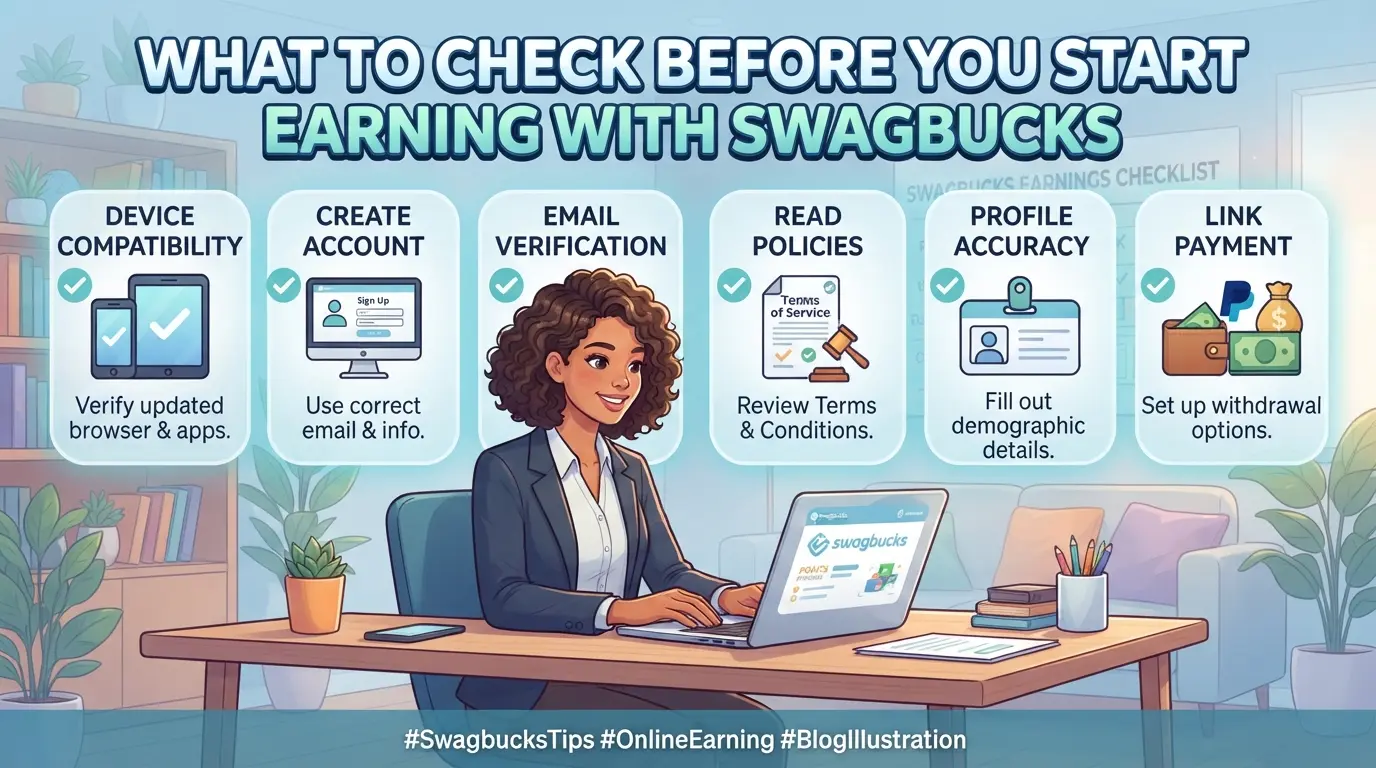
Missing one basic setup step can mean your Swagbucks earnings never show up or get wiped out in a day. Before you start, check these essentials, most bans come from mistakes people don’t even realize they’re making.
Which Countries and Devices Are Eligible in 2026?
Swagbucks only pays users in supported regions. In 2026, the US, Canada, UK, Australia, and Germany are fully eligible. If you’re outside these areas, payouts won’t process. Desktop access is more reliable for surveys and offers, while mobile can miss some tasks. Trying to use unsupported devices or locations usually gets accounts flagged.
What Account Details and Verification Steps Matter Most?
- Use a real email (temp emails get blocked).
- Complete phone verification if prompted, skipping this often leads to limits.
- Fill in all profile fields; incomplete profiles rarely qualify for higher-paying tasks.
How to Avoid Red Flags That Trigger Account Restrictions
Most users lose access because their device or location doesn’t match what Swagbucks expects. Accounts flagged for IP mismatches or browser fingerprint changes are usually locked before payout.
- Check your IP matches your claimed country, proxy errors can cause instant bans.
- Stick to one device per account; switching between desktop and phone too often gets flagged.
- Clear cookies before each login if you use multiple accounts; old session data can trip platform security.
The fastest way to lose your Swagbucks balance is by ignoring country, device, or verification requirements, even small mismatches can trigger account restrictions.
Next up: why steady Swagbucks earnings are rare, and what most users get wrong about long-term payouts.
Why Most Swagbucks Users Fail to Earn Consistently (and How to Avoid It)
Getting real payouts from Swagbucks means dodging the traps that sink most users, missed credits, sudden bans, and wasting hours on tasks that never pay. The biggest reason people fail is ignoring how Swagbucks actually tracks accounts and rewards. If you just follow the surface advice, you'll run into issues that are nearly impossible to fix once your account is flagged.
Why Do Some Tasks Never Credit or Pay Out?
Offer wall tracking breaks whenever your browser blocks cookies, scripts, or ads, even if you think you're only “making things faster.” Swagbucks relies on multiple trackers to confirm you finished a task. Running an ad-blocker, using a privacy browser, or switching tabs mid-task can mean you never get paid, even after spending hours. If credits don’t show after 24 hours, you’re almost always out of luck.
What Are the Top Mistakes That Get Accounts Banned?
Trying to run multiple accounts from the same device is the fastest way to lose everything, Swagbucks flags device fingerprints and IP overlaps. Scripts or browser automation also get detected, especially after the platform’s 2025 update. For example, logging in to two accounts on one phone, or using autofill tools, almost guarantees a ban within weeks. The real risk isn’t just losing one account; it’s losing all linked balances and getting blocked from future payouts. If you don’t separate devices, browsers, and proxies for each account, you’ll end up locked out with no warning.
How to Spot and Avoid Scam Offers or Fake Tasks
- Tasks that promise huge payouts for simple actions (like “free gift cards for one click”) almost never pay.
- Legit offer walls in 2026 are “AdGate,” “RevU,” and “OfferToro”, others often mix in fake tasks.
- If an offer asks for payment info or outside sign-up, skip it, real Swagbucks tasks don’t require upfront fees.
The difference between steady earning and wasted effort is catching these issues early. Once you know what blocks payouts and bans, you can focus on safe, repeatable ways to earn. Next up: how to actually scale your Swagbucks routine for higher rewards.
How to increase Your Swagbucks Earnings: Advanced Strategies for 2026
If you want Swagbucks to pay out more than pocket change, you need a routine that stacks rewards, uses referrals, and avoids daily slipups. Most users stall out after the first few weeks, what separates the grinders is how they layer offers, track progress, and stay under the radar.
How to Stack Offers and Cashback for Bigger Rewards
- Pick purchases you can run through Swagbucks and another cashback app. Double-dipping is possible if both platforms credit the same transaction.
- Time buys for bonus events, Swagbucks often runs limited-time multipliers on gift cards or partner stores. Doing this right can push your earnings to 40% higher on a single purchase.
- Check each app’s terms before stacking. If you skip this, you risk losing both rewards: some retailers block cashback if they spot affiliate overlap.
- Keep detailed screenshots of every step. If a payout fails, proof speeds up appeals.
When to Use Referral Programs for Passive Income
- Only invite people who actually plan to use Swagbucks. Empty signups rarely trigger referral bonuses and can lead to account reviews.
- Track the referral limits, Swagbucks typically caps bonuses per user and per year. Going over the cap wastes effort and can trigger a restriction.
- Share your code during bonus periods. Swagbucks sometimes doubles referral payouts for a week; missing these windows costs you easy money.
- Avoid spamming forums or social groups. If your referral activity gets flagged as excessive, you risk losing both your bonus and your account.
How to Organize Your Workflow for Daily Consistency
- Set up a morning routine: login, check featured offers, and lock in easy tasks before the daily streak resets.
- Use a spreadsheet or tracker app to record completed offers, pending payouts, and bonus events. Missing a payout window is the fastest way to lose earnings.
- Schedule weekly reviews, look for patterns in what earns most per minute, and drop low-paying tasks.
- Stop when you hit fatigue. Burnout leads to mistakes, like skipping payout terms or reusing devices in ways that look suspicious.
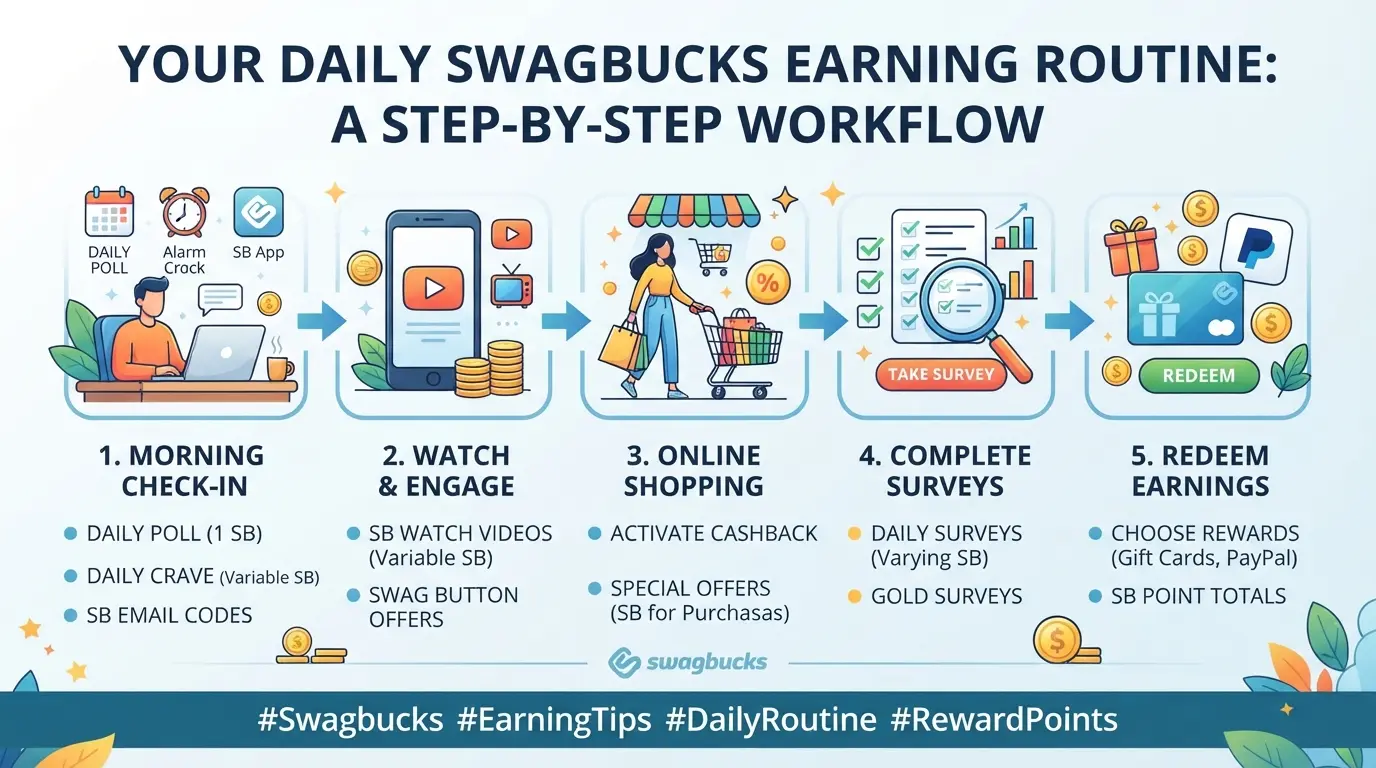
If you’re aiming to scale, the next step is managing multiple accounts safely, rush this and you’ll end up locked out instead of earning more.
How to Manage Multiple Swagbucks Accounts Safely and Efficiently
Running more than one Swagbucks account sounds easy, but the platform’s detection is strict. You can lose all balances and get banned for even small mistakes.
What Are Swagbucks' Rules on Multiple Accounts?
Swagbucks officially bans users from holding more than one account per person or household. If you break this rule, expect permanent bans and loss of all earnings, no appeal. Trying to bypass with fake info or the same device nearly always leads to shutdown.
What Technical Risks Lead to Account Linking or Bans?
Swagbucks tracks IP addresses and browser fingerprints closely. If accounts overlap on either, both get flagged.
- Using the same Wi-Fi or device creates a technical link, even if you swap emails.
- Safer move: Isolate each account with separate browser profiles and unique proxies. Avoid logging in from the same phone or computer.
When Does Using a Browser Profile Tool Make Sense?
Operators managing multiple accounts for payouts need full browser isolation. Basic tricks like clearing cookies won’t cut it, Swagbucks still sees fingerprint matches. Only serious grinders or teams should use browser profile tools; hobby users risk losing everything by guessing.
How Operators Use DICloak to Manage Multiple Platform Accounts for Earning Money Online
Scaling up from casual surveys to running multiple earning accounts isn’t just about having extra logins, it’s about keeping every session, fingerprint, and connection truly separate. For online earners who need to manage several platform accounts, the main challenge is avoiding cross-linking and accidental overlap. Once you’ve handled the basic Swagbucks make money routine, the next step is setting up a workflow where every account stays isolated, even as you ramp up volume or share tasks with a team. DICloak fits this scenario when operators need to build and maintain independent browser profiles for each assigned account. The scope is limited to browser-profile access; it does not change the connected platform itself.
How to Set Up Isolated Profiles and Configure Fingerprints for Each Account
Operators can create a new DICloak browser profile for every platform account, making sure sessions don’t share storage or settings. For each profile, you can configure the operating system, user agent, time zone, screen resolution, and WebRTC behavior, so every account workflow gets its own distinct browser signals. This matters most when earning across different regions or devices, since a reused fingerprint often triggers platform review. What actually separates the serious operators is keeping every browser profile cleanly isolated and consistently configured. 
User-Provided Proxy Configuration for Assigned Profiles
Where network separation is needed, operators can assign a user-provided HTTP, HTTPS, or SOCKS5 proxy to each DICloak profile. Enter proxy details manually or use Quick Input to parse a proxy string. The built-in proxy check shows the exit IP and location, so you can confirm each account runs through the correct connection. Proxy quality, rotation, and compliance are up to the user, DICloak only stores and applies the settings per profile. 
How to Use the Window Synchronizer for Efficient Multi-Account Actions
Manual entry gets messy fast when working with several accounts. With DICloak’s Window Synchronizer, operators can mirror supported clicks, text input, and scrolling from a master window to open profiles. This is live, supervised action, so you watch each window as you submit surveys or offers across accounts. Synchronizer doesn’t automate everything, but it cuts repetitive work when handling bulk platform tasks. 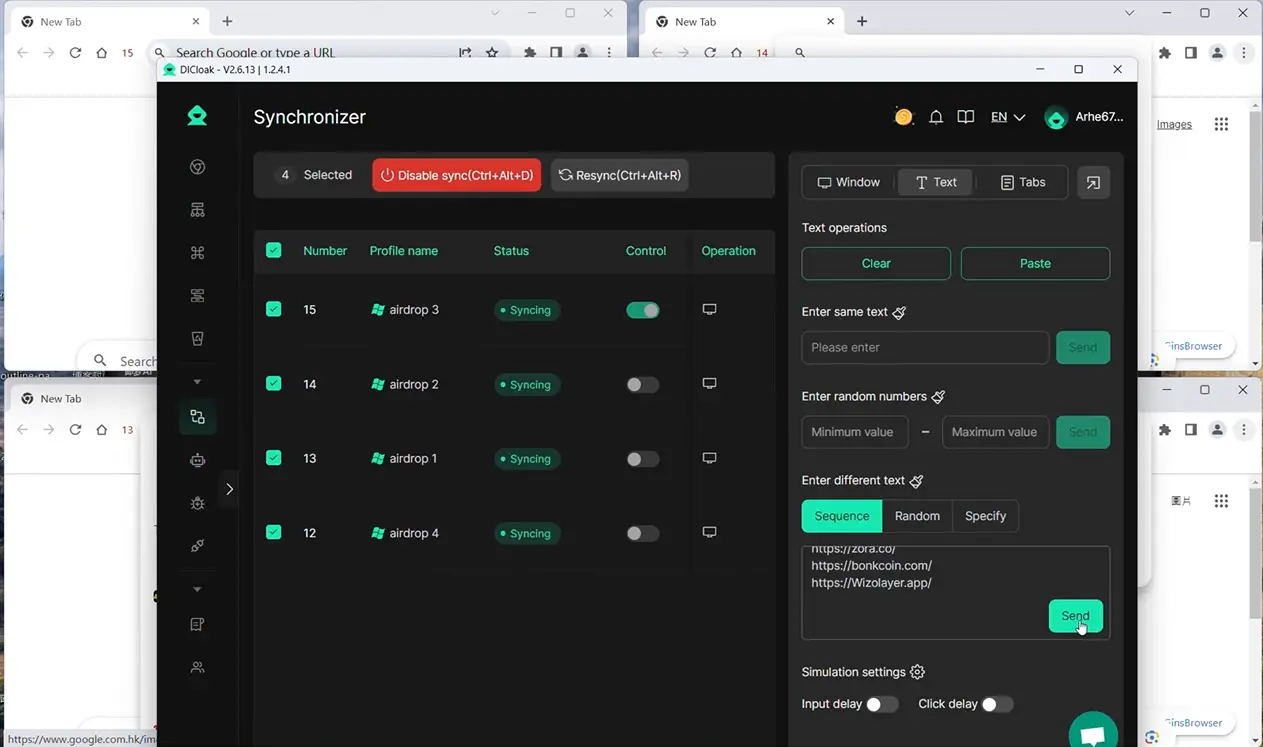
Which DICloak Plan Fits Multi-Account Earning Needs in 2026?
Choosing a plan depends on how many profiles and daily actions your workflow really needs. Free covers up to 5 profiles, Base expands to 20 with basic bulk operations, Plus supports 100 profiles and advanced features like Synchronizer, and Share+ is built for large teams with unlimited members and 200 profiles. Operators should match plan limits to their earning scale and automation needs; check DICloak pricing for current details. 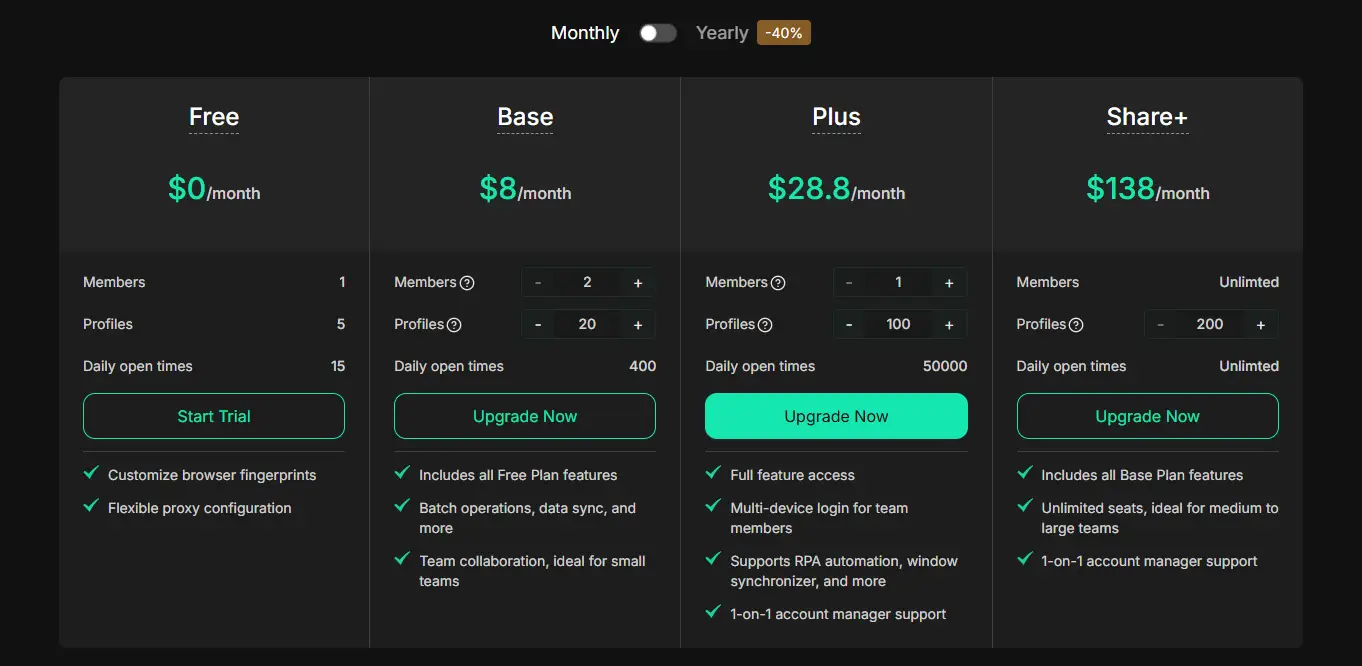
If your earning routine starts to require more accounts, more separation, or faster actions, this workflow is the line between steady payouts and wasted effort. Next up: how to tell when Swagbucks isn’t worth your time, or when it’s smarter to try other platforms.
When Swagbucks Is Not Worth Your Time: Signs to Move On or Try Other Platforms
Some users hit a wall with Swagbucks earn money routines, spending hours but seeing little payout. If your earnings have stalled or you’re running out of fresh offers, it’s time to check if your effort could work better elsewhere.
What Are the Signs Your Earnings Have Plateaued?
If you’re getting fewer points per hour or most new offers repeat, your earning rate is probably stuck. Here’s how the warning signs stack up:
| Plateau Sign |
What It Looks Like |
What to Do Next |
| Diminishing Returns |
Surveys pay less than $0.20 each |
Try higher-paying apps |
| Offer Exhaustion |
Same offers cycle every week |
Diversify platforms |
Sticking with Swagbucks when your payout drops just means you’re spending time for pocket change.
Which Other Earning Platforms Are Worth Trying in 2026?
If surveys and offers dry up, check apps like InboxDollars, Toluna, or Pinecone Research. These often give new users better payouts and fresher tasks. Diversifying early stops you from wasting time on stale routines.
Swagbucks works best as a side hustle, not your main earning app, once you see your balance crawling, move on and keep your options open.
What to Do If Your Swagbucks Account Gets Restricted or Banned
If your Swagbucks account gets locked, you have one shot at appeal, ignore the usual tips and focus on details that make you look real, not automated.
How to Appeal a Ban or Restriction
- Open a support ticket within 24 hours, delays drop your chances.
- Attach screenshots of your most recent transactions, device info, and your real name as used in payouts.
- Explain if you think a specific action triggered the ban (like logging in from a new device). Skip templates, canned replies mean your case is probably dead.
How to Secure Your Earnings and Data Before Issues Happen
- Withdraw rewards once you hit the minimum, balances disappear after a ban.
- Keep a record of payout emails and account settings.
- Don’t store all earnings in one account, spreading risk means a ban won’t wipe out everything at once.
Frequently Asked Questions About swagbucks earn money
Is Swagbucks legit for earning real money in 2026?
Yes, Swagbucks is a legitimate platform and has paid out millions since 2008. In 2026, users still report successful redemptions for PayPal cash and popular gift cards. However, watch for regional restrictions and make sure to complete tasks honestly, as fraudulent activity can result in lost earnings or bans.
How long does it take to cash out earnings from Swagbucks?
Most cash outs process within 1-5 business days, but some rewards, like PayPal, may take up to a week. Gift cards are usually delivered faster. Delays can happen if your account needs extra verification or if there’s high demand during sales or holidays.
Can I use Swagbucks on my phone and desktop at the same time?
Using Swagbucks on both your phone and desktop is allowed, but don’t run the same task or survey on both devices at once. Simultaneous logins from different IP addresses can trigger fraud alerts and may risk your account. Always complete each task on just one device.
What are the best Swagbucks tasks for beginners?
Simple surveys, daily polls, and watching videos are the best starting tasks for new users. These are quick, easy to understand, and usually pay out small but steady points. Shopping through Swagbucks links and using the search tool also offer beginner-friendly ways to earn.
How do I avoid getting my Swagbucks account banned?
Follow the rules: use only one account per person, don’t fake information on surveys, and avoid proxys or proxy servers. Complete tasks honestly, and don’t rush through them. If you get flagged for suspicious activity, your account may be suspended and your points lost.
If you’re ready to start earning while you browse, consider setting aside a few minutes each day to engage with surveys, offers, or other simple tasks online. Making a habit of these activities can gradually supplement your income in a low-effort way. Try DICloak For Free
 Web Proxy Tools
 Free Tools
 Cookie Plugin
 UA Generator
 MAC Address Generator
 IP Generator
 IP Address List
 2FA Code Generator
 World Clock
 Anonymous Check
 WebRTC Leak Test
 UUID Generator
 Free Web Proxy Site
 Proxy Checker
 FB Ad Checker
 AI Web Scraping
 Free SMM Tools
 Twitter Shadowban Checker
 Instagram Name Checker
 UTM Generator
 Username Generator
 AI Hashtag Generator
 LinkedIn Headline Generator
 Social Media Image Resizer