CapCut has become one of the most popular editing tools for short videos, so it is no surprise that many users felt worried when questions like why did CapCut get banned started spreading online. For creators, small businesses, and social media teams, CapCut is more than just an app. It is part of a daily workflow for editing, posting, and growing online. When access feels uncertain, the real problem is not only the app itself. It is the risk of delays, lost projects, and broken content plans.
This article explains what CapCut is, why people began asking why did CapCut get banned, and how this situation can affect users and creators. It also looks at practical alternatives and smarter ways to keep content work moving, so you can stay prepared and keep creating with less stress.
What Is CapCut?
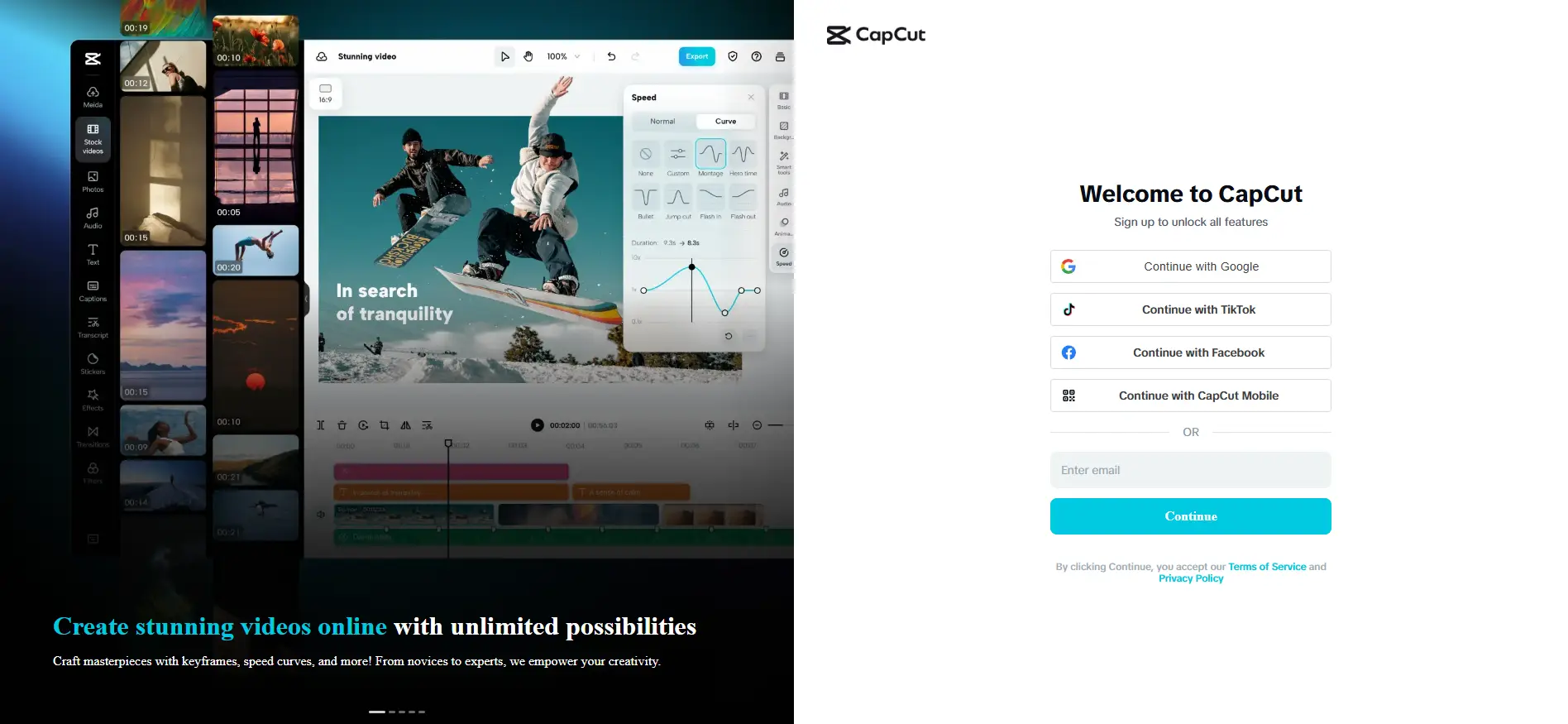
CapCut is an all-in-one video editing tool for mobile, desktop, and web users. It helps people cut clips, add text, make captions, use templates, and create short videos faster. On its official website, CapCut presents itself as a smart editor built for easy content creation, with tools for video, image, audio, and AI-based editing. This is important because before asking why did CapCut get banned, readers first need to know what CapCut is and why it became such a big part of everyday content work.
Many users move between the two platforms as part of one workflow. A creator might record a quick product clip, edit it in CapCut, add captions and effects, and then post it to TikTok, Instagram Reels, or YouTube Shorts. CapCut also supports simple account access through its official CapCut sign up and CapCut login pages, where users can continue with Google, TikTok, Facebook, or CapCut Mobile. That easy entry made the app feel familiar and simple from the start.
Another big reason CapCut became popular is that it made editing feel less scary. Many people do not want to learn hard desktop software just to make one short video. CapCut gave them a faster path. A small shop owner could turn a few product photos into a clean promo video in minutes. A student could make a class video with captions on a phone. A beginner could use built-in templates instead of starting from a blank screen. Apple’s App Store listing also describes CapCut as an all-in-one video editor that beginners can start using very quickly, while still offering more advanced tools for experienced users.
This background also helps explain why so many people later searched questions like is CapCut banned, is CapCut getting banned, and why is CapCut getting banned. For most users, the worry was not really about editing features alone. It was about access, stability, and whether they could still open the app, finish projects, or keep using the same creative workflow. In January 2025, CapCut became unavailable in some countries's app stores for a period, which made those concerns much more real for creators and everyday users. So when people search why did CapCut get banned, they are often trying to understand not just the app itself, but why a tool they rely on suddenly felt uncertain.
Why Did CapCut Get Banned?
As the last section showed, CapCut is more than a simple editing app. It is part of a larger app ecosystem, and that is a big reason people started asking why did CapCut get banned. The concern was not really about filters, templates, or editing quality. It was more about access, platform stability, and whether users could keep using the app without problems. That is why search terms like is CapCut banned, is CapCut getting banned, and why is CapCut getting banned became much more common when the app was removed from major app stores for a period.
For many users, the biggest fear was practical. They were not thinking about background reasons first. They were thinking about work. A creator may have needed to finish a client video. A seller may have needed to post a product clip. A team may have needed shared templates and saved drafts. In moments like that, people start worrying about CapCut login, CapCut sign up, project access, and whether the app will still work the next day. That real user pressure helps explain why why did CapCut get banned became such a widely searched question.
In simple terms, the situation was not about CapCut’s editing features failing or users losing interest. The app itself remained useful and widely used. But once access became uncertain for a period, user trust dropped quickly. That sudden change in experience is what pushed many people to search and try to understand why did CapCut get banned.
How Does the Ban Impact Users and Creators?
When people search why did CapCut get banned, they are often not just looking for a cause. They also want to know what happens next. For many users, the biggest impact is not the news itself. It is the effect on daily editing, posting, and content planning.
Loss of Access to Projects and Tools
Once people started asking why did CapCut get banned, the biggest fear was not theory. It was lost access. When an app becomes unavailable in app stores or harder to reinstall, users worry about unfinished drafts, saved templates, and account access. That is why searches like CapCut login and CapCut sign up often rise at the same time. CapCut itself promotes editing across devices and online tools like templates, captions, and AI features, so any break in access can feel serious for people who use the app every day.
Disruptions to Content Creation Workflows
For creators, the real damage is often time. A short-form video workflow can move fast. Someone may film in the morning, edit at noon, and post the same day. If access feels unstable, that whole rhythm breaks. A freelancer may miss a deadline. A shop owner may delay a product video. A student creator may lose the chance to join a trend while it is still hot. That is why questions like is CapCut banned and is CapCut getting banned matter so much. They are really questions about whether work can continue without stress.
Impact on Brands and Social Media Strategies
Brands feel this too. Many small teams use CapCut because it is simple, fast, and built for social video. If that system becomes uncertain, brands may need to change tools, retrain staff, or slow down posting plans. So when marketers search why is CapCut getting banned or why did CapCut get banned, they are often trying to protect content speed, campaign timing, and daily output, not just understand the news.
What Are the Best Alternatives to CapCut?
If people keep asking why did CapCut get banned, the next step is simple. They need another tool that can keep work moving. The good news is that several editors now offer easy cutting, captions, templates, and social video features, so users do not have to stop creating just because is CapCut banned or is CapCut getting banned becomes a real worry.
Top Video Editing Apps to Consider
1. Descript
Descript is a strong choice for creators who work with spoken content. It is built around text-based editing, so users can edit video and audio by editing the transcript. Descript also offers screen recording, captions, podcast tools, and AI features such as audio cleanup and its Underlord AI co-editor. This makes it very useful for YouTube creators, educators, podcasters, and founders who make explainers, interviews, or talking-head videos. If someone started searching why did CapCut get banned because they were worried about losing a fast editing workflow, Descript can feel like a smart next step for voice-driven content.
Pros: text-based editing saves time; strong caption and transcription tools; great for podcasts, tutorials, and repurposed content. Cons: less ideal for trend-heavy mobile edits; the workflow can feel different from a template-first app; some advanced AI features depend on usage limits and plan level.
2. InShot
InShot is one of the easiest options for people who want a mobile-first editor. It is designed for quick video making, with tools for trimming, effects, music, text, transitions, and social-ready editing. This makes it a good match for users who liked CapCut because it was simple and fast. A small seller making product clips, or a casual creator posting short daily videos, may find InShot easier to learn than a more advanced desktop editor. When people ask is CapCut banned or is CapCut getting banned, what they often want is a tool that lets them keep posting with as little slowdown as possible. InShot fits that need well.
Pros: easy to learn; strong for quick phone editing; good for short social content. Cons: not as strong for team workflows or deep editing; fewer advanced controls than professional desktop software.
3. DaVinci Resolve
DaVinci Resolve is the most advanced option on this list. Blackmagic Design describes it as an all-in-one app for editing, color correction, visual effects, motion graphics, and audio post-production. It has free and paid versions, and the free version already includes a very large tool set. It also supports collaboration and advanced AI-assisted features in newer versions. This makes it a serious option for freelancers, agencies, and creators who want more control over quality. If the search for why did CapCut get banned leads someone to rethink their whole editing setup, DaVinci Resolve is a strong long-term upgrade.
Pros: very powerful; strong free version; excellent for color, audio, and professional editing. Cons: harder to learn; heavier software; may feel too complex for someone who only wants fast social edits.
4. Canva Video
Canva Video works very well for marketers, small brands, and beginners who care more about speed than deep technical editing. Canva’s video editor runs in the browser and uses drag-and-drop tools, templates, transitions, audio, and automatic captions. It is especially helpful for teams already using Canva for presentations, social posts, and brand kits. A small business that used CapCut for fast product videos may find Canva Video easier to fit into a wider content system. So when brands ask why is CapCut getting banned, they are often also asking which tool can help them keep publishing on time. Canva Video is one of the easiest answers.
Pros: simple browser-based workflow; strong template system; useful for teams and branded content. Cons: less control for advanced editing; better for marketing videos than for complex creator edits.
5. Clipchamp
Clipchamp is a beginner-friendly editor from Microsoft. It offers browser-based and Windows-friendly editing, along with templates, screen recording, AI subtitles, AI voiceovers, audio cleanup, and stock assets. Because it is designed to be easy for non-experts, it works well for creators, educators, internal teams, and small businesses. It can be a practical choice for users who are worried about CapCut login, project continuity, or moving to a tool that feels simple from day one.
Pros: easy for beginners; strong recording tools; good subtitle and voice tools; convenient for Windows users. Cons: not as deep as pro editing software; some users may outgrow it if they need advanced color work or complex timelines.
How to Transition to a New Editing Tool
If why is CapCut getting banned or why did CapCut get banned makes you want to switch tools, do not move everything at once. Start by exporting your finished videos, saving raw clips, and backing up brand assets like logos, subtitles, music, and thumbnail files. If you still have CapCut login access, save what matters first. This lowers the risk of losing active work.
Then test one new tool with one small project. For example, a short product ad may work well in Canva Video or Clipchamp, while a podcast clip may be easier in Descript. If your old workflow depended on CapCut sign up across devices, pick a tool that also works well on the web or on both desktop and mobile. This makes the change less stressful.
The best transition tip is to match the tool to the job. Do not chase the most powerful app if you only need fast social videos. A solo creator who posts daily may care most about speed. A brand team may care more about templates and shared files. A video editor may want stronger color and audio tools. When people search why did CapCut get banned, they often feel stuck. But in real use, the best answer is not panic. It is choosing a tool that fits your content style and helps you keep publishing.
A Better Way to Manage Content Work Beyond CapCut with DICloak
When people search why did CapCut get banned, many are not only worried about one app. They are thinking about something bigger. What if access changes again? What if multiple accounts are affected at the same time? For creators, agencies, and small teams, the real goal is to keep work stable, even when tools change.
Protecting Multi-Account Work with Isolated Profiles
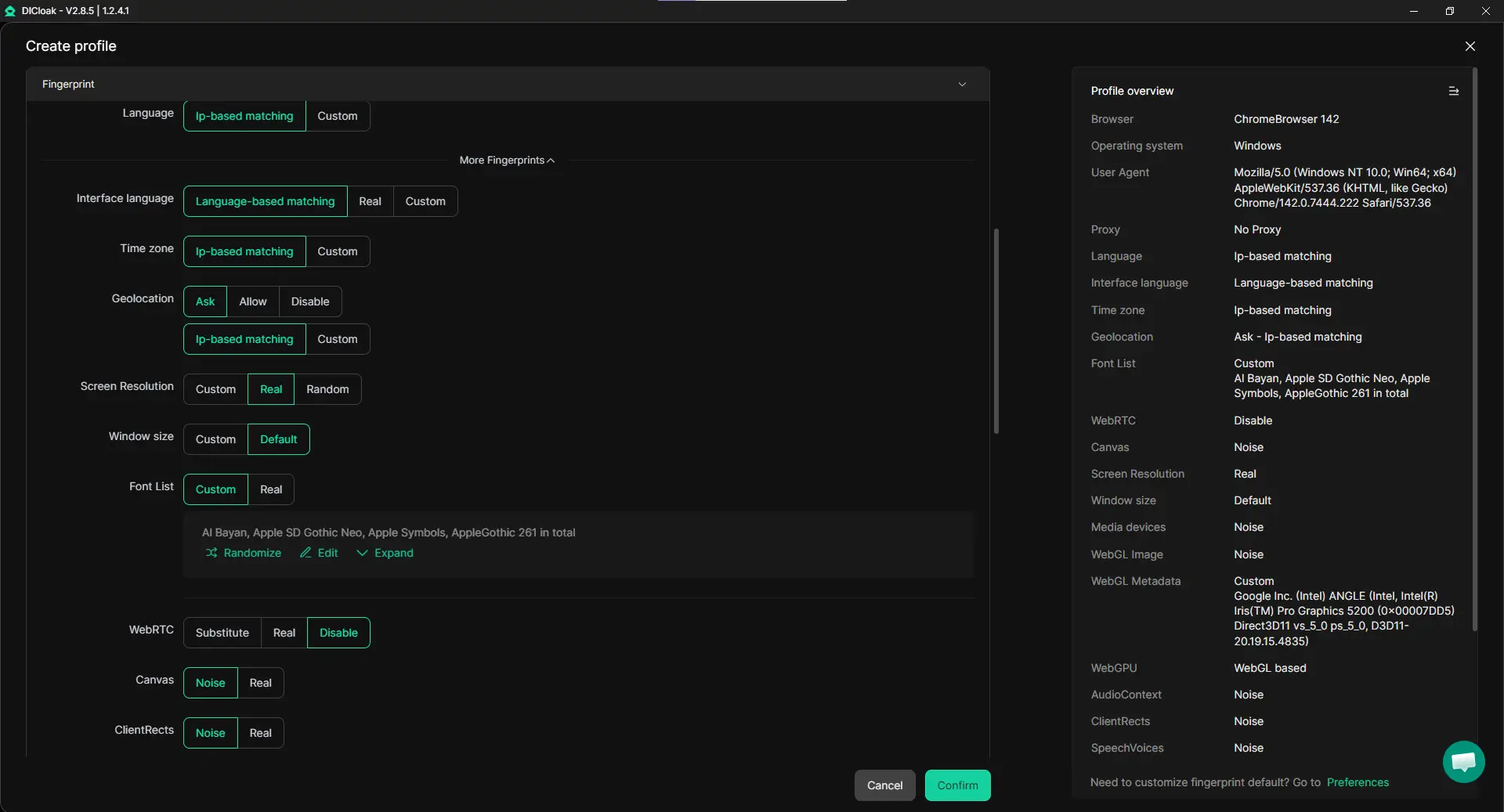
Handling many accounts in one normal browser can quickly create problems. Sessions mix, cookies overlap, and accounts may get linked by mistake. A more stable way is to run each account in its own isolated browser profile, with a unique fingerprint. This keeps accounts separate and reduces unexpected conflicts. For example, a social media manager handling five brand accounts can switch between profiles without worrying about one login affecting another.
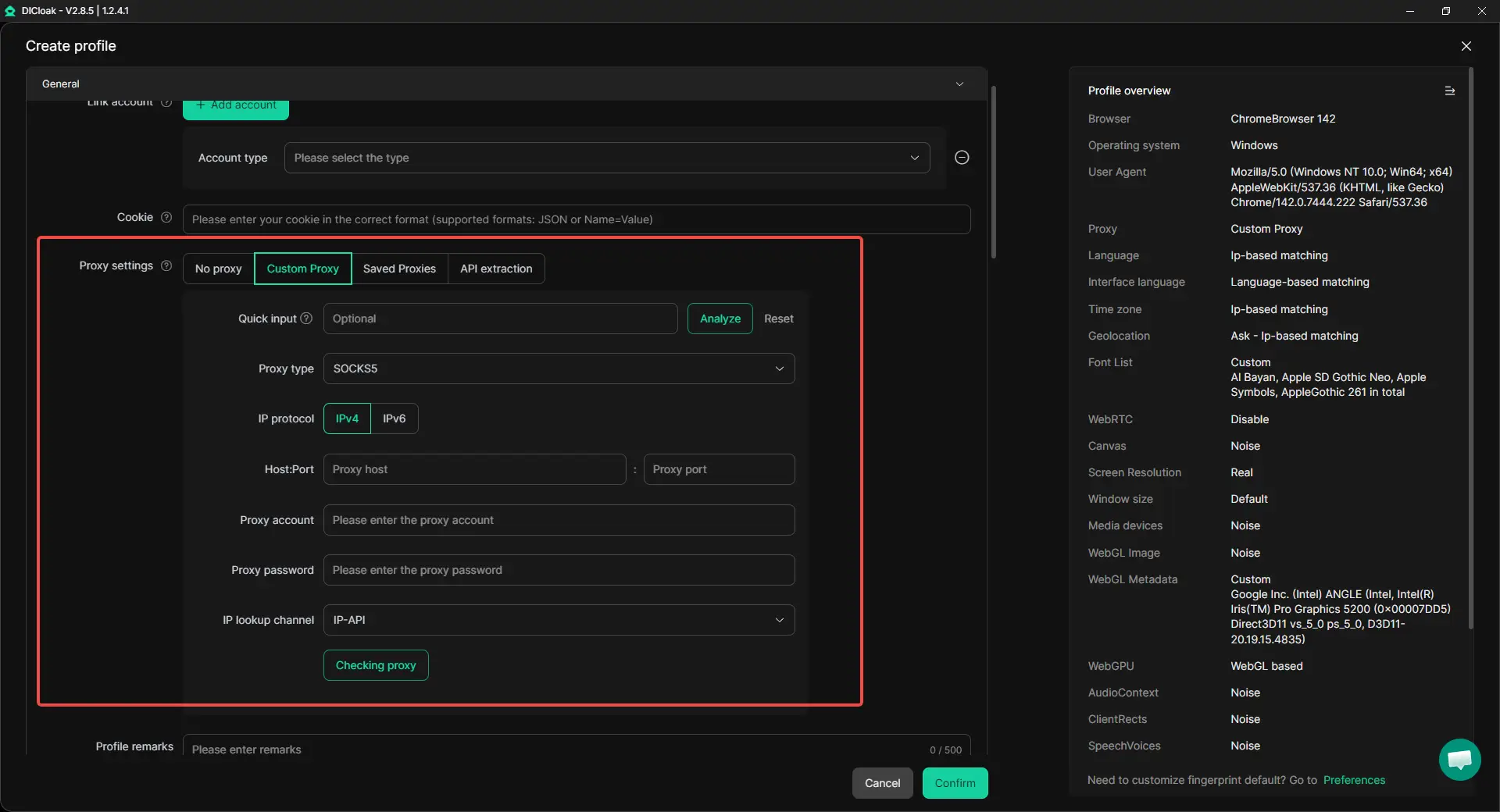
Using Custom Proxy Settings for More Stable Access
When users start asking is CapCut banned or is CapCut getting banned, they often begin looking for ways to keep access smooth across platforms. In this case, using different proxies for different accounts can help keep each profile consistent. Instead of changing system settings again and again, each browser profile can be linked to its own proxy. This makes it easier to manage multiple accounts at scale and keeps daily work more stable.
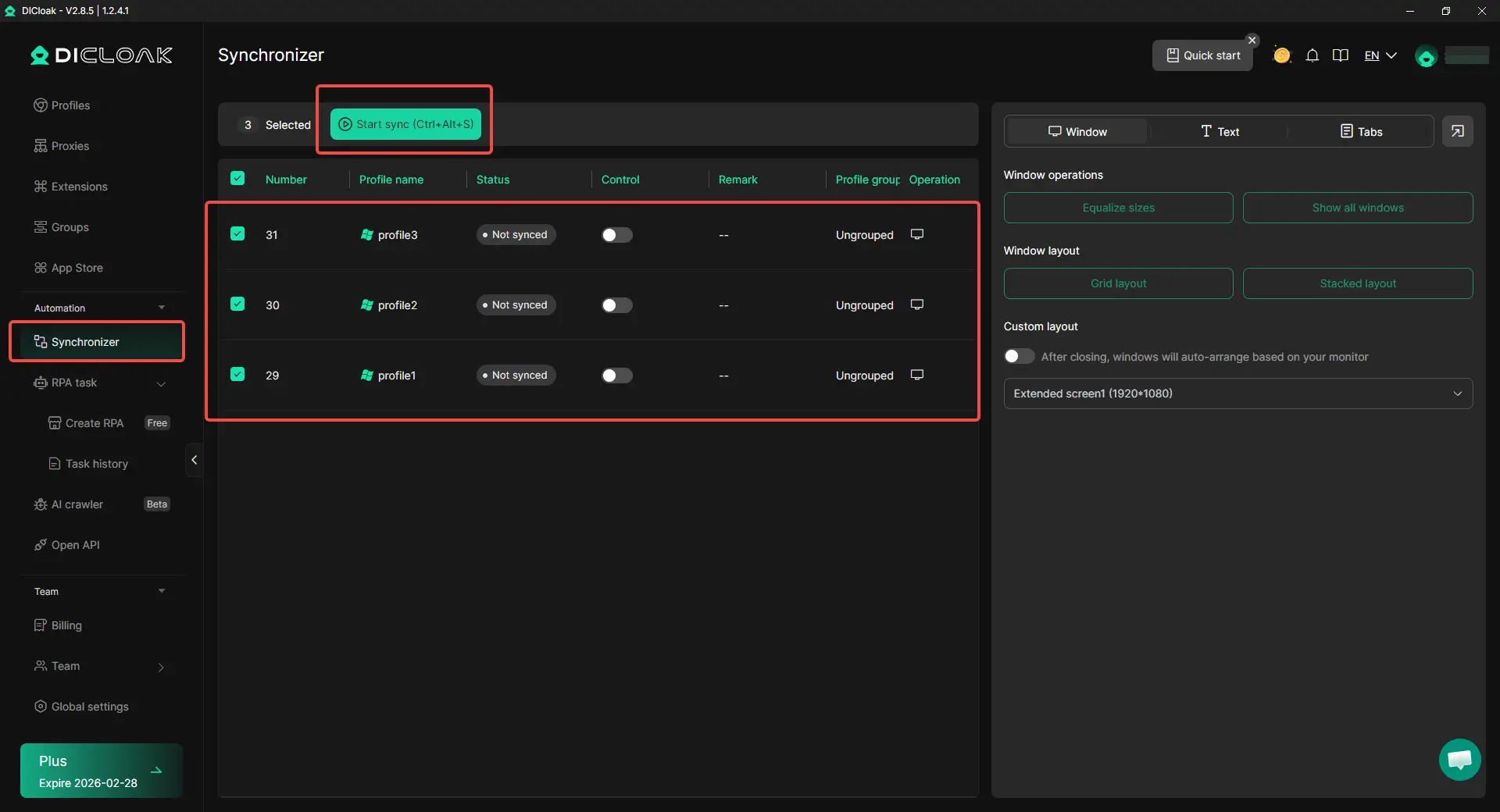
When workflows change, the last thing creators want is more manual work. Repeating the same steps across many accounts can take hours. With a Synchronizer, actions like opening pages, clicking buttons, or filling forms can be mirrored across multiple profiles at the same time. For example, a marketer managing ten accounts can publish or update content across all of them in a much shorter time.
Making Team Collaboration Easier and Safer
Content work is often shared across teams. One person edits, another publishes, and another checks performance. In this setup, sharing accounts directly can be risky and messy. A better approach is to share access through controlled browser profiles, where permissions, roles, and activity logs are clearly defined. This way, teams can work together without exposing passwords or mixing data between accounts.

FAQs
Why did CapCut get banned?
Many users ask why did CapCut get banned because they noticed changes in access, downloads, or platform availability. In simple terms, the concern was not mainly about CapCut’s editing tools. It was more about access stability, platform availability, and whether users could keep using the app normally. That is why this topic quickly became a major search question.
Is CapCut banned right now?
When people search why did CapCut get banned, they often also want to know whether the app is still usable now. The answer can depend on the platform, device, and region. In many cases, users are not dealing with a full permanent shutdown, but with changing access, store availability, or uncertainty around future use.
Why is CapCut getting banned if so many creators still use it?
This is one of the most common follow-up questions after why did CapCut get banned. CapCut is still popular because it is easy to use, fast for short videos, and helpful for creators, brands, and small teams. The concern has never really been about whether people like the app. It has been about whether users can keep relying on it without disruption.
What should I do if I am worried about CapCut access?
If you are searching why did CapCut get banned because you worry about your own workflow, the best step is to prepare early. Export finished videos, save raw files, back up templates and brand assets, and test at least one alternative editing tool. This can help you avoid stress if access changes again later.
What is the best alternative if I searched why did CapCut get banned?
If you searched why did CapCut get banned because you want a backup plan, good alternatives include Descript, InShot, DaVinci Resolve, Canva Video, and Clipchamp. The best choice depends on your workflow. Some are better for quick social videos, while others are stronger for team projects, voice-based editing, or advanced video work.
Conclusion
CapCut became popular because it made video editing easy for almost everyone. It gave creators, small businesses, and everyday users a fast way to make short videos with captions, templates, and simple effects. That is also why so many people started asking why did CapCut get banned. The real concern was not just the app itself, but whether users could still access their projects, keep their workflow running, and continue posting without interruption.
For creators and brands, the biggest impact was uncertainty. If access changes, users may worry about saved drafts, editing tools, login issues, and missed publishing plans. This is also why many people began looking for alternatives like Descript, InShot, DaVinci Resolve, Canva Video, and Clipchamp. Each tool fits a different need, from quick mobile editing to more advanced video work.
At the same time, this situation showed that content work today is about more than one editing app. For users who manage many accounts or work in teams, a more stable setup matters just as much as the editing tool itself. That is where solutions like DICloak can help support smoother multi-account workflows through isolated profiles, proxy management, team collaboration, and automation features. In the end, understanding why did CapCut get banned is not only about one platform. It is about helping users stay flexible, protect their workflow, and keep creating with less risk.
 Web Proxy Tools
 Free Tools
 Cookie Plugin
 UA Generator
 MAC Address Generator
 IP Generator
 IP Address List
 2FA Code Generator
 World Clock
 Anonymous Check
 WebRTC Leak Test
 UUID Generator
 Free Web Proxy Site
 Proxy Checker
 FB Ad Checker
 AI Web Scraping
 Free SMM Tools
 Twitter Shadowban Checker
 Instagram Name Checker
 UTM Generator
 Username Generator
 AI Hashtag Generator
 LinkedIn Headline Generator
 Social Media Image Resizer