What does "full data extraction from ChatGPT" actually mean in 2026?
By 2026, the phrase "full data extraction from ChatGPT" has bifurcated into two distinct technical paths. For the casual user, it refers to the account data export—retrieving one’s personal conversation history from OpenAI’s servers. However, for data engineers and architects, the term now primarily signifies AI-powered scraping.
This latter interpretation has become the dominant technical standard. We have moved past the era of "locating" data via brittle CSS selectors and entered the era of "understanding" data through semantic extraction. In this paradigm, ChatGPT (specifically GPT-4o and its successors) acts as an intelligent parsing engine that identifies and structures information from raw web content, regardless of how often the underlying site layout changes.
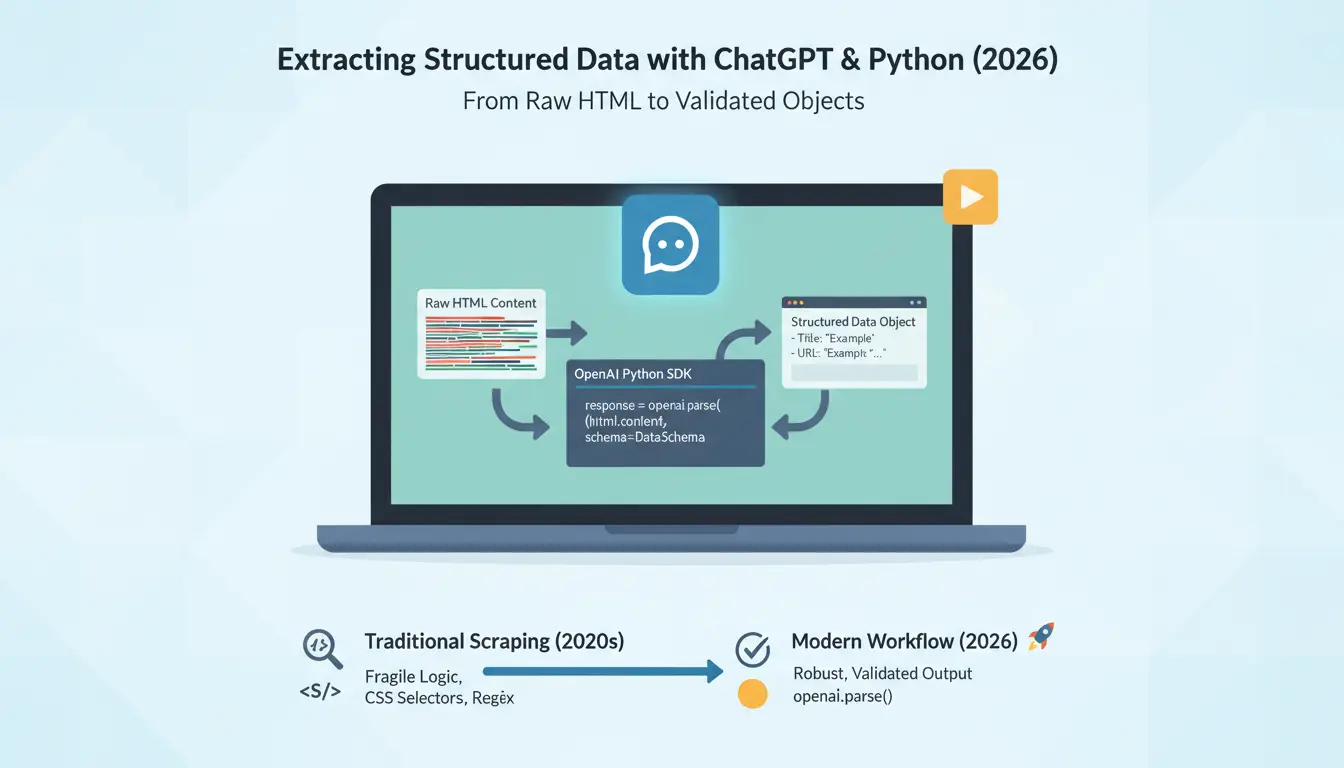
How can you use ChatGPT to extract structured data from raw HTML?
The modern practitioner’s workflow centers on the OpenAI Python SDK’s parse() method. This method allows us to bypass traditional string manipulation and regex, moving directly from raw content to a validated object.
Why skip CSS selectors and XPath in 2026?
Traditional scraping logic is fragile. If a developer renames a class from .price-tag to .product-amount, a standard scraper breaks. Semantic extraction is layout-agnostic. By passing the content to an LLM, the model identifies "Price" based on context and data types rather than its position in the DOM. This is essential for modern e-commerce sites where layouts are dynamic and frequently A/B tested.
Defining the data schema with Pydantic
To get consistent JSON instead of conversational fluff, we use Pydantic to define a strict schema. For an "Ecommerce Test Site," a senior architect would define a class like this:
from pydantic import BaseModel
from typing import Optional, List

class Product(BaseModel):
    sku: Optional[str]
    name: Optional[str]
    price: Optional[float]
    description: Optional[str]
    images: Optional[List[str]]
    sizes: Optional[List[str]]
    colors: Optional[List[str]]
    category: Optional[str]
Pro-Tip: Marking fields as Optional is critical. If you mark a field as required and the data is missing from the page, the model may hallucinate a value just to satisfy the schema.
The implementation follows a refined sequence:
- Fetch: Use
requests to pull the raw HTML from the target.
- Scope & Clean: Isolate the target container (e.g.,
#main) to remove noise.
- Parse: Pass the cleaned content to the
client.beta.chat.completions.parse() method.
- Handle Output: The method returns an instance of your
Product class or None if parsing fails. Engineers must implement a check here to handle None values gracefully.
Why is converting HTML to Markdown essential for cost-efficient extraction?
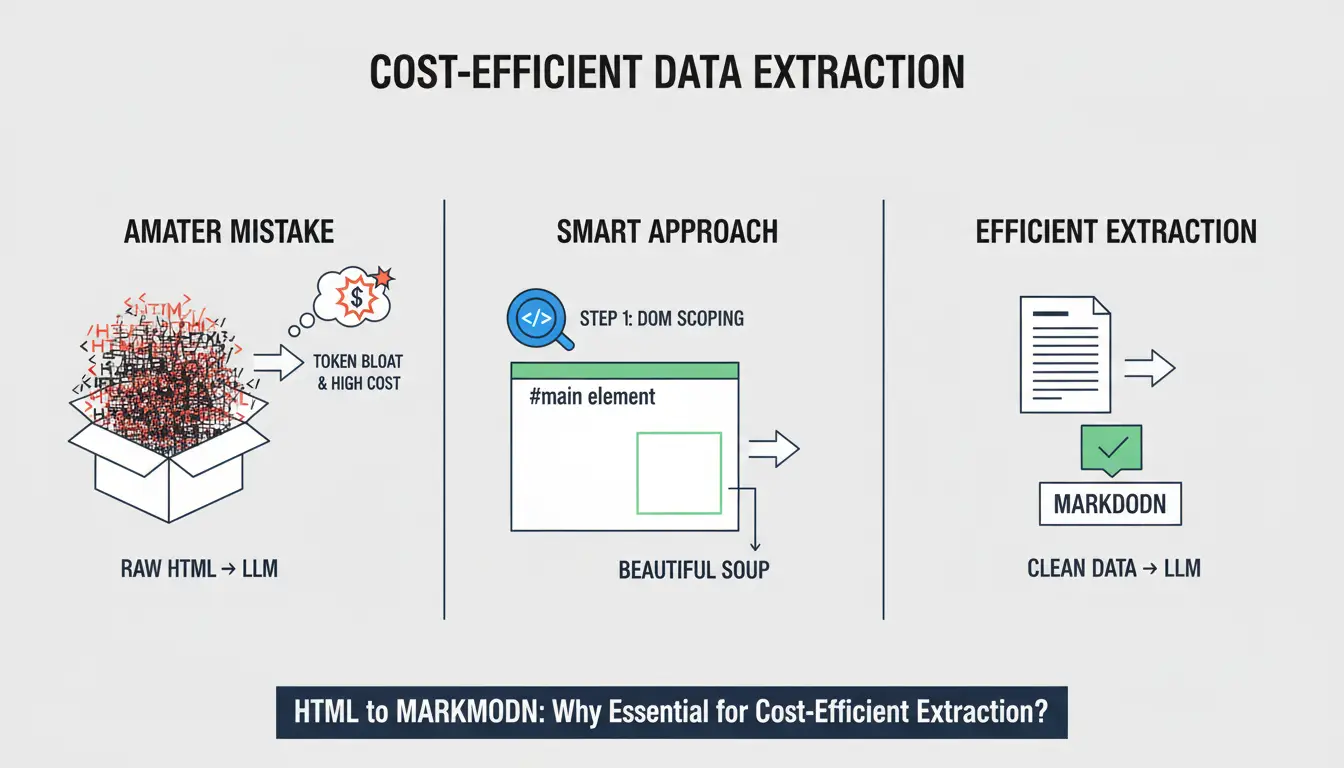
Passing raw HTML to an LLM is an amateur mistake that leads to massive "token bloat." HTML is cluttered with tags, scripts, and attributes that provide no value for data extraction but significantly increase costs.
Step 1: DOM Scoping. Before conversion, use Beautiful Soup to select the #main element or the specific container where the data lives. Sending the entire page (including headers and footers) adds unnecessary noise.
Step 2: Conversion. Converting the scoped HTML to Markdown via the markdownify library is the industry standard for optimization.
| Metric |
Raw HTML (main element) |
Markdown Conversion |
| Token Count |
~21,504 |
~956 |
| Token Reduction |
0% |
95%+ |
| Cost per Request |
~$0.10 |
~$0.006 |
Reducing noise and hallucinations
By stripping the boilerplate, you minimize the "distraction" for the model. A cleaner input reduces compute overhead and results in higher accuracy, as the LLM focuses strictly on the data points defined in your Pydantic schema.
What are the main limitations of relying on ChatGPT for web scraping?
Even the most sophisticated AI models face environmental roadblocks that they cannot solve through logic alone.
The 403 Forbidden roadblock
Most high-value targets in 2026 employ aggressive anti-bot protections. A standard requests.get() call will frequently trigger a 403 Forbidden error. ChatGPT never even sees the data because the scraper was blocked at the door.
The JavaScript rendering gap
ChatGPT is a text-processing engine, not a browser. It cannot "wait" for a React or Vue component to render. If the data is injected via JavaScript after the initial page load, the AI will receive an empty shell. Solving this requires a headless browser or an specialized API to render the DOM before the AI parses it.
Token window and context limits
While Markdown optimization helps, extremely long pages (like deep technical documentation) can still exceed the context window. Large-scale extraction requires "chunking" strategies or advanced RAG (Retrieval-Augmented Generation) setups to ensure no data is lost.
How do you scale data extraction without getting your IP blacklisted?
To scale from a single product page to an an entire catalog, you need a robust infrastructure that masks your automated footprint.
Bypassing sophisticated anti-bot systems
The professional standard for solving the 403 and JavaScript rendering gap simultaneously is a Web Unlocking API. These services handle browser fingerprinting, CAPTCHA solving, and header management automatically. They return the fully rendered, AI-ready HTML (or even Markdown) directly to your script, bypassing the need for manual browser automation.
Utilizing global proxy networks
For high-volume tasks, residential IP networks are non-negotiable. They route your requests through real-peer devices, making your scraper indistinguishable from a legitimate user. This is the way to avoid the IP blacklisting that typically follows thousands of requests to a single domain.
How can an antidetect browser secure your data extraction workflow?
While the parse() method handles the data, DICloak handles the identity. In a modern extraction workflow, an antidetect browser is used for two specific purposes:
- Multi-Profile Account Management: If you are extracting your own account history or using premium AI tools at scale, DICloak allows you to manage multiple OpenAI profiles in isolated environments. This helps reduce the risk of cross-linking and supports protecting your accounts from potential shadow-banning due to "unusual activity."
- Target Site Warm-up: Some sites require a "human" browsing history (cookies, realistic mouse movements) before they allow access to deep data. DICloak’s hardware fingerprint masking (Canvas, WebGL, RTC) helps ensure that your manual warm-up sessions are perceived as organic, preparing the site for the automated extraction phase.
What are the biggest mistakes to avoid in AI data extraction?
Hardcoding sensitive API keys
Never place your OPENAI_API_KEY directly in your code. Use a .env file and the python-dotenv library. Exposure of keys in version control is the leading cause of account drainage in the automation world.
Ignoring "Required" vs. "Optional" Pydantic fields
If you mark a field as required (e.g., sku: str) but the product page is missing a SKU, the LLM will often "invent" a value to satisfy the schema. Always default to Optional unless you are 100% certain every single page contains that data point.
Over-reliance on a single model version
The behavior of gpt-4o can drift as OpenAI updates its weights. A prompt that works today might fail next quarter. A senior architect builds tests to validate extraction consistency across different model iterations.
Is manual data parsing officially obsolete in 2026?
Manual parsing via Regex or XPath is not dead, but it is now a niche tool for low-cost, high-volume scenarios on simple, static sites. For anything involving complexity or dynamic layouts, AI extraction is the new baseline.
The industry is moving toward a future where browser-based AI agents perform these tasks natively. Until then, the combination of Python, Pydantic, and Markdown optimization remains the most powerful toolkit for the data-driven professional.
Frequently Asked Questions
Can I extract data from ChatGPT conversations into Excel?
Yes. Use the OpenAI account data export feature to get your history in JSON format. You can then use a simple Python script (via pandas) to flatten that JSON into a .csv or .xlsx file for analysis in Excel.
How much does it cost to scrape 1,000 pages using ChatGPT?
With the Markdown optimization described in this guide, it costs approximately $0.006 per page, bringing the total for 1,000 pages to roughly $6.00. Without Markdown optimization, that cost could soar to $100.00 or more.
Why does my script return a 403 Forbidden error?
This is an anti-bot block. The website has identified your Python script as an automated bot. To fix this, you need to use a Web Unlocking API or residential proxies to hide your automated signature.
Is it legal to do a full data extraction from public websites using AI?
Extracting public data is generally legal in many jurisdictions, but you must respect robots.txt and the site's Terms of Service. Always consult legal counsel regarding the specific data you are scraping and your intended use case.
Do I need a proxy to use the OpenAI API for scraping?
No, you do not need a proxy to talk to OpenAI. However, you almost certainly need proxies or a Web Unlocker to fetch the HTML from the target website before sending it to OpenAI for parsing.
What is the best Python library for HTML to Markdown conversion?
The markdownify library is the current industry favorite. It is lightweight, fast, and integrates perfectly with Beautiful Soup for token optimization.
 Web Proxy Tools
 Free Tools
 Cookie Plugin
 UA Generator
 MAC Address Generator
 IP Generator
 IP Address List
 2FA Code Generator
 World Clock
 Anonymous Check
 WebRTC Leak Test
 UUID Generator
 Free Web Proxy Site
 Proxy Checker
 FB Ad Checker
 AI Web Scraping
 Free SMM Tools
 Twitter Shadowban Checker
 Instagram Name Checker
 UTM Generator
 Username Generator
 AI Hashtag Generator
 LinkedIn Headline Generator
 Social Media Image Resizer