Managing engagement on Facebook can be time-consuming, especially when you’re juggling multiple posts and comments. That’s where auto comment in Facebook can make a real difference. By automating replies to comments, you can keep your followers engaged while saving time. Whether you're a small business owner, a marketer, or a content creator, this tool helps you stay responsive and maintain a consistent presence. In this article, we’ll guide you through setting up auto comments, share best practices to enhance your engagement, and introduce tools that make automation simple and effective. Ready to boost your Facebook interactions effortlessly? Let’s get started!
Understanding Auto Comment in Facebook
Engagement on Facebook is essential for building relationships with your audience. But managing comments, especially when your page becomes popular, can be overwhelming. This is where auto comment bots come in, offering a solution to keep the conversation flowing smoothly. In this section, we’ll break down what auto comment bots are, their purpose, and how they can benefit your Facebook engagement efforts.
What is an Auto Comment?
Auto comment in Facebook refers to using software that automatically posts replies on your Facebook posts or comments without you typing each one by hand. This software is often called an auto comment bot. These bots work by watching for certain words or phrases and then posting a reply you set up in advance. For example, if someone writes “More details,” the bot can reply with a message like “Thanks! Here is a link to our info page.” This happens without a person needing to sit at the computer all day. The bot uses rules you set up so it knows when and how to reply.
This tool is different from fake “like farms.” The goal is not to generate fake engagement but to help real followers get responses fast and keep the conversation active. A good auto comment bot can look like real help, not spam.
The Purpose of Auto Commenting on Facebook
The main purpose of auto comment in Facebook is to help businesses and creators stay active and responsive on their posts. When people comment on your content, they expect a reply. If you wait too long, they may lose interest or go to a competitor. With a bot, replies can happen in seconds, even outside business hours. This is especially useful when your page gets many comments at once.
For example, a local bakery may post a photo of fresh bread in the morning. If customers ask “Is it still available?” many might comment at once. A good auto comment setup can send a fast reply like “Yes! Come by before noon for fresh bread!” This quick answer makes followers feel seen and cared for, without a person needing to reply to each message manually.
Benefits of Using Auto Comment in Facebook
Using auto comment in Facebook can help your page in many real ways. Below are some clear benefits with real‑world examples:
1. Saves Time for Your Team
Replying to every comment can take hours each day. With auto comments, you set rules once and let the bot handle repetitive replies. For example, a small online shop may get many similar questions like “Do you ship to Canada?” A bot can reply instantly, freeing staff to work on other tasks.
2. Increases Engagement Fast
When people get quick replies, they are more likely to stay in the conversation or even make a purchase. Quick responses often encourage others to comment too. For instance, a fitness coach who auto‑replies “DM us for a free plan” sees more direct messages and sign‑ups because followers get a fast path to help.
3. Improves Customer Experience
Auto comments can answer common questions right away. This improves how your audience feels about your brand. A travel agency could use auto comments to send FAQs like pricing or availability when a user asks, making followers feel supported.
4. Helps Moderation and Spam Control
Some automation tools can hide spam comments, keeping your page clean and professional. This protects other followers from seeing unwanted posts. A busy page with hundreds of comments per hour will especially benefit from this feature.
Using auto comment in Facebook does not replace real human interaction, but it makes engagement easier and faster. When set up well, it boosts your page activity, keeps followers happy, and saves your team’s time.

How to Set Up Auto Comment in Facebook with DICloak
Setting up auto comment in Facebook may seem hard at first. But with the right steps and tools, you can do it in a few simple steps. Below, we’ll walk you through how to set it up and show what types of posts work best with auto comment tools.
DICloak is a powerful antidetect browser built for safe and scalable online work. It helps you manage many accounts on platforms like Facebook without risks of bans or tracking. Each browser profile has its own fingerprint and proxy settings. This keeps accounts separate and private. DICloak also offers built‑in automation tools like RPA, which can automatically perform tasks such as browsing posts, liking, and commenting on Facebook. These tools help you do things like auto comment in Facebook without manual work. Because of this, social media managers and businesses can stay more responsive and save time with repetitive tasks.

Step‑by‑Step Guide to Setting Up Auto Comment in Facebook
DICloak's RPA feature makes automating interactions on Facebook simple. Rather than manually creating a task from scratch, you can choose pre-configured RPA workflows that suit your needs. Here's how you can set up auto commenting using DICloak’s pre-configured RPA:
1. Login to DICloak
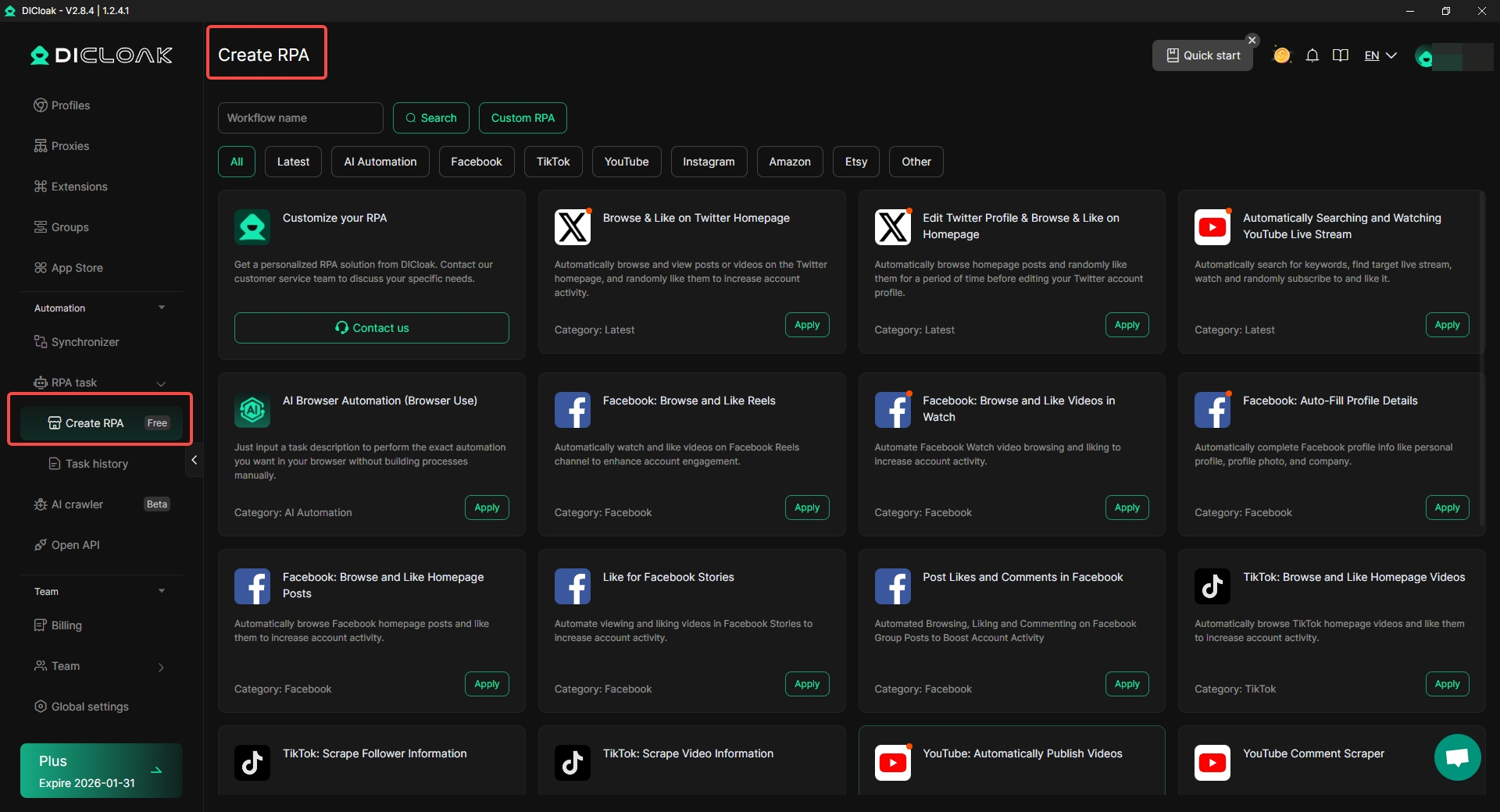
Start by logging into your DICloak account. Once logged in, go to the Automation section on the left sidebar and select the RPA task.
2. Choose the Right RPA Workflow
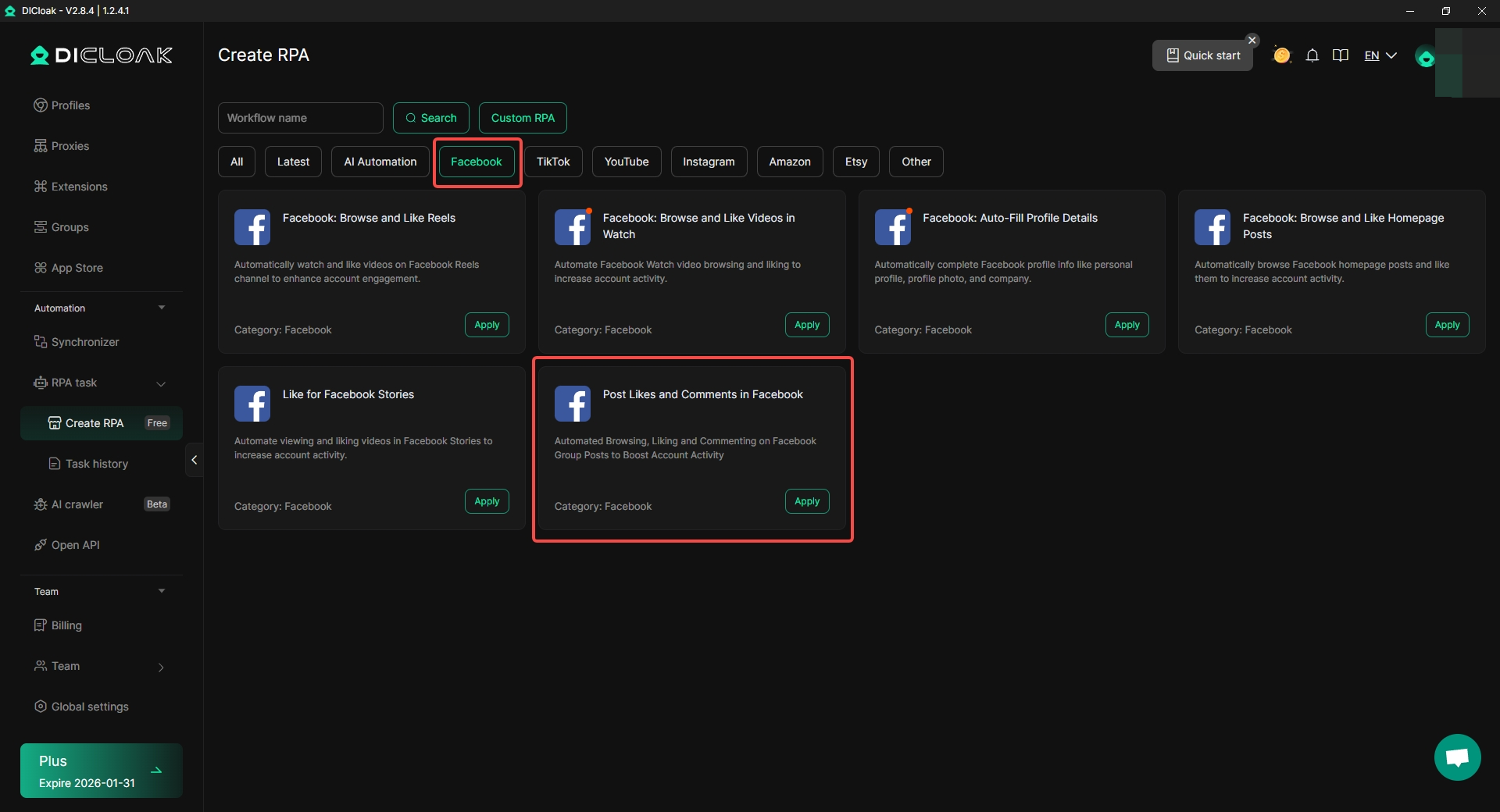
In the Create RPA section, you will see a range of available workflows. Find the one labeled “Post Likes and Comments in Facebook” and click on the Apply button next to it. This pre-configured RPA will allow you to automatically browse, like, and comment on posts to boost account activity.
3. Set Post Link
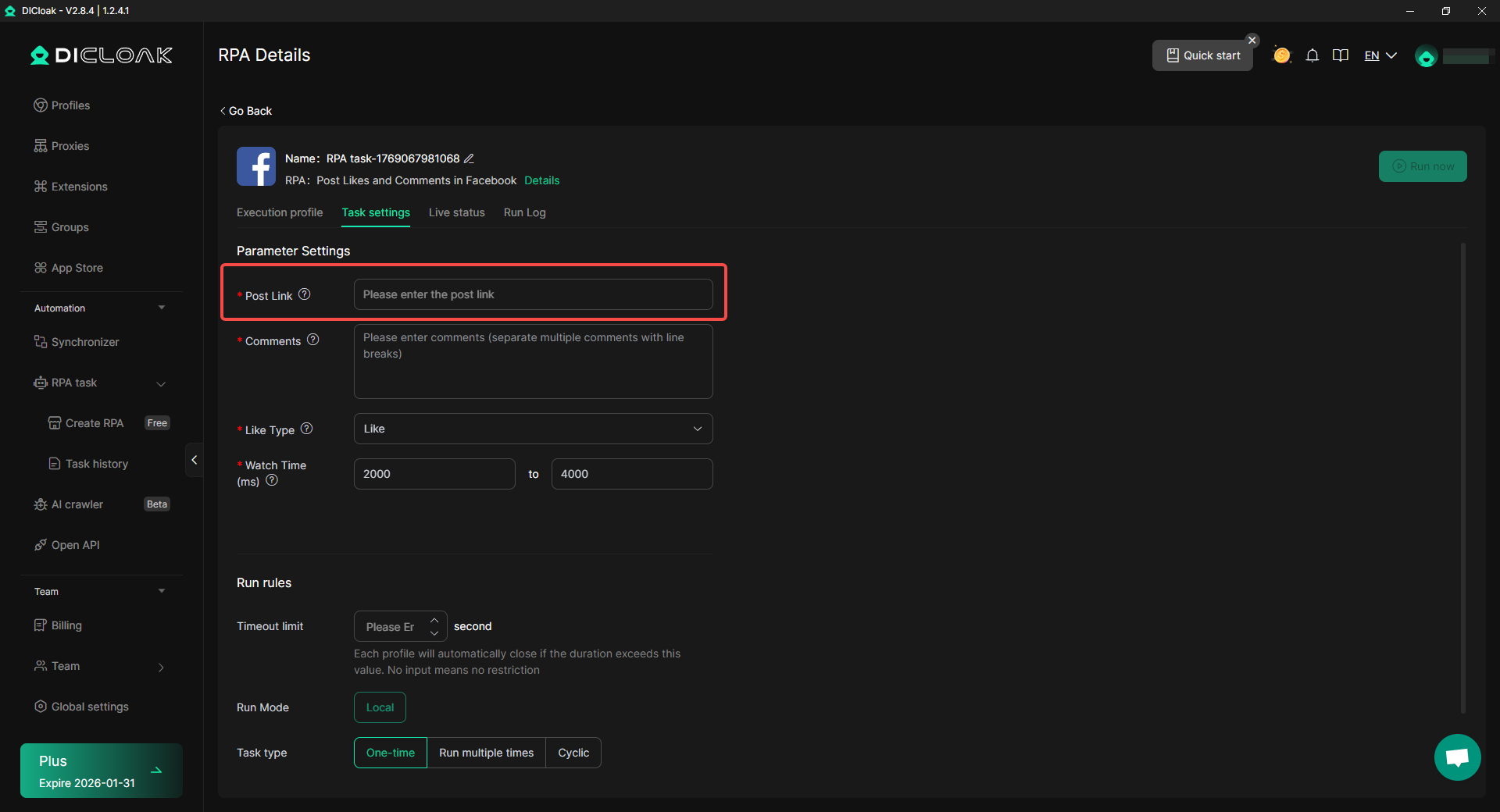
After applying the workflow, you will be prompted to enter the Post Link. This is the URL of the Facebook post where you want to automate likes and comments. Simply paste the link to the Facebook post you want the bot to interact with.
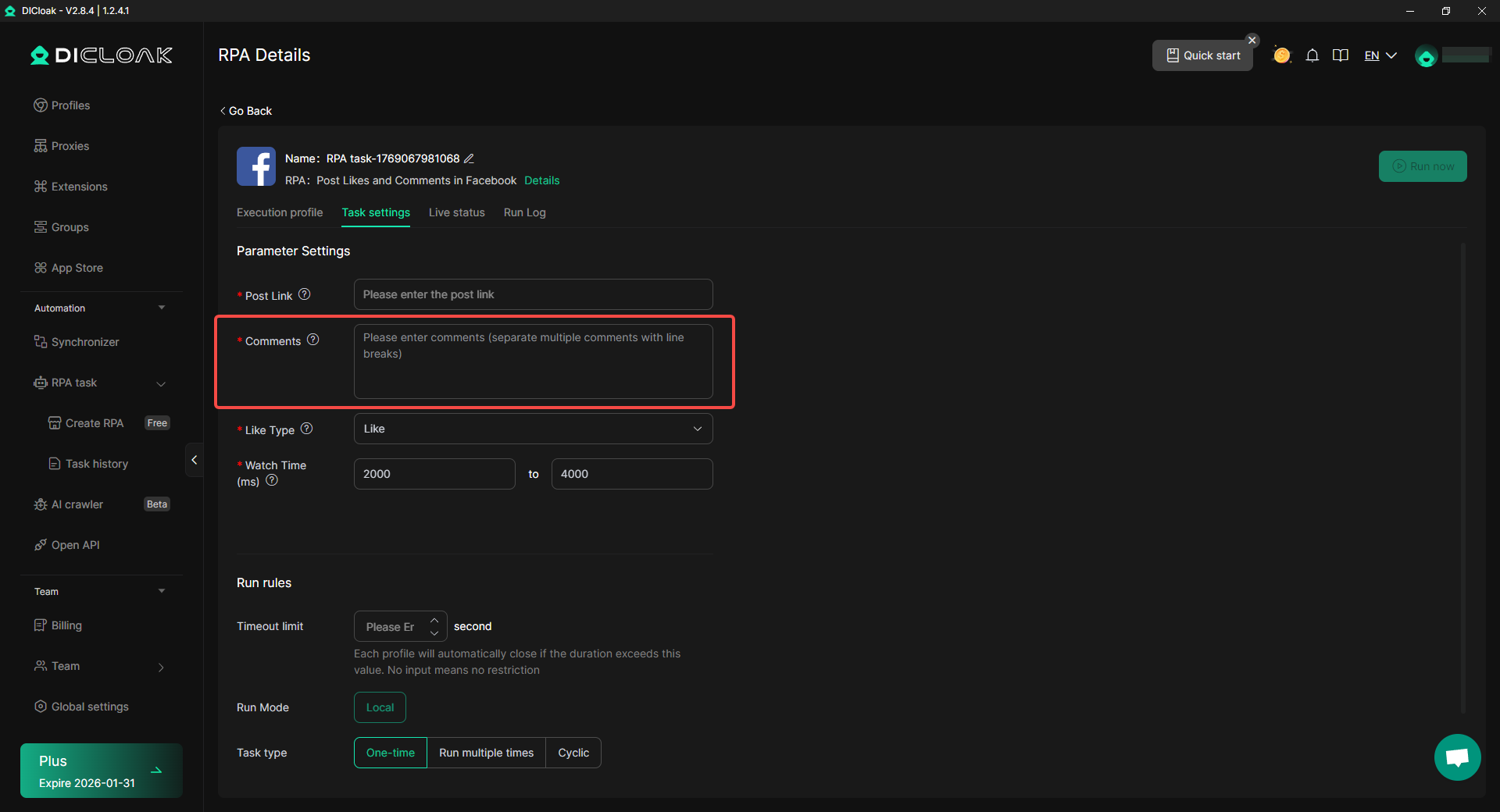
4. Enter Comments
In the Comments section, you will enter the replies that the bot will post. You can separate multiple comments with line breaks. For example, if someone comments “more info,” the bot can reply with, “Thanks for your interest! Here’s a link for more information.”
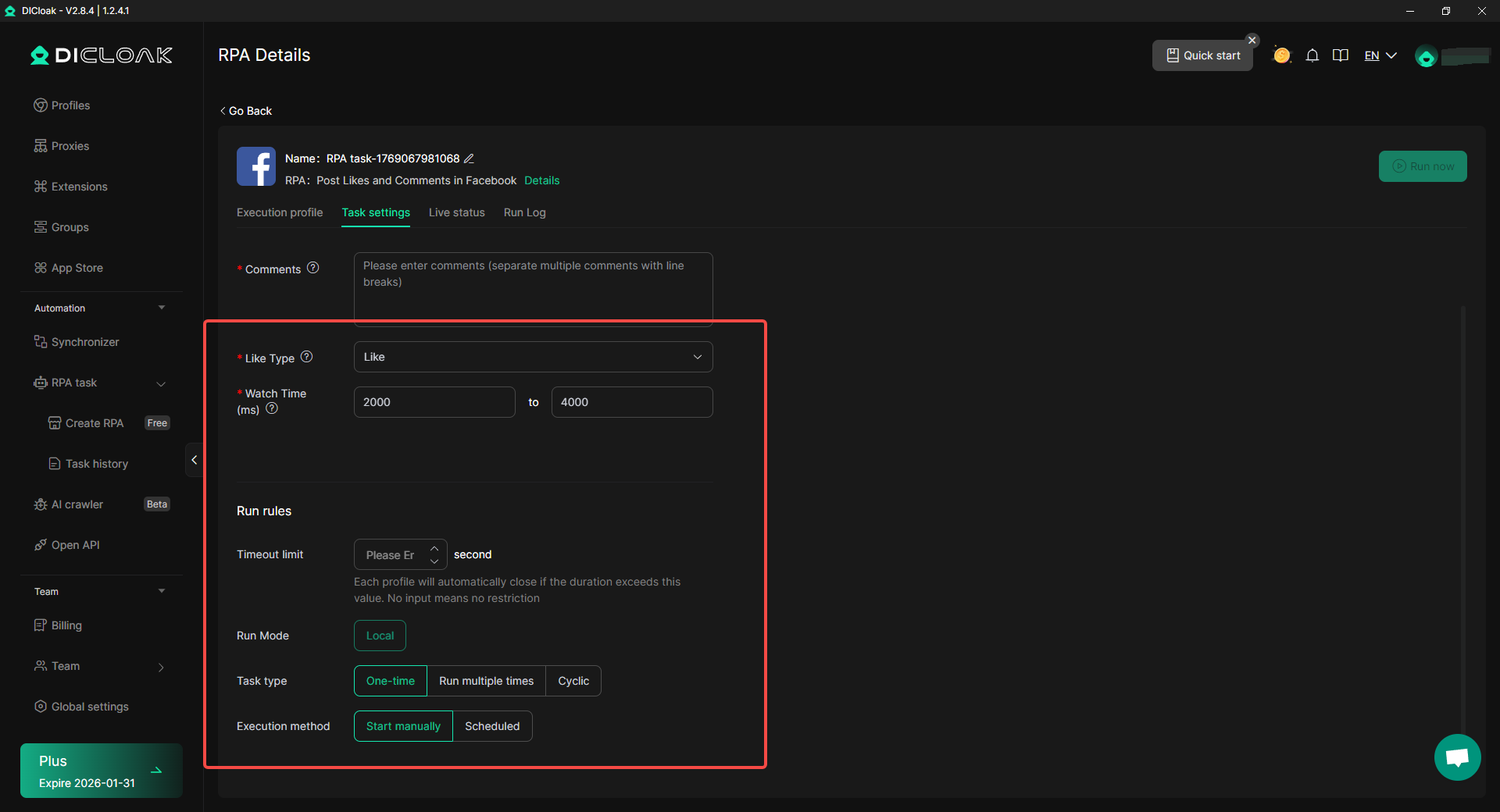
5. Customize the Reaction and Timing
Select the Like Type, such as “Like” or “Love,” and set the watch time between 2000 to 4000 milliseconds to introduce a natural delay. Then, choose the Run Mode (whether to run it locally or on another machine), the Task Type (one-time, multiple times, or cyclic), and how you want the task to start (either manually or on a schedule).
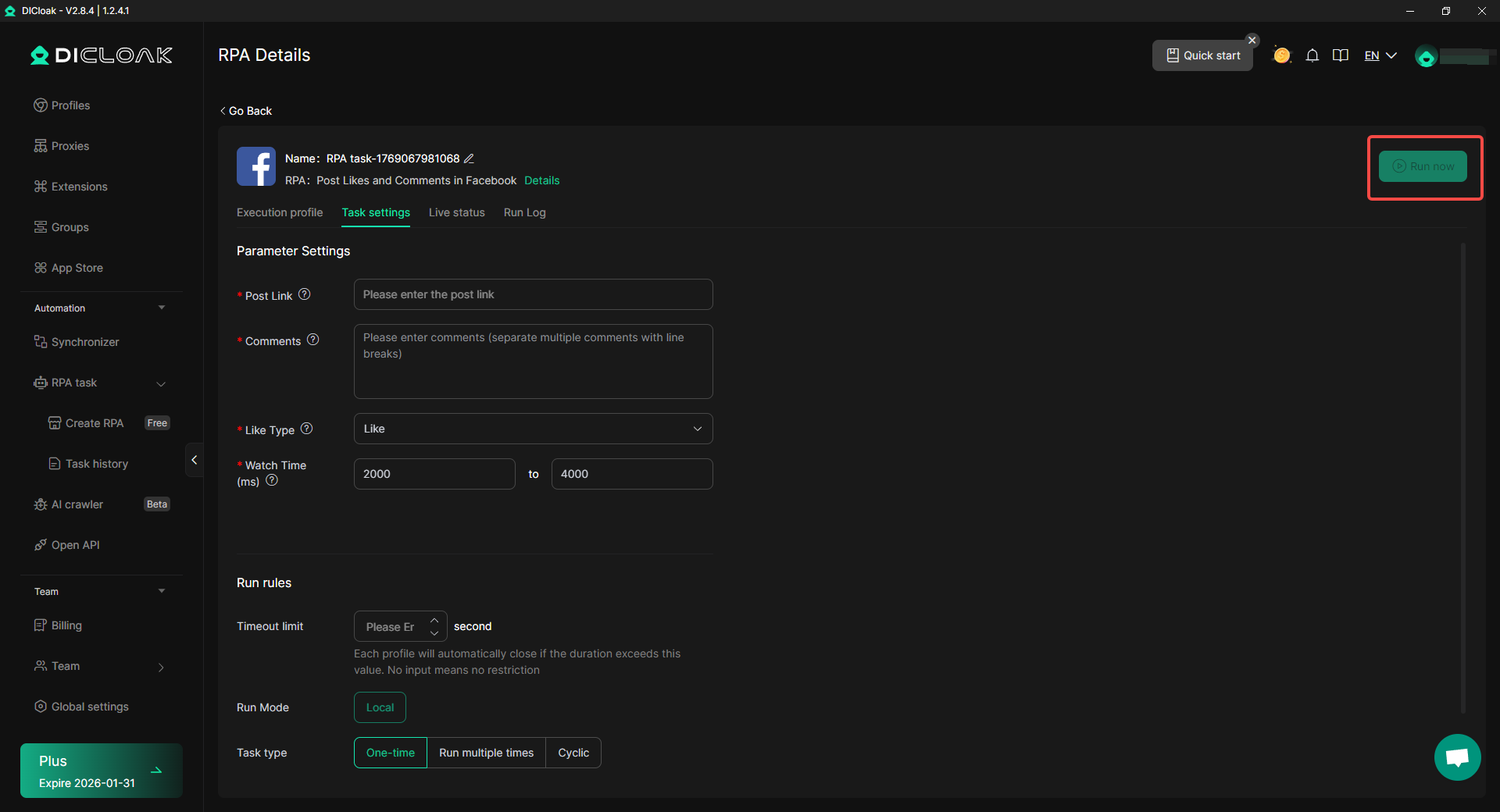
6. Activate the Task
Once you’ve set everything up, click "Run now" to activate the task. The bot will now automatically handle likes and comments on the specified Facebook post.
By following these steps, you can easily automate your Facebook engagement using DICloak's RPA tool, saving time and boosting your account activity.
Types of Posts Compatible with Auto Comment in Facebook
Not all posts are equally good for auto comment in Facebook. Some work better and create more value when paired with automation. Below are common types that benefit most:
- Announcement Posts: Posts that share news, like a new product or sale, get many similar questions. Auto comment helps answer those questions fast.
- FAQ‑Focused Posts: When a post invites questions, such as “Ask me anything about our services,” auto comment bots can reply to keywords like “price,” “hours,” or “location.”
- Giveaway and Contest Posts: Many giveaways ask users to comment to enter. With automation, you can reply with rules or next steps. For example, when someone comments “enter,” the bot can reply “Thanks! You’re in the contest. Good luck!”
- Promotional or Limited‑Time Offers: Posts that promote a limited‑time offer often get quick responses. If followers ask about availability or details, auto comment can send the information right away.
- Lead Capture Posts: Some posts aim to collect emails or contact info. A comment trigger can reply with a link to a signup form. For instance, someone comments “info,” the bot replies with “Click here to join our free webinar!”
Using auto comment in Facebook the right way can make your page feel more responsive. When you set it up step by step and match it to suitable posts, your followers get faster replies and your page stays active even when you are busy.
Best Practices for Using Auto Comment in Facebook
To get the most out of auto comment in Facebook, it's essential to use it wisely. Here are some best practices to ensure your automation is effective, engaging, and compliant.
Strategies for Effective Engagement with Auto Comments
Mix automation with personal replies. Use automation for FAQs and common questions, but reserve manual replies for unique or complex issues. For example, set up auto replies for pricing inquiries but engage personally with customer complaints or feedback. This balance keeps the interaction helpful and human.
Ensuring Compliance with Facebook Policies
Facebook has strict rules to avoid spam. Your bot should respond directly to user comments and avoid irrelevant or repetitive messages. If your bot sends promotional content, ensure it follows the 24-hour rule, which means it must be sent within 24 hours of the user’s last comment. Regularly review your automation settings to stay compliant.
Personalizing Responses to Avoid Robotic Interactions
To make auto comments more engaging, personalize your replies. Instead of generic responses like “Thanks for commenting,” provide helpful, context-specific replies. For example, if someone asks for more information, reply with relevant details. Keep the tone conversational and friendly, and adjust your rules if the bot misinterprets keywords.
By following these best practices, you can ensure your auto comment in Facebook is both effective and compliant, offering fast responses while maintaining a personal touch.
Tools and Software for Auto Comment in Facebook
To effectively automate Facebook comment replies, choosing the right tool is crucial. Below, we’ll explore popular auto comment tools, compare their features, and look at real-world examples to help you choose the best solution for your needs.
Overview of Popular Auto Comment Tools
Here are some of the best tools available for auto comment in Facebook:
1. ManyChat ManyChat is a Meta-approved Messenger chatbot platform. It's perfect for building chat funnels, collecting leads, and segmenting your audience. You can use ManyChat to automatically respond to comments, direct users to specific messages, and integrate with Messenger for a seamless follow-up. ManyChat also offers a free plan, with Pro versions starting at $15 per month.
2. Axiom.ai Axiom.ai is a no-code browser automation tool that allows you to automate almost any repetitive action in Chrome, including extracting comments, posting in Facebook groups, and much more. It's perfect for those who want complete control over their automation setup. Axiom.ai is powerful but may require more technical knowledge than other simpler tools.
3. PostJelly PostJelly is a simple, easy-to-use automation tool for Facebook comments. It features keyword triggers for automatic replies and supports both public replies and private messages. PostJelly is great for small businesses or agencies looking for a quick setup.
Comparative Analysis of Auto Comment Software
Here's how these tools compare:
| Feature |
PostJelly |
ManyChat |
Axiom.ai |
| Ease of Use |
Easy to set up with a user-friendly interface. |
Slightly complex but powerful features. |
Flexible, ideal for tech-savvy users. |
| Engagement Capabilities |
Simple and effective comment automation. |
Turns comments into conversations, integrates with Messenger. |
Custom workflows for tailored automation. |
| Price |
Affordable, great for small businesses. |
Free plan available; Pro starts at $15/month. |
Flexible pricing based on usage. |
Features to Look for in Auto Comment Tools
When selecting auto comment in Facebook software, consider the following features to ensure it meets your needs:
- Keyword Triggers: Choose a tool that allows you to set up triggers based on user comments. For example, if someone types "more info," the bot should be able to send specific details about the product or service.
- Customizable Replies: Look for tools that let you personalize the automated responses, making them sound more human and relevant to the comment. Avoid generic replies like "Thanks for your comment." Instead, tailor responses to the conversation.
- Delay Settings: A good auto comment tool should have the ability to set natural delays between responses, which helps reduce the appearance of spam and mimics human behavior.
- Analytics and Reporting: Monitoring how your automated comments impact engagement is essential. Choose a tool with built-in analytics to track response times, engagement rates, and other important metrics.
- Compliance with Facebook Rules: Make sure the software complies with Facebook’s Community Standards, especially regarding spam and promotional content. Ensure it only interacts with Facebook Pages (not personal profiles), and follows the 24-hour messaging rule for promotional replies.
By choosing the right auto comment tool, you can automate your Facebook interactions while maintaining engagement and compliance. These tools, when used effectively, can save time and boost your social media strategy.
Common Issues and Troubleshooting Tips for Auto Comment Tools
When using auto comment in Facebook, there are a few common issues that can arise, but most of them can be easily fixed. Here’s how to identify and troubleshoot these problems:
1. Too Many Comments Too Fast
Posting too many comments in a short time can trigger Facebook’s spam filters, causing your account to be blocked or rate-limited. Fix: Add delays between comments to make the automated comment tool’s actions appear more natural. Vary the delay times to avoid predictable patterns and slow down the posting speed. This helps reduce the chance of Facebook flagging your activity as spam.
2. Comments Sound Robotic
If your automated comments use the same reply every time, they can appear unnatural and repetitive, which may be flagged by Facebook. Fix: Vary your responses. Use different replies for similar queries to make the automated tool sound more human. For example, if someone asks for more info, have multiple responses like “Here’s the info you asked for” or “Check out the details here.”
3. Incorrect Permissions or Access
If you don’t have the correct permissions or the right access token, your auto comment tool might fail to comment or reply to posts. Fix: Make sure the tool has admin rights and proper access to the Facebook Page you're automating. Without this, it won’t be able to post replies or manage interactions.
4. Reaching Facebook's API Limits
Facebook’s API limits how many actions (like comments) a tool can perform in a day. Exceeding these limits can result in temporary restrictions. Fix: Keep track of how many actions the auto comment tool performs each day and adjust the frequency of comments. You can also test the tool on smaller posts or during lower traffic periods to avoid hitting limits.
5. Comment Targeting Restrictions
Automation tools may not work well with Facebook Groups or personal profiles; they are primarily designed for Business Pages. Fix: Ensure your automation is set up for Facebook Pages, not personal profiles or groups. If you need to automate comments on a Group, consider using a different tool or method.
By identifying these common issues and following the troubleshooting tips above, you can ensure your auto comment in Facebook remains effective and compliant, without unnecessary interruptions.
Conclusion
Using auto comment in Facebook is a powerful way to boost engagement by automating replies to comments on your posts. This method saves time, ensures quick responses, and helps maintain consistent interaction with your audience. Tools like DICloak simplify the setup process, allowing users to apply pre-configured workflows and customize comments for different types of posts, such as announcements or FAQs.
However, to use automation effectively, it’s important to mix automated replies with personal engagement, especially for complex issues. Always comply with Facebook’s policies to avoid spam penalties and personalize your automated replies to feel more human. Popular tools like ManyChat, PostJelly, and Axiom.ai offer various features to enhance automation, including keyword triggers and customizable responses.
Despite its benefits, there are some limitations, such as Facebook’s API limits on comment frequency and potential spam filters. To avoid these issues, ensure proper delays between comments, monitor engagement, and keep automation within Facebook’s guidelines.
In conclusion, auto comment in Facebook can significantly improve engagement if used correctly, with the right tools and practices in place. Regular adjustments and monitoring ensure long-term success without running into problems.
FAQs About Auto Comment in Facebook
What is auto comment in Facebook and how does it work?
Auto comment in Facebook refers to using automated tools or bots to post comments on Facebook posts without manual input. It works by setting up triggers based on keywords or specific actions (like someone commenting "more info") to automatically reply with pre-written responses. This helps businesses engage with their audience quickly and efficiently.
Is it legal to use auto comment in Facebook?
Yes, using auto comment in Facebook is legal, but it must comply with Facebook's Community Standards. Automation tools should avoid spamming users and must not violate Facebook’s 24-hour messaging rule or promote irrelevant content. Always ensure that your automation complies with Facebook's policies to avoid account restrictions.
Can auto comment in Facebook help improve engagement?
Absolutely! Auto comment in Facebook can help increase engagement by providing fast, relevant responses to comments on your posts. Quick replies encourage more users to interact, which can improve your page's visibility and foster positive interactions. Personalized and timely comments can also improve customer satisfaction.
How can I personalize auto comments on Facebook to sound more human?
To avoid robotic replies, personalize your auto comment in Facebook by varying the responses. For example, instead of a simple "Thank you for your comment," you can say, "Thanks for reaching out! Let us know if you need more details." Using different phrases and responding contextually to each comment will help make the interaction feel more natural.
What are the best tools for auto comment in Facebook?
Some of the best tools for auto comment in Facebook include ManyChat, PostJelly, and Axiom.ai. These tools offer user-friendly features such as keyword triggers, customizable replies, and seamless integration with Facebook pages. Choosing the right tool depends on your business needs, such as ease of use, advanced features, and budget.
 Web Proxy Tools
 Free Tools
 Cookie Plugin
 UA Generator
 MAC Address Generator
 IP Generator
 IP Address List
 2FA Code Generator
 World Clock
 Anonymous Check
 WebRTC Leak Test
 UUID Generator
 Free Web Proxy Site
 Proxy Checker
 FB Ad Checker
 AI Web Scraping
 Free SMM Tools
 Twitter Shadowban Checker
 Instagram Name Checker
 UTM Generator
 Username Generator
 AI Hashtag Generator
 LinkedIn Headline Generator
 Social Media Image Resizer