Introduction: The Strategic Role of Antidetect Browsers for Mac in 2026
In the hyper-competitive digital landscape of 2026, professional marketers and e-commerce sellers face a technical environment where a single oversight in browser identity can result in immediate, permanent account bans. Navigating this requires specialized Antidetect Browsers for Mac to protect high-value business assets across platforms like Facebook, Amazon, and eBay. An antidetect browser is a sophisticated infrastructure tool designed to create isolated browsing environments, each with its own unique digital signature. By masking browser fingerprints—the complex data sets including screen resolution, font lists, and hardware signals—these tools ensure that websites cannot link multiple accounts to a single machine. For Mac-based professionals, understanding the technical reality of fingerprinting on macOS is the first step toward building a scalable, ban-proof operation.
The Mechanics of Browser Fingerprinting on macOS: Why Antidetect Browsers for Mac Are Essential
The macOS environment is under intense scrutiny by global platforms in 2026 because of its inherent "hardware consistency." Unlike the fragmented Windows market, Apple’s ecosystem is tightly integrated, meaning millions of users share nearly identical hardware configurations. Platforms use "device entropy" to find tiny, unique variations in how your specific Mac renders data. Without protection, your Mac’s predictable signature makes it incredibly easy for anti-fraud systems to link your social media profiles or seller accounts.
To be effective, Antidetect Browsers for Mac must spoof a wide array of signals to mimic a diverse pool of real users. Critical parameters include:
- IP Address and Geo-location: Masking the network origin to match a specific local identity.
- WebGL and GPU Rendering: Spoofing the "heartbeat" of your Mac's graphics card to prevent hardware-level tracking.
- Canvas Fingerprinting: Altering how hidden images are drawn to ensure your Mac's rendering engine looks unique for every profile.
- System Fonts and OS-level APIs: Randomizing the list of software components and how the browser interacts with the macOS sound and interface layers.
- Timezone and Audio Context: Aligning system settings with network data to avoid "red flags" caused by technical inconsistencies.
For a business, masking these signals isn't about hiding; it's about appearing as a perfectly normal, independent user for every account you manage.

DICloak: The Premier Antidetect Browser for Mac for Professional Multi-Account Management
DICloak has established itself as the leading solution among antidetect browsers for Mac, designed for users who need to manage over 1,000 accounts from a single workstation. Positioned as the industry standard, DICloak’s core value is that 'each account appears as a separate user.' This provides a level of isolation that effectively removes the risk of 'linked-account' bans that plague standard browsers.
Built on Chrome-based architecture, DICloak offers a familiar interface while functioning like a private, secure container. Fully optimized for macOS, it allows professionals to maintain the stability of their Apple hardware while benefiting from a system where every profile has its own fingerprint, proxy, and storage.
Advanced Features and Business Automation in DICloak: The Best Antidetect Browser for Mac
Scaling a digital agency or e-commerce empire in 2026 requires more than just privacy; it requires efficiency. DICloak serves as a "force multiplier," allowing a single team member to perform the workload of an entire department through professional-grade automation. These features solidify its position among the top Antidetect Browsers for Mac.
- RPA Automation: DICloak’s Robotic Process Automation (RPA) automates "the grind"—the repetitive tasks like account warming or data entry—freeing your team for high-level strategy.
- Synchronizer: This tool allows you to sync actions across multiple windows at once. When you click or type in one window, the action is mirrored across all active profiles.
- Shielded Teamwork: Agencies can share profiles with flexible permissions and member notifications. This allows for secure collaboration without ever needing to share sensitive passwords.
- Deep Fingerprint Customization: Beyond basics, users can spoof WebGL, WebGPU, and Canvas signals to ensure every profile remains invisible to modern anti-fraud scripts.
DICloak Pricing: Scalable Plans for Every Business Level Using Antidetect Browsers for Mac
DICloak provides exceptional cost-efficiency, offering the power of a network of virtual machines at a fraction of the cost. This price-to-performance ratio is a primary driver for its dominance in the market.
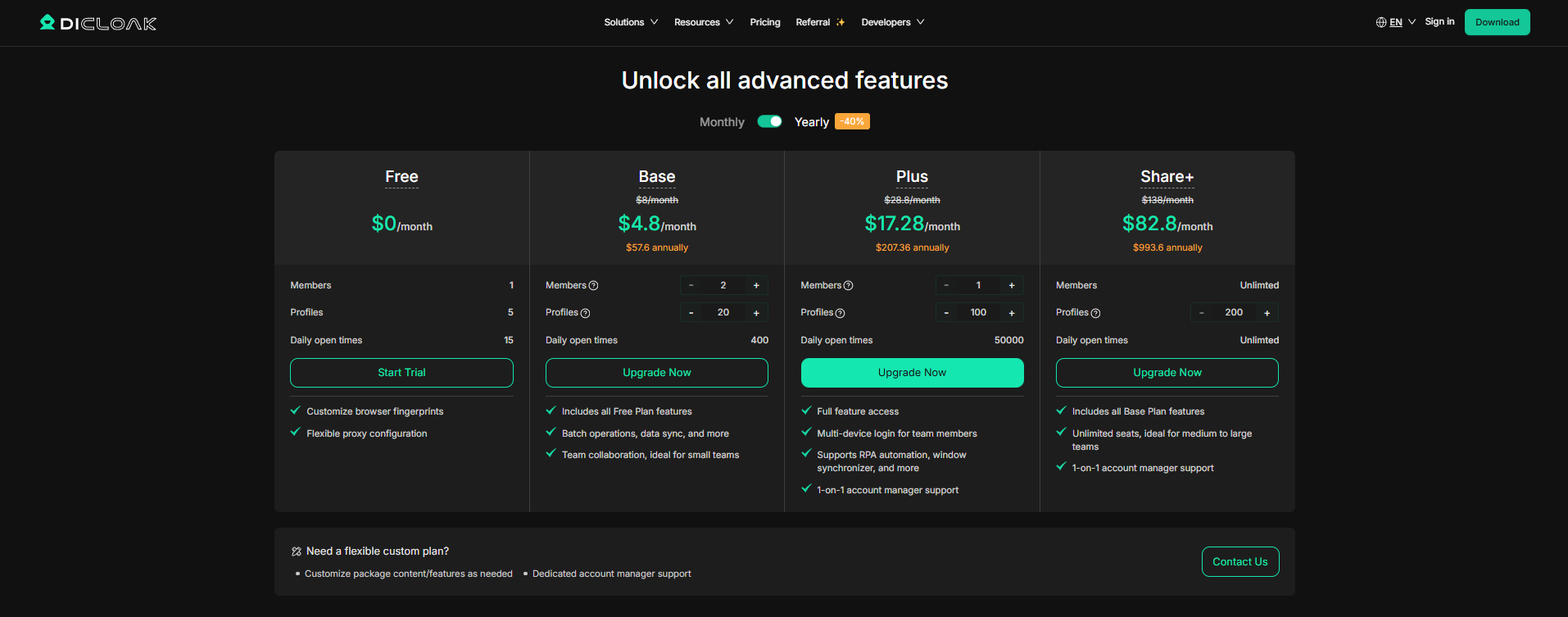
For enterprise-scale operations, DICloak offers Custom plans tailored to specific profile and member requirements.
Comprehensive Review: The 10 Best Antidetect Browsers for Mac in 2026
1. DICloak (The Top Choice)
DICloak is a comprehensive antidetect browser, built for high-volume account management and security. DICloak remains the superior choice for professionals due to its advanced RPA automation and the "Share+" unlimited profile plan. It offers the most "secure and controlled" environment for preventing bans on high-scrutiny platforms.
- Best For: Professional agencies, scale-up e-commerce, and high-volume account management.
- Pros: 1-on-1 support, powerful synchronizer.

2. GoLogin
GoLogin leverages the Orbita engine for advanced fingerprint simulation, providing a high level of anonymity for Mac users. It’s designed for managing multiple accounts with ease, but its premium price is better suited for businesses rather than solo users.
3. Dolphin Anty
Dolphin Anty offers a user-friendly interface tailored for advertising, especially on macOS. It’s designed for managing large-scale marketing campaigns, though its fingerprinting may not be as responsive as competitors.
4. AdsPower
AdsPower is designed for bulk account management, making it ideal for large e-commerce or marketing operations. It allows for easy profile creation and management, though some fingerprint discrepancies may arise with platform updates.
5. Multilogin
Multilogin is known for offering unparalleled control over browser fingerprint settings, giving technical users the ability to fine-tune profiles. It’s perfect for businesses requiring deep customization, though its resource demands can be heavy.
6. Incogniton
Incogniton is ideal for entry-level users who need basic multi-account management with automation tools built-in. While it’s straightforward, it’s not designed for large-scale or high-risk activities.
7. Morelogin
Morelogin focuses on providing a stable, consistent experience for daily account management. It’s great for users who need reliable, straightforward tools but lacks advanced automation features for larger operations.
8. BitBrowser
BitBrowser is built with strong profile isolation, making it ideal for managing e-commerce accounts. It’s simple to use but lacks some of the advanced features seen in more specialized tools.
9. Kameleo
Kameleo stands out for simulating both mobile and desktop identities on a single device, which makes it versatile for cross-platform management. However, its setup can be complex for new users.
10. Undetectable Browser
The Undetectable Browser is tailored for short-term, quick setup projects, offering instant identity deployment with preset configurations. It’s a good choice for temporary tasks but may lack reliability for long-term operations.
Each browser offers its own strengths, but DICloak stands out for its scalability, security, and automation, making it the best option for professionals handling multiple accounts.
Strategic Integration: Using Proxies with Antidetect Browsers for Mac
Fingerprint protection and proxies are two sides of the same coin: IP address = Location; Fingerprint = Device identity. To survive in 2026, you must have both. While a proxy masks your location, the antidetect browser ensures that the hardware signature of your Mac matches that location.
DICloak supports all major protocols (HTTP, HTTPS, SOCKS5). For professional Mac workflows, residential proxies are recommended as they most accurately mimic real consumer behavior. DICloak’s built-in proxy management allows you to assign and rotate your proxy pool in bulk, ensuring a clean, dedicated connection for every profile.
Final Verdict: Selecting Your Antidetect Browser for Mac
The complexity of online tracking in 2026 demands a solution that balances technical depth with ease of use. For Mac users, DICloak offers the best combination of fingerprint realism, RPA "force multiplier" automation, and scalable pricing. Whether you are managing client social media or a global e-commerce empire, DICloak provides the security and scalability required for business continuity.
Ready to protect your accounts? We recommend starting with the free version of DICloak to experience why it is the premier choice among Antidetect Browsers for Mac.
Frequently Asked Questions (FAQs)
What is the best antidetect browser for Mac for small businesses?
The DICloak Base Plan is the best choice. It is affordable and helps small teams work together on accounts without getting blocked.
Is it legal to use antidetect browsers for Mac in 2026?
Yes, it is legal. These are professional tools used for privacy and for managing many business accounts at the same time.
Does DICloak offer a free trial for its antidetect browsers for Mac?
Yes. DICloak has a Free Plan that lets you use 5 different digital identities so you can test how it works.
How do antidetect browsers for Mac prevent account bans?
They give each account its own digital identity and a unique IP address. This makes the website think each account is on a completely different computer.
Can I share accounts with my team using antidetect browsers for Mac?
Yes. DICloak lets you share your digital identities with team members easily while keeping everything secure.
 Web Proxy Tools
 Free Tools
 Cookie Plugin
 UA Generator
 MAC Address Generator
 IP Generator
 IP Address List
 2FA Code Generator
 World Clock
 Anonymous Check
 WebRTC Leak Test
 UUID Generator
 Free Web Proxy Site
 Proxy Checker
 FB Ad Checker
 AI Web Scraping
 Free SMM Tools
 Twitter Shadowban Checker
 Instagram Name Checker
 UTM Generator
 Username Generator
 AI Hashtag Generator
 LinkedIn Headline Generator
 Social Media Image Resizer