Buying an Amazon seller account isn't just picking from a list and sending payment. The real problem for buyers is knowing how to avoid hidden risks, like accounts with recent restriction history or sellers who can't provide full transfer control. Plenty of profiles look clean at first glance, but smart buyers don't rely on surface info when it's time to buy Amazon seller accounts.
The biggest trap isn't price or the number of products listed, it's chasing speed and convenience without checking the critical details. Accounts that seem ready for instant transfer can later be flagged, or recovery info might remain tied to someone else. If you rush to purchase Amazon seller accounts without digging into the backend history and session control, you risk bans or costly disputes after the deal.
A proper Amazon seller account buying guide doesn't just list checks; it walks you through which steps matter most for staying safe. Before you acquire Amazon seller accounts, you need to see how sellers prove ownership, how transfer sessions are handled, and how you can clear or update recovery data. Even if the listing looks legitimate, missing one step in the process can bring serious complications, not just delays, but lockouts or full loss of access.
Start by knowing which signals point to a stable account, and which shortcuts tend to hide big problems. Here's what actually needs checking before you commit.
Essential Steps Before Purchasing an Established Amazon Storefront
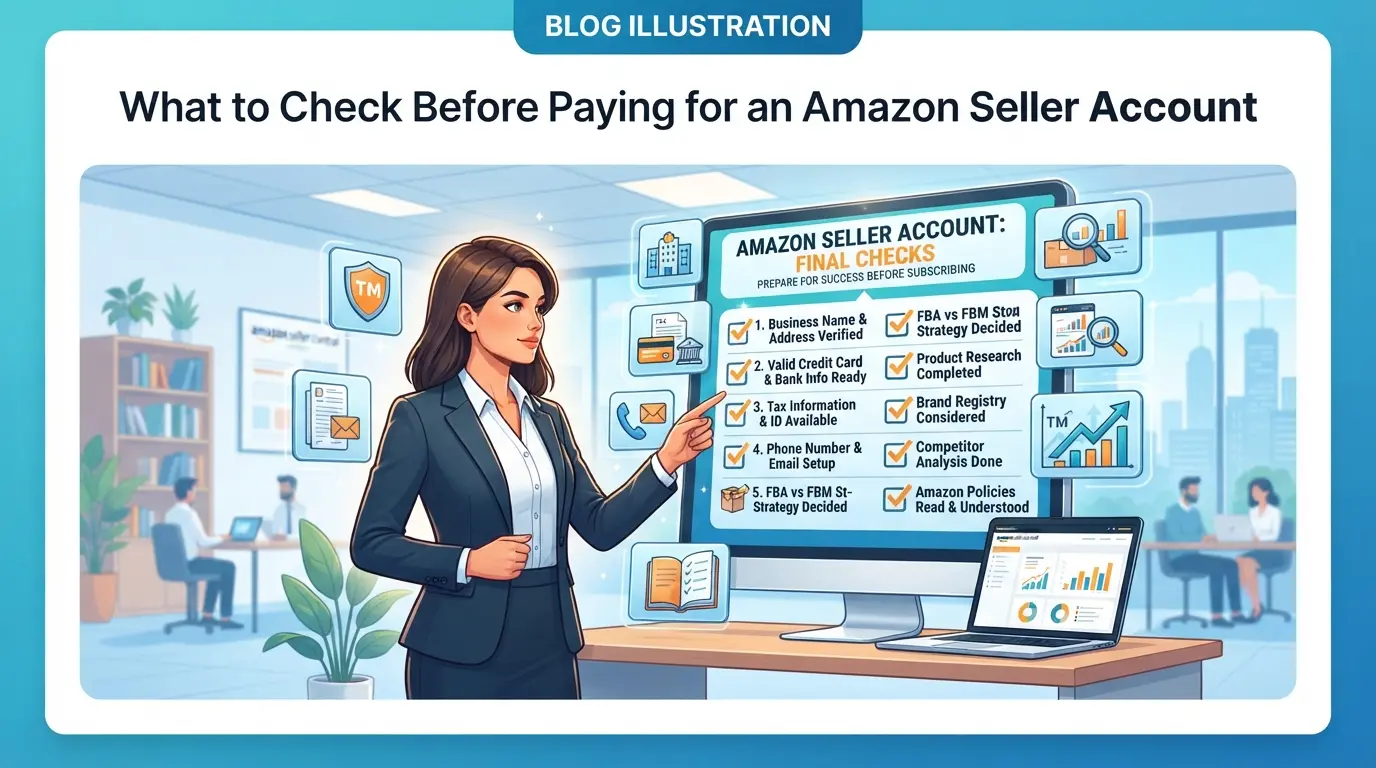
Jumping straight into payment before you check the right details is asking for trouble, what matters most isn't the seller's pitch, but the actual history, verification, and session control tied to the account. If you miss even one of these checks, you can end up locked out or flagged in your first week.
Account Age and History: Why It Matters
Amazon watches account age closely. Older accounts with clean histories are trusted more and face fewer restrictions. But don't just look at the signup date. Check the account's activity logs, if sales patterns look odd, or if there's a gap in activity, that's a red flag. A stable account shows steady activity and no sudden drops or spikes. If you see listings removed, frequent login changes, or sudden country switches in the log, walk away. Even if the account survived, these signals often mean previous bans or risky behavior.
Verification Status and Documentation
It's easy to get fooled by screenshots or half-filled document packs. Real verification is more than a badge; it means every document matches the registered identity and is current. Sellers who dodge sharing full docs are often hiding mismatches.
- Ask for original, full-resolution verification documents, cropped images or screenshots are not enough.
- Confirm the identity listed on the account matches the provided documentation word-for-word.
- Check that business registration, tax info, and contact details can be updated after transfer; many fake accounts can't change these fields without triggering review.
If any document is missing or inconsistent, expect trouble during the transfer. Amazon's review team often asks for updated documents after a new login or major account change. Fake or incomplete docs trigger instant restriction, and you'll spend days fighting support, sometimes with no way back.
Before you move forward, demand live proof of account access and document control. A seller who can't do this on camera probably can't transfer ownership safely.
These checks aren't just formalities, they're the difference between a smooth takeover and a blocked account. Rush past them, and you're likely to find out in the worst way why some bought Amazon accounts get restricted or suspended fast.
Why Some Bought Amazon Accounts Get Restricted or Suspended Fast
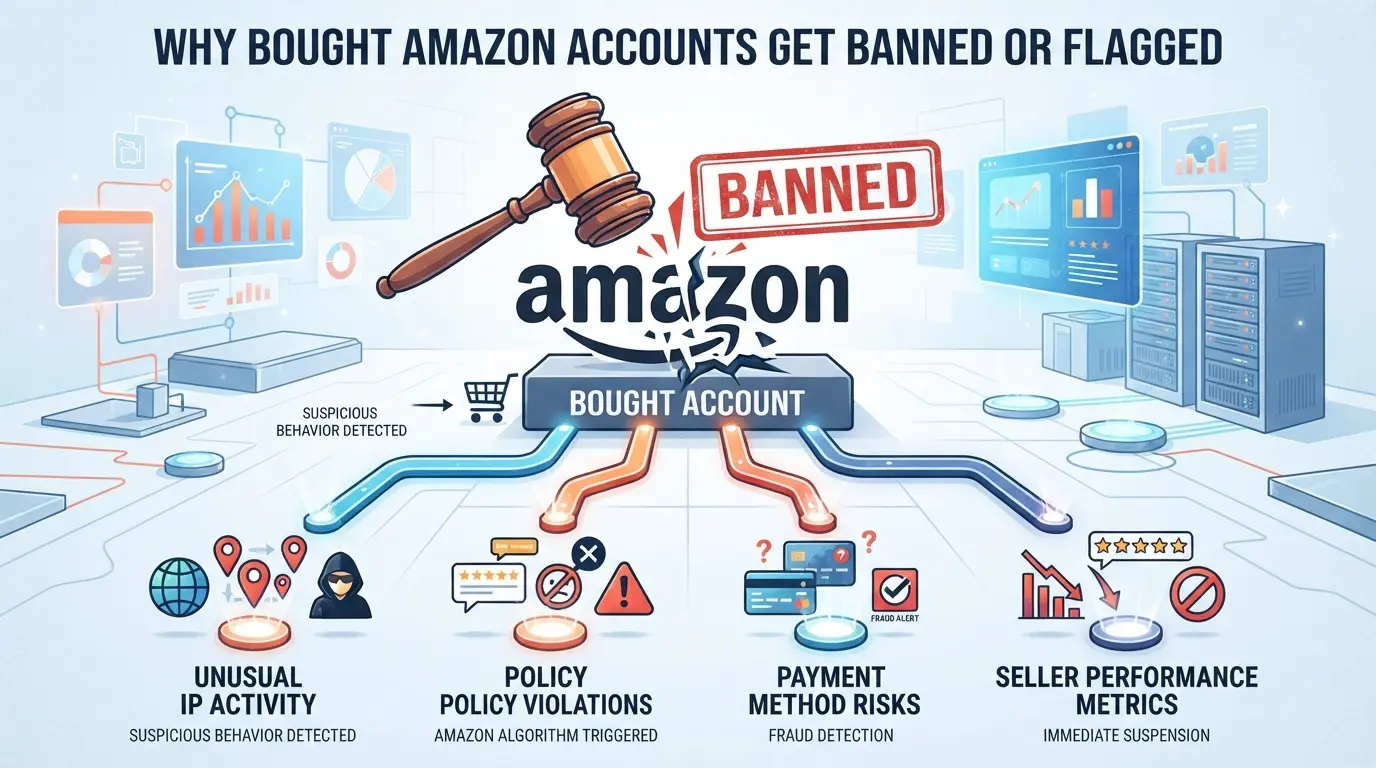
Buying an Amazon seller account can backfire fast, most lockouts and bans happen because Amazon spots sudden changes, skipped transfer steps, or leftover ties to the original owner. The biggest risks aren’t hidden in the listing details; they show up right after the new owner logs in.
Mismatch in Device, IP, or Browser Fingerprint
Amazon flags accounts when the login environment suddenly changes. If you switch devices, IP addresses, or browsers without matching the original patterns, you trigger their detection systems.
- Logging in from a new region or country sets off alerts, especially if the old owner was always local.
- Using a device that’s never appeared in account logs looks like a takeover attempt.
- Changing browser fingerprint (cookies, user agent, OS) can break session continuity and prompt restriction.
Incomplete Account Transfer Steps
The real trouble starts when either buyer or seller rushes the handover. It’s not just about getting the password; you need to clear all recovery info, update business contact details, and wipe any old session tokens. Skipping even one step can leave traces, Amazon’s internal logs will show mismatches or conflicting ownership signals. For example, if recovery email or phone isn’t changed, the original owner can trigger a reset and regain control, or Amazon will see mixed account signals and freeze the account for review.
One common failure is missing the address update. If the seller’s address stays on file, but the buyer’s device logs in from a different region, Amazon sees two conflicting locations, this almost always leads to a restriction. Another mistake is skipping two-factor authentication reset. If old authentication remains in place, the buyer can get locked out, and the account can be flagged for suspicious activity. The fastest way to lose a purchased account is leaving even one recovery path tied to the previous owner.
Bridge to Price Judgment
Problems with restriction often show up before you even get to use the account. That’s why judging price isn’t just about the listing, it’s about the true cost of getting an account you can actually operate. Next, it’s time to see what makes an Amazon seller account price fair or risky.
How to Evaluate the Price When Acquiring an FBA Business
Most buyers focus on price, but the real question is whether the account’s history and risk actually match what’s being asked. You want to know if you’re paying for value, not just a quick listing. Skip any seller who’s vague about control, session history, or sales records, these are the details that separate a fair deal from a costly mistake.
Aged vs. Fresh Seller Profiles: What Drives Price Differences
| Account Type |
Typical Price Range |
Why Buyers Pay More |
When It’s Overpriced |
| Aged (2+ yrs) |
$900–$2,500 |
Stable history, higher limits |
Poor feedback, hidden restrictions |
| Fresh (<6 mo) |
$400–$950 |
Clean slate, fast setup |
No sales, no reviews, risky transfer |
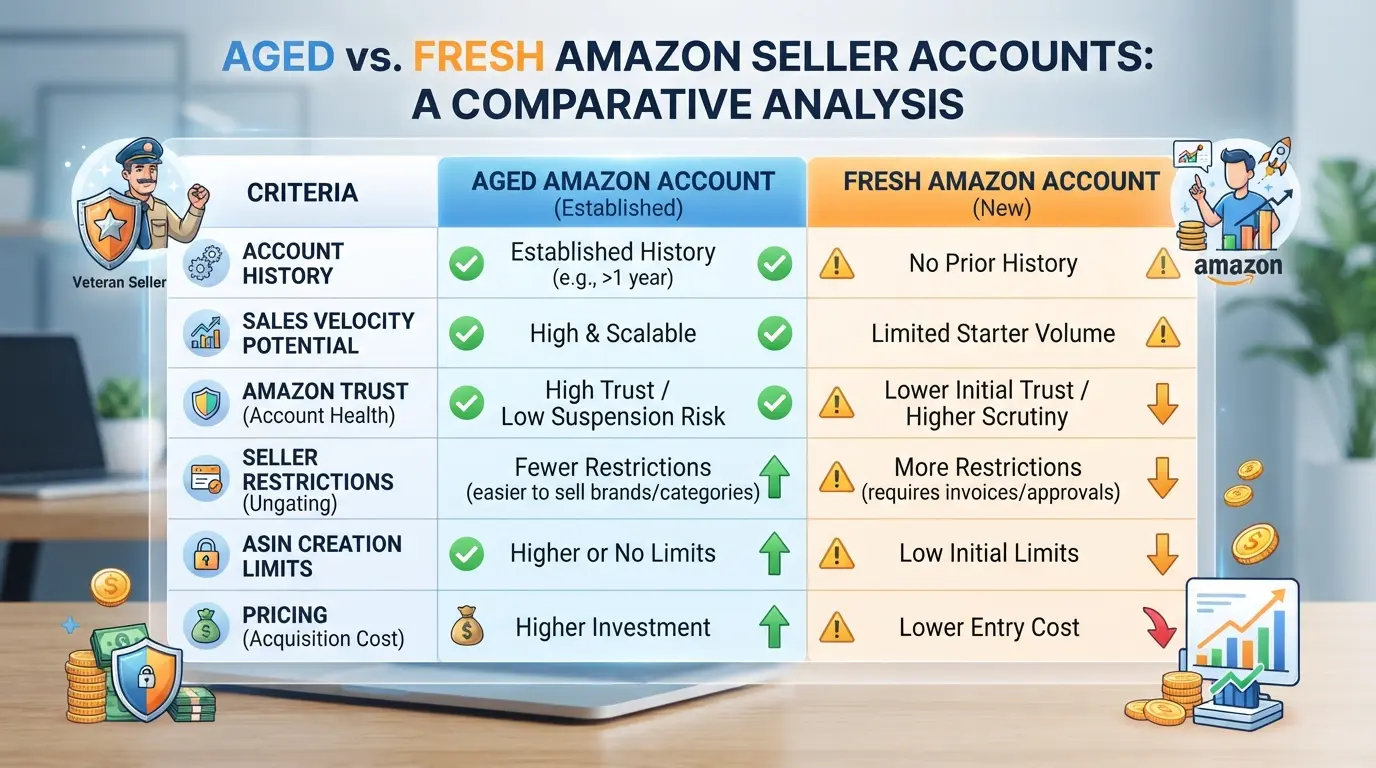
Aged accounts cost more because they come with verified sales and fewer sudden bans, if the history checks out. Fresh accounts are often sold cheap, but if the price is close to an aged account, you’re probably just paying for the seller’s markup.
Region, Category Access, and Past Performance
Region and category access can push prices up. For example, a US-based account with ungated categories sells for more than one from a less active market. Sales history and feedback ratings matter even more, you should always check for hidden restrictions or bad reviews before closing a deal. If the account lacks solid past performance, the asking price is rarely justified.
If you’re unsure, compare similar listings and insist on seeing backend screenshots. Most scams start with inflated prices on accounts that look clean but hide past issues. The next section will show where buyers get burned when trust breaks down during the transfer.
Where Most Buyers Get Scammed When Investing in Existing Amazon Stores
Scams happen most often when buyers overlook proof of seller identity, pay without safe methods, or skip checking who controls the account recovery data. The single biggest risk is trusting screenshots or promises instead of live verification and escrow.
Fake Listings and Unverified Sellers
Scammers often copy real account details or invent seller histories to craft believable Amazon seller account offers. If you only get screenshots, links, or vague claims, you’ll lose money with no account. Demand a live screen share, backend access demonstration, and ID matching before you pay.
Payment Risks and Account Recovery Scams
Fake sellers push you to send money by wire, gift card, or crypto, then vanish or reclaim the account days later.
- If you handle payment outside a secure escrow, the seller can disappear or trigger an Amazon password reset, locking you out.
- Make sure the final transfer includes a real-time password change, complete recovery info update, and that all device sessions are logged out before you pay, if any of these steps are skipped, the seller can get the account back within hours.
Most buyers skip these steps, thinking the seller “seems legit.” That mistake turns into a lost account and wasted funds. Buying Amazon seller accounts safely means seeing real proof, using proper payment flow, and locking down recovery before you hand over the cash.
Managing Multiple Amazon Seller Accounts: DICloak Workflow for Safer Operations
After you’ve handled payment risks and checked recovery info, the next challenge is keeping each Amazon seller account isolated and organized—especially as your operation grows. Most buyers hit trouble when accounts get mixed up or share browser sessions, leading to unexpected platform reviews or workflow breakdowns. Teams need a way to keep each account’s environment clean, control network connections, and batch-manage profiles without wasting hours or risking accidental overlap.
Profile Isolation and Fingerprint Configuration in DICloak
Operators can create a separate browser profile for every Amazon seller account in DICloak. Each profile stores its own browser signals, such as User Agent, time zone, geolocation, screen resolution, and font list. This means sessions never share storage or settings, even on the same workstation. By customizing fingerprint signals per account, you avoid accidental cross-account leaks—this is where most multi-account setups break down. The scope is limited to browser-profile access; it does not change anything in the Amazon account itself.

Proxy Configuration for Account Separation
A consistent network connection is critical when operating many accounts. Operators configure a user-provided proxy in each profile, choosing HTTP, HTTPS, or SOCKS5 based on their needs. The built-in proxy check verifies connectivity and shows the exit IP, region, and time zone—giving you proof before launching a session. If you skip proxy setup, all accounts share your local IP, which makes session management risky and can lead to operational headaches. Teams are responsible for proxy selection and compliance; DICloak only stores and applies the settings.

Bulk Operations for Efficient Multi-Account Management
Batch actions cut wasted time and reduce mistakes—teams can create, edit, and export browser profiles for Amazon seller accounts in bulk. On supported plans, you can batch-assign proxies, edit fingerprint settings, and export profiles for team use. This is a game changer once you’re running dozens of accounts: manual edits lead to missed settings and profile confusion, but bulk operations keep everything aligned. The feature applies only to browser profiles, not to Amazon account settings or content.

Once your profiles and proxies are set up, the next step is to secure control and update recovery info inside each Amazon seller account. That’s where the handoff moves from browser workflow to platform changes.
What to Change Right After Taking Over an Amazon Seller Account
The second you get access, your real work starts. Buyers who skip these steps end up locked out or flagged for suspicious activity, so don't treat the handoff as the finish line.
Update Credentials and Linked Information
- Change the password and enable two-factor authentication , if you skip this, the original owner can log back in and undo your work.
- Update the email and phone number to yours , Amazon uses these for recovery and alerts; leaving old info means you’re exposed if something goes wrong.
- Review and replace bank payout details , missing this step can result in your funds sent to the previous owner.
- Check for connected third-party apps , some tools have backend access. Remove anything you don’t recognize.
A buyer once thought changing the password was enough. Two weeks later, their payout vanished, because the old bank account was still linked.
Review Account Permissions and Remove Old Access
- Inspect Seller Central permissions , look for lingering admin, manager, or team accounts. If a previous staff email still has access, you risk unauthorized changes.
- Remove all unfamiliar users , Amazon doesn’t always notify you about new logins. Manual checks are the only way to catch hidden access.
- Audit API keys and developer tokens , leftover integrations can trigger suspicious activity or expose your store data.
Even after wiping user access, some accounts keep old API keys alive for months. If you see odd activity or sales data going somewhere you don’t control, revoke every token. Missing this step is the fastest way to lose control after a purchase.
If you handle these changes right away, your new account is much less likely to trigger Amazon’s fraud checks or ownership disputes. The next question, should you even buy, or is building from scratch safer, depends on your risk tolerance and what you find during transfer.
When Buying Amazon Seller Accounts Is Worse Than Building Your Own
If you’re weighing whether to buy Amazon seller accounts or start fresh, skip buying when platform rules or past history make future control shaky, especially after mid-2026 policy shifts.
High-Risk Scenarios and Platform Policy Changes
| Situation |
Risk of Buying |
Building Your Own |
Practical Takeaway |
| Account has recent policy marks |
High |
Low |
Recent strikes trigger restriction |
| 2026: strict identity compliance |
High |
Low |
Sudden ID checks can block transfers |
| Account tied to legacy devices |
High |
Low |
Device fingerprinting links history |
If the account’s fingerprints or ownership history put you at risk, building your own account almost always keeps control cleaner. Up-to-date policies mean even a well-transferred account can get flagged for legacy issues you didn’t cause.
You won’t fix hidden risk by just updating basic profile data. If even one session, recovery contact, or device stays linked after transfer, Amazon’s backend can trigger a restriction or full suspension, sometimes within days.
Frequently Asked Questions About buy Amazon seller accounts
Is it legal to buy Amazon seller accounts in 2026?
The legality can change depending on your country’s laws and Amazon’s terms of service. Most countries consider selling or buying accounts a violation of Amazon policies. If you buy Amazon seller accounts, you risk getting suspended or banned. Always check local laws and Amazon’s policies before making any purchase.
Can I pay for Amazon seller accounts with crypto?
Some vendors allow payment with cryptocurrencies like Bitcoin or Ethereum. However, always use secure, traceable payment methods and a trusted escrow service to avoid fraud. Be aware that crypto payments are hard to reverse, so only transfer funds after verifying the legitimacy of the Amazon seller account and the seller.
How many Amazon seller accounts can I safely operate?
Amazon’s policy typically allows only one seller account per person or business. Operating multiple accounts can get you banned unless you have written permission from Amazon. Use separate business details, payment methods, and network setups if you must manage more than one account for reasons like selling in different countries.
Is buying an Amazon seller account better than starting from scratch?
Buying an established account can save time, as it may have existing reviews and sales history. However, new owners may risk bans or hidden issues from previous activity. Starting fresh lets you control everything but takes longer to build trust. Choose what fits your goals and how much risk you can manage.
Can I use bought Amazon seller accounts on the same device?
Using multiple accounts on the same device increases the risk of getting linked and suspended. Use unique browser profiles, proxies, or virtual machines for each account. Also, avoid sharing Wi-Fi, cookies, or payment information across accounts. Careful setup reduces the chance of Amazon detecting and shutting down your accounts.
Now that you understand the risks and considerations, it's crucial to carefully evaluate your options and ensure compliance with Amazon's policies before making any moves. Protecting your business and privacy should be a top priority as you navigate this process. Try DICloak For Free
 Web Proxy Tools
 Free Tools
 Cookie Plugin
 UA Generator
 MAC Address Generator
 IP Generator
 IP Address List
 2FA Code Generator
 World Clock
 Anonymous Check
 WebRTC Leak Test
 UUID Generator
 Free Web Proxy Site
 Proxy Checker
 FB Ad Checker
 AI Web Scraping
 Free SMM Tools
 Twitter Shadowban Checker
 Instagram Name Checker
 UTM Generator
 Username Generator
 AI Hashtag Generator
 LinkedIn Headline Generator
 Social Media Image Resizer