A single misstep with browser identity can get your session flagged or your accounts locked, Cloudflare alone blocks 20 billion threats per day, often triggered by unusual browser fingerprints or mismatched IP addresses, according to Cloudflare's threat report. That’s why more users now search for ways to hide their real location or device details online. The proxy browser has become a go-to for anyone who needs to access restricted content, manage multiple accounts, or keep browsing private. Unlike a standard web proxy, an online proxy browser doesn’t just relay your traffic, it runs your session in a remote browser, or manipulates browser fingerprints so sites see you as someone else. This is why tools like a web proxy browser or an anonymous browser proxy show up in guides for affiliate marketers, social media managers, and researchers.
But there’s a catch. Using the wrong proxy browser can leave traces that trigger anti-bot systems or leak your real IP. Some free online proxy browsers claim to protect your privacy, but most don’t isolate your fingerprint or keep login sessions truly separate. If your workflow depends on staying one step ahead of detection, you will need to understand how these tools work, where they fall short, and which methods actually keep your identity safe. Here’s how serious users approach anonymous browsing today.
What Is a Proxy Browser and Why Do People Use It?
Proxy Browser Definition and Core Functionality
A proxy browser is a tool that sends your web traffic through a proxy server before reaching the internet. This means any website you visit sees the proxy’s IP address and environment, not yours. Unlike a standard browser, which connects directly from your device, a proxy browser acts as a middleman. Some versions, such as an online proxy browser, work inside a webpage or a cloud platform. Others, like a web proxy browser, run as standalone apps and let you customize how requests are sent.
The biggest difference is isolation. A regular browser keeps all your sessions, cookies, and fingerprints tied to your device. A proxy browser can isolate each profile, making it harder for sites to link your activity. This is why tools like DICloak is used by people who need to manage separate accounts or control browser fingerprints. For example, affiliate marketers use an anonymous browser proxy to avoid bans and keep multiple identities separated.
| Feature |
Standard Browser |
Proxy Browser |
| Direct IP exposure |
Yes |
No |
| Session isolation |
No |
Yes |
| Fingerprint control |
Limited |
Full (with tools) |
| Use for account ops |
Risky |
Safer |
Table: Proxy browser vs standard browser features. See Wikipedia: Proxy server for technical background.
Common Reasons People Choose Proxy Browsers
The main reason people use proxy browsers is privacy. By masking your real IP and browser fingerprints, you lower the risk of being tracked or flagged by anti-bot systems. This matters for anyone handling multiple logins, such as social media managers or researchers.
Another big reason is access. If a site blocks content in your region, a proxy browser can help you reach those pages. Some users rely on an online proxy browser to bypass restrictions for work, while others use a web proxy browser for personal privacy. True session isolation is what protects your identity when running multiple accounts, without it, simple proxies aren’t enough.
What Risks Should You Know Before Using a Proxy Browser?
Proxy browsers promise privacy, but they often have gaps that can put your accounts or data at risk. If you use a web proxy browser for social media, e-commerce, or research, certain mistakes can trigger detection or leaks. Here’s what to check before you trust any online proxy browser with your workflow.
How Proxy Browsers Can Fail to Protect Privacy
Not all proxy browsers actually shield you from tracking. The most common failure is IP leaks, sometimes the proxy only covers part of your traffic, so sites still see your real location. Weak session isolation is another issue. If you visit one site in a proxy browser and another in your regular browser, both can sometimes link those visits using your device fingerprint.
Browser fingerprinting is a bigger risk than most people think. Even if your IP is hidden, sites can collect details like your device type, plugins, and fonts. If your anonymous browser proxy does not randomize these details, it’s easy to tie your new session back to your real identity. Free proxy browsers often skip fingerprint protection. Some also connect through untrusted proxy providers, which can expose your data or inject ads. See Mozilla’s privacy guide) for common pitfalls with browser-based privacy tools.
Common Mistakes That Trigger Detection or Bans
Mixing real and proxy sessions is a red flag. If you log into the same account using both your normal and proxy browsers, anti-fraud systems quickly spot the change in IP and device fingerprint. This often leads to sudden bans or verification checks.
Reusing browser profiles causes trouble too. If you use the same profile for different accounts, patterns start to show. Sites detect that multiple accounts share the same browser setup, which signals automated or fake activity. The biggest risk is thinking you’re safe just because your IP looks different; fingerprint overlap is what gets most accounts flagged.
For team use or handling many accounts, browser profile isolation is key. Tools like DICloak build separate environments for each session, reducing the risk of cross-account bans. Always check if your proxy browser supports real isolation, not just IP switching.
How to Set Up and Use a Proxy Browser Safely: Step-by-Step Guide
Setting up a proxy browser isn’t just about flipping a switch or adding a proxy server. The key is to pick the right proxy type, configure it for your needs, and test for leaks that could expose your real identity. Many users rush into using an online proxy browser or a web proxy browser without checking if their setup actually works, this is why most detection failures happen at the setup stage. Here’s what actually works in practice.
Choosing the Right Proxy Type for Your Needs
Not all proxies do the same job. It’s easy to get lost between HTTP, HTTPS, and SOCKS proxies, but the differences matter. HTTP proxies only handle web traffic, while HTTPS proxies add encryption. SOCKS proxies cover more protocols, letting you use them for browsers, mail clients, or other apps. If you need to mask your location, pick a proxy server based in the country you want sites to see. But beware, using a proxy location far from your target app can slow your connection or trigger extra checks.
| Proxy Type |
Handles |
Encryption |
Common Use |
| HTTP |
Web |
No |
Basic browsing |
| HTTPS |
Web |
Yes |
Secure browsing |
| SOCKS |
Any |
Depends |
Apps, browsers |
Diagram: Proxy browser traffic flow and proxy types
Configuring a Proxy Browser: Essential Steps
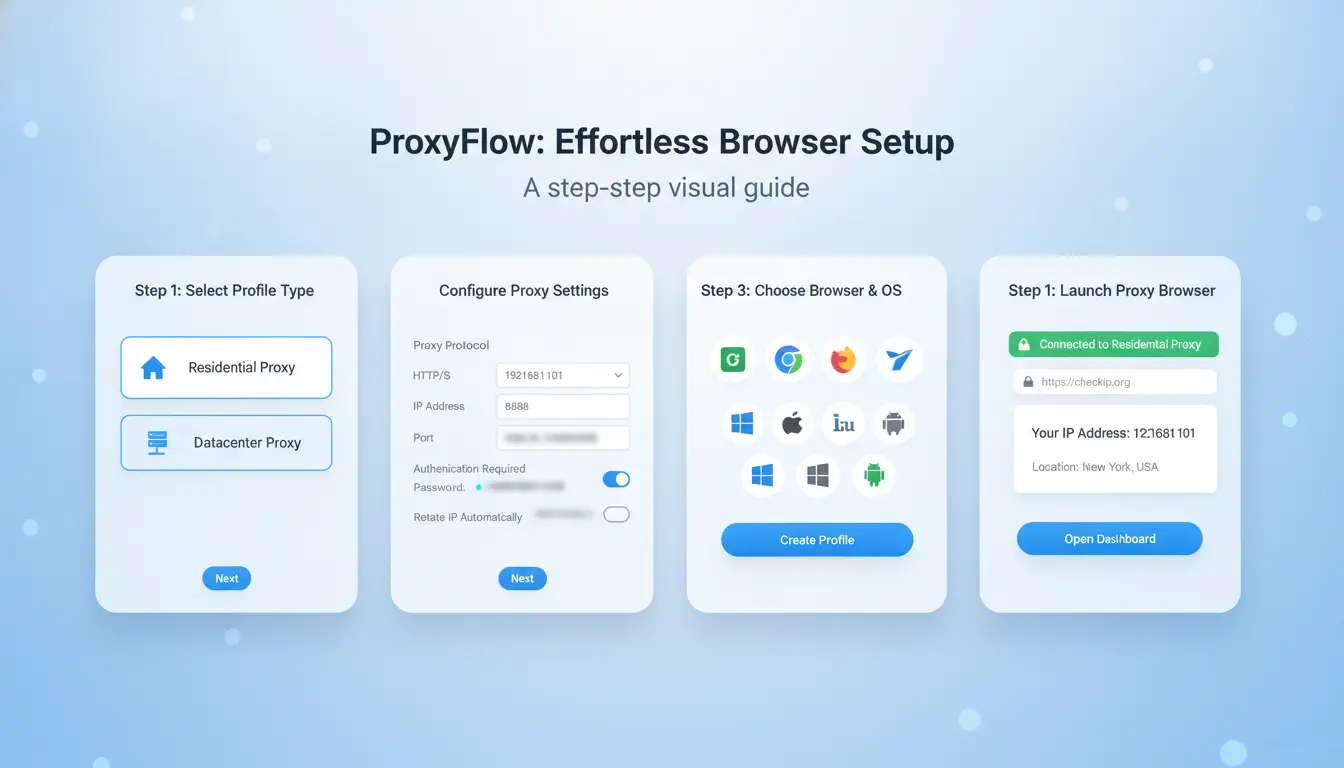
Setting up your proxy browser starts with the browser’s settings. Go to your browser’s network or proxy section and enter the proxy server details, address, port, and protocol. Next, check for IP leaks. Use sites like ipleak.net or BrowserLeaks to see what your browser reveals. Fingerprint leaks are trickier; even anonymous browser proxies can leave traces if you use the same browser profile or device repeatedly. For stronger isolation, you can use tools like DICloak to create separate browser profiles, each with its own proxy and fingerprint. This reduces the chance of detection. The biggest mistake is skipping leak tests, most bans come from missed IP or fingerprint leaks.
Why Proxy Browsers Are Not Enough for Multi-Account and Team Workflows
Even though a proxy browser can hide your IP and make you appear from a different location, that’s only part of what multi-account users and teams need. The real gaps show up when you try to keep accounts completely separate, hand them off to teammates, or need to see exactly who did what. Basic tools rarely cover those needs. Here’s why relying only on an online proxy browser or anonymous browser proxy almost always hits a wall.
Risks of Using Basic Proxy Browsers for Multiple Accounts
Switching between accounts with a simple web proxy browser sounds safe, but most anti-fraud systems look far beyond your IP address. Many of these tools reuse the same browser fingerprint, details like screen size, fonts, and hardware, without you realizing it. That means two different accounts can look like they come from the same device, making it easy for platforms to link or flag them.
Manual mistakes make things worse. Forgetting to swap the proxy or clearing cookies in the wrong order can instantly connect accounts. These errors are common when you run lots of logins for social media, e-commerce, or ad accounts. Once platforms detect overlap, bans or restrictions often follow.
Challenges in Team Collaboration and Access Control
Teams need to share access without leaking passwords or control. A basic proxy browser doesn’t let you create, save, and assign separate browser profiles. You can’t easily limit what each member can see or do, and there’s no audit trail to check actions if something breaks.
Suppose your group manages 50 accounts for clients. Handing out one login to everyone, or sharing a profile file by email, means you lose track of changes and can’t see who made a mistake. Advanced tools like DICloak solve this with profile sharing, permissions, and action logs, but typical proxy browsers do not.
The bottom line: Without real browser isolation and access control, every extra account or team member raises your risk instead of lowering it.
How DICloak Makes Proxy Browser Workflows Safer and More Efficient
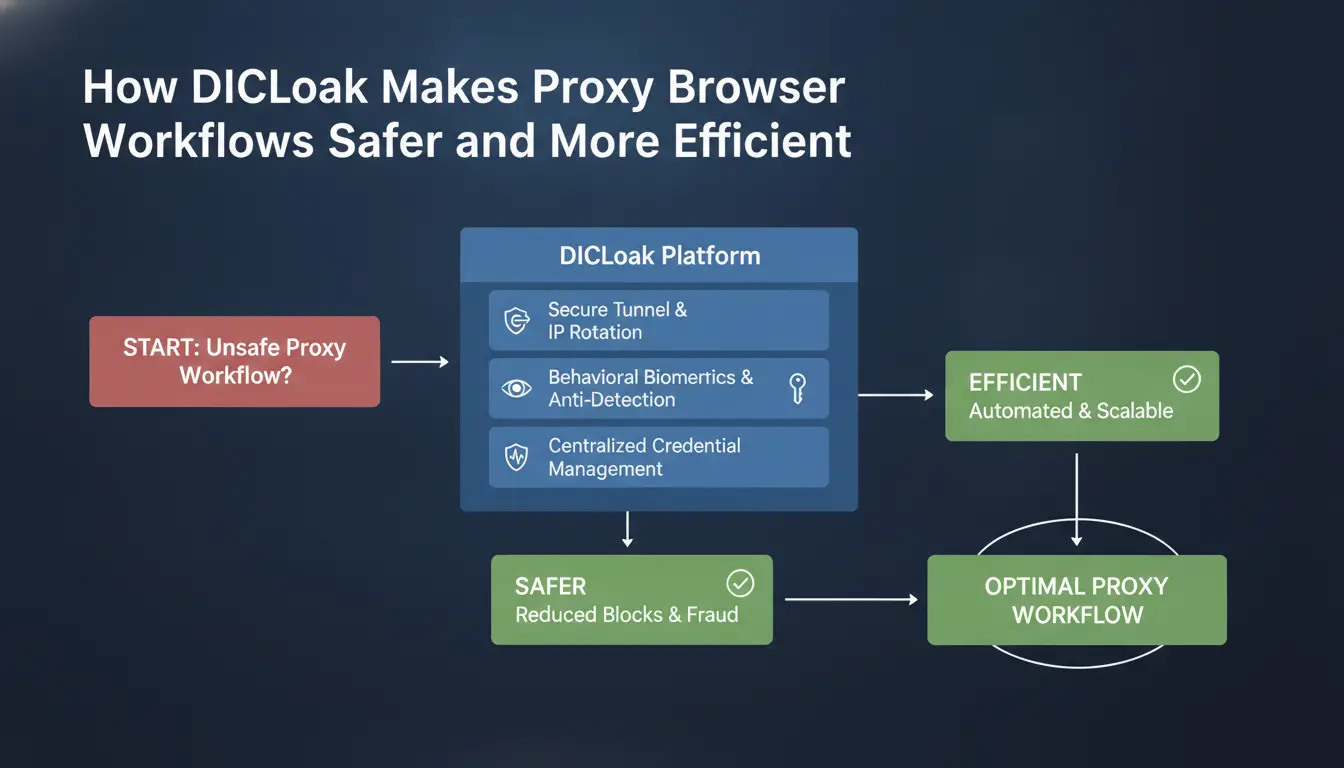
Handling multiple accounts with a proxy browser sounds easy, until you run into bans, session leaks, or team mistakes. DICloak tackles these weak points by pushing proxy, fingerprint, and workflow control beyond what most online proxy browser tools offer.
Isolated Browser Profiles and Custom Proxy Settings
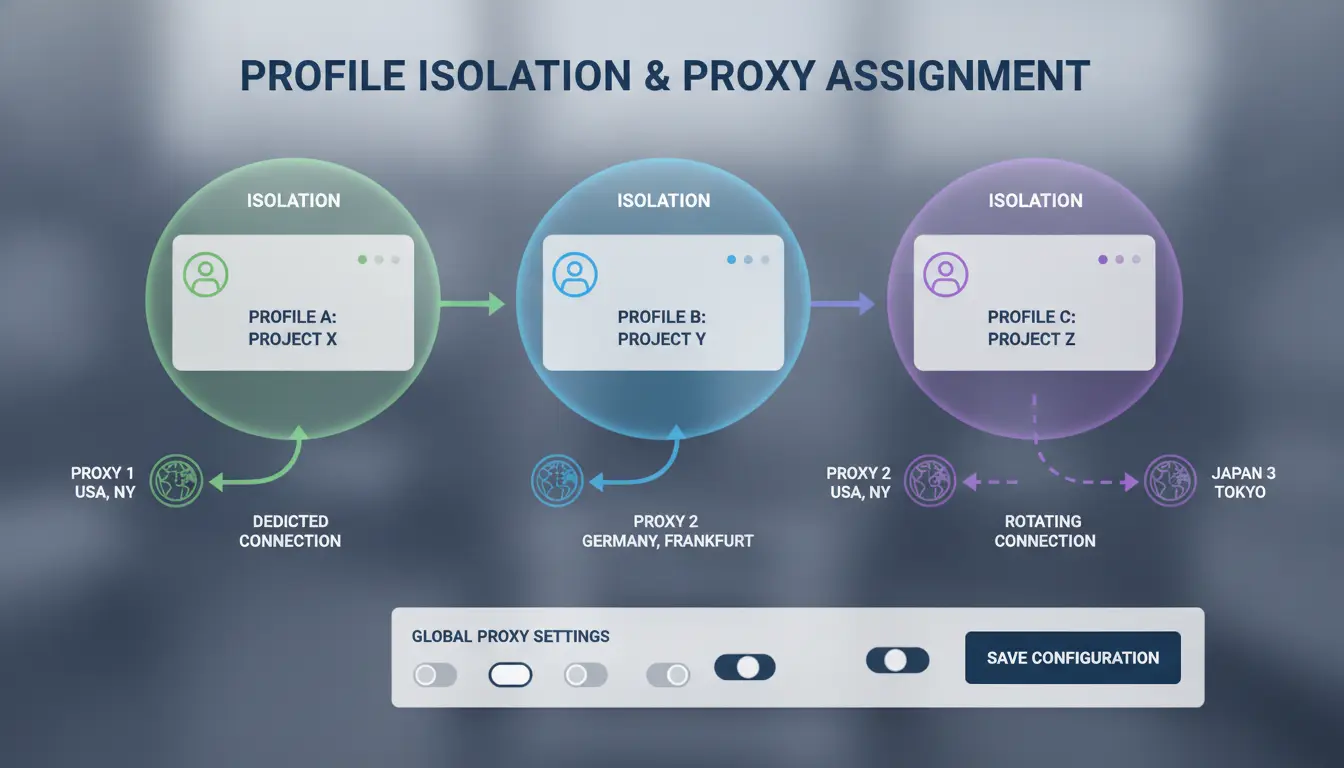
The biggest risk with a typical web proxy browser is session mixing. If two accounts share the same fingerprint or IP, platforms spot the link and restrict them. DICloak creates a separate browser profile for each account, with its own fingerprint, cookies, and session files. This means one account’s history never touches another’s.
You can set a different proxy server for every profile. For example, one account can run from a US IP, another from Germany, all in the same dashboard. This level of separation is hard to get with a simple anonymous browser proxy or most free online proxy browser tools.
Team Collaboration, Permission Control, and Operation Logs
Sharing accounts across a team is where mistakes get expensive. DICloak lets you share selected profiles with team members, but you decide who can view, edit, or just use them. No more passing raw logins in chat.
Every action, from login to config changes, is tracked in operation logs. If an account gets flagged, you can see exactly who did what, and when. This isn’t possible with basic proxy browser setups, and it keeps everyone more careful.
Automating Repetitive Tasks and Scaling Operations
Manual logins and profile setups slow you down, and people make mistakes. DICloak’s RPA automation lets you script common actions, like logging in, posting, or changing settings, across dozens of accounts at once. Bulk profile creation means you can prep new accounts in minutes, not hours.
Automated, isolated workflows reduce human error and keep your accounts safer, even as your team grows.
For users who need more than what a simple online proxy browser can do, DICloak covers both the technical and team risks that add up fast.
When Should You Use a Proxy Browser vs. Advanced Antidetect Tools?
Scenarios Where a Simple Proxy Browser Is Enough
A basic proxy browser works for casual private browsing or checking geo-blocked sites. If you just want to hide your IP, an online proxy browser or web proxy browser can mask your location and let you access restricted pages. This is enough for one-off visits or reading news behind a country wall. But these tools don’t block fingerprint tracking or keep sessions separated.
Managing multiple accounts, running affiliate campaigns, or handling team operations needs more than an anonymous browser proxy. You risk account bans or linkage if sessions aren’t isolated. Tools like DICloak let you build unique browser profiles, set custom proxies, and automate workflows. You can share profiles with teammates, set permission controls, and track actions with operation logs. Bulk actions and RPA automation save time and cut mistakes.
Key Differences in Privacy, Security, and Efficiency
The most important difference is fingerprint isolation, basic proxy browsers only mask IP, while advanced antidetect tools prevent account linking by creating separate environments. Proxy flexibility, workflow automation, and team safety make tools like DICloak a practical choice for serious users. See Wikipedia’s browser fingerprinting page for technical background.
Best Practices to Avoid Detection and increase Proxy Browser Safety
If you rely on a proxy browser for privacy or account management, skipping basic safety steps can trigger detection or leaks. The most experienced users focus on clean browser profiles, careful proxy choices, and steady routines. Here’s what actually works, and where most people slip up.
How to Prevent Browser Fingerprinting and IP Leaks
Sites spot unusual activity by matching browser fingerprints and tracking IP changes. You need unique browser profiles for each task or account. This means setting up separate environments with fresh cookies, user agents, and no reused login sessions. Tools like DICloak let you create isolated profiles and bind proxies for each one, so your web proxy browser never overlaps fingerprints.
Testing for leaks is just as important. Visit sites like ipleak.net or BrowserLeaks to check if your anonymous browser proxy is leaking real IP or device details. If anything shows up from your home network, switch the proxy or reset your browser profile.
Avoiding Common Proxy Browser Pitfalls
One of the biggest mistakes is mixing real and proxy sessions. If you log into sensitive accounts in your main browser, then swap to an online proxy browser without clearing sessions, you leave traces that sites can connect. Always use separate browsers or profiles for each workflow. Another common pitfall is trusting unreliable proxy providers. Cheap or free proxies often get flagged fast. Stick with paid options from well-known providers like Oxylabs or Bright Data.
Maintaining Long-Term Account Safety
Routine matters more than you think. Rotate proxies and browser profiles every few weeks, especially if you manage multiple accounts. Keeping browser profiles isolated, never mixing cookies, logins, or device settings, cuts the risk of detection. For teams, use tools that support profile sharing and permission controls, so each member stays in their own workspace. The real safety comes from never letting different accounts cross paths in the same browser or proxy environment.
FAQ: Proxy Browser Use, Safety, and Advanced Workflows
Is a proxy browser really anonymous?
Not always. An online proxy browser hides your IP, but most free options don’t isolate browser fingerprints. Sites can still track your device, so true anonymity needs both fingerprint and session separation. For higher privacy, tools like an anonymous browser proxy should offer full environment isolation.
Can I safely log into multiple accounts with one proxy browser?
Logging into several accounts using a single web proxy browser can cause session mix-ups. If your browser profiles share fingerprints, platforms may link your accounts and trigger bans. For team workflows, use separate browser profiles and unique proxies, DICloak lets you do this with real isolation and access controls.
Does a proxy browser block all tracking scripts?
No. Proxy browsers may block some trackers, but advanced scripts still fingerprint your device or link sessions. To reduce leaks, combine proxy browsers with strict cookie controls and regular environment resets.
What’s the difference between a proxy browser and browser extensions?
A proxy browser runs your session in a controlled environment, changing IP and fingerprint. Extensions only tweak settings in your existing browser, which rarely fools detection engines.
Can I integrate proxy browsers with automation tools?
Yes. Many proxy browsers support API or RPA for batch tasks. DICloak, for example, allows automated profile creation and login flows for bulk account operations.
Frequently Asked Questions
Is it legal to use a proxy browser in my country?
Laws about using a proxy browser depend on your country. In most places, using a web proxy browser is legal for privacy or bypassing simple blocks. However, a few countries like China, Iran, and Russia restrict or ban some proxy services. Always check your local laws before using any online proxy browser to avoid legal trouble.
Can I use a proxy browser to access geo-blocked websites?
Yes, a proxy browser lets you visit websites blocked in your area by routing your traffic through another country. The success depends on the proxy’s location and how the website detects proxies. Some streaming services can still block access even with an anonymous browser proxy, but simple sites often work without problems.
How many accounts can I safely manage with a proxy browser?
Basic proxy browsers are risky for managing multiple accounts. Websites can link your accounts if you only change your IP address. Advanced tools like DICloak use separate browser profiles, making it much safer to manage many accounts. For serious multi-account use, avoid simple web proxy browsers and pick tools with strong profile isolation.
Will a proxy browser hide my real IP from all websites?
A proxy browser usually hides your real IP address from most sites, showing the proxy’s IP instead. However, leaks can happen through WebRTC or browser fingerprints. Always test your connection with online tools to check for IP or fingerprint leaks. For better privacy, use a browser proxy with extra leak protection features.
Can teams share proxy browser profiles securely?
Most standard proxy browsers do not support secure profile sharing for teams. Without profile isolation and permission controls, sharing can lead to data leaks or account bans. Tools designed for teams, like DICloak, let you share browser profiles safely by keeping each user’s data separate and allowing admins to control access.
A proxy browser offers a practical solution for users seeking improved privacy, bypassing internet restrictions, and protecting their online identity. By routing traffic through intermediary servers, it empowers safer and more flexible web access for both personal and professional use. Try DICloak For Free
 Web Proxy Tools
 Free Tools
 Cookie Plugin
 UA Generator
 MAC Address Generator
 IP Generator
 IP Address List
 2FA Code Generator
 World Clock
 Anonymous Check
 WebRTC Leak Test
 UUID Generator
 Free Web Proxy Site
 Proxy Checker
 FB Ad Checker
 AI Web Scraping
 Free SMM Tools
 Twitter Shadowban Checker
 Instagram Name Checker
 UTM Generator
 Username Generator
 AI Hashtag Generator
 LinkedIn Headline Generator
 Social Media Image Resizer