One throwaway signup for a coupon can turn into 30+ promo emails in a week, which is why people start looking for temp mail. A temporary address helps when you need a quick verification code but do not want your primary inbox tied to yet another app, store, or trial form. The idea is simple, yet the risk is often missed: some temp inboxes are public, some delete messages too fast, and some domains get blocked by major platforms.
You will leave with a clear rule set: when temp mail is safe, when it is not, how to pick a provider, and what to do right after account verification so you do not lock yourself out later. If you need background, Wikipedia’s disposable email article gives a solid baseline, while Google’s sign-in and recovery guidance shows why recovery access still matters after signup. You can also review provider behavior in their own docs, such as Firefox Relay and Temp-Mail.
The next step is to separate low-risk signups from accounts you may need to recover months later.
What Is Temp Mail and How Is It Different From a Regular Email Address?
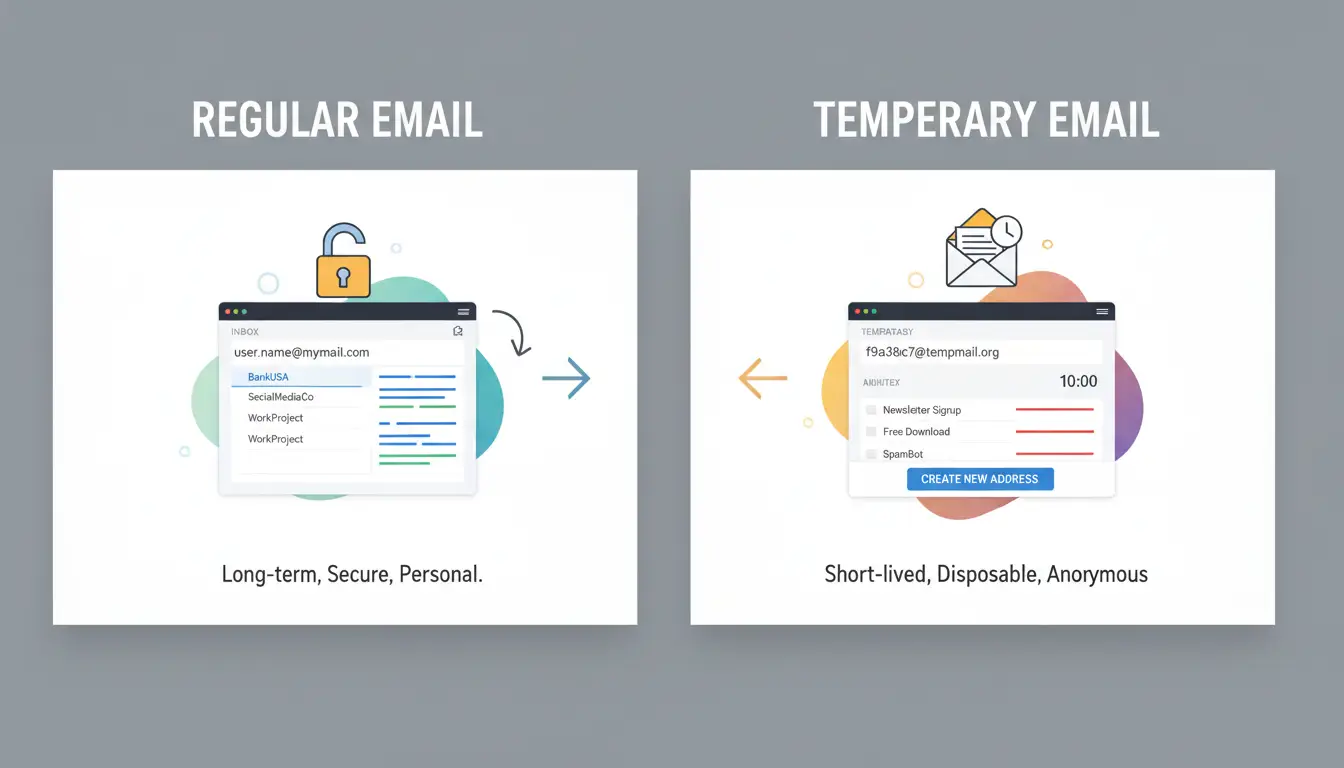
A temp mail address is a short-life inbox you can open in seconds, often with no account setup. It is built for quick signups and one-time verification, not for long-term identity. Services listed in Wikipedia’s disposable email overview follow this same idea.
How a disposable inbox is generated in seconds
Most tools create a random address as soon as you load the page. You copy it, paste it into a signup form, and wait for the code email.
Two models are common. Public inbox model: anyone who knows the address may read messages. Private mailbox model: access is tied to a browser session or account token, so inbox access is harder to share by accident.
What temp mail usually supports (and what it usually blocks)
It usually supports one job well: receiving verification emails for account creation.
Common limits are stricter than regular inboxes:
- No outbound sending
- Short message retention windows
- Limited attachment handling
- Domain blocks on major apps and marketplaces
If the platform checks domain reputation, delivery may fail even when the address format looks valid.
Temp mail vs regular email: speed, privacy, and account recovery trade-offs
Use temp mail for low-risk signups you do not need to recover later. For accounts you plan to keep, a permanent inbox is safer, especially for password resets and security alerts noted in Google account recovery guidance.
| Factor |
Temp mail |
Regular email |
| Setup time |
Seconds |
Minutes |
| Privacy at signup |
Higher (less identity data) |
Lower |
| Recovery months later |
Weak or none |
Strong |
| Reliability on major platforms |
Mixed |
Higher |
When Should You Use Temp Mail, and When Should You Avoid It?
Use temp mail for short tasks where losing inbox access will not hurt you later. Keep your permanent email for anything tied to money, identity, or long-term access. This matches how disposable email addresses are designed and why Google account recovery still depends on a reachable inbox.
Safe use cases where temp mail makes sense
Use it for one-time downloads, free trials, coupon unlocks, and low-risk forum sign-ups. It is also useful when you expect spam and do not want your personal inbox exposed.
If a site only sends one verification code and you do not plan to return, a burner inbox is fine.
High-risk use cases where temp mail can backfire
Avoid it for banking, work tools, cloud drives, paid software, tax records, and school portals. Skip it for any account that may need password reset, invoices, or legal proof later.
Some platforms block disposable domains, and some temp inboxes expire fast. If you cannot recover the account without that inbox, do not use a temporary address.
A quick decision checklist before using a burner email
| Question |
If “Yes” |
If “No” |
| Will you need this account after today? |
Use permanent email |
Burner can work |
| Can you recover access without this inbox? |
Burner can work |
Use permanent email |
| Will this account store money, files, or contracts? |
Use permanent email |
Burner can work |
If you still want privacy with longer access, you can use Firefox Relay aliases instead of a fully disposable inbox.
How to Use Temp Mail Step by Step Without Losing Access
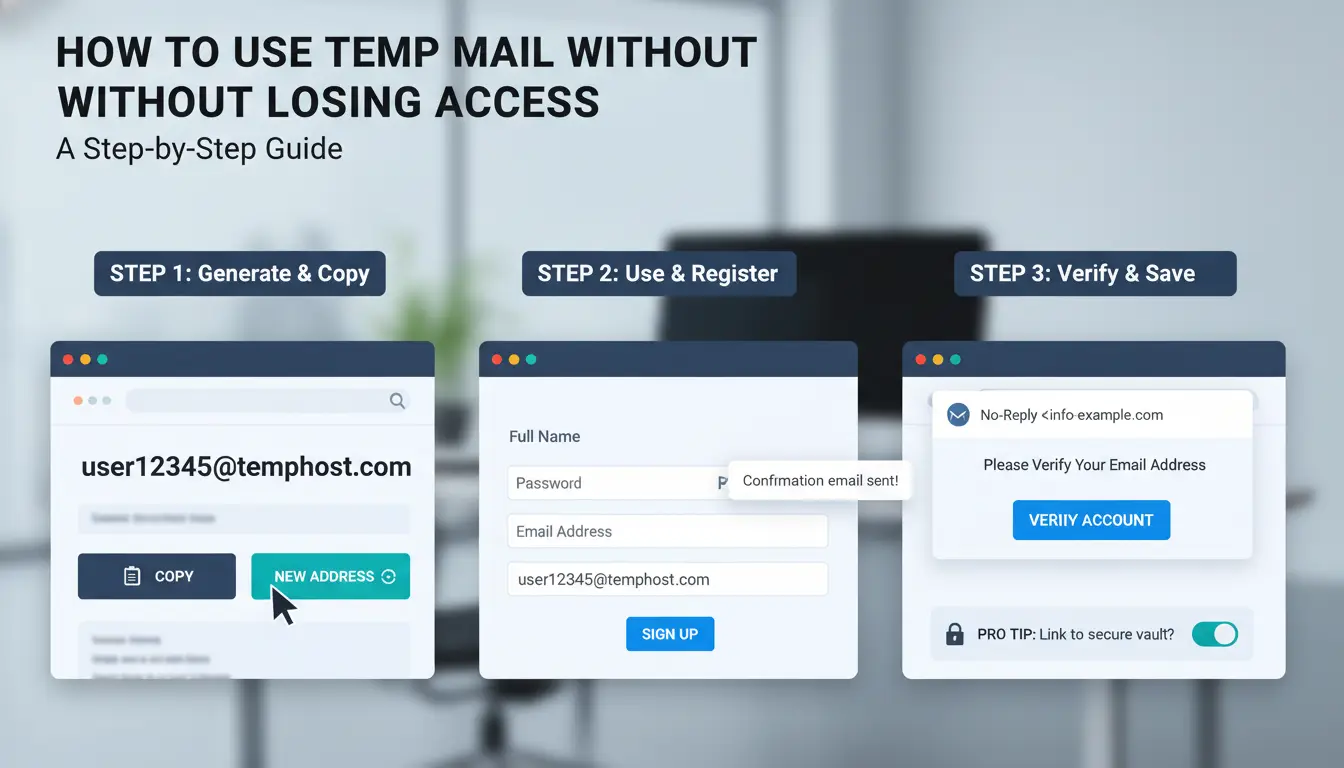
Use this workflow when you need quick verification but still want a recovery path later. The main risk with temp mail is not signup failure. It is losing account control after verification.
Step 1: Choose a provider and generate an address
Pick a provider with stable inbox refresh and public docs, such as Firefox Relay or Temp-Mail. Check whether the domain looks already blocked on your target site by running a test signup page before real use.
Generate one address per account. Do not reuse one inbox across multiple signups. Copy the address with your system clipboard, then paste once into a plain text note and once into the signup form. This catches hidden spaces or missing characters that cause silent failures.
Step 2: Register and verify before inbox expiry
Open signup and inbox in two tabs. Submit registration only when the inbox is active and refreshing. Some disposable inboxes expire fast, so timing controls the whole process.
If the code email is delayed, wait and refresh for a short cycle, then request one new code. Avoid multiple resend clicks in a row, since old codes often get invalidated.
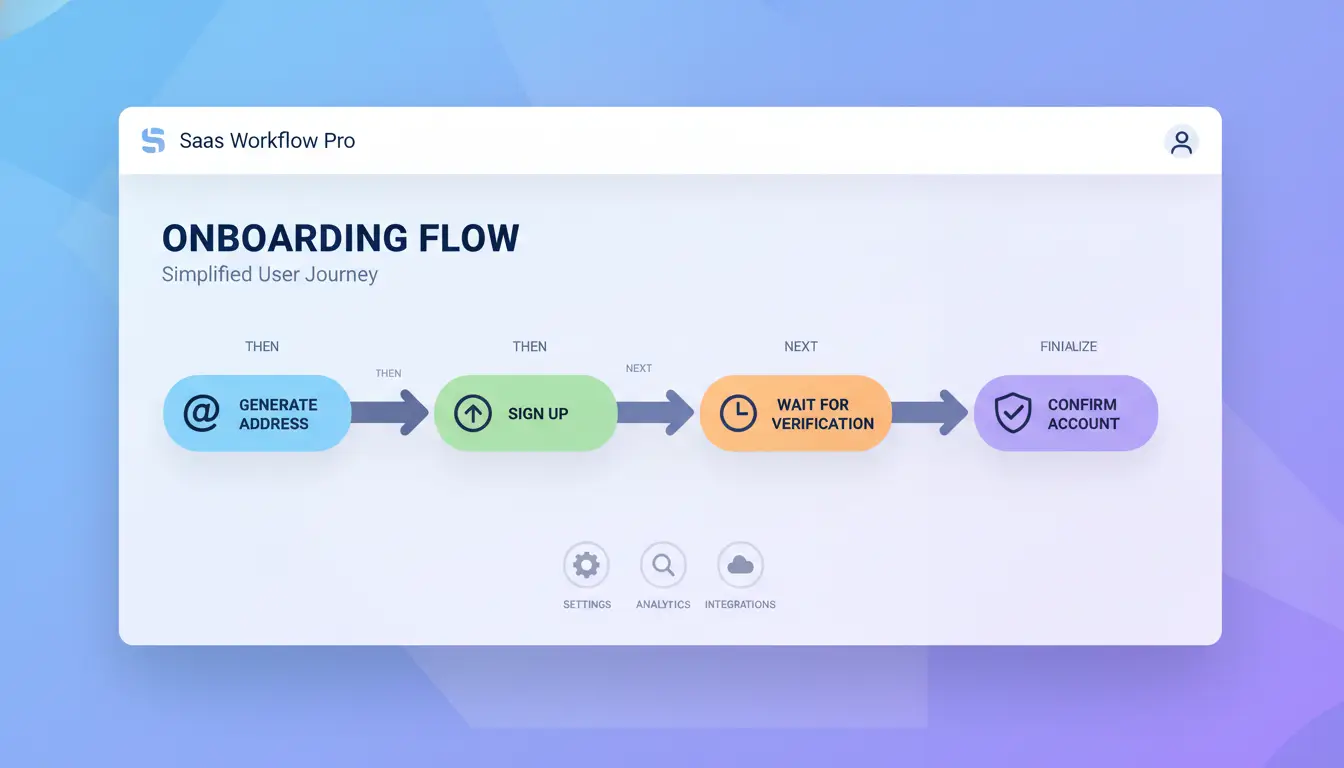
Step 3: Save critical account details immediately
Right after verification, save username, password, signup time, and any recovery codes in a password manager. Also record which email alias you used.
Move the account to a permanent email as soon as the platform allows it. Google’s account recovery guidance explains why this step prevents lockouts months later.
Why Temp Mail Sometimes Fails: Blocked Domains, Missing Emails, and Verification Errors
If a signup fails, the issue is usually not random. Sites block risky domains, mail can arrive late, and retries can trigger abuse checks. With temp mail, quick checks save time and prevent lockouts.
Why some websites reject disposable email domains
Many platforms run anti-abuse filters that flag known disposable domains. This is common on social apps, marketplaces, and fintech signups. Lists update often, so an address that worked last week may fail today. Background on disposable addresses is covered in Wikipedia’s disposable email page.
If you see “invalid email,” “domain not allowed,” or instant rejection after submit, switch to a different domain, not just a new username on the same domain. The fastest fix is domain rotation across providers, then one clean retry after 5–10 minutes.
Why verification emails never arrive
Missing codes usually come from delay, rate limits, or temporary provider outages. Some systems also throttle repeated code requests. If you click “resend” too fast, later emails may get delayed or dropped.
Refresh inbox every 20–30 seconds for up to 3 minutes. Then request one new code and wait again. You can check provider status and behavior in tools like Firefox Relay or Temp-Mail.
How to fix common signup and login issues
Check address typos, hidden spam/junk folders, and any “too many attempts” warning on the signup form. Open only the newest code email; older codes often expire.
If login still fails, stop retries for 15 minutes, then use an alternate disposable address on a different domain. For accounts you may need later, switch to a regular email and set recovery methods using Google account recovery guidance.
How to Choose a Reliable Temp Mail Provider
Pick a service the same way you would pick a backup lockout option: test it before you need it. A temp mail inbox that works once is not enough. You need stable delivery, clear policies, and low abuse signals.
Key evaluation criteria before you trust a provider
Check message retention time in the provider FAQ or help page. If mail expires in minutes, you can lose verification codes during delays. Test uptime by sending 3-5 messages from different platforms. If one never arrives, treat that domain as risky. You can use services with published docs, such as Firefox Relay or Temp-Mail, and compare behavior.
Also check page behavior: heavy ads, auto-refresh loops, and inbox freezes often break code retrieval. If the inbox fails during a basic test, do not use it for any account you may need to recover later.
Privacy and security checks most users skip
Read the privacy page, not just the home page. You are looking for log retention, abuse handling, and ownership details. Confirm HTTPS is active and valid. Google account recovery guidance shows why verification and later access both matter.
Accountless access is fast but risky on shared devices. Anyone with the open tab can read incoming mail.
Red flags that suggest a low-quality or risky service
| Signal |
Lower risk |
Higher risk |
| Inbox delivery |
Codes arrive consistently |
Missing or delayed codes |
| Domains |
Rotates and still accepted |
Blocked by major platforms |
| Site behavior |
Clean UI, stable load |
Pop-ups, fake verify prompts |
| Policy |
Clear owner and logging terms |
No ownership or policy details |
How to Use Temp Mail More Safely When Managing Many Accounts with DICloak
If your team creates account batches, temp mail can save time, but setup errors can link accounts fast. The safer path is to separate each account’s browser profile, proxy, and operator from day one. Treat each account like its own workstation, even on one device.
What goes wrong in multi-account temp mail workflows
Teams often reuse one browser session for quick signups. That creates repeated fingerprints and shared IP patterns, which can trigger risk checks. Another common failure is account handoff without clear logs. One person verifies email, another sets password, and a third changes recovery info. Later, no one knows who changed what. This gets worse when inbox aliases expire and you did not store backup recovery methods from Google’s recovery guidance.
How DICloak reduces risk in daily operations
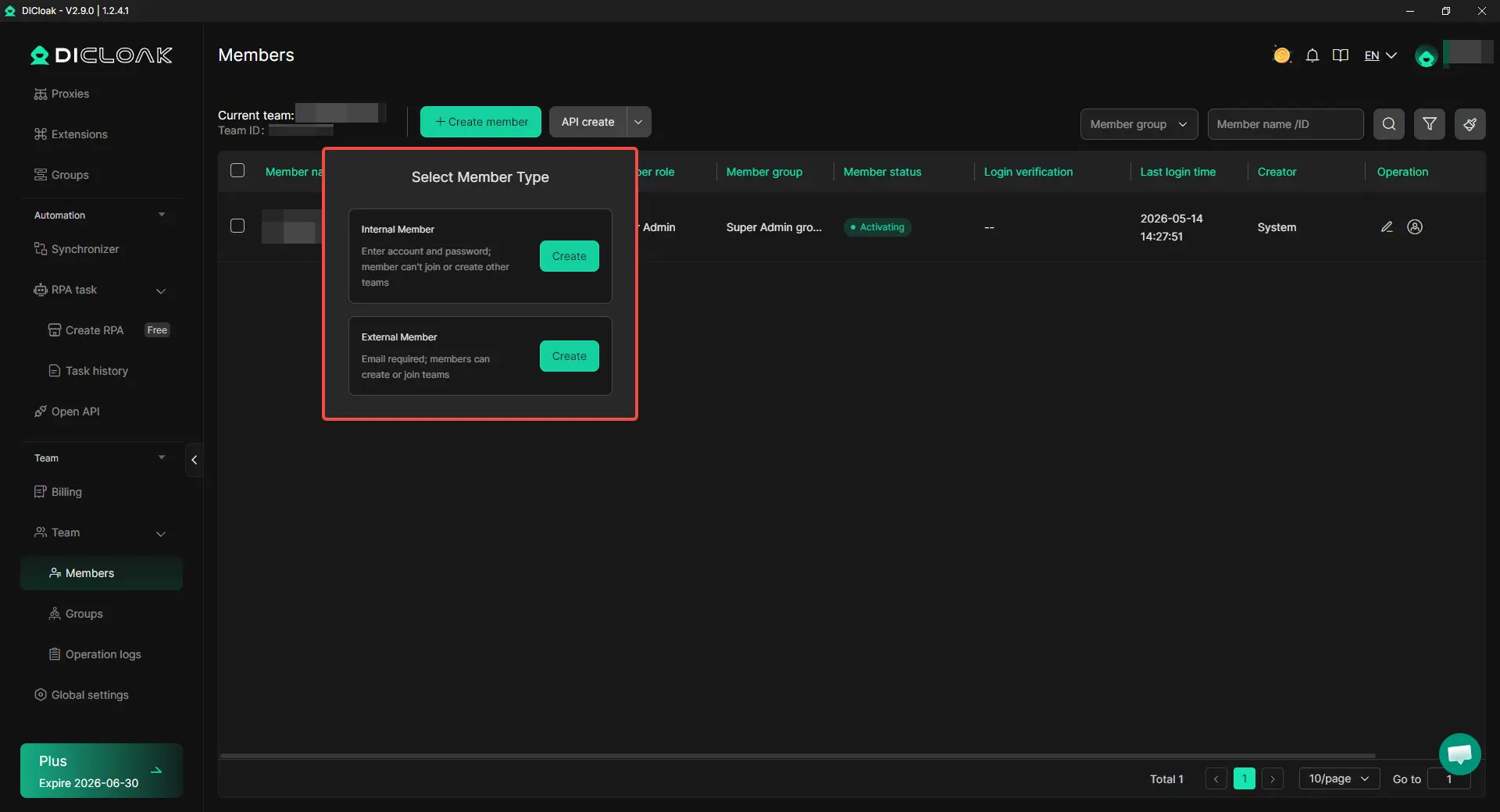
You can use DICloak to run isolated browser profiles, so each account keeps a separate fingerprint. You can bind a different proxy to each profile, which lowers overlap across registrations. For team work, set role-based permissions so only assigned members can open, edit, or export account data. Operation logs give a trace of who performed each step, which helps fix mistakes fast.
A practical setup pattern for teams
Create one profile per account. Assign one owner per profile. Store login, recovery email, and backup code in one shared record. Use temp mail only for low-value or short-life registrations. For long-life accounts, switch to stable inboxes after verification. Use batch actions and RPA for repeat steps like opening signup pages, filling tags, and status labeling. Keep manual edits for recovery settings and security checks.
What Are the Biggest Temp Mail Security Risks and How Can You Reduce Them?
temp mail inboxes are often public or easy to guess. Treat them as exposed channels, not private mailboxes. Never send IDs, reset links, wallet keys, or contract files to a disposable inbox. Use alias-style signups, share the minimum profile data, and separate test accounts from real customer accounts.
Public inbox exposure and accidental data leaks
A common failure is team reuse of one browser profile across multiple signups. You can use DICloak to map one account to one isolated browser profile, so cookies and fingerprints do not mix. Bind one proxy per profile, then lock role permissions so only the right teammate can view credentials. Add operation logs to track who changed what.
Phishing and fake verification links
Attackers copy sender names and host pages on lookalike domains. Check the full sender domain and URL path before any click. Tools like DICloak let you keep risky verification work inside isolated profiles, lowering cross-account damage if one link is malicious.
Recovery risk after inbox expiration
Move important accounts to permanent email right after verification. Turn on backup recovery in Google account recovery options at once.
Temp Mail Alternatives: Which Option Is Better for Long-Term Privacy?
If an account may need password reset, billing checks, or legal notices later, a one-time inbox is a weak choice. Use temp mail for short verification only, then switch to an address model you can control long term.
Email aliases vs disposable inboxes
Aliases forward mail to your real inbox, and you can turn each alias off when spam starts. Disposable inboxes often expire fast and may be blocked by large platforms, which is documented in Wikipedia’s disposable email entry.
| Method |
Keeps long-term access |
Can stop spam later |
Good for recurring logins |
| Disposable inbox |
No |
Limited |
No |
| Email alias |
Yes |
Yes |
Yes |
For subscriptions, newsletters, and repeat logins, aliases give better control without exposing your primary address. You can use Firefox Relay as one practical alias option.
Secondary permanent inbox for low-trust signups
Create one separate mailbox just for risky sites, free trials, and coupon portals. Keep it permanent, not disposable. This gives clean compartmentalization: your main inbox stays private, and recovery still works months later. Recovery access is a core step in Google account recovery guidance.
How to build a simple privacy stack
Use this stack in order: alias or secondary inbox, unique password per site, then app-based 2FA. For account separation across projects, pair stable email identity with proxies and isolated browser profiles so sessions do not mix. If you handle shared accounts, you can use tools like DICloak to separate profiles and control team access logs.
Frequently Asked Questions
Is temp mail legal to use?
Yes. Using temp mail is usually legal in most places when you want privacy, reduce spam, or test a signup flow. The legal risk starts when someone uses it for fraud, scams, account takeovers, or breaking a platform’s rules. Always check site terms, because policy violations can still lead to bans.
Can temp mail receive password reset emails later?
Usually no. Most temp mail inboxes expire after a short time, and the address may stop working or get reused. If you sign up for an important account, change the email to your permanent inbox right away. Otherwise, you can get locked out when a password reset link is sent later.
Does temp mail hide my identity completely?
No. Temp mail protects your primary inbox, but it does not make you fully anonymous. Websites can still track IP address, browser fingerprint, cookies, device IDs, and login behavior. Your internet provider, employer network, or app platform may also keep logs. For stronger privacy, combine temp mail with broader security steps.
Why do some platforms block temp mail addresses?
Many platforms block disposable domains to reduce abuse, fake trials, bot signups, and spam campaigns. Their filters often include known temp mail domain lists and reputation checks. If blocked, try a more trusted email provider, phone signup, social login, or contact support for manual verification when your use case is legitimate.
Can I send emails from a temporary email address?
Most temp mail services are receive-only, so you can read incoming messages but cannot send replies. A few providers allow limited outbound mail, often with caps, verified recipients, or anti-abuse checks. These limits prevent spam and fraud. If you need regular sending, use a standard mailbox with proper authentication and recovery options.
Temp mail is a practical way to protect your primary inbox, reduce spam, and keep your online signups more private when you only need short-term access. Used thoughtfully, it helps you stay organized and lower exposure to unwanted messages while still completing one-time verifications quickly. Try DICloak For Free
 Web Proxy Tools
 Free Tools
 Cookie Plugin
 UA Generator
 MAC Address Generator
 IP Generator
 IP Address List
 2FA Code Generator
 World Clock
 Anonymous Check
 WebRTC Leak Test
 UUID Generator
 Free Web Proxy Site
 Proxy Checker
 FB Ad Checker
 AI Web Scraping
 Free SMM Tools
 Twitter Shadowban Checker
 Instagram Name Checker
 UTM Generator
 Username Generator
 AI Hashtag Generator
 LinkedIn Headline Generator
 Social Media Image Resizer












-01-v14.png?x-oss-process=image/interlace,1/format,webp/quality,q_75)