Reddit is full of funny, useful, and creative GIFs. Many users see a GIF and want to save it right away. But Reddit does not always make this easy. A reddit gif download can work differently on phones and computers. Some GIFs are not real GIF files at all. This guide will help you understand Reddit GIFs and show you how to download them the right way.
Introduction to Reddit GIF Download
What Are GIFs and Why Download Them?
A GIF is a short, looping image that shows motion without sound. People use GIFs to share reactions, jokes, and quick moments. They are popular because they load fast and clearly show emotion. On Reddit, GIFs often capture funny or useful moments in just a few seconds.
Many users want to save these files for later use. A reddit gif download lets you keep a GIF on your phone or computer. You may want to share it in a chat, post it on social media, or save it as a reference. One thing to know is that some Reddit GIFs are actually short videos. This can change how they are saved, which often confuses new users.
Overview of Reddit as a GIF Source
Reddit is a large platform where users post content in topic-based communities. Many of these communities share GIFs every day. You can find reaction GIFs, tutorials, memes, and short clips across many subreddits.
A reddit gif download is not always direct. On the Reddit app, the save option may not appear. On a web browser, the same GIF may be easier to save. This difference is why many users look for clear steps before downloading. Understanding how Reddit handles GIFs makes the process much easier and helps you avoid common mistakes.
How Reddit Handles Videos, Images, and GIFs
To download GIFs from Reddit without problems, you first need to understand how Reddit stores content. This connects directly to the issues mentioned earlier. Many users try a reddit gif download, but the file does not save as expected. The reason is simple. Reddit treats videos, GIFs, and images in different ways.
1. Videos (MP4 / DASH Format)
Most videos on Reddit are saved as MP4 files. Reddit also uses a system called DASH. This splits video and audio into separate parts. When you click “save video,” you usually get only the video part.
For example, you may see a short clip that looks like a GIF. You try to download it. The file saves as MP4. This is normal. Reddit is showing you a video, not a real GIF. Understanding this helps you avoid confusion during a reddit gif download, especially on desktop browsers.
2. GIFs (Actually MP4 Files)
This is where many users get stuck. On Reddit, most GIFs are not true GIF files. They are short MP4 videos that loop. They look like GIFs, but they act like videos.
Here is a common case. You see a looping reaction GIF in a subreddit. You long-press it on your phone. Instead of a GIF, a video saves to your gallery. This happens because Reddit converts many GIF uploads into MP4 files to save space and load faster.
For a successful reddit gif download, you must first check what the file really is. If it plays like a video with controls, it is an MP4. This detail explains why some downloads fail or save in the wrong format.
3. Images
Images on Reddit are the simplest to handle. These are still files like JPG or PNG. You tap or right-click and save them. There is no looping and no format change.
For example, if a post shows a single frame or a meme image, saving it works the same way on most devices. Images rarely cause problems during a reddit gif download, because they are not animated.
Legal and Safety Considerations
After learning how Reddit stores videos, GIFs, and images, it is also important to know what is safe and allowed. A smooth reddit gif download is not only about the file format. It also involves basic legal and safety rules.
Understanding the Legal Aspects of Downloading GIFs
Most GIFs on Reddit are shared by users, but that does not always mean they are free to use anywhere. In general, downloading a GIF for personal use is usually acceptable. For example, saving a reaction GIF to send to a friend or keep on your device is common.
Problems start when content is reused for commercial purposes. If you download a GIF and repost it on a website, ad page, or product without permission, this may break copyright rules. A simple rule helps here. If the GIF is for personal use, it is usually fine. If it is for public or business use, you should check the source and give credit when possible.
Safety Tips for Downloading GIFs
Safety matters during any reddit gif download. Reddit itself is safe, but risks appear when users move to third-party sites. Some download pages show fake buttons or ask for extra permissions.
A common example is clicking a “Download” button that opens a new tab or asks you to install software. This is a warning sign. The safest method is to download directly from Reddit or use trusted browser actions like right-click or long-press.
If something feels wrong, stop and close the page. Staying cautious helps you download GIFs safely and avoid problems with malware or unwanted files.
Methods for Downloading GIFs from Reddit
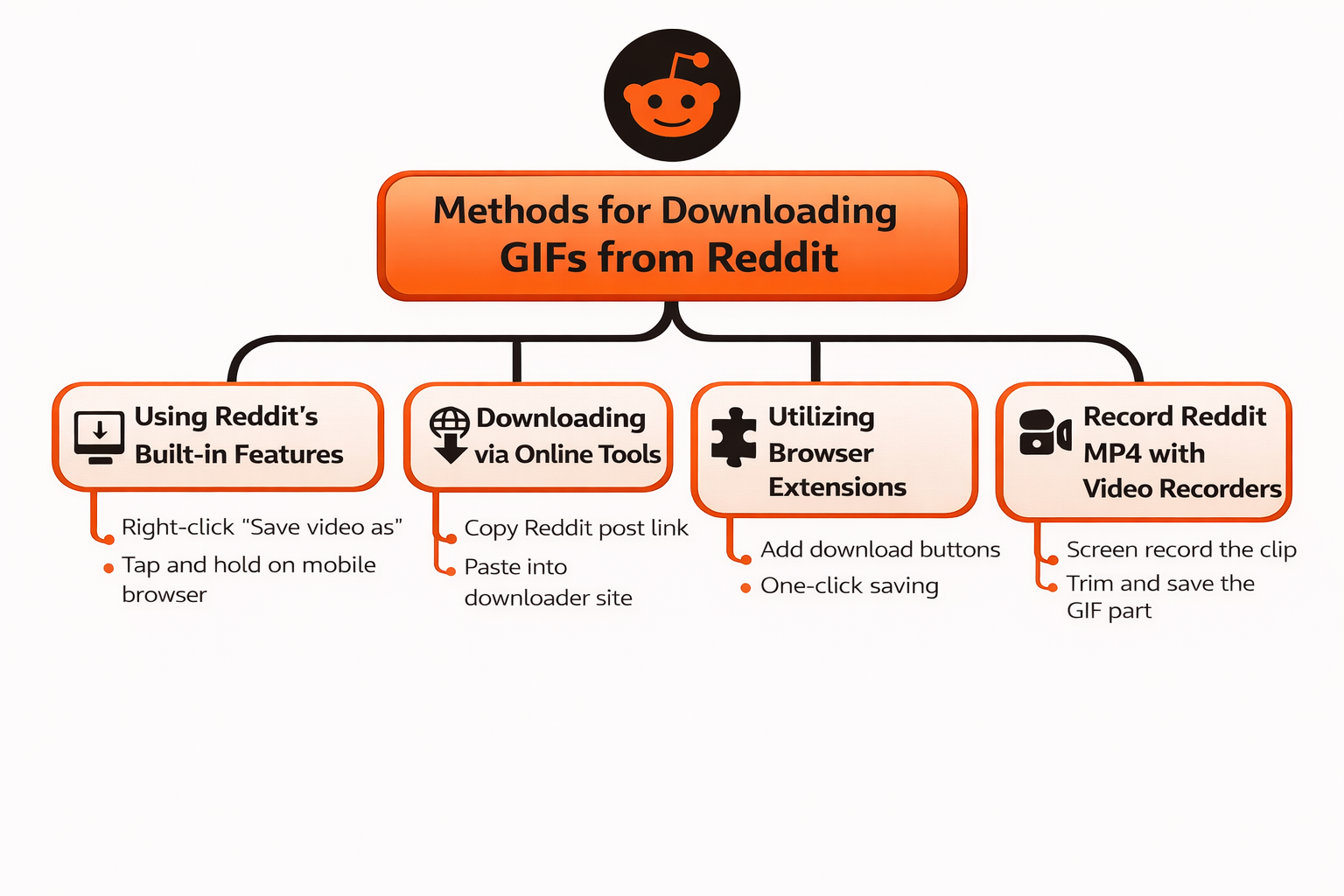
Once you understand the legal and safety rules, you can move to the practical part. This section shows clear and safe ways to complete a reddit gif download. Each method works in different situations, so knowing more than one option is helpful.
Using Reddit’s Built-in Features
Some Reddit posts allow direct saving. On desktop, you can right-click a GIF or looping clip and choose “Save video as.” On mobile browsers, you can tap and hold the content to save it. This works best when Reddit shows the file clearly and does not block saving.
For example, a simple reaction GIF in a browser often saves with no extra steps. This is the safest and fastest reddit gif download method.
Downloading via Online Tools
When direct saving does not work, online tools can help. These tools usually ask you to copy the Reddit post link and paste it into a download box. The tool then prepares the file for download.
A common case is a GIF that saves as an MP4. Online tools can detect the file correctly and let you download it in one click. Always check that the site looks clean and does not ask for logins or software installs.
Utilizing Browser Extensions
Browser extensions are useful for users who download often. These tools add a download button directly to Reddit pages. With one click, you can save GIFs or MP4 files.
For example, if you browse many GIF posts daily, an extension can speed up your reddit gif download process. Make sure the extension comes from a trusted browser store and has good user reviews.
Record Reddit MP4 with Video Recorders
Sometimes downloads fail due to restrictions. In this case, screen recording is a backup option. You can play the GIF or MP4 and record the screen.
This method works well for short clips. After recording, you can trim the video and keep only the GIF part. It is slower, but useful when nothing else works.
Step-by-Step Guides for Different Methods
How to Download GIFs on Desktop
On a computer, open Reddit in a browser. Click the post. If the GIF looks like a video, right-click it and save it as MP4. If it saves correctly, your reddit gif download is done. If not, copy the post link and use an online tool.
Desktop browsers usually offer the most control and best results.
How to Download GIFs on Mobile Devices
On phones, results depend on how you open Reddit. In the app, saving may be limited. In a mobile browser, tap and hold the GIF to save it.
If that fails, copy the post link and open it in a browser tool. Mobile users often face more limits, so having two methods ready makes a reddit gif download much easier.
If you often download many GIFs from Reddit, manual methods can feel slow and repetitive. This is where an antidetect browser like DICloak can help. DICloak lets you open multiple isolated browser profiles at the same time. Each profile acts like a separate device. This setup is useful for batch reddit gif download tasks, especially when you manage many links or threads. It also keeps sessions stable and reduces errors caused by repeated actions in one browser. For users who work with large volumes of Reddit content, this approach is faster, cleaner, and easier to manage.
Why Choose DICloak Antidetect Browsers for Your Downloading?
⚡The DICloak Antidetect Browser has become a global favorite for its unparalleled ability to efficiently and securely manage multiple accounts. Designed for professionals in social media management, and more, DICloak offers powerful features like RPA automation, bulk operations, and a synchronizer. Additionally, it allows you to customize fingerprints and integrate proxies for each profile, ensuring top-level security and operational efficiency. It’s the ultimate tool for seamless, secure, and scalable operations.

What Makes DICloak Stand Out?
✅ Manage 1,000+ Accounts on One Device: Stop wasting money on extra hardware! DICloak allows you to manage multiple accounts on a single device, cutting costs and boosting efficiency.
✅ Guaranteed Account Safety, No Ban Risks: Every account gets its own isolated browser profile with custom fingerprints and IPs, drastically reducing the risk of bans. Your accounts, your control!
✅ Flexible Proxy Configuration for Maximum Performance: Seamlessly integrate with all major proxy protocols (HTTP/HTTPS, SOCKS5) and manage your proxy pool with bulk operations. No more struggling with IP management—DICloak has you covered.
✅ Streamlined Team Collaboration for Better Results: Easily manage your team with advanced tools like profile sharing, permission settings, data isolation, and operation logs. Your team works smarter, not harder.
✅ Automate the Grind with RPA: DICloak's built-in RPA saves you hours of manual work. Automate repetitive tasks, streamline workflows, and focus on what really matters—growing your business.
✅ Powerful Bulk Tools to Scale Your Operations: Create, import, and launch multiple browser profiles in one click. DICloak makes scaling your business as easy as it gets.
✅ Compatible with All Major Operating Systems: Based on the Chrome core, DICloak supports simulating Windows, Mac, iOS, Android, and Linux operating systems. No matter what platform you need, DICloak has you covered.
🔗 Ready to Get Started?
Visit the DICloak website to explore more details and choose the plan that’s right for you. Start for free today and experience the power of secure, efficient, and scalable multi-account management!
Troubleshooting Common Issues with GIF Downloads
Even with the right method, a reddit gif download may not always work as expected. The issues below are common and easy to fix once you know the reason.
GIFs Not Downloading or Saving
This often happens because the GIF is actually an MP4 video. For example, you click save, but nothing appears in your folder. In this case, try saving it as a video or use an online tool that detects the file type. Switching from the Reddit app to a browser also helps.
Video Has No Sound
Many Reddit GIFs have no sound by design. They are meant to loop silently. If you expected audio, the file was likely uploaded as a GIF-style video. This is normal and not an error in your reddit gif download.
Low-Resolution Downloads
Low quality usually comes from preview files. For example, saving a GIF directly from a feed may grab a compressed version. Open the post fully before downloading to get better resolution.
GIF Doesn’t Loop Correctly
If a downloaded GIF plays only once, it is often an MP4 file. Videos do not loop by default. You can fix this by enabling loop playback or converting the file into a true GIF.
Downloads Are Too Slow
Slow downloads often come from busy servers or unstable connections. This is common with large files. Trying again later or using a desktop browser can make a reddit gif download faster and more stable.
FAQs about Reddit GIF Download
Do You Need a Reddit Account to Download GIFs?
No. In most cases, you do not need an account. You can open Reddit posts in a web browser and complete a reddit gif download without logging in. An account is only needed to save posts or interact with content.
Are There Any Costs Associated with Downloading GIFs?
No. Downloading GIFs from Reddit is usually free. Reddit does not charge for saving content. Most basic download methods also cost nothing. Be careful with sites that ask for payment or subscriptions just to download a GIF.
How to Handle Specific Download Scenarios?
If a GIF saves as a video, treat it as an MP4. If saving fails in the app, switch to a browser. For repeated downloads, using a stable setup makes reddit gif download faster and easier. Knowing the file type helps you choose the right method every time.
Conclusion
Downloading GIFs from Reddit can be simple once you know how it works. Understanding file types, choosing the right method, and fixing common issues all help make a reddit gif download smooth and stress-free. For users who download many GIFs, using an antidetect browser can improve stability and efficiency during batch tasks. Reddit offers many creative GIFs that are fun to save and share. Use them for personal enjoyment, respect the original creators, and share responsibly.
 Web Proxy Tools
 Free Tools
 Cookie Plugin
 UA Generator
 MAC Address Generator
 IP Generator
 IP Address List
 2FA Code Generator
 World Clock
 Anonymous Check
 WebRTC Leak Test
 UUID Generator
 Free Web Proxy Site
 Proxy Checker
 FB Ad Checker
 AI Web Scraping
 Free SMM Tools
 Twitter Shadowban Checker
 Instagram Name Checker
 UTM Generator
 Username Generator
 AI Hashtag Generator
 LinkedIn Headline Generator
 Social Media Image Resizer