A single ad campaign on Roblox can burn through 10,000 Robux in hours, yet still leave developers wondering why those clicks don’t turn into cash. That’s the reality for most people chasing roblox advertising monetization, lots of traffic, low revenue, and no clear idea what actually works. Roblox’s ad system doesn’t promise real earnings just because your game gets seen. Most new devs find out the hard way that spending more on sponsored slots doesn’t guarantee a payout, and even viral plays often hit a wall when it’s time to turn visits into real money.
The bigger trap? Believing that better graphics or catchy thumbnails are enough. In practice, payout rates depend on what players do after clicking, whether they buy passes, stick around, or actually engage with your game’s economy. The Roblox developer forum is full of stories where ad spend outpaced monetization by 3:1 or worse. Without a smart workflow for tracking spend, filtering bot clicks, and understanding payout rules, it’s easy to burn through your balance and end up with nothing to cash out.
This guide breaks down what most tutorials miss: the real risks, the steps that matter, and smarter ways to actually earn from ads instead of just funding platform traffic. Here’s where things usually go wrong, and what the top developers do differently.
What Roblox Advertising Monetization Really Means for Creators
Roblox advertising monetization is about turning game traffic, players who see and interact with your ads, into real cash for developers. It’s not just about putting up banners and hoping for payouts. Instead, it ties your game’s reach to how well you convert visitors into active, paying users. Many creators think just getting clicks is enough, but what matters is whether those clicks lead to in-game actions that pay out.
How Roblox Ads Generate Revenue
Roblox supports several ad formats: banners (image ads shown in the games list), video ads that play before or during gameplay, and rewarded ads where players watch a video or try an offer for in-game perks. Each format pays out differently. For banners and videos, you earn based on impressions (how many times your ad is shown) and engagement (such as clicks or time spent). Rewarded ads track how many players complete the action, like watching the full video or installing an app.
Earnings flow into your developer account when players engage in ways Roblox counts as valuable. For example, if your ad brings in a player who buys a game pass, you get a share of that sale. The real challenge is that not every view or click pays the same, sometimes bot traffic can drain your ad budget without real players spending money.
Who Can Monetize with Roblox Ads
Not every creator can join Roblox advertising monetization right away. Your account must be in good standing and meet age and verification rules. Some experiences, such as gambling-style games or those that break Roblox’s content rules, are excluded from running ads or earning payouts. You’ll find the latest eligibility details on the Roblox Creator Hub. If your game qualifies, you can start showing ads and track performance through your dashboard.
What to Check Before Enabling Ads in Your Roblox Experience
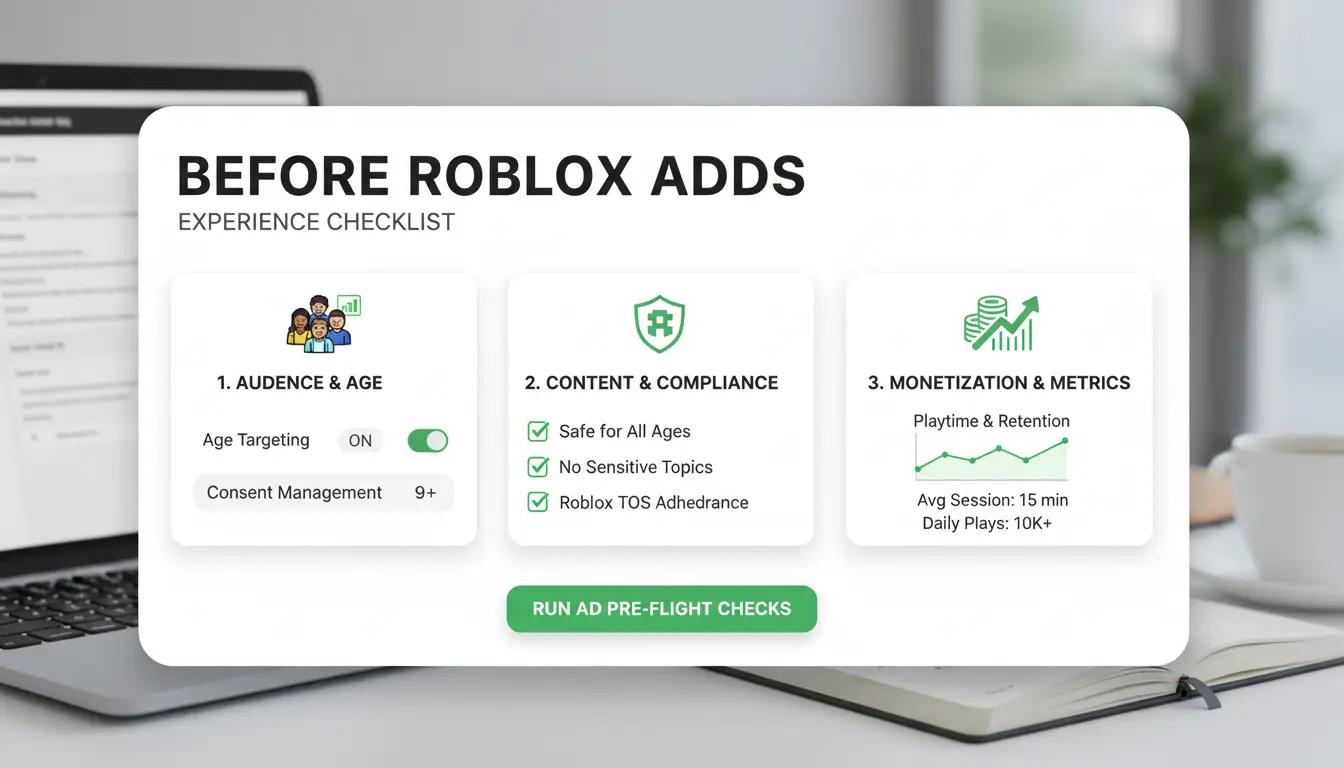
Getting roblox advertising monetization right means you need to clear some critical hurdles before switching on ads. Skipping these steps is the fastest way to lose time, or worse, lose payout access.
Minimum Eligibility and Content Guidelines
Roblox doesn’t show ads in every experience by default. Your game must meet the platform’s minimum requirements, which usually include a working monetization model and a stable player base. For most ad networks on Roblox, you’ll need at least 100 daily active users (DAU) to even be considered. Content guidelines are strict: anything flagged for mature content, copyright issues, or unsafe gameplay will get blocked. Read the Roblox Community Standards carefully, one missed rule can take your whole game off the ad network.
Common Pitfalls That Block Monetization
A polished game can still get rejected if your ads show up in the wrong context. Many creators lose roblox advertising monetization for simple mistakes: adding ads to games that target young children, using copyrighted audio, or slipping in unapproved links. Policy violations often mean lost revenue, not just a warning. When a game gets flagged, payouts freeze and it can take weeks to appeal. Missing the fine print can cost you all your ad income.
Technical Setup Mistakes to Avoid
Enabling ads is not just flipping a switch. Developers often forget to enable ad inventory in the settings, or they place ad units where players rarely see them. Test your ad placements with real users, ads that show up during loading screens or in hidden menus won’t get clicks. Always double-check your setup before launch.
Why Some Roblox Ads Earn More Than Others: Key Factors That Impact Revenue
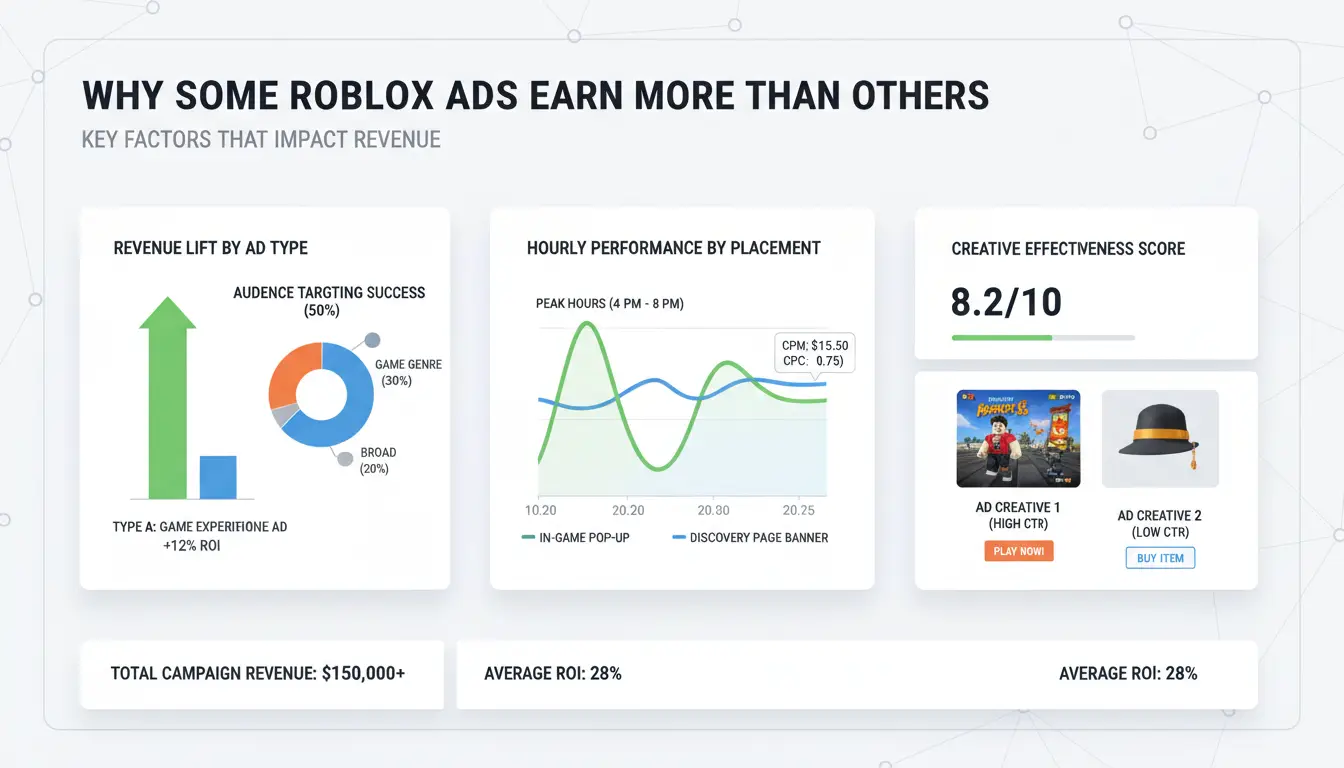
Not every Roblox ad pays out the same. The gap comes down to choices about ad format, who sees your game, and when you run campaigns. Miss on any one of these, and your roblox advertising monetization can stall, even if you spend as much as top earners.
How Ad Format and Placement Affect Earnings
Where and how your ad shows up matters more than most realize. Rewarded video ads, for example, pay out when players willingly watch them to get in-game perks. These tend to have higher completion rates and better payouts than static banners or homepage slots, which many users ignore.
| Ad Format |
Typical Payout |
User Engagement |
| Rewarded Video |
Higher |
High (users opt-in) |
| Banner |
Lower |
Low |
| Homepage Slot |
Medium |
Varies |
Players are much more likely to finish a rewarded video than click on a banner. That difference directly affects your earnings per view. Placement also counts, a banner buried on a busy page won’t drive the same results as a video ad at a reward checkpoint. Roblox’s own ad guide covers these tradeoffs.
The Role of Audience Size and Geography
A game with 2,000 daily users will never out-earn one with 200,000, even if both use the same ads. But it’s not just about size. Where your players live changes the value of each impression. Advertisers often pay more for users in the US, UK, or Canada.
This means two games with the same audience size can see different roblox advertising monetization results, simply because of geography. The Roblox developer forums have threads showing payouts from US traffic at almost double those from less targeted regions.
Seasonal Trends and Advertiser Demand
Ad rates do not stay flat year-round. Holidays, school breaks, and platform events bring more advertisers and higher rates. Earnings often spike during December or summer vacation. Planning your ad pushes to match these periods can make a real difference. Developers who track demand cycles, rather than just running ads on autopilot, see the biggest jumps in revenue. 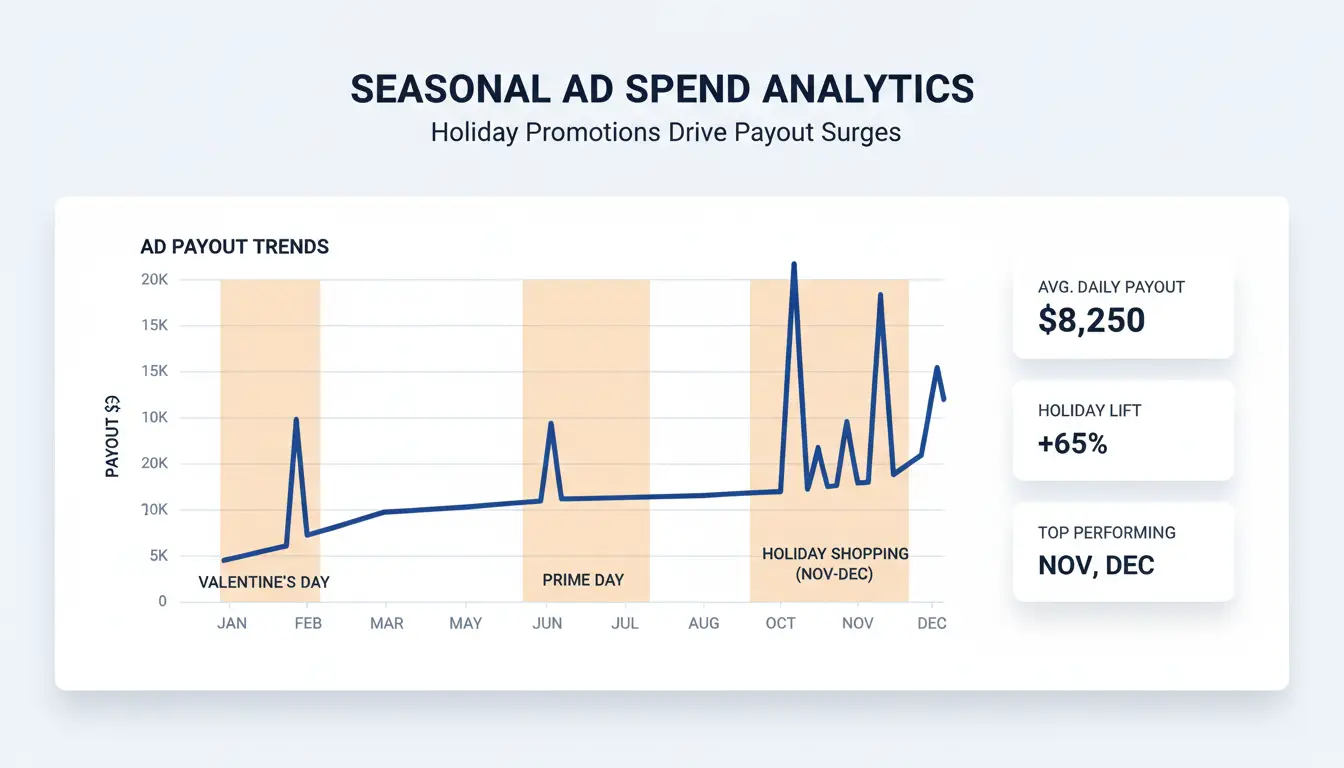
How to Set Up and improve Roblox Ads Without Getting Restricted
Getting roblox advertising monetization right means more than turning on ads and hoping for payouts. Restrictions often hit when you skip setup details, push ads too aggressively, or ignore warning signs in your analytics. Here’s how top developers handle setup, placement, and tracking, without risking a ban or burning ad spend.
Step-by-Step: Enabling Ads in Roblox Studio
Start in Roblox Studio. Open your game, then click “Home” and look for “Monetization.” Under “Ad Settings,” you’ll see options for “Sponsored Games,” “Video Ads,” and “Banner Ads.” Pick the format that fits your audience, sponsored game ads reach players in the Discover page, while banners appear in-game. Save changes and publish. Always double-check that your ads follow Roblox’s Community Standards to avoid instant restrictions.
Best Practices for Ad Placement and User Experience
Putting ads everywhere might boost short-term clicks but usually hurts roblox advertising monetization. Top games place banners where players can see them but not where they interrupt gameplay, like lobbies, not action zones. Never force players to click ads to continue. Spammy placements trigger user complaints and fast takedowns. Test placements on real users and adjust based on feedback.
How to Monitor Performance and Spot Issues Early
Don’t wait for a ban to find out something’s wrong. Check your Developer Stats panel every day, look for sudden drops in “Impressions,” “CTR” (click-through rate), or “Revenue.” A quick fall often means Roblox flagged your ads. Watch for bot traffic spikes; these can kill payouts. If you spot a problem, pause ads and review your setup. Catching problems early gives you a real shot at fixing issues before you lose your monetization.
Common Mistakes That Get Roblox Ad Monetization Restricted or Banned
Roblox advertising monetization can disappear fast if you fall into certain traps. Most restrictions aren’t random, they come from a handful of mistakes that plenty of devs repeat. Knowing what triggers bans is the only way to keep your ad revenue steady.
Violating Roblox Ad Policies
Content rules are strict. Ads showing gambling, scams, or real-money offers get flagged quickly. Even a joke reference to “free Robux” can get you blocked. Moderators use both reports and automated tools to scan for banned words or images. If your ad or game links to offsite offers or sneaks in prohibited content, you risk a takedown. The Roblox Community Standards spell out what’s off-limits, miss a detail, and your whole monetization flow can go offline without warning.
Using Multiple Accounts or Devices Unsafely
Some try to boost ad reach by running several accounts or working with friends, but this often backfires. Roblox tracks device fingerprints, IP addresses, and login patterns. If it spots two accounts logging in from the same phone or computer, or sees a network of accounts sharing the same proxy, you’ll likely get flagged for manipulation. Linking accounts, even just for payouts, can cause all related accounts to lose access. The fastest way to get banned is ignoring how tightly Roblox watches for overlap.
Automation and Botting Risks
Automated scripts that click your ads or fake engagement are easy for Roblox to spot. If player actions look too fast, repetitive, or follow unnatural patterns, detection systems step in. Even tools that just schedule ad runs can look suspicious if not used carefully. Instead, stick to organic traffic and review the Roblox developer guidelines to see what’s allowed. Trying to game the system almost always leads to lost monetization rights.
How Teams and Power Users Can Manage Multiple Monetized Roblox Accounts Safely (with DICloak)
Why Multi-Account Management Gets Risky Fast
Running multiple Roblox ad accounts brings fast bans if accounts share the same IP, browser fingerprint, or device signals. Roblox’s system will spot when accounts overlap, even if you swap browsers or clear cookies. For teams, the risk doubles: one person logs in from the wrong place, and every connected account could go down.
How DICloak Reduces Risk and Boosts Efficiency
You can use tools like DICloak to give each Roblox account its own isolated browser profile and unique proxy. This means device and IP overlap, one of the biggest ban triggers, never happens. Team permission controls let you share access without sharing passwords, cutting down on mistakes and keeping monetization compliant. Bulk automation helps serious groups run ads, cash out, or test creatives much faster.
Practical Workflow: Setting Up DICloak for Roblox Ad Operations
A practical setup: create a profile for each account, assign its proxy, then share access with teammates. DICloak handles profile syncing and logs actions for review. This lets teams focus on roblox advertising monetization instead of fighting restrictions.
When Roblox Ad Monetization Isn’t the Best Option: Alternatives and Smarter Strategies
Not every game earns well from ads alone. Some genres, like story-driven or complex games, see better results with other income methods. Before sinking more Robux into ads, compare what you actually get from each approach. A smart mix keeps your earnings steady even if ad payouts drop or rules change.
Comparing Ad Revenue to Other Roblox Monetization Methods
Roblox offers a few main ways to earn: ads, game passes (one-time unlocks), developer products (repeat buys), and premium payouts (for playtime from Roblox Premium users). Here’s how they stack up:
| Method |
Upfront Cost |
Ongoing Income |
Works for All Games? |
Risk of User Pushback |
| Ads |
High |
Unstable |
No |
Low |
| Game Passes |
Low |
Medium |
Yes |
Medium |
| Dev Products |
Low |
High (if used) |
Yes |
Medium |
| Premium Payouts |
None |
Variable |
No |
None |
Source: Roblox Creator Documentation
Ads drive exposure but don’t always convert to sales. Game passes and dev products reward players who want more, while premium payouts depend on how long Premium users play your game.
When to Prioritize User Experience Over Ads
Heavy ad placement can annoy players. Sometimes, forcing more ads reduces playtime or causes users to quit early. If you notice falling retention or poor reviews after adding ads, it’s a signal to slow down and focus on your game’s core experience. Growth often comes from players who recommend your game, not those who just click ads.
Building a Sustainable Monetization Mix
Relying on one income stream is risky, smart developers spread out how they earn. Mix ads with game passes, dev products, and premium payouts. Track which method brings in the most Robux each month. Adjust your strategy as player behavior and platform rules shift. This way, your Roblox advertising monetization plan can survive sudden changes and keep paying out even if one source dries up.
Frequently Asked Questions
How much can you earn from Roblox advertising monetization?
Earnings from Roblox advertising monetization change based on your daily active users (DAU), ad formats you use, player location, and how much users interact with ads. Most creators see different results. Some games with high DAU and strong engagement may earn hundreds of dollars monthly, while smaller games earn less. Payouts can also shift if Roblox changes ad policies.
Is Roblox ad monetization available to all developers?
No, Roblox advertising monetization is not open to everyone. You must meet certain requirements like a minimum DAU (often around 1,000 or more). Your content must follow Roblox’s rules and community standards. If your game breaks policies or has low engagement, you may become ineligible for ad monetization features.
What are the main risks of Roblox advertising monetization?
Major risks include getting your account banned, ads being restricted, or losing revenue because of policy violations or technical issues. Roblox closely reviews games for ad compliance. If your game shows restricted content or uses unauthorized ad formats, you could lose monetization access or face account penalties.
Can you use proxies or tools to manage multiple Roblox ad accounts?
Yes, you can use proxies and tools to handle several Roblox ad accounts, but you must avoid getting detected. Tools like DICloak help mask your identity and prevent account linking. However, breaking Roblox’s terms can still lead to bans or lost monetization, so use these tools carefully.
How do you know if your Roblox ads are performing well?
Check your Roblox advertising monetization dashboard for stats like impressions, clicks, and revenue. Strong ad performance shows high engagement and steady income. Watch for sudden drops or restrictions, which may signal policy problems or technical errors. Tracking these numbers helps you spot and fix issues quickly.
Roblox advertising monetization offers creators and brands unique opportunities to engage with a vast user base while generating revenue within the platform's dynamic ecosystem. By leveraging targeted ad placements and in-game promotions, developers can improve player experiences and unlock new income streams. Try DICloak For Free
 Web Proxy Tools
 Free Tools
 Cookie Plugin
 UA Generator
 MAC Address Generator
 IP Generator
 IP Address List
 2FA Code Generator
 World Clock
 Anonymous Check
 WebRTC Leak Test
 UUID Generator
 Free Web Proxy Site
 Proxy Checker
 FB Ad Checker
 AI Web Scraping
 Free SMM Tools
 Twitter Shadowban Checker
 Instagram Name Checker
 UTM Generator
 Username Generator
 AI Hashtag Generator
 LinkedIn Headline Generator
 Social Media Image Resizer