Proxyium is a free web proxy that works right in your browser. You do not need to install software or change system settings. You paste in a URL, and Proxyium loads the site through its own server instead of connecting directly from your device. Its main appeal is simple: quick access to blocked websites and basic IP masking for casual browsing.
But that does not mean Proxyium is the right tool for every job. It can be useful for fast, no-install browsing, yet free web proxies also come with limits around speed, stability, and sensitive account use. In this guide, you will learn what Proxyium is, how it works, where it helps most, and when you may need something more robust.

What Is Proxyium?
Proxyium is a free web proxy that works inside your browser. You open the site, paste in a web address, and Proxyium loads that page through its own server instead of connecting straight from your device. Its official site describes it as a free web proxy for browsing popular websites, and recent reviews also describe proxiyum as a browser-based tool for quick access to blocked pages without installing software.
What Proxyium does in simple terms
In simple terms, proxiyum acts like a middle step between you and the site you want to open. For example, if a school or office network blocks a page, the proxiyum service may still load that page for you through its own web interface. This is why people often use it for fast, casual browsing rather than for sensitive work. Several recent reviews describe Proxyium as useful for quick unblocking and basic IP masking, especially when users do not want to install anything.
How Proxyium works inside your browser
The process is simple. You type a URL into Proxyium, the request goes to Proxyium’s server, and that server fetches the page for you. The website sees the proxy server’s connection instead of your direct one. Proxyium’s own site says traffic is encrypted while browsing, and third-party reviews explain that it hides your real IP by routing browser traffic through its servers. That setup is what makes the proxiyum easy to use on both desktop and mobile.
Why people search for Proxyium in 2026
Most people search for proxiyum because they want something quick and simple. They may be trying to open a blocked site, hide their local IP during casual browsing, or avoid downloading extra software. But people also search for it because they want to know whether it is safe and whether a free web proxy is enough for daily use. Recent 2026 reviews make that point clearly: Proxyium is easy to start with, but it may not be the best fit for sensitive logins, long sessions, or heavier workflows.
What Can Proxyium Be Used For?
Now that the basic idea is clear, the next question is simple: what is proxiyum actually good for? In most cases, Proxyium is used for quick browser-based access, not for heavy or sensitive work. Its official site says users can paste a URL and browse restricted websites through the proxy, and recent reviews describe the proxiyum as most useful for fast, casual tasks.
Using Proxyium to open blocked websites
One of the main reasons people use proxiyum is to open blocked websites. For example, if a school, office, or local network blocks a news site or social platform, Proxyium may still load it through its own browser interface. Proxyium’s site openly markets this use case and says users can surf restricted websites by pasting in the address.
When Proxyium works well for casual browsing
Proxiyum works best for casual browsing when the goal is simple: check a page, read something quickly, or reach a blocked site without installing software. Recent reviews describe Proxyium as a good fit for light, low-risk use, especially when people want quick access and basic IP masking. A simple example is opening a blocked article or checking a public webpage on a restricted network.
Why Proxyium is popular for quick no-install access
A big reason the proxiyum stays popular is convenience. You do not need an app, an extension, or even an account to start. You open the site, paste the link, and try the page. That makes it appealing for people who want fast access with very little setup. Several recent reviews point to this no-install, no-account flow as one of Proxyium’s biggest strengths in 2026.
Is Proxyium Safe to Use?
After looking at what proxiyum is good for, the next question is safety. The short answer is: it can be fine for simple, low-risk browsing, but it is not a tool you should trust for everything. Proxyium says it encrypts traffic while you browse and routes requests through its own servers, which can help hide your local IP from the site you open. But recent reviews also note that the proxiyum does not hide every signal a site can use to track you, especially outside basic IP masking.
What Proxyium may hide and what it does not
Proxiyum may hide your direct IP address from the website you visit because the request goes through the proxy server first. That can help with quick access to blocked sites and basic casual privacy. But it does not mean full anonymity. Recent reviews point out that while Proxyium hides IPs, it does not mask things like browser fingerprints or behavior patterns, which can still matter on many websites.
Common risks of using a free web proxy
The biggest risks are simple. Free web proxies can be slower, less stable, and less suitable for sensitive logins or personal data. One recent review says Proxyium is reasonably safe for low-stakes browsing, but not a good choice for accounts involving personal or financial information. Other reviews also describe free web proxies like the proxiyum as better for temporary, casual use than for anything serious.
When Proxyium is fine, and when it is not enough
For example, proxiyum can be fine if you just want to read a blocked article, open a public page, or watch a quick video on a restricted network. But it is usually not enough for sensitive accounts, long sessions, or work that needs stronger control and consistency. Several recent reviews describe Proxyium as best for quick, low-risk access, not for heavier or high-trust browsing tasks.
How to Use Proxyium Effectively
If Proxyium sounds like the right fit so far, the next step is using it the right way. The good news is that proxiyum is simple to start with. The bigger challenge is knowing what to expect, especially when pages load slowly or behave differently than they do in a normal browser session. Proxyium’s official site and recent reviews both describe it as a no-install web proxy that works through a browser on desktop and mobile.
How to start using Proxyium
To start, open the Proxyium website, find the URL box, and paste in the page you want to visit. Then Proxyium loads that site through its own server instead of connecting directly from your device. The official site says the process is meant to be quick and simple, with no software install required. A practical example is opening a blocked news page or social site on a school or office network without changing browser settings.
Tips for smoother browsing and fewer loading issues
For better results, keep your expectations realistic. The proxiyum works best for lighter browsing, not heavy or sensitive tasks. If a page loads slowly, try a simpler site first, reload the page, or test whether the target site is blocking proxy traffic. Recent reviews note that free web proxies can become overloaded, and some sites may refuse to work well through them. That means loading problems are not always your fault. Sometimes the server is busy, and sometimes the target website is blocking proxy-based access.
What to expect on desktop and mobile
One reason proxiyum stays popular is that it works in both desktop and mobile browsers. Recent reviews say you can use it in a normal browser without extra apps, which makes it convenient when you need quick access on different devices. Still, mobile browsing may feel less stable on larger or more complex pages, simply because web proxies depend on the browser session and server response. So for fast checks, public pages, and casual browsing, both desktop and mobile can work well. For longer sessions or more demanding sites, desktop usually feels easier to manage.
Proxyium vs Other Proxy-Based Privacy Tools
Now that the setup is clear, it helps to see where proxiyum fits in the bigger picture. Not all proxy-based tools work the same way. Some are built for quick browser access. Others are made for deeper control, fixed proxy settings, or repeated workflows. Proxyium’s official site presents it as a free web proxy that runs in the browser, which already tells you a lot about where it fits best.
How Proxyium differs from standard proxy services
Proxiyum is simpler than a standard proxy service because it works through a web page, not through system or browser-level proxy settings. You do not need to import an IP, enter a port, or configure a profile. You just open the Proxyium site and load the target page there. That makes it easier for beginners, but it also gives you less control than tools built around full proxy configuration. Recent reviews describe Proxyium as a lightweight browser proxy, while standard proxy services are usually meant for wider connection control or repeated use.
Which situations favor Proxyium over other proxy tools
The proxiyum makes more sense when speed of setup matters more than depth of control. For example, if you just want to open a blocked article, check a public site on a restricted network, or do a quick browse without installing anything, Proxyium is often the easier option. Reviews in 2026 still highlight that kind of no-install access as one of its main strengths.
When a simple web proxy is enough for the job
A simple web proxy is enough when the task is light, public, and short. Reading a blocked page, opening a public forum, or doing a quick search are all normal examples. But if the work involves sensitive accounts, long sessions, or more stable repeated use, proxiyum may feel too limited. Several recent reviews make the same point: Proxyium is useful for casual browsing, but it is not built for every privacy or workflow need.
Common Limits and Problems with Proxyium
After learning where proxiyum works best, it is just as important to understand where it falls short. Proxyium is simple and convenient, but that does not mean it works smoothly on every site or for every task. Most free web proxies have limits around compatibility, speed, and trust. Recent reviews of the proxiyum make that clear too.
Why some websites still do not work well with Proxyium
Some websites do not work well with proxiyum because they detect or limit proxy traffic. Others use scripts, logins, or page features that do not load properly through a browser-based proxy. This is one reason a blocked site may open halfway, show errors, or fail after login. Recent reviews note that some sites still block Proxyium or work poorly through free web proxy tools.
Why speed and stability can vary
Speed can vary because free web proxies depend on shared servers and changing traffic levels. If too many people use the service at once, pages may load slowly or stop responding. Reviews also point out that stability is one of the main trade-offs with free browser-based proxy tools. In simple terms, the proxiyum may feel smooth on one page and much slower on the next.
Why free web proxies are not ideal for sensitive tasks
Free web proxies are usually not the best choice for sensitive work. That includes important logins, financial activity, private messages, or anything that needs strong trust and stable access. Several recent reviews say proxiyum is better for light browsing than for accounts or personal data. A simple rule helps here: if the page matters a lot, a free web proxy is probably not the place to use it.
Is Proxyium Good for Serious or Business Use?
After looking at its limits, the short answer is this: proxiyum is usually better for light personal browsing than for serious or business work. It is fast to open, easy to try, and useful when you just need quick access to a public site. But most recent reviews describe Proxyium as a casual-use tool, not a full setup for long sessions, sensitive work, or larger workflows.
When Proxyium is enough for personal use
For personal use, proxiyum can be enough when the task is simple. Good examples are opening a blocked article, checking a public forum, or loading a page on a restricted network without installing extra software. Recent reviews keep pointing to this same strength: quick, no-install access for low-risk browsing.
Why Proxyium may fall short for multi-account or repeated workflows
The problem starts when the work becomes heavier or more repetitive. A free browser proxy like the proxiyum is not built for clean session control, repeated account work, or stable long-term use across many tasks. Reviews in 2026 still describe Proxyium as better for quick browsing than for structured workflows that need more control and consistency.
What users usually need when Proxyium stops being enough
When Proxyium stops being enough, users usually need more control, not just another quick unblock tool. That can mean cleaner session separation, more stable proxy handling, better support for repeated work, or a browser profile built for managing multiple tasks more clearly. In practice, proxiyum is useful at the simple end of the spectrum. Once the workflow grows, people usually start looking for tools with stronger profile and session management.
When a Managed Browser Environment Helps More Than a Free Web Proxy
Why DICloak is not the same as Proxyium
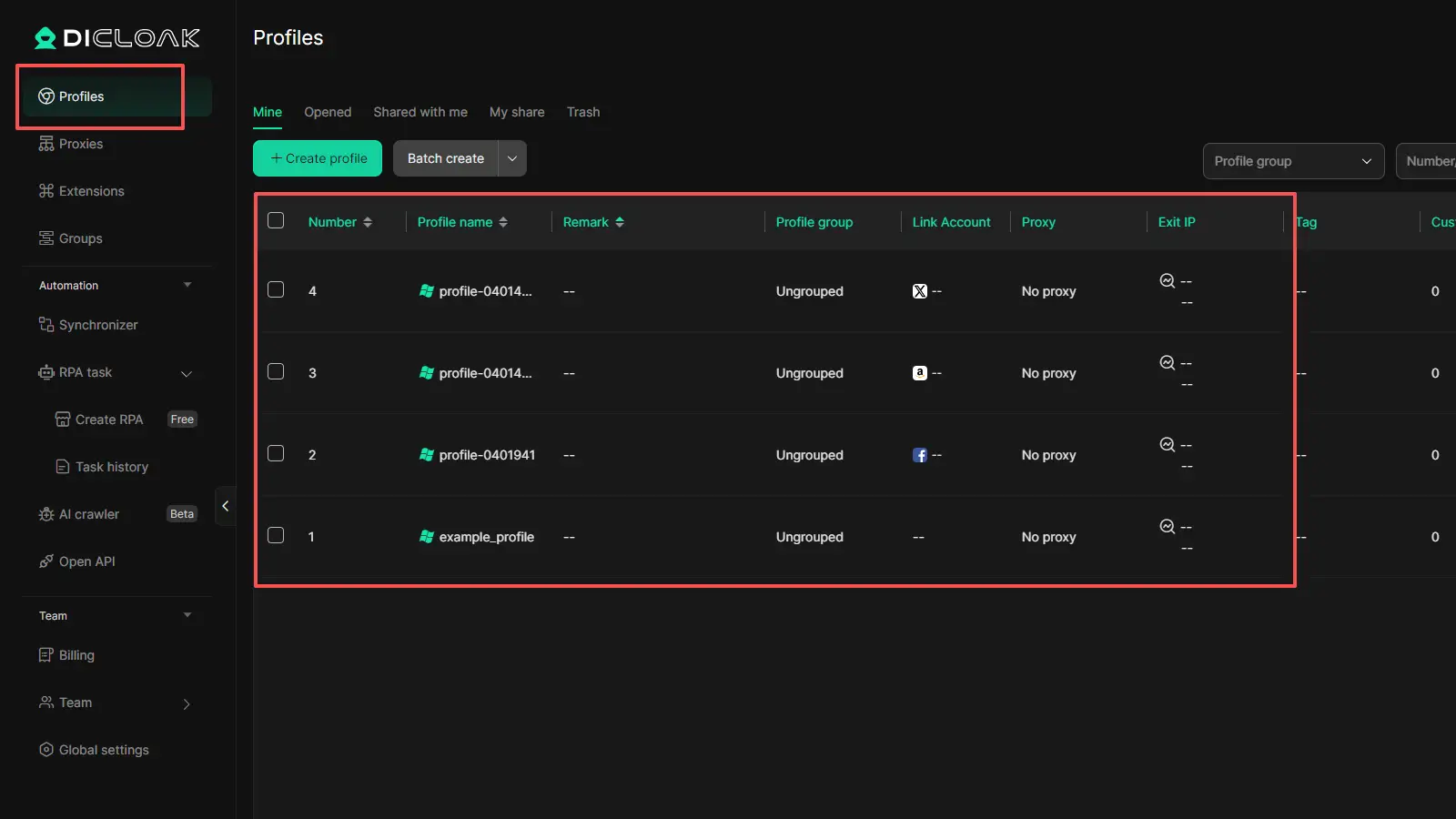
DICloak is not another simple web proxy. Proxyium is mainly for quick browser-based access. DICloak is an antidetect browser built for people who need more control. It focuses on isolated browser profiles, customizable fingerprints, proxy integration, and larger multi-account workflows.

How DICloak helps when Proxyium stops being enough
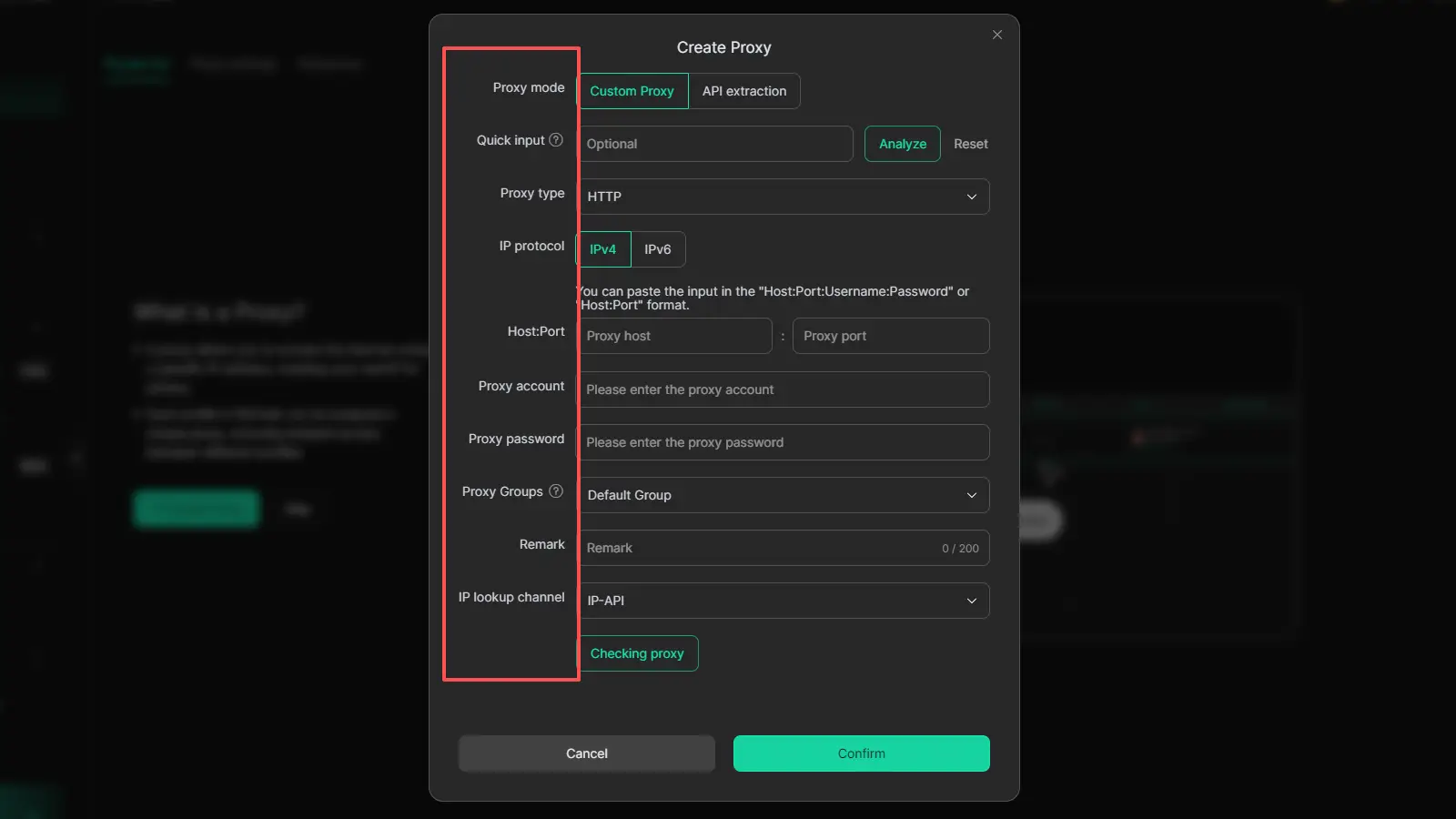
When the job becomes more than casual browsing, DICloak gives you tools that a free web proxy does not:
- Isolated browser profiles to keep sessions separate and reduce account overlap
- Flexible proxy setup with support for major proxy types and bulk proxy management
- Built-in tools like RPA, bulk operations, and a synchronizer to make repeated tasks easier
When DICloak makes the most sense
DICloak fits better when you manage many accounts or work in more structured setups, such as:
It also supports team features like profile sharing, permission settings, data isolation, and operation logs, so it works better when the real need is stability, separation, and scale, not just quick access to one blocked page.
FAQs about Proxiyum
Q1: What is Proxiyum?
Proxiyum is a free web proxy that works inside your browser. It helps users open websites through a proxy page instead of connecting to them directly from their device. People usually use Proxiyum for quick access to blocked websites or simple casual browsing without installing extra software.
Q2: Is Proxiyum safe to use for everyday browsing?
Proxiyum can be fine for light, low-risk browsing, such as reading public pages or opening blocked websites on a restricted network. But it is usually not the best choice for sensitive tasks, personal accounts, or anything that involves important private data. Like many free web proxies, it is better for simple browsing than for high-trust use.
Q3: How does Proxiyum work?
Proxiyum works by loading a website through its own proxy server. Instead of the target site seeing your direct connection, it sees the proxy server’s connection. That is why Proxiyum can help hide your local IP from the site you visit and make blocked websites easier to open in some cases.
Q4: Is Proxiyum good for long-term or business use?
In most cases, Proxiyum is better for personal, short-term use than for serious or business workflows. It is useful for quick no-install access, but it may fall short when users need stable sessions, multi-account work, or stronger control over browsing environments.
Q5: Why does Proxiyum sometimes not work well on certain websites?
Proxiyum may not work well on some websites because free web proxies can be blocked, limited, or slowed down by the target site. Some pages also use scripts, logins, or protections that do not work smoothly through a browser-based proxy. That is why Proxiyum can feel fast and easy on one site but unstable on another.
Conclusion
Proxiyum is a simple tool for quick browser-based access in 2026. It works well when you need to open a blocked website, browse casually, or avoid installing extra software. But like many free web proxies, it also has clear limits. Speed can vary, some websites may not work well, and it is usually not the best choice for sensitive tasks or larger workflows. The main value of Proxiyum is convenience. If that is all you need, it can be useful. If your work needs more control, stability, or session management, then a more advanced setup may make more sense.
 Web Proxy Tools
 Free Tools
 Cookie Plugin
 UA Generator
 MAC Address Generator
 IP Generator
 IP Address List
 2FA Code Generator
 World Clock
 Anonymous Check
 WebRTC Leak Test
 UUID Generator
 Free Web Proxy Site
 Proxy Checker
 FB Ad Checker
 AI Web Scraping
 Free SMM Tools
 Twitter Shadowban Checker
 Instagram Name Checker
 UTM Generator
 Username Generator
 AI Hashtag Generator
 LinkedIn Headline Generator
 Social Media Image Resizer