Many people think it is easy to leave a review on Google, but to leave a review on Google safely is often more complex than it appears. Google does not evaluate a review by text alone. It also looks at account trust, device signals, browser setup, IP consistency, and behavior patterns over time. Because of this, attempts to leave a review on Google can sometimes result in filtering, delays, or removal when the account environment appears unusual or low-trust. For users and teams that need to leave a review on Google in a more stable and controlled way, it is important to understand how Google review trust works and what affects long-term account reputation. This guide explains how to leave a review on Google more safely, what can affect whether a review stays visible, and how a stable technical setup can support better reputation management.
The Importance of Leaving A Reviews On Google
Google reviews have evolved from simple feedback mechanisms into critical infrastructure for digital growth. Whether you are scaling affiliate marketing or managing a network of social media assets, your Google identity is the foundation. However, Google does not evaluate reviews in a vacuum; it calculates a "Trust Score" for every account based on its underlying environmental data.
In the current landscape, the security protocols governing Google accounts have shifted from basic login/logout monitoring to advanced behavioral analysis and statistical identifiability. To successfully leave a review on Google without triggering filters, an analyst must understand that the platform is no longer just looking at what you do, but the technical integrity of the machine you are using to do it. A high Trust Score in the Google ecosystem acts as a gateway, providing the necessary reputation to anchor accounts across other high-stakes platforms like TikTok, Facebook, and Instagram.
Why a Review May Fail Even When the Content Looks Normal
One common point of confusion is this: a user writes a polite review, sees nothing offensive in it, and still finds that the review does not appear. Google’s official explanation is that missing or delayed reviews often happen because the system removes content that violates policy, including spam or inappropriate content, and because reviews may go through moderation checks before they become visible. Google also says fake engagement is not allowed, including reviews that do not reflect a genuine experience.
This matters because a review can “look normal” at the sentence level and still fail at the trust level. For example, imagine two people write the same short review for the same café. One account has a normal history of map use, location visits, and mixed review behavior over time. The other account was recently created and suddenly starts posting public ratings with little other activity. Even if the wording is similar, the second case is more likely to look weak from a trust perspective. Google does not publicly describe every moderation factor in detail, but its missing-review guidance makes clear that visibility is not based on text alone.
Another reason reviews fail is low informational value. Google’s own tips for high-quality reviews encourage users to be specific, authentic, relevant, and useful to future visitors. So if a review is vague, repetitive, copied, or disconnected from the actual place experience, it may have a harder time being treated as strong, trustworthy user content. A simple example is a review that says only “Great business, highly recommend.” That is positive, but it tells readers almost nothing. A stronger version would mention what service was used, what stood out, and when the visit happened. That kind of detail is more useful for readers and more aligned with Google’s quality guidance.
How to Leave a Review on Google in a Safe and Trustworthy Way
After understanding why Google reviews matter, the next step is knowing how to leave a review on Google in a way that looks real, helpful, and trustworthy. Many users think the job ends once they write a few lines and click submit. In reality, Google reviews are part of a larger trust system. Google wants reviews to reflect a real experience at a real place, and its policies say fake engagement, review manipulation, and irrelevant content are not allowed. That is why a review that looks harmless to the writer may still run into problems if the surrounding signals do not look credible.
What Google Requires Before You Leave a Review on Google
To leave a review on Google, the first requirement is simple: the person must be signed in to a Google Account. Google also notes that people can create that account with a non-Gmail email address, so a Gmail inbox is not required. On the user side, the basic process is straightforward. In Google Maps, a signed-in user opens the business profile, clicks Write a review, gives a star rating, and can then add written feedback and sometimes extra details about the visit.
But the practical requirement goes beyond just having a login. Google’s public review guidance makes it clear that reviews should be based on a genuine experience, be specific to the place, and help other visitors understand what to expect. In other words, if someone wants to leave a review on Google safely, the safest path is not “posting more cleverly.” It is writing from a real visit, using accurate details, and keeping the review relevant to that exact business. For example, a short review like “Nice place” may publish, but a more useful review such as “The staff explained the return policy clearly, and the wait time was under ten minutes on Tuesday afternoon” is much closer to the kind of specific, experience-based content Google says it wants.
This is also where trust starts to build. A normal account with steady activity, a believable visit pattern, and a review tied to a real experience usually fits Google’s expectations better than an account that appears only to post ratings. Google does not publish a checklist of every signal it uses, but its help pages do confirm that reviews can be delayed or removed when they trigger policy or quality checks. That means the ability to leave a review on Google is not only about the text on the screen. It is also about whether the full action looks authentic from a platform trust point of view.
Why Trust Signals Matter More Than Most Users Expect
By this point, it becomes easier to see why some review actions succeed and others do not. A person may try to leave a review on Google with honest wording and still run into trouble. That is because Google does not rely on the written review alone. Google’s public policy says reviews should reflect a genuine experience, and its review-quality guidance tells users to be specific, authentic, and relevant. Google also explains that reviews may be delayed or removed when they trigger policy or quality checks. In simple terms, the platform is not only asking, “Does this review sound normal?” It is also asking, “Does the full action behind this review look real and trustworthy?”
This is where trust signals matter more than most users expect. When someone tries to leave a review on Google, the review sits inside a larger pattern. A long-used account that shows normal activity over time will usually look more believable than an account that appears suddenly and posts public reviews with little other history. Google does not publish a full scoring formula, so we cannot claim to know every signal it checks. But based on Google’s own rules, we do know the system cares about genuine experience, authenticity, and protection against fake engagement. That makes it reasonable to infer that trust is shaped by the whole context around the review, not just the words in the comment box.
So ,to leave a review on Google in a safer and more reliable way, users need more than acceptable wording. They need believable trust signals around the whole action. Once that is clear, the next step follows naturally: if Google is judging the environment behind the review, then the browser profile matters too. That is exactly why the next section turns to browser-level identity and consistency.
Use DICloak to Create a More Stable Environment to Leave a Review on Google
If you want to leave a review on Google in a safer and more reliable way, writing good review text is only one part of the process. As explained earlier, Google does not judge a review by content alone. It also looks at account trust, browser consistency, login history, cookie continuity, and the full environment behind the action. That is why many users can leave a review on Google once without a problem, but struggle to keep review activity stable over time when their account setup looks weak or inconsistent.This is where DICloak becomes useful.
DICloak Can Create an Independent Browser Profile for Each Account
Instead of using a normal browser where sessions, cookies, and browser signals can easily mix together, DICloak creates an isolated browser profile for each account. That means each profile keeps its own cookies, local storage, browser settings, and fingerprint configuration. For anyone trying to leave a review on Google through a cleaner and more controlled setup, this kind of profile isolation helps reduce overlap between accounts and supports a more stable browsing identity.
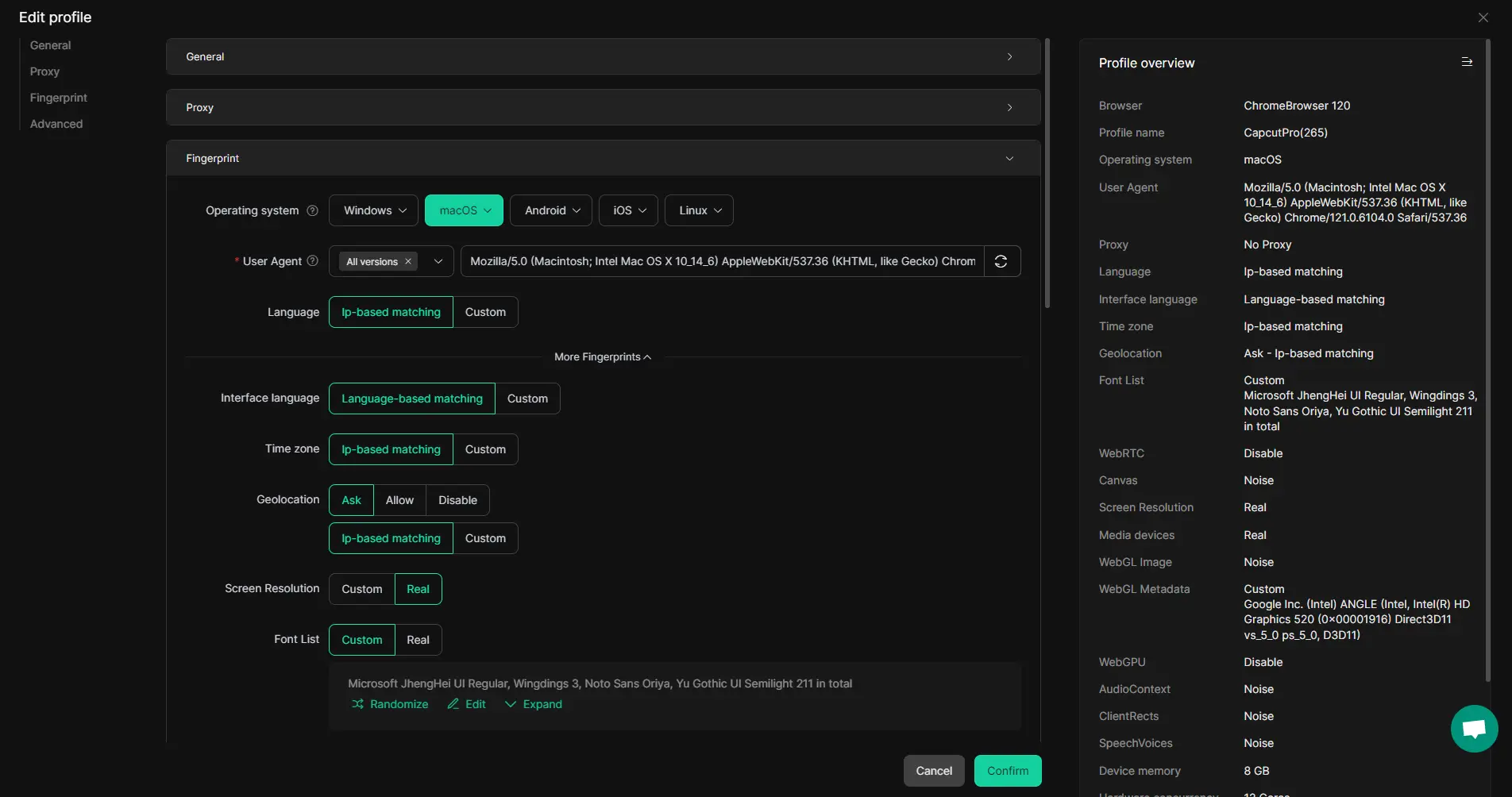
DICloak is also helpful for team workflows.
In many real cases, one person creates or warms an account, and another person later needs to access the same environment. In a normal browser, that often leads to password sharing, repeated logins, changed browser settings, and a less stable account pattern. DICloak solves this more cleanly by supporting profile sharing, permission control, and secure team collaboration. Instead of passing around just the login details, teams can share the full browser profile environment. That helps keep the account context more consistent, which is important for long-term reputation work and for any workflow that needs to leave a review on Google without creating avoidable trust issues.
Security control is another part of the value.
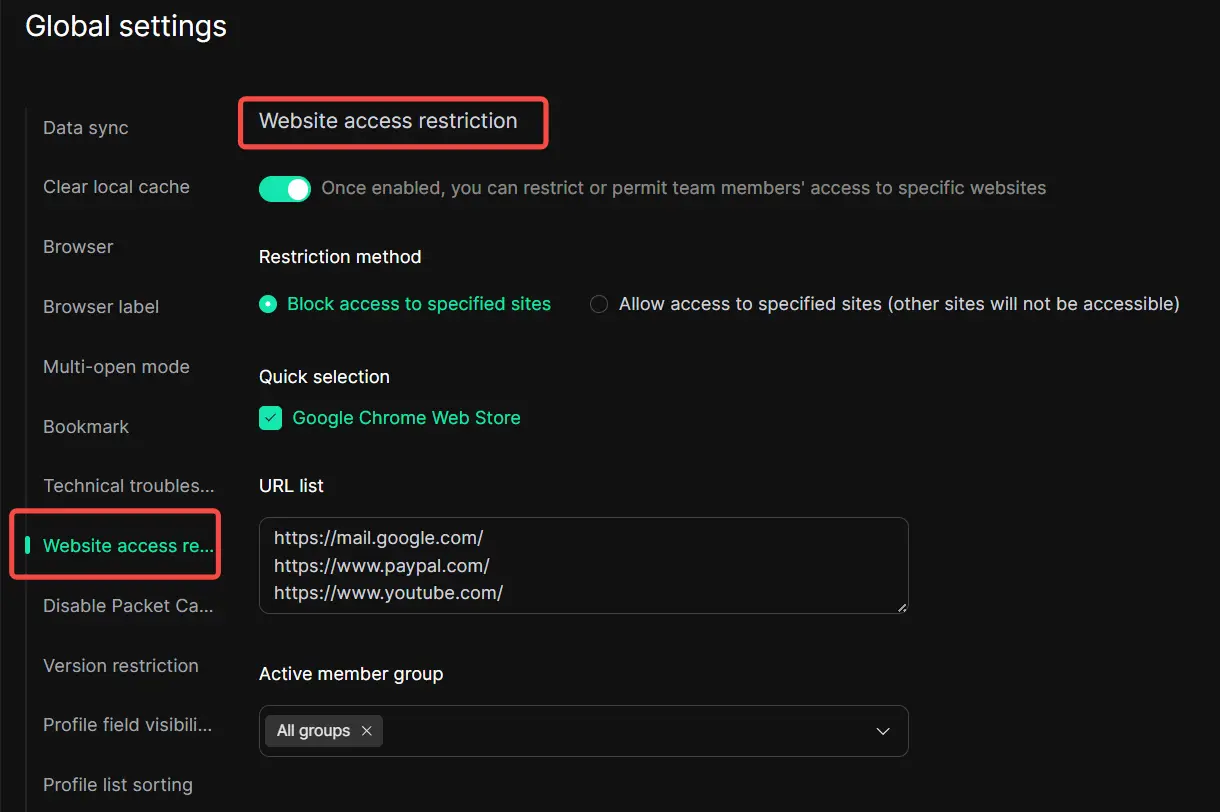
DICloak includes features such as Website Access Restriction and Security Protection Mode, which help teams reduce unauthorized changes to the browser profile. This matters because even small changes, such as different extensions, different browsing behavior, or uncontrolled page access, can make an account look less stable over time. For users who need to leave a review on Google through managed accounts, keeping the environment clean and controlled is often just as important as writing the review itself.
So, if your goal is not just to post once but to leave a review on Google through a safer, cleaner, and more repeatable environment, DICloak works well as a long-term support tool. It helps separate browser identities, protect account sessions, improve team collaboration, and reduce the technical inconsistency that often weakens managed account reputation. For users and teams that need to leave a review on Google with more stability, that kind of infrastructure can make a real difference.
FAQs About How to Leave a Review on Google
Q1: Do I need anything special before I leave a review on Google?
Not much, but a few basics matter. You need to be signed in to a Google account, and the review should be based on a real experience with the business. If you want to leave a review on Google without problems, it also helps if your account activity looks normal and consistent.
Q2: Why did my review disappear after I left a review on Google?
This happens more often than people expect. Sometimes Google delays, filters, or removes reviews during moderation. Even if the review sounds normal, it may still be affected if the account, device, or activity pattern does not look trustworthy enough.
Q3: What is the safest way to leave a review on Google?
The safest way to leave a review on Google is to use a real account, write about a real experience, and keep your review clear, relevant, and specific. Reviews that feel honest and useful usually fit Google’s guidelines much better than vague or repeated comments.
Q4: Why does Google care about trust signals when I leave a review on Google?
Because Google is trying to tell real user feedback apart from spam or fake activity. When you leave a review on Google, the system may look at more than just the words you wrote. It can also consider things like account history, login consistency, and the overall browser profile.
Q5: Can DICloak help if I need to leave a review on Google in a more stable way?
It can help support a cleaner setup. DICloak creates separate browser profiles, which can make account sessions more organized and consistent over time. For people or teams that need to leave a review on Google through managed accounts, that kind of stable environment can be useful.
Conclusion
In the end, learning how to leave a review on Google safely is about more than writing a few nice words. Google reviews are shaped by trust, consistency, and the full account environment behind the action. That is why even a normal-looking review can still fail if the surrounding signals look weak or unusual. For users who manage reviews more carefully, it is important to think beyond the review text itself and pay attention to account quality, browser stability, and long-term behavior patterns. A more controlled setup, such as using DICloak to keep profiles isolated and consistent, can help support a cleaner and more stable review environment. The key is simple: if you want to leave a review on Google in a safer and more reliable way, real experience, useful content, and strong trust signals all need to work together.
 Web Proxy Tools
 Free Tools
 Cookie Plugin
 UA Generator
 MAC Address Generator
 IP Generator
 IP Address List
 2FA Code Generator
 World Clock
 Anonymous Check
 WebRTC Leak Test
 UUID Generator
 Free Web Proxy Site
 Proxy Checker
 FB Ad Checker
 AI Web Scraping
 Free SMM Tools
 Twitter Shadowban Checker
 Instagram Name Checker
 UTM Generator
 Username Generator
 AI Hashtag Generator
 LinkedIn Headline Generator
 Social Media Image Resizer