Using a different proxy for every airdrop wallet may look like enough separation at first. The IP addresses are different, the locations can be different, and each wallet appears to have its own network connection. But the browser can still tell another part of the story. Cookies, local storage, extensions, timezone, language, Canvas, WebGL, and other fingerprint signals come from the browser Profile, not the proxy.
That is why a reliable multi-wallet setup needs to look beyond IP addresses. This guide explains why a proxy alone is not enough for airdrops, what browser fingerprint isolation adds, and how proxies and separate browser Profiles work together. You will also see how an antidetect browser like DICloak can keep each wallet workflow organized with its own Profile, proxy, fingerprint settings, and required extensions.
Is a Proxy Enough for Airdrops in 2026?
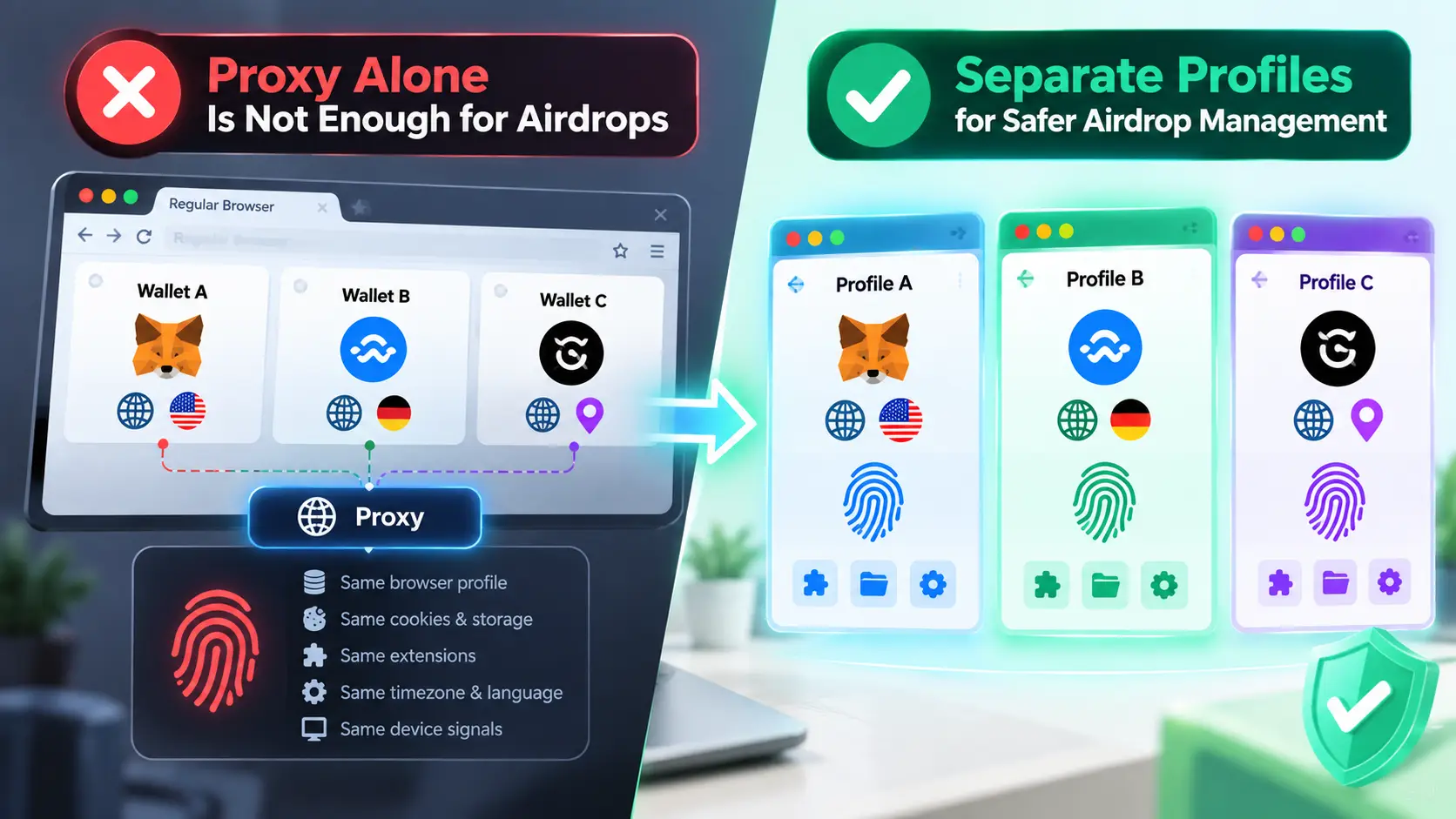
No. A proxy is useful for airdrop workflows because it changes the IP address and network location seen by a website, but it does not create a separate browser profile for each wallet. If several wallets are opened through the same regular browser, changing the proxy only separates one part of their online environment.
Think about a user managing several wallets from one computer. Wallet A connects through one proxy, while Wallet B connects through another. The two sessions now have different IP addresses, but they may still use the same browser setup. Browser-level data such as cookies, local storage, extensions, timezone, language, and device-related signals are not changed simply because the IP changed.
This is the main limitation of using proxies alone for airdrops. A different IP means a different network connection, not automatically a different browser profile. A proxy can help separate IP addresses and locations, but it does not isolate the browser data attached to each wallet session.
For example, changing from a US proxy to a German proxy does not automatically change the browser's timezone, language, or other device characteristics. It also does not separate cookies and local storage if the wallets continue to run inside the same browser context. For users managing multiple wallet sessions, the better question is therefore not only “Does each wallet have a different IP?” but also “Does each wallet have its own browser profile?”
What Can Still Link Airdrop Wallets After You Change the IP?
Changing the IP separates the network connection, but it does not separate the browser Profile. If several airdrop wallets use different proxies but still share the same browser Profile, browser data and fingerprint signals can remain connected across those sessions.
The Same Browser Profile Can Still Share More Than an IP Address
Consider a user managing Wallet A and Wallet B on the same computer. Wallet A connects through Proxy A, while Wallet B connects through Proxy B. Their public IPs are different, but if both wallets are opened in the same browser Profile, they can still share cookies, local storage, extensions, and other session data.
This is the main gap in an IP-only setup. A proxy changes the network identity of a session, but it does not create a separate browser Profile for each wallet. For users managing multiple airdrop wallets, changing the proxy is only one part of keeping those sessions separate.
Browser Fingerprints Add Another Layer of Identity
The browser itself also exposes characteristics that a proxy does not change. These can include the operating system, user agent, screen properties, fonts, Canvas and WebGL output, language, timezone, and WebRTC information. Together, these signals can form a browser fingerprint that stays separate from the public IP address.
This is why simply assigning more proxies does not solve the browser side of the setup. Two wallets can use different IPs while still running through browser Profiles with the same or closely related browser characteristics. Browser fingerprint isolation addresses this missing layer by separating the browser Profiles used for different wallet sessions.
The Proxy and Browser Profile Should Stay Consistent
Separation is not only about making every value different. The settings inside a browser profile should also make sense together. If a Profile connects through a US proxy but keeps unrelated timezone, language, or location settings, the network and browser Profile are no longer consistent.
For airdrop users, this means there are two different things to manage. The proxy controls the IP and network location, while the browser Profile controls browser data, session data, and fingerprint settings. A different IP solves the network layer; a separate and consistent browser Profile handles the browser layer.
There is still another layer outside both of them. Funding sources, wallet-to-wallet transfers, transaction history, and other on-chain relationships remain part of the wallet's blockchain activity. Proxy and browser Profile isolation therefore have clear roles: they separate network and browser-side data, while on-chain activity remains a separate part of the overall wallet setup.
What Is Browser Fingerprint Isolation, and Why Does It Matter for Airdrops?
Browser fingerprint isolation means keeping each wallet workflow in a separate browser Profile with its own browser data and fingerprint settings. For airdrop users managing multiple wallets on one computer, this prevents different wallet sessions from repeatedly sharing the same browser Profile.
A browser fingerprint is built from many browser and device signals, including the operating system, user agent, screen properties, fonts, timezone, language, Canvas, and WebGL. Cookies, local storage, extensions, and login sessions add another layer of browser data. When several wallets are opened in one regular browser Profile, much of this information comes from the same place even if the user switches proxies between wallets.
Fingerprint isolation changes how these wallet sessions are organized. Wallet A can stay in Profile A with its own cookies, storage, extensions, and fingerprint settings, while Wallet B stays in Profile B with a separate set of data. This also makes repeated use easier to manage because users can return to the same Profile instead of rebuilding the browser setup each time they open a wallet.
The goal is not to make every fingerprint value as different as possible. A useful browser profile should be separate, stable, and internally consistent. For example, timezone and language settings should make sense with the Profile's network location instead of changing randomly from one session to the next. This consistency matters when the same wallet is used over time.
For airdrop workflows, browser fingerprint isolation therefore fills the gap left by using proxies alone. It gives each wallet a persistent browser Profile rather than relying only on a different IP address. Once the number of wallets grows, however, creating and maintaining these Profiles manually becomes harder, which is where an antidetect browser like DICloak becomes a more practical way to manage the setup.
What Is a More Complete Setup for Managing Multiple Airdrop Wallets?
For users managing multiple airdrop wallets, a more complete setup should separate more than IP addresses. An antidetect browser combines browser Profile isolation, fingerprint settings, and proxy configuration, so each wallet workflow can be managed as its own setup instead of repeatedly changing settings in one regular browser.
Here are the parts that matter most for multi-wallet workflows:
- Browser Profile Isolation: Each browser Profile keeps its own cookies, sessions, cache, local storage, and other Profile data. This makes it possible to keep Wallet A in Profile A and Wallet B in Profile B instead of mixing their browser data in the same Profile.
- Fingerprint Settings: Each Profile can use its own browser settings for signals such as user agent, operating system, timezone, language, fonts, Canvas, WebGL, and WebGPU. With an antidetect browser like DICloak, these settings can be managed at the Profile level, making it easier to keep each wallet Profile separate and consistent over time.
- Per-Profile Proxy Configuration: A proxy can be configured for each browser Profile instead of changing the connection for the whole browser. This creates a clear Wallet → Profile → Proxy mapping and makes it easier to return to the correct setup later.
- Extension Management: Wallet extensions and other browser extensions can be managed within Profiles. This matters when different wallet workflows rely on different extension setups and users do not want to rebuild them each time they switch Profiles.
- Bulk Management and Automation: Once the number of Profiles grows, setting them up one by one becomes inefficient. DICloak supports bulk Profile operations and proxy configuration, while its Open API can be used with tools such as Playwright, ChromeDriver, and Puppeteer for workflows that need programmatic Profile management.
The value of an antidetect browser becomes clearer as the number of wallets grows. Instead of treating the proxy, browser fingerprint, session, and extensions as separate pieces to manage manually, users can keep them organized around individual browser Profiles.
How to Combine a Proxy and Browser Fingerprint Isolation With DICloak
The practical way to combine a proxy with browser fingerprint isolation is to build each wallet workflow around a separate browser Profile. With DICloak, users can configure the Profile's fingerprint, proxy connection, extensions, and session data in one place, then return to the same setup when they need that wallet again.
Step 1: Create a Separate Browser Profile and Configure Its Fingerprint
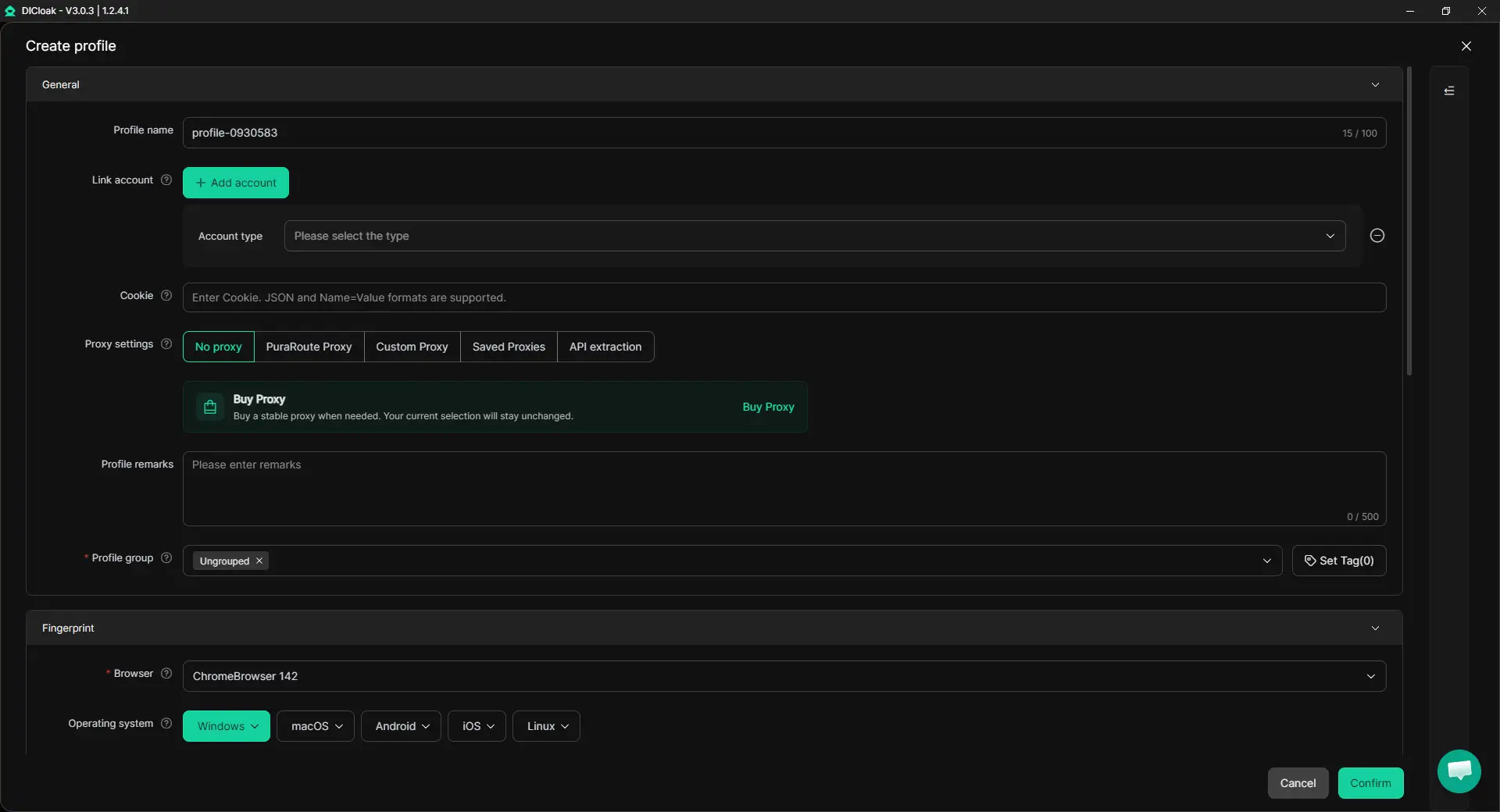
Start in Profiles and create a separate Profile for each wallet workflow. Each Profile keeps its own cookies, sessions, local storage, extension data, and other browser data, so different wallet sessions do not have to share the same browser Profile.
During Profile setup, configure the fingerprint settings that the Profile will use. These can include the operating system, user agent, timezone, language, fonts, Canvas, WebGL, WebGPU, and Audio. Instead of changing every value just to make Profiles look different, focus on keeping each Profile stable and internally consistent. This makes the setup easier to maintain when the same wallet is used again later.
Step 2: Configure and Check the Proxy for Each Profile
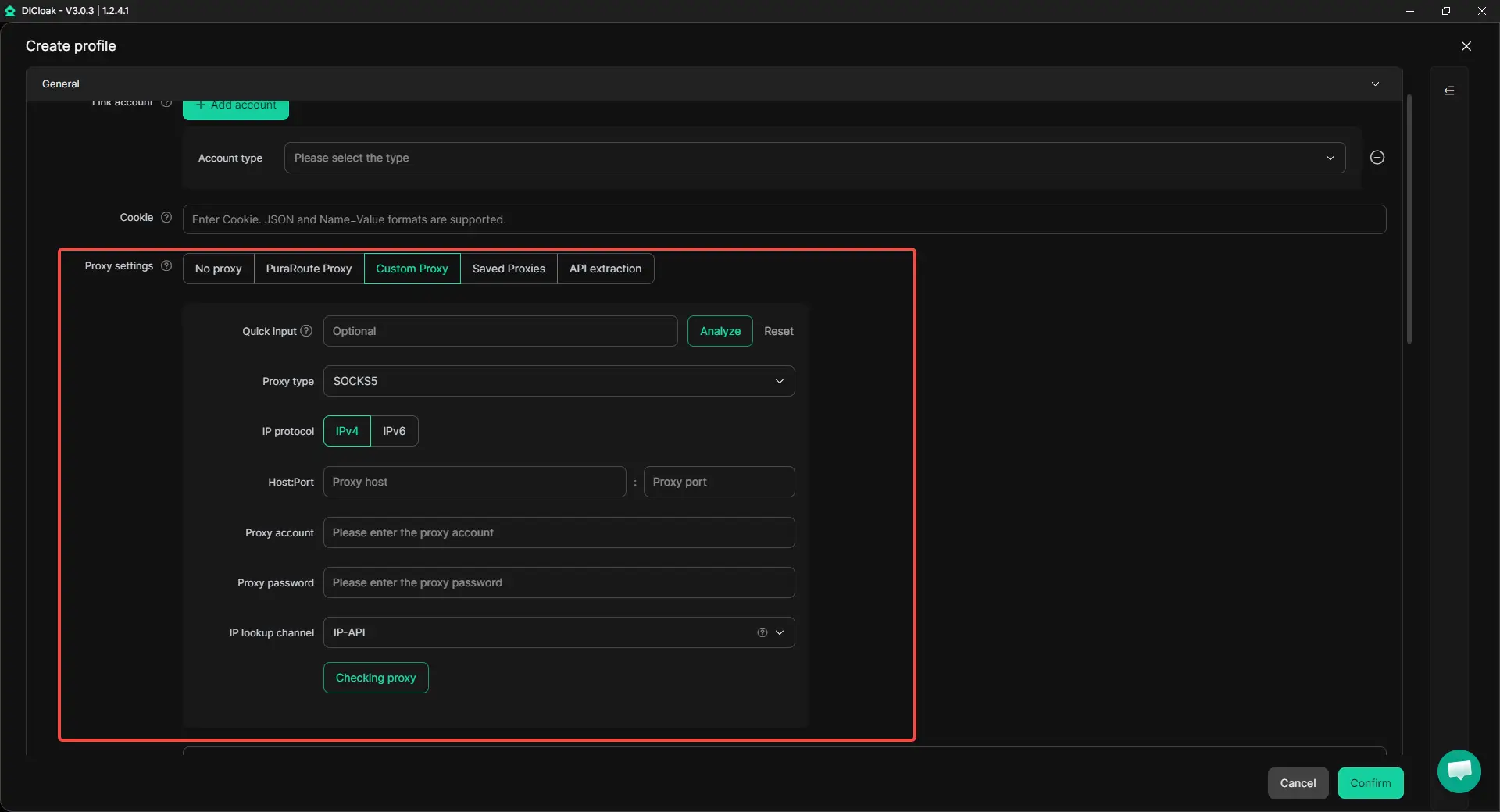
Next, configure the proxy for the Profile. With DICloak, users can add their own proxy settings at the Profile level, allowing different Profiles to use different network connections rather than changing one proxy setting for the whole browser.
After entering the proxy details, check the connection before opening the Profile. Look at the exit IP, region, and connection status, and make sure browser settings such as timezone and language make sense with the proxy location. A separate IP works best as part of a consistent Profile setup, not as a setting that is changed independently every time the wallet is opened.
Step 3: Add Extensions and Apply Them to the Profile
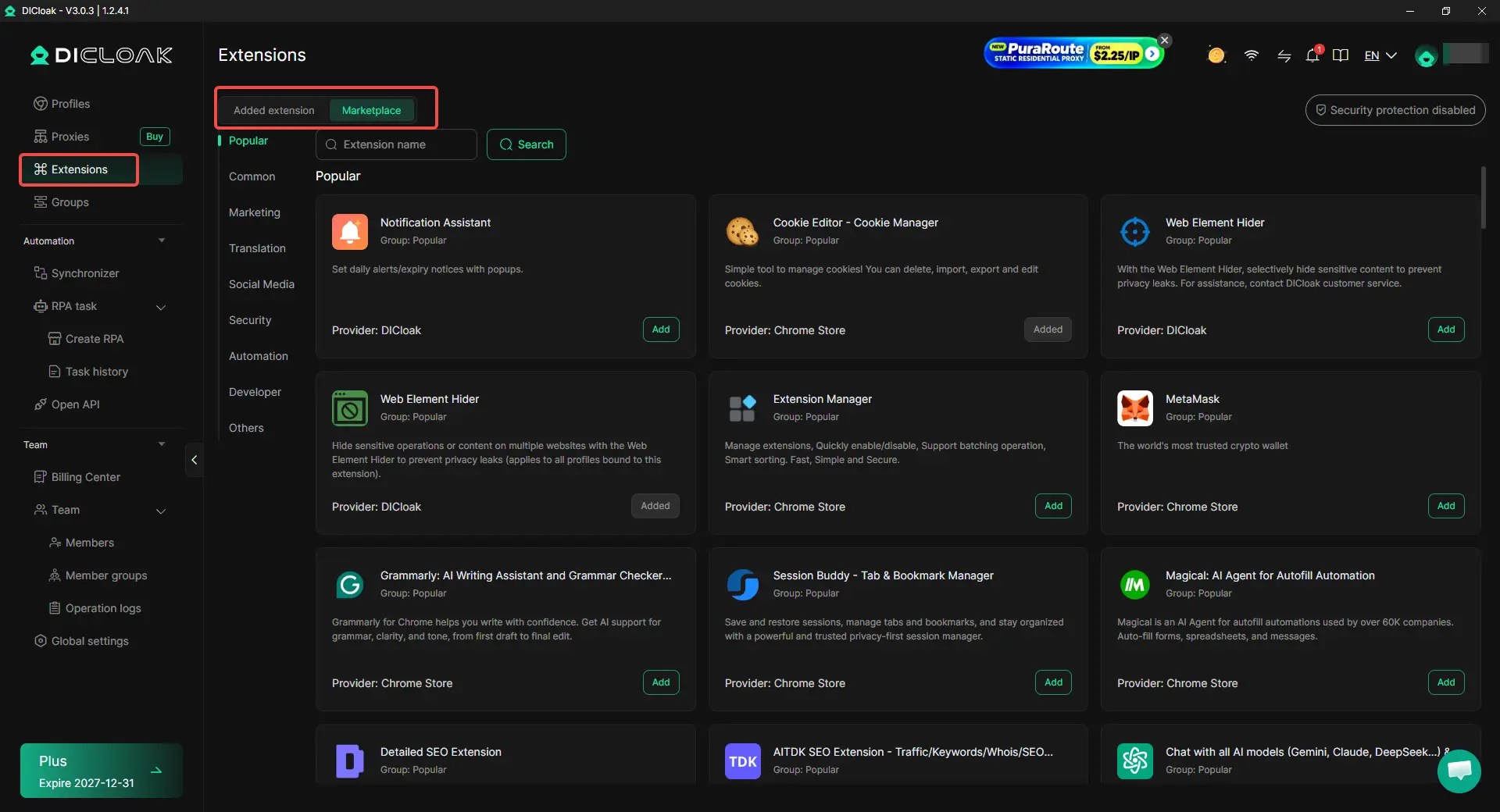
If the wallet workflow needs a browser extension, add it through Extension Management. Extensions can be added from the Chrome Web Store, uploaded as a local extension package, or added from the Extension Marketplace.
After adding the extension, enable it and place it in the appropriate Extension Group. Then go to Profiles, edit the target Profile, open Advanced → Extension settings, and select the Extension Group you want to use. The enabled extensions in that group will then be available in the Profile.
Step 4: Open the Profile and Start the Wallet Session
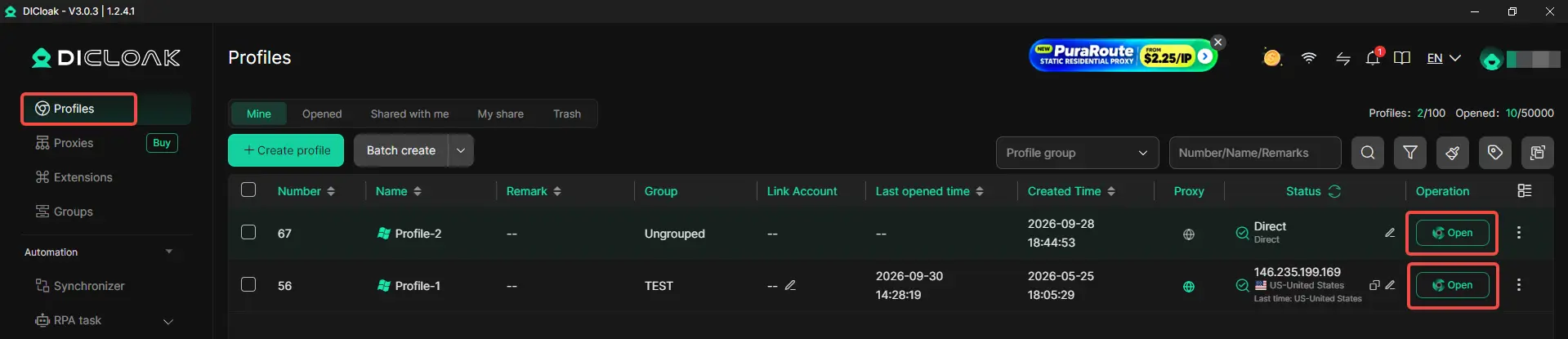
Once the Profile, fingerprint settings, proxy, and required extensions are ready, open the Profile and set up the wallet session for that workflow. When returning to the same wallet later, use its assigned Profile so the existing browser data and configuration remain organized in one place.
Step 5: Use the Synchronizer When the Same Action Is Needed Across Profiles
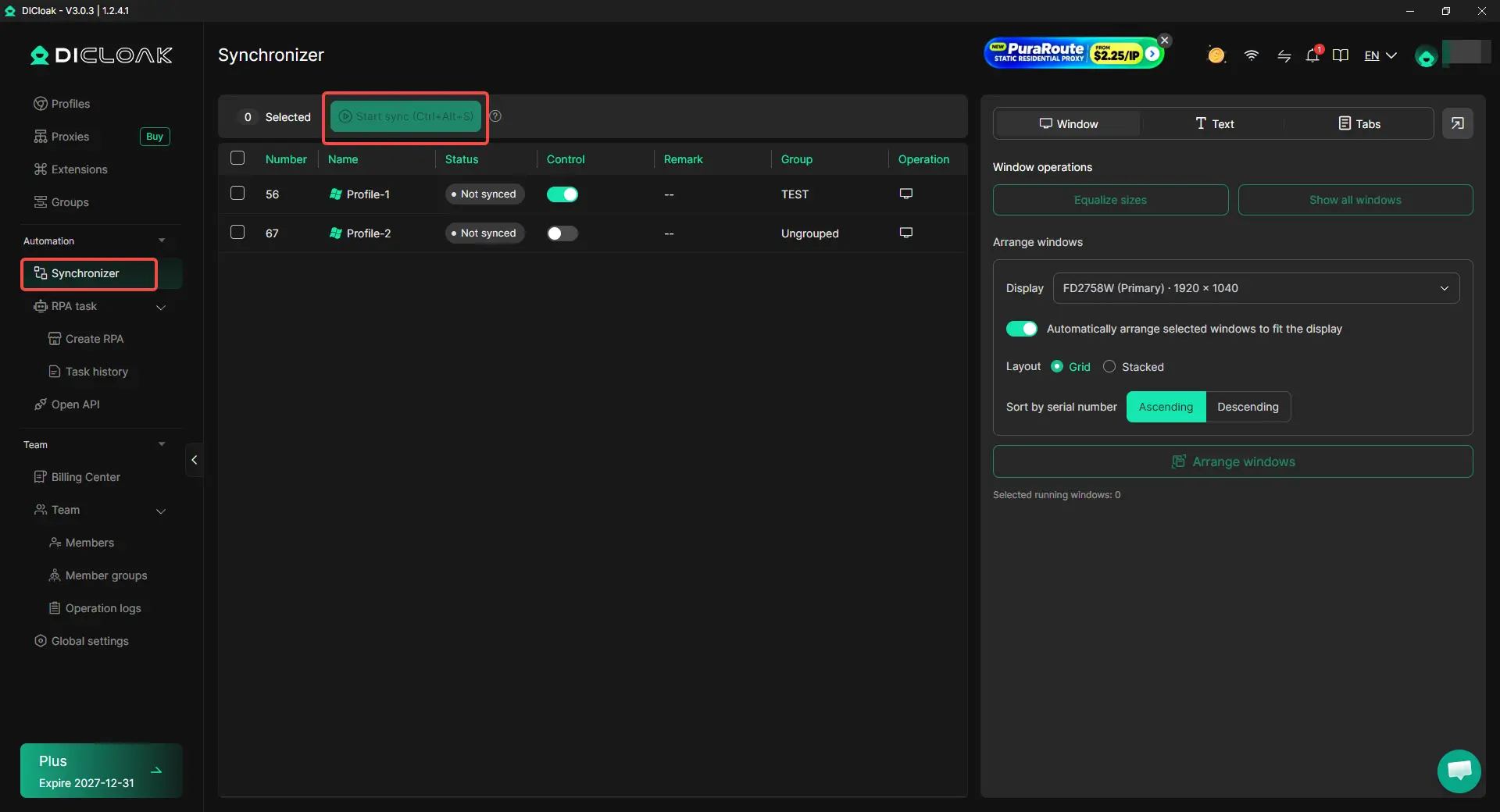
When several open Profiles need the same browser actions, repeating every click and input window by window can become inefficient. With DICloak's Synchronizer, supported actions such as clicks, text input, scrolling, and tab operations can be synchronized from one main window to other Profile windows.
Frequently Asked Questions About Proxies and Browser Fingerprint Isolation for Airdrops
Is using a different proxy for each airdrop wallet enough?
No. A different proxy gives each wallet session a different IP address and network connection, but it does not separate browser data such as cookies, local storage, extensions, or browser fingerprint settings. If several wallets are managed in the same browser Profile, they can still share browser-level data. For a more complete setup, users can combine a separate proxy with a separate browser Profile for each wallet workflow.
Do I need a separate browser Profile for every airdrop wallet?
A separate browser Profile is useful when you want to keep the browser data for different wallet workflows isolated and easier to manage. Each Profile can maintain its own cookies, sessions, local storage, extensions, fingerprint settings, and proxy configuration. With an antidetect browser like DICloak, users can keep each wallet assigned to its own Profile instead of repeatedly switching settings inside one regular browser.
Can Chrome Profiles provide the same fingerprint isolation as an antidetect browser?
Chrome Profiles can separate some data, including cookies, browsing history, and login sessions, but they are not designed for detailed browser fingerprint management. An antidetect browser provides Profile-level control over additional browser characteristics such as user agent, operating system, timezone, language, Canvas, WebGL, and other fingerprint settings. This makes it more suitable when browser fingerprint isolation is an important part of a multi-wallet setup.
Should every airdrop browser Profile use completely different fingerprint settings?
Not necessarily. Making every fingerprint value different is less useful than keeping each Profile stable and internally consistent. For example, the Profile's timezone and language should make sense with its proxy location rather than being changed randomly between sessions. Browser fingerprint isolation is mainly about maintaining separate and consistent Profiles, not maximizing the number of different fingerprint values.
Should I keep the same proxy for the same airdrop wallet?
In most cases, keeping a stable proxy setup for the same wallet Profile is easier to manage than frequently changing its IP and location. If a wallet normally uses one browser Profile, its proxy location, timezone, language, and other browser settings can remain consistent across sessions. With an antidetect browser like DICloak, users can save the proxy configuration at the Profile level, so they do not need to manually reconfigure the network setup each time they return to that wallet workflow.
Conclusion
A proxy alone is not enough to separate every part of a multi-wallet airdrop workflow. It changes the IP address and network location, while browser fingerprint isolation separates browser Profiles, cookies, sessions, storage, extensions, and fingerprint settings. For users managing multiple airdrop wallets, a more complete setup combines a separate browser Profile with a consistent proxy and fingerprint configuration for each wallet workflow.
An antidetect browser like DICloak makes this setup easier to manage by keeping browser Profiles, user-configured proxies, fingerprint settings, and extensions organized in one place. The key is not to change as many signals as possible, but to keep each wallet workflow separate, stable, and consistent when it is used again.
 Web Proxy Tools
 Free Tools
 Cookie Plugin
 UA Generator
 MAC Address Generator
 IP Generator
 IP Address List
 2FA Code Generator
 World Clock
 Anonymous Check
 WebRTC Leak Test
 UUID Generator
 Free Web Proxy Site
 Proxy Checker
 FB Ad Checker
 AI Web Scraping
 Free SMM Tools
 Twitter Shadowban Checker
 Instagram Name Checker
 UTM Generator
 Username Generator
 AI Hashtag Generator
 LinkedIn Headline Generator
 Social Media Image Resizer