Have you ever opened a quest page, clicked through a wallet pop-up, and then realized an old dApp session was still active? Airdrop work can get messy fast when testnet tasks, Discord links, wallet extensions, and campaign logins all live in one browser. In its 2024 airdrop review, Wormhole assessed more than 400,000 wallets across over 30 chains using ownership clustering, funding analysis, and behavior patterns.
When wallets, sessions, proxy settings, and shared workspaces start crossing over, an antidetect browser can help keep browser-side work more organized. This guide explains when it is worth using one, what features matter, and how to avoid common browser mistakes.
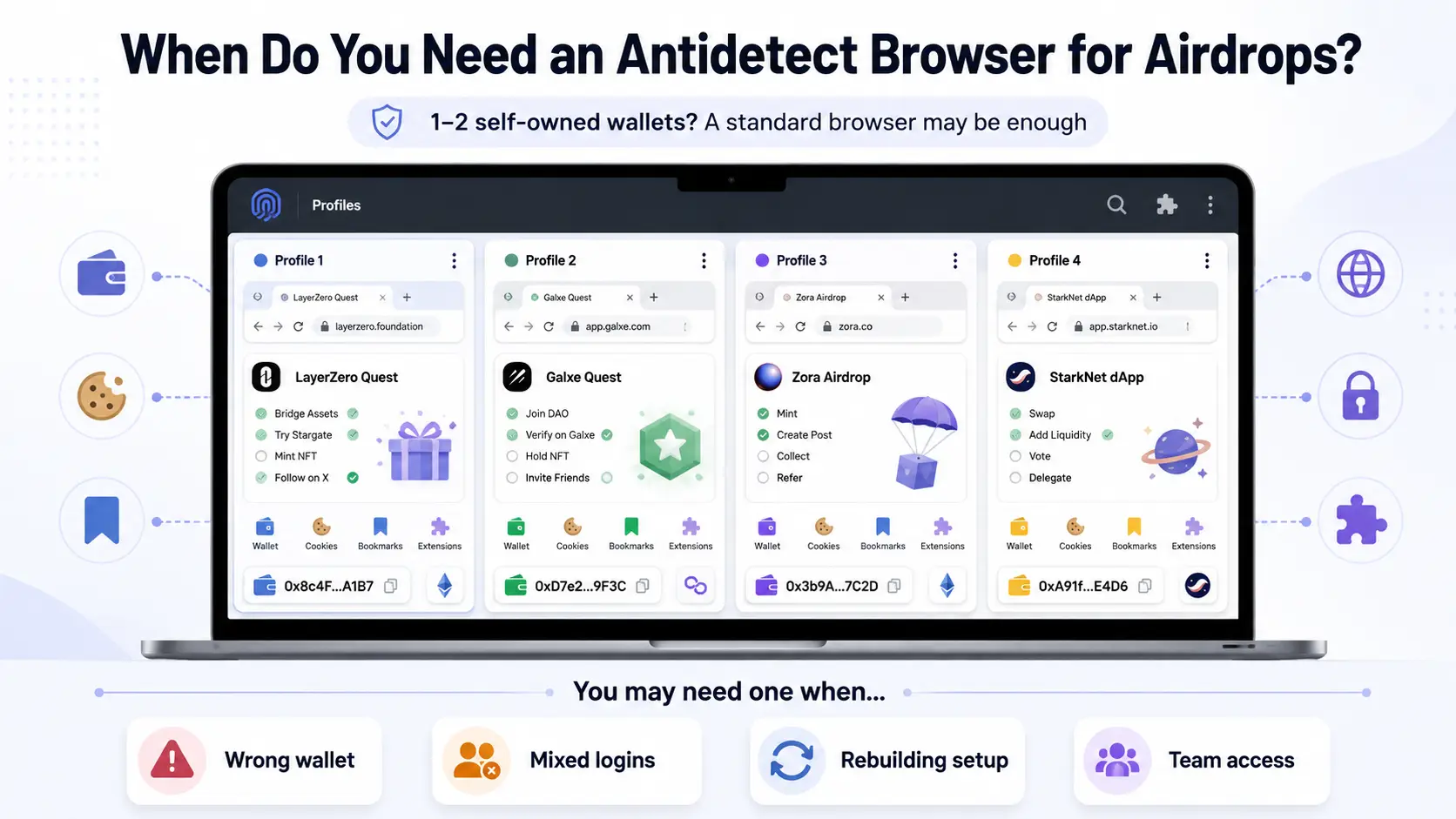
You may need an antidetect browser when standard browser profiles no longer keep your wallets, dApp sessions, and campaign logins easy to manage. For one or two self-owned wallets and occasional tasks, a normal browser profile is usually enough.
It may be time to use one when:
- You reconnect the wrong wallet or find an old dApp session still active.
- Logins, bookmarks, and quest platforms from different campaigns are mixed together.
- You keep reinstalling extensions or rebuilding the same browser setup.
- A teammate needs access to one workspace without access to everything else.
It is especially useful when each wallet has a clear role, such as testnet activity, project research, or longer-term holdings. Separate browser profiles can keep the related extensions, cookies, bookmarks, and saved sessions together, so it is easier to return to the right setup later.
What Makes a Good Antidetect Browser for Airdrops?
A good antidetect browser for airdrops should keep each browser workspace clear, stable, and easy to manage. It should support your real wallet and dApp workflow without implying that software can decide airdrop eligibility or override project rules.
Consistent Fingerprint Settings for Each Profile
A profile should keep its browser settings consistent when you reopen it. You should not have to reconfigure technical details every time you return to a project dashboard or quest platform. The useful part is stability and clear profile management, not changing settings for the sake of changing them.
Separate Browser Profiles for Different Wallet Workspaces
Each profile should have a clear role, such as project research, testnet activity, or routine quest tasks. This keeps related cookies, bookmarks, wallet extensions, and saved sessions in one workspace. It also makes it easier to return to the right browser setup instead of rebuilding it from scratch.
Proxy Support That Works With Each Profile
If you need a proxy for permitted network access, it should be easy to attach it to the correct profile and review it later. A clear profile-level setup helps you understand which connection belongs to which workspace. Proxy support can help keep browser work consistent, but it does not change regional rules, KYC requirements, or one-user participation limits.
Reliable Wallet Extension and dApp Compatibility
Airdrop work often involves wallet extensions, task pages, campaign dashboards, and dApps. Before choosing a browser, test it with the tools you actually use, such as MetaMask, Rabby, Phantom, or a project’s quest page. A tool is not a good fit if extensions fail to load, wallet actions become unreliable, or saved sessions disappear unexpectedly.
Simple Setup and Management as Airdrop Tasks Grow
A browser setup should still feel manageable when you move from a few tasks to several active projects. Look for profiles that are easy to create, name, find, reopen, and organize. It also helps when you can copy a useful workspace instead of reinstalling extensions, rebuilding bookmarks, and repeating the same setup work.
How to Choose the Right Antidetect Browser for Airdrops
Choose an antidetect browser based on the browser work you actually need to manage, not on the biggest profile limit or the longest feature list. The right tool should make your approved wallet workspaces easier to set up, reopen, and keep separate.
Start With the Number of Wallet Profiles You Actually Need
Start with the workspaces you can clearly explain and manage. For example, you may need separate profiles for project research, testnet use, or a low-balance wallet used for approved tasks. Do not pay for hundreds of profiles if you only need a few clear workspaces.
More profiles also create more work. Each one needs a clear name, the right extensions, and a reason to exist. A good tool should let you begin small and add profiles only when your real workflow becomes harder to manage.
Make Sure It Works Smoothly With Your Wallet Extensions and Quest Platforms
Your browser needs to work with the wallet extensions and task sites you use every week. Test it with your usual wallet extension, a campaign page, a dApp dashboard, and any quest platform you rely on before moving important work into it. If extensions fail to load, wallet connections feel unstable, or saved sessions disappear, the tool will create more problems than it solves.
This matters because airdrop work often moves between wallet pop-ups, project sites, Discord links, and task dashboards. A useful browser should keep that normal flow simple. Do not assume that a tool supports your workflow just because it supports Chromium extensions in general.
Check How Easily You Can Set Up and Keep Each Profile Consistent
A profile should be easy to create, label, reopen, and review later. You should not need to rebuild bookmarks, wallet extensions, and browser settings every time you return to a project. Consistent profile settings are useful because they make daily browser work easier to follow.
Look at how the tool handles profile creation, saved sessions, extension setup, and profile recovery. A clean setup process matters more than a large number of technical controls. Browser settings can help organize a workspace, but they do not guarantee airdrop eligibility.
Compare Proxy Options, Profile Limits, and the Real Cost of Running Your Setup
Do not compare tools by monthly price alone. Check whether proxy settings can be attached to a profile, whether the profile limit matches your actual needs, and whether the setup will still be manageable after a few weeks. The real cost may include the browser subscription, proxy service, setup time, and the effort needed to maintain each workspace.
A proxy can support a consistent browser setup when its use is permitted. It does not override campaign rules or make restricted participation acceptable. Keep regional requirements, KYC terms, and project limits separate from your browser-tool decision.
Choose Team Features Only If You Really Need to Share Workspaces
Team features are useful when another person needs to continue working in one defined browser workspace. In that case, look for controlled profile sharing, clear permissions, and an easy way to remove access when responsibilities change. Passing around every browser login is usually harder to manage than sharing one approved workspace.
A small solo setup may not need these features at all. However, they become more valuable when one person tracks campaigns while another handles approved browser-side tasks. No matter which tool you choose, recovery phrases and private keys should never be shared through a browser workspace.
| What to Check |
Why It Matters for Airdrop Work |
Test Before Paying |
| Profile limit |
You only need enough profiles for the wallet workspaces you can clearly manage. |
Create a few sample profiles and see whether they are easy to name and find. |
| Wallet extension support |
Your normal workflow may rely on MetaMask, Rabby, Phantom, or other extensions. |
Install your main wallet extension and test a normal connection on a trusted dApp. |
| Quest platform and dApp compatibility |
Airdrop tasks may involve campaign pages, dashboards, Discord links, and wallet pop-ups. |
Open the platforms you use most and check whether sessions and wallet actions work normally. |
| Profile setup and recovery |
Rebuilding extensions, bookmarks, and saved sessions can waste time. |
Check how profiles are created, copied, reopened, and restored after a device change. |
| Proxy configuration |
Some users need profile-level proxy settings for permitted network access. |
Confirm that proxy settings are easy to attach, review, and update for each profile. |
| Ongoing cost |
The real cost may include the browser plan, proxy service, and setup time. |
Compare the monthly plan with the number of profiles and features you actually need. |
| Team access |
Shared workspaces only make sense when another person needs limited access. |
Check whether you can share one profile without exposing every login or workspace. |
With DICloak, airdrop-related browser work can be easier to organize when profiles, extensions, repeated setup, and team handoffs start becoming difficult to manage. The goal is to keep browser workspaces clearer and easier to maintain.
Keep Wallet Extensions, Cookies, and dApp Sessions in Separate Browser Profiles
With DICloak, you can create separate browser profiles for different workspaces, such as project research, testnet tasks, or routine quest activity. Each profile can keep its own extensions, cookies, bookmarks, and saved dApp sessions together.
This makes it easier to open the right workspace instead of sorting through one crowded browser. You can also avoid reinstalling the same extensions or rebuilding the same bookmarks for every project. Before moving important work into a new profile, test your own wallet extensions and dApps first.
Clone Useful Airdrop Workspaces Instead of Rebuilding Them
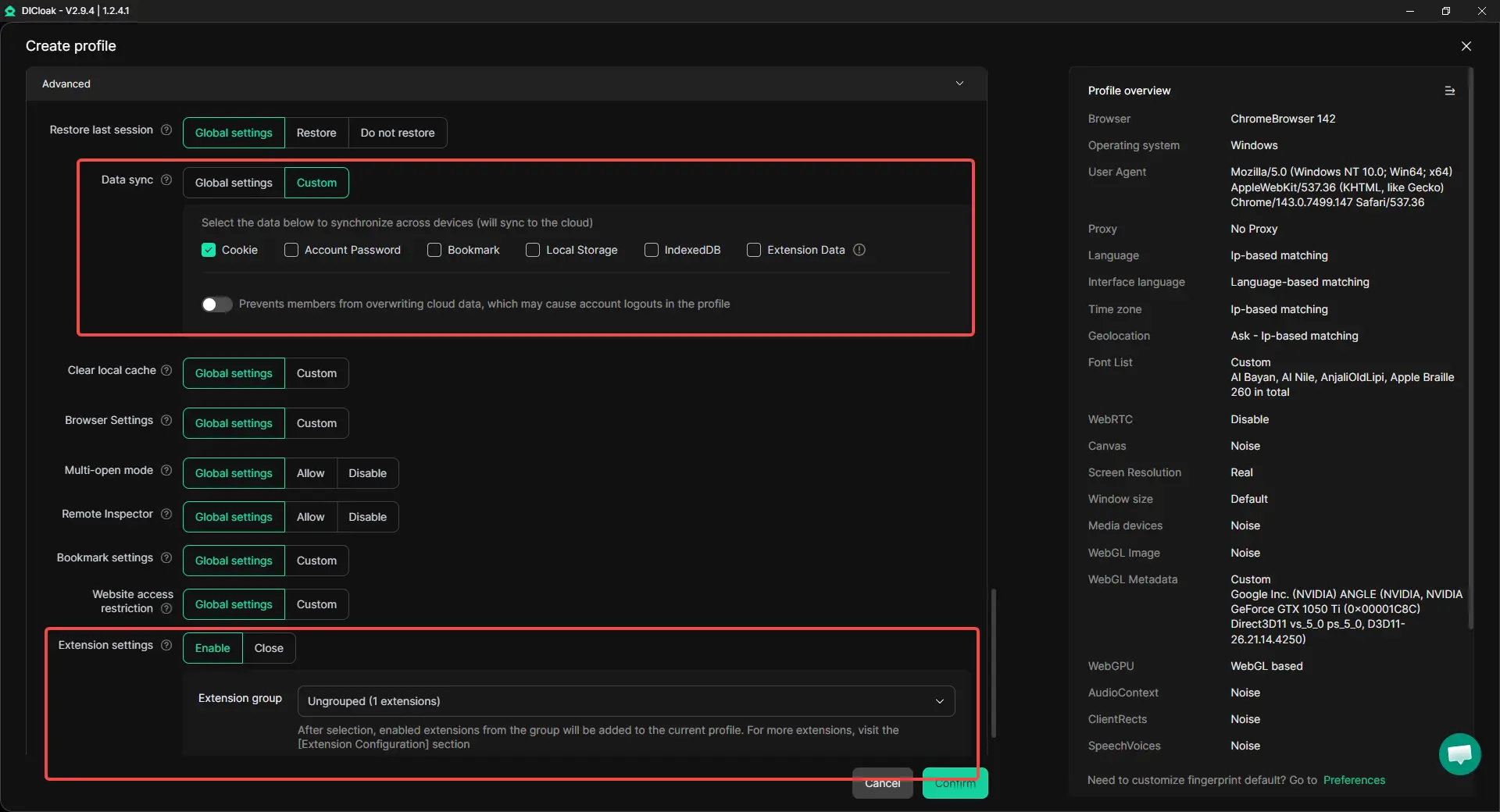
With profile cloning in DICloak, you can reuse an existing workspace when a new project needs a similar setup. For example, you may want to keep the same wallet extension, bookmarks, proxy configuration, or basic browser settings without starting from an empty profile.
Cloning is most useful when the original profile is already clear and well organized. It should save setup time, not create a growing list of profiles that are hard to explain or maintain. Give each copied workspace a clear name and purpose before using it.
Manage Multiple Profiles Without Losing Track of Them
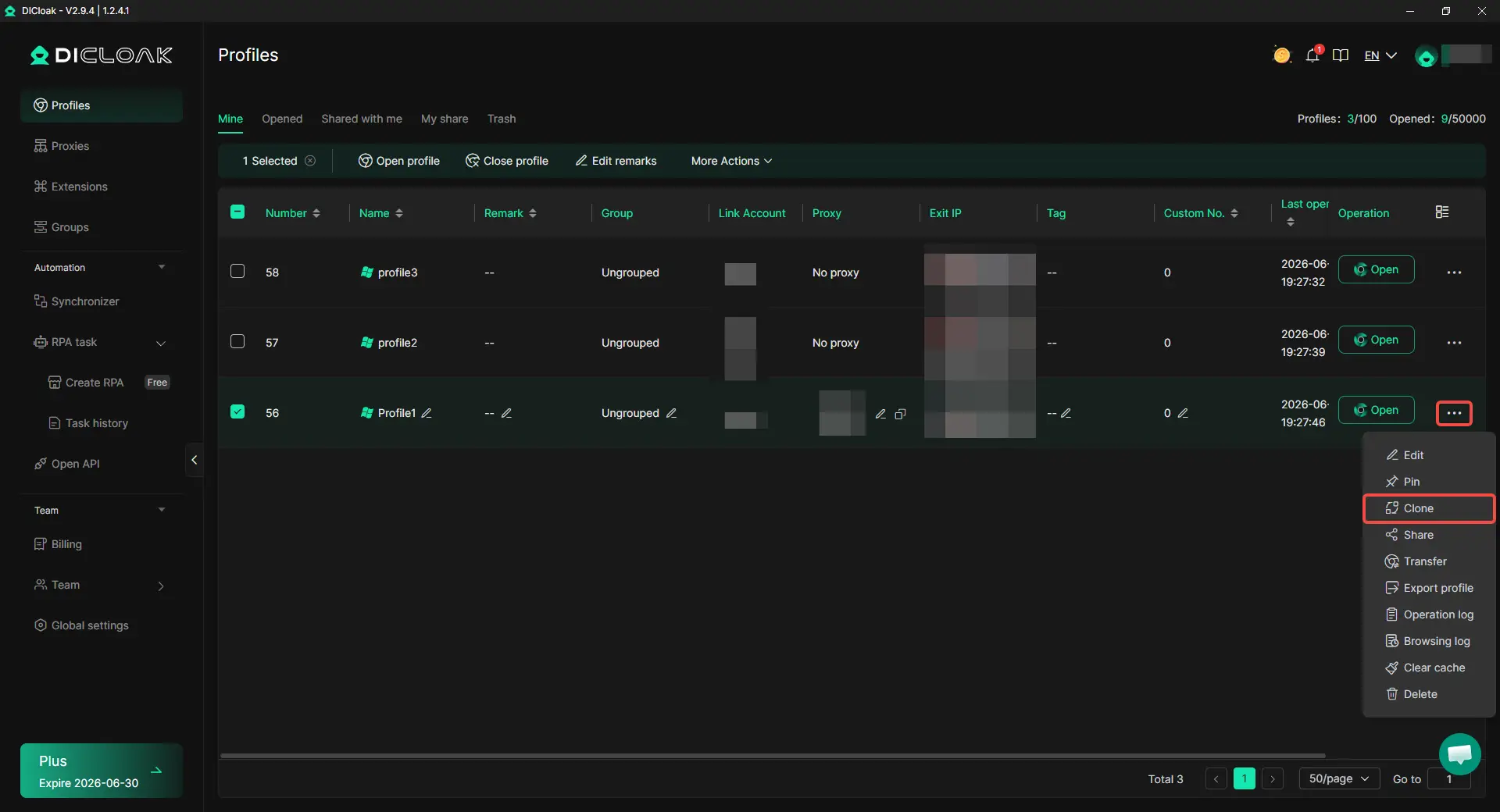
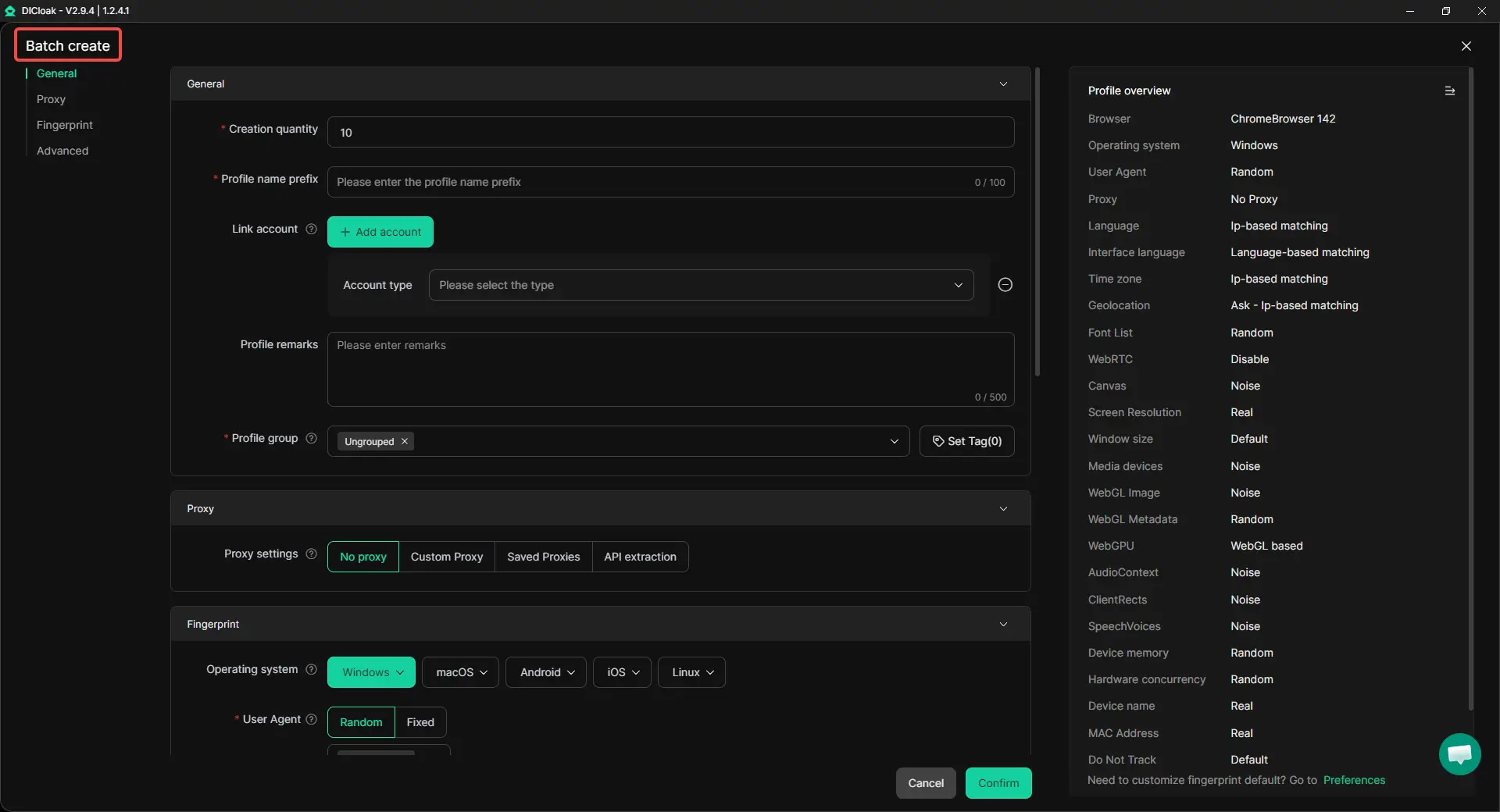
As active projects grow, managing profiles one by one can become slow. With DICloak’s bulk profile actions, you can organize, open, close, transfer, or update selected profiles from one place.
This can help with routine workspace management, such as grouping profiles by project stage or updating a shared browser setting across selected workspaces. It does not mean every task needs more profiles. The goal is to keep an existing workflow easier to manage as it grows.
Use Automation Only for Approved Repetitive Browser Work
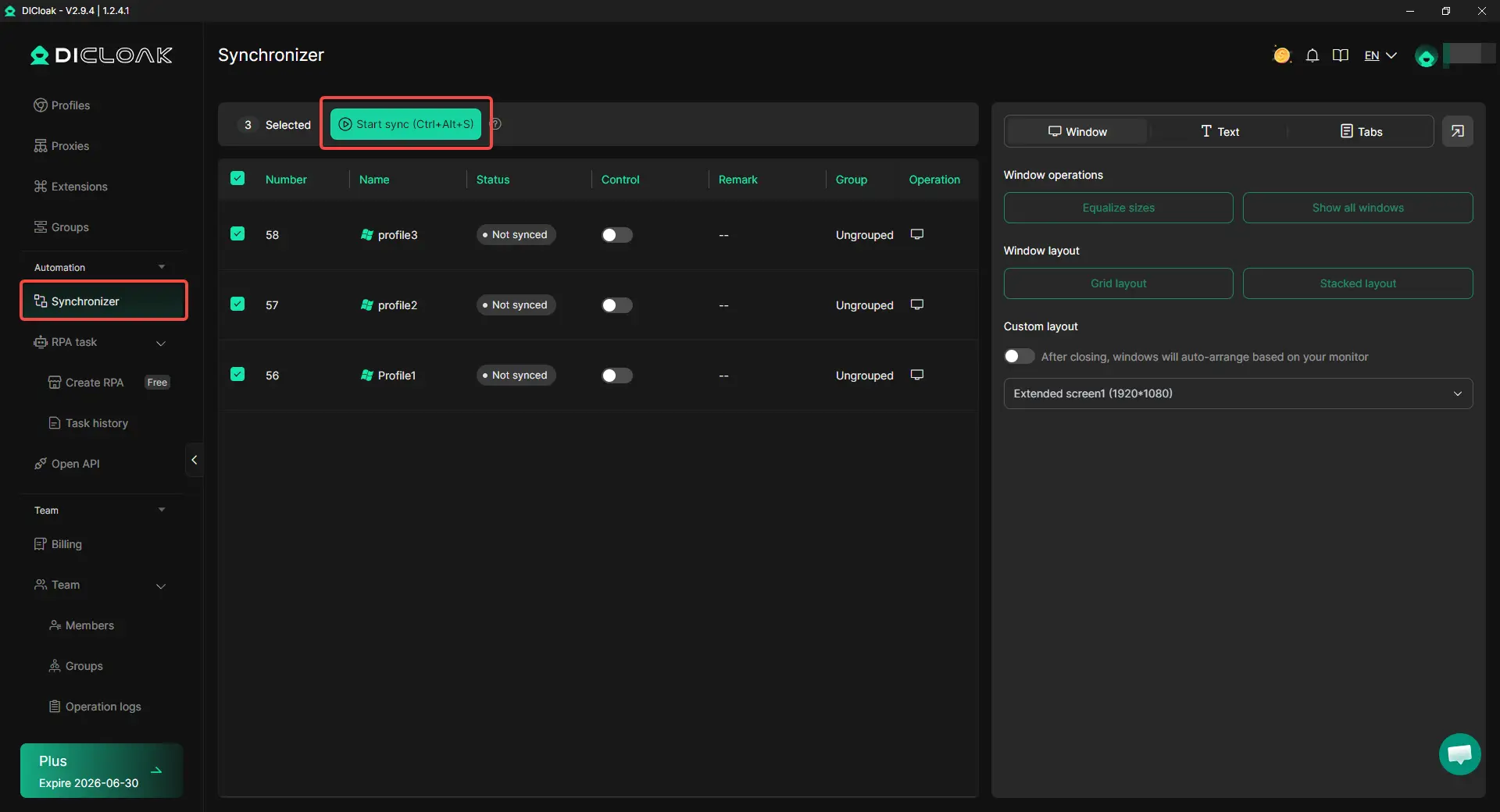
With DICloak’s synchronizer, users can handle certain repetitive browser actions across selected workspaces. This may be useful for approved internal tasks, such as opening the same project page, arranging tabs, or repeating a workspace setup action. Check whether the project allows the action before using it, especially when a campaign includes manual review or one-user participation terms.
Give Teammates Access to Only the Profiles They Need
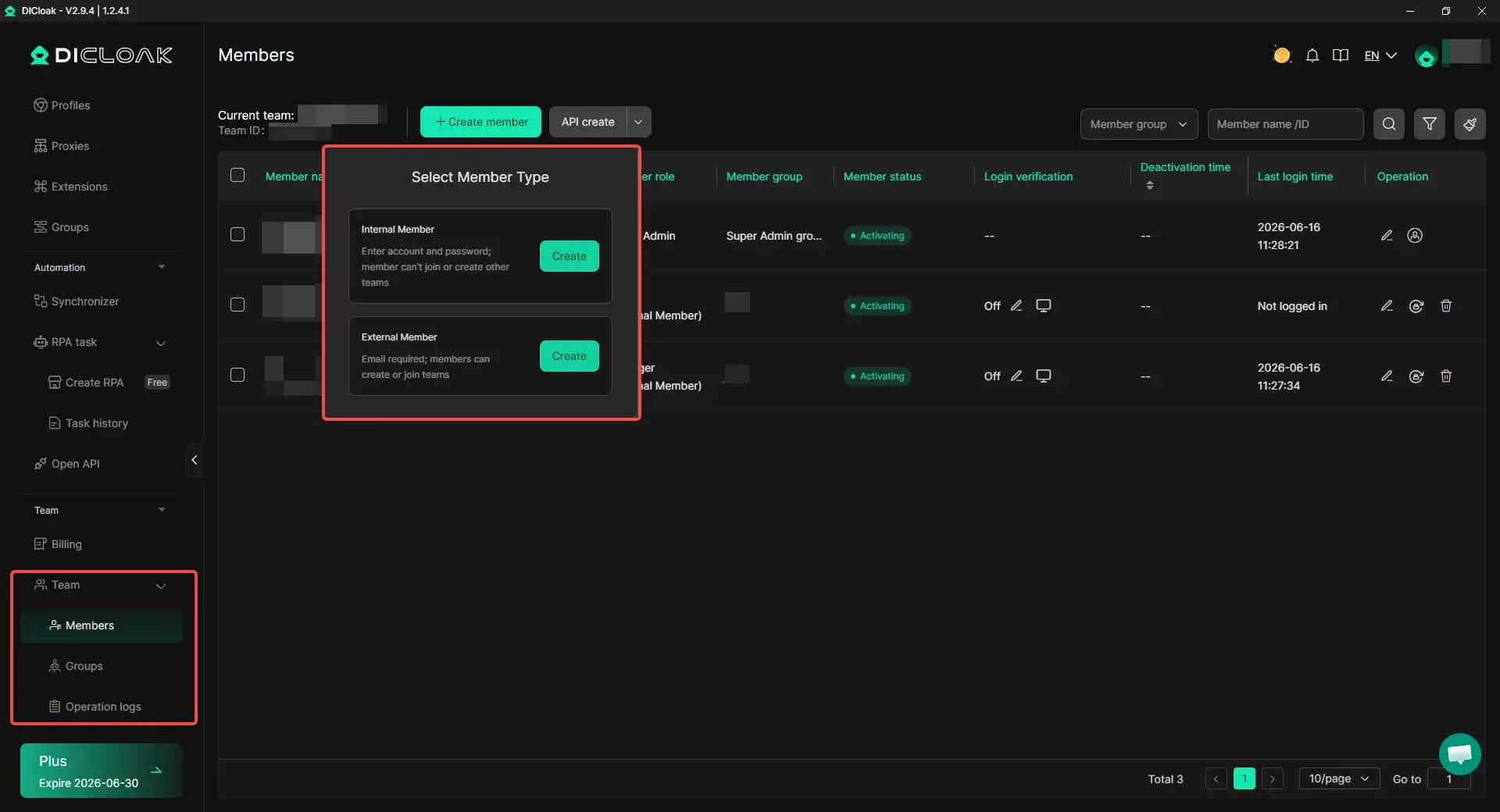
With DICloak’s profile sharing and team permissions, you can give teammates access to selected profiles or profile groups instead of handing over every browser login, bookmark, or workspace. This creates a clearer handoff when one person tracks campaign updates and another continues an approved browser-side task.
Access should stay limited to the workspace needed for that job. Recovery phrases and private keys should never be shared through a browser profile, profile note, or team workspace. Good access control supports clearer responsibility, but it does not replace wallet security.
With DICloak, you can make airdrop-related browser work easier to organize when profiles, extensions, repeated setup, and team handoffs become difficult to manage.
Common Airdrop Browser Mistakes That Can Create Problems
Most airdrop browser mistakes come from poor workspace control, not from a lack of advanced tools. Keeping wallets, sessions, and access clearly separated helps reduce avoidable errors, but it does not change a project’s eligibility rules.
Connecting the Wrong Wallet to a Quest or dApp
It is easy to open a quest page and approve a connection before checking which wallet extension is active. This can lead to a task being completed from the wrong wallet or an unwanted wallet connection on a site you only meant to review. Before connecting, check the wallet address, the browser profile, and the site domain.
A simple routine helps. Keep one clear purpose for each workspace, and close wallet pop-ups you are not using. If a task requires a signature or transaction, read the request before approving it rather than clicking through quickly.
Letting Old dApp Sessions Carry Into a New Campaign
Old cookies and saved sessions can make a new campaign page load with a previous account or wallet context. This is confusing when you move between several project dashboards, quest platforms, and social logins during the week. It can also make it harder to tell which activity belongs to which project.
Review the active login and connected wallet when starting a new campaign. Use a separate browser workspace when the task has a different purpose or wallet role. Do not clear browser data blindly, since doing so may remove useful sessions or require you to set up the workspace again.
Keeping Test Wallets and Higher-Value Wallets in the Same Browser Setup
A low-balance test wallet and a wallet used for longer-term holdings should not feel interchangeable. When both live in the same browser setup, it becomes easier to connect the wrong wallet, visit an unfamiliar site from the wrong context, or lose track of which wallet is meant for which task.
Separate workspaces make the distinction more visible. You can keep research, testing, and higher-value activity organized by purpose, with only the relevant extensions and bookmarks in each workspace. This is a browser organization habit, not a substitute for wallet security or campaign-rule checks.
Giving a Teammate More Workspace Access Than They Need
Sharing an entire browser setup for one small task can expose unrelated logins, saved sessions, and project notes. A teammate may only need access to one defined workspace, not every profile or account connected to your browser. Clear access boundaries also make it easier to understand who is responsible for a task.
Share only the workspace needed for the job, and remove access when the work is finished. Recovery phrases and private keys should never be placed in browser notes, shared profiles, or team messages. Good access control can reduce confusion, but it cannot replace careful wallet security.
Frequently Asked Questions About Antidetect Browsers for Airdrops
Do I Need an Antidetect Browser for One or Two Wallets?
Usually, no. If you only use one or two self-owned wallets, join occasional campaigns, and can keep your browser sessions organized, normal browser profiles may be enough. An antidetect browser becomes more useful when wallet extensions, dApp sessions, task-platform logins, or shared workspaces start getting mixed up.
Can an Antidetect Browser Guarantee Airdrop Eligibility?
No. An antidetect browser can help organize browser-side work, but it cannot guarantee that a wallet will qualify for an airdrop. Project rules, KYC requirements, regional limits, one-user terms, and on-chain activity still matter, so users should always review the campaign requirements before connecting a wallet.
Do I Still Need a Proxy With an Antidetect Browser?
It depends on your approved workflow and the campaign’s rules. A proxy can help keep a browser workspace’s network setup consistent, but it does not replace browser profile management or change eligibility requirements. Do not use a proxy to ignore regional restrictions, KYC requirements, or other participation terms.
Will an Antidetect Browser Work With MetaMask, Rabby, or Other Wallet Extensions?
Many antidetect browsers support Chromium-style extensions, but you should test your own wallet extension and usual dApp flow before moving important work into a new profile. Check whether the wallet loads normally, connects to trusted sites, and keeps the expected session after reopening the browser. A tool is not a good fit if wallet pop-ups fail, sessions disappear, or normal transactions become difficult to review.
Can a Small Team Share an Airdrop Browser Workspace Safely?
A small team can share a defined browser workspace when the campaign allows that type of work and each person has a clear role. With an antidetect browser like DICloak, selected profiles can be shared with limited access instead of giving every teammate every browser login. Recovery phrases, private keys, and unrelated account access should never be included in a shared workspace.
Conclusion
An antidetect browser for airdrops becomes more useful when wallet extensions, dApp sessions, quest-platform logins, proxy settings, and shared workspaces are becoming hard to manage without mistakes. The right tool should help keep browser profiles organized, wallet tools stable, and repeated setup work easier to handle. With DICloak, users can separate browser workspaces, reuse prepared profiles, manage growing profile lists, and share selected workspaces with teammates when needed.
 Web Proxy Tools
 Free Tools
 Cookie Plugin
 UA Generator
 MAC Address Generator
 IP Generator
 IP Address List
 2FA Code Generator
 World Clock
 Anonymous Check
 WebRTC Leak Test
 UUID Generator
 Free Web Proxy Site
 Proxy Checker
 FB Ad Checker
 AI Web Scraping
 Free SMM Tools
 Twitter Shadowban Checker
 Instagram Name Checker
 UTM Generator
 Username Generator
 AI Hashtag Generator
 LinkedIn Headline Generator
 Social Media Image Resizer