You may want to check your current public IP, confirm a proxy’s reported location, understand an unfamiliar login record, or learn why a website shows the wrong region. An ip address lookup tool can show approximate location and network information connected to a public IPv4 or IPv6 address. These results come from IP databases, not GPS tracking. They cannot reveal a person’s real identity, exact home address, or real-time device location. This article explains what IP lookup results contain, how to use the tool, why locations may be incorrect, and where the data is useful. It also compares related IP tools and shows how users can organize proxy and browser settings with DICloak.
What Information Can an IP Address Lookup Tool Show?
An IP lookup can show estimated geographic details and network registration data linked to a public IP address. However, the reliability and meaning of each field may differ.
IP Location, Time Zone, and Coordinates
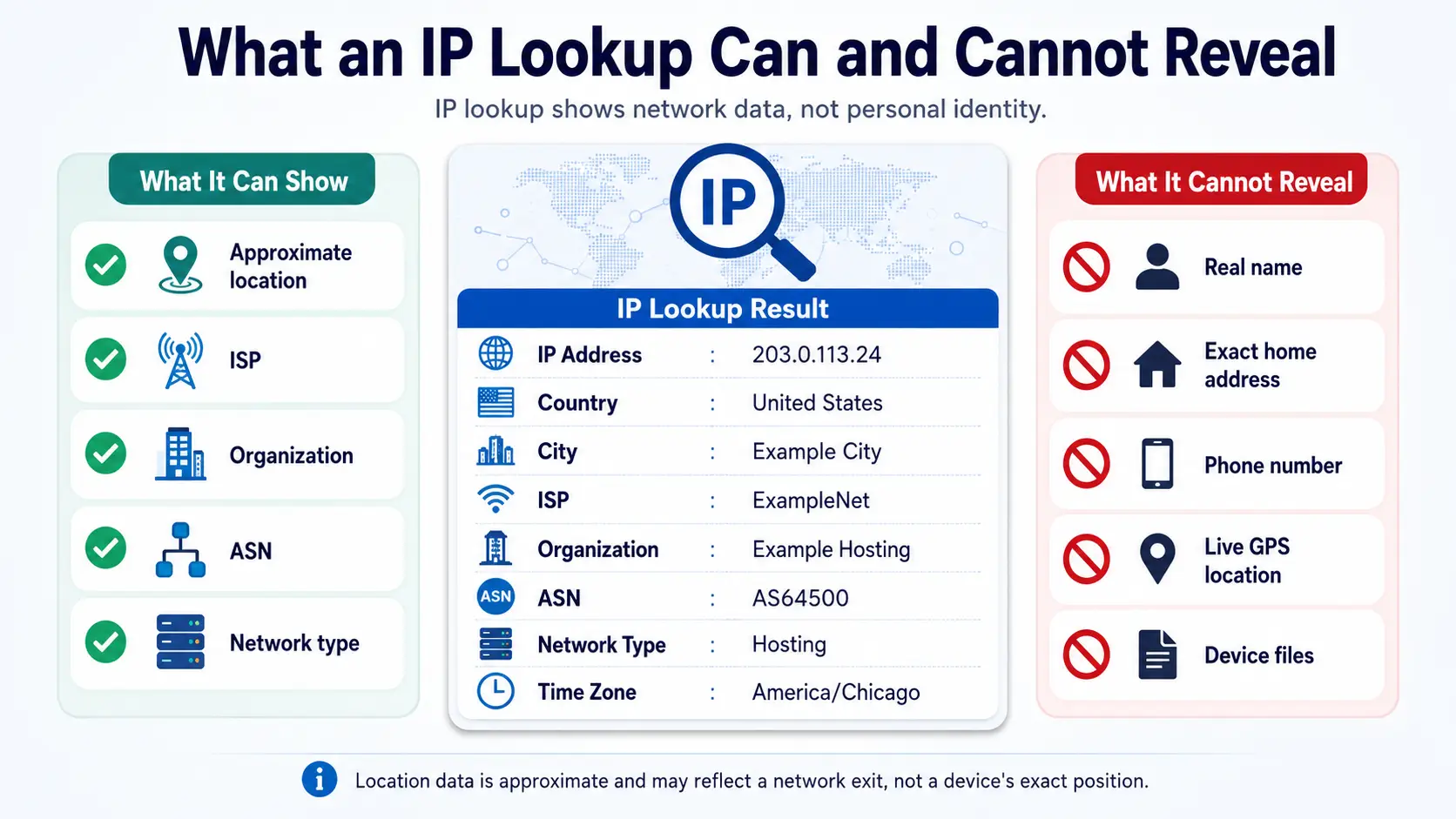
An IP location lookup may return a country, region or state, city, postal code, time zone, and latitude and longitude. An IP geolocation lookup connects these fields to an IP range using database records and network signals. The listed city may represent an ISP gateway, network hub, or estimated database location rather than the device’s physical position. Latitude and longitude are also approximate. They may point to the center of a city, region, postal area, or network service area. These coordinates do not show where a device is located in real time. Treat every location field as an estimate, especially city, postal code, and coordinate data.
ISP, Organization, and ASN
An ISP lookup identifies the internet service provider or network company that supplies or manages the connection. The organization field names the business, institution, hosting service, or other entity associated with the IP range. An ASN lookup returns the Autonomous System Number used to identify the network responsible for routing that address. The ISP and organization may show the same name, but they can differ when an organization leases addresses, uses a hosting provider, or operates through another network. The organization listed in the result is not necessarily the person using the IP. ASN data is often useful for understanding which network controls the route and how the address is announced on the internet.
Hostname and IP Address Type
A hostname is a name associated with an IP address. Reverse DNS checks whether a PTR record maps that address back to a hostname. When one exists, the name may offer clues about the ISP, hosting company, or purpose of the network. A lookup may also label an address as residential, mobile, datacenter, hosting, or proxy traffic. These network type labels describe how the address is commonly used or what services it has been associated with. They are database classifications, not direct measurements of the current user. Records may be missing, and classifications may be incomplete, outdated, or incorrect. A label should therefore be treated as useful context rather than final proof.
What an IP Lookup Cannot Reveal
A normal ip address lookup cannot directly reveal a person’s real name, phone number, email address, exact home or office address, real-time GPS location, private messages, browsing history, or device files. It also cannot identify the specific person using a shared public IP. A registry or database may name the company that owns, receives, or operates an IP range, but that organization is different from the current end user. Many people may appear under one public IP through household Wi-Fi, mobile carrier networks, company networks, or carrier-grade NAT. The lookup describes the address and its network context, not the individual behind it. Any tool claiming to identify a person or reveal an exact home address from a public IP alone is misleading.
Once you understand these fields, the next step is learning how to run a lookup and read the results correctly.
How to Use an IP Address Lookup Tool
Enter a valid public IPv4 or IPv6 address, run the lookup, and review the location and network fields together. Treat the returned location as an estimate rather than an exact device position.
Check Your Current Public IP Address
A “Check My IP” function performs a public IP address lookup automatically and displays the address that websites and external servers currently see. You normally do not need to enter an address first. When you check IP address details this way, the result shows your network’s public exit rather than the private address assigned inside your local network.
A public IP connects a household, office, or mobile network to external services. A private IP, such as '192.168.x.x.x' or '10.x.x.x' identifies a device within a local network. Several devices can share one public address through the same router. Mobile networks and CGNAT may also place many users behind one public IP, so the result does not identify one device or person.
Look Up an IPv4 or IPv6 Address
You can manually look up an IP address by copying a valid public address into the search field. An IPv4 address lookup accepts four groups of decimal numbers separated by periods, such as the documentation address '192.0.2.24'. An IPv6 address lookup accepts a longer hexadecimal format separated by colons, such such as '2001:db8::24'IPv6 may use compressed notation, where :: replaces a sequence of zero groups.
Copy the full address carefully. Extra spaces, missing characters, or invalid formatting may prevent a result. Private, reserved, loopback, and documentation addresses are not normal public endpoints, so they may return no useful public location data. The examples above are reserved for documentation and are not being assigned real locations.
How to Read the IP Lookup Results
Consider this illustrative result for a fictional public address:
- Country: United States
- City: Example City
- ISP: ExampleNet
- Organization: Example Hosting
- ASN: AS64500
- Network type: Hosting
- Time zone: America/Chicago
Read the fields together. Country and region provide a broad estimate of the network location, while the city and coordinates need more caution. ISP and organization help identify the provider or network operator associated with the address. The ASN helps confirm which network announces the route. Network type adds context by showing whether the address is classified as residential, mobile, or hosting. The time zone can support regional testing, but it does not prove where the user or device is physically located. IP geolocation data describes an approximate area linked to an address, not a precise device position.
How Accurate Is IP Address Lookup?
When judging IP address location accuracy, treat the result as an estimate of a network’s country and provider, not an exact device position. Country-level data is generally more useful than city, postal code, or coordinate estimates.
Country-Level vs. City-Level Accuracy
IP geolocation accuracy changes with the level of detail. Country results are usually more stable because they only need to place an IP range within a broad area. Region or state data can be less certain when an ISP routes traffic through another part of the country. A listed city may represent a network hub, ISP gateway, or registered address rather than the user’s city. Postal codes and latitude and longitude are even more approximate. Coordinates may point to the center of a city, service area, or database location, not a street or building. IP geolocation also does not follow the live movement of a phone, computer, or other device.
Why Does My IP Show the Wrong Location?
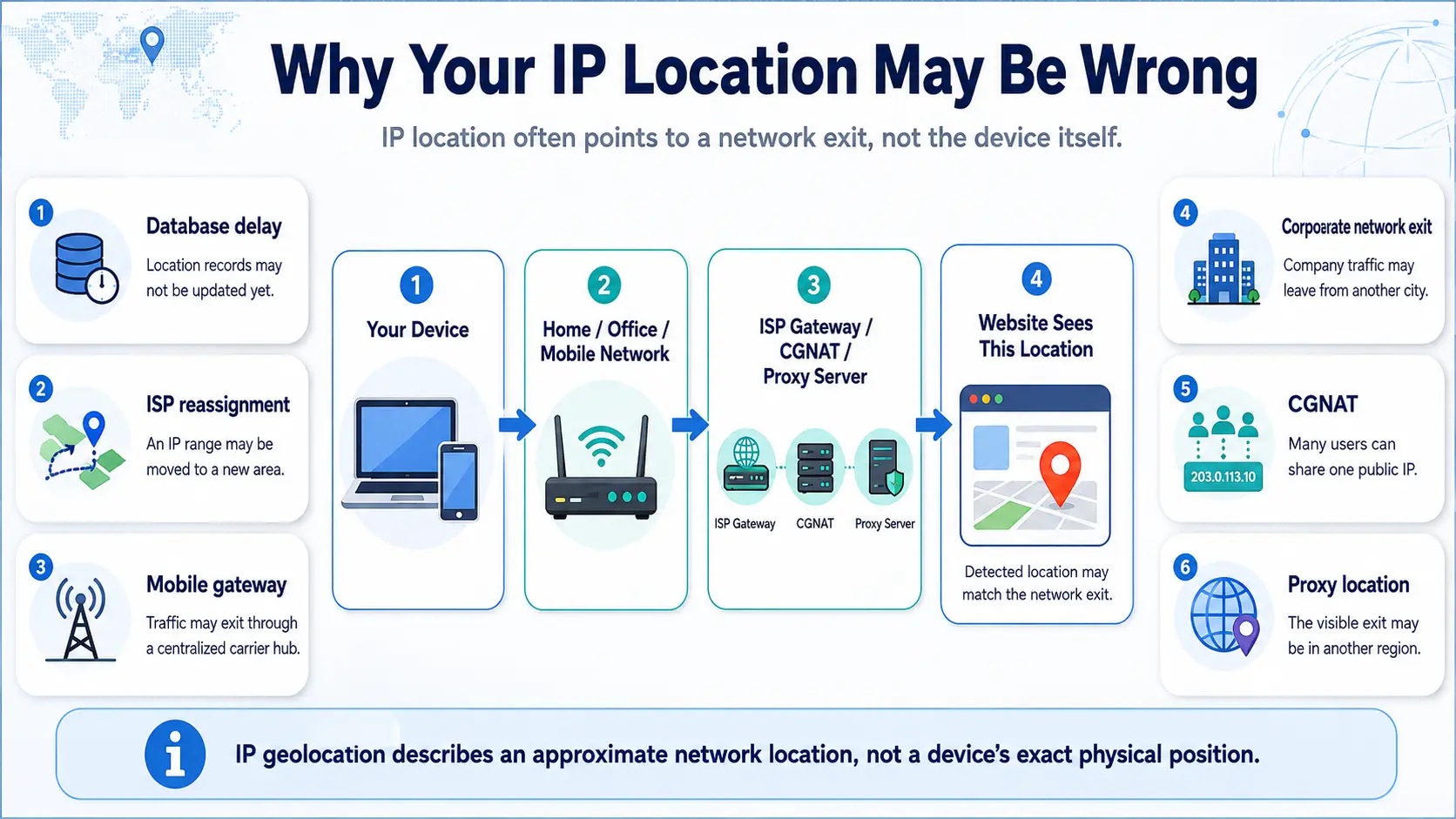
When users ask why is my IP location wrong, the answer is often that the lookup describes the network exit rather than the device’s physical location. A database may not yet reflect a recent update, or an ISP may have reassigned an address range. Dynamic addresses can also move between customers and service areas. Mobile carriers may send traffic through centralized gateways, while CGNAT can place many subscribers behind one public address. A company or school may route users through a central exit in another city. A proxy server can make traffic appear to leave from its own location. Registration records may also show the address of the network operator or resource holder instead of where the address is currently used.
Why Do Different IP Lookup Tools Show Different Results?
An incorrect IP location may reflect disagreement between databases rather than a clear tool failure. Services can rely on different geolocation providers, update schedules, routing records, registration data, and methods for estimating city-level locations. They may also apply different rules when classifying an address as residential, mobile, datacenter, hosting, or proxy traffic. Confidence thresholds matter too: one service may display a city while another returns only a region. One database may use the network registration city, while another estimates a likely traffic exit location. The result shown by the largest number of services is not automatically correct, because they may share similar source data or update at different times.
How to Verify IP Address Information
Cross-check the network details before relying on one location field. The ISP and organization can help confirm the network operator associated with the address. The ASN shows which autonomous system announces the route. Regional Internet Registry WHOIS records provide allocation and registration information for the IP range, but they do not prove where the current user is located. Reverse DNS may return a hostname that offers another clue about the network. A second reliable IP database can show whether the country, region, or city result is consistent. When checking a proxy, compare the lookup with the location and network information supplied by the provider. Even when the ISP, ASN, registry, hostname, and database results agree, they still cannot confirm a person’s exact physical location.
Once readers understand these limits, they can use IP data more carefully for proxy checks, login reviews, and regional testing.
Common Uses for an IP Address Lookup Tool
An ip address lookup tool can help check network exits, add context to traffic records, and troubleshoot regional website behavior. However, IP data should not be treated as proof of a person’s identity, intent, or exact physical location.
Check a Proxy IP and Its Location
After connecting to a proxy, a proxy IP checker can show whether the public IP has changed and whether the expected country or region appears. A proxy IP lookup may also display the ISP, organization, ASN, network type, and time zone connected to that address.
Users can check proxy location data to see whether the broad region matches the intended setup. A proxy ISP lookup can provide more context about the provider or network controlling the route. The result may classify the address as residential, mobile, datacenter, hosting, or proxy traffic.
One lookup cannot prove that a proxy is clean, stable, fast, or suitable for a specific website. Network type labels may be outdated or incorrect, and a city mismatch does not always mean the proxy failed. Users should compare the results with the location and network information supplied by their proxy provider.
Review Website Traffic and Login Records
Website owners, administrators, and security teams may use an IP address checker to add context to traffic and login records. The result can estimate the country or region linked to a visit and show the related ISP, organization, or ASN.
This information may help teams review an unfamiliar login location, compare repeated visits from the same network, investigate sudden regional traffic changes, or separate consumer connections from hosting and datacenter traffic.
An IP address alone cannot identify who visited or logged in. Several people may share one public IP through household Wi-Fi, an office network, a mobile carrier gateway, or CGNAT. A changed IP also does not automatically indicate misuse. Location and network data should be reviewed with timestamps, account activity, device records, and other available evidence before drawing conclusions.
Troubleshoot Regional Website Results
IP lookup data can help when a website behaves as though the user is in the wrong region. For example, the site may display the wrong language, localize search results to an unexpected area, show prices in another currency, load the wrong store catalog, or apply an unexpected time zone.
The first step is to compare the current public IP, country, ISP, and ASN with the intended network setup. This can show whether traffic is leaving through the expected country or network provider.
However, IP data is not the only factor that affects regional content. A website may also use browser language, geolocation settings, cookies, saved account preferences, or its own regional settings. A correct country result therefore does not guarantee that every page will display the expected regional version.
Identify Residential, Mobile, and Datacenter IPs
Residential IPs are associated with consumer internet service providers. Mobile IPs are connected to mobile carrier networks, while datacenter or hosting IPs are linked to servers and hosting infrastructure.
Users may review these categories when checking proxy information, analyzing website traffic, testing regional content, reviewing login records, or understanding how a website may classify a connection. The category provides useful network context, but it is based on database records and network analysis.
A classification may become outdated when an IP range changes ownership or begins serving a different purpose. For that reason, network type should be reviewed together with the ISP, organization, and ASN. It does not reveal the identity, behavior, or intent of the person currently using the address.
These terms are often used together, but they do not always describe the same type of IP search.
IP Lookup vs. IP Checker, IP Locator, and WHOIS
These terms are related, but they can describe different types of searches. Features vary between websites, so focus on the information a tool returns rather than the name used on the page.
| Tool or Term |
Main Purpose |
Typical Results |
| IP lookup |
Checks location and network data |
Country, region, ISP, organization, and ASN |
| IP checker |
Displays or checks an entered IP |
Public IP and basic network details |
| IP locator |
Focuses on estimated geography |
Country, region, city, time zone, and coordinates |
| WHOIS lookup |
Checks IP range registration |
Registry, allocation, organization, and contact records |
| Reverse IP lookup |
Finds domains linked to an IP |
Domains hosted on or associated with the address |
IP Lookup vs. IP Address Checker
An IP lookup and an IP checker often provide similar information, but their main focus may differ. An IP lookup usually emphasizes estimated location and network data. An IP address checker may focus on displaying the current public IP seen by external websites. Some checkers also validate whether an entered address uses a valid format or provide basic ISP details. Because websites use these labels differently, the actual fields shown in the results matter more than the name of the tool.
IP Lookup vs. IP Locator
An IP locator focuses mainly on estimated geographic information. It may return a country, region, city, postal code, time zone, or approximate coordinates. A broader IP lookup may also include the ISP, organization, ASN, hostname, and network type linked to the address. Neither term means that the tool can locate a phone, computer, or other device precisely. Both rely on IP databases, so the geographic information should be treated as an estimate rather than an exact physical position.
IP Lookup vs. WHOIS Lookup
An IP lookup estimates location and describes the network associated with an address. A WHOIS IP lookup checks how the wider IP range was registered and allocated. It may show the Regional Internet Registry, assigned organization, address range, allocation date, and administrative contact details.
The registered contact usually belongs to an ISP, company, hosting provider, or network operator responsible for the range. It does not identify the person currently using one address from that range. Registration details may also reflect an organization’s official office or network records rather than the place where the IP is currently being used.
IP Lookup vs. Reverse IP Lookup
A normal IP lookup returns estimated location and network information about an address. A reverse IP lookup commonly searches for domain names hosted on or associated with the same server IP. This can help when reviewing shared hosting, server infrastructure, or groups of domains connected to one address.
A single server IP may host many unrelated websites, especially on shared hosting platforms. A domain appearing in the results does not prove that every listed website has the same owner or operator. Reverse IP lookup also does not convert an address into a person’s name, identity, or physical address. It differs from reverse DNS, which checks whether an IP has a hostname record; reverse IP services may search broader datasets for multiple associated domains.
After choosing the right lookup method, users managing proxies should also consider the browser profile connected to each network setup.
Verify Proxy IP and Browser Settings with DICloak
An IP lookup checks the public network exit and related database information. It does not show the complete browser profile connected to that IP address. With DICloak, you can keep your own proxy, browser settings, cookies, and login session inside a separate browser Profile. This helps when you manage several authorized accounts, regional tests, or network setups. The goal here is to organize each browser profile after checking the IP, not to repeat the lookup process.
Add Your Proxy to an Isolated Browser Profile
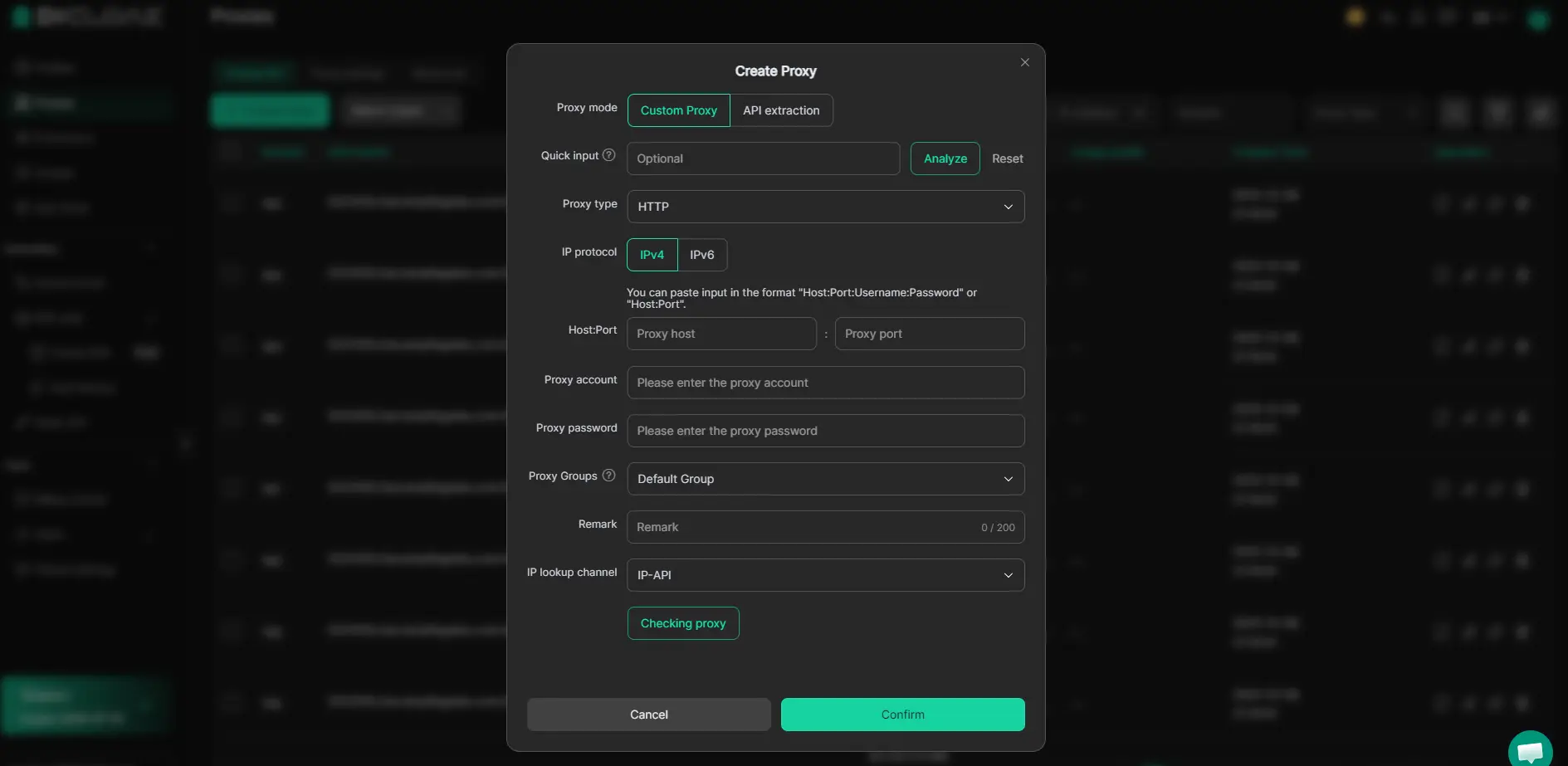
With DICloak, you can create an isolated browser Profile and add your own HTTP, HTTPS, or SOCKS5 proxy. You can keep that proxy configuration connected to the same Profile, along with separate cookies, local browser data, session information, and login state. You can use different Profiles for different authorized accounts or workflows, then reopen each Profile without mixing its browser data with another one.
You must obtain the proxy from your own proxy provider because proxy IPs are not sold or supplied through DICloak. The proxy controls the public network exit, while the browser Profile keeps the related browser profile and session data separated. You should still confirm that the proxy fits the website, region, and workflow you plan to use.
Match the Proxy Location with Browser Settings
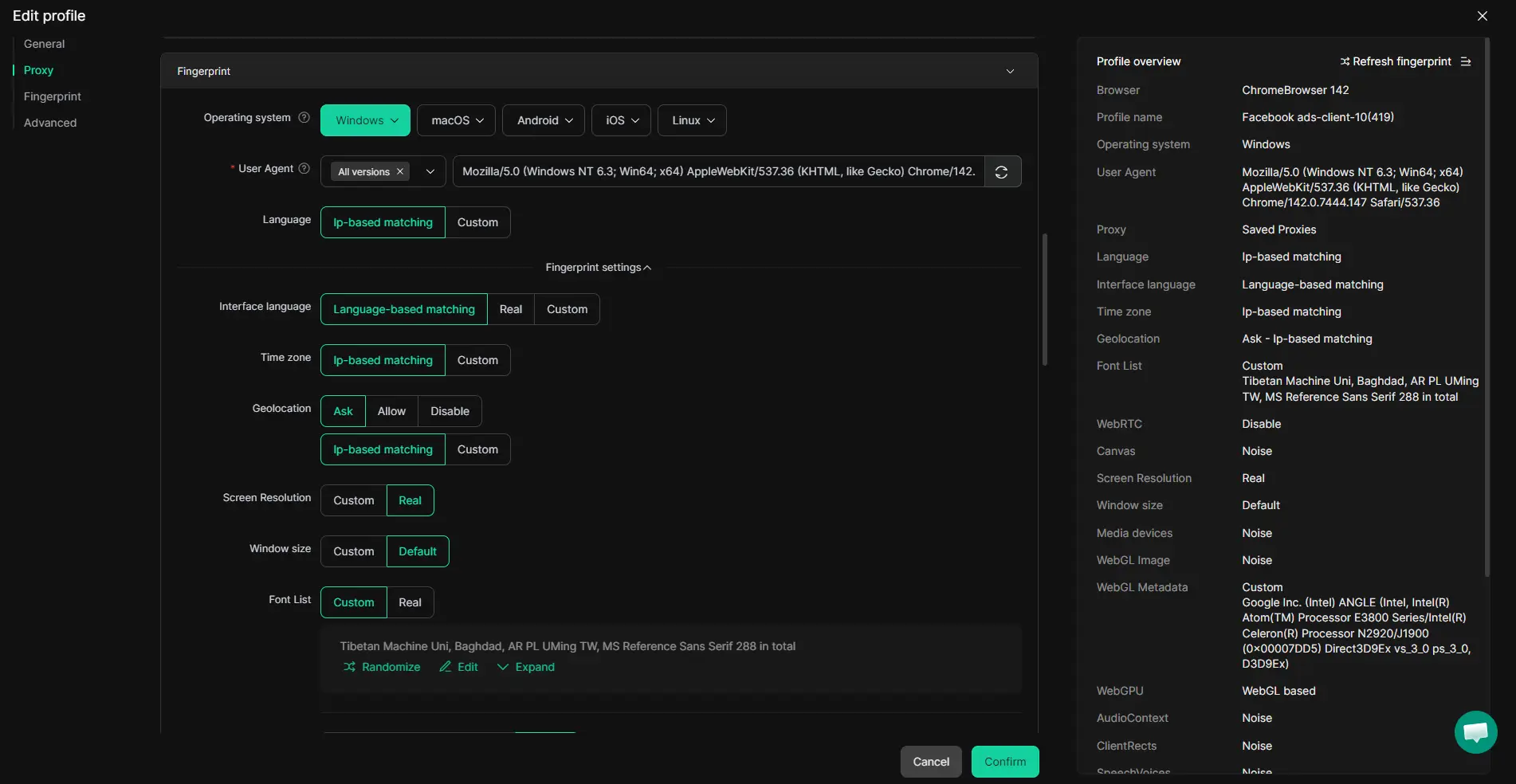
A correct proxy IP is only one part of the browser profile. Websites may also read or respond to geolocation, time zone, browser language, user agent, operating system, WebRTC, WebGL, cookies, and login session data.
With DICloak, you can configure a separate browser fingerprint for each Profile. You can review settings such as geolocation and user agent, then keep those fingerprint settings connected to the relevant proxy and saved session. You can also maintain different browser profiles for different regional workflows instead of reusing one setup for every task.
These settings do not prove the user’s real location, and they do not adjust themselves perfectly. You must review the configuration and change only the settings that have a clear purpose. A setup that appears consistent does not guarantee access, account safety, or any specific platform result.
FAQ about ip address lookup tool
Can an IP Address Lookup Reveal an Exact Address?
No. An IP lookup may estimate a country, region, city, postal area, or coordinate range. It cannot reveal a precise home, office, street, or building address. The displayed location may represent a network gateway, service area, or registration location. It is not a form of live device tracking.
Can You Identify a Person from an IP Address?
A public IP lookup cannot identify a specific person. It may show an ISP, organization, or network operator associated with the address range, but these fields do not name the current user. Many people can share one public IP. Subscriber records held by an ISP are not available through a normal lookup tool.
Why Does My IP Show the Wrong City or Country?
The lookup may show a network exit or database location instead of the device’s actual location. Common causes include database update delays, ISP routing or address reassignment, mobile carrier gateways, CGNAT, corporate network exits, and proxy servers located in another city, region, or country.
Can an IP Lookup Detect a Proxy?
Some IP databases may classify an address as proxy, hosting, residential, mobile, or datacenter traffic. These labels are based on database records and network analysis, so they may be incomplete, outdated, or incorrect. One classification cannot confirm a proxy’s quality, history, stability, or suitability for a particular website.
What Is the Difference Between IPv4 and IPv6 in IP Lookups?
IPv4 uses four decimal groups separated by periods, while IPv6 uses a longer hexadecimal format separated by colons. Both formats can return estimated location, ISP, organization, ASN, and network type data. The available results depend on whether the lookup database contains current information for that specific address range.
Before using a regional or multi-account setup, verify that both your proxy IP and browser settings match the intended workflow. With DICloak, you can keep proxy settings, browser fingerprints, cookies, and sessions organized in separate Profiles.Try DICloak for Free.
 Web Proxy Tools
 Free Tools
 Cookie Plugin
 UA Generator
 MAC Address Generator
 IP Generator
 IP Address List
 2FA Code Generator
 World Clock
 Anonymous Check
 WebRTC Leak Test
 UUID Generator
 Free Web Proxy Site
 Proxy Checker
 FB Ad Checker
 AI Web Scraping
 Free SMM Tools
 Twitter Shadowban Checker
 Instagram Name Checker
 UTM Generator
 Username Generator
 AI Hashtag Generator
 LinkedIn Headline Generator
 Social Media Image Resizer