Are you tired of constantly swiping up to watch the next TikTok video? What if you could let the app do all the work for you? Auto scroll on TikTok is a game-changing feature that allows you to sit back and watch videos hands-free. In this guide, we’ll show you how to enable this feature, troubleshoot common issues, and explore alternative methods if it’s not available yet. Whether you’re a casual viewer or a social media manager handling multiple accounts, this article will provide the tips and tools you need to make your TikTok experience smoother and more efficient. Keep reading to discover how to get the most out of TikTok's auto scroll feature!
Understanding Auto Scroll on TikTok
Auto scroll is a helpful feature on TikTok that makes watching videos easier and more convenient. Instead of swiping up to go to the next video, auto scroll can automatically load the next one for you. This feature is being gradually rolled out, and not all users may have access to it yet. Below, let's dive deeper into what auto scroll is and how it benefits TikTok users.
What is Auto Scroll on TikTok?
Auto scroll on TikTok is a feature that lets videos move on their own. Instead of swiping up with your finger every time, TikTok can go to the next video for you. This means you can watch more content without touching the screen. Many users do not know this feature yet because it is new and still rolling out to some phones and regions. On most phones, you can find it on your For You page by holding a video and then tapping Auto Scroll when the menu appears. This lets the app play videos one after another without manual effort.
Benefits of Using Auto Scroll for TikTok Users
Auto scroll on TikTok offers several advantages that can improve your overall experience on the app. Here’s how it can benefit you:
- Hands-Free Experience: Auto scroll saves you from constantly swiping up to find the next video. This is especially useful when your hands are occupied, such as while cooking or working, allowing you to watch videos effortlessly without interruptions.
- Increased Video Discovery: With auto scroll, TikTok will continuously show you videos based on its algorithm, helping you discover new content you might not have seen otherwise. This makes it easier to explore more content, whether it's trending or niche.
- Better Engagement: Since auto scroll allows you to watch more videos in less time, your overall engagement with content increases. This can be beneficial for users who want to enjoy longer viewing sessions without having to manually interact with the app.
- Account Growth: For TikTok users who want to grow their account or increase their presence, using auto scroll can help you stay active and engage with a variety of videos. TikTok’s algorithm rewards accounts that regularly engage with content, and auto scroll can help you maintain consistent activity without effort. This passive interaction can help you build a more robust account with better chances for exposure.
- Improved Content Consumption: Auto scroll encourages uninterrupted content consumption, making it easier to focus on watching, rather than constantly interacting with the app. This results in a smoother, more enjoyable viewing experience.
How to Turn on Auto Scroll on TikTok
If you want to use auto scroll on TikTok, you need to know the right steps and settings. Auto scroll helps the app play videos one after another without touching your screen. In this section, you will learn easy steps to turn on auto scroll on TikTok, how to find the settings, and why updating your app matters.
Step-by-Step Instructions to Activate Auto Scroll
Here is how to turn on auto scroll on TikTok in a few simple steps you can follow right now:
- Open TikTok on your phone.
- Go to the For You page. This is where TikTok shows recommended videos.
- Find a video you want to watch.
- Press and hold your finger on the video for a moment. A small menu will pop up.
- If you see the Auto Scroll button in the menu, tap it.
- Your videos will now scroll by themselves. You do not need to swipe up anymore.
This method works on many phones because TikTok places the auto scroll option right in the video menu. If the button is not there, your app might not have the feature yet.
Navigating TikTok Settings for Auto Scroll
TikTok does not have a special “Auto Scroll” switch in its main settings yet. Instead, the feature is part of the video menu on the For You feed. Here’s how to check it properly:
- Make sure you are in the main feed, not in your profile or “Following” section.
- Press and hold any video you see on the For You page.
- Look carefully at the small menu that pops up.
- If your app supports auto scroll, the Auto Scroll option will appear among other choices like Share or Save.
Many users report they found auto scroll this way after updating their TikTok app.
Ensuring Your App is Updated for Optimal Performance
Auto scroll on TikTok is a new feature that is still rolling out to users in different regions. That means you need the latest version of TikTok to see it:
- Go to your App Store (iPhone) or Google Play Store (Android).
- Search for TikTok.
- If there is an Update button, tap it.
- After the update, open TikTok again and try the steps above.
Updating the app not only helps you find auto scroll, but also fixes bugs and gives you new features. Many users say they only saw auto scroll after updating TikTok to the newest version.
Troubleshooting Common Issues with Auto Scroll on TikTok
Even after learning how to turn on auto scroll on TikTok, some users still may not see it work. This can be frustrating when you want to watch hands‑free videos. In this section, we explain why auto scroll might not be available and how to fix common problems with the feature. This helps you enjoy videos smoothly without confusion.
Why Auto Scroll Might Not Be Available
There are a few reasons you might not see the auto scroll on TikTok option. The first thing to know is that the feature is still new. TikTok is testing it with small groups of users before releasing it to everyone. That means your account might not have a feature yet, even if other people see it. Some users report that auto scroll appears when they travel to other countries, but then disappears when they return home. This suggests the feature can be limited by region or account type.
Account Limitations and Feature Availability
Sometimes the issue is simply that the feature hasn't been made available to your account. TikTok releases new features gradually, and auto scroll might be available to some users but not others. If you don't see it, the feature might not have rolled out to your account yet. It’s important to keep checking, as TikTok often introduces features to different accounts over time.
Beta Testing and Regional Restrictions
TikTok also tests new features in “beta” mode with select users. Beta testing means only a small number of accounts get the feature at first. Many users have reported that auto scroll appeared for them briefly after an update, then disappeared after a few days. This behavior indicates that TikTok may still be experimenting with how the feature works before offering it widely.
Technical Glitches Affecting Auto Scroll
Sometimes the problem is not about your account or region — it can be a technical glitch. Even if you know how to turn on auto scroll on TikTok, the option might disappear or fail to work if the app has a bug or memory issue. Users have shared that auto scroll will show one day and then vanish the next.
Solutions for App Performance Issues
Here are simple solutions you can try if auto scroll on TikTok is missing or not working:
- Restart TikTok: Close the app completely and open it again. This can refresh the menu and bring back auto scroll.
- Update the App: Make sure you have the latest TikTok version. New features like auto scroll are often tied to the newest updates.
- Clear Cache: TikTok cache files can interfere with how features show up. Clearing the cache may help.
- Reinstall TikTok: Deleting and reinstalling the app can resolve deeper errors that updates don’t fix.
These steps have helped many users see auto scroll again after it disappeared.
When to Contact TikTok Support
If none of the basic fixes work, it might be time to contact TikTok support. You can report the problem inside the app. Go to Profile → Settings & Privacy → Report a Problem and describe your issue. Include details like your phone model, TikTok version, and steps you already tried. Support may offer more specific help for your account.
Alternatives to Auto Scroll on TikTok
If auto scroll on TikTok isn’t available, there are alternative ways to navigate videos without swiping. Voice commands are an easy solution, allowing users to control TikTok hands-free. Both Android and iPhone/iPad devices have built-in features that let you scroll through videos using voice commands, providing a convenient, hands-free experience.
Scrolling Hands-Free on Android
- Install the Voice Access app from the Google Play Store. It’s a free app that lets you control your phone using only your voice.
- Enable Voice Access: Open the Settings menu, then tap Accessibility. Find Voice Access, toggle it on, and follow the prompts to give it permission.
- Once set up, open TikTok and use simple commands like “Scroll down” to go to the next video, or “Scroll up” to return to the previous one.
- This setup will allow you to control TikTok hands-free, making it easy to watch videos while doing other tasks.
Voice Access is ideal for users who want to avoid swiping but still enjoy TikTok's content.
Scrolling Hands-Free on iPhone and iPad
- Open the Settings app, then tap Accessibility.
- Tap Voice Control, and turn it on by tapping the toggle switch.
- Customize your voice commands by selecting Customize Commands and creating new ones, such as “Next” or “Scroll Down.”
- Save the command and link it to TikTok by selecting the TikTok app under Applications.
- Now, you can say your custom voice command to scroll through TikTok, making video navigation easier and faster.
These voice commands are an excellent solution for hands-free scrolling while watching TikTok, and they are available on both Android and iOS devices.
DICloak Browser for Enhanced Auto Scroll on TikTok Experience
While auto scroll on TikTok is a convenient way to watch videos hands-free, many social media marketers and small business owners who manage multiple TikTok accounts may need more advanced tools to efficiently handle their accounts and grow their presence on the platform. This is where DICloak comes in.
DICloak is an advanced antidetect browser designed to help users maintain privacy and security while managing multiple accounts. Whether you're handling several TikTok accounts or navigating other social media platforms, DICloak ensures that your accounts remain secure and undetected by masking your digital footprint.

With DICloak, you can:
- Manage Multiple TikTok Accounts: DICloak allows users to easily manage and isolate multiple TikTok accounts. With isolated profiles, each account appears completely unique, preventing platforms from linking or flagging them as suspicious.
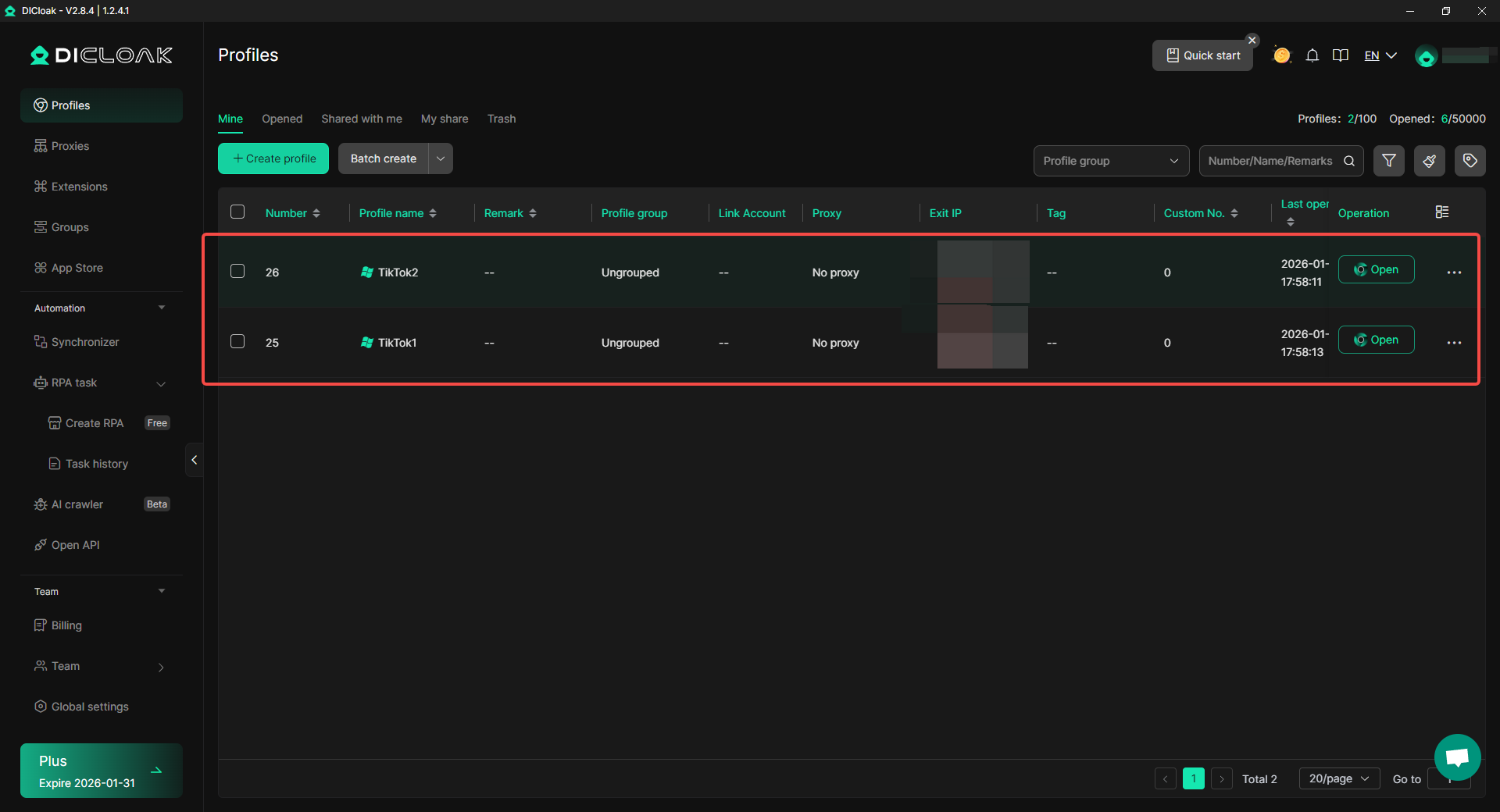
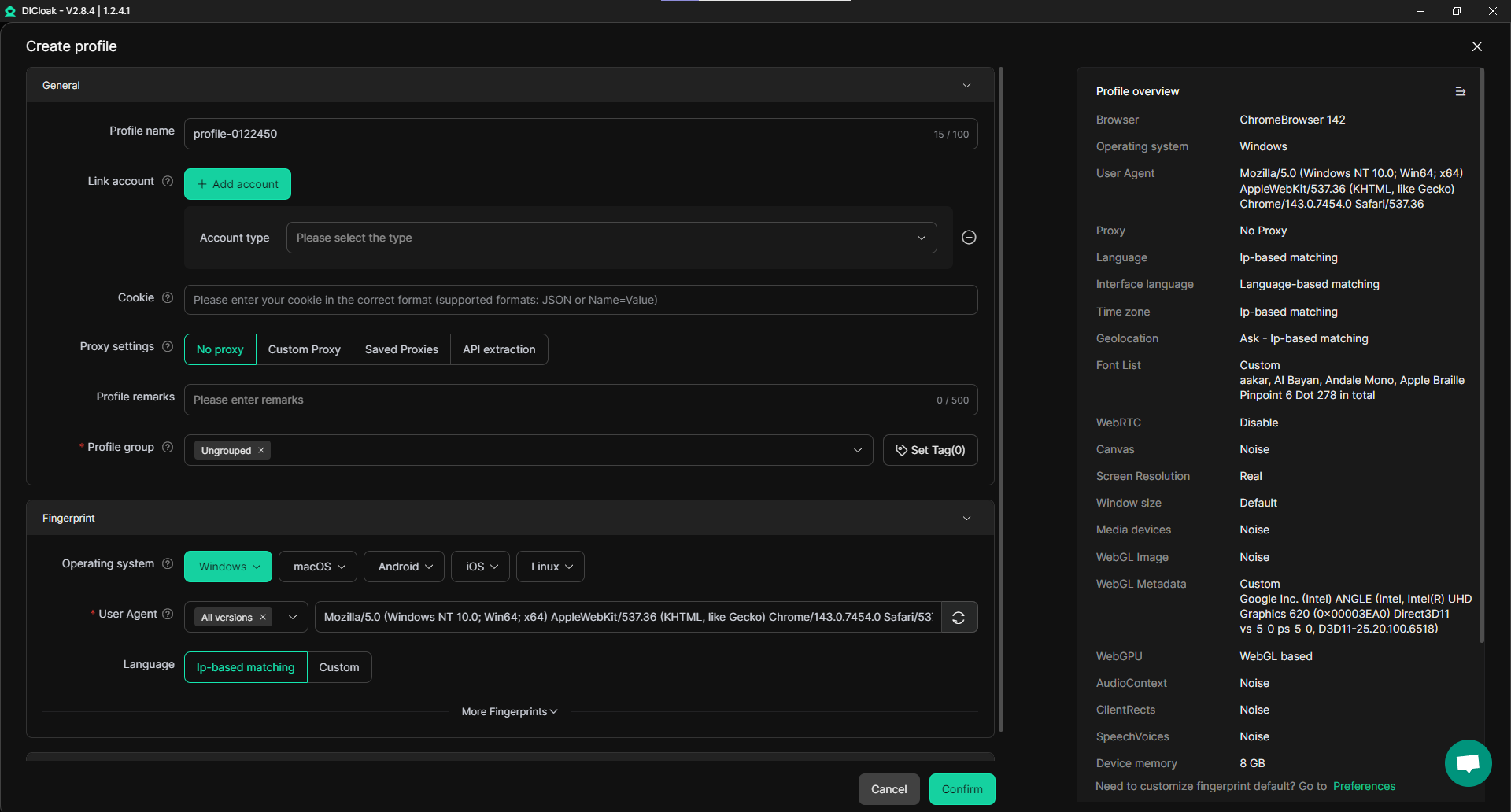
- Mask Digital Footprint: With features like WebRTC protection, Canvas fingerprinting, and custom proxy configuration, DICloak helps that your activities remain private and your accounts are not detected as being controlled by the same user.
- Use automation with RPA (Robotic Process Automation): DICloak also offers powerful RPA tools, which are perfect for TikTok account farming. You can automate actions like liking videos, scraping follower data, and interacting with content, all while keeping your account activity consistent and natural. These automations help increase engagement and maintain the activity needed for account growth without manual effort.
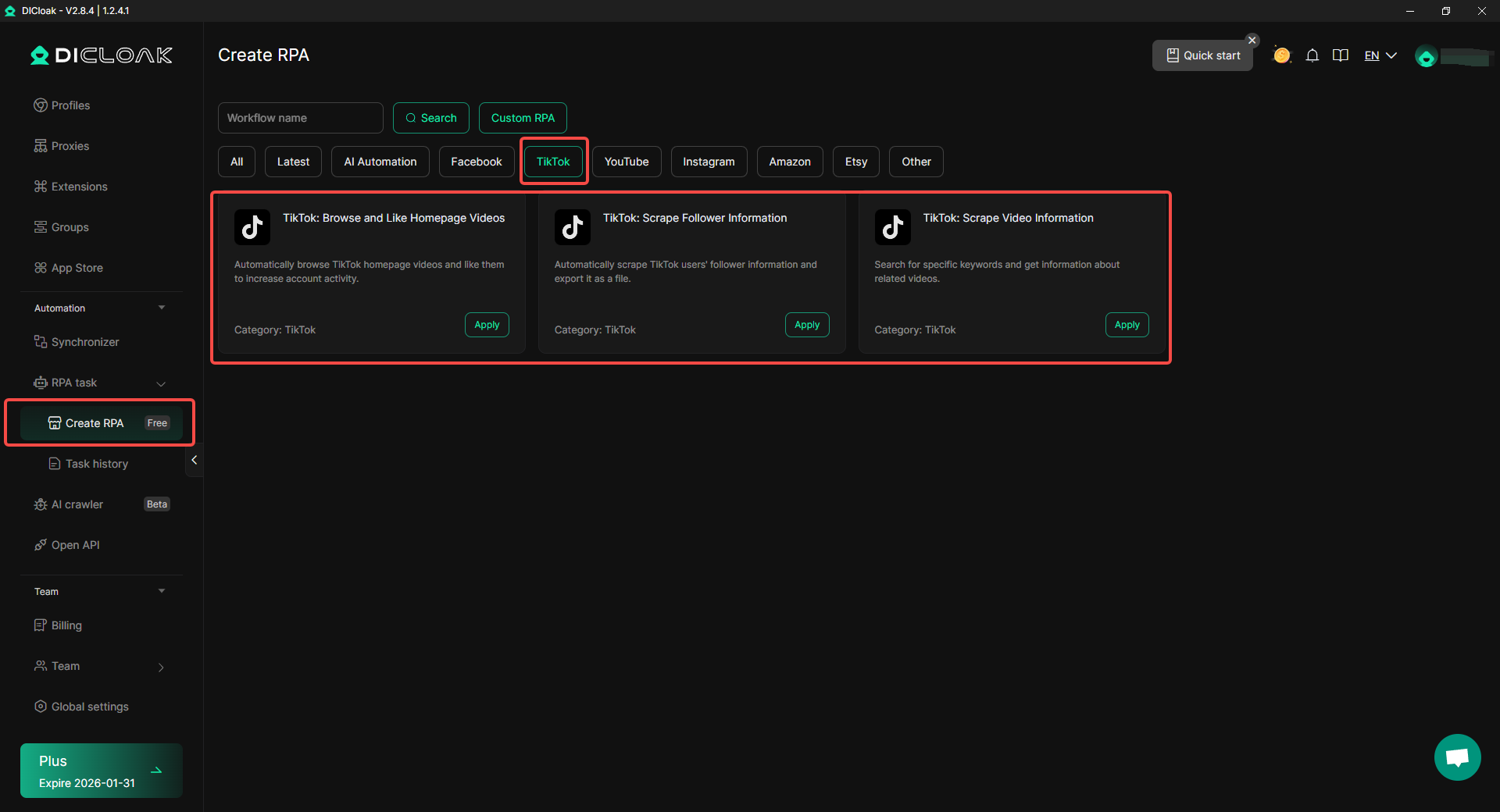
For those looking to scale their TikTok presence or grow multiple accounts, DICloak provides the ideal tools for safe, effective, and automated account farming. The browser’s RPA capabilities, along with custom proxy configuration, offer users the ability to stay anonymous while managing several accounts at once.
Conclusion
Auto scroll on TikTok offers a hands-free way to watch videos by automatically advancing to the next one. While not yet available to all users, enabling it is easy through the video menu. If you can’t access the feature, try updating the app, clearing cache, or using voice commands as an alternative method for scrolling hands-free.
For users managing multiple accounts or seeking more advanced options, DICloak provides powerful tools like custom proxy configurations and RPA automation to enhance your TikTok experience. These features help you manage accounts safely and efficiently.
In summary, auto scroll on TikTok is a great way to enjoy videos without swiping, and with tools like DICloak, users can further optimize their TikTok management and activity.
Frequently Asked Questions About Auto Scroll on TikTok
What is Auto Scroll on TikTok and How Does It Work?
Auto scroll on TikTok is a feature that automatically moves to the next video without requiring you to swipe the screen. Once enabled, TikTok will play videos continuously, allowing users to enjoy hands-free viewing. This feature is ideal for those who want to watch content without having to interact with the app.
Why Is Auto Scroll Not Available on My TikTok?
If auto scroll on TikTok is not available to you, it could be due to a few reasons. First, TikTok is still rolling out this feature gradually to users. Second, it might not be available in your region or on your specific account yet. Ensure your app is up to date and keep checking for the feature's release.
How Can I Turn on Auto Scroll on TikTok?
To turn on auto scroll on TikTok, follow these simple steps:
- Open TikTok and go to the For You page.
- Press and hold any video you want to watch.
- When the menu appears, tap Auto Scroll to enable it.
This will allow videos to play one after another automatically.
Can I Use Voice Commands to Enable Auto Scroll on TikTok?
While auto scroll on TikTok provides a hands-free way to watch videos, you can also use voice commands as an alternative. On both Android and iOS, you can enable voice control to give commands like “scroll down” or “scroll up” to navigate through TikTok videos, offering another way to interact with the app without needing to swipe.
Is There an Alternative to Auto Scroll on TikTok for Managing Multiple Accounts?
If you're managing multiple TikTok accounts and looking for more advanced tools, consider using DICloak. DICloak is an antidetect browser that helps users manage multiple accounts without the risk of bans. It provides RPA tools to automate actions, such as liking videos and scraping follower data, offering a hands-free way to grow and maintain multiple TikTok accounts safely.
 Web Proxy Tools
 Free Tools
 Cookie Plugin
 UA Generator
 MAC Address Generator
 IP Generator
 IP Address List
 2FA Code Generator
 World Clock
 Anonymous Check
 WebRTC Leak Test
 UUID Generator
 Free Web Proxy Site
 Proxy Checker
 FB Ad Checker
 AI Web Scraping
 Free SMM Tools
 Twitter Shadowban Checker
 Instagram Name Checker
 UTM Generator
 Username Generator
 AI Hashtag Generator
 LinkedIn Headline Generator
 Social Media Image Resizer