A single phishing email can drain thousands from a business ad budget in minutes, just ask the dozens of advertisers who saw their compromised ad account facebook run up fake charges before they could react. Hackers today use social engineering, malware, and even fake support messages to slip into Facebook ad accounts, often going undetected until campaigns are hijacked or credit cards get maxed out. Sometimes, the first sign is an unexpected alert, but often the only clue is a wave of unfamiliar ads draining your balance. Recovering a Facebook ad account hacked by attackers is rarely as simple as resetting a password. You may find that recovery options are locked or your profile is banned for “policy violations” triggered by the intruder’s actions. Even after you regain access, the risks don’t stop, attackers can linger through hidden admins or browser sessions, making full control a challenge.
Knowing how to recover compromised Facebook Ads and lock down your account is not just about damage control; it’s about blocking silent threats that can resurface weeks later. This practical guide covers the real steps advertisers use to get back in, cut off intruder access, and prevent repeat takeovers, without waiting on slow support tickets. From warning signs to recovery actions and new routines for Facebook ads account security, everything here is based on what actually works for teams and solo marketers. Here’s where to start if you want your ad spend, and your business, protected.
What Are the First Signs Your Facebook Ad Account Is Compromised?
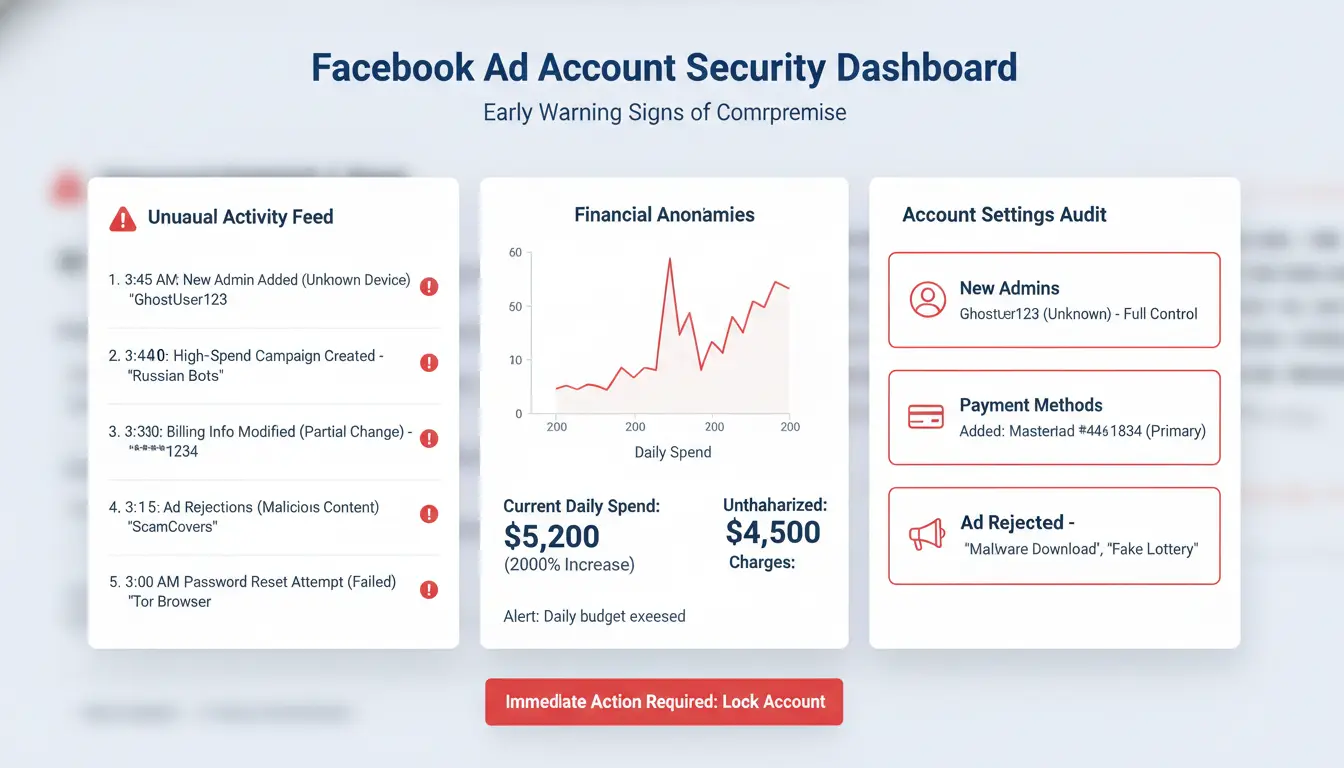
Spotting a compromised ad account on Facebook early can save your budget and your brand’s reputation. Hackers usually move fast, often in hours, not days. The sooner you catch strange activity, the less damage you’ll face. Here’s how most advertisers realize something is wrong and why quick action matters.
Unusual Activity and Unauthorized Campaigns
One of the clearest warning signs is ad spend that makes no sense. If you see a sudden spike in your daily budget, or campaigns running that you didn’t start, stop and review each change. For example, you might log in and find ads for products or websites you never approved. These can drain your payment method in just a few hours.
Checking Facebook Ads Manager often helps you catch these problems early. Watch for unexplained edits to existing ad sets, new campaigns in languages you don’t use, or changes to your billing info. Even small changes can signal a hacked account. If you need to recover compromised Facebook ads, move fast, waiting gives attackers more time to hide their tracks.
Login Alerts and Suspicious Access Locations
Facebook often sends alerts when your account is accessed from a new device or location. If you get a login notification and you weren’t the one signing in, investigate right away. Go to your account’s security settings and look at the list of recent logins. Access from cities or countries you don’t recognize is a red flag.
Don’t ignore these alerts. They often show up before you see changes in your ads. Strong Facebook ads account security means acting on these warnings, not brushing them off. Fast response can keep intruders from locking you out, making recovery much easier if your Facebook ad account is hacked.
Why Do Facebook Ad Accounts Get Compromised So Often?
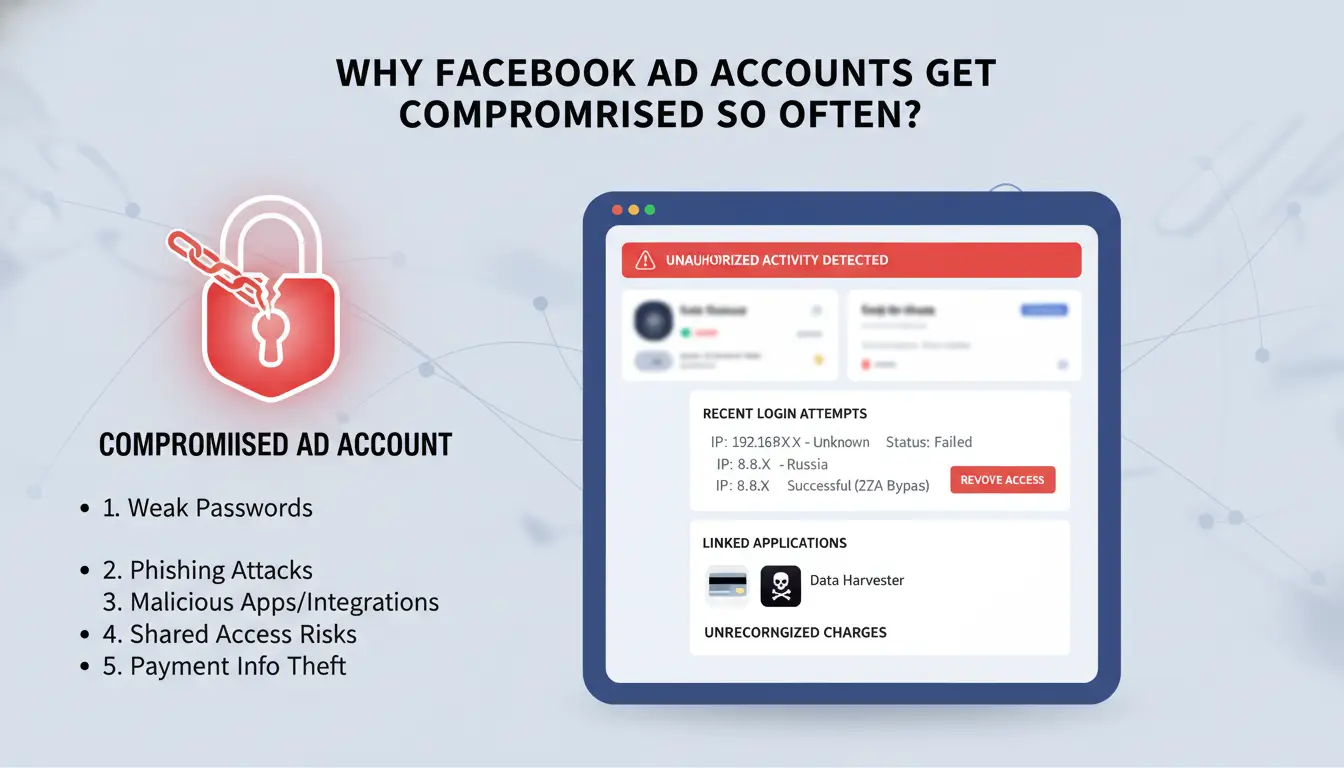
A compromised ad account on Facebook usually happens for simple reasons: attackers look for weak points that most teams ignore. Even experienced marketers can miss basic security steps, which is why Facebook ad account hacked cases keep rising. The main risks start before you even notice something is wrong, by the time you see strange ads or charges, the attacker has often already set up hidden ways back in. Here’s how most accounts get breached.
Weak Passwords and Poor Security Practices
Too many Facebook ad accounts use passwords that get reused across different platforms. If an unrelated site gets breached and you used the same password, attackers can log in without much effort. Teams also skip turning on two-factor authentication, which could block most account takeovers. Even strong passwords are not enough if an attacker already knows them from another leak. The easiest way to prevent a compromised ad account Facebook event is to use unique passwords and always turn on extra login checks.
Phishing, Social Engineering, and Malware
Fake login pages and emails are now more convincing than ever. Attackers send messages that look like real Facebook support, asking you to “confirm” your account or “fix” ad issues. If you click these links and enter your login, your details go straight to the attacker. Malicious browser extensions are another hidden danger, once installed, they can steal cookies or session details, letting someone bypass your password entirely. This is how some attackers regain access even after you recover compromised Facebook ads.
The real problem is that attackers combine these tricks: a single weak link in your Facebook ads account security can undo everything else. For more on keeping your accounts safe, check the Facebook Help Center or learn about browser isolation tools that cut off risky extensions.
What Immediate Steps Should You Take After Discovering a Compromised Facebook Ad Account?
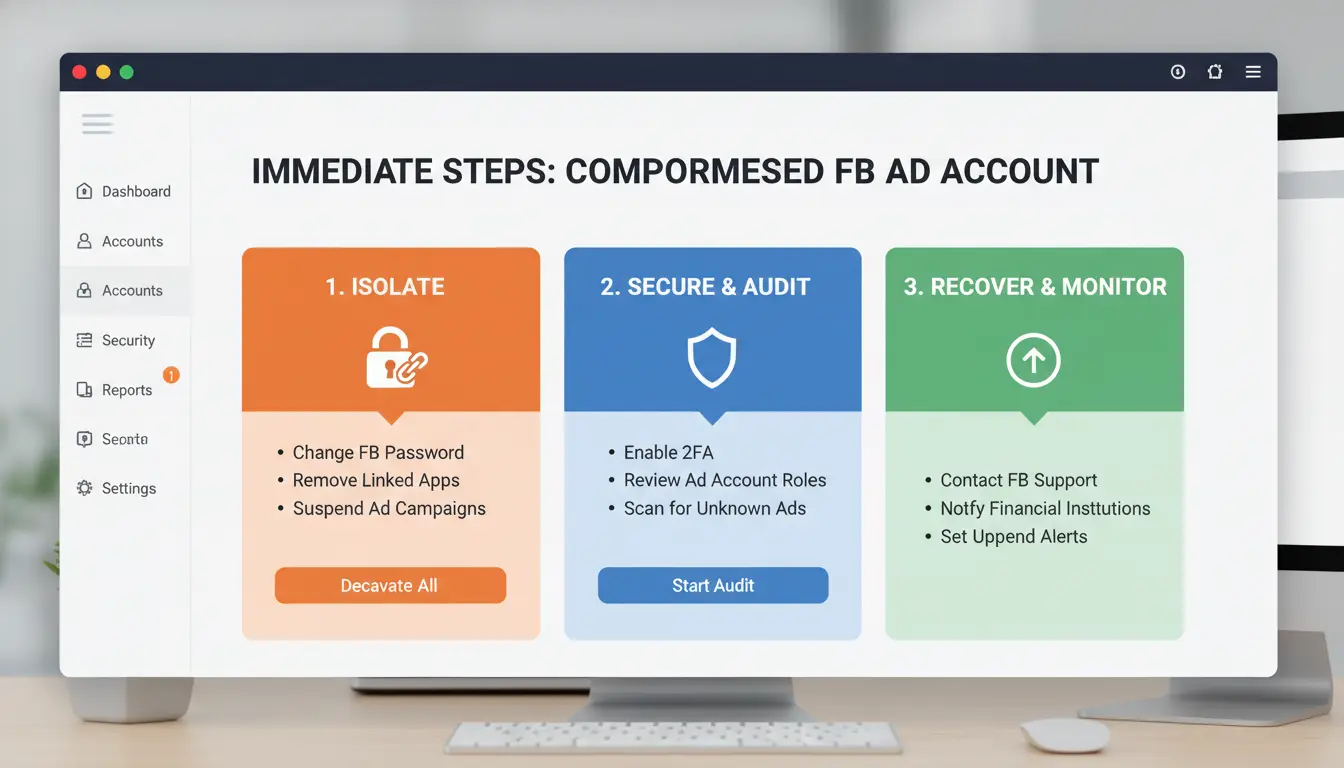
When you spot strange activity, unexpected ads, unfamiliar admins, or weird billing changes, you’re likely dealing with a compromised ad account Facebook situation. Quick action is the only way to stop losses and prevent deeper damage. Even a short delay can mean extra charges, stolen data, or repeat hacks. Here’s what actually works to recover compromised Facebook ads and protect your business.
Secure Your Facebook Login and Change Passwords
Start by resetting your Facebook password. Use a device you trust, like your main phone or computer, and go directly to Facebook’s official password reset page. Make your new password strong and unique. Next, turn on two-factor authentication (2FA) for every account tied to your Business Manager. 2FA means nobody can log in without a code sent to your device, even if they have your password. This step blocks most repeat takeover attempts and is the fastest way to boost Facebook ads account security.
Review and Remove Unauthorized Users and Apps
Open Business Manager and check all users with admin or finance access. Remove anyone you don’t recognize, don’t wait for approval or confirmation. Attackers often hide as “helpers” or add new admins to keep access. Also, look at connected apps in your Facebook settings. Revoke access for any app you didn’t install or don’t use. Some hacks come from bad apps that link directly to your ads account. Cleaning up both users and apps is how you lock out hidden intruders.
Acting fast, before the attacker moves funds or changes ownership, is what stops bigger losses and keeps your advertising budget safe. Recovery is about speed and focus; waiting for support can cost you more than the hack itself.
How to Report a Compromised Facebook Ad Account and Recover Access
A compromised ad account on Facebook is not just about stolen budget, attackers often change payment info, launch risky ads, or add hidden admins. Fast action is the only way to limit damage. Here’s how to report the breach and start recovery.
Filing a Security Report with Facebook Support
Go directly to the Facebook Business Help Center if you notice unauthorized ads or account changes. Use the “Policy Violations or Account Compromised” request, not general support, this routes your case to the right team. If you can still log in, start with Meta’s compromised account tool. If you’re locked out, ask a trusted admin to file on your behalf.
Share clear details: “My Facebook ad account was hacked,” plus the Account ID, last good login, and what changed (like new admins or payment methods). Attach screenshots if you can. The more proof you give, the faster support can act. Don’t delete anything before Facebook investigates, removing users or ads may erase evidence support needs.
What to Expect During the Recovery Process
After you report, Facebook usually responds within 1–3 business days for ad account hacks, but it can take longer if there’s a surge in cases. You’ll get updates in Account Quality or through email. To verify you, Facebook may ask for an ID, business proof, or details only the real owner would know.
Once they confirm you, Facebook can restore admin rights, reverse fake ad charges, and help remove suspicious changes. But full recovery takes more than just a password reset. You must review admins, payment methods, and connected apps to block future risks. For more tips on Facebook ads account security, check the official Facebook Security page.
What Mistakes Should You Avoid After Regaining Access to Your Facebook Ad Account?
Getting back into your account feels like the hard part, but many advertisers lose control again by missing hidden risks. The biggest mistakes happen in the hours and days after recovery, one slip and the attacker can stay inside, watching or even regaining access. Here’s what to check next if you want your compromised ad account facebook to stay secure.
Failing to Audit Account Settings Thoroughly
Attackers rarely make just one change. They often add extra admins, change notification emails, or connect suspicious apps. If you stop at resetting your password, you leave the door open. Go line by line through your Facebook Business Manager settings. Look for new users you don’t recognize, admin roles you did not set, or integrations you don’t use. Remove anything that doesn’t belong. It’s easy to overlook an app, one that quietly pulls data or injects new ads. Attackers often hide their tracks by using subtle changes, so check every section, not just the main dashboard.
Not Updating Security Measures for All Linked Accounts
Most Facebook ad account hacks start with a weak spot outside Facebook, like a stolen email or a reused password. If you don’t change passwords for every admin and update your connected email security, you risk a quick repeat attack. That means going beyond your own login: have every team member update their passwords and check for two-factor authentication. Review linked payment methods too; attackers sometimes add their own cards for stealthy spending. Skipping this step is one of the fastest ways a recover compromised Facebook ads attempt fails.
If your team manages multiple accounts or rotates logins, a tool like DICloak can help by giving each user a separate profile and audit trail. That way, you spot unusual access and block it fast, missing this step is the most common cause of a second compromise.
How to Prevent Future Compromise: Advanced Security Strategies for Facebook Ad Accounts
Protecting your Facebook ad account from another attack means building defenses that block both technical and human threats. Sophisticated intruders don’t just steal passwords, they use browser tricks and weak team setups to sneak back in. If your compromised ad account Facebook nightmare is finally over, use these steps so you don’t face the same risk twice.
Isolated Browser Profiles and Proxy Use
Most account takeovers happen when someone reuses a browser or device fingerprint across accounts. Facebook tracks small details about your browser and network to spot fake users or sudden changes. If you share one browser for work and ads, you risk cross-contamination, especially after a Facebook ad account hacked event.
The safer way is to use an isolated browser profile for each ad account. Each profile should have its own proxy, which gives a unique IP address. This makes it much harder for attackers or Facebook’s systems to link accounts together or flag suspicious actions. You can use tools like DICloak to set up separate browser profiles, assign proxies, and keep ad account fingerprints clean. This method is what most advanced teams and agencies use to recover compromised Facebook ads and stop repeat attacks.
Team Collaboration and Permission Controls
Even strong passwords won’t save you if every team member has admin rights. Limit who gets full access. Assign clear roles, only give admin to those who actually need it for ad management. Everyone else should get advertiser or analyst roles.
Track all changes using activity logs. If Facebook’s built-in logs miss details, consider team workflow tools that record who logs in, from where, and what they do. That way, if your Facebook ads account security is breached, you can quickly spot suspicious actions and react before more damage happens. The most common reason for repeat takeovers is letting too many people have high-level control without oversight.
How DICloak Helps Social Media Marketers Secure Multiple Facebook Ad Accounts
Handling multiple Facebook ad accounts on one device is a known risk. Mixing logins, reusing browsers, or skipping proxy setup often leads to a compromised ad account Facebook teams have seen too often, sometimes with bans or silent hijacks that go undetected for days.
Managing Multiple Accounts Safely on One Device
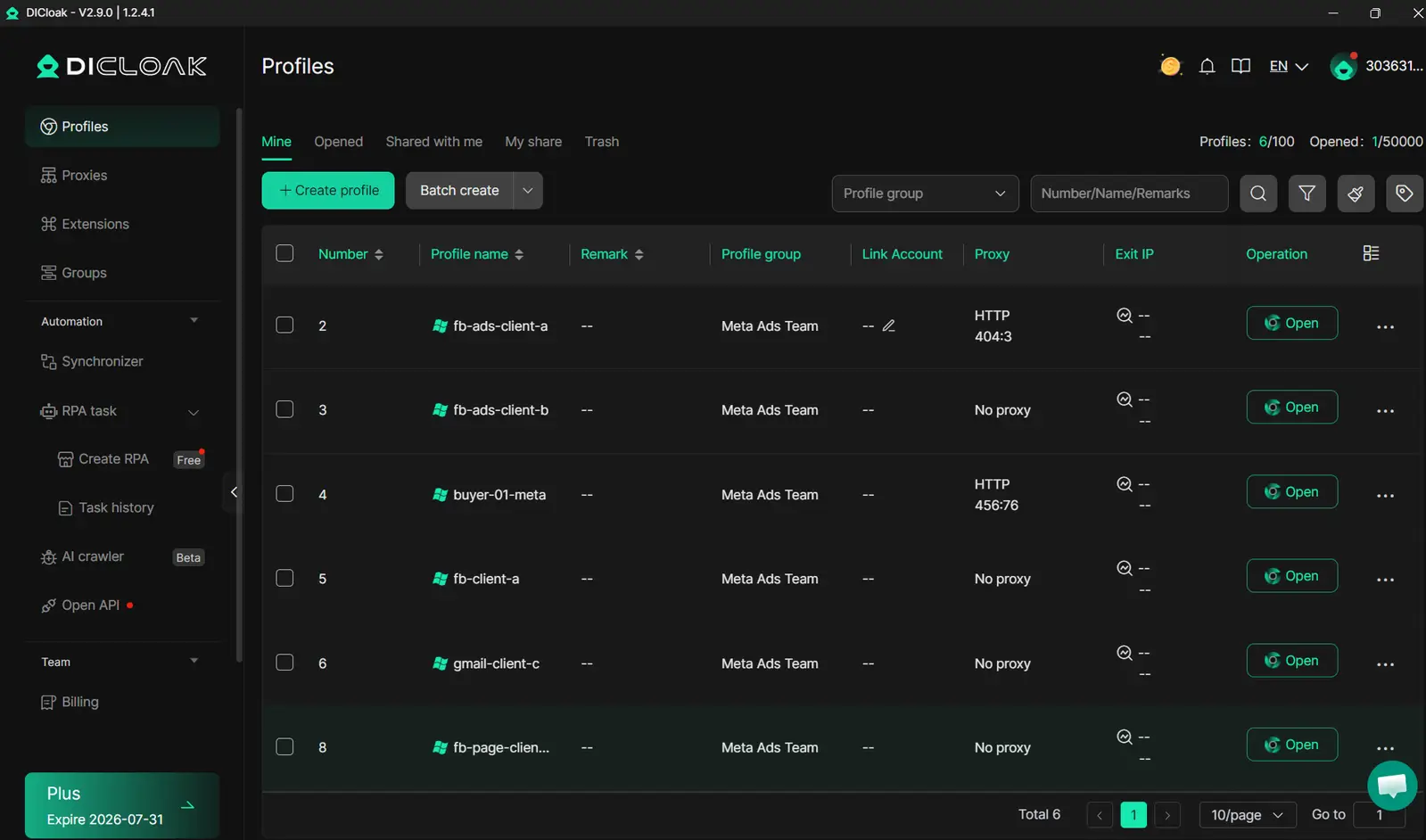
You can use DICloak’s antidetect browser to give each Facebook ad account its own isolated browser profile, complete with a unique fingerprint and dedicated proxy. This setup keeps cookies, sessions, and login data fully separated. If one account gets flagged or if you’re recovering a compromised ad account Facebook flagged, the others stay untouched. These isolation tools are used by agencies who manage dozens of accounts and want to avoid cross-contamination.
Automating Account Engagement and Team Collaboration
Tools like DICloak let you automate risky routine tasks, such as posting, liking, and switching profiles, using built-in RPA. Team members get clear permission settings and operation logs, so you always know who did what and when. For Facebook ads account security, this means fewer manual errors and quick pinpointing if something goes wrong, helping teams recover compromised Facebook ads without guesswork.
When Should You Consider Professional Help or Account Replacement?
Recovering a compromised ad account on Facebook isn’t always possible. Sometimes the damage goes deeper, permanent bans, lost access, or hidden threats that won’t go away. Before you spend days chasing recovery, or risk buying a replacement, it’s smart to know where the limits are and how to spot real help versus scams.
Cases Where Recovery Is Not Possible
If your Facebook ad account is hit with a permanent ban, like “confirmed policy violations” or “irreversible security compromise”, recovery isn’t an option. Even with all the right steps, Facebook support often won’t restore accounts flagged for repeated violations or fraud. In these cases, many marketers consider buying a new account or hiring experts to recover compromised Facebook ads.
But buying replacement accounts brings new risks. You might get an account with hidden bans, fake ownership, or recycled credentials that trigger instant restrictions. Here’s a quick comparison:
| Option |
Risks |
Typical Outcome |
| Buying replacement account |
Hidden bans, fake control, recycled profiles |
Short-lived access |
| Professional recovery |
High fees, no guarantee, possible scam |
Uncertain |
Table source: Facebook Help Center
Choosing Reliable Support and Avoiding Scams
Not every service claiming to recover compromised ad account Facebook issues is legit. Real experts should explain their process, have verifiable history, and never promise instant fixes, especially for accounts with permanent bans. Ask for proof of past recoveries and check reviews on trusted platforms like Trustpilot or Reddit’s r/FacebookAds.
Warning signs of fraudulent sellers include asking for upfront payment, refusing video calls, or offering accounts at prices much lower than market. If you’re not sure, safer options like DICloak help with Facebook ads account security by isolating browser profiles and tracking admin sessions to reduce takeover risks.
If you can’t restore control, replacing your account only makes sense when you can verify new ownership and remove leftover risks from past admins.
Frequently Asked Questions
How can I check if my Facebook ad account is compromised?
To spot a compromised ad account Facebook issue, open Ads Manager and look for ads you didn’t create, strange spending, or new campaigns. Check for login alerts or messages about new devices. Review account roles to see if unknown users have access. Act quickly if you notice any suspicious activity.
What should I do if Facebook support is slow to respond about a hacked ad account?
If your Facebook ad account is hacked and support is slow, first change your password and remove unknown users. Document every strange ad or login event with screenshots. Submit all evidence through Facebook’s help channels. Keep records of your messages and follow up often until your compromised ad account Facebook issue is resolved.
Can compromised Facebook ad accounts affect connected business pages?
Yes, compromised Facebook ad accounts can put business pages at risk. Hackers may use your access to manage pages, change admins, or run harmful ads. Regularly review page roles and ad account permissions. Remove users you don’t know and watch for new admins or changes you didn’t make to keep your assets safe.
Is it safe to use proxies for Facebook ads account security?
Using proxies for Facebook ads account security can be safe if done right. Proxies help separate different accounts and reduce the risk of Facebook linking them. Make sure to use reliable, private proxies and unique browser profiles. Avoid free or public proxies, as they can make your compromised ad account Facebook more vulnerable.
How does DICloak improve security for teams managing Facebook ad accounts?
DICloak boosts Facebook ad account security by offering isolated browser profiles, built-in proxy support, and strong permission controls. Teams can automate routine tasks without sharing passwords. This setup helps prevent a single compromised ad account Facebook incident from spreading to other accounts or business assets.
Protecting your Facebook ad account requires vigilance and quick action if you suspect it has been compromised. By understanding the warning signs and implementing strong security measures, you can significantly reduce the risk of unauthorized access and potential financial loss. Try DICloak For Free
 Web Proxy Tools
 Free Tools
 Cookie Plugin
 UA Generator
 MAC Address Generator
 IP Generator
 IP Address List
 2FA Code Generator
 World Clock
 Anonymous Check
 WebRTC Leak Test
 UUID Generator
 Free Web Proxy Site
 Proxy Checker
 FB Ad Checker
 AI Web Scraping
 Free SMM Tools
 Twitter Shadowban Checker
 Instagram Name Checker
 UTM Generator
 Username Generator
 AI Hashtag Generator
 LinkedIn Headline Generator
 Social Media Image Resizer