Managing your digital identity is more critical than ever in today's online world. Every interaction leaves behind a trace, forming a digital footprint that websites and services use to identify and track you. Iphey is a powerful tool designed to give you a clear, detailed understanding of this footprint. This article serves as a comprehensive guide, providing a clear, step-by-step process on how to successfully pass Iphey test using the DICloak antidetect browser, ensuring your online privacy and security.
What is Iphey
Iphey is an advanced, practical, and easy-to-use tool that provides a clear view of what your digital footprint looks like to the outside world. It works by analyzing key details ranging from your IP address and browser settings to more subtle system attributes. By creating a comprehensive snapshot of your online presence, Iphey helps identify potential security weaknesses. Passing its checks is a key indicator of a strong, consistent, and well-managed digital identity.
Why Pass Iphey Test Matters
The ability to pass Iphey test is a practical benchmark for privacy, development, and security professionals. It confirms that your setup appears genuine and consistent to websites, without revealing your true identity or location. For anyone serious about managing their digital identity effectively, mastering these checks is a necessary and foundational step.
Key Fingerprint Elements You Must Mask to Pass Iphey Test
Passing the Iphey test requires a holistic approach. While your IP address is the most obvious identifier, it's the consistency across dozens of subtle parameters that determines success or failure. Iphey excels at detecting mismatches between these elements. Key elements include:
- IP Address and Connection Type: Iphey identifies your IP address and checks for the use of a proxy or other anonymizers, noting any inconsistencies.
- Browser and System Details: Standard settings such as your browser version, operating system, and screen resolution are logged and compared for authenticity.
- Advanced Fingerprinting: Iphey employs advanced methods to build a highly detailed profile. It analyzes canvas rendering, DNS queries, and even hardware characteristics to detect minute differences that could expose your real setup.
DICloak: The Ultimate Tool to Pass Iphey Test
Why an Antidetect Browser is Essential to Pass Iphey Test
Simple tools like basic proxies are not enough to mask your digital footprint from an advanced checker like Iphey. While a proxy creates a secure tunnel for your data, it does nothing to change the dozens of browser and hardware parameters that Iphey scrutinizes, leaving a trail of inconsistencies that immediately flag your connection as suspicious. To pass these comprehensive checks, you need an antidetect browser. This is a specialized tool designed not only to mask your current IP address but also to modify your entire digital fingerprint, making your online activity truly secure and anonymous.
What Makes DICloak So Powerful?
One of DICloak’s biggest strengths is its seamless compatibility with Iphey. DICloak allows users to create and manage multiple isolated digital identities, switching between browser profiles smoothly without leaving fingerprint traces. This level of control is especially valuable for sensitive online activities—such as crypto trading, secure account management, or privacy-focused browsing—where maintaining a stable environment and consistently passing Iphey checks is critical.

Core Features for Maximum Privacy
✅ Manage 1,000+ Accounts on One Device: Stop wasting money on extra hardware! DICloak allows you to manage multiple accounts on a single device, cutting costs and boosting efficiency.
✅ Guaranteed Account Safety, No Ban Risks: Every account gets its own isolated browser profile with custom fingerprints and IPs, drastically reducing the risk of bans. Your accounts, your control!
✅ Flexible Proxy Configuration for Maximum Performance: Seamlessly integrate with all major proxy protocols (HTTP/HTTPS, SOCKS5) and manage your proxy pool with bulk operations. No more struggling with IP management—DICloak has you covered.
✅ Streamlined Team Collaboration for Better Results: Easily manage your team with advanced tools like profile sharing, permission settings, data isolation, and operation logs. Your team works smarter, not harder.
✅ Automate the Grind with RPA: DICloak's built-in RPA saves you hours of manual work. Automate repetitive tasks, streamline workflows, and focus on what really matters—growing your business.
✅ Powerful Bulk Tools to Scale Your Operations: Create, import, and launch multiple browser profiles in one click. DICloak makes scaling your business as easy as it gets.
✅ Compatible with All Major Operating Systems: Based on the Chrome core, DICloak supports simulating Windows, Mac, iOS, Android, and Linux operating systems. No matter what platform you need, DICloak has you covered.
Step-by-Step Guide: How to Use DICloak to Pass Iphey Test
Follow these steps to configure DICloak and create a digital identity that can successfully pass Iphey test.
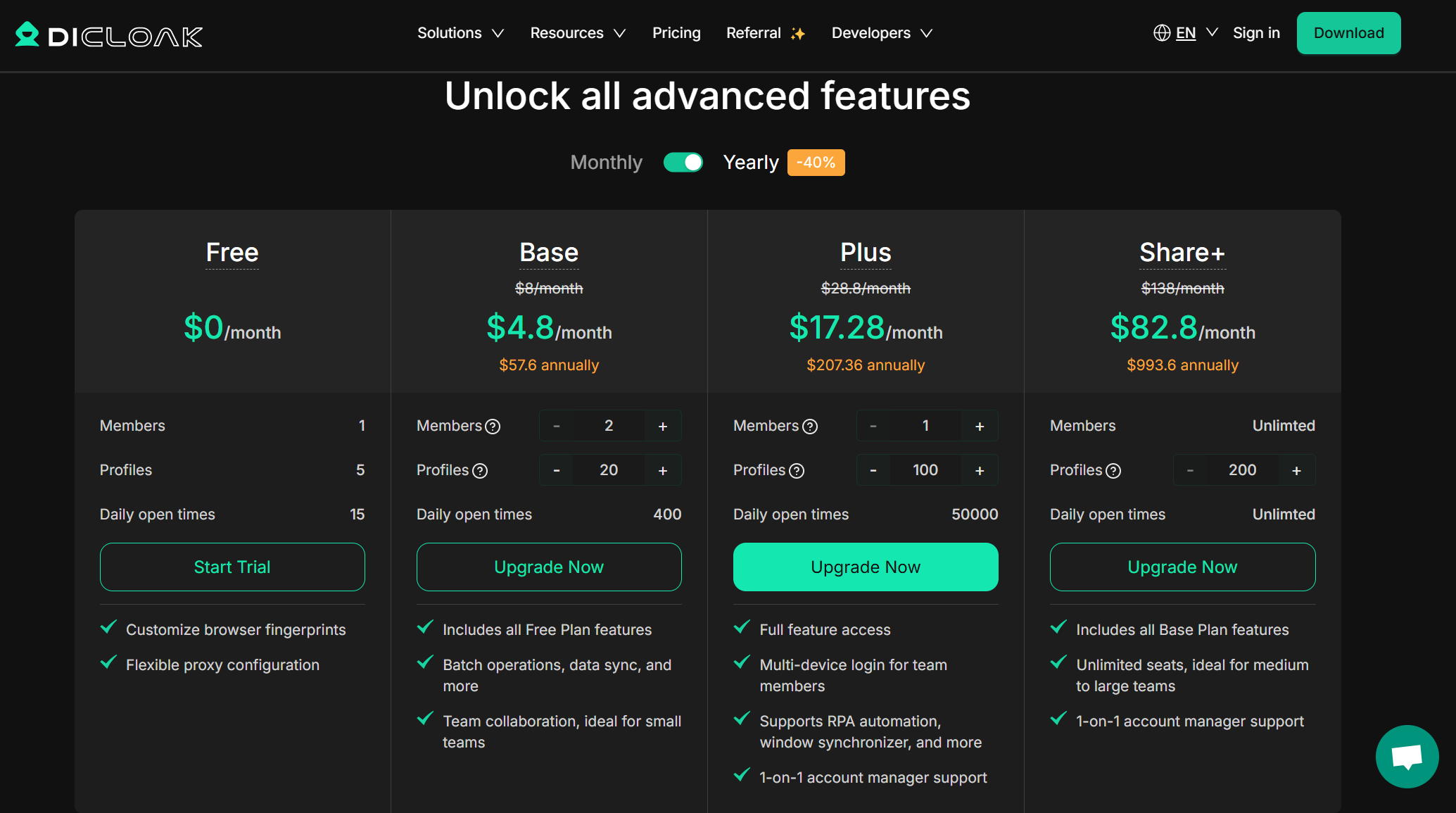
Step 1: Choose Your Plan and Install DICloak
Begin by selecting the DICloak plan that best suits your needs. After subscribing, download the application, complete the installation process, and log in to your account to access the main dashboard.
Step 2: Create a New Browser Profile
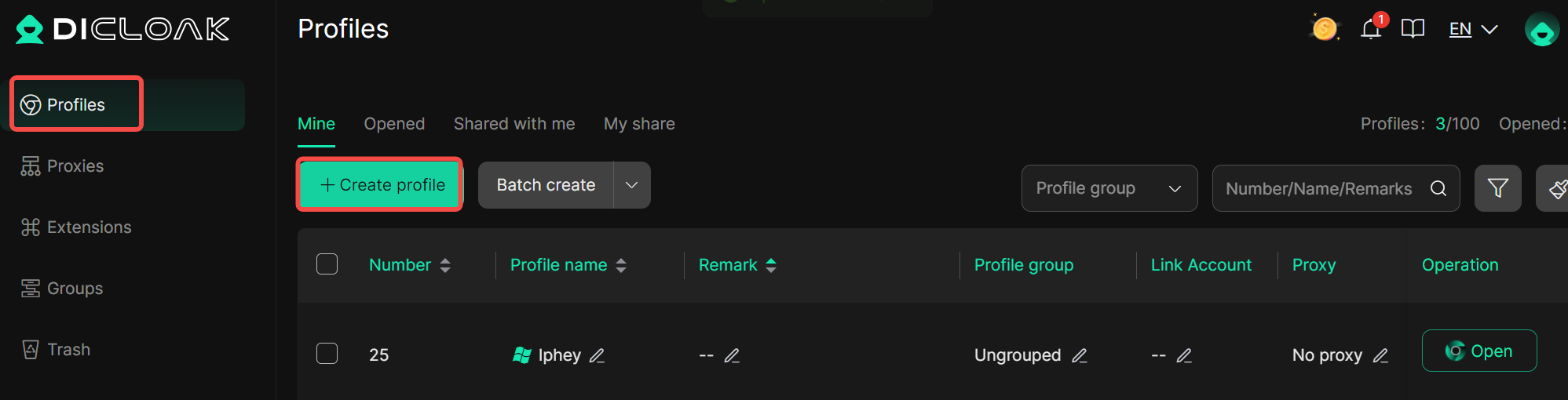
From the main dashboard, click the "Create Profile" button to start creating a new profile. DICloak's primary strength lies in its well-optimized, genuine base profiles, which come pre-configured with diverse screen, WebGL, and other parameters.
Step 3: Configure Your Proxy Settings
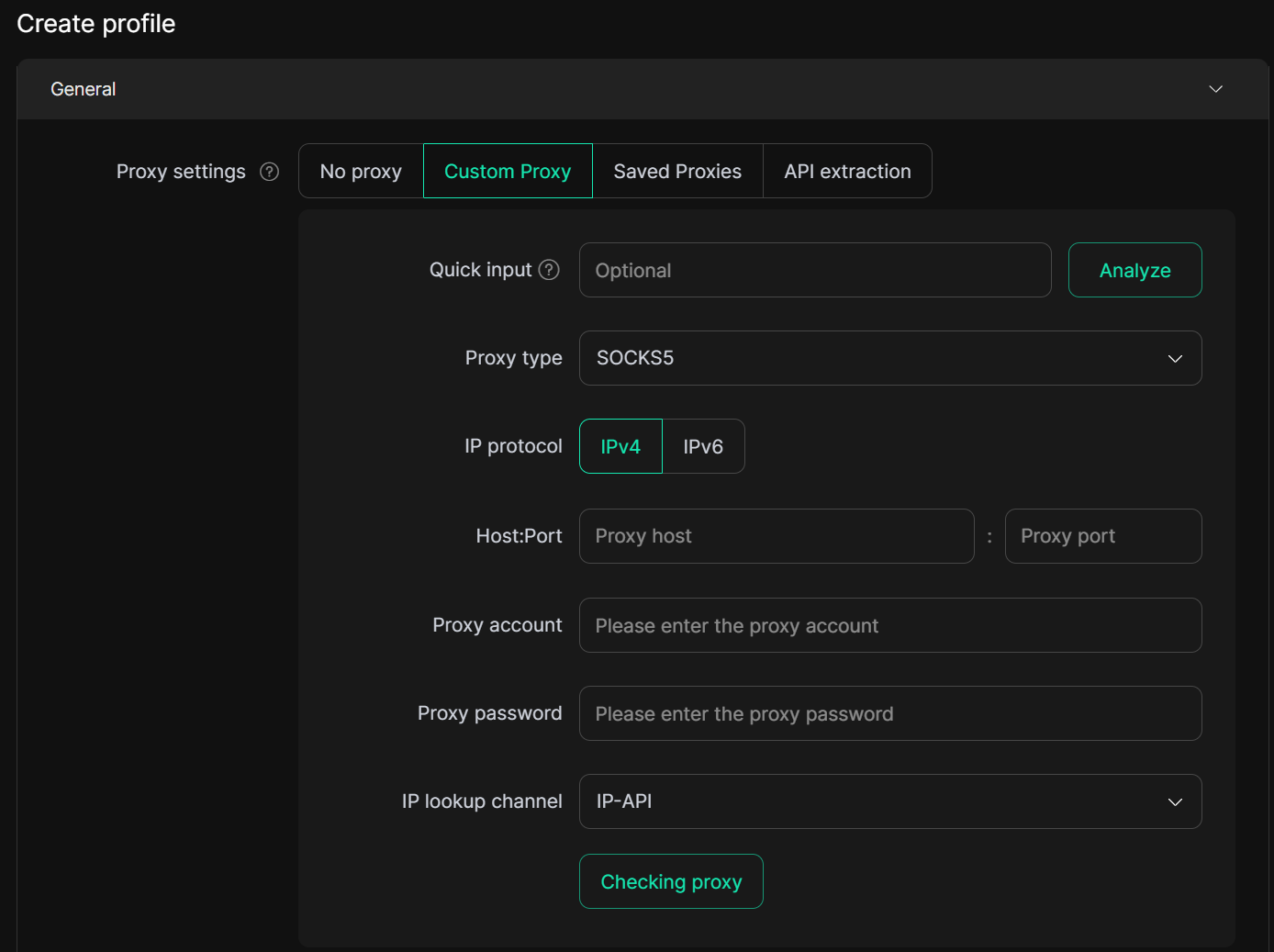
Integrating a reliable proxy service is a critical step. Configure your proxy settings within the DICloak profile to mask your current IP address. This protects against hidden vulnerabilities that could otherwise expose your real identity and ensures that your traffic is routed through a secure intermediary.
Step 4: Verifying Your Success
Once your profile is configured, it is vital to test its effectiveness to ensure your modified digital fingerprint appears authentic.
1. Launch Your DICloak Profile: Start the newly created browser profile directly from the DICloak application.
2. Visit Iphey.com: Navigate to the Iphey website to run its comprehensive suite of privacy and fingerprinting tests.
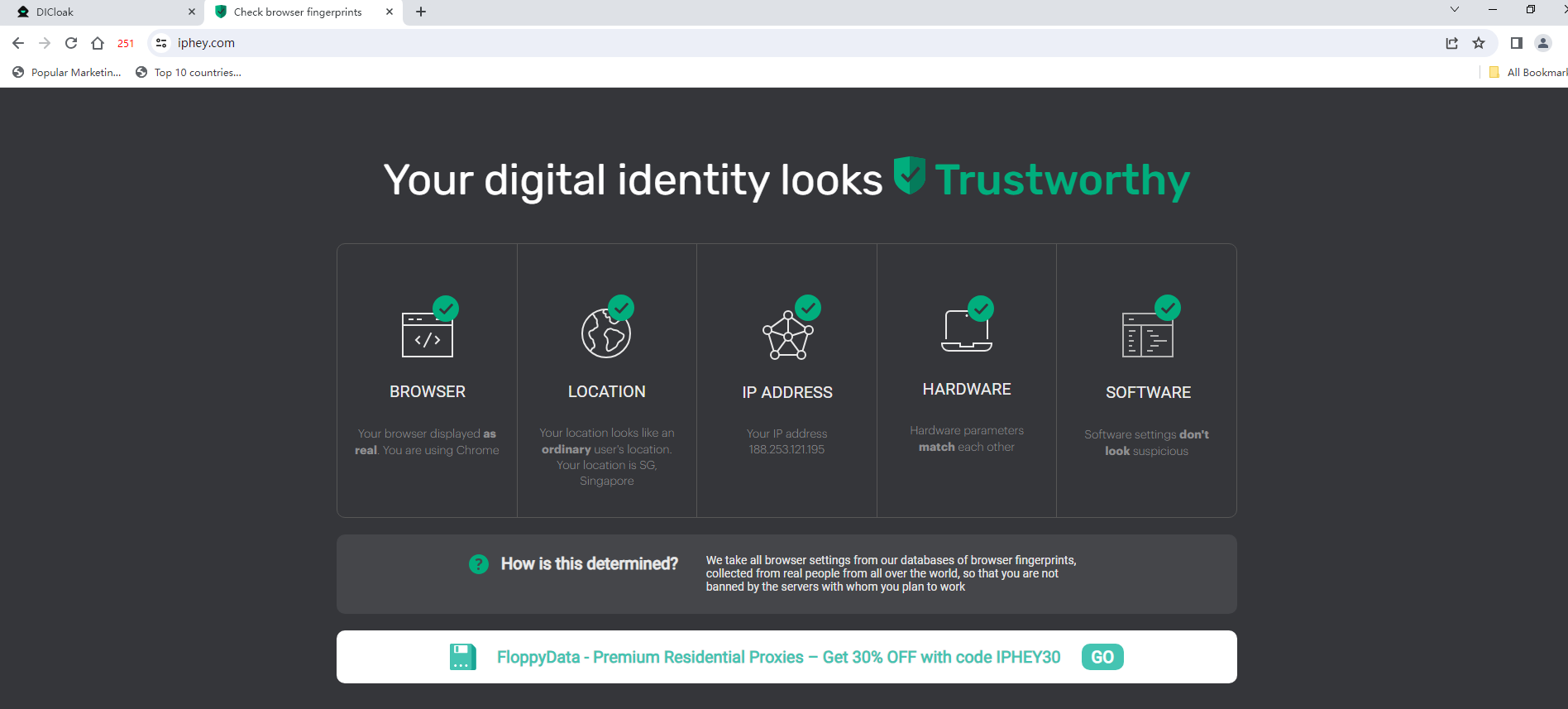
3. Analyze the Results: Observe how DICloak’s antidetect features allow you to successfully pass the tests, presenting a completely different and consistent digital identity.
4. Test Consistently: Run tests on a variety of websites—both high-traffic (like Google or Facebook) and random ones—to analyze fingerprint testing results and ensure your visual signature and browser configuration remain consistent and effective across different platforms.
5. Next Leve: Browser Automation: For advanced users, the next step is to integrate automation. Begin automating tasks with DICloak and re-test your setup on Iphey to ensure your automated workflows maintain the same level of digital integrity and pass detection checks successfully.
Real-World Use Cases: Who Needs to Pass Iphey Test?
Mastering digital fingerprint transformation is not just about privacy—it is a competitive advantage for a wide range of professionals. The ability to maintain multiple, resilient digital identities is essential for:
- Affiliate Marketers: To manage multiple ad accounts and campaigns without being linked or banned.
- Web Developers: To test how websites appear and function from different locations and on different devices.
- Multi-account Managers: To operate numerous secure online accounts on the same platform for e-commerce or social media.
- Web Scrapers: To gather data from websites without being blocked by anti-bot systems.
- Security Researchers: To analyze systems and potential vulnerabilities from different network perspectives without revealing their identity.
Final Thoughts: Achieve Anonymity and Pass Iphey Test with Confidence
Changing your digital fingerprint is a challenging yet essential process for anyone serious about online privacy and security. If your goal is to pass Iphey test reliably, you need more than basic privacy tools. By using DICloak, you can adopt a strategy that is both safe to manage and powerful in protecting your digital confidentiality. DICloak provides the tools and technology required to create authentic digital identities, helping you pass Iphey test by masking your IP address and aligning critical fingerprint parameters with real-world device behavior. This allows you to pass Iphey test with confidence, even against advanced detection systems.
Frequently Asked Questions (FAQs)
What does it mean to pass Iphey test?
Passing the Iphey test means your browser setup appears genuine and consistent to websites. When you pass Iphey test, it shows no signs of proxy usage or fingerprint manipulation, confirming that your digital identity is well-protected and stable.
Can I pass Iphey test without an antidetect browser?
While basic tools can hide your IP address, they cannot modify deep-level fingerprint parameters that Iphey checks. To truly pass Iphey test, you need control over elements like canvas rendering, WebGL, and device signals. Only an advanced antidetect browser such as DICloak can consistently help you pass Iphey test successfully.
How does DICloak help me pass Iphey test?
DICloak helps you pass Iphey test by replacing your real digital fingerprint with a realistic one from its extensive profile library. It also auto-configures WebRTC, timezone, and geolocation based on your proxy, preventing data leaks and ensuring the consistency required to pass Iphey test.
Is it enough to just change my IP address to pass Iphey test?
No. Simply changing your IP address is not enough to pass Iphey test. Iphey evaluates many additional factors, including browser version, screen resolution, canvas behavior, and hardware details. All of these must align correctly for your profile to pass Iphey test and appear authentic.
How often should I test my setup on Iphey to pass Iphey test consistently?
It’s best to test your setup on Iphey regularly, especially after adjusting your browser profile or proxy. Frequent checks help ensure your configuration continues to pass Iphey test over time and remains secure against new detection methods.
 Web Proxy Tools
 Free Tools
 Cookie Plugin
 UA Generator
 MAC Address Generator
 IP Generator
 IP Address List
 2FA Code Generator
 World Clock
 Anonymous Check
 WebRTC Leak Test
 UUID Generator
 Free Web Proxy Site
 Proxy Checker
 FB Ad Checker
 AI Web Scraping
 Free SMM Tools
 Twitter Shadowban Checker
 Instagram Name Checker
 UTM Generator
 Username Generator
 AI Hashtag Generator
 LinkedIn Headline Generator
 Social Media Image Resizer