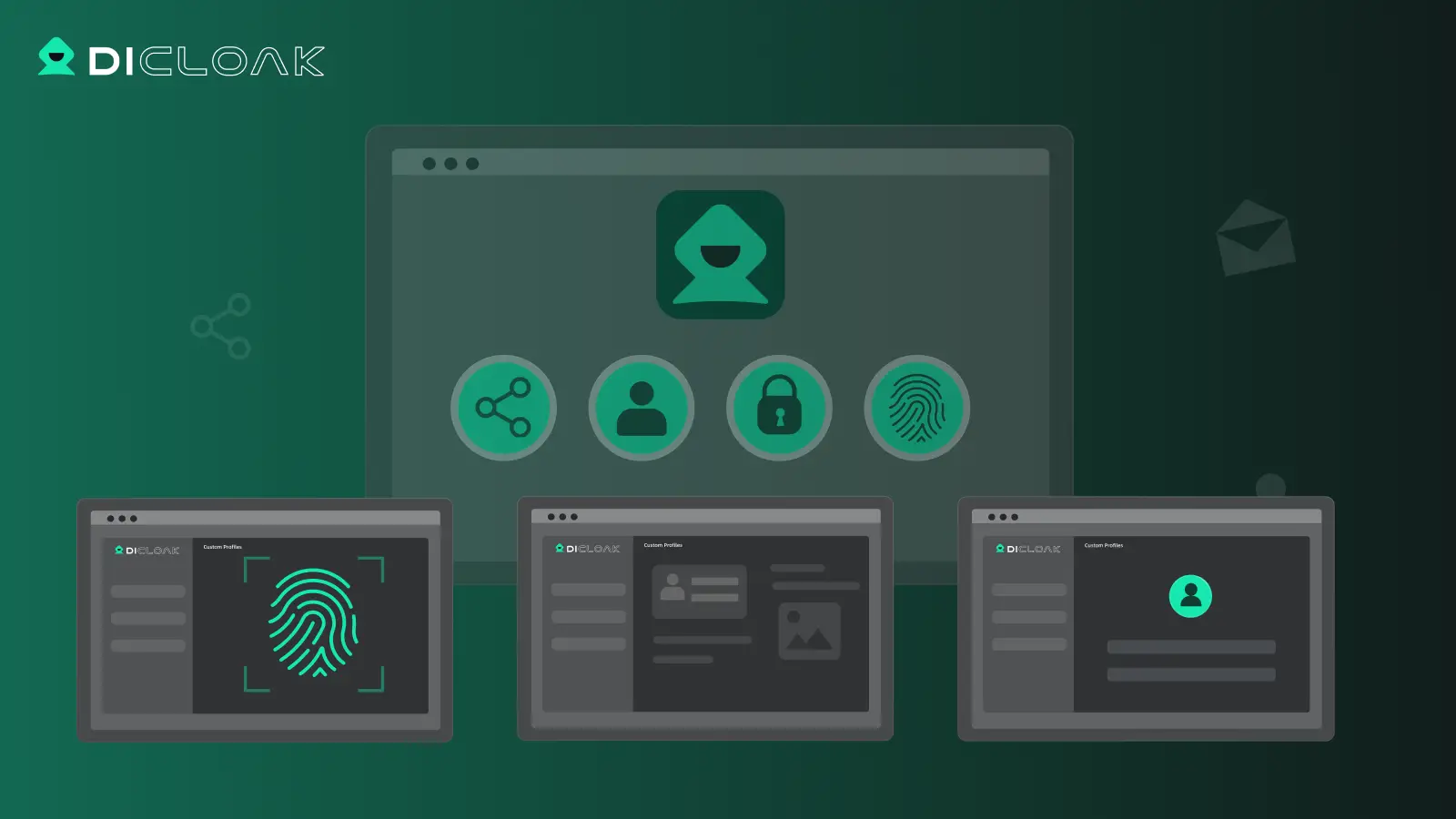
Managing multiple social media accounts can quickly become overwhelming. Posting updates, liking videos, or checking proxy statuses every day are repetitive tasks that are both time-consuming and prone to errors. This is where DICloak Browser MCP comes in. By connecting your AI tools to DICloak Browser MCP, you can automate these actions—whether it’s handling profiles, scheduling content, or monitoring proxies—directly from a single, centralized interface. The result is faster, more consistent workflows and a significant boost in efficiency.
What is Browser MCP?
Browser MCP (Model Context Protocol) is an open-source standard designed to connect AI applications to external systems seamlessly. Using MCP, AI applications like ChatGPT or Claude can interact with data sources (such as local files and databases), tools (like search engines or calculators), and workflows (including specialized prompts), allowing them to access critical information and perform complex tasks efficiently.
Think of MCP as a universal interpreter. If everyone speaks different languages, communication becomes painful. But if one interpreter stands in the middle, everyone can talk using one shared method. That’s MCP: it lets AI apps and external systems connect through the same communication method.
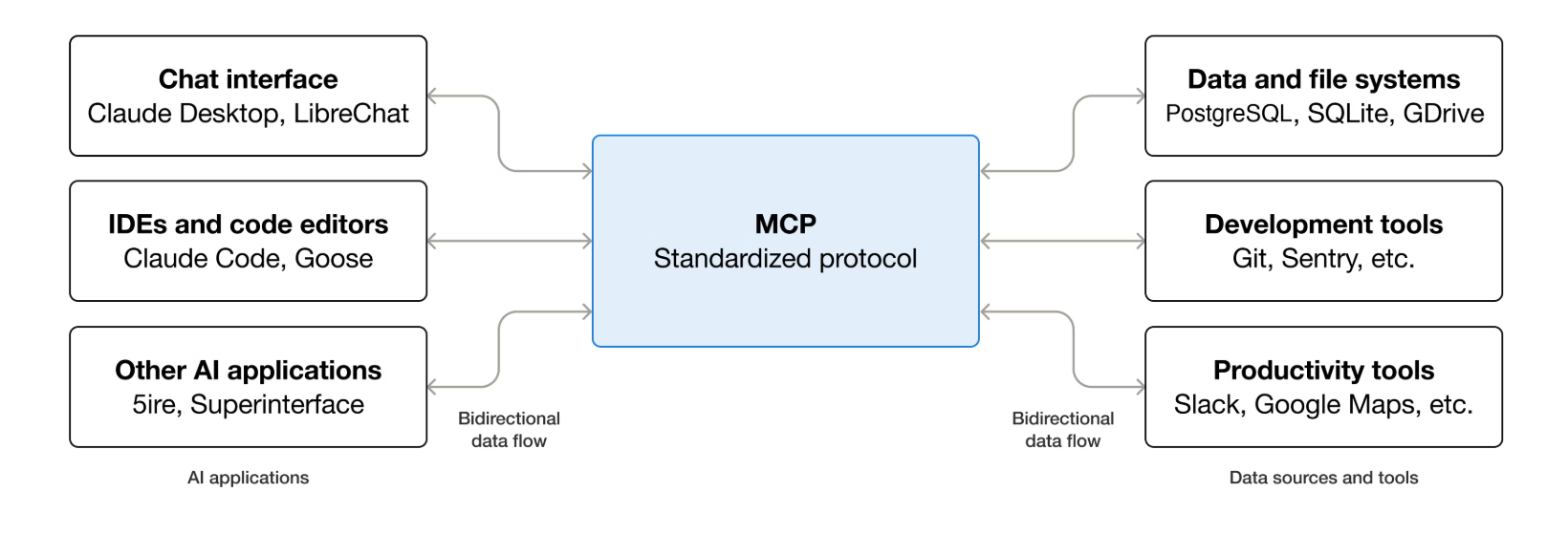
The benefits of MCP extend across the ecosystem:
- For Developers: MCP simplifies development and integration, reducing time and complexity when building AI applications or agents.
- For AI Applications/Agents: MCP opens up access to a broad ecosystem of data sources, tools, and applications, enhancing their capabilities and performance.
- For End-Users: MCP enables more powerful AI tools that can access relevant data and take actions on your behalf when needed.
Technically, MCP allows developers to create secure, two-way connections between AI-powered tools and data sources. Developers can either expose their data through MCP servers or build AI applications (MCP clients) that connect directly to these servers, creating a flexible and straightforward architecture for integrating AI into real-world workflows.
How to Set Up DICloak MCP with MCP Clients (Claude Desktop Example)
Step 1: Obtain Your MCP Token
Before connecting any MCP-compatible client:
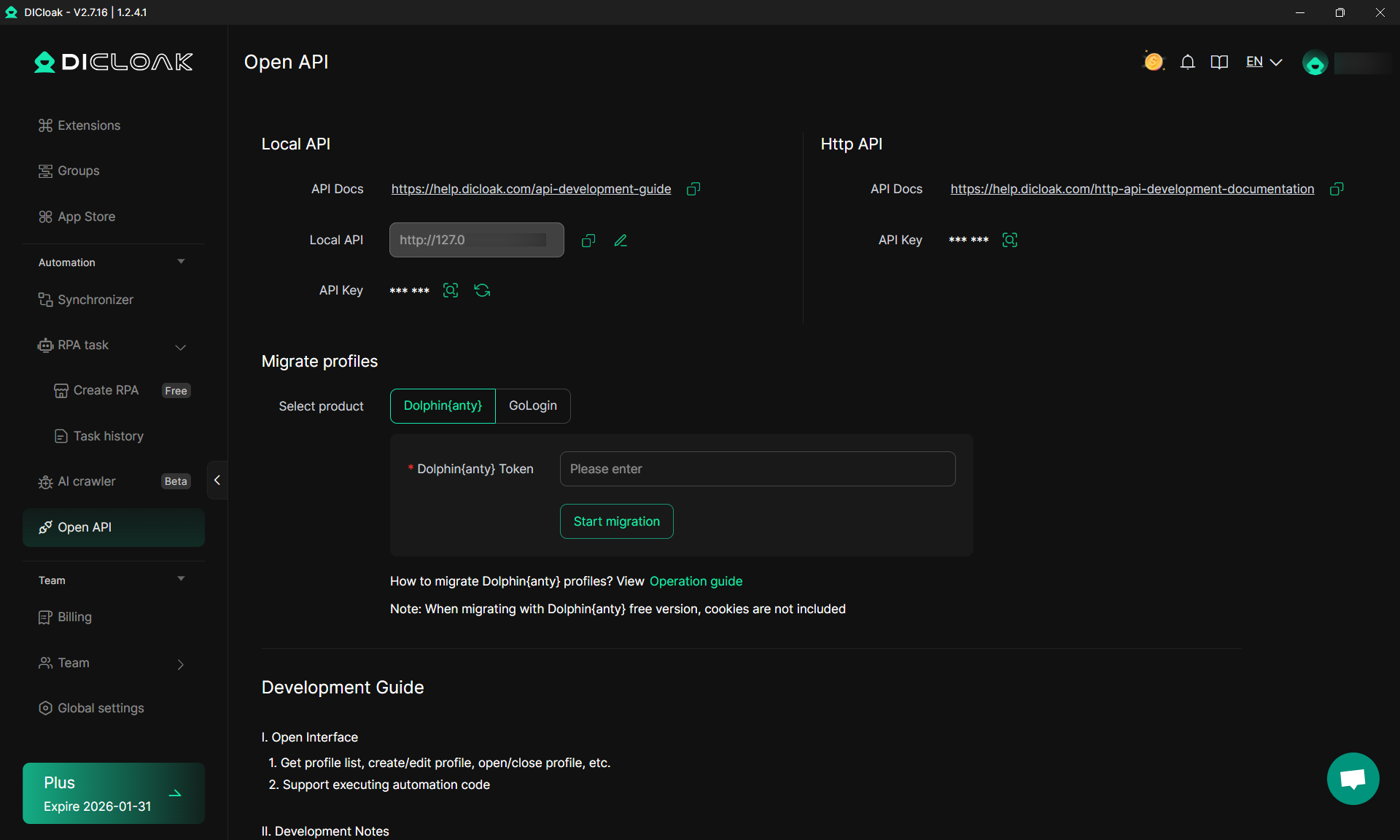
- Log in to your DICloak account.
- Go to OpenAPI Settings.
- Generate or copy your API token and API address.
- Important: Append
/openapi to the API address (e.g., 127.0.0.1:52140/openapi).
Step 2: Locate Your Client’s Configuration File
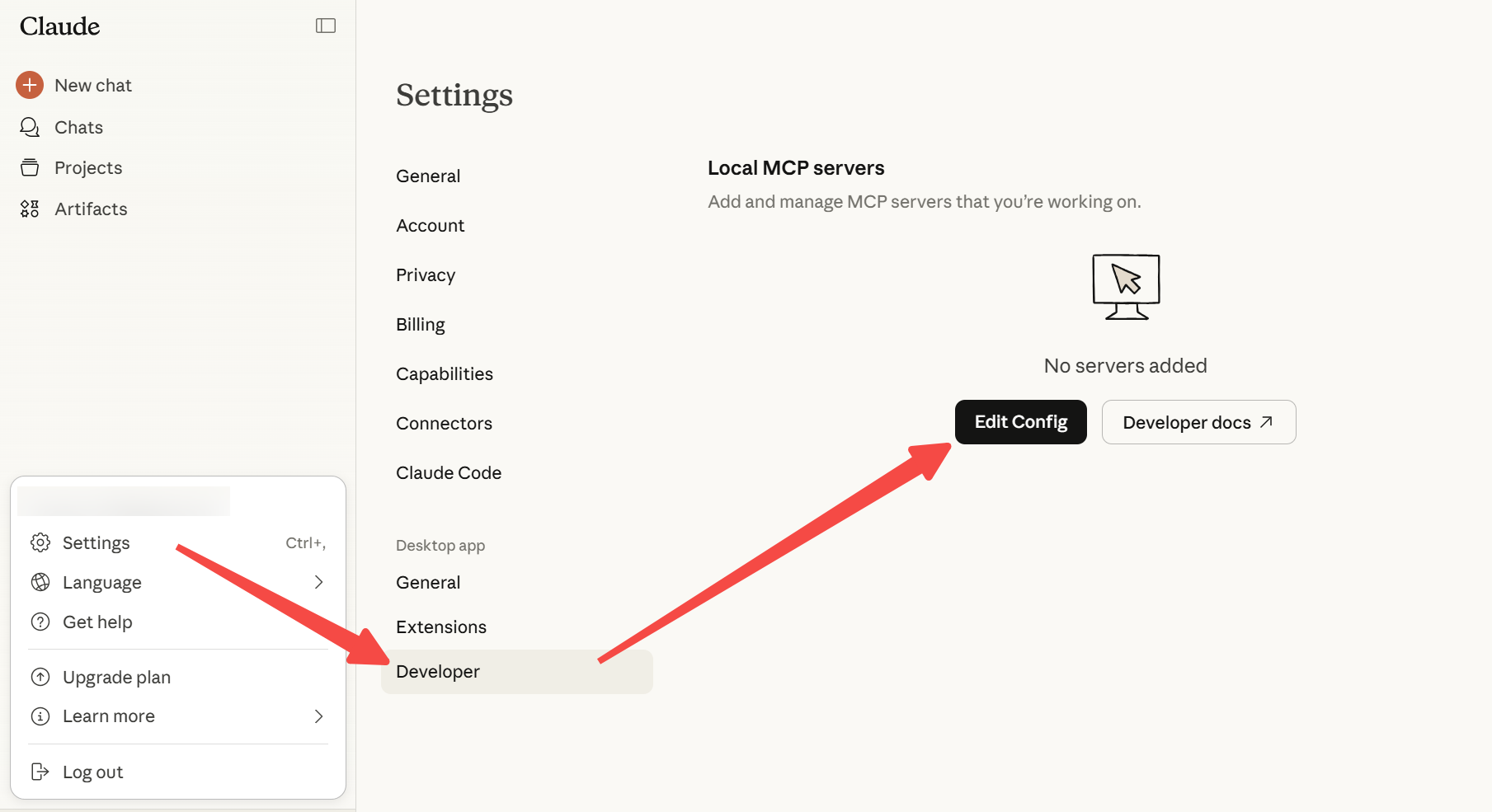
- Different MCP clients (other than Claude or Cursor) have their own configuration files, often named something like
config.json or mcp_config.json.

- Open this file in a text editor.
Step 3: Add DICloak MCP Server Configuration
Use the same JSON pattern as for Claude (or other MCP clients):
{
  "mcpServers": {
    "dicloak-local-api-mcp": {
      "command": "npx",
      "args": ["dicloak-local-api-mcp-bridge"],
      "env": {
      "DICLOAK_API_KEY": "PASTE_YOUR_API_KEY_HERE",
      "DICLOAK_BASE_URL": "PASTE_YOUR_BASE_URL_HERE"
      }
    }
  }
}
- Replace
"PASTE_YOUR_API_KEY_HERE" with your DICloak API token.
- Replace
"PASTE_YOUR_BASE_URL_HERE" with your Base URL (with /openapi at the end).
Step 4: Save and Restart Your Client
After saving the configuration, restart your MCP client to load the new settings. Check the client’s Connectors section to confirm that dicloak-local-api-mcp-bridge is listed and active.
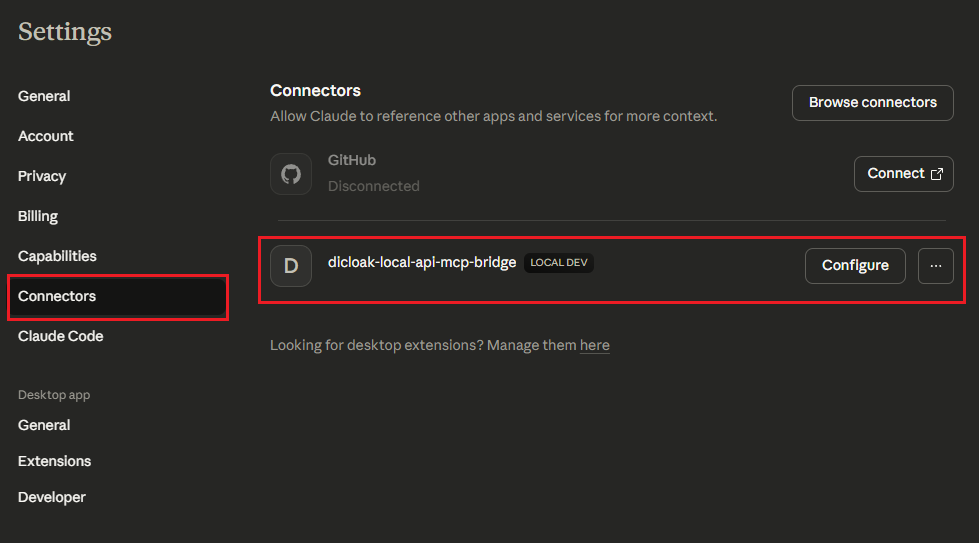
For detailed set-up process, check the DICloak MCP server tutorial.
Boost Your Workflow with DICloak Browser MCP: The Overview
DICloak’s MCP interface gives AI agents a unified way to manage profiles, team members, and automated tasks through simple natural-language commands. Instead of handling multiple tools or APIs, MCP provides one standard layer for all operations. Below is an overview of the basic management features and advanced RPA automation supported through MCP.
Basic MCP Capabilities
DICloak’s MCP integration supports a wide set of foundational operations for multi-account management. These operations follow a unified instruction format, allowing AI agents to manage profiles, members, and similar resources through natural language.
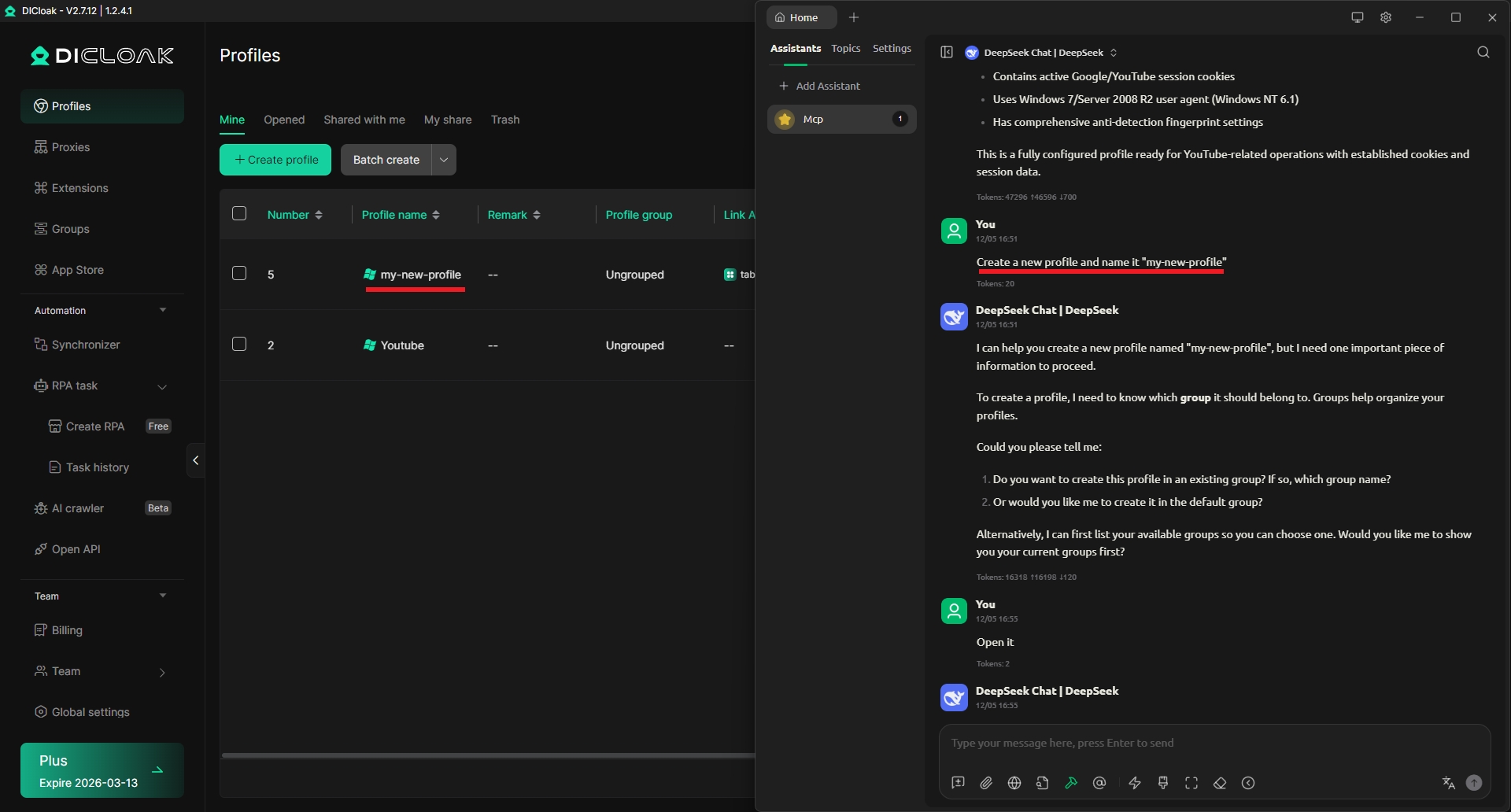
Profile Management
Examples of supported actions:
- Create a new profile.
- Open an profile by sequence number (e.g., “Open profile #100”).
- Search for a profile by name and return its details.
Member Management
Examples of supported actions:
- Add a new internal member with a specified name, login account, and password.
- Query the full list of members.
- Delete a member by name.
Other Modules
Profile groups, proxy settings, and similar modules follow the same command style and can be extended with equivalent operations such as:
- Query list
- Create item
- Modify item
- Delete item
- Search by name or ID
Advanced RPA Capabilities
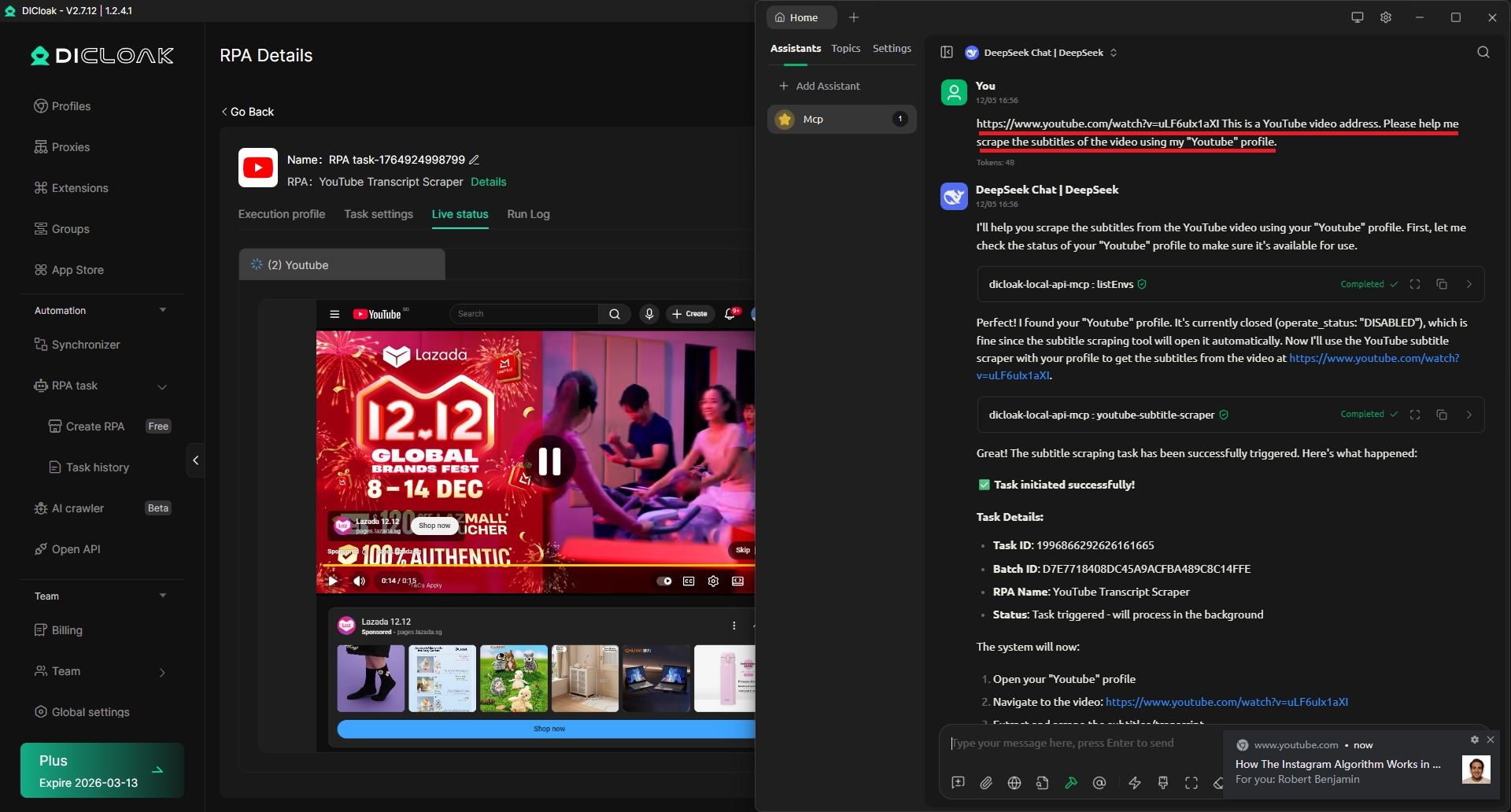
DICloak also supports advanced automated workflows through MCP by connecting to RPA apps in the DICloak App Market. Different RPA tools accept different parameters, but the instruction style remains consistent. Here are the examples of supported RPA tasks:
- Cookie Robot Use a specified profile to browse target websites and collect cookies.
- Collect TikTok Creator Follower Data Visit a creator’s profile and gather a defined number of follower records.
- YouTube Auto Video Publishing Upload a YouTube video (with title/content) through a selected profile, with optional timeout settings for long tasks.
- Scrape Amazon Product Reviews Retrieve the first batch of reviews from a given Amazon product page.
- Amazon Search + Add to Cart Search a keyword and add a selected number of products to the cart.
(Note: The examples above do not represent the full parameter set. Each RPA in the App Market may support additional parameters.)
You can also query the results of any RPA task. Each task returns a Batch ID, and you can check the output using natural language commands such as:
- “Check the result of the previous task.”
- “Check the result of batch ID xxxxx” (helpful when context is large or ambiguous).
Who Should Use DICloak MCP
DICloak Browser MCP is ideal for:
- AI Developers and Integrators – Those building or integrating AI applications who need a standardized, secure way to connect to external data sources, tools, and workflows.
- AI Application Users / Agents – Users of AI tools like Claude or ChatGPT who want to extend the AI’s capabilities by connecting to additional data sources and automating complex tasks.
- Social Media Managers – People managing multiple social media accounts (TikTok, YouTube, Amazon, etc.) who want to automate actions like posting, liking, or browsing without manual intervention.
- Businesses with Multi-Profile Workflows – Teams that handle multiple profiles, proxies, and member permissions, needing centralized management and control.
- Power Users Seeking Automation – Individuals or teams who want to streamline repetitive tasks, boost efficiency, and ensure consistent execution across multiple profiles and platforms.
If you want to automate multi-profile workflows, manage proxies and members efficiently, or integrate AI tools with external systems seamlessly, DICloak Browser MCP is the perfect solution.
Get Started with DICloak Browser MCP
DICloak Browser MCP provides a powerful, standardized way to integrate AI applications with external systems. From automating social media workflows to managing multiple profiles, proxies, and team permissions, MCP streamlines operations and saves time. Perfect for developers, AI enthusiasts, and businesses seeking efficient automation, DICloak MCP empowers you to maximize the capabilities of your AI tools while keeping management simple and centralized.
 Web Proxy Tools
 Free Tools
 Cookie Plugin
 UA Generator
 MAC Address Generator
 IP Generator
 IP Address List
 2FA Code Generator
 World Clock
 Anonymous Check
 WebRTC Leak Test
 UUID Generator
 Free Web Proxy Site
 Proxy Checker
 FB Ad Checker
 AI Web Scraping
 Free SMM Tools
 Twitter Shadowban Checker
 Instagram Name Checker
 UTM Generator
 Username Generator
 AI Hashtag Generator
 LinkedIn Headline Generator
 Social Media Image Resizer