Snapchat is still one of the biggest social apps in 2026, with 956 million monthly active users and 483 million daily active users in Q1. For creators, agencies, marketers, and brand teams, that reach makes Snapchat hard to ignore. But managing more than one Snapchat account is not as simple as creating another username. Snapchat accounts can start to look connected when they share phone numbers, recovery details, devices, contacts, or repeated activity patterns. This guide explains how to manage multiple Snapchat accounts without getting them linked, what mistakes usually create overlap, and when a cleaner setup like separate browser profiles with DICloak can help keep account work more organized.
Can You Have Multiple Snapchat Accounts in 2026?
Yes, you can have multiple Snapchat accounts in 2026. Snapchat introduced official multi-account support allowing users to add and switch between up to four accounts within a single app installation. This feature works well for casual users who want to separate personal and business accounts or manage a few accounts for different purposes.
Having more than one account is not automatically a problem. The bigger challenge comes when accounts share the same login details, device, or other overlapping factors, which can make them appear connected if not managed carefully.
Why Do Multiple Snapchat Accounts Get Linked?
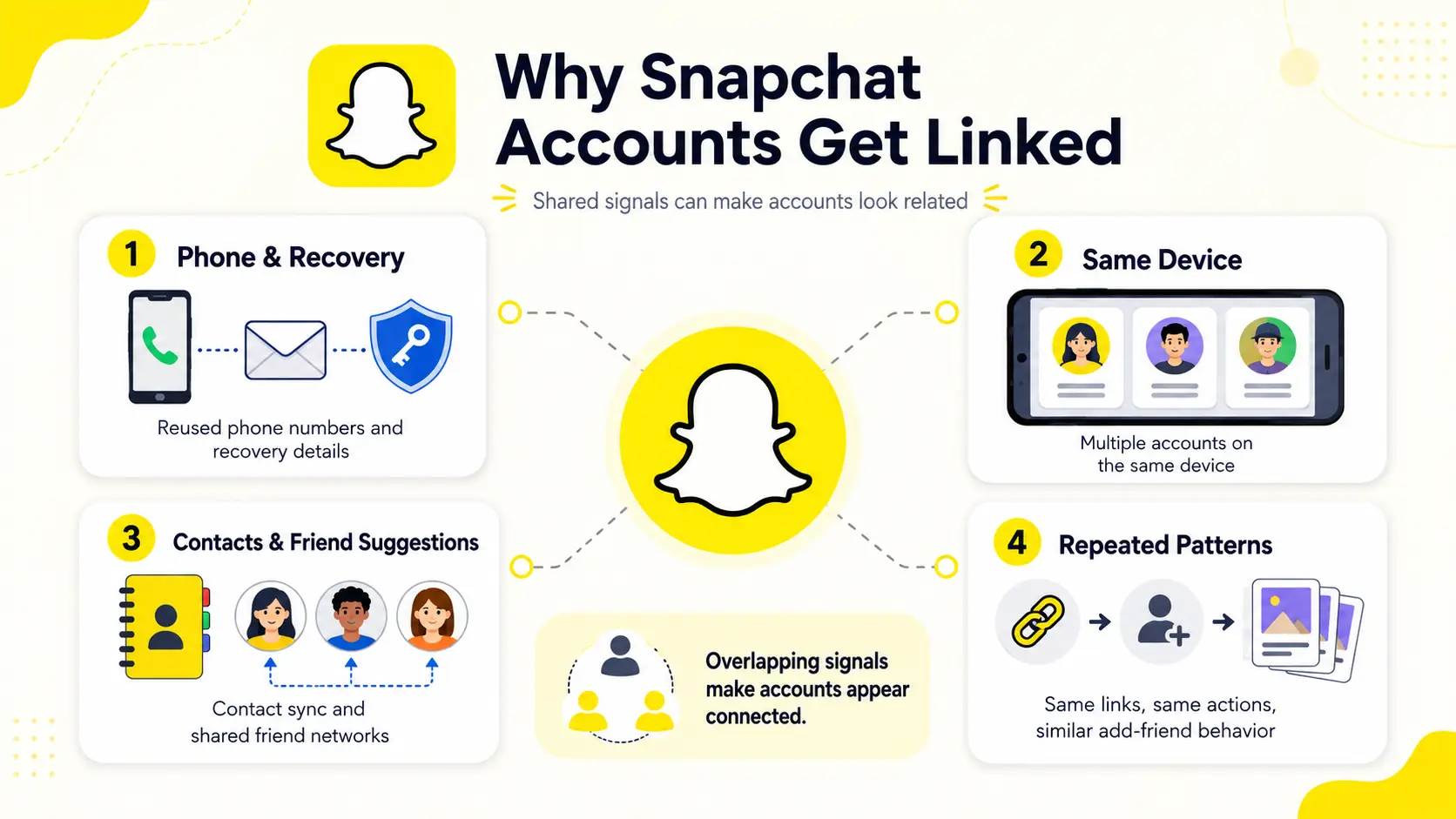
Multiple Snapchat accounts can look connected when important signals overlap. Snapchat may look at login details, device use, contacts, friend suggestions, and repeated activity patterns to understand whether accounts are separate or related.
Reused Phone Numbers and Recovery Details
Phone numbers and recovery details are some of the clearest links between Snapchat accounts. If several accounts use the same phone number, backup email, or recovery setup, they may look like they belong to the same person.
This can also make account recovery harder. If one account needs verification, reused details may create confusion or connect accounts that were meant to stay separate. For multiple Snapchat accounts, it is safer to keep login and recovery information clean and easy to track.
Multiple Accounts on the Same Device
Snapchat's built-in account switching can let users add and switch between up to four accounts in one app. This is useful for casual users who want a personal account, a business account, or a few project accounts.
But built-in switching does not mean full separation. Those accounts still use the same phone, app installation, device settings, and local app environment. For casual use, this may be fine. For larger account work, the shared device setup can make accounts easier to connect.
Contact Sync and Friend Suggestions
Snapchat is heavily built around contacts, friends, and private sharing. That makes contact sync more important than many users expect. If several accounts import the same phone contacts or start adding the same people, the accounts can begin to look related.
Friend suggestions can also reveal overlap. If different accounts keep showing the same suggested friends, it may be a sign that the accounts share similar contact or social signals. This is why contact management matters more on Snapchat than on many content-first platforms.
Repeated Posts, Links, and Add-Friend Patterns
Account behavior can also create connections. If several accounts post the same links, add similar users, or repeat the same actions in a short time, they may look coordinated.
This is especially risky for new accounts. A new Snapchat account that quickly adds many people, sends similar messages, or shares the same promotional link may not look like a normal user. Even when login details are different, repeated behavior can make multiple accounts appear connected.
What Mistakes Usually Cause Snapchat Accounts to Look Connected?
Most Snapchat account-linking problems are caused by everyday management mistakes. The accounts may start with different usernames, but repeated overlaps in recovery details, device usage, contacts, or activity can make them look related over time.
Using One Recovery Setup for Every Account
One of the most common mistakes is reusing the same recovery email or phone number across multiple accounts. It may seem easier to remember, but it also creates a direct connection between accounts.
This often happens when users create several Snapchat accounts over time and continue using the same backup email or verification number. Later, if one account needs verification or recovery, the overlap becomes much easier to spot. Keeping recovery information separate helps maintain clearer boundaries between accounts.
Fast Login Switching on One Phone
Snapchat's built-in account switching makes it easy to move between accounts, especially when managing a personal account and a business account. The problem starts when users switch rapidly between several accounts throughout the day.
Frequent logins, logouts, and account changes can create unusual activity patterns. This does not automatically mean an account will be restricted, but excessive switching can make account behavior look less natural. The more accounts being managed, the more important it becomes to maintain a consistent workflow.
Contact Sync Left on by Default
Many users enable contact syncing without thinking about how it affects multiple accounts. On Snapchat, contacts are closely connected to friend discovery and account recommendations.
If several accounts import the same phone contacts, they may begin building similar friend networks and receiving similar friend suggestions. Users who want stronger separation between accounts should review contact-sync settings instead of leaving them enabled by default on every account.
The Same Link Pushed Across Several Accounts
Another common mistake is treating multiple Snapchat accounts as copies of each other. This often happens when users repeatedly share the same website, promotional link, invite link, or message across several accounts.
Using the same content occasionally is normal. The problem is when multiple accounts consistently perform the same actions, target the same people, and share the same links in a similar pattern. Over time, highly repetitive behavior can make separate accounts look coordinated rather than independent.
| Common Mistake |
Why It Creates Overlap |
| Reusing recovery details |
Creates a direct account connection |
| Fast account switching |
Produces unusual activity patterns |
| Contact sync enabled everywhere |
Builds similar friend networks |
| Repeating the same links and actions |
Makes accounts appear coordinated |
Common Ways to Manage Multiple Snapchat Accounts
There is no single best way to manage multiple Snapchat accounts. The right setup depends on how many accounts you manage, how much separation you need, and whether you care more about convenience, cost, or long-term control.
Snapchat's Built-In Account Switching
Snapchat's built-in account switching is the easiest option for casual users. It works well when you only need to separate a personal account, a business account, or a few low-risk accounts.
Pros:
- Easy to use inside the Snapchat app
- No extra software or device needed
- Good enough for casual personal and business use
- Fast switching between saved accounts
Cons:
- Accounts still share the same app and device environment
- Not suitable for managing many accounts
- Weak separation between accounts
- Not ideal for team or client account management
Best for: Casual users who manage a small number of accounts and do not need strong separation.
Multiple Phones for Stronger Separation
Using one phone for each Snapchat account gives stronger separation than switching accounts inside one app. Each account can have its own device, app installation, phone number, and usage history.
Pros:
- Strong physical separation between accounts
- Easy to understand and manage on a small scale
- Each account can keep its own device history
- Lower chance of mixing sessions by mistake
Cons:
- Expensive as account numbers grow
- Hard to manage beyond a few accounts
- Requires charging, updating, and storing many devices
- Difficult for teams to share access safely
Best for: High-value accounts where strong separation matters and the number of accounts is small.
App Cloners and Dual Apps
App cloners and dual-app features let users run more than one Snapchat instance on the same phone. This can feel convenient because users do not need to buy another device or log in and out all the time.
Pros:
- Low cost or free
- Simple to set up on some Android devices
- Allows more than one app instance on one phone
- More convenient than manual logout and login
Cons:
- Accounts still share the same physical device
- Device-level signals may remain connected
- Some third-party cloners can be unstable
- Not ideal for long-term or professional accounting work
Best for: Casual users who need convenience and understand that app cloning does not create full separation.
Android Emulators on Desktop
Android emulators let users run mobile apps from a desktop computer. This can be helpful for testing or for users who prefer managing tasks from a larger screen.
Pros:
- Easier to manage from a desktop
- Can support multiple instances on one computer
- Useful for testing workflows
- No need to carry several phones
Cons:
- Setup can be technical
- Performance may be unstable
- Snapchat is mainly designed for real mobile use
- Emulators may create trust or compatibility issues
Best for: Technical users who need testing environments and are willing to handle setup and stability issues.
Separate Browser Profiles
Separate browser profiles can help users keep different Snapchat account sessions apart when working through web-based tools or account-related tasks. Each profile can keep its own cookies, login state, and browser data.
Pros:
- Easier to organize than many physical devices
- Helps keep sessions and cookies separated
- Useful for account checks, web access, and supporting tasks
- Easier to scale for projects or teams
Cons:
- Still requires careful account handling
- Network and behavior patterns still matter
Best for: Users who manage several accounts from a computer and need cleaner separation for web-based account work.
| Method |
Cost |
Ease of Use |
Account Separation |
Scalability |
Best For |
| Snapchat Built-In Switching |
Low |
High |
Low |
Low |
Personal + business accounts |
| Multiple Phones |
High |
Medium |
High |
Low |
A few high-value accounts |
| App Cloners & Dual Apps |
Low |
High |
Low |
Medium |
Casual users who prioritize convenience |
| Android Emulators |
Medium |
Medium |
Medium |
Medium |
Testing and desktop-based workflows |
| Separate Browser Profiles |
Medium |
High |
High |
High |
Managing multiple accounts, brands, or projects |
How to Manage Multiple Snapchat Accounts More Cleanly with DICloak
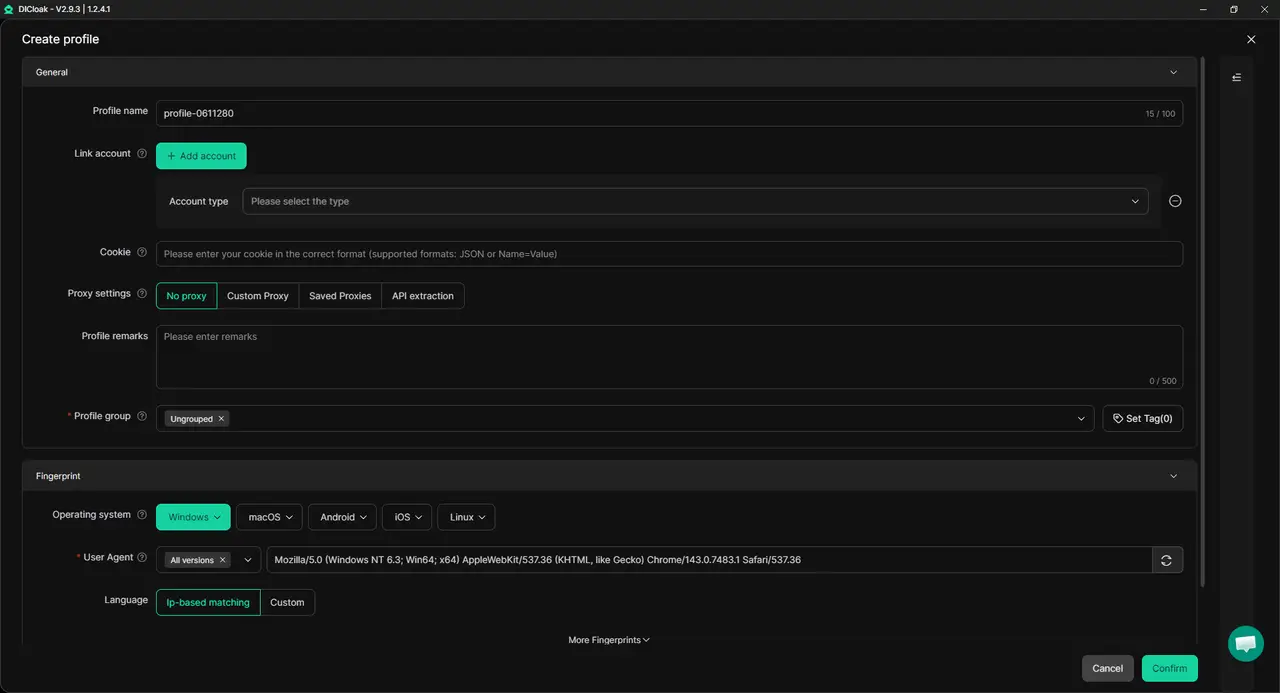
When several Snapchat accounts are handled from one computer or by one team, the main problem is messy overlap. With DICloak, users can keep different accounts in separate browser profiles, manage network setups more clearly, and control who can access each profile.
Separate Browser Profiles for Each Snapchat Account
Users can create a separate browser profile for each Snapchat account in DICloak. Each profile keeps its own cookies, login session, browser data, and working environment. This helps reduce simple mistakes, such as opening the wrong account in the same browser or mixing saved sessions. For example, one profile can be used for a restaurant brand, another for a fitness creator, and another for an online store.
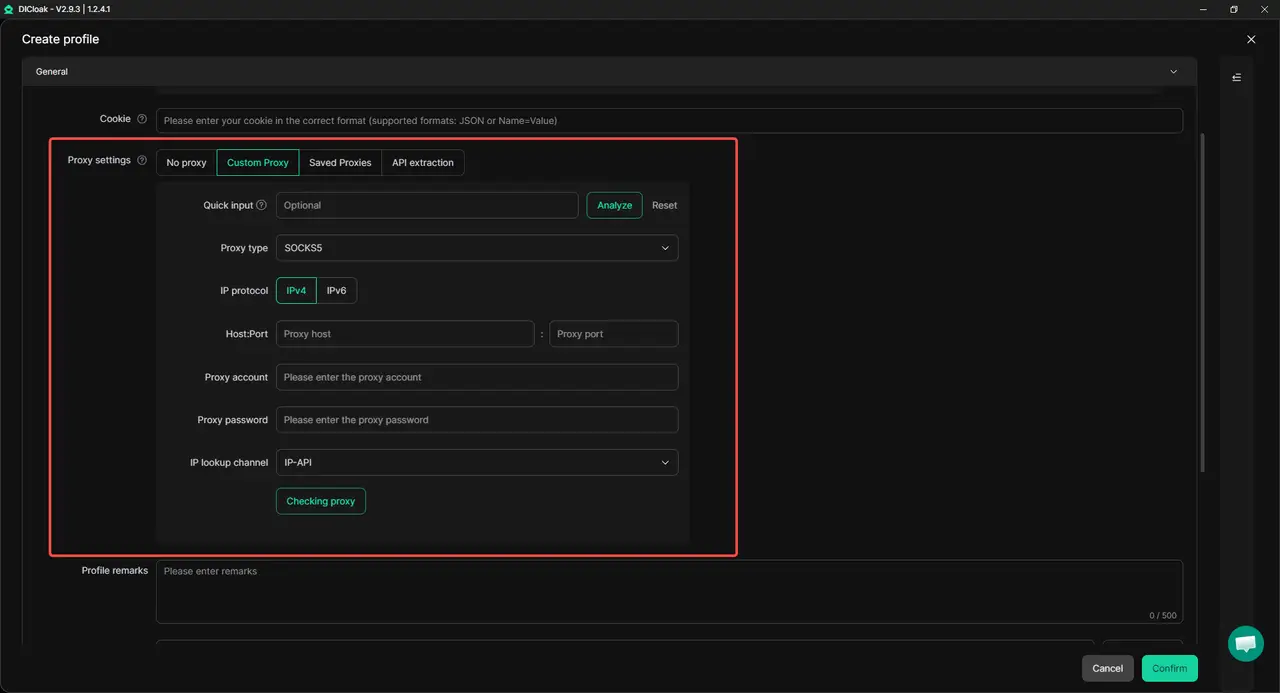
User-Configured Proxies for Different Network Setups
For accounts that need different network setups, users can add their own proxies to different DICloak profiles. This helps each account keep a more consistent login environment when accounts are used for different regions, clients, or projects. Users are able to bind each network setup to a specific account profile, so they do not have to switch settings manually every time.
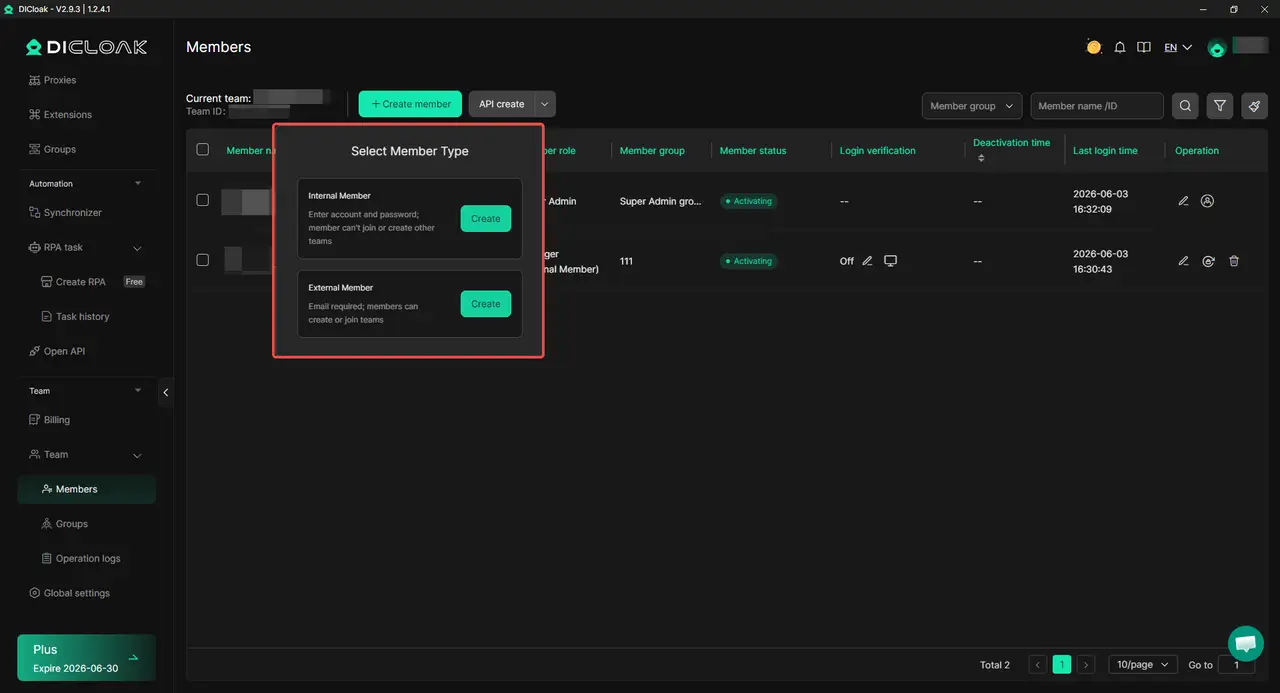
Team Permissions for Safer Shared Access
When several team members manage Snapchat accounts, sharing raw passwords can quickly become risky and messy. With team permissions, admins can decide which member can access which profile. This is useful for agencies or remote teams. One member can handle a client's Snapchat profile, while another works on a different account without seeing everything across multiple accounts.
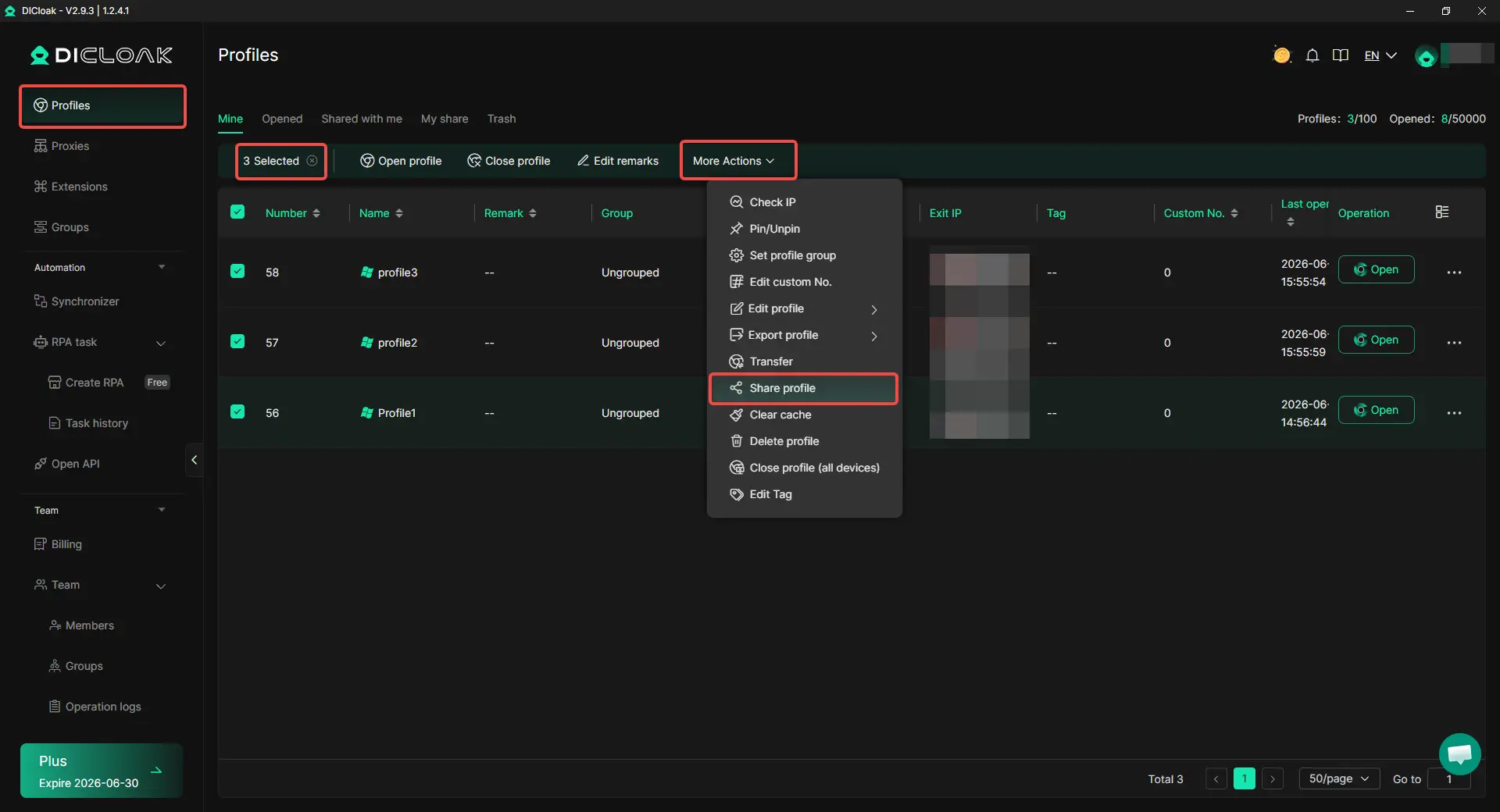
Profile Sharing for Client or Team Workflows
Profile sharing helps teams move account work between members without passing around login details. The browser session, cookies, and setup can stay inside the shared profile. This works well for client workflows where one person sets up or checks an account, and another handles daily posting, monitoring, or customer messages. The team keeps a cleaner workflow without rebuilding the setup each time.
What Should You Do If One Snapchat Account Gets Locked or Restricted?
If one Snapchat account gets locked or restricted, do not rush to switch between accounts or make major changes immediately. The first step is to understand what happened and prevent the issue from spreading to other accounts that may share the same setup.
Pause Switching Before Checking the Cause
Many users start logging into other Snapchat accounts as soon as one account gets restricted. This can make troubleshooting harder because it becomes difficult to tell which account triggered the issue. Instead, stop switching between accounts and review the affected account first. Check recent login activity, account changes, messages from Snapchat, and any unusual actions that happened before the restriction appeared.
Review Shared Details Across Accounts
Next, look for anything the affected account shares with other accounts. This includes phone numbers, recovery emails, devices, contacts, browser profiles, or network setups. The goal is not to assume every account is at risk. It is to identify possible overlaps. If several accounts use the same recovery information or operate from the same setup, make a note of it before taking further action.
Separate Unaffected Accounts First
If other Snapchat accounts are still working normally, avoid treating them exactly the same as the restricted account. Review whether they share the same device, browser session, or account management workflow.
For users managing accounts through separate browser profiles, keeping unaffected accounts in their own environments makes this process easier. With DICloak, different Snapchat accounts can remain in separate profiles, helping users review one account without disrupting the others.
Prepare Recovery Records for Verification
Some restrictions require additional verification before access can be restored. This is much easier when account records are organized in advance.
Keep track of the email address, phone number, recovery details, creation date, and purpose of each account. For teams, storing this information in a clear account record can save time if verification is requested later. The faster you can verify account ownership, the easier it is to move through the recovery process.
| After a Restriction |
Recommended Action |
| Stop switching accounts |
Review the affected account first |
| Check shared details |
Identify possible overlaps |
| Protect working accounts |
Keep unaffected accounts separate |
| Prepare verification info |
Speed up recovery if needed |
Frequently Asked Questions About Managing Multiple Snapchat Accounts
Can Snapchat Link Multiple Accounts Even If They Use Different Usernames?
Yes, Snapchat can link accounts even when usernames differ. Accounts may appear connected if they share the same phone number, recovery email, device environment, contacts, or repeated activity patterns. Maintaining proper separation across all of these signals is more important than the username alone for preventing accounts from being associated.
Is Snapchat's Built-In Account Switching Safe for Multiple Accounts?
Snapchat's built-in account switching is convenient for casual users managing one personal and one business account, allowing up to four accounts in a single app installation. However, all accounts still operate within the same app and device environment, so larger setups or professional management may require separate workflows to maintain account separation.
Can Snapchat Link Accounts Through Contacts and Friend Suggestions?
Yes, syncing contacts or building similar friend networks can create connections between accounts. Snapchat heavily relies on social relationships, so if multiple accounts import the same contacts, interact with the same friends, or receive similar friend suggestions, the accounts may appear linked. Managing contacts individually helps maintain better separation.
What Is the Best Way to Manage Multiple Snapchat Accounts for a Team?
Teams managing multiple Snapchat accounts often need organized workflows and controlled access. Using an antidetect browser like DICloak allows different accounts to stay in separate browser profiles, manage member permissions, and share account environments without passing passwords directly, which simplifies collaboration while keeping accounts organized.
Do Separate Browser Profiles Help Reduce Snapchat Account Overlap?
Yes, separate browser profiles isolate sessions, cookies, and account data, making it easier to manage multiple accounts without accidental mixing. Placing different Snapchat accounts into separate profiles using tools like DICloak helps maintain independent working environments for each account, which is especially useful for managing multiple brands, projects, or client accounts.
Conclusion
Managing multiple Snapchat accounts in 2026 is possible, but keeping them separate requires more than using different usernames. Accounts are more likely to look connected when they share phone numbers, recovery details, devices, contact networks, or similar activity patterns. Understanding how Snapchat connects accounts helps users make better decisions about account setup, daily management, and long-term organization.
For most users, Snapchat's built-in account switching is enough for a personal and business account. As account numbers grow, maintaining clear separation becomes more important. Using separate account environments, unique recovery information, controlled contact syncing, and organized workflows can help reduce unnecessary overlap. The key takeaway is simple: Snapchat accounts are less likely to appear connected when each account has its own purpose, setup, and usage pattern.
 Web Proxy Tools
 Free Tools
 Cookie Plugin
 UA Generator
 MAC Address Generator
 IP Generator
 IP Address List
 2FA Code Generator
 World Clock
 Anonymous Check
 WebRTC Leak Test
 UUID Generator
 Free Web Proxy Site
 Proxy Checker
 FB Ad Checker
 AI Web Scraping
 Free SMM Tools
 Twitter Shadowban Checker
 Instagram Name Checker
 UTM Generator
 Username Generator
 AI Hashtag Generator
 LinkedIn Headline Generator
 Social Media Image Resizer