Pinterest has cemented itself as the premier visual search engine in 2026. For marketers, DIY enthusiasts, and creators, it is a vital source of high-quality tutorials and creative trends. In fact, Pinterest videos now offer 3x better viewability and 2x higher completion rates than most other social platforms.
However, a common hurdle remains: the desktop version of Pinterest lacks a native download button. Whether you are building an inspiration library or saving a tutorial for offline use, knowing how to download pinterest videos safely is a necessary skill.

Can You Directly Download Pinterest Videos in 2026?
Pinterest prioritizes protecting the intellectual property of its creators. Because of this, the desktop website does not provide a direct way to save video files to your hard drive. While you can "Save" a Pin, this only bookmarks it to your online profile; it does not give you offline access.
"Saved Pins" vs. "Downloaded Videos"
| Feature |
Saved Pins |
Downloaded Videos |
| Storage Location |
Pinterest Cloud Servers |
Your Local Drive (PC/Mac/Phone) |
| Offline Access |
No |
Yes |
| File Format |
URL/Link |
MP4 or GIF |
| Control |
Creator can delete it anytime |
You keep the file permanently |
Why You Should Download Pinterest Videos for Your Business
For businesses, local content storage is more than just a convenience—it is a strategic advantage. Moreover, having your own library allows for deeper analysis and better presentations.
- Watch marketing tutorials or creative "how-to" clips during travel or in areas with poor internet. This ensures your learning never stops.
- Create private folders of design ideas. Consequently, you can fuel your next creative campaign even if the original Pin is eventually deleted.
- If you use user-generated content for your brand, downloading those videos ensures you have a record of the praise, even if the user goes private.
- Easily send MP4 files to clients or teammates via Slack or email. This is much faster than asking them to log into a Pinterest account to view a link.
- Marketers analyze downloaded videos to track ROI and creative trends. By watching competitors' viral videos locally, you can study their editing styles and hook techniques without needing a constant connection.
How to Download Pinterest Videos on Desktop (PC & Mac)
Desktop users have three primary ways to secure their favorite content.
Using Online Downloader Websites
This is the most common method. Simply click the share arrow on a Pin, copy the link, and paste it into a reputable downloader site. These sites will then generate a download link for the MP4 file.
Browser Extensions for Frequent Users
If you download videos daily, extensions for Chrome or Firefox add a "Download" button directly to the Pinterest interface. This saves you the trouble of constant copy-pasting. Furthermore, it streamlines the workflow for creative directors.
Professional Software Solutions
Managing research across multiple accounts requires extra security. Tools like DICloak provide an isolated environment for these extensions. This means you can run your downloaders in a safe space that hides your real identity, preventing platform bans.
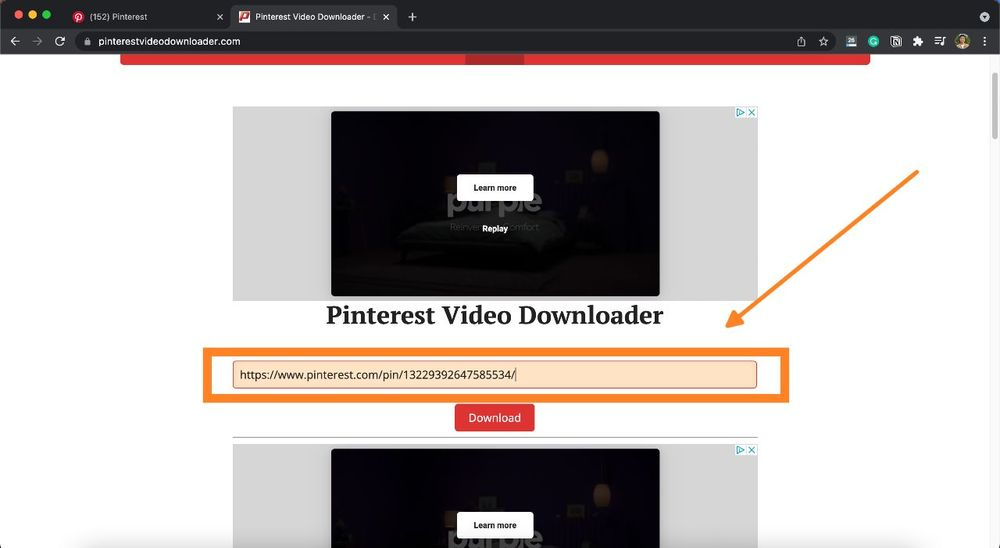
Using Online Tools to Download Pinterest Videos Quickly
Several free sites allow you to convert Pinterest links into high-quality MP4s. Popular options include ExpertsPHP and SavePin.app.
Safety Checklist for Choosing a Downloader:
- HTTPS Protocol: Only use sites where the URL begins with "https."
- No Login Required: A safe site will never ask for your Pinterest password.
- No Executable Downloads: Avoid sites that force you to download ".exe" or ".bat" files for a simple video.
While these tools are fast for one-off tasks, they lack the automation features found in DICloak. If you need to download dozens of videos across different niche accounts, manual sites will slow you down.
How to Download Pinterest Videos on Mobile (Android & iPhone)
Unlike the desktop version, the mobile app often includes a native feature for saving content directly to your gallery.
Steps for Official App Downloads
If a creator has enabled it, you can tap the "Share" icon on a full-screen video Pin and select "Download." This is the safest and most direct method. However, if the "Download" button is missing, the creator is likely disabled that option.
Steps for Android and iPhone Fallbacks
If the native button is missing, Android users can use mobile browsers to visit sites like SavePin.app. iPhone users can do the same through Safari, using the "Files" app or "Documents by Readdle" to manage the download.
Mobile App Safety Tips
- Permissions: Be wary of apps asking for access to your contacts or camera just to download a video.
- Reviews: Only download social media savers from the official App Store or Google Play with 4-star ratings or higher.
Advanced Method: Bulk Download Pinterest Videos with DICloak
For professional agencies managing 1,000+ accounts, downloading one by one is impossible. DICloak is the industry standard for scaling these operations.

DICloak creates a unique digital identity for every account you manage. It doesn't just hide your IP; it masks technical "fingerprints" like WebGPU, Canvas, and WebGL. This means it hides your computer's real ID so Pinterest cannot link your accounts together. Consequently, you can manage hundreds of profiles on a single device without the risk of a ban.
Using the Synchronizer for Parallel Tasks
The Synchronizer feature allows you to mirror your actions across multiple profiles. If you open ten browser windows, the Synchronizer ensures that when you click "Download" in one window, the action is repeated in the other nine. This allows for massive parallel downloads.
Automating with RPA
DICloak features a built-in RPA (Robotic Process Automation) marketplace. You can automate the "grind" of repetitive tasks, such as automatically copying links and executing downloads while you focus on other work.
Success Story: Professional users like Syed Haseeb Ahmad describe DICloak as "lighter, smoother, and more intuitive" than any competition. One AI Ads Consultant shared how the support team used AnyDesk for over an hour to solve a technical issue and remained available via WhatsApp and Telegram for fast support. Furthermore, DICloak is 12x cheaper than using traditional virtual machines, making it a "life-changing" tool for building a multi-account business.
How to Download Photos and GIFs from Pinterest
While videos are the main draw, you may also need static images or looping animations.
| Media Type |
Download Method |
| Photos |
Use the "Download Image" option in the 3-dot menu or right-click "Save Image As." |
| GIFs |
Pinterest often treats these as looping videos; use a video downloader tool for best results. |
Essential Legal and Ethical Rules for Downloading Pinterest Content
To maintain professional trustworthiness (EEAT), follow these "Golden Rules":
- Personal Use Only: Download content for research, inspiration, or education.
- No Unauthorized Re-uploading: Never post someone else’s work as your own.
- Credit the Creator: If you show a downloaded video in a presentation, always credit the original source.
- Commercial Restrictions: Do not use downloaded content in paid advertisements without a license from the creator.
Pro Tips to Organize Your Saved Pinterest Inspiration
Once you have your files, you must keep them organized to stay productive.
- Folder Structure: Organize by project (e.g., "Client X - Summer 2026").
- Isolate Profiles: Use DICloak browser profiles to keep your personal downloads separate from client data. This ensures your cookies and history never mix.
- Cloud Sync: Use DICloak's cloud synchronization to access your organized profiles and research from any device, anywhere.
FAQs About How to Download Pinterest Videos
1.Can I download directly from the Pinterest app?
Yes, but only if the creator allows it. If the "Download" option is missing in the share menu, you must use a third-party tool like an online downloader or DICloak.
2.Are downloader websites safe?
Most are safe if they use HTTPS and don't require a login. However, for total safety, professional researchers use DICloak to isolate these sites from their main computer data.
3.Can I reuse videos on my own blog?
Only if the content is under a Creative Commons license or you have written permission. Always credit the pinner to remain ethical.
4.How does DICloak help with Pinterest?
It allows you to manage multiple Pinterest accounts securely. It masks your digital identity (WebGL/WebGPU) and uses RPA to automate bulk video downloads.
5.Does downloading affect video quality?
It depends on the tool. Most high-quality downloaders allow you to choose between 720p and 1080p resolutions.
Conclusion
In 2026, knowing how to download pinterest videos is vital for any modern marketing strategy. While casual users can get by with simple websites, professionals need a more robust solution.
DICloak is the ultimate tool for those who need security, speed, and scale. It protects your accounts from bans, automates the "grind," and organizes your workflow in a way that regular browsers simply cannot.
Ready to scale your Pinterest operations? Visit the DICloak website today to explore our features and start for free.
 Web Proxy Tools
 Free Tools
 Cookie Plugin
 UA Generator
 MAC Address Generator
 IP Generator
 IP Address List
 2FA Code Generator
 World Clock
 Anonymous Check
 WebRTC Leak Test
 UUID Generator
 Free Web Proxy Site
 Proxy Checker
 FB Ad Checker
 AI Web Scraping
 Free SMM Tools
 Twitter Shadowban Checker
 Instagram Name Checker
 UTM Generator
 Username Generator
 AI Hashtag Generator
 LinkedIn Headline Generator
 Social Media Image Resizer