Affiliate marketing gets harder to manage long before it looks “large.” A publisher may start with one network and a few links, then add new advertisers, markets, websites, and team members over time. Awin alone gives affiliate partners access to more than 30,000 brands, while Impact’s 2025 research found that leading brands often work across three to four different partner types. More offers can create more revenue opportunities, but they also create more account logins, rules, tracking links, and chances to mix up daily work.
So, can you manage multiple affiliate accounts across different networks without creating unnecessary risk? Yes, but the answer is not simply opening more accounts or keeping more tabs open. You need a clear reason for every account, accurate promotion records, approved traffic sources, and separate workspaces for each authorized setup. This guide explains how to manage multiple affiliate accounts, reduce avoidable review and payout problems, and keep your browser sessions, links, and team responsibilities organized in 2026.
Can You Manage Multiple Affiliate Accounts Across Different Networks?
Yes. Managing affiliate accounts across different networks can be normal when each account supports a real business need, such as different advertiser programs, brands, websites, or authorized client work. The key is to keep the account owner, promotion channels, and business purpose clear.
The main distinction is simple:
| Situation |
What it means |
| Accounts across different affiliate networks |
Usually normal business expansion |
| More advertiser programs in one network |
Often managed under one publisher account |
| Authorized accounts for different brands or clients |
Can be valid when ownership and access are clear |
| Another account after a restriction |
Not a normal workaround; check the review reason and program rules first |
A new email address alone is not a reason to create another publisher account. Before opening one, check whether your current account can add the new website, social channel, advertiser program, or promotion method. If the business owner, payment details, and approved channels are still the same, a second account may only make your setup harder to explain.
Managing multiple affiliate accounts across different networks is not the same as creating duplicate accounts within one network. Treat every new account as a business-structure decision, not just another login.
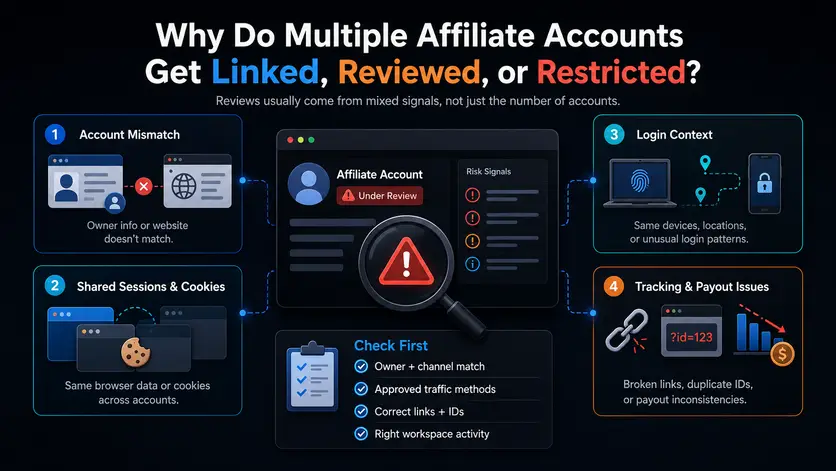
Why Do Multiple Affiliate Accounts Get Linked, Reviewed, or Restricted?
Multiple affiliate accounts do not usually cause a review just because there are several of them. Problems are more likely when account ownership, promotion methods, tracking records, and browser workspaces tell an unclear or inconsistent story.
Networks and advertisers may look at several signals together during a review. A messy login setup alone does not prove a policy issue. However, it can make ordinary mistakes more likely and make it harder to explain how each authorized account is being used.
| Risk area |
What can create questions |
What to keep clear |
| Business and ownership |
Account details do not match the real business setup |
Owner, website, promotion channels, contacts, and payment details |
| Traffic and promotion |
A channel or promotion method was not approved |
Actual traffic sources, content type, offers, and advertiser restrictions |
| Links and conversions |
Wrong links, unusual conversion patterns, or unclear tracking |
Tracking IDs, Sub IDs, link status, refunds, and commission stages |
| Browser and login context |
Sessions, cookies, saved links, or account workspaces get mixed up |
Which workspace belongs to which authorized account |
The Account Story Does Not Match the Actual Business Setup
Each affiliate account should have a simple and consistent explanation. You should be able to state who owns the account, which website or channel it supports, what offers it promotes, and which approved methods are being used. If those details are unclear, a review becomes harder to answer because the account record does not match the real work.
For example, an account may be set up around a content site, but the team later starts using new social channels, landing pages, or promotion methods without checking whether they need to be registered or approved. The issue is not that the business grew. The issue is that the account details no longer show how the business actually operates. Update records when your promotion setup changes instead of waiting until a network asks questions.
Shared Sessions and Cookies Can Blur Account Boundaries
Running several affiliate accounts in one crowded browser can create avoidable confusion. Logged-in sessions, cookies, autofill details, bookmarks, saved links, and recent pages may overlap when people move quickly between dashboards. That does not automatically lead to a restriction, but it can lead to practical mistakes such as opening the wrong account, copying the wrong affiliate link, or updating settings in the wrong workspace.
Clear account boundaries help reduce these errors. Each authorized account should have an easy-to-recognize working context with its own dashboard links, policy pages, campaign notes, and current affiliate links. The goal is not to hide an account relationship. It is to make sure a team member knows exactly which account they are using before they take action.
Device and Login Context Can Add to a Network Review
Browser sessions, device context, and login patterns can become part of the background when a network reviews an account. The exact checks vary by network and advertiser, but a review may become more complicated when account ownership is unclear and daily account activity is also inconsistent. For example, a team may struggle to explain why one person was working across unrelated account workspaces if internal records are incomplete.
Technical organizations cannot fix an account that uses inaccurate details or unapproved promotion methods. It can only support a cleaner workflow around accounts that are already authorized and properly documented. Treat browser organization as one part of account hygiene, alongside clear ownership, approved channels, and accurate campaign records.
Tracking Errors and Conversion Quality Create a Second Layer of Risk
Account reviews do not always begin with a login question. They may start with a tracking issue, a payout hold, a high number of reversed commissions, or a pattern that needs more context. Wrong affiliate links, Tracking IDs, Sub IDs, landing pages, coupon codes, or campaign parameters can make it difficult to understand where a conversion came from.
Keep clicks, pending commissions, approved commissions, reversed commissions, and paid earnings separate in your records. A pending commission is not the same as confirmed income, and a payout hold is not always the same as an account restriction. When numbers change, check recent links, campaign settings, traffic sources, refunds, and advertiser terms before assuming the problem comes from one single factor.
Before responding to a review, check these four areas:
- Does the account owner, website, channel, and promotion method match the current setup?
- Were all active traffic sources and promotional methods approved for the relevant program?
- Are the affiliate links, Tracking IDs, Sub IDs, landing pages, and coupon rules correct?
- Can the team identify which authorized browser workspace and account activity relate to the campaign in question?
The safest response to a review is usually a clear one. Pause unnecessary changes, save the notice and recent records, identify any mismatch, and explain the actual setup with accurate details. Trying to solve an unclear account structure with more logins or more changes usually makes the situation harder to explain.
What Should You Confirm Before Adding Another Affiliate Account?
Before adding another affiliate account, confirm whether you actually need a new account, a new advertiser program, or simply a new workspace for existing work. The right choice depends on the real business purpose, approved promotion channels, account ownership, and the rules of the network or advertiser involved.
A new email address is not an account strategy. Start by asking what has changed in the work itself. You may be adding a new advertiser inside an existing network, launching a new website, promoting through a new channel, managing a separate brand, or handling an authorized account for another business. Those situations can require different actions, and they should not all lead to a new publisher account.
| Your situation |
Best first move |
Why it matters |
| You want to promote a new advertiser in a network you already use |
Check whether you can apply through your current publisher account |
A new advertiser program may not require another account |
| You are adding a website or social channel |
Confirm whether the network requires you to register or approve it |
Your account record should match the channels you actually use |
| You are working with a separate brand or authorized client account |
Confirm ownership, access, payment responsibility, and promotion scope |
Clear boundaries make the account easier to manage and explain |
| You are unsure whether another account is allowed |
Ask the network or advertiser before creating one |
It is easier to clarify the structure early than fix a duplicate setup later |
Start With the Business Purpose, Not the Email Address
The first question is not “Which email should I use?” It is “What real business purpose will this account serve?” A separate account may be reasonable when it supports a different authorized business, a clearly separate brand setup, or a client-owned program with its own payment and promotion rules. It is less useful when the same business, same website, same payment details, and same promotion plan are simply being split into extra logins.
Write down the purpose of the new setup in one sentence before you apply. For example, “This account will manage approved affiliate programs for Brand B’s review site” is clear. “We need another login for the same offers” is not a strong business reason on its own. This small test can reveal whether you need a new account, a new advertiser program, or a cleaner way to organize your current work.
You should also identify who is responsible for the account. Record the real owner, the person handling daily work, the website or channel being promoted, and the payment contact. When those details are clear from the start, it is easier to keep the account structure organized as more programs and campaigns are added.
Register the Channels and Promotion Methods You Actually Use
Your affiliate account should reflect how you really promote offers, not only how you first planned to promote them. List the websites, social channels, content formats, landing pages, and traffic sources connected to each account. Then mark which ones are already approved and which ones still need confirmation before they are used.
This matters because promotion rules can change from one advertiser program to another. One program may allow a certain content format or channel, while another may restrict brand terms, discount claims, coupon use, or paid promotion. Treating every advertiser under the same network as if it follows the same rules is an easy way to create avoidable mistakes.
Keep a short record of restricted promotion methods next to each account. It does not need to be complicated. A simple note such as “No unapproved coupon codes,” “Check brand-term rules,” or “Confirm social channel before launch” can stop a rushed campaign from using the wrong approach. The goal is to make the correct option obvious before a link goes live.
Compare Overlapping Offers Before You Publish a Link
The same advertiser may appear in more than one affiliate network. That does not mean you should automatically use the account with the highest listed commission. The better option depends on the market you serve, the landing page available, the promotion methods allowed, the tracking setup, and the payment terms.
Compare the offer before you publish anything. Check whether the program covers your target country, whether its cookie period fits your content cycle, and whether it allows the channel you plan to use. Also review the current landing page, available promo materials, tracking options, and any restrictions that could affect your campaign.
Use one current link path for each advertiser, market, and campaign. Record the network, affiliate link, Tracking ID or Sub ID, target page, and last check date in one place. This reduces the chance of using an old link, posting a link meant for another market, or sending traffic through a program that no longer matches your approved promotion plan.
A well-planned affiliate account structure starts with business clarity, not more logins. If the purpose, owner, channels, and rules are easy to explain before launch, the account will also be easier to manage when your affiliate work grows.
How Do You Keep Multiple Affiliate Accounts Separate in Daily Work?
Keep each affiliate account tied to one clear name and one clear working context. The goal is not to build a complicated system. It is to make sure you can tell which dashboard, links, campaign notes, and rules belong to an account before you start working.
Daily mistakes usually happen when several networks and advertiser programs are open at the same time. Someone may enter the wrong dashboard, copy an old affiliate link, or update a campaign under the wrong account. These errors can affect tracking, reporting, and payout follow-up even when the original account structure is valid.
Build an Account-to-Profile Management Map
You do not need a large spreadsheet to keep multiple affiliate accounts organized. Start by giving every authorized account one clear name and matching that name to its daily browser workspace. The name should show the network, brand, market, or campaign so that anyone on the team can recognize it before opening anything.
For example, you might use names such as “Impact – Brand A – US Content Site” or “CJ – Brand B – Product Review Campaign.” Use the same wording in your browser workspace, link folder, campaign notes, and internal records. When the names match across your daily tools, it becomes much harder to open the wrong account or use a link from another program.
Keep only the details that help someone make the right decision before they begin work. At minimum, note the account owner, the approved website or channel, the active advertiser programs, the current link location, and the person responsible for updates. That is enough for many teams to stay organized without turning account management into another full-time job.
Keep the Right Dashboard, Links, and Policy Pages Together
Each affiliate workspace should contain the materials needed for that account and nothing unrelated. Keep the correct network dashboard, advertiser pages, affiliate links, policy pages, campaign notes, and common bookmarks in the same place. This reduces the chance that someone grabs a link from browser history without checking which program or market it belongs to.
This becomes especially useful when the same advertiser appears in more than one affiliate network. One offer may be intended for a U.S. content site, while another may cover a different market or have different promotion rules. If both links sit in one mixed bookmark folder, it is easy to publish the wrong version during a busy workday.
Use clear labels for every active link and campaign. Mark them as active, paused, expired, or under review, and add the date when they were last checked. An old link may still look usable in a document or browser tab, even after the offer, landing page, or coupon terms have changed.
Make Weekly Account Separation Checks Part of the Workflow
A short weekly check can catch small problems before they become a larger cleanup task. You do not need a long audit every Friday. The goal is simply to confirm that the account name, browser workspace, active links, and team responsibility still match.
Review these items once a week:
- Confirm that each browser Profile still matches the correct affiliate account.
- Check for new advertiser terms or channel restrictions.
- Test active links and remove expired coupons or outdated landing pages.
- Review pending commissions that have not moved for an unusual period.
- Update account owners, responsibilities, or contact details when work changes.
- Pause, archive, or reorganize workspaces that no longer support an active campaign.
This review works best when one person owns the process. That person does not need to manage every account or every campaign alone. They simply make sure changes are recorded, inactive materials are removed, and the team knows where to find the current version of each account workspace.
Keeping multiple affiliate accounts separate is mainly a workflow problem, not a tab-management problem. A clear name, a fixed workspace, current links, and a simple review routine make it easier to use the right account, follow the right rules, and avoid avoidable mistakes during daily work.
With DICloak, teams can organize authorized affiliate workspaces when several networks, brands, or campaigns are active at the same time. Its value is mainly operational: keeping the right account context, notes, access scope, and activity history together, so daily work is less likely to get mixed up.
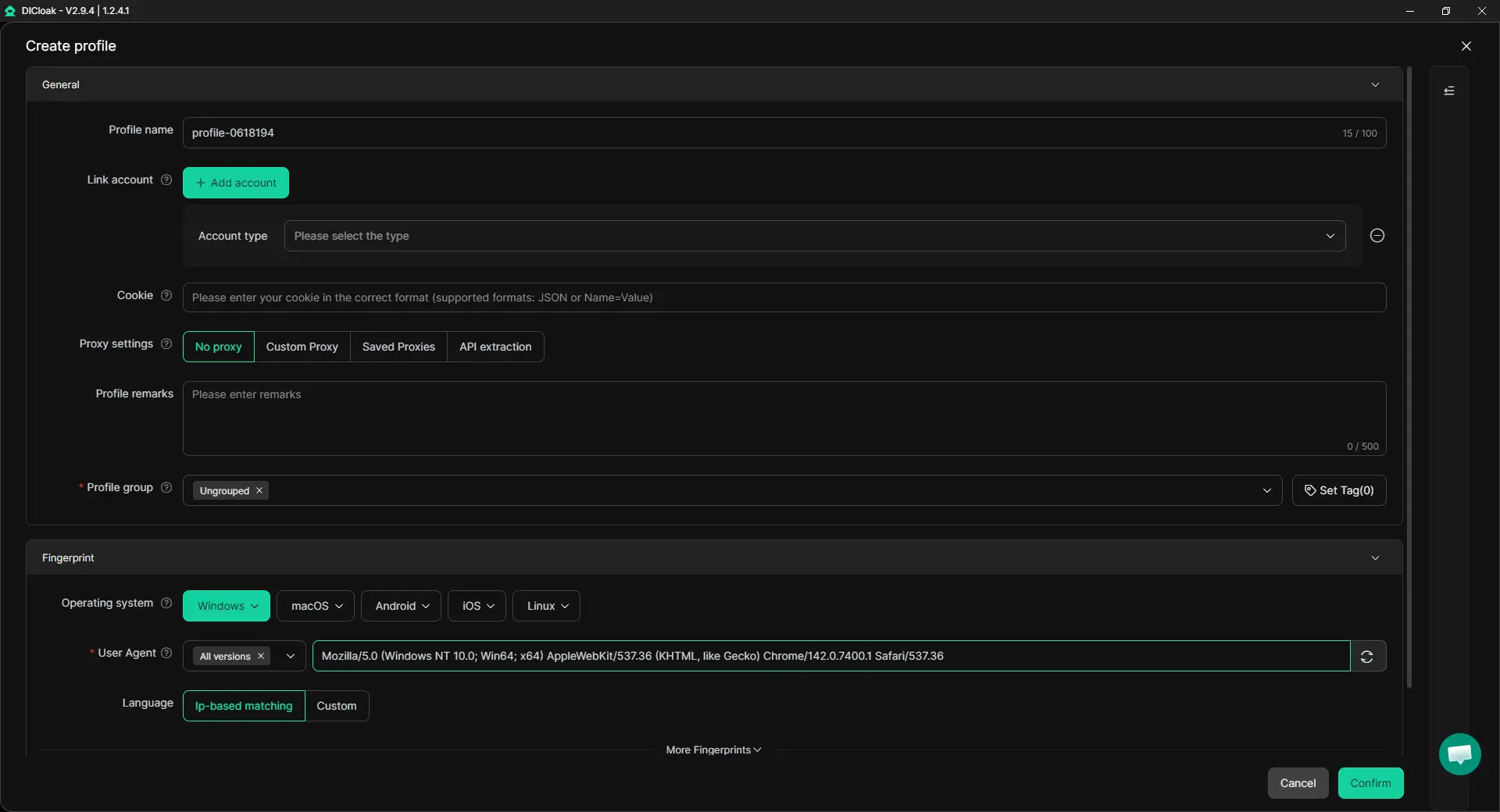
Set Up One Profile for Each Affiliate Workspace
Start by creating one Profile for each real affiliate workspace. Use a clear name such as Impact – SaaS Brand A – US Content Site or Awin – Client B – UK Review Site. This helps a team member see which network, brand, and campaign they are opening before they enter a dashboard.
Add Profile Remarks while setting it up. A short note can record the account owner, approved website or channel, active advertiser programs, link folder location, or any promotion limits the team needs to remember. This is more useful than leaving a Profile with only a vague name and hoping everyone remembers its purpose later.
Configure the Assigned Proxy and Keep the Workspace Consistent
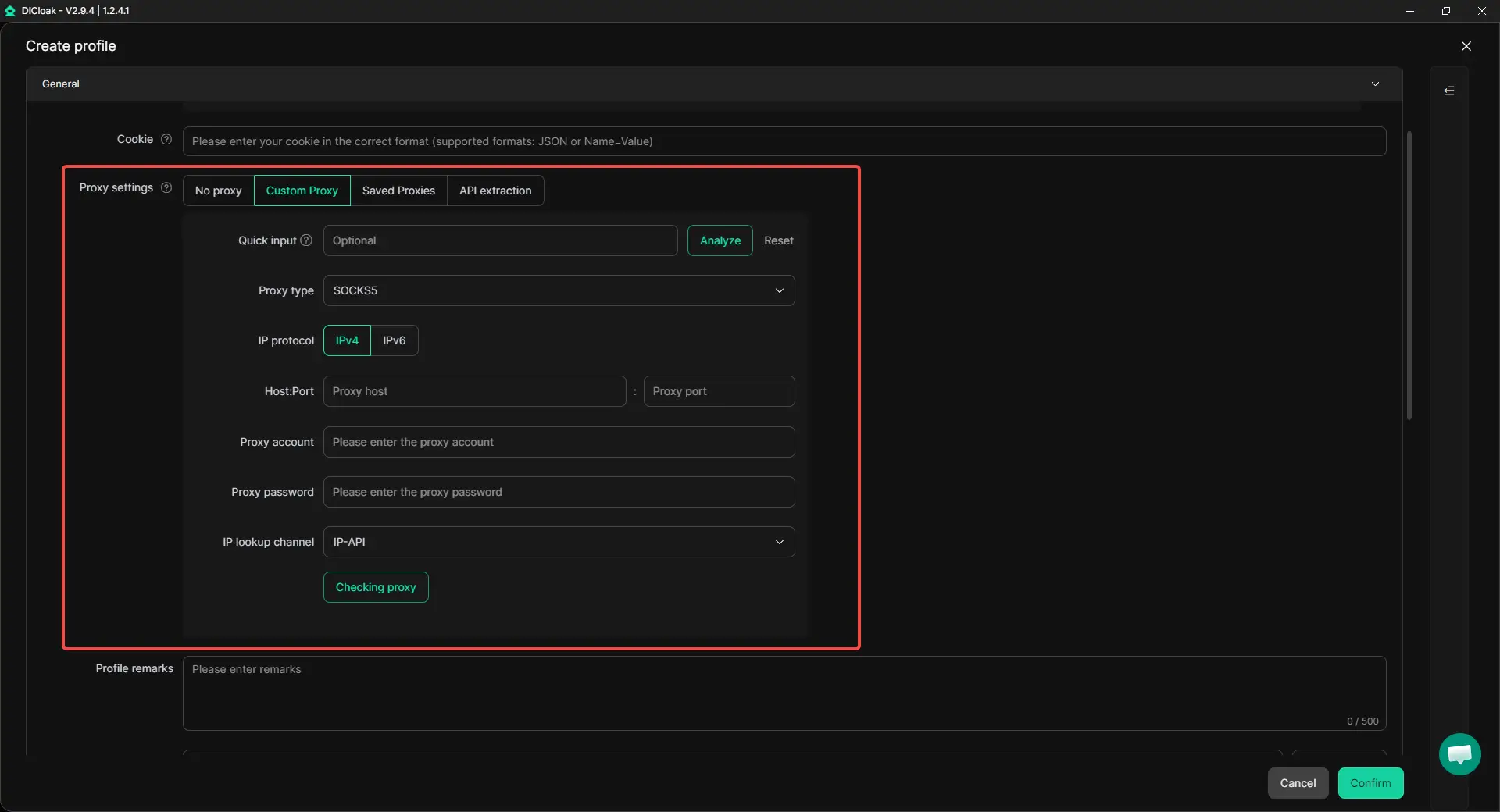
Next, add the custom proxy assigned to that authorized workspace when your team uses one. Keep the proxy details in the Profile instead of relying on a separate note or asking team members to remember which connection belongs to which account. The goal is to keep the workspace setup organized and reduce avoidable switching mistakes during daily work.
The Profile can then hold the related login session, dashboard bookmarks, policy pages, campaign notes, and current affiliate links. When everything for one account stays in one place, it is easier to avoid opening the wrong dashboard or copying a link from another network or market.
Give Access by Role and Check What Changed
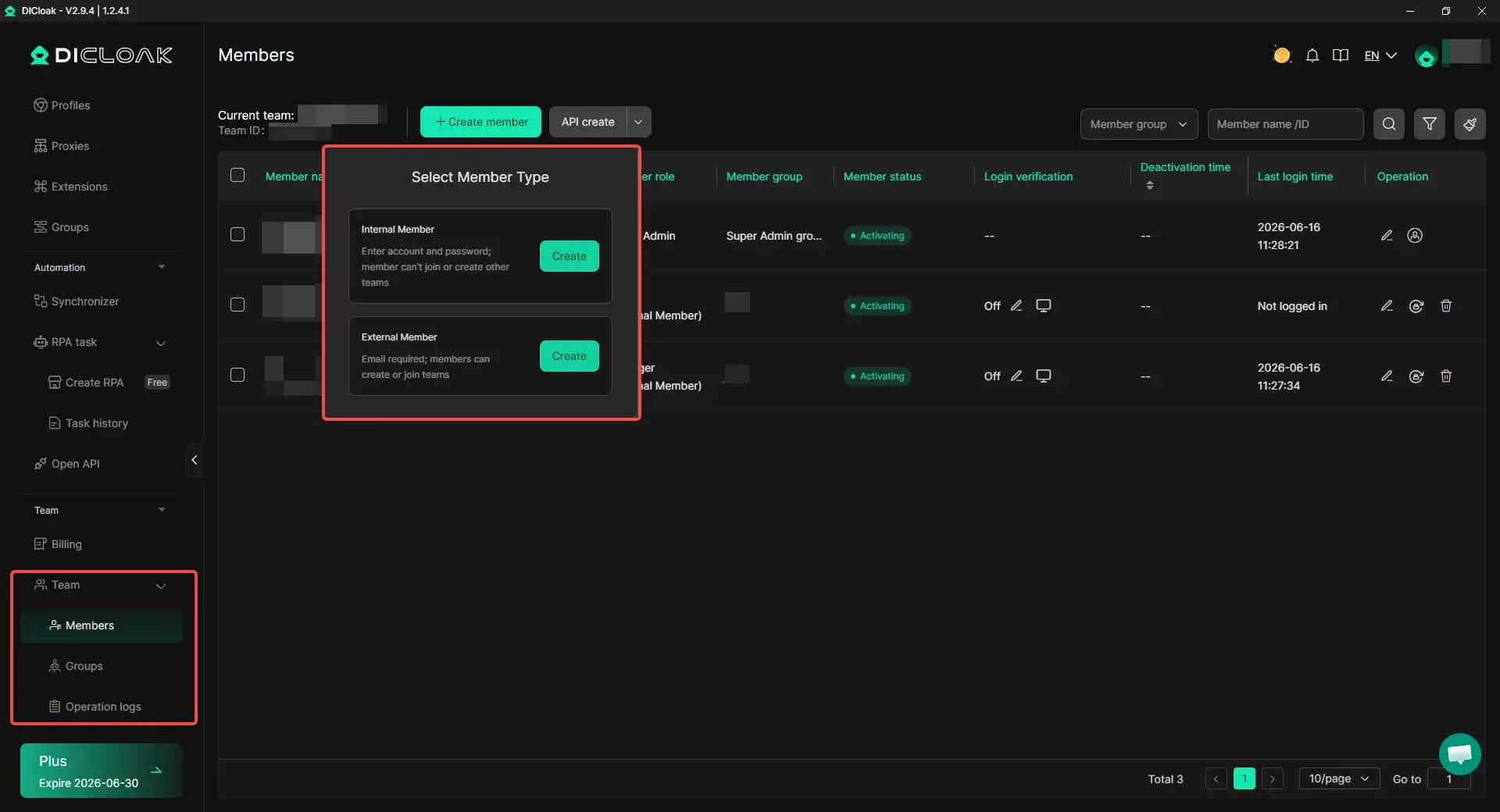
Use team permissions to give members access only to the Profiles they need for their work. For example, one person may update links and campaign notes, while another only checks reporting or account settings. This keeps responsibilities clearer and makes handoffs less messy when campaign ownership changes.
Operation logs can help when something needs to be checked later. If a tracking link changes, a Profile setting is updated, or a campaign workspace looks different, the team can review recent activity instead of relying on memory or chat messages. This supports cleaner internal records, but it does not replace accurate account details, approved traffic sources, or advertiser rules.
Frequently Asked Questions About Managing Multiple Affiliate Accounts
Can I join multiple affiliate networks for the same website?
Yes, you can often join multiple affiliate networks for the same website if each program accepts your site and promotion methods. Different networks may give you access to different advertisers, markets, commission terms, or campaign tools. Managing multiple affiliate accounts across networks is not the same as creating duplicate publisher accounts within one network, so check each program’s rules before opening another account.
Do I need a separate affiliate account for every brand, website, or client?
Not always. A separate account may make sense when the ownership, payment details, approved channels, advertiser requirements, or business purpose are genuinely different. If the same business and promotion channels are involved, first check whether your existing account can add the new website, brand, or advertiser program before creating another login.
Can multiple affiliate accounts be linked just because I use one computer?
Using one computer does not automatically make multiple affiliate accounts improper. However, mixed browser sessions, cookies, saved links, bookmarks, and account details can lead to mistakes and make a review harder to explain. Keep each authorized account’s purpose, approved promotion methods, and daily workspace clear, and do not treat browser setup as a substitute for network approval.
Why is an affiliate commission pending, reversed, or put on hold?
A commission may stay pending while an order is checked, or it may be reversed after a refund, cancellation, duplicate order, or campaign-rule issue. A pending commission is not the same as confirmed income, and a payout hold does not always mean the whole account is restricted. Check the conversion record, active affiliate link, campaign terms, payment details, and current account notices before assuming the problem comes from one cause.
Can an Antidetect Browser Like DICloak Help Manage Multiple Affiliate Accounts?
An antidetect browser like DICloak can help organize authorized affiliate workspaces when a team switches between networks, brands, and campaigns. Separate Profiles and Profile Remarks can keep the right login session, bookmarks, link notes, and account context together, while team permissions and operation logs make access and changes easier to review.
Conclusion
Managing multiple affiliate accounts across different networks can be a normal part of growing affiliate work, but each account should have a clear purpose, accurate business details, approved promotion methods, and an organized daily workspace. The biggest risks usually come from unclear ownership, unapproved traffic sources, wrong links or tracking settings, outdated campaign rules, and mixed browser sessions that lead to avoidable mistakes.
The safest approach is to treat every affiliate account as part of one clear operating system. Keep account records, links, policy pages, payment status, and browser workspaces organized, so your team always knows which network, advertiser, and campaign they are working on. An Antidetect Browser like DICloak can support this process by helping teams separate authorized workspaces, manage access, and review changes.
 Web Proxy Tools
 Free Tools
 Cookie Plugin
 UA Generator
 MAC Address Generator
 IP Generator
 IP Address List
 2FA Code Generator
 World Clock
 Anonymous Check
 WebRTC Leak Test
 UUID Generator
 Free Web Proxy Site
 Proxy Checker
 FB Ad Checker
 AI Web Scraping
 Free SMM Tools
 Twitter Shadowban Checker
 Instagram Name Checker
 UTM Generator
 Username Generator
 AI Hashtag Generator
 LinkedIn Headline Generator
 Social Media Image Resizer