Seeing a Cloudflare block can feel confusing, especially when the website worked fine before. You may see a verification page, a 403 error, or a message that keeps loading again and again. At that point, many users start asking, "how do i unblock Cloudflare?" The real cause is not always the same. It may be your browser, cookies, extensions, IP trust, or a rule set by the website owner. This guide explains the safest ways to fix common Cloudflare access errors in 2026, without weakening security or changing the wrong settings.
How Do I Unblock Cloudflare When a Website Blocks My Access?
If you search "how do i unblock Cloudflare," you may be dealing with a browser check, an IP issue, or a website security rule. The block is often not a full ban on you as a person. It usually means the website is using Cloudflare to check whether your visit looks safe. This can happen on Chrome, Safari, Mac, or any other device when the browser check does not pass.
What a Cloudflare Block Usually Means
A Cloudflare block means the website has placed a security check between you and the page. Cloudflare may ask your browser to prove that it can load scripts, accept cookies, and behave like a normal visitor. If something breaks during that check, the page may keep loading, ask you to verify again, or stop you with an error.
This is why searches like "how to unblock Cloudflare on Chrome" and "how to unblock Cloudflare Safari" are common. The real issue is often inside the browser. An old browser, blocked JavaScript, strict privacy settings, or an extension can stop the check from working.
Common Cloudflare Errors You May See
You may see messages like "Checking if the site connection is secure," "Enable JavaScript and cookies to continue," "403 Forbidden," or "Error 1020." Some pages also show a Cloudflare Ray ID. That Ray ID is useful because it helps the website owner find the blocked request in their Cloudflare logs.
For example, a user may search "Cloudflare unblock IP" after seeing a 403 page again and again. But the IP is only one possible reason. The block can also come from browser extensions, damaged cookies, blocked scripts, or strict site rules. If the problem happens only in one browser, the fix may be as simple as clearing site data or turning off an extension.
When the Problem Is Not on Your Side
Sometimes you cannot fix the block from your device. The website owner may have set strict firewall rules. The site may also have a DNS, SSL, or security setting issue. In that case, changing settings on your Mac, Chrome, or Safari will not fully solve it.
A real case happened on November 18, 2025, when a Cloudflare outage affected large services such as ChatGPT, X, Shopify, Dropbox, and Coinbase. Many users saw errors, but the problem was with internet infrastructure, not their own browser. This kind of case shows why it is important to check whether the website itself is having trouble before changing too many settings on your device.

Why Is Cloudflare Blocking My Access?
After you know the error may come from your browser, IP, or the website itself, the next step is to find the likely cause. Cloudflare checks many signals before it lets a visitor reach a protected page. Some signals come from your browser. Others come from your network or from rules set by the website owner.
Your Browser Looks Suspicious or Incomplete
A normal browser sends many small signals when it opens a website. It loads scripts, stores cookies, keeps a session, and shows normal browser details. If these signals look missing or broken, Cloudflare may stop the visit before the page opens.
This is why many people search "how to unblock Cloudflare on Chrome" or "how to unblock Cloudflare Safari" after the same page keeps asking for a check. For example, Chrome may fail if an extension blocks a required script. Safari may fail if strict privacy settings stop the challenge from saving the needed cookie. Cloudflare’s challenge help pages also list browser updates, extensions, JavaScript, cookies, private mode, and another browser or device as useful checks.
JavaScript, Cookies, or Extensions Are Causing Problems
Cloudflare challenges often need JavaScript and cookies to work. If JavaScript is off, the check may never finish. If cookies are blocked, the website may not remember that you already passed the check. Then you may get stuck in a loop.
For instance, a user trying to learn how to unblock Cloudflare on Mac may test the same site in Safari and Chrome. If Chrome works but Safari fails, the issue is likely not the website. It may be a Safari setting, old site data, or a content blocker. Turning off the blocker for that site and clearing old cookies can often make the check load again.
Your IP Address or Network Has a Poor Trust Signal
Sometimes the browser is fine, but the network signal is not. A shared office network, public Wi-Fi, or heavily used IP range may send too many requests to the same protected site. Cloudflare or the website owner may treat that traffic as risky, even when your own visit is normal.
This is where the search term "Cloudflare unblock IP" comes from. But an IP block is not always something a visitor can remove alone. Cloudflare IP Access rules can allow, block, or challenge traffic by IP address, ASN, or country, and they are often used when site owners need to control suspicious traffic.
The Website Owner Set Strict Security Rules
Cloudflare does not make every access decision by itself. The website owner can set rules that block certain paths, countries, IP ranges, user agents, or request patterns. If you see Error 1020, it often means a Cloudflare firewall or security rule has denied the request.
This matters because the right fix depends on who controls the rule. A visitor can update the browser, enable cookies, or try another device. But only the website owner can review Cloudflare Security Events, check which rule matched the request, and adjust the rule if it blocked a real user by mistake. Cloudflare’s Security Events tool is made for reviewing flagged or mitigated requests and tuning security settings.
How to Fix Cloudflare Blocks as a Normal User
Once you know why the block may happen, start with the fixes you can control. Most normal users do not need advanced tools at first. The goal is to help your browser pass the security check in a clean and normal way. If you are asking "how do i unblock Cloudflare," these steps should come before contacting the website owner.
1. Update Your Browser and Enable JavaScript
Start with the browser itself. Cloudflare challenges may not work well if your browser is old or if JavaScript is turned off. Update Chrome, Safari, or the browser you use most, then reload the blocked page.
This matters when you search "how to unblock Cloudflare on Chrome" or "how to unblock Cloudflare Safari." Chrome may fail because an old version cannot handle the check well. Safari may fail if JavaScript is limited by a setting or content rule. Cloudflare's challenge troubleshooting guide also lists browser updates and JavaScript checks as common ways to fix challenge loops.
2. Clear Cookies and Cache for the Blocked Website
Cloudflare often uses cookies to remember that your browser passed a check. If old site data is broken, the website may keep asking you to verify again. Clearing cookies and cache for only that website can remove the bad data without wiping your whole browser.
For example, a Mac user may search "how to unblock Cloudflare on Mac" after Safari keeps showing the same verification page. In that case, clearing Safari website data for the blocked domain may help. If the same site works in Chrome but not Safari, the issue is likely stored data or a browser setting, not a full website block.
3. Turn Off Extensions That May Block Cloudflare Checks
Some extensions can block scripts, cookies, or security challenge files. Privacy tools, ad blockers, script blockers, and some security extensions may cause the page to fail before you see the real website. Turn them off for the blocked site, then reload the page.
This does not mean every extension is bad. It only means one extension may be too strict for that page. Indeed's Cloudflare troubleshooting guide also starts with disabling browser extensions and ad blockers when Cloudflare errors appear.
4. Try Another Browser, Device, or Network
If the page still does not open, test the problem in a different place. Try Chrome if Safari fails. Try Safari if Chrome fails. You can also test the same website on another device or another network.
This helps you separate a browser issue from a network issue. If the website works on your phone but not your laptop, your laptop browser may be the problem. If no device works on the same network, the issue may be tied to the network or IP. That is when people often search "Cloudflare unblock IP," but the website owner may be the only one who can remove a strict IP rule.
5. Save the Cloudflare Ray ID Before Asking for Help
If none of the fixes work, do not just say "Cloudflare blocked me" when you contact support. Save the Cloudflare Ray ID from the error page. Also note the time, the page URL, your browser, your device, and what you already tried.
The Ray ID helps the website owner find your request in Cloudflare logs and check whether a rule blocked it by mistake. Cloudflare describes the Ray ID as an identifier added to requests that pass through Cloudflare, and it can help with reviewing Security Events. Cloudflare support guidance also asks users to provide the Ray ID when a Cloudflare error page appears.
How Website Owners Can Unblock Cloudflare Access
If normal browser fixes do not work, the next step belongs to the website owner. A visitor can update Chrome, clear Safari data, or test another device. But the site owner must check Cloudflare rules when a real user is still blocked. This is especially important when users keep asking "how do i unblock Cloudflare" after they have already tried basic fixes.
1. Check Cloudflare Security Events and Firewall Rules
Start with Cloudflare Security Events. This area shows requests that were flagged or stopped by Cloudflare security tools. It can help you find false positives and tune security rules without turning protection off for everyone.
For example, a customer may report that checkout works on mobile data but fails on an office network. Ask for the Cloudflare Ray ID, time, URL, and browser. Then search the event record and check which rule acted on the request. If a rule is too broad, you can adjust it instead of lowering the whole site's security.
2. Review WAF, Bot, and Challenge Settings
Cloudflare WAF can protect a site from common attacks, but strict rules may block normal users by mistake. Managed rules are made to protect against web attacks, stolen credentials, and sensitive data risks. Bot tools can also challenge or block traffic that looks automated.
This is why a user searching "how to unblock Cloudflare on Chrome" may not always need a Chrome fix. The site may be challenging too many visitors from one region, one path, or one request pattern. Review WAF matches, bot settings, and challenge rules together. A small rule change on one login page is safer than weakening security across the full domain.
3. Fix DNS, SSL, and Custom Domain Settings
Some Cloudflare access problems come from site setup, not user behavior. DNS proxy status matters because proxied records send web traffic through Cloudflare. Cloudflare recommends proxying A, AAAA, and CNAME records that serve web traffic, while some records used for domain ownership checks should stay DNS-only.
This can matter for custom domains, SSL checks, and third-party services. For instance, a SaaS product may ask users to connect a custom domain. If the wrong CNAME is proxied, or the SSL setup does not match the service's needs, users may see Cloudflare errors even on a clean Mac or Safari browser. In that case, searches like "how to unblock Cloudflare Safari" or "how to unblock Cloudflare on Mac" point to a site configuration issue, not a user mistake.
4. Allow Trusted IPs Only When It Is Safe
For some business services, a trusted IP may need stable access. Payment providers, API clients, crawlers, or internal tools may need fewer challenges than public traffic. Cloudflare IP Access rules can allow, block, or challenge traffic by IP address, ASN, or country.
Still, "Cloudflare unblock IP" should not mean allowing every blocked address. Only allow an IP when you know who owns it, why it needs access, and what pages it should reach. Cloudflare also recommends using custom rules instead of older IP Access rules for many IP-based or geography-based controls. A narrow rule for a trusted service is safer than a broad allowlist that opens the door to abuse.
Risks of Unblocking Cloudflare the Wrong Way
Unblocking access should not mean turning off protection without checking the cause. In the last section, we looked at safe ways for site owners to review rules, DNS, SSL, and trusted IPs. This part matters because a fast fix can create a bigger problem later. When users ask "how do i unblock Cloudflare," the safest answer depends on whether the issue is a real false block or a real security risk.
Lowering Security Can Expose Your Website
Some site owners try to fix blocked users by turning off WAF rules or lowering all security settings. That may help one visitor open the page, but it can also remove protection from the whole site. Cloudflare WAF is designed to protect web apps from common vulnerabilities and gives owners custom rules for different traffic needs.
For example, a store owner may get a complaint from a Mac user searching "how to unblock Cloudflare on Mac." If the owner disables major security rules for the full checkout path, attackers may also get easier access to that path. A better choice is to check the Ray ID, review the matched rule, and adjust only the rule that caused the false block.
Weak Rules Can Increase Spam and Bot Traffic
Cloudflare blocks are often annoying, but weak rules can invite spam, fake signups, scraping, and login abuse. Cloudflare’s bot tools use machine learning and behavior signals to detect harmful automated traffic before it reaches an application. If those checks are removed too widely, normal users may see faster pages at first, but the site may soon get more fake traffic.
For instance, a blog owner may see many Chrome users ask "how to unblock Cloudflare on Chrome" after a challenge appears too often. The risky move is to remove all bot checks from the whole site. The safer move is to review which pages are being challenged. Login, signup, payment, and comment pages often need stronger protection than public article pages.
Unauthorized Access Can Create Legal Risk
"Cloudflare unblock IP" is a useful search term when a trusted service is blocked. But it can become risky if the site owner allows an address without knowing who controls it. IP Access rules can allow, block, or challenge traffic by IP address, ASN, or country, and they are often used for APIs, crawlers, payment providers, and other services that need regular access.
This is important for both users and site owners. A visitor should not try to force access to pages they are not allowed to use. A site owner should not allow broad access just because one person says Safari is blocked and searches "how to unblock Cloudflare Safari." Keep the rule narrow, confirm the requester, and document why the access is needed.
What to Do When Cloudflare Keeps Blocking You
If the same Cloudflare block keeps coming back, slow down before changing more settings. You may have already updated your browser, cleared cookies, and tested Chrome or Safari. At this point, the question is not only "how do i unblock Cloudflare." It is also whether the problem is on your device, your network, or the website itself.
Check Whether the Website Is Down
Before you keep changing browser settings, check whether the website is working for other users. Try opening the same site on another device or another network. You can also check the website's status page, social media updates, or a trusted outage tracker. If many users report the same issue at the same time, the block may not be about you.
This happened on November 18, 2025, when a Cloudflare outage affected many large services, including ChatGPT, X, Shopify, Dropbox, Coinbase, and others. Cloudflare later explained that the issue came from an internal system change, not a cyberattack. Many users saw errors, but there was nothing useful to fix in Chrome, Safari, or Mac settings.
Contact the Website Owner or Support Team
If the site is working for others, contact the website owner or support team. Send useful details instead of only saying the site is blocked. Include the page URL, the time of the error, your browser, your device, and a screenshot if possible. If the error page shows a Cloudflare Ray ID, copy it exactly.
The Ray ID matters because it helps the website owner review the blocked request in Cloudflare Security Events. Cloudflare describes the Ray ID as an identifier added to each request that passes through Cloudflare, and it is useful for checking false positives and traffic patterns. For example, if you searched "how to unblock Cloudflare on Chrome" but the same block also appears on Safari, the support team may find that a firewall rule, not Chrome, caused the issue.
Understand When an IP Block Cannot Be Removed by You
Sometimes the block is tied to an IP address, country, ASN, or a rule set by the website owner. In that case, searching "Cloudflare unblock IP" will not give you a button to remove the block yourself. Cloudflare IP Access rules can allow, block, or challenge traffic based on IP address, ASN, or country, and only the site owner can safely change those rules.
This is important if you are trying to learn how to unblock Cloudflare Safari or how to unblock Cloudflare on Mac after every local fix fails. Your device may be fine. The website may have blocked a network range because of past abuse, heavy requests, or strict regional rules. The best next step is to send your Ray ID and error details to the site owner, then let them decide whether the block is a mistake or a real security rule.
Common Myths About Cloudflare Blocks
After you have tried browser fixes, checked the website status, and sent the Ray ID to support, it is easy to make the wrong guess. Cloudflare blocks can look simple from the outside, but they often come from several signals at once. These myths can help you avoid wasting time on the wrong fix. They also help answer the real search intent behind "how do i unblock Cloudflare."
Cloudflare Does Not Block Every User by Itself
Many users think Cloudflare chooses to block them directly. In many cases, the website owner has set a firewall, WAF, bot, country, IP, or challenge rule. Cloudflare then applies that rule when a request matches it. Error 1020 is a clear example because it means access was denied by a Cloudflare firewall rule.
This matters when someone searches "Cloudflare unblock IP." If a website owner blocked an IP range, Cloudflare is only enforcing that site rule. A normal visitor cannot remove that rule from their side. The better step is to collect the Ray ID and contact the website owner, so they can check whether the block was a mistake.
Passing a Challenge Does Not Always Mean Full Access
Some users pass a Cloudflare challenge and still cannot open the page they want. That can feel confusing, especially if the browser already showed a success screen. But a challenge is only one layer. A website may still block a login page, checkout page, admin path, API route, or region after the challenge is passed.
For example, a user may search "how to unblock Cloudflare on Chrome" after passing the check but still seeing a 403 page. Another user may search "how to unblock Cloudflare Safari" because the challenge repeats on Safari but not Chrome. In these cases, JavaScript, cookies, extensions, cached data, or a site rule may still be involved. Cloudflare's challenge troubleshooting guidance also lists browser updates, extensions, JavaScript, cookies, private mode, and another browser or device as checks when challenges fail or loop.
Changing DNS Is Not Always the Right Fix
DNS changes can help website owners when the issue is tied to domain setup. But they are not a magic fix for every Cloudflare block. If a visitor is blocked by a browser challenge, changing DNS on a Mac will not remove the website's firewall rule. If the site owner has blocked an IP range, changing local DNS settings will not safely allow that traffic.
This is why searches like "how to unblock Cloudflare on Mac" can lead users in the wrong direction. Cloudflare proxy status controls whether HTTP and HTTPS traffic for a DNS record goes through Cloudflare or goes directly to the origin server. That setting belongs to the website owner, not a normal visitor. For most users, browser checks, cookies, extensions, and support details are better first steps than changing DNS.
After basic Cloudflare fixes, some users still need a cleaner setup for daily account work. This is common for social media teams, e-commerce sellers, affiliate marketers, and agencies managing many accounts. The goal is not to force access through Cloudflare. It is to keep each account environment stable and separate.
Keep Different Accounts in Separate Browser Profiles
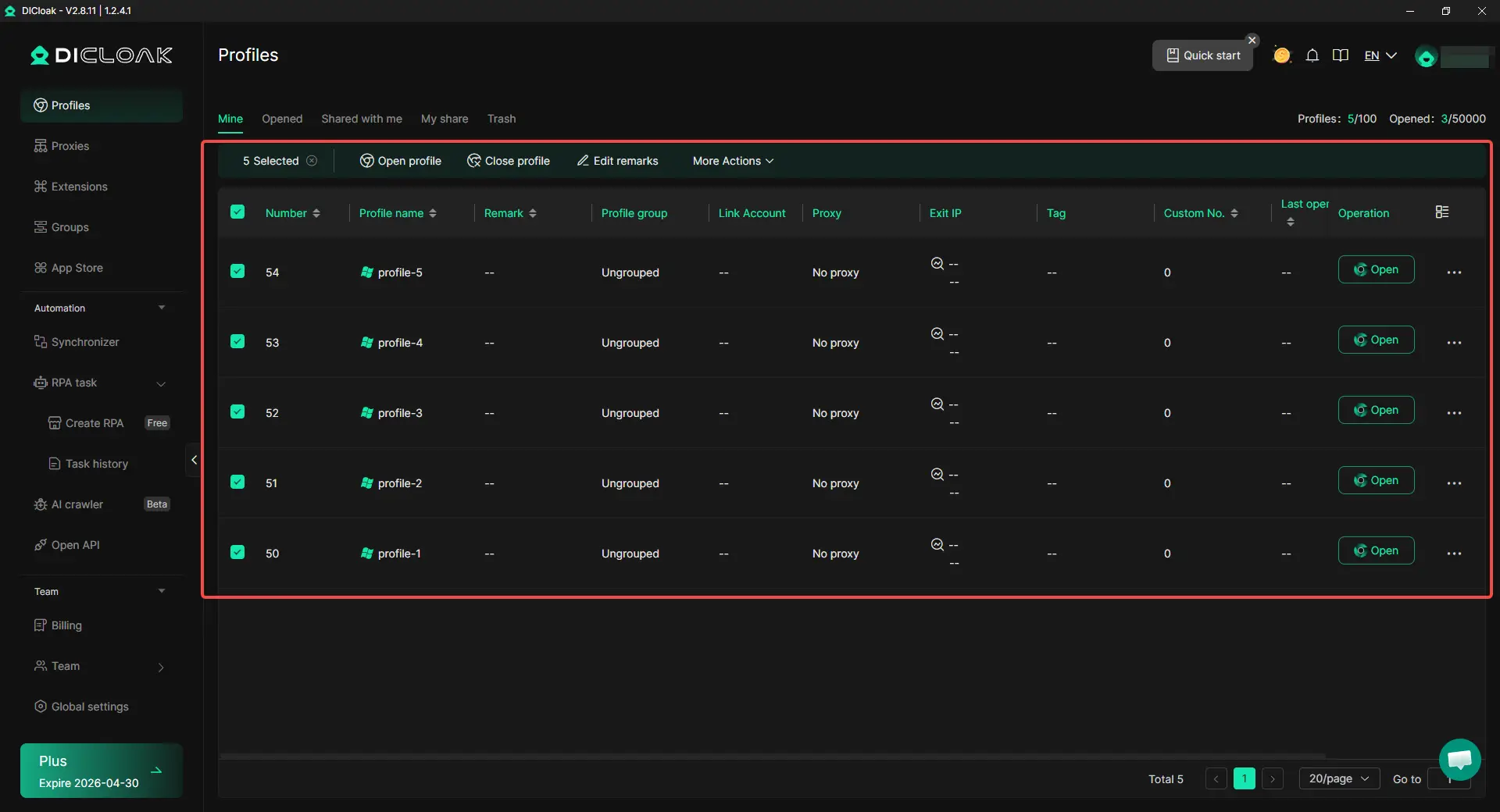
When many accounts run in one normal browser, cookies, sessions, cache, and login data can mix. With DICloak, users can create a separate browser profile for each account or project. Each profile keeps its own cookies, local storage, login state, and browser data, which makes access checks easier to manage.
Keep Cookies, Sessions, and Fingerprints Consistent
Cloudflare may challenge visits that look unstable or incomplete. Users can use DICloak to keep fingerprints, cookies, sessions, and local storage separate by profile. They can also set browser details like User-Agent, screen size, language, time zone, Canvas, and WebGL to keep each account environment more consistent.

Configure Custom Proxies for Different Access Environments
Some blocks are tied to IP trust or network history. In DICloak, users can configure custom proxies for different profiles, including HTTP, HTTPS, and SOCKS5. For example, an e-commerce team can assign one stable proxy to one store account and another proxy to a separate regional account, instead of switching everything in one shared browser.

Frequently Asked Questions About How Do I Unblock Cloudflare
1. How do I unblock Cloudflare if I keep seeing a verification page?
If you keep seeing a Cloudflare verification page, start with your browser. Update the browser, turn on JavaScript, allow cookies, and disable extensions that may block scripts. Then clear cookies and cache for the blocked website. If the page still does not load, try another browser, device, or network.
2. Why does Cloudflare keep blocking me on Chrome or Safari?
Cloudflare may keep blocking you on Chrome or Safari if the browser check cannot finish. This can happen when cookies are blocked, JavaScript is off, or an extension stops the challenge from loading. If one browser works and another fails, the issue is often a browser setting, not a full IP block.
3. Can I unblock a Cloudflare IP block by myself?
In most cases, no. If a website owner has blocked your IP address, only the website owner can review and change that rule. You can collect the Cloudflare Ray ID, the error time, the page URL, and your browser details. Then send them to the site support team so they can check whether the block was a mistake.
4. How do I unblock Cloudflare on Mac?
To unblock Cloudflare on Mac, test the blocked site in Safari and Chrome. Then update your browser, clear website data, enable JavaScript, and turn off strict content blockers for that site. If the same error appears on every browser and device, the problem may be the website’s Cloudflare rule instead of your Mac.
5. Is it safe to change DNS settings to unblock Cloudflare?
Changing DNS is not always the right fix. It may help only when the issue is related to local network resolution or a website owner’s domain setup. If Cloudflare is blocking you because of a browser challenge, firewall rule, or IP rule, DNS changes will not solve the real problem. Start with browser checks and Ray ID support before changing DNS.
Conclusion
Cloudflare blocks can happen because of browser issues, strict security rules, IP trust signals, or website-side errors. If you ask "how do i unblock Cloudflare," start with safe fixes first. Update your browser, enable JavaScript, allow cookies, clear site data, turn off blocking extensions, and test another browser or device.
If the problem keeps happening, save the Cloudflare Ray ID and contact the website owner. Only the site owner can review firewall rules, WAF settings, DNS setup, or IP blocks. For teams managing many accounts, a cleaner setup with separate browser profiles, consistent cookies, fingerprints, and custom proxies can also help keep access more stable over time.
 Web Proxy Tools
 Free Tools
 Cookie Plugin
 UA Generator
 MAC Address Generator
 IP Generator
 IP Address List
 2FA Code Generator
 World Clock
 Anonymous Check
 WebRTC Leak Test
 UUID Generator
 Free Web Proxy Site
 Proxy Checker
 FB Ad Checker
 AI Web Scraping
 Free SMM Tools
 Twitter Shadowban Checker
 Instagram Name Checker
 UTM Generator
 Username Generator
 AI Hashtag Generator
 LinkedIn Headline Generator
 Social Media Image Resizer