Trying to open a Cloudflare-protected site in 2026 can feel confusing. One minute the page loads. The next minute you see a challenge page, a block message, or a loop that never ends. This does not always mean you did something wrong. Cloudflare uses challenges to tell real users apart from bots and other risky traffic, and even legitimate visitors can get flagged when a browser, request pattern, or network signal looks unusual.
This guide explains the safe and practical side of the problem. You will learn why Cloudflare challenges happen, what setup issues often trigger them, how to test your browser profile, and which tools can help create a more stable workflow. For example, Cloudflare says a solved challenge may set a cf_clearance cookie for continued access, which shows how much browser state and session consistency can affect the experience. So this article is not about “breaking” security. It is about reducing false alarms, fixing unstable setups, and accessing sites more smoothly in a legitimate way.

Why Cloudflare Challenges Happen
If you search for a cloudflare bypass extension, you are usually not trying to “break” a site. Most of the time, you just want the page to load normally. In 2026, Cloudflare still uses challenge pages to check whether a visitor looks like a real user or an automated script. These checks can be triggered by signals from the browser, the IP, the request pattern, or site-specific security rules. That is why even normal users sometimes see CAPTCHAs, loops, or block pages.
What common signals trigger Cloudflare checks?
Cloudflare says challenges can be triggered by several common signals. These include high-risk IP reputation, bot-like traffic patterns, Browser Integrity Check results, and custom WAF rules set by the site owner. In simple words, if your browser or traffic looks unusual, Cloudflare may stop and test you before letting you in.
Why legitimate users sometimes get blocked or challenged
Real users get challenged for simple reasons more often than people expect. Cloudflare’s troubleshooting pages show that a browser can fail a challenge because JavaScript is off, the browser is outdated, or a needed challenge script cannot load. In other cases, the site owner may have stricter rules that affect visitors from higher-risk networks or unusual browser setups. A good example is a user who opens a site in an older browser and gets stuck on a CAPTCHA page even though they are only trying to log in. In that case, the problem is not “bad intent.” It is a trust signal problem. This is also why a cloudflare captcha bypass extension may sound helpful in search, but the real fix is often much simpler.
How browser extensions, cookies, and unstable sessions affect access
Browser state matters a lot. Cloudflare notes that some browser extensions, especially script-blocking or ad-blocking tools, can stop challenge scripts from running correctly. Cookies matter too. Cloudflare uses challenge-related cookies, such as cf_clearance, to remember that a challenge was solved, so broken or blocked cookie handling can lead to repeated checks. Unstable sessions can create the same problem.
Legitimate Ways to Access Cloudflare-Protected Sites
After you understand why Cloudflare challenges happen, the next step is not to rush for a tool. In many cases, the fastest fix is to clean up your browser profile first. People often search for a cloudflare bypass extension when the real problem is a blocked script, a bad cookie, or an unstable session.
How to fix browser and extension issues before trying anything else
Start with the simple checks. Update your browser, make sure JavaScript is on, and temporarily disable extensions that may block challenge scripts. Cloudflare specifically says ad blockers and other extensions can interfere with Turnstile, and it recommends testing in Incognito or Private mode to rule out extension or cached-data problems. A simple example is a user who keeps seeing a CAPTCHA page because one privacy extension blocks the script Cloudflare needs to run. In that case, trying another cloudflare bypass extension usually makes the problem worse, not better.
Why a cleaner network setup and stable browser profile can improve access
Cloudflare also points to unstable connections and environment issues as common causes of repeated challenges. If your browser keeps losing session state, clearing cookies, or changing behavior between visits, Cloudflare may treat each visit like a fresh risk check. Cloudflare’s docs note that solved challenges rely on browser state and that challenge loops can continue when the environment is unstable.
When to contact the site owner instead of retrying
Sometimes the issue is not on your side at all. Cloudflare says that if the troubleshooting steps do not work, legitimate users should contact the website administrator with the error code and Ray ID, or submit feedback through the widget when available. That is especially important if the site owner has strict custom rules or if your requests are being challenged by site-specific settings. A good example is when one site blocks you again and again, but other Cloudflare-protected sites load normally. At that point, using a new cloudflare bypass extension is less useful than asking the site owner to review the block.
How to Troubleshoot Cloudflare Challenge Loops
After trying the basic fixes, some users still get stuck in the same challenge again and again. This is where troubleshooting matters. Many people start searching for a cloudflare bypass extension, but a repeated challenge loop often points to a browser, session, or network problem instead. Cloudflare says challenge loops can happen when it detects strong bot signals, or when the browser cannot complete the challenge correctly because of settings, extensions, unsupported browsers, disabled JavaScript, or unstable connections.
Why challenge pages may keep reappearing
A challenge page may come back because the browser never finishes the check in a clean way. Cloudflare lists several common causes:
- poor or unstable network connections,
- blocked scripts, unsupported browsers,
- JavaScript being turned off,
- detection errors when behavior looks bot-like.
How to test whether your browser setup is causing the issue
The safest way to test this is to simplify your setup. Cloudflare recommends updating your browser, disabling extensions, turning on JavaScript, trying Incognito or Private mode, and testing another browser or device. This gives you a clean comparison.
What to do when your IP reputation is the problem
Sometimes the browser is fine, but the request still gets blocked because of site-side rules tied to your IP or request history. Cloudflare’s Error 1020 page says this kind of denial happens when access is blocked by a Cloudflare firewall rule. If you are a visitor, Cloudflare advises sending the site owner a screenshot of the error. The Ray ID shown on the page helps the site owner review the event and check whether it was a false positive. So if only one site keeps blocking you while others load normally, it may be smarter to contact the site owner than to keep testing every cloudflare bypass extension you can find.
Best Tools for Stable, Compliant Access in 2026
After troubleshooting challenge loops, the next step is choosing the right setup. Many users search for a cloudflare bypass extension first, but extensions are only one part of the picture. In many cases, stable access depends more on browser compatibility, JavaScript support, cookie handling, and a clean session than on any single add-on. Cloudflare’s own troubleshooting guide says repeated challenges can be caused by blocked scripts, unsupported browsers, disabled JavaScript, or unstable browser profiles.
What to look for in a browser profile tool
A good browser profile tool should help you keep sessions stable and predictable. That means it should support updated browsers, allow JavaScript to run normally, preserve cookies correctly, and reduce conflicts from extensions or cached data. For example, Cloudflare says solved challenges rely on the cf_clearance cookie, which helps the site remember that a challenge was already passed for a period of time. If your setup breaks that cookie flow, access may become unstable again.
Extensions vs. isolated browser profiles vs. proxy-based setups
- Browser extensions are easy to try, but they can also create problems. Cloudflare says some extensions, especially ones that block scripts, may stop challenge pages from working correctly.
- Isolated browser profiles are often better when you need separate cookies, separate sessions, or a cleaner environment for repeat visits.
- Proxy-based setups can help in some workflows, but they also add another layer that can affect challenge solving if the network looks inconsistent.
Which option fits login sessions, research, or team workflows
The best option depends on the job. For one-time access, a clean browser with fewer extensions may be enough. For login sessions, repeated research, or team workflows, isolated profiles are often easier to manage because they keep cookies and session history separate. That can help reduce mix-ups between tasks. For example, one profile can be used for account access, while another is kept for research or testing. This kind of separation is useful because Cloudflare’s challenge system checks browser state over time, not just one page load. So before installing another cloudflare bypass extension, it often makes more sense to choose the setup that matches how you actually work.
How to Test Access Without Triggering More Problems
Once you choose a cleaner setup, the next step is to test it carefully. This matters because too many repeated retries can create more trouble, not less. Many users look for a cloudflare bypass extension at this stage, but the smarter move is to check whether your environment is now stable before changing tools again.
What signals show your setup is stable?
A stable setup usually shows a few simple signs. The page loads without sending you back to the same challenge. Your browser keeps the session instead of asking you to verify again right away. Cloudflare explains that after a successful challenge, it can set a cf_clearance cookie so the visitor does not need to solve new challenges for a period of time. In plain terms, if the site opens normally on the next page and the challenge does not come back at once, your setup is probably in a better state. For example, if you open the login page, pass the check once, and then move through the site without another prompt, that is a much better sign than simply installing another cloudflare bypass extension.
How to spot extension conflicts and header issues
The easiest way to test for conflicts is to simplify the browser first. Cloudflare recommends disabling extensions, turning on JavaScript, trying Incognito or Private mode, and testing another browser or device. This helps you find out whether the issue is caused by cached data, blocked scripts, or something in your normal browser setup.
When to stop retrying and switch methods
There is a point where more retries stop being useful. Cloudflare says that if the issue continues after basic troubleshooting, legitimate users should try a different device or network, or contact the website administrator with the error code and Ray ID. That is usually the right moment to stop refreshing the same page over and over.
Mistakes to Avoid When Accessing Cloudflare-Protected Sites
Once you start testing your setup, small mistakes can undo all your progress. This is why many users think they need a new cloudflare bypass extension, when the real problem is an unstable browser profile.
Why outdated tools and strange browser headers cause trouble
Old browsers and unusual browser signals can create trust problems fast. Cloudflare’s Browser Integrity Check looks for common HTTP headers linked to abuse, and it can also challenge visitors with no user agent or a non-standard user agent. Cloudflare also says Turnstile works best on updated, supported browsers. A simple example is a user who runs an old browser with several add-ons that change request behavior. That setup may look less trustworthy than a normal browser, even if the person is real. In cases like this, installing another cloudflare bypass extension often adds more noise instead of fixing the issue.
How repeated rapid requests can trigger rate limits
Trying the same page too many times in a short period can backfire. Cloudflare says rate limiting rules are used to define request limits and take action when those limits are reached, including blocking or challenging traffic for a set period. In plain terms, fast repeated refreshes can look like abusive traffic, not normal browsing.
Why mixed cookies, reused sessions, and unstable proxies backfire
Session consistency matters more than many users expect. Cloudflare says that after a successful challenge it sets a cf_clearance cookie, and if that cookie is still valid, new challenges may not be shown. But if cookies get mixed across sessions, cleared too often, or tied to an unstable setup, access can become inconsistent again. Cloudflare also warns that some network setups and unstable connections can interfere with challenge completion.
Using DICloak to Build a More Stable Access Environment
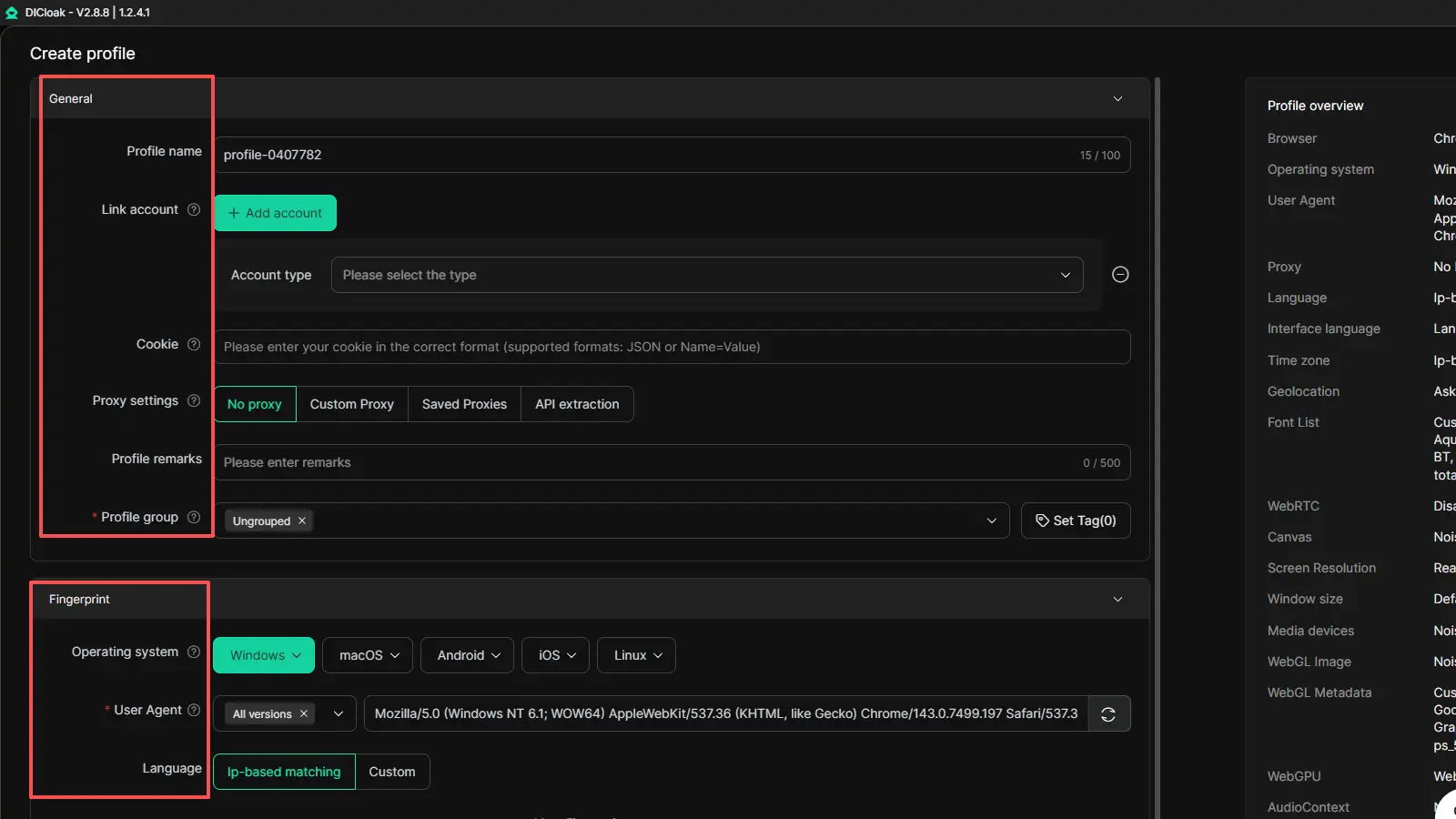
After testing browser settings, challenge loops, and session issues, the next step is to make your access environment more consistent. This is where DICloak can fit naturally into the workflow. Instead of treating it like a shortcut tool, it makes more sense to use it as a browser management layer. Based on the material you shared, DICloak focuses on isolated browser profiles, custom fingerprints, per-profile proxy integration, profile sharing, permission controls, bulk operations, and automation tools such as RPA and a synchronizer.
How isolated profiles help reduce session conflicts
One common reason access becomes unstable is that different tasks share the same browser state. Cookies mix together. Old sessions stay active. One login affects another. DICloak is useful here because each account can run inside its own isolated browser profile with separate cookies and fingerprint settings. That kind of separation helps keep one session from affecting the next. For example, if one profile is used for account access and another is used for testing or research, the two workflows stay cleaner and easier to manage. The materials you provided also describe isolated profiles and unique fingerprints as core product features.
Using custom proxy settings more consistently
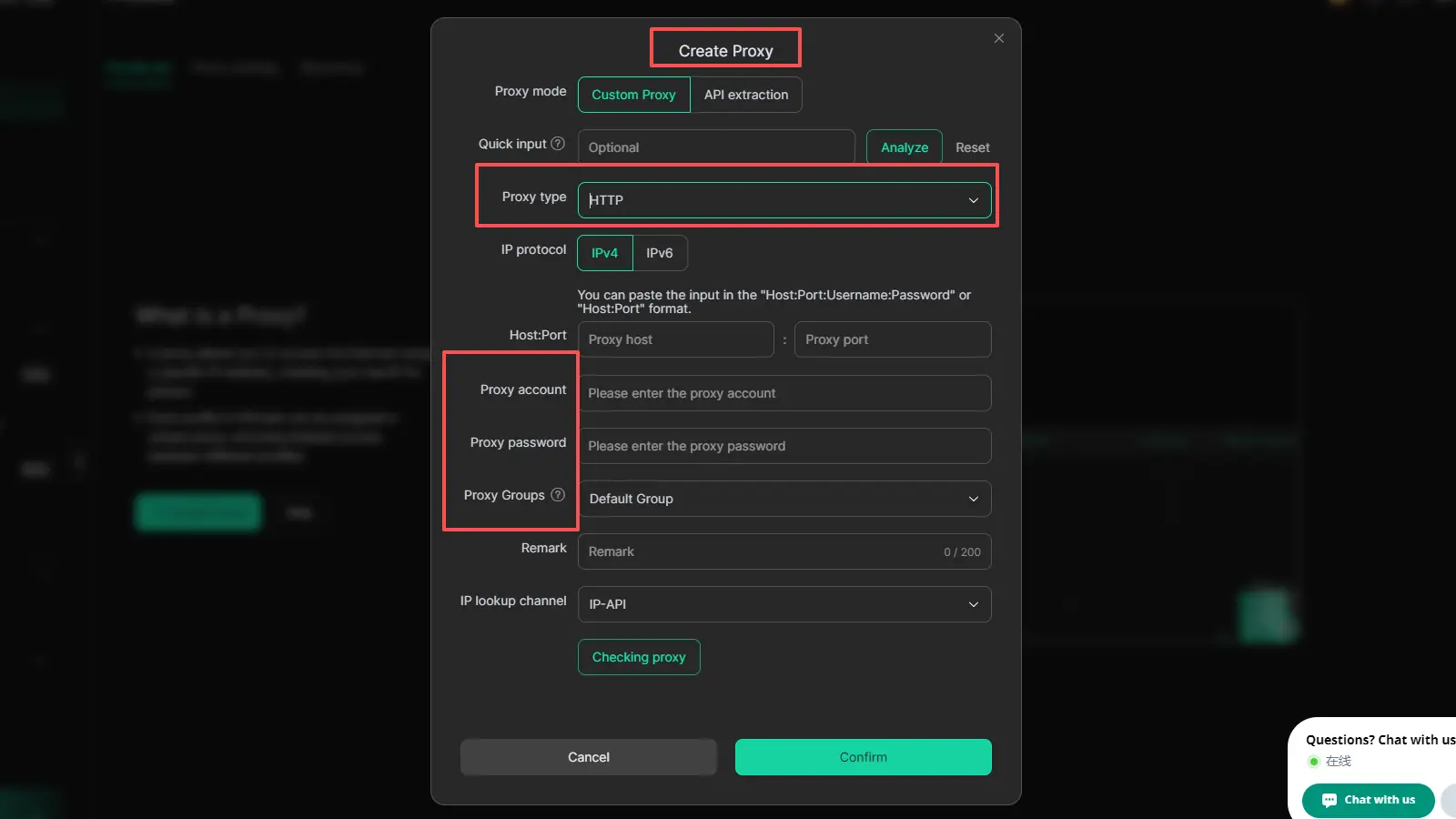
DICloak does not provide proxy services by itself. Instead, it lets users add and manage their own proxies inside each browser profile.so users can connect the proxy resources they already bought from a separate provider. This matters because each profile can keep its own network path, cookies, and browser profile instead of sharing one mixed setup. For example, one profile can use one user-added proxy for account access, while another profile uses a different proxy for research or testing. That kind of separation is often easier to manage and helps keep the workflow more consistent.
Managing multiple profiles with clearer separation
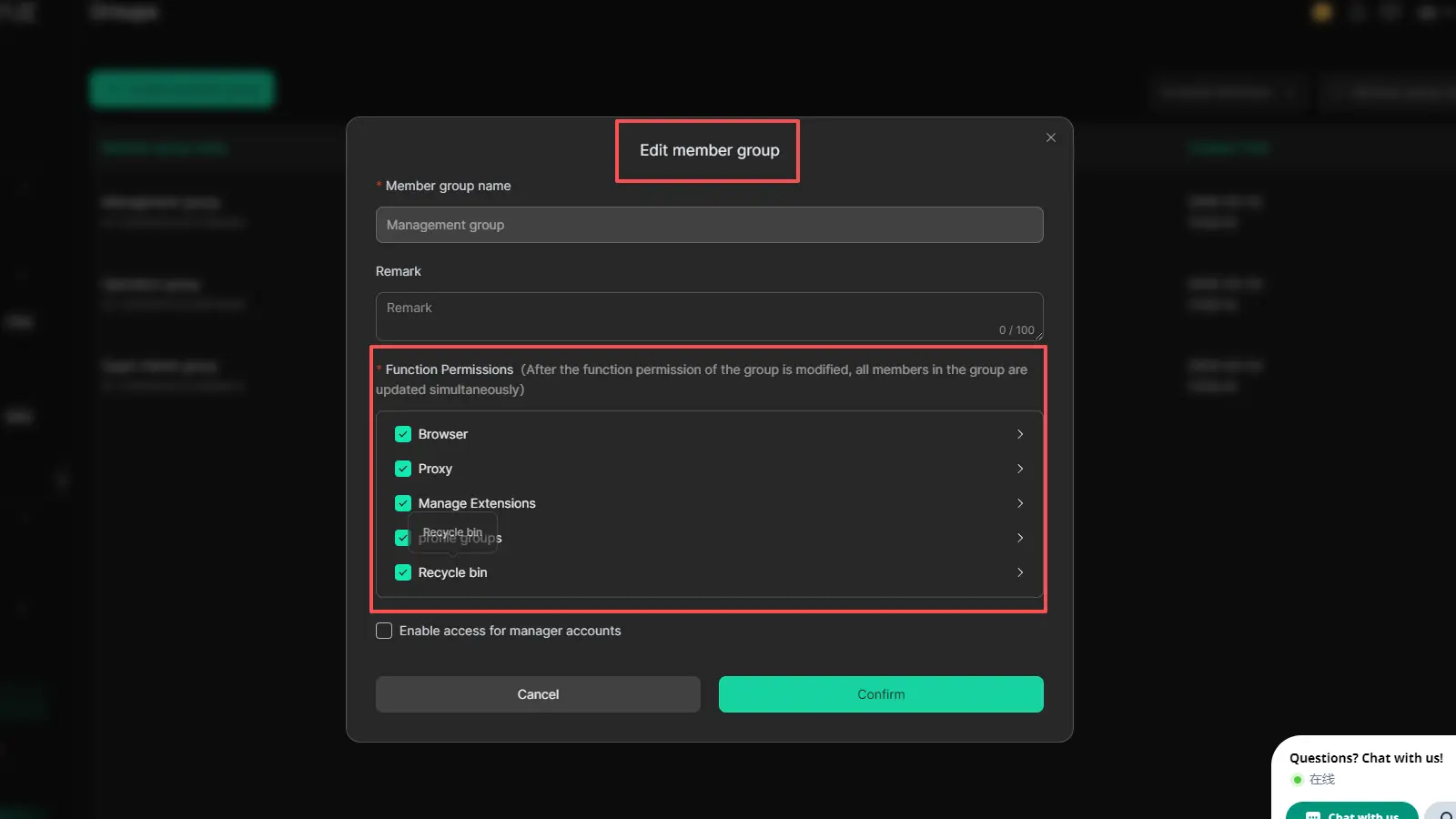
DICloak also makes more sense when several profiles or team members are involved. The product materials highlight profile sharing, permission settings, data isolation, and operation logs for collaboration. That can be useful when one person handles account access, another checks site behavior, and another reviews logs or session issues. Instead of passing credentials around or reusing one messy browser window, the team can work through separated profiles with clearer control. For a workflow built around reliability, that structure is often more valuable than chasing quick fixes.
FAQ about cloudflare bypass extension
Q1:What is a cloudflare bypass extension?
A cloudflare bypass extension is a browser tool people try when a Cloudflare challenge page keeps blocking access. In many cases, it is used to improve browser handling, not to solve the real cause by itself.
Q2:Does a cloudflare bypass extension always work?
No. A cloudflare bypass extension may help in some cases, but challenge loops are often caused by browser settings, blocked scripts, bad cookies, or unstable sessions.
Q3:Is a cloudflare captcha bypass extension safe?
Not always. Some tools may create more browser conflicts or make access less stable. That is why users should be careful before installing any cloudflare captcha bypass extension.
Q4:Why does Cloudflare keep showing the challenge page?
This usually happens when the browser cannot keep a stable session. Blocked cookies, broken scripts, or repeated failed checks can all cause the page to appear again.
Q5:When should you stop using a cloudflare bypass extension?
If the same problem keeps coming back after basic fixes, it may be time to change your browser setup or contact the site owner. In that case, trying one more cloudflare bypass extension often does not help much.
Conclusion
Accessing Cloudflare-protected sites reliably in 2026 is not just about finding a cloudflare bypass extension. In many cases, the real fix is a cleaner browser setup, stable sessions, and fewer environment conflicts. When you understand what triggers Cloudflare checks and choose the right tools, access becomes much smoother and more consistent.
 Web Proxy Tools
 Free Tools
 Cookie Plugin
 UA Generator
 MAC Address Generator
 IP Generator
 IP Address List
 2FA Code Generator
 World Clock
 Anonymous Check
 WebRTC Leak Test
 UUID Generator
 Free Web Proxy Site
 Proxy Checker
 FB Ad Checker
 AI Web Scraping
 Free SMM Tools
 Twitter Shadowban Checker
 Instagram Name Checker
 UTM Generator
 Username Generator
 AI Hashtag Generator
 LinkedIn Headline Generator
 Social Media Image Resizer