Experiencing a sudden suspension of your Claude account in 2026 can be a jarring disruption to your professional ecosystem. For researchers, developers, and business strategists, Claude has evolved into a cornerstone of high-velocity workflows. Losing access does not just mean losing a chat interface; it means losing a collaborative partner and the data integrity of your ongoing projects.
While Anthropic maintains a rigorous commitment to its "helpful, honest, and harmless" framework, the automated defensive systems used to enforce these principles are not infallible. These systems are designed to detect large-scale abuse, but they frequently produce false positives, flagging legitimate technical configurations as malicious behavior. Understanding the technical architecture of these bans is the first step toward reclaiming your access and hardening your setup against future disruptions.
What caused my Claude account to get banned?
Anthropic’s security stack monitors account health through a combination of behavioral heuristics and network signals. When an account is flagged, it is rarely due to a single event but rather a cluster of high-risk indicators that trigger a suspension.
Violating the Acceptable Use Policy and Terms of Service
The most direct path to a ban is the generation or solicitation of prohibited content. Claude’s safety layer is fine-tuned to detect attempts to generate hate speech, facilitate illegal activities, or bypass ethical guardrails. Repeatedly "jailbreaking" or pushing the model toward harmful outputs signals a fundamental violation of Anthropic’s safety alignment, leading to permanent account termination.
Detecting automated bot-like behavior
Anthropic distinguishes between official API usage and standard web interface interactions. If you use scripts to scrape the web UI or employ browser automation tools to send queries at a frequency impossible for a human, the account will be flagged for bot-like behavior. These automated systems look for rhythmic request patterns and lack of standard human UI interaction signals (like mouse movements or varied typing speeds).
Suspicious network activity and billing anomalies
Technical signals often trigger bans before a user even sends a prompt. Security systems flag accounts that frequently switch IPs, use low-reputation anonymous VPNs, or utilize rotating proxies. Furthermore, Anthropic monitors for "suspicious billing behavior." This includes high-signal triggers like chargebacks, the use of stolen payment credentials, or the misuse of API credits. These financial flags are often treated as "hard" violations, making recovery significantly more difficult.
How to submit a Claude account ban appeal that works
Navigating the appeal process requires a technical, professional tone that addresses the security system's concerns. Emotional pleas are less effective than a clear, humanizing explanation of your activity.
Reviewing the official suspension notice
Before contacting support, examine your registered email and the Claude dashboard for a specific reference number or violation category. Identifying whether the ban was for "policy violations" versus "suspicious activity" allows you to tailor your response. Documenting any specific error codes provided during the login attempt is crucial for the support team's investigation.
Drafting a professional appeal to support
When submitting your ticket to Anthropic, your goal is to prove you are a legitimate human user. Provide your registered email, a screenshot of the ban message, and a detailed description of your professional use case. If you were using a VPN, explain the legitimate reason—such as a corporate security policy or necessity due to regional network restrictions. This helps support staff distinguish your session from a malicious actor using a VPN for identity obfuscation. Conclude with a clear commitment to future compliance with their Terms of Service.
Why does Anthropic flag certain IP addresses and VPNs?
From a risk-management perspective, Anthropic views network identity as a primary indicator of intent. Public and "free" VPN services are high-risk because they utilize shared IP addresses. If a malicious actor uses a specific IP for spamming or scraping, that IP earns a "negative reputation." Any subsequent user logging in from that same address—even a legitimate one—may be banned by association.
Additionally, Anthropic’s systems look for "multi-account abuse." When multiple Claude Pro accounts originate from a single IP address or hardware profile, it mimics a botnet or a single user attempting to evade rate limits. For the platform, flagging these overlaps is a preventative measure against systemic abuse, making dedicated, high-quality network environments essential for power users.
What should you do if your Claude appeal is officially denied?
If your appeal is formally rejected, Anthropic typically considers the decision final. To maintain access to Claude’s capabilities, you must pivot to a "fresh environment" strategy. Simply creating a new account with the same browser or payment method will likely result in an immediate "re-ban," as the system will link your new account to the banned identity.
Establishing a fresh environment requires a clean break from your previous digital footprint. This involves utilizing a new email address, a different payment method for Pro features, and—most importantly—ensuring your technical identifiers (IP address and browser metadata) have zero overlap with the compromised account. Without this isolation, your new session is effectively pre-flagged.
How do browser fingerprints get your Claude accounts flagged?
Anthropic employs sophisticated browser fingerprinting to track users beyond basic cookies. This technique aggregates data points such as User-agent strings, screen resolution, time zones, and hardware identifiers to create a unique "ID" for your device.
The danger of overlapping cookies and cache
Cookies and local storage act as persistent breadcrumbs. If you attempt to log into a new account on a browser that previously held a banned session, the residual data instantly links the two. Automated security protocols are programmed to recognize these overlaps, leading to a cascade of bans across every account accessed on that specific browser instance.
How hardware identifiers and shadowbans link separate accounts
Hardware-level fingerprinting identifies the underlying components of your machine. When a ban occurs, Anthropic may associate that specific hardware profile with "risky" behavior. In some cases, instead of a hard suspension, the platform may implement a "shadowban." In a shadowban scenario, your account remains "active," but responses may be intentionally degraded, throttled, or the model may become significantly less helpful as a security friction measure.
How DICloak Enables Safe Claude Account Sharing
DICloak offers several key features that make it possible for multiple people to use the same account safely and at the same time.
• Simultaneous Access: DICloak’s "Multi-open mode" allows multiple team members to use the same Claude account simultaneously without logging each other out.
• Consistent IP Address: By configuring a static residential proxy in the browser profile, all logins can appear to come from a single, stable location. Think of your IP address like a key to your house. If you use the same key every day, your security system knows it's you. But if ten different keys from all over the world suddenly start working, the system will lock everything down. A static proxy ensures everyone on your team uses the same "key," so Claude never gets suspicious.
• Synced Login Status: The "Data Sync" feature saves the login session information. Once the primary user logs in, other members can access the account without needing to re-enter the password.
• Secure Team Management: You can create separate member accounts within DICloak and grant them access only to the specific Claude profile, keeping your other online accounts private and secure.
How DICloak helps teams share Claude more smoothly
For small teams that still share one Claude account, DICloak can help make the workflow more stable. Each user can work inside a separate browser profile, with isolated cookies, local storage, and a more consistent browsing environment. That makes handoffs cleaner and reduces the mess that often happens when multiple people use the same account casually.
It can also help teams manage access without passing the raw login around every time. In practice, that matters because a shared Claude workflow becomes much easier to control when each person uses a fixed profile instead of logging in from random devices and browsers.
Step-by-Step Guide to a Secure Claude Account Share with DICloak
Setting up a shared Claude account with DICloak is a straightforward process that doesn't require technical expertise.
1.Download and Install DICloak
Visit the official DICloak website, register for an account, and download and install the application on your computer.
2. Choose the Right Plan
To share profiles with your team, you should subscribe to DICloak. The choice depends on your team size. The Base Plan is a good starting point for smaller teams, while the Share+ Plan is recommended for larger teams needing unlimited member access.
3. Step 3: Set Up a Static Residential Proxy (Recommended)
While not mandatory, using a single static residential proxy is highly recommended. This provides a stable, fixed IP address for your shared profile, which prevents security systems from being flagged by logins from different locations. This greatly reduces the risk of forced logouts or other security issues. DICloak does not sell proxies but partners with several third-party providers.
Inside the DICloak application, create a new browser profile. This profile will serve as the dedicated, secure borwser profile for your shared Claude account.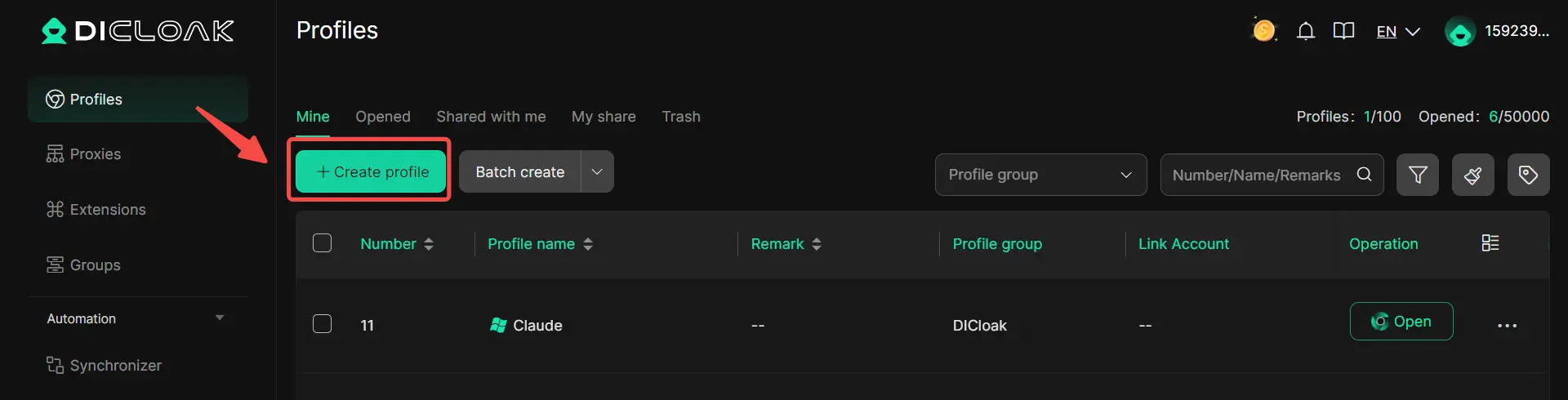
5.Enable Multi-open Mode
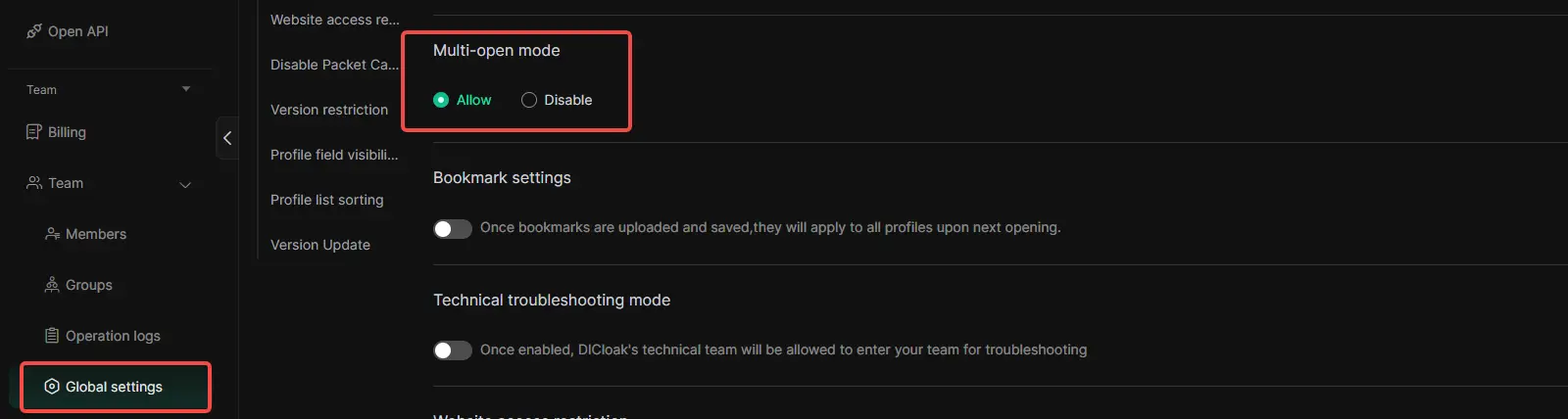
You shoud Go to [Global Settings], find the [Multi-open mode] option, and select [Allow].This feature allows multiple people access the same Chatgpt account at the same time.
6. Log In to Claude
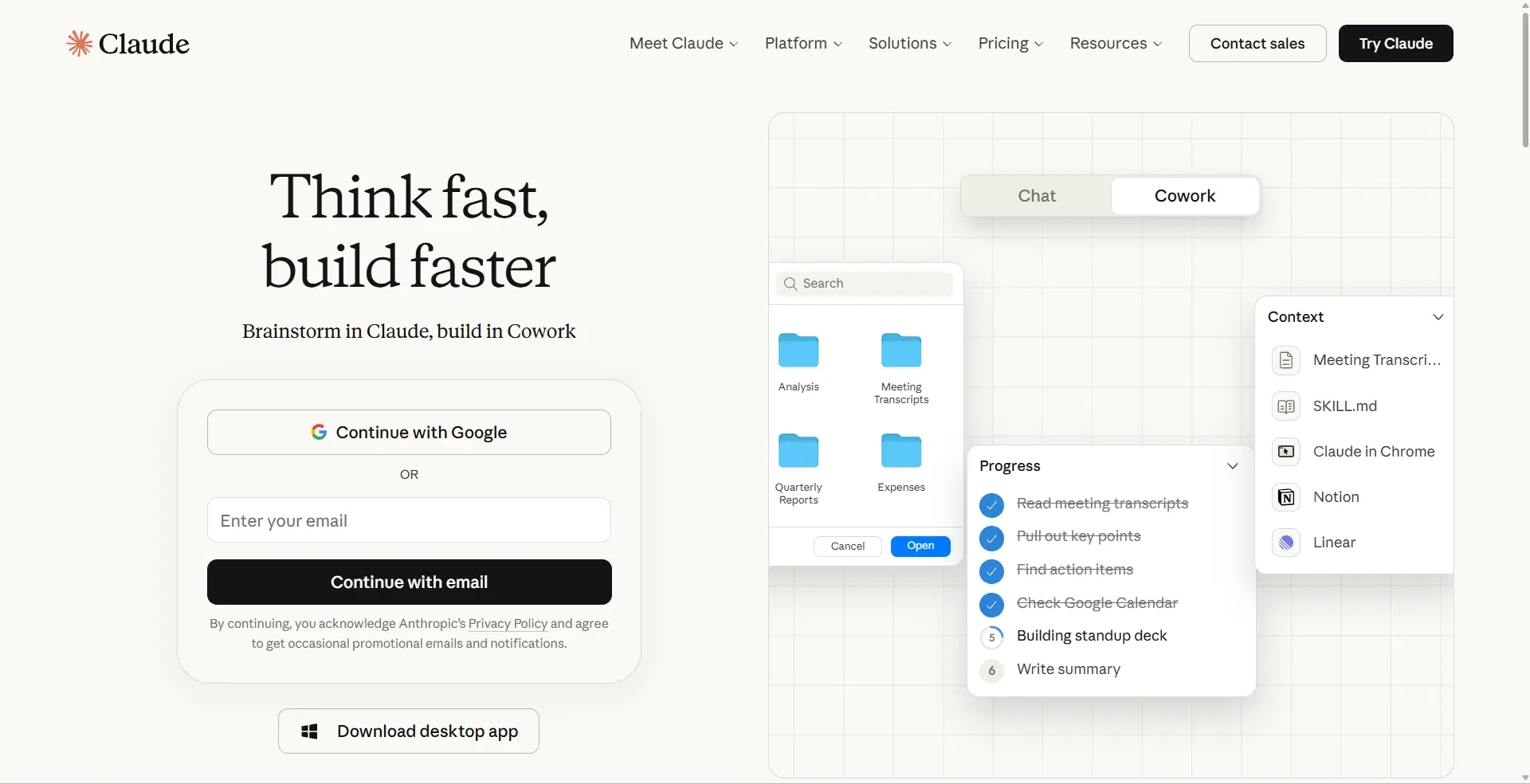
Launch the browser profile you just created. It will open a new browser window. Navigate to the official Claude website and log in with your account credentials.
7. Share the Profile with Your Team
Return to the DICloak main screen. Use the team feature to create members to invite your friends to your DICloak Team.
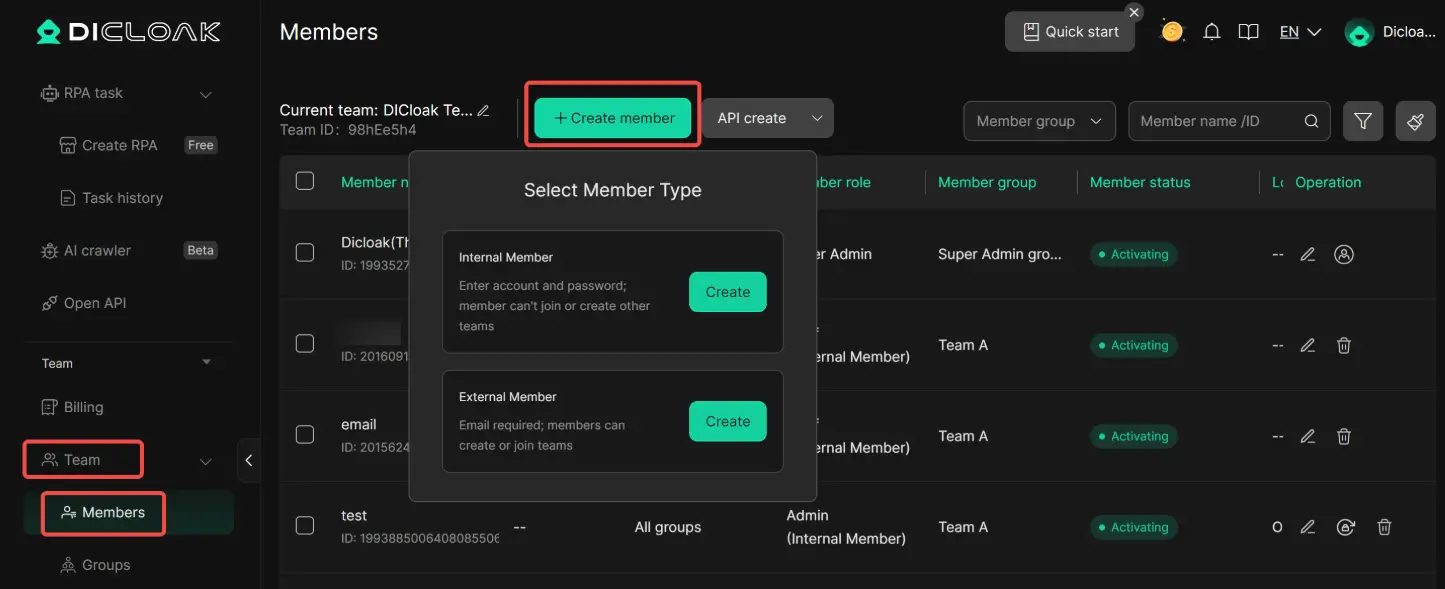
8. Access the Shared Account
Once your teammate accepts the invite, the shared profile will appear in their DICloak application. They can launch it from their own computer and will be automatically logged into the same session.
Checklist for long-term Claude account safety
Maintaining stable access to Claude in 2026 requires strict adherence to technical hygiene and platform policies. Use this checklist to protect your professional access:
- Adhere strictly to the Anthropic Acceptable Use Policy and avoid testing safety guardrails.
- Prohibit the use of web-app automation or scraping scripts on the claude.ai interface.
- Utilize the official Claude API for any high-volume or automated data processing tasks.
- Ensure all billing and payment information is accurate and avoid initiating chargebacks.
- Operate within established rate limits and avoid request patterns that mimic bot behavior.
- Never share account credentials or API keys with third parties or unauthorized users.
- Access only one Claude account per isolated browser profile or session.
- Prioritize dedicated, high-reputation network connections over shared, public VPNs.
Conclusion
While a Claude AI account ban is a significant professional hurdle, these suspensions are generally the output of automated risk-management systems. By understanding the triggers—from billing anomalies and network reputation to sophisticated browser fingerprinting—you can navigate the recovery process with a technical advantage. Through the use of environment isolation and responsible usage patterns, you can ensure your access to Claude’s intelligence remains stable and uninterrupted throughout 2026.
FAQ about Claude account banned
Why was my Claude account banned?
A Claude account banned issue can happen because of policy violations, unusual login activity, payment problems, abuse detection, or repeated suspicious behavior. Sometimes the account may be restricted by mistake and needs a review.
Is Claude account free to use in 2026?
Yes, Anthropic continues to offer a free tier with daily usage limits. For professionals requiring expanded context windows, higher message frequency, and priority access during peak times, Claude Pro and the API tiers remain the standard for enterprise-grade performance.
How long does a Claude ban appeal usually take?
The manual review process typically takes a few business days. During this window, it is critical that you do not attempt to circumvent the ban by creating multiple new accounts, as this behavior will be flagged as "ban evasion" and can jeopardize the outcome of your appeal.
What is the best way to manage multiple Claude Pro accounts?
The most effective strategy is technical isolation. By using separate browser profiles—each with its own unique fingerprint and dedicated IP—you ensure that the security systems view each account as a distinct, legitimate entity rather than a group of linked accounts.
Will my API key be banned if my web account is suspended?
There is a significant risk of collateral suspension. Anthropic’s systems often link a user’s web identity to their API credentials and billing profile. A severe violation on the web interface can result in a comprehensive review and subsequent suspension of all associated technical assets.
 Web Proxy Tools
 Free Tools
 Cookie Plugin
 UA Generator
 MAC Address Generator
 IP Generator
 IP Address List
 2FA Code Generator
 World Clock
 Anonymous Check
 WebRTC Leak Test
 UUID Generator
 Free Web Proxy Site
 Proxy Checker
 FB Ad Checker
 AI Web Scraping
 Free SMM Tools
 Twitter Shadowban Checker
 Instagram Name Checker
 UTM Generator
 Username Generator
 AI Hashtag Generator
 LinkedIn Headline Generator
 Social Media Image Resizer













-03-v13.png?x-oss-process=image/interlace,1/format,webp/quality,q_75)