Ad-based short links can be frustrating. You click a download page, tutorial resource, or forum link, but instead of reaching the final page, you get ads, timers, pop-ups, and extra redirects. This is why many users search for bypass.vip in 2026.
Bypass.vip can help users reach final links faster, but it should be used with care. Not every link is safe, and not every bypass attempt will work. In this guide, you will learn what bypass.vip is, how to use it, why it may fail, what safer habits to follow, and which alternatives are worth considering when bypass.vip is not working.
What Is Bypass.vip and Why Do People Use It?
Bypass.vip is a web-based link bypasser. It helps users reach the final page behind ad-based short links faster. These links often appear on download pages, forums, game mod sites, and tutorial pages. Before users get the real link, they may see ads, timers, pop-ups, or redirect pages.
Many users search how to use bypass.vip because they want a faster way to open public resource links. Bypass.vip is often used for links from services like Linkvertise, Lootlinks, Paster.so, and Work.ink. It is not a magic tool, though. If the link platform changes its rules, the tool may fail, which is why searches like bypass.vip not working are common.
How Bypass.vip helps users reach final links faster
Bypass.vip works in a simple way. Users copy the original short link, paste it into Bypass.vip, and wait for the final page. For example, a student may use it to open a study file. A creator may use it to reach a free design pack. A marketer may use it when checking many shared resource links.
When one link takes 30 to 60 seconds to open, the delay feels small. But with many links, it becomes annoying. Bypass.vip can help reduce that waiting time.
Common link types users try to bypass with Bypass.vip
Users often try Bypass.vip on ad-based short links from file pages, forum posts, online tools, game mod pages, and creator resources. These links usually include ads, waiting screens, or extra clicks before showing the final page.
Still, users should be careful. If a final page asks for passwords, payment details, wallet access, or private files, it is better to stop. So, is bypass.vip safe? It can be safer for public, low-risk links, but it should not be used blindly.
When Bypass.vip is useful and when it may not help
Bypass.vip is useful when users need faster access to public links. It can help students, creators, researchers, and community users save time.
But it may not help if the link is dead, the file was removed, or the website blocks bypass tools. It may also fail on links that need login, payment, or real user actions. In those cases, users may compare bypass.vip alternatives, but the final page still needs to be checked before opening or downloading anything.
Is Bypass.vip Safe to Use in 2026?
After knowing how to use bypass.vip, the next question is safety. Bypass.vip can be helpful for public links, but users should still check what they paste and what they open. Bypass.vip works as an ad-link bypasser for platforms such as Linkvertise, Admaven, Paster.so, and Work.ink. It can help skip some advertising pages and redirects, but it cannot make every final link safe.
What to check before pasting a link into Bypass.vip
Before using this link bypasser, check where the link came from. A link from a trusted tutorial page is usually less risky than a random link in a comment, DM, or unknown forum post.
Look at the original page first. If it is full of pop-ups, fake virus alerts, or many “Download” buttons, be careful. Unsafe sites may involve malware, phishing, bad extensions, intrusive ads, or fake warnings. These risks can still exist after a bypass if the final page is bad.
For example, if a game mod link comes from a known community thread, Bypass.vip may help you reach the final file faster. But if the same link comes from a new account with no history, it is better to slow down and check the source first.
Why users should avoid sensitive accounts and payment pages
So, is bypass.vip safe for every page? No. It is better for public, low-risk links. It should not be used for pages that ask for passwords, banking details, crypto wallet access, private files, or payment information.
Phishing pages often try to collect personal or financial details through fake messages, pop-ups, or copied brand designs. A page may look real at first, but the goal may be to steal login data.
For instance, using Bypass.vip to open a public template link is one thing. Using it before logging into an account, paying for a service, or connecting a wallet is much riskier. If the final page asks for sensitive information, close it and return to the official website directly.
How to spot risky redirects, fake buttons, and suspicious downloads
A risky final page often gives small warning signs. The URL may look strange. The page may open several tabs. The real download button may be hidden between ads. Some fake buttons may push browser extensions, unknown apps, or files with unusual names.
If bypass.vip not working appears, do not keep clicking every new button on the page. The link may be dead, blocked, or changed. Trying many random redirects can increase the chance of landing on a bad page.
Users can also compare bypass.vip alternatives when one tool fails, but safety checks should stay the same. A different bypass tool may reach the link, but it cannot prove the final page is trustworthy. Before downloading anything, check the file name, file type, source page, and browser warning. If something feels wrong, leaving the page is the safer choice.
How to Use Bypass.vip Step by Step
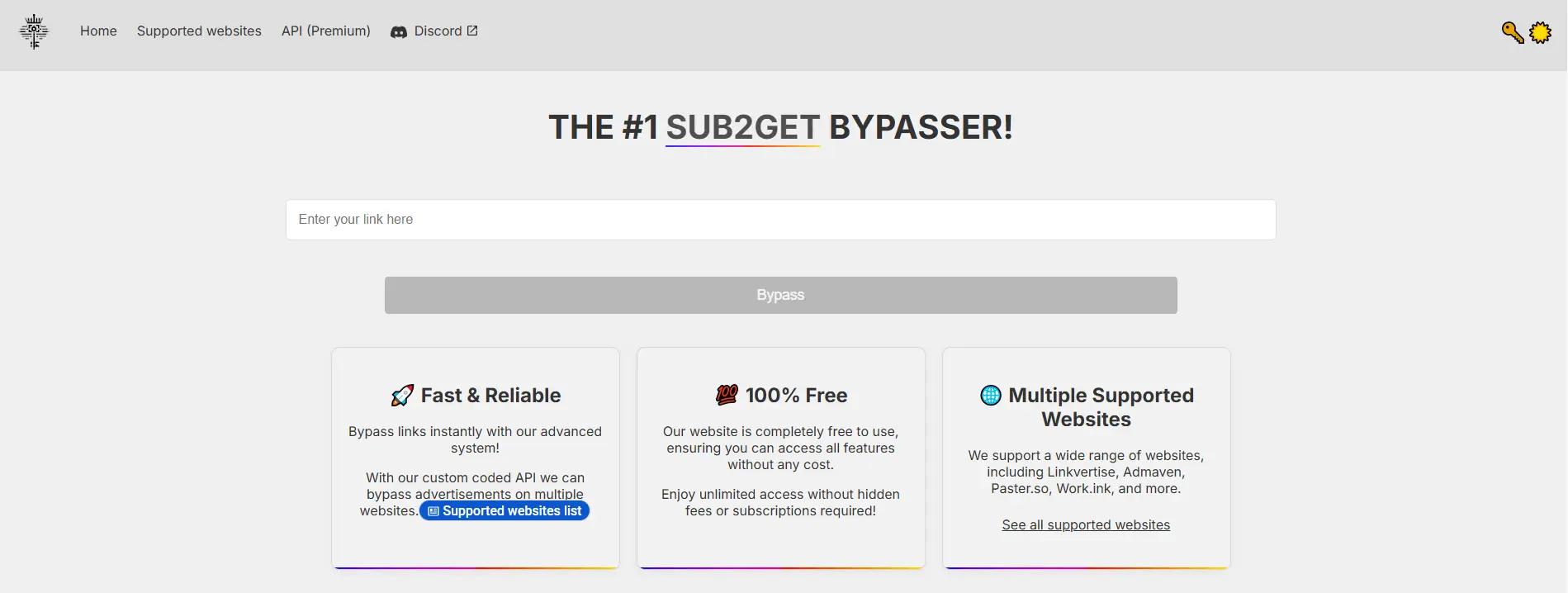
After checking whether a link looks safe, you can use bypass.vip to try to reach the final page faster. The site has a direct input box where users can enter a link and press the bypass button. It also lists support for services such as Linkvertise, Admaven, Paster.so, Work.ink, and more.
Copying the original shortened or ad-based link
Start with the full original link. Do not copy only part of the URL. If the link comes from Linkvertise, Work.ink, Lootlinks, or another supported site, copy it from the browser address bar or from the page where it was shared.
For example, a user may find a resource link in a forum post. The link may open a waiting page before showing the file. In that case, copy the ad-based link first. If the source page already looks fake, do not continue. A link bypasser can shorten the path, but it cannot make a bad link trustworthy.
Pasting the link into Bypass.vip
Next, open bypass.vip and paste the copied link into the input box. Then click the bypass button. If the link is supported, Bypass.vip may return the final destination page.
This is the main reason users search how to use bypass.vip. The tool is meant to keep the action simple. Copy the link, paste it, and check the result. If you see a bypass.vip not working error, the link may be unsupported, expired, blocked, or changed by the original link service.
Checking the final page before opening or downloading anything
When Bypass.vip gives a result, do not rush to download. Check the final URL first. Make sure the page matches what you expected. If you wanted a PDF but the page asks you to install an unknown app, leave the page.
This habit matters if you care about whether bypass.vip safe use is possible. It is safer when used for public, low-risk links. It is not safe to trust every final page without checking it.
If the link keeps failing, you can compare bypass.vip alternatives such as bypass.city, bypass.link, or other tools. Still, the same rule applies. Open only links from sources you trust, and avoid pages that ask for passwords, payment details, wallet access, or private files.
Common Problems Users Face with Bypass.vip
Even when users know how to use bypass.vip, some links may still fail. This is normal with any link bypasser. Bypass.vip supports many ad-link services, including Linkvertise, Admaven, Paster.so, Work.ink, and more, but supported does not always mean every single link will open every time. Link services change often, and some pages add new checks to slow down bypass tools.
Why Bypass.vip may fail on some links
A common bypass.vip not working issue happens when the original link is dead, expired, or changed. For example, a creator may remove a file, update a download page, or switch from Linkvertise to another ad-link service. In that case, Bypass.vip may not have a valid final page to find.
Some links also need a real user action. They may ask users to watch an ad, complete a task, or pass a browser check. If the link depends on that action, Bypass.vip may return an error or no result.
How browser settings, network limits, or ad blockers can affect access
Sometimes the problem is not Bypass.vip itself. Browser settings, ad blockers, VPNs, school networks, office Wi-Fi, or ISP limits can affect the result. Some ad-link pages may also show an ad blocker warning even when the user does not expect it. Users have reported similar issues with Linkvertise and Work.ink, especially when a network or VPN blocks part of the page.
For instance, a student using campus Wi-Fi may find that Bypass.vip loads, but the final page does not open. The same link may work later on a home network. This does not always mean the tool is unsafe. It may mean the network blocks redirects, scripts, or ad-link domains.
What to do when Bypass.vip shows an error or loads slowly
If Bypass.vip shows an error, check the link first. Make sure it is complete and copied from the original page. Then try a normal browser refresh. If the page still loads slowly, wait a little and avoid clicking random buttons on redirect pages.
To keep bypass.vip safe use more controlled, do not enter passwords, payment details, or wallet information on any final page. If the link keeps failing, compare bypass.vip alternatives like bypass.city, bypass.link, or other tools. Still, treat the result with care. A different tool may open the link, but it cannot guarantee that the final page is safe.
Why Bypass.vip Does Not Work for Every Website
If bypass.vip not working appears, it does not always mean Bypass.vip is broken. A link bypasser depends on how the original ad-link page sends users to the final URL. If that path changes, the tool may fail even when the user copied the link correctly.
Some link platforms change their redirect rules often
Ad-link platforms update their pages from time to time. They may change the waiting page, redirect path, task step, or final link format. When that happens, Bypass.vip may need time to catch up. For example, a user may copy an old download link from a forum post. The post still looks active, but the file may have moved or the link structure may have changed. In that case, knowing how to use bypass.vip is not enough. The original link may no longer lead to a valid page.
Certain pages may block automated link checks
Some pages are built to stop automatic link checks. They may ask for a real click, a fresh browser session, or a small task before showing the final page. If the link depends on those actions, Bypass.vip may return an error. This is why some users compare bypass.vip alternatives when one tool fails. Another tool may handle a different redirect path, but it can still fail if the page blocks automated access.
Why failed bypass attempts do not always mean the tool is broken
A failed result can come from many things. The link may be expired. The file may be deleted. The network may block part of the redirect. The browser may stop scripts or pop-ups. For bypass.vip safe use, do not keep clicking random buttons after a failed attempt. Check the source link first. Try another browser or network if needed. If it still fails, ask the original poster for a fresh link instead of forcing an old one.
Bypass.vip Alternatives to Consider in 2026
If bypass.vip not working keeps showing up, the link may not be supported at that moment. It may also be blocked by the network, browser settings, or the original ad-link page. In that case, users can compare a few bypass.vip alternatives. Common options in 2026 include Bypass.city, Bypass.link, Bypassunlock.com, and FastForward. These tools work in a similar space, but each one has its own strengths and limits.
Bypass.city
Bypass.city is one of the more visible alternatives to bypass.vip. It works as a web-based link bypasser, so users can paste a supported ad-link and try to reach the final page faster. Its supported-sites page notes that it uses a custom backend to support a wide range of websites.
For example, if a user has an old resource link from a forum and Bypass.vip fails, Bypass.city may be worth trying next. It is still better to use it only for public links, not for pages that ask for passwords or payment details.
Pros: It is easy to use, does not need a browser extension, and may support links that fail on another tool.
Cons: It can still fail when the original link is dead or changed. Some networks may also block bypass sites, so loading problems are possible.
Bypass.link
Bypass.link is another common choice for users looking for bypass.vip alternatives. It works as a free web-based bypasser for several ad-link services. It also offers paid supporter options for users who want extra benefits.
This option may fit users who want a clean web tool and do not want to install anything. For instance, a creator checking several shared links can paste each link into Bypass.link and compare the result with Bypass.vip.
Pros: It is simple, web-based, and easy for beginners who already know how to use bypass.vip.
Cons: Free tools may still show limits, errors, or slow results during busy times. Some browser filters or ad blockers may also affect how the page loads.
Bypassunlock.com
Bypassunlock.com is another option users may test when their first link bypasser does not work. It sits in the same general category as bypass.vip, so it may be useful when a certain ad-link fails on one tool but works on another.
It can be helpful when Bypass.vip or Bypass.link does not return a result. Still, users should not treat it as a safety tool. A different bypasser may reach the final page, but the final page still needs to be checked.
Pros: It gives users another option when Bypass.vip does not return a result.
Cons: Public information about features may be less detailed than larger tools. Users should be extra careful with redirects, download buttons, and pages that ask for private data.
FastForward and browser-based options
FastForward is different from tools like bypass.vip because it is browser-based. Instead of pasting each link into a site, users install a browser extension or use a related browser-based setup to handle some redirects while browsing.
This type of option may suit users who deal with many links often. For example, someone checking many public resource links in one session may find it faster than copying and pasting each URL into a web tool. But browser-based options need more trust because extensions may ask for permissions.
Pros: It can be convenient for users who handle many links in one browser session. It may reduce repeated copy-and-paste work.
Cons: Browser extensions need careful review before installation. Users should check permissions, update history, and the source. For bypass.vip safe use, a web tool may feel easier to control because users only paste links when needed.
How to Compare Bypass.vip with Other Bypass Tools
After looking at several bypass.vip alternatives, users may still wonder which tool fits their case better. The choice depends on the link type, safety needs, and how often they handle ad-based links. Bypass.vip is simple for quick use, while Bypass.city, Bypass.link, Bypassunlock.com, and FastForward may fit different needs.
The table below compares them across practical points.
| Tool |
Best for |
Ease of use |
Safety notes |
Main limits |
| Bypass.vip |
Quick public ad-link access |
Very easy. Paste and run |
Check the final page before opening files |
May fail on expired or changed links |
| Bypass.city |
Backup when bypass.vip not working appears |
Easy. No extension needed |
Still check redirects and downloads |
May be blocked by some networks |
| Bypass.link |
Simple web-based bypassing |
Beginner-friendly |
Avoid login, wallet, or payment pages |
Free use may be slower at times |
| Bypassunlock.com |
Extra testing when other tools fail |
Simple if the page loads well |
Be careful with fake buttons |
Public feature details are limited |
| FastForward |
Frequent link handling |
Less simple. Extension-based |
Review permissions before installing |
Not ideal for one-time users |
For occasional use, bypass.vip is often enough because it does not require setup. Users can paste a link, check the result, and leave if the final page looks unsafe. For heavier use, browser-based tools may save time, but they also need more trust. No matter which link bypasser users choose, the safest habit is the same. Use bypass tools for public links, avoid sensitive accounts, and check the final page before downloading anything.
Best Practices for Using Bypass.vip More Safely
After comparing bypass.vip alternatives, it is worth slowing down and looking at safer habits. A link bypasser can save time, but it should not replace basic judgment. The final page still matters more than the tool that opens it.
Use it only for public and low-risk links
Bypass.vip is better for public links, such as a shared template, a tutorial file, or a community resource. These links do not ask for personal details. They only lead to content the user wants to view or download.
For example, if a forum user shares a free icon pack through an ad-link page, bypass.vip may help you reach the final page faster. But if the link comes from a random comment saying “claim your reward now,” it is better to avoid it. Scam pages often use pressure and fake rewards to push users into bad clicks.
Avoid entering passwords, wallet details, or private data
Many users ask whether bypass.vip safe use is possible. The safer answer is yes, but only with the right limits. Do not use it before logging into banking pages, crypto wallets, work accounts, or payment pages.
Phishing pages often try to steal passwords, account numbers, and financial details. Some fake pages copy real brand designs, so they may look normal at first. For this reason, if the final page asks for a password, card number, recovery phrase, or private file, close it and visit the official site directly.
Keep your browser clean and avoid suspicious downloads
Even if you know how to use bypass.vip, avoid clicking every button after the final page opens. Some pages place fake download buttons next to the real one. Others open new tabs or ask users to install unknown extensions.
Chrome may warn users about unsafe websites that involve malware, phishing, intrusive ads, abusive extensions, or social engineering. If your browser shows a warning, do not ignore it just because a bypass tool found the link.
If bypass.vip not working appears, try checking the original link, using another network, or comparing other tools. But do not force the link through random pages. A failed bypass is less risky than downloading the wrong file.
Bypass.vip can help users open public ad-based links faster. But it only solves the link access problem. For users who manage many accounts, the bigger issue is keeping each account in a clean and separate browser profile.
A link bypasser like bypass.vip may help users skip waiting pages or redirects. But it does not separate cookies, sessions, fingerprints, or login data. For example, a social media manager may use bypass.vip to open resource links. But if several Facebook, TikTok, Instagram, or e-commerce accounts are logged in through one normal browser, account data can mix. That can make the setup harder to control.
Keep profiles, cookies, and sessions separated
With DICloak Antidetect Browser, users can create a separate browser profile for each account. Each profile keeps its own cookies, sessions, cache, and fingerprint settings. This is useful for social media management, affiliate marketing, e-commerce, airdrops, and client account work. One account can stay in one profile, instead of switching many accounts inside the same browser.

Use custom proxy configuration for stable access
Location consistency also matters for account-based platforms. With DICloak, users can configure a proxy separately for each profile. This helps keep each account tied to a more stable access region. For example, a US-based account can stay in one profile with a stable US proxy, while another account uses a different profile and proxy setup. This is cleaner than mixing all accounts in one browser.

For repeated actions across many profiles, users can use DICloak's Synchronizer. It can mirror the same action across selected browser windows, which helps reduce manual work.
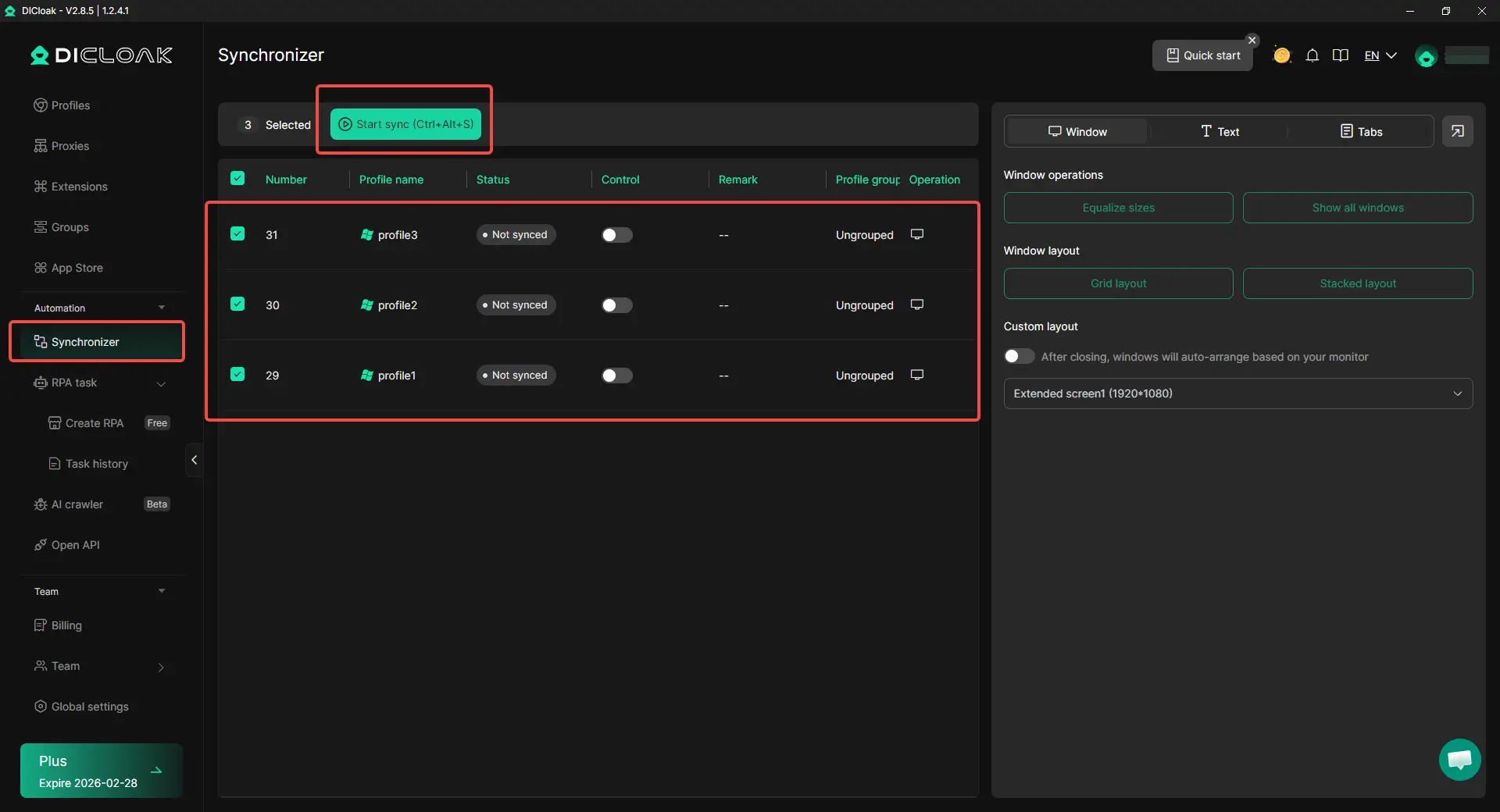
Bypass.vip is useful for faster link access. DICloak is better for long-term multi-account management, where users need profile isolation, custom proxy configuration, and more organized daily operations.
FAQs About Bypass.vip
What is bypass.vip used for?
Bypass.vip is used to reach the final page behind some ad-based short links faster. Users often try it when a link has waiting pages, pop-ups, redirects, or extra steps before showing the real destination. It is mainly useful for public resource links, such as tutorial files, community downloads, or creator-shared assets.
Is bypass.vip safe to use?
Bypass.vip can be safer when used only for public and low-risk links. Users should not use it on pages that ask for passwords, payment details, wallet access, or private files. Even if bypass.vip finds the final page, users still need to check the URL, file type, and download source before opening anything.
Why is bypass.vip not working?
Bypass.vip may stop working if the original link is expired, removed, changed, or blocked. Some ad-link platforms also update their redirect rules often, so a link that worked before may fail later. Browser settings, ad blockers, VPNs, or network restrictions can also affect the result.
Can I use bypass.vip on mobile?
Yes, bypass.vip can usually be used in a mobile browser if the site loads properly. Users can copy the ad-based link, paste it into bypass.vip, and check the result. However, mobile browsers may handle pop-ups, redirects, and downloads differently, so users should be extra careful before opening files.
What are the best bypass.vip alternatives?
Common bypass.vip alternatives include Bypass.city, Bypass.link, Bypassunlock.com, and FastForward. These tools may help when bypass.vip does not work on a certain link. Still, no link bypasser can guarantee safety, so users should always check the final page before downloading or entering any information.
Conclusion
Bypass.vip is a web-based link bypasser that helps users reach final pages behind ad-based short links faster. It can save time for public resource links, but users should still check the source, avoid sensitive pages, and review the final page before downloading anything.
If bypass.vip is not working, users can try alternatives like Bypass.city, Bypass.link, Bypassunlock.com, or FastForward. For multi-account work, DICloak Antidetect Browser can help keep profiles, cookies, sessions, fingerprints, and proxy settings separated for more stable access.
 Web Proxy Tools
 Free Tools
 Cookie Plugin
 UA Generator
 MAC Address Generator
 IP Generator
 IP Address List
 2FA Code Generator
 World Clock
 Anonymous Check
 WebRTC Leak Test
 UUID Generator
 Free Web Proxy Site
 Proxy Checker
 FB Ad Checker
 AI Web Scraping
 Free SMM Tools
 Twitter Shadowban Checker
 Instagram Name Checker
 UTM Generator
 Username Generator
 AI Hashtag Generator
 LinkedIn Headline Generator
 Social Media Image Resizer