In 2026, discussions about DNS breaches on GitHub have doubled compared to 2024. Every month, new cases emerge in Cloudflare's official community: users have configured proxies, yet sensitive requests are still leaked by local DNS, causing real identities to be identified by carriers or third-party websites. What truly troubles developers isn't whether it can be detected, but hidden leaks that many tools can't detect, such as automatic system fallbacks, local DNS caching, browser-built DNS over HTTPS functionality, and even uncontrollable leak paths when multiple people share configurations in team environments. If you don't do this step carefully, DNS leak detection often doesn't go wrong right away, but rather leads to tracing back to the source or even your account being banned, and by the time you find out, it's already too late. Common DNS leak detection methods are actually easy to bypass, such as only testing explicit requests on the current network while ignoring hidden traffic during background applications, RPA batch operations, or even browser profile switches. More practically, what really needs to be checked is "under which scenarios the real DNS might suddenly be exposed," and "which detection tools can detect leaks hidden in team collaboration, batch operations, and automation scripts." Below, I'll explain in detail how to use DNS leak testing tools, manually review configurations, and risk troubleshooting processes in team collaboration environments.
What exactly is DNS leakage? Why is 2026 still a year of vigilance?
Basic concepts and working mechanisms of DNS leaks
DNS leaks refer to situations where, under a proxy or special network environment, some domain name resolution requests are not passed through the proxy, but are directly exposed to the local network's DNS server. Normally, when a user visits a website, the browser first initiates a DNS query to convert the domain name into an IP address. This request should be intercepted or forwarded by a proxy. But in practice, browsers, operating systems, and even certain automation tools often bypass proxies and send requests directly to local DNS, such as Windows system services, Chrome's DoH (DNS over HTTPS) feature, or some default background service configurations.
This situation is especially common when switching between "multi-browser profiles," "RPA batch tasks," or "team members configure different proxies." You think all your traffic has gone through the proxy, but DNS leaks expose your real network environment, carrier information, and even your physical location. This is why DNS leak detection must be implemented thoroughly; otherwise, even if mainstream detection tools show everything is normal, there may still be hidden leak paths in the background.
Why will the risk of DNS leaks become more prominent in 2026?
The risk of DNS leaks in 2026 is much more complex than in the past. One major reason is the widespread adoption of new tracking technologies. For example, many websites combine browser fingerprints, IP history, and DNS resolution paths to cross-identify users. Even if your proxy configuration is correct, missing a single DNS request can link the entire account behavior chain. For example , Cloudflare's DNS tutorial mentions that some websites actively trigger multiple subdomain resolutions for cross-session tracking.
When multiple devices and accounts operate simultaneously, the risk is further amplified. Many teams use automated scripts, batch login tools, or RPA, but the default DNS settings on a certain device remain unchanged, and the entire batch operation process is recorded by the local operator's DNS. These risks cannot be fully detected by simple DNS leak detection tools; they often require a combination of DNS leak detection, manual configuration review, and specialized DNS leak risk investigation processes.
Which scenarios are most likely to cause DNS leaks? High-risk operations you might overlook
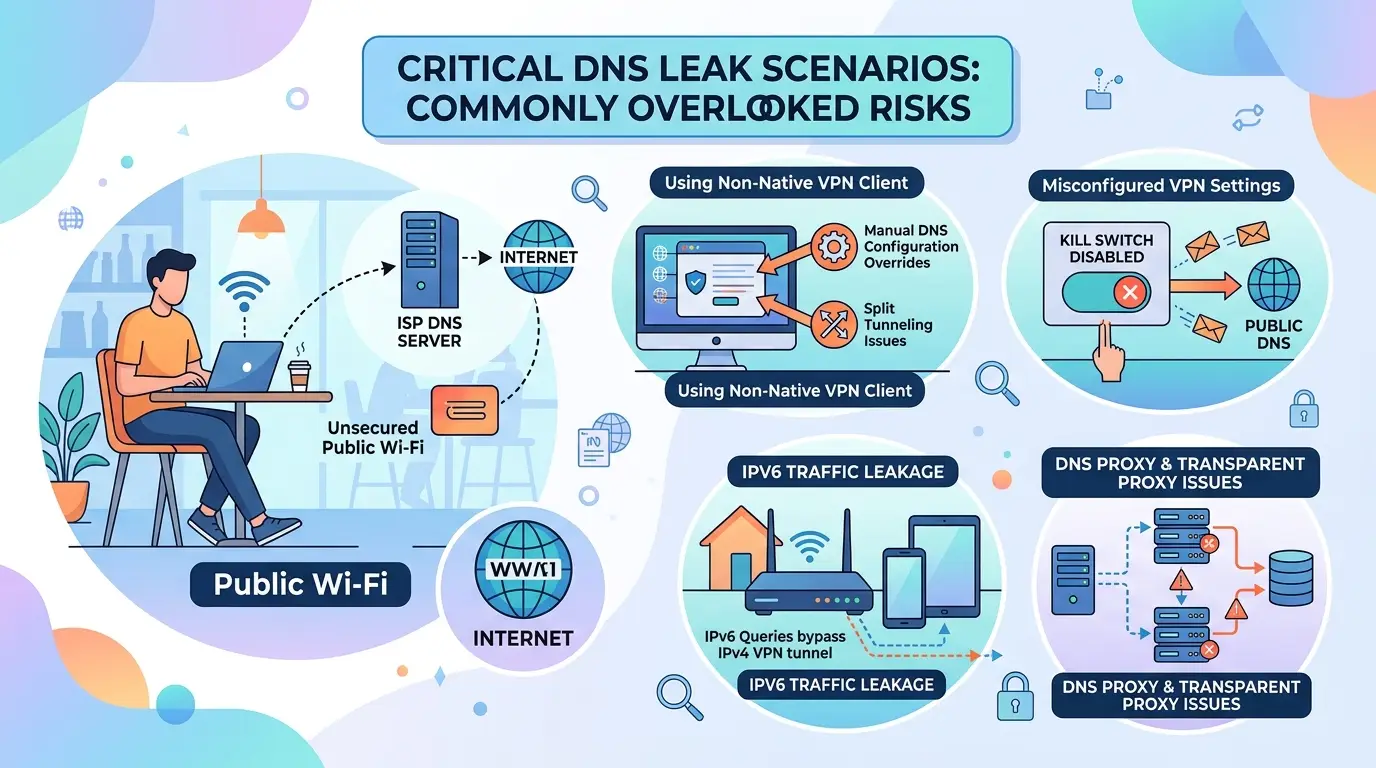
In everyday network environments, many users believe that using proxies will completely prevent DNS leak risks. But in practice, seemingly minor configuration errors or team collaboration habits can actually expose the real DNS. If DNS leak detection focuses only on surface traffic, it is easy to miss these high-risk links.
Risks of DNS leaks caused by improper proxy configuration
Many proxy tools only handle HTTP or SOCKS traffic by default, so system-level DNS queries still go locally, which creates hidden risks. For example, if you don't check if "Global Mode" is enabled when switching proxies, some applications or background processes will still directly access the local DNS server. A more common issue is that "local DNS priority" is higher than a proxy. Even when a proxy is configured, Windows and macOS systems still use local DNS for resolution. In such cases, conventional DNS leak detection websites may not be able to detect it; you need to combine tools and system logs to uncover hidden loopholes.
Leakage risks under multi-account management and team collaboration
When teams work together on account management, automated registration, or batch testing, the probability of DNS leaks is actually higher. Multiple people taking turns operating the same account often suffer from network environment switching or inconsistent proxy configurations, exposing the true DNS at certain stages. For example, A uses a proxy on the company intranet, B uses another proxy at home, and when the account switches back to the company, the DNS leak path is created. Another situation is mixing profiles from different browsers, or when using RPA tools to run scripts in bulk, the scripts don't have a globally bound proxy, so backend DNS queries are sent directly to the local server. The truly high-risk is not a one-time exposure, but the repeated environmental transitions, which lead to more and more leaks, eventually becoming difficult to trace.
DNS leaks caused by system and browser settings
The operating system's DNS caching mechanism is another point that is easily overlooked. Windows has its own local cache, and macOS has similar mechanisms. If you change proxies but don't clear the cache, old DNS entries will be reused. In this kind of "pseudo-proxy" scenario, DNS leak testing rarely detects problems. Also, mainstream browsers (like Chrome and Firefox) now have "DNS over HTTPS" functionality. If you don't manually disable it, browsers may bypass system proxies and use their own resolution channels. When detecting DNS leaks, you must test both browser and system configurations separately to close this gap. For a detailed technical explanation, you can refer to Cloudflare's DNS tutorial; actual cases are also organized in the Wikipedia DNS leak entry.
How to detect DNS leaks? Mainstream methods and detailed steps for 2026
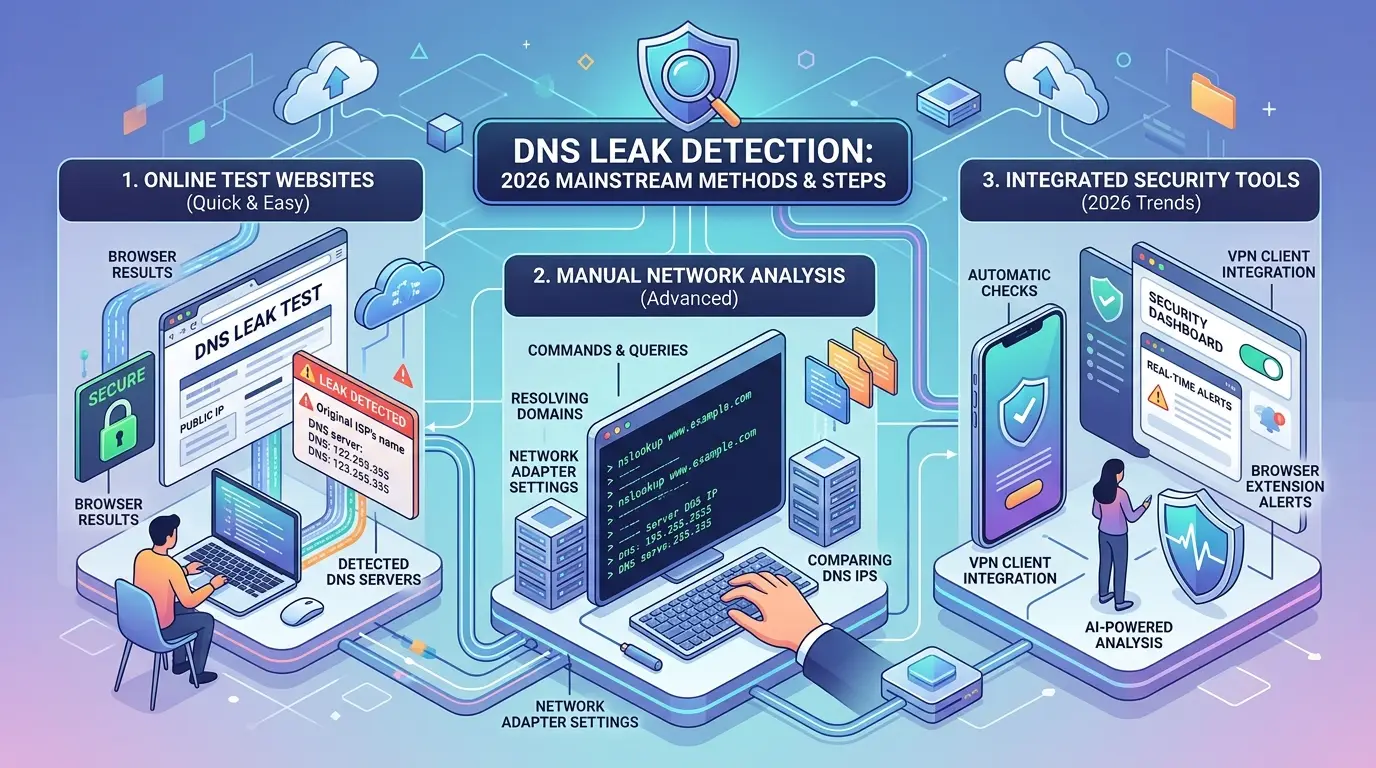
DNS leak detection isn't just about running a tool once; what you really need to look at is: under your current network, devices, browsers, batch scripts, or even team operations, which traffic might accidentally reveal the real DNS. Nowadays, network applications are becoming increasingly complex, and routine detection often misses background automatic requests and multi-person collaboration scenarios. Below is a detailed explanation of the operational details of each testing method.
The correct way to use online DNS leak detection tools
If you want to quickly determine if your DNS is leaking, you can directly use several mainstream detection sites, such as dnsleaktest.com and Browserleaks. These tools simulate requests to see which DNS server your device is actually using. When testing, it is recommended to run the "standard test" first, then the "extended test," which can capture more types of traffic.
If your local carrier or an unconfigured DNS address appears in the results, it indicates a leak. Don't just look at "pass" or "fail"; the key point is that as long as there is an unfamiliar address, especially the local network's DNS, it is basically considered risky. In team environments, it is recommended that everyone run separately to test different device and browser profiles.
Manual detection and command-line methods
Online tools can only measure surface layers; if you want to check more detailed DNS flows, you can use the command line. Use nslookupit on Windows, use it on macOS and Linux dig, for example: dig example.com check the returned server address to confirm whether it is the proxy or secure DNS you expect. If it is found otherwise, it indicates a system fallback or local cache bypass is being used.
Packet detection is more detailed. Using Wireshark to directly listen to DNS traffic allows you to see unencrypted requests and exception paths. When capturing packets, pay attention to filtering out UDP 53 and common DoH ports, and troubleshoot hidden requests from automation tools.
Practical tips for batch and automated inspection
In multi-account, multi-device scenarios, a single inspection easily misses hidden leaks from batch operations and script automation. A common approach is to use RPA or automated scripts to trigger DNS requests in batches, then use command line or packet capture tools to monitor and check the flow of each profile or session.
When writing scripts, don't just test the main process; it should also cover child processes and background services. For example, when using Selenium scripts to batch open browsers, it is recommended to configure proxies and DNS independently for each profile, then combine packet capture to check for abnormal traffic. During team collaboration, tools like DICloak can help you isolate profiles and bind proxies, making batch detection more stable and preventing uncontrollable leaks after configuration sharing.
What is truly most easily overlooked are hidden DNS leaks under automation and multi-user collaboration, which are often missed by a single person.
Common Misconceptions in DNS Leak Detection: Which Practices Actually Make You More Exposed?
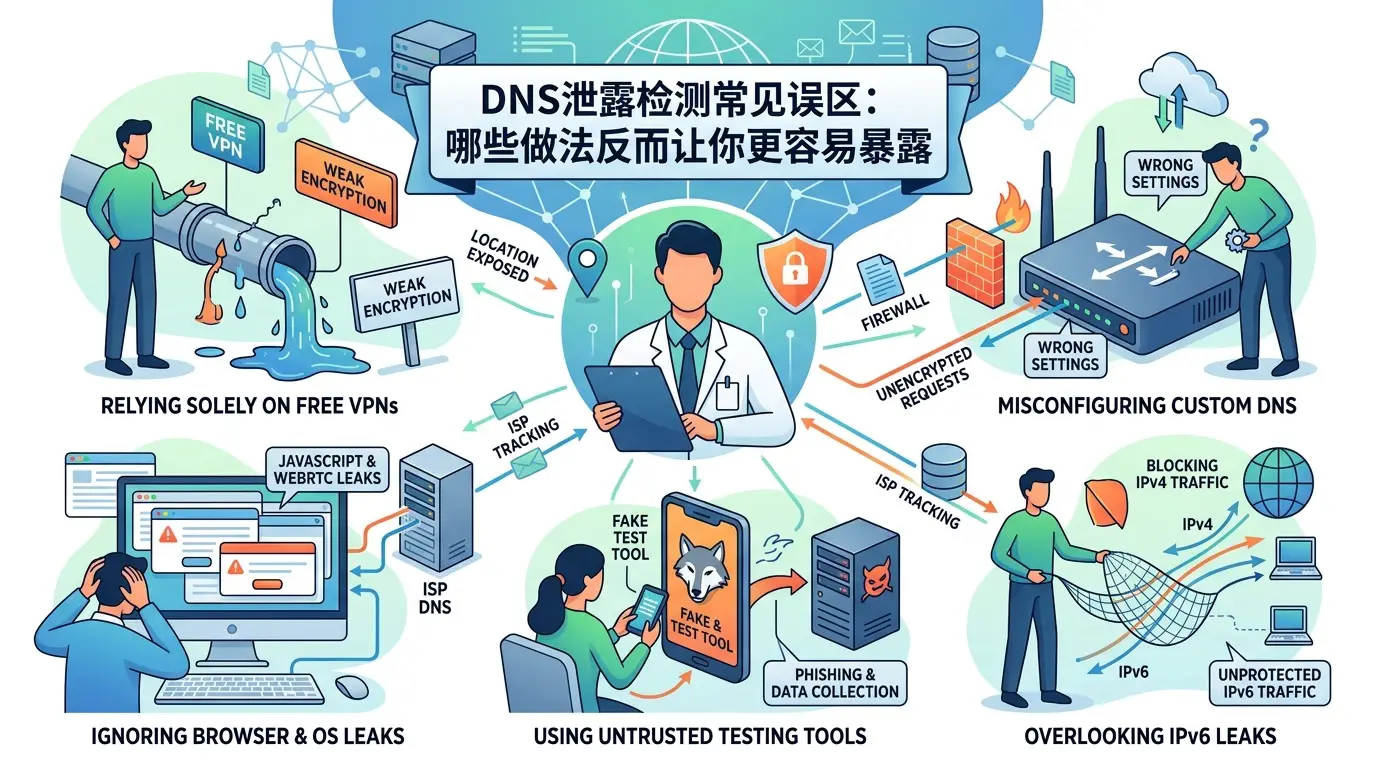
Testing only once and letting your guard down
Many people feel reassured after just one run of DNS leak detection and the results. In reality, changes in network environments can easily distort detection results. For example, if you switch proxies, switch WiFi, or manage accounts on different devices in a team environment, the previous test results will no longer be reliable. After each proxy switch, DNS leak testing must be redone; otherwise, backend traffic may still go through local DNS, causing sensitive requests to be recorded by the ISP. Trusting only one test result actually hides the risk at the step you didn't re-check.
Ignore browser and system DNS caches
Many users fail to clear their browser and system DNS cache during DNS leak detection, and if this step is missed, the result may be a false negative. For example, Chrome and Firefox handle caching differently; when switching profiles or proxies, the old DNS cache can still affect new sessions. If you just run a simple test site, the results may not be consistent across different browsers. Manually cleaning system and browser caches ensures more thorough DNS leak risk checks.
Mistrust all the results of the detection tool
The detection website itself has limitations; for example, some tools can only capture explicit requests, and hidden traffic from backend automation scripts or batch operations is often overlooked. When using tools like ipleak.net and dnsleaktest.com, remember to conduct multiple inspections and cross-validate multiple tools. In team collaboration scenarios, it is recommended to combine log review with actual traffic analysis, rather than just looking at the results of the test website pages.
How to prevent DNS leaks? The most effective protection and configuration recommendations for 2026
The risk of DNS leaks doesn't lie in the "surface configuration," but in the details that are not properly handled. When users perform DNS leak detection, the most easily overlooked thing is that the proxy and DNS configuration are not separated, and backend traffic goes directly through local DNS, resulting in sensitive requests being identified by the ISP. Below are specific protective recommendations for common scenarios.
Properly configure proxies and DNS servers
Simply setting up a proxy is far from enough; it is essential to explicitly allow all DNS queries to go to remote servers. For example, when using specialized proxy software, be sure to enable DNS forwarding so that local DNS no longer needs direct resolution. A common approach is to change the system DNS to 1.1.1.1 or 8.8.8.8, but if the proxy does not have DNS forwarding functionality, some traffic will still be leaked. The most common mistake is backend applications and automated scripts bypassing proxies and using local DNS directly.
Browser and system-level protection measures
Many browsers have DNS over HTTPS enabled by default, which appears secure on the surface but may actually bypass some requests. It is recommended to disable the browser's built-in DNS function and let the system-level DNS encryption scheme handle resolution. Both Windows and macOS support system DNS encryption. After configuration, it can reduce hidden leakage paths, but be sure to regularly use DNS leak detection tools to test actual traffic trends, such as dnsleaktest.com.
Leak prevention recommendations for multi-account and team collaboration
Team environments are the easiest to fall into traps. For batch operations, RPA scripts, or multi-user browser profiles, it is recommended to assign an independent environment to each account. You can use tools like DICloak to batch create standalone browser profiles, binding dedicated proxies and DNS. Combined with operational permissions and log auditing, it effectively traces anomalies and prevents hidden leaks caused by missed team collaboration during DNS leak risk checks.
How can multi-account and team operations prevent DNS leaks? DICloak supports security isolation and batch inspection
There is a special risk of DNS leakage under multi-account operations
When multiple accounts operate simultaneously, mixing environments is most likely to cause DNS leaks. For example, switching between different browser profiles on the same computer, or the same proxy being shared by multiple accounts, background DNS requests can easily be compromised. Even if you switch proxies, the system layer or browser's built-in DNS over HTTPS may still expose the real domain name resolution. Team collaboration is more complex; if a member accidentally uses the wrong proxy or profile, a DNS leak of a single account can affect the entire group, making thorough traceability difficult.
How DICloak Achieves Browser Environment Isolation and Independent Proxy Configuration
With professional tools like DICloak, you can assign individual fingerprint and proxy configurations to each account. This prevents DNS requests from mixing up, reducing accidental leaks caused by "link crossing." DICloak also supports batch DNS leak detection and operation log auditing, quickly checking which account configurations are abnormal and at which steps DNS leaks have occurred. When problems arise, logs can pinpoint the specific operators and behaviors, making troubleshooting much more accurate than manual single-point testing.
Practical suggestion: Use DICloak for batch detection and DNS leak protection
For team collaboration, it is recommended to use DICloak's permission allocation feature to clarify that each member can only operate the corresponding account, preventing misuse of proxies or profiles. By combining automated detection with scripted batch DNS leak testing, you can conduct regular self-checks and avoid a momentary oversight that can cause DNS leak risks to pile up beyond control. What truly minimizes DNS leakage risk often isn't a single detection, but continuous isolation and log tracking.
How to quickly fix DNS leaks? Common Issues and Emergency Handling Procedures
Immediate screening and isolation measures
If you encounter a DNS leak, don't hesitate—disconnect all high-risk network connections first, especially shared Wi-Fi, unknown proxies, and shared environments with company teams. Many leaks are not technical vulnerabilities but operational oversights. Switching to secure DNS servers like Cloudflare or Google Public DNS can quickly reduce exposure risk. Do not use your existing account to log into sensitive websites in the short term to prevent further leaks. If DNS leak detection only passes superficially, the risks behind it may not be fully eliminated, and the real identity may be traced later.
System and browser repair operations
Common methods to fix DNS leaks include clearing the local DNS cache. Specifically: enter the command line ipconfig /flushdnson Windows, or sudo dscacheutil -flushcacheuse macOS. Browsers are also prone to leaving old caches, so it's recommended to close all windows and restart your browser. Synchronously restarting the router and network devices can disconnect any established abnormal connections. Manually check whether the browser profile has switched to a standalone environment to avoid hidden leaks caused by automatic syncing.
Long-term protection and follow-up monitoring recommendations
Don't rely on just one check—regularly check backend traffic with DNS leak detection or dedicated team DNS leak testing tools. The team environment should regularly check for DNS leak risks, and it is recommended to establish internal training processes to ensure everyone can identify anomalies. After process optimization, leakage paths become more controllable, and batch operations can reduce hidden risks.
Recommended mainstream DNS leak detection tools and websites for 2026
Comparison of mainstream domestic and international DNS leak detection websites
The most commonly used DNS leak detection websites are dnsleaktest.com, ipleak.net, Cloudflare DNS Checker, and whoer.net. Mainstream websites support basic DNS leak detection. For example, dnsleaktest.com can quickly locate local DNS servers, ipleak.net can simultaneously test multiple risks such as WebRTC and IPv6, making it suitable for users who want comprehensive troubleshooting. Domestic users have special network environments, so it is recommended to prioritize Cloudflare or whoer.net, as they offer better speed and compatibility.
| Name |
Support projects |
Detection speed |
Applicable scenarios |
| dnsleaktest.com |
DNS |
Fast |
Basic testing |
| ipleak.net |
DNS/WebRTC/IPv6 |
Faster |
Comprehensive inspection |
| Cloudflare DNS |
DNS |
Fast |
Good compatibility domestically |
| whoer.net |
DNS/proxy/browser fingerprint |
Fast |
Multi-dimensional risk investigation |
A batch inspection tool suitable for multiple accounts or teams
For batch DNS leak detection tools, choose dnsleaktest CLI or dnsleaks.com scripts. You can use automated scripts (such as Python requests or PowerShell batch scheduling) to inspect multiple environments with one click. In actual team management, integrating with browser fingerprint management tools like DICloak can automate DNS leak testing for each profile.
Points to note when choosing testing tools
The detection platform itself may also collect access logs. When choosing, first check the privacy policy and avoid using suspicious, niche sites. Do not use detection websites that require login or upload configurations, as these platforms can easily collect your real environmental information.
Frequently Asked Questions
Does DNS leak detection need to be performed multiple times at a time?
It is recommended to perform DNS leak testing every time you change your network environment, proxy settings, or team members. Regular testing is also important, especially in company or team environments. This allows for timely detection of potential DNS leak risks and prevents sensitive information from being exposed. Maintaining detection frequency helps with security management, especially in multi-device and multi-person collaboration scenarios.
Will DNS leaks still occur after using proxies?
If the proxy configuration is incorrect or the local DNS request does not pass the proxy, DNS leak testing may still detect the leak. Some proxies or proxy services do not handle local DNS by default, exposing real IPs or geographic locations. It is recommended to use tools that support DNS proxies and verify proxy effectiveness through DNS leak detection to ensure all DNS requests are handled securely.
Will DNS leak detection tools leak my privacy?
Legitimate DNS leak detection websites generally do not disclose user privacy, but their privacy policies should still be observed. Avoid using DNS leak testing tools from unknown sources during sensitive operations. Choose reputable platforms to ensure data is used solely for testing purposes. Do not enter account information or personal information during testing to reduce privacy risks.
How can teams work together to prevent DNS leaks?
It is recommended that the team adopt an independent network environment, reasonable permission allocation, log auditing, and other measures for DNS leak detection and protection. Unified configuration of proxies and DNS servers, with regular DNS leak risk checks. This ensures team members operate consistently, reduces leaks caused by misconfigurations, and enhances overall security.
Will DNS leaks cause account bans?
Some platforms check for DNS leak risk checks; if they discover real identity or abnormal operating environments, the account may be deemed a violation or even banned. DNS leaks increase records of abnormal account behavior, especially in cross-border operations, sensitive industries, or multi-account scenarios. Maintaining DNS leak detection helps reduce the risk of account bans.
By enhancing the security and efficiency of team collaboration, companies can better meet the challenges of the digital age and achieve efficient information circulation and protection. Choosing the right collaboration tools helps ensure data security and promotes smooth communication among members. Download DICloak and start safer team collaboration
 Web Proxy Tools
 Free Tools
 Cookie Plugin
 UA Generator
 MAC Address Generator
 IP Generator
 IP Address List
 2FA Code Generator
 World Clock
 Anonymous Check
 WebRTC Leak Test
 UUID Generator
 Free Web Proxy Site
 Proxy Checker
 FB Ad Checker
 AI Web Scraping
 Free SMM Tools
 Twitter Shadowban Checker
 Instagram Name Checker
 UTM Generator
 Username Generator
 AI Hashtag Generator
 LinkedIn Headline Generator
 Social Media Image Resizer














-02-v15.png?x-oss-process=image/interlace,1/format,webp/quality,q_75)