Getting real clicks from ads is hard enough, sorting out the fake ones is where most teams stumble. You can spot a spike in traffic, but figuring out which clicks are bots or paid farm traffic isn’t obvious. Click fraud protection means tracking every click, knowing what triggers the anomalies, and responding before your ad budget gets drained.
The problem isn’t just the wasted spend. Fake clicks can skew your analytics, making it nearly impossible to judge if your campaign is actually reaching real users. Sometimes, the signs are subtle: conversions drop even though click numbers rise, or you see repeat clicks from unusual locations. If you don’t act fast, you’re not just losing money, you’re making decisions based on bad data.
What matters most is how you prevent click fraud and what you do when you spot it. Relying on simple IP blocking or generic filters doesn’t cut it anymore. You need a workflow that covers detection, response, and ongoing monitoring. Teams that handle it well check logs, set up custom alerts, and dig into suspicious patterns, not just the obvious spikes. The trick is knowing which signals to trust, which ones to ignore, and what your next step should be when something looks off.
Let’s start with how to recognize click fraud before it gets out of hand.
What Makes Click Fraud Such a Big Risk for Advertisers in 2026?

Click fraud is tougher to spot and more destructive than ever, automation and smarter attack methods have made old defenses nearly useless. Advertisers face losses not just from wasted spend, but from polluted data and damage that lingers after the fraud is gone.
How click fraud tactics have evolved
Fraudsters don’t just click manually anymore. Most attacks use bots that mimic real users, AI scripts that shift device fingerprints, and click farms hired to target specific ads. Competitors run deliberate campaigns to drain budgets or skew performance data. Simple IP blocks barely dent these tactics.
The real costs: wasted budget, lost leads, and reputation damage
Lost ad spend is only the start. When click fraud hits, the damage adds up fast, leads vanish, campaign data gets skewed, and you may even lose trust with clients or partners. For example, a retail agency saw its conversion rate drop by half after a bot network flooded their ads. They spent thousands on fake clicks, but the bigger problem was the bad data: their budget allocation shifted based on false signals, which meant future campaigns aimed at the wrong audience. This is where the hidden costs bite, staff hours wasted chasing the wrong metrics, lost opportunities from misjudged audience targeting, and a reputation hit when clients notice the drop in performance. Recovery isn’t quick. Even after the fraud stops, teams have to scrub analytics and rebuild trust before real sales return. The toughest part is that every dollar lost to click fraud makes future decision-making riskier, since you can’t trust the data your campaigns produce.
Why traditional protections often fail
- Basic filters only catch repeat offenders; smart bots rotate fingerprints and proxies to slip past.
- Manual reviews lag behind, by the time you spot a pattern, the damage is done.
- IP blocking misses most attacks, since farms and bots use fresh IPs for each session.
Knowing how tactics evolve and what the real costs look like is the first step. The next challenge is learning how to spot click fraud before your budget drains, so you catch the warning signs early, not after the damage is done.
How Can You Spot Click Fraud Before It Drains Your Ad Budget?
The most reliable warning signs for click fraud show up before your budget disappears. If you catch them early, using real metrics, not just gut feeling, you can halt the drain and keep your campaigns on track. What separates solid click fraud protection from guesswork is knowing which patterns point to actual fraud and which are just noise.
Unusual traffic patterns and spikes
Watch for sudden jumps in clicks from one region, especially if your past data shows no activity there. High click rates paired with low conversions usually mean bots or click farms are hitting your ads. If your cost-per-click (CPC) rises while engagement stays flat, you’re likely facing mass fake clicks, not genuine interest.
Suspicious user behavior signals
- Sessions under 10 seconds, especially if most users bail after landing.
- Multiple clicks from the same IP or device, showing up several times in a day.
- Browser or device types that don’t match your typical audience (like dozens of clicks from obsolete browsers).
Red flags in analytics and logs
If your ad spend climbs but the number of real leads hardly moves, there’s a problem. Noticeable anomalies in device or browser fingerprints, like hundreds of identical configurations, often point to automated scripts rather than humans.
- Check if the ratio of clicks to conversions doubles, but lead quality drops.
- Look for clusters of users with nearly identical cookie values or browser fingerprints.
- Scan logs for repeated session IDs accessing your ad landing page in rapid succession.
Teams that spot these signs early don’t just block individual IPs, they dig through logs, match click timestamps, and set up alerts for conversion anomalies. The single best move is to flag any pattern where clicks surge but conversions stall, if you ignore this, you’ll spend weeks chasing phantom leads while your real budget drains out.
Next, you’ll need to break down the types of click fraud that cause these signals and see which ones require a different response. Not every spike means the same thing, so matching the warning sign to the fraud type is what makes your next steps actually work.
What Types of Click Fraud Do You Need to Defend Against?

Not all click fraud looks the same, different attack methods target your ad campaigns in ways that simple filters won’t catch. Knowing which threats matter helps you build a smarter defense and avoid wasting time chasing false positives.
Competitor and manual click fraud
Direct attacks from competitors are usually targeted and personal. These can come in bursts, with rivals clicking your ads to drain your budget or sabotage your campaign metrics. The pattern often shows up as sudden spikes in clicks from known business IPs or locations.
Bot-driven and automated click fraud
Bots are built to mimic real users, blending in by copying normal browsing patterns and device fingerprints. When you block one bot, the attacker can spin up dozens more with new IDs, making detection a moving target. For example, if you only filter by IP, you’ll miss bots using rotating proxies and fake browser sessions. The hardest part isn’t spotting the first bot, it’s catching the swarm that adapts after each filter change.
Click farms and organized fraud rings
Click farms run batches of devices and real people to generate fake traffic that’s hard to flag. You might see hundreds of clicks from unique devices, but conversions stay flat or drop. A common sign: many clicks arrive within a tight window, all from devices with similar OS versions and browser builds, but scattered across nearby cities.
Proxy and IP-masked attacks
Fraudsters use proxies to hide their real locations and identities, bypassing simple IP blocks. Here’s what to check:
- Look for repeated clicks from clusters of IPs tied to proxy services.
- Don’t rely on country blocks, fraudsters can use local proxies to appear genuine.
- Watch for session patterns: identical device fingerprints but shifting IPs.
Each fraud type needs its own detection and response workflow. The next step is understanding which protection methods actually block these threats, and which ones just create extra noise.
Which Click Fraud Protection Methods Actually Work in 2026?
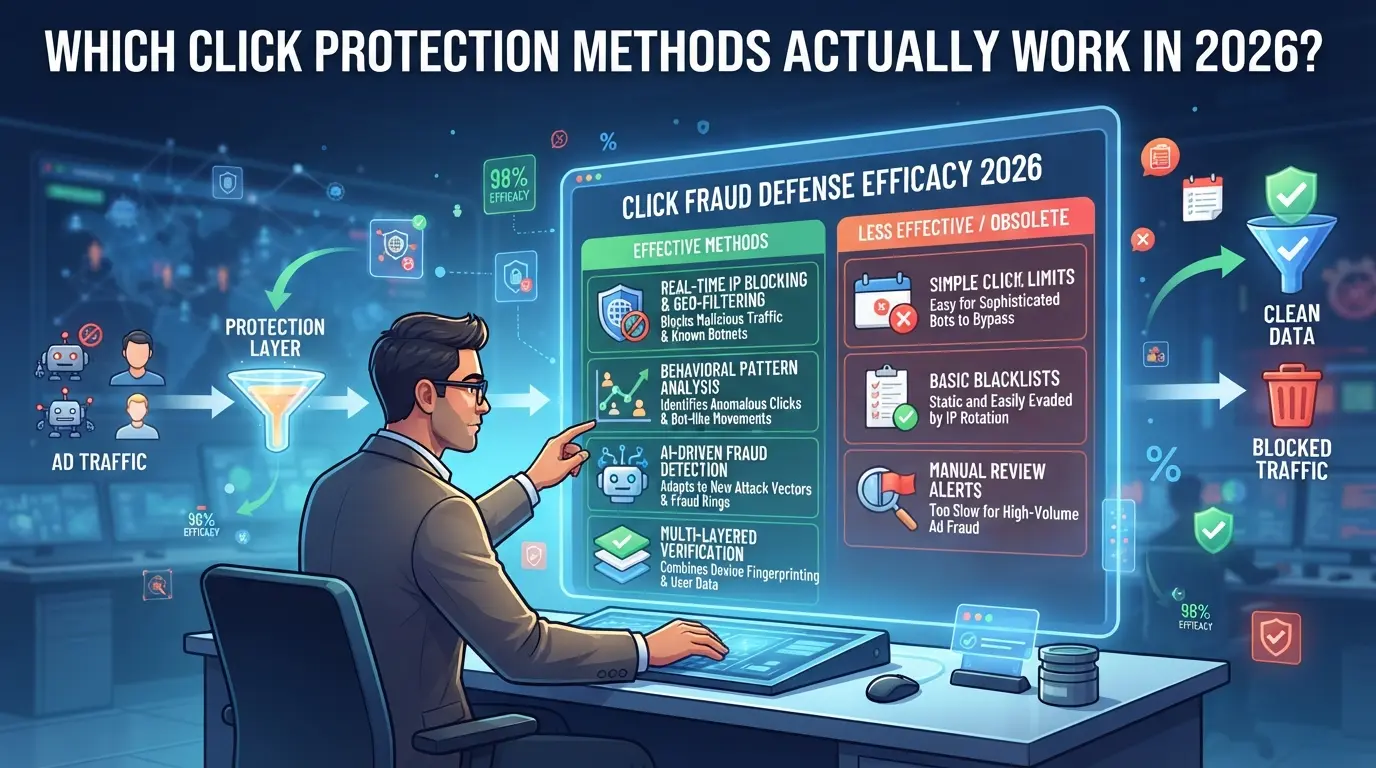
Most teams now use layered defenses, no single tactic catches everything. AI-powered anomaly detection stands out because it exposes patterns that basic filters miss, especially as fraudsters adapt. Simple IP blocking and manual logs are too slow for real-time attacks and often miss device-level tricks. If you’re serious about preventing click fraud, you’ll need tools that watch for both technical and behavioral signals, plus a process for quick response.
Advanced traffic filtering and bot detection
Traditional filters flag IPs or block known bots, but fraud networks change tactics fast. AI/ML systems track how users interact, spotting click farms and bots by their behavior, not just by their address. Here’s how they compare:
| Method |
How It Works |
Strengths |
Weaknesses |
| IP/Geo Filtering |
Blocks by IP/location |
Simple, fast |
Bypassed by proxies, limited scope |
| AI/ML Behavior Detection |
Analyzes mouse/scroll/clicks |
Finds subtle bot/farm signals |
Needs real traffic data, setup time |
| Fingerprint Analysis |
Tags unique device/browser traits |
Harder for bots to fake |
May miss sophisticated clusters |
Real teams report that combining AI behavior analysis with fingerprinting stops more attacks than relying on IP lists alone.
Blocking suspicious IPs and using geo-restrictions can cut out basic fraud, but attackers often use proxies and emulated devices to blend in. Device fingerprinting adds another layer and catches repeat offenders, even if they switch IPs. The trick is to use all three methods together, filters alone won’t hold up.
Manual review vs. automated protection tools
Automation covers most cases, but manual checks are still needed for edge events, like sudden spikes from a new country or abnormal click bursts on one ad. The fastest teams set up alerts for anomalies; then a human checks the logs to confirm before acting. Don’t depend on automation for everything, manual review catches targeted fraud that scripts miss.
Working with ad platforms to report and recover losses
Document every flagged incident: keep logs, screenshots, and timestamps. Most ad platforms offer partial refunds or credits if you can show clear evidence of fraud, but they only respond to detailed reports. Filing too late or with vague info usually means you get nothing back, precision matters here.
The next step is to manage ad accounts in a way that makes account-level attacks much harder to pull off and easier to track.
Managing Multiple Ad Platform Accounts with DICloak: Safer Profile and Proxy Workflows
Teams running several ad platform accounts face a real risk, browser session overlap and network reuse can link accounts and create headaches for click fraud protection. If you need to keep each account cleanly separated at the browser and network layer, DICloak offers a workflow to manage this from the ground up.
Isolating each ad account with separate browser profiles and fingerprint settings
Operators can build a separate browser profile for every ad platform account, storing each session apart and configuring the fingerprint details, like OS, user agent, time zone, and display settings, to match the expected environment. This means ad account work stays contained, so browser data and signals from one session don’t spill into another. The scope is limited to browser-profile separation and fingerprint setup; it does not affect the ad platform side.

Assigning and testing a user-provided proxy for each profile
For teams that need extra network separation, admins can set up a user-provided proxy for each DICloak profile. Enter the proxy details, test the connection, and check that the exit IP and region align with the account’s history. Which proxy to use, how often to rotate, or what quality to pick, those are up to the operator, not DICloak. This setup supports isolated workflows but does not guarantee account safety or block click fraud.

What Should You Do Immediately If You Suspect Click Fraud?
If your ad traffic looks suspicious, maybe conversions drop or you see a pattern of repeat clicks from strange locations, don’t wait. Acting fast gives you the best shot at recovering lost spend and catching problems before they snowball. Here’s exactly what to do when you suspect click fraud is hitting your campaigns:
Pause affected campaigns and gather evidence
- Stop the campaign , If you keep running ads while fraud is active, you’ll burn more budget and lose clean data.
- Export logs and analytics , Grab click records, device IDs, location info, and timestamps. If you skip this, you might lose proof once the platform auto-cleans old logs.
- Document suspicious activity , Make screenshots of spikes, weird IPs, or patterns. Write down anything you notice that stands out, especially traffic from regions you don’t target.
Contact your ad platform and submit a fraud report
- File a fraud report , Use your platform’s official support or dispute form. Attach logs and screenshots so the reviewer sees the full picture.
- Include all evidence , List dates, campaign names, affected ad groups, and how much budget was lost. Platforms often ask for specifics; missing them means slower reviews.
- Follow up for refunds or credits , If you don’t hear back in a week, contact support chat or phone. Refunds usually need a second request, especially for larger claims.
Review and tighten your click fraud protection settings
- Update filters and blacklists , Add any suspicious IPs, device IDs, or referrers to your account settings.
- Review detection tools , If your current setup missed the fraud, look at new options or tweak thresholds.
- Check workflow changes , If the same campaign gets hit again, rebuild the audience, split traffic, or switch platforms.
Missing evidence can mean no refund, even if your campaign clearly lost budget.
How to Evaluate and Choose the Right Click Fraud Protection Tools
Once you spot click fraud, picking the right tool means looking past marketing and focusing on what actually helps you catch and prevent bad clicks. The fastest way to compare is by checking detection, integration, and reporting, not just what’s promised, but what’s proven.
Key features to compare
| Feature |
Option A: Basic Filter |
Option B: Advanced Detection |
Option C: Platform-Integrated |
| Detection Speed |
1-2 hours |
Near real-time |
Real-time |
| Accuracy |
70% |
85-90% |
90%+ |
| Integration |
Manual export |
API + dashboard |
Direct to ad account |
| Reporting/Alerts |
Daily email |
Custom alerts |
Instant, dashboard + alerts |
Even a tool with high accuracy won’t help if it takes hours to flag bad clicks, real-time detection and integration are what let teams act before budgets get wasted.
Cost, support, and scalability
Most tools charge per ad account or click volume. Some offer a free trial, but you’ll want to check if team features, workflow support, and scaling up are included, or if you pay extra as you grow. An option that fits now can get expensive as your traffic increases.
Red flags and common pitfalls
Watch out for anything that promises “100% fraud blocked” or hides fees behind vague terms. Tools that don’t spell out data privacy policies may put your campaign data at risk. If pricing, support, or privacy look unclear, skip it, hidden costs and weak privacy sink even the best-looking solution.
Frequently Asked Questions About click fraud protection
Is click fraud illegal, and can I take legal action?
Click fraud is illegal in many places because it involves intentionally generating fake clicks to waste an advertiser’s budget. While you can report fraud to authorities or your ad platform, tracking down and suing fraudsters is very hard. Many operate from overseas or hide their identities, making legal action costly and rarely successful for most businesses.
How often should I review my click fraud protection settings?
Review your settings at least once every quarter. You should also audit them after launching major campaigns, seeing unusual spikes in clicks, or changing your ad budget. Regular reviews help you catch new threats, adjust rules, and stay protected as fraud tactics change over time.
Can small businesses afford effective click fraud protection?
Yes, small businesses can prevent click fraud without big budgets. Many ad platforms offer free or low-cost click fraud detection tools. Google Ads, for example, has built-in filters. Some third-party services offer free trials or low-fee plans, which can be enough for smaller ad spends.
Does click fraud protection slow down my ad campaigns?
Most click fraud protection tools work in real time and do not slow down your ad delivery. They filter or block fake clicks as they happen. Your ads still reach real users, and campaigns usually run at normal speed. If you notice delays, check your tool’s settings or contact support.
What should I do if my ad platform doesn’t support third-party protection tools?
If your platform doesn’t allow outside tools, use its built-in ad fraud protection features. Regularly review your performance reports for odd patterns, such as sudden click spikes or low-quality leads. You can also set stricter targeting to reduce risk and report suspicious activity directly to the platform.
Taking proactive steps to secure your advertising budget means evaluating and implementing effective solutions designed to detect and prevent fraudulent activity. If you're ready to see how advanced protection can safeguard your campaigns and improve your ROI, consider starting with a tool that offers real-time monitoring and actionable insights. Try DICloak For Free
 Web Proxy Tools
 Free Tools
 Cookie Plugin
 UA Generator
 MAC Address Generator
 IP Generator
 IP Address List
 2FA Code Generator
 World Clock
 Anonymous Check
 WebRTC Leak Test
 UUID Generator
 Free Web Proxy Site
 Proxy Checker
 FB Ad Checker
 AI Web Scraping
 Free SMM Tools
 Twitter Shadowban Checker
 Instagram Name Checker
 UTM Generator
 Username Generator
 AI Hashtag Generator
 LinkedIn Headline Generator
 Social Media Image Resizer