Seeing a "Blocked because of IPS Attack" error can be frustrating and alarming. However, this does not mean your computer is infected or broken. An Intrusion Prevention System (IPS) is simply an automated security guard that flagged your connection by mistake. This guide explains why IPS blocks happen, how to resolve them quickly, and how to prevent them in 2026.
Why Does an IPS Block Your IP Address?
To successfully fix an IPS block, you first need to deeply understand how the security system actually thinks and operates. An IPS is a piece of network security technology designed to constantly monitor internet traffic and instantly stop cyberattacks before they can cause any permanent damage to a server. Think of it as a highly trained bouncer at the door of a nightclub, checking everyone's ID and kicking out anyone causing trouble.
What triggers an IPS to block traffic?
An IPS actively inspects every single data packet moving through a network connection. It is not just looking at where the data comes from; it is looking closely at what the data contains. The system will immediately block your IP address if it detects anything that looks like malicious behavior. Common triggers in 2026 include:
- Malformed Data Packets: Sometimes your web browser or an old piece of software sends data that is formatted incorrectly. The IPS sees this broken data and assumes a hacker is trying to crash the server.
- Rapid Automated Requests: If you send hundreds of requests in a single second, the system will assume you are launching a Denial of Service (DoS) attack to overload the website.
- Suspicious Code Words: If a search query or a form submission contains words that look like database coding (such as SQL injection attempts), the system will instantly lock you out.
- Port Scanning: If your computer accidentally pings multiple closed digital ports on a server, the IPS assumes you are a hacker searching for a weak entry point.
How does suspicious activity lead to IP blocking?
When you interact with any website on the internet, your computer sends and receives continuous requests. If those requests look like a hacking attempt, the IPS immediately steps into action. Because a modern IPS has automated threat prevention abilities, it does not wait for a human IT worker to wake up and review the alert. It acts instantly.
The system assigns a "threat score" to your IP address. Every time you do something slightly suspicious, your score goes up. If your score crosses a specific hidden limit, the system drops the heavy hammer. It can directly block your internet traffic on its own without any human approval. Depending on how severe the system thinks the fake attack is, your IP address might remain temporarily blocked for a few hours, or it could be permanently added to a global blacklist that lasts for weeks.
Can legitimate users be mistakenly blocked by IPS?
Yes, absolutely. Legitimate, innocent users are often blocked by mistake every single day. In the professional cybersecurity world, this highly annoying event is called a "false positive." A false positive happens when the automated IPS identifies a normal file, a regular web browser, or a safe background process as malicious, even though it is completely safe and harmless.
This frequently happens when you run a harmless software script that accidentally triggers a strict security alarm. It can also happen when an authorized business user tries to access a highly sensitive network resource for the very first time from a new city. The system sees this new geographical activity as an anomaly and blocks the user just to be safe. Legitimate administrative actions, like backing up a website or transferring large files, can easily trigger these automated false alarms.
Common Risks of Being Blocked by IPS Systems
Being blocked completely slows down your daily business tasks and ruins your productivity. Certain specific online behaviors drastically increase your risk of triggering these aggressive security systems. You need to know what actions put a target on your back.
How IP spoofing increases the risk of blocking
IP spoofing is a dangerous technique where someone intentionally hides their true identity online by faking their IP address details. Malicious hackers use this to trick servers into letting them inside. If a modern security system detects that your IP address details do not match your actual, physical network routing, it will automatically assume you are an attacker trying to break in.
Even if you are not a hacker, sometimes complex network setups, poorly configured routers, or unstable internet connections can accidentally make your traffic look spoofed. When this happens, the IPS will instantly block the connection to protect the server's highly sensitive data from what it believes is a stealthy attack.
Why repeated failed logins can trigger IPS blocks
We all forget our long passwords sometimes. It is a normal part of the modern digital life. However, if you type the wrong password too many times in a row, the IPS gets extremely suspicious.
The system assumes a hacker is using a malicious computer program to guess your password by trying thousands of combinations every second. This is known in the security industry as a brute-force attack. To protect your account from being stolen, the IPS will block your specific IP address completely, totally locking you out of the login page before the hacker can guess the right word.
How to Confirm If Your IP Is Blocked by an IPS
Before you can actually fix the problem, you need to prove that an IPS is truly causing the block. Sometimes, a website is just broken, or your home internet router is simply unplugged. Here is exactly how you can tell the difference.
Signs your IP is being blocked
The clearest and most obvious sign is the error message itself. You might see a blank white screen with bold black text that says, "Blocked because of IPS attack," "Access Denied," or "An attack was detected, originating from your system."
Another major sign is network isolation. For example, the website might fail to load on any computer, tablet, or smart TV connected to your home Wi-Fi network. However, if you turn off your Wi-Fi on your mobile phone and use your 5G cellular data instead, the website loads perfectly. This simple test proves that the website is completely fine, but your specific home Wi-Fi IP address has been blacklisted by their security guard.
Tools to check if your IP is blacklisted
You can use several free and easy online tools to check your network status.
- Public IP Checkers: Use websites like whatismyipaddress.com or iplocation.net to find out your exact public IP address. Write this number down.
- Global Blacklist Scanners: You can copy and paste your IP address into free diagnostic tools like MXToolbox or AbuseIPDB. These websites will scan dozens of global security databases to see if your network has been officially flagged for bad behavior across the internet.
How to analyze server logs for IPS-related blocks
If you are the person who actually owns the website or manages the server, you can look deeply at the backend computer logs to find the truth. You should check your security events dashboard.
If the IPS is actively blocking traffic, you will see a massive list of dropped data packets and forcibly reset network sessions. The detailed logs will show you the exact IP address that was blocked, the exact time it happened, and the specific security rule that triggered the loud alarm. This information is vital for fixing the error.
Steps to Fix "Blocked Because of IPS Attack" Errors
Once you confirm without a doubt that an IPS block is the root issue, you need to take direct action to restore your digital access.
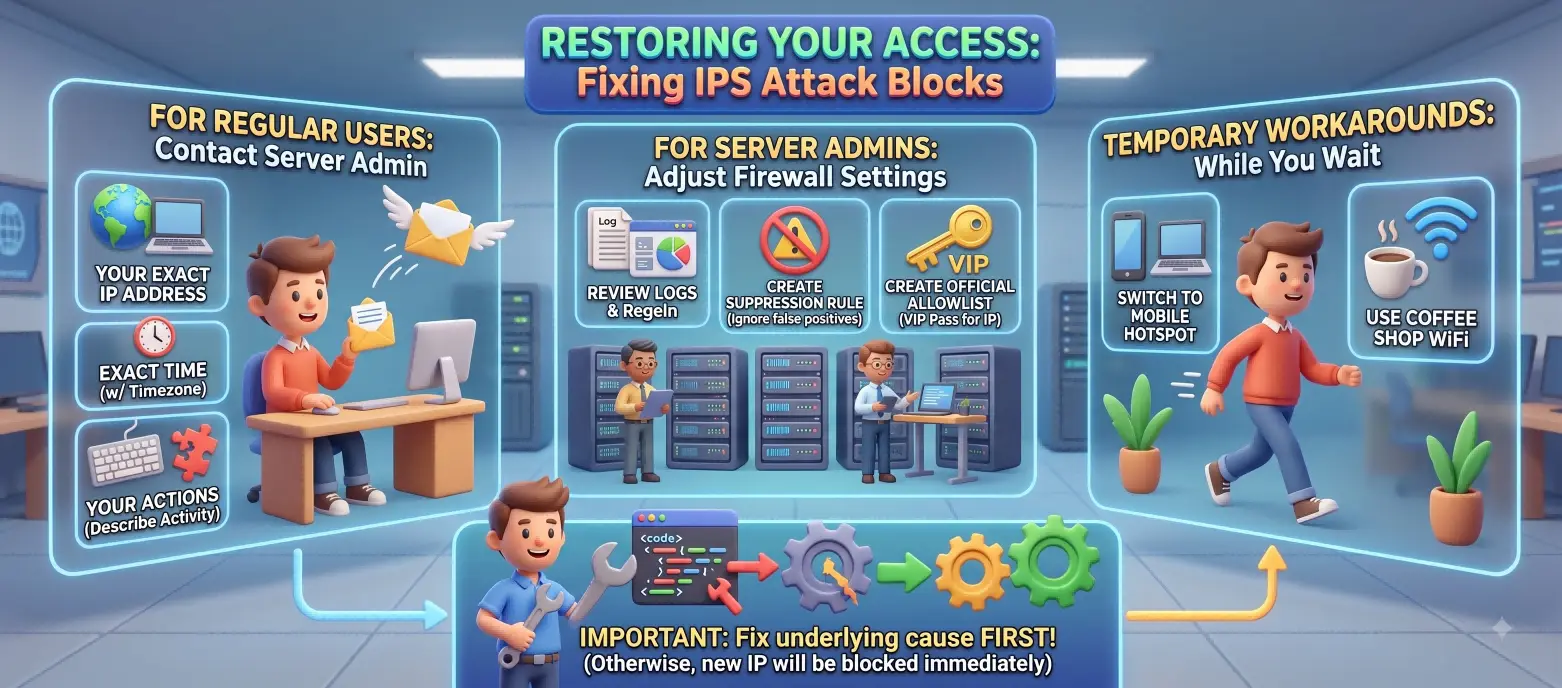
How to request unblocking from the server admin
If you are a regular internet user just trying to visit a public site, you cannot fix this yourself. You have no control over their security. You must contact the website's system administrator, the IT help desk, or the web hosting company directly.
When you submit a support ticket or send an email, you must provide highly specific details to get help quickly. If you just say "the site is broken," they cannot help you. You should include:
- Your Exact IP Address: Use the tools mentioned above to give them your public IP.
- The Exact Time: Tell them exactly when you first saw the error message, including your local time zone.
- Your Actions: Describe the specific activity you were doing when the block happened (e.g., "I was uploading a 50MB PDF file," or "I accidentally typed my password wrong five times").
Adjusting firewall settings to resolve IPS blocks
If you are the professional managing the server, you can adjust the backend firewall settings to fix the issue for your users. Once you review the logs and confirm it is a false positive, you can create a suppression rule. This tells the IPS to ignore that specific harmless behavior in the future.
You can also create custom indicators to explicitly allow specific traffic. By adding the blocked user's IP address to an official allowlist (sometimes called a whitelist), you grant that specific user a VIP pass, allowing safe passage through the strict firewall without being inspected.
Temporary solutions to regain access
While you wait patiently for the IT administrator to unblock you, you can use temporary workarounds to get back to work. Because the block heavily targets your specific network IP address, simply switching to a completely different internet connection will usually restore your access instantly.
You can easily connect your laptop to your mobile phone's cellular hotspot, or you can take your laptop and visit a local coffee shop or library to use their public Wi-Fi network.
Important Note for Workarounds: You must absolutely identify and fix the underlying cause before you try to connect again on a new network. If a broken automated script caused the block, the firewall will just instantly block your brand new coffee shop IP address the exact moment you run that broken script again.
Real-World Scenarios: Why IPS Blocks Legitimate Traffic
Digital security systems are highly intelligent, but they are not perfect. In the modern, fast-paced digital workplace, normal everyday business activities often look exactly like malicious cyberattacks to a highly sensitive IPS.
Examples of false positives in IPS systems
If you run a digital marketing or SEO agency, you might use automated software tools to crawl client websites for search engine ranking data. These crawlers send hundreds of rapid data requests to a server in a matter of seconds to read the pages. A strict IPS will almost always view this rapid, robotic traffic as a malicious attack and permanently block your agency's IP address.
Similarly, running harmless administrative scripts on an information system, such as running a daily database backup command, can easily trigger a false alarm. The security tools simply misinterpret the dense code and panic, shutting the connection down.
How shared IP addresses can cause unintended blocks
Many modern websites use massive reverse proxy networks like Cloudflare or Fastly to speed up their page loading times around the world. This means that normal website traffic passes through a shared proxy IP address before reaching the main website server.
Sometimes, the main hosting server mistakenly attributes malicious hacking activity to that shared proxy IP. When the host aggressively blocks that proxy IP, it accidentally blocks all the legitimate, innocent visitors who are trying to use that exact same pathway. To fix this massive problem, server administrators must carefully configure their systems to ignore the proxy IP and read the original, underlying visitor IP addresses correctly.
Case study: Resolving IPS blocks in corporate networks
Consider a busy cross-border e-commerce company preparing for a massive holiday sale. The marketing team is rapidly uploading hundreds of new high-resolution product images to their global website at the exact same time. The corporate security firewall notices a massive, highly unusual sudden spike in data uploading to an external web server.
Because anomaly-based IPS models block any unusual or rare activity, it violently cuts the internet connection and boots the entire marketing team offline. To resolve this frustrating mess, the IT department must investigate and classify the alert as a false positive. By classifying alerts properly, the IT team slowly trains the machine learning system to recognize that massive image uploads are completely normal behavior for this specific marketing team. Over time, this training drastically reduces the number of false alarms.
How to Prevent IPS Blocks in the Future
The absolute best way to handle a frustrating IPS block is to prevent it from ever happening in the first place. You can actively optimize your digital habits to stay completely under the radar of these strict systems.
Best practices for avoiding suspicious activity
- Pace Your Automation: If you rely on software scripts for data analysis, price tracking, or SEO monitoring, do not let them run at their maximum, blazing-fast speed. Add random time delays (like 2 to 5 seconds) between requests so your script closely mimics slow, normal human browsing behavior.
- Double-Check Credentials: Always ensure you are typing the correct passwords. If you use automated password managers or login tools, make absolutely sure they are updated with your newest credentials before they try to log in automatically.
- Fix Errors Immediately: Identify and fix any errant scripts or broken software applications on your computer before you ask an IT admin to remove a block. If you don't fix the root cause, you will just get blocked again tomorrow.
How to secure your network against IPS triggers
If you are an IT professional who manages a corporate network, you need to carefully balance tight security with actual business usability. Automating the blocking of an entire system at the slightest hint of doubt is not a viable long-term solution for a growing company.
If your security policies are configured too strictly, end-users will become deeply frustrated and will actively try to bypass your rules, creating worse security risks. You should review blocked traffic logs continuously and adjust your rule sensitivity to perfectly fit your actual, real-world business needs.
Monitoring tools to detect potential IPS issues early
Use advanced monitoring dashboards to constantly watch your network health in real-time. When you see a yellow warning alert for something detected as slightly suspicious, you should investigate it immediately before it turns into a full red alert block.
If the alert is technically accurate but completely unimportant to your security, you can suppress the alert to reduce digital noise for your security team. This proactive strategy helps your team ignore harmless activities and focus all their energy on real, high-priority cyber threats.
Comparing IPS Systems: Which Are Most Likely to Block Traffic?
Not all digital security systems work the exact same way. Some software brands are much stricter and more aggressive than others. Understanding the difference in these technologies can help you figure out exactly why you are getting blocked so frequently.
How different IPS systems handle traffic filtering
There are two main ways that a modern IPS filters and judges internet traffic:
- Signature Matching: This is the older method. The system looks for specific, known patterns of bad code. It operates like a dictionary of known viruses. It only blocks traffic that exactly matches a known, recorded attack. It is very accurate but can miss brand-new attacks.
- Anomaly Detection: This is the modern, AI-driven method. The system watches your network for weeks to learn what "normal" daily traffic looks like. It establishes a baseline. After that, it blocks absolutely anything that looks new, strange, or different from that baseline, even if it has never seen the behavior before.
Features to look for in an IPS to minimize false positives
When your company is choosing an IPS to purchase, look for advanced systems that allow you to easily classify alerts as true or false positives with a simple click. Good systems seamlessly allow you to create custom indicators to allow specific trusted IP addresses safely. The absolute best security tools also allow you to easily undo automated remediation actions, such as safely restoring a quarantined file or unblocking a user instantly through a clean dashboard.
Why some IPS systems are more aggressive than others
Anomaly-based IPS systems are usually the most aggressive on the market. They are highly prone to causing annoying false positives because they operate purely on suspicion and deviation from the norm, rather than waiting for exact proof of a virus. Policy-based systems are also highly aggressive, as they are programmed to instantly drop data packets if a user violates a strict, hard-coded company rule, no matter who the user is.
For dedicated business professionals working in global markets, such as running a complex cross-border e-commerce empire, getting suddenly blocked by an IPS can entirely disrupt major sales campaigns. When you are managing multiple storefronts and global marketing channels, you absolutely need a highly secure, reliable way to access your vital accounts without constantly triggering security alarms. You can use the DICloak Antidetect Browser to streamline this entire process safely and effectively.
How DICloak prevents suspicious-login triggers during recovery
If you accidentally trigger an IPS block and need to recover your locked accounts, trying to log in repeatedly from a flagged, blacklisted office network is incredibly dangerous. It signals to the e-commerce platform that you might be a persistent attacker trying to force your way in.
You can use DICloak to carefully create highly customized, completely isolated browser profiles for every single business account you manage. You can easily assign totally unique digital fingerprints to each individual profile. This smart technology ensures that when you log in to recover a sensitive account, you look like a completely normal, entirely separate human user to the platform's security guards, helping you easily avoid strict IPS login triggers.

Reducing shared-device risks with isolated browser profiles
In a busy, fast-paced cross-border e-commerce team, multiple different employees often need to log into the exact same digital storefronts to manage inventory or answer customer questions. If ten different people log into a highly secure platform from the exact same office IP address using different laptop computers, the platform's anomaly-based IPS might detect this sudden burst of traffic as a strange anomaly and automatically block the entire marketing team.
You can easily prevent this frustrating disaster by assigning distinct, pre-configured profiles to your team members using DICloak. You can easily share account access securely across your office without ever handing out raw text passwords. Because each DICloak profile operates in its own perfectly isolated digital environment, your entire team can work collaboratively without setting off shared-device security alarms or raising threat scores.

Ensuring consistent access after password resets or IPS blocks
After you successfully resolve an IPS block with the system administrator or reset your compromised passwords, you desperately need stable, consistent access to your business tools going forward. You cannot afford another day of downtime.
You can seamlessly configure various custom proxy connections (like secure HTTP or fast SOCKS5 protocols) directly into your individual DICloak browser profiles. By strictly linking a specific regional proxy to a specific browser profile, you ensure that your business account always appears to connect from the exact same trusted, highly reliable geographical location every single day. This consistent, predictable digital behavior builds deep trust with automated security systems and drastically reduces the chances of facing another frustrating IPS block in the future.

Frequently Asked Questions about IPS Attack Blocks
Can changing my IP address resolve IPS blocks?
Yes. Switching to a new network (like mobile data) assigns you a new IP address and bypasses the block immediately. However, if you repeat the same trigger activity on the new IP, it will be blocked as well.
What is the difference between IPS and firewall blocks?
A standard firewall blocks traffic using basic rules like IP addresses and ports. An IPS inspects the actual data content within packets to detect and stop suspicious behavior in real time.
How long does it take to get unblocked by an IPS?
Automated IPS blocks usually last between 30 minutes and 24 hours. Severe or repeated violations may require a manual unblock from the system administrator.
Are there legal risks associated with IPS blocks?
No, false-positive blocks carry zero legal risk for legitimate users. Legal issues only occur if an attacker intentionally attempts to breach a private system or steal data.
Can using a proxy server help bypass IPS blocks?
Yes, a proxy routes your traffic through a different IP address to regain access. However, some strict platforms detect and automatically block commercial proxy IPs.
 Web Proxy Tools
 Free Tools
 Cookie Plugin
 UA Generator
 MAC Address Generator
 IP Generator
 IP Address List
 2FA Code Generator
 World Clock
 Anonymous Check
 WebRTC Leak Test
 UUID Generator
 Free Web Proxy Site
 Proxy Checker
 FB Ad Checker
 AI Web Scraping
 Free SMM Tools
 Twitter Shadowban Checker
 Instagram Name Checker
 UTM Generator
 Username Generator
 AI Hashtag Generator
 LinkedIn Headline Generator
 Social Media Image Resizer