YouTube contains a huge amount of public information that can support content research, competitor tracking, audience analysis, and market research. Video titles, descriptions, views, comments, channel information, upload dates, and available transcripts can all reveal useful patterns. The problem is that collecting this information by hand becomes unrealistic once you need data from hundreds or thousands of videos.
A YouTube Scraper helps turn this work into a structured process. Instead of opening every video and copying information into a spreadsheet, a scraping tool can collect selected fields and save them as CSV, JSON, or another format. Depending on the project, users can choose no-code YouTube scraping tools, scraper APIs, Python libraries, or the official YouTube Data API.
Before using any method, it is important to understand YouTube's rules. YouTube's API Developer Policies state that API clients must not scrape YouTube applications or obtain scraped YouTube data, except where YouTube's rules specifically allow it. If the information you need is already available through the official API, that is usually the first option worth checking.
If you are new to this type of data collection, understanding basic web scraping concepts first can also help. The rest of this guide focuses on how a YouTube Scraper works, which tools are useful in 2026, how to collect different types of YouTube data, and what problems you should expect.
What Is a YouTube Scraper and What Data Can It Extract?
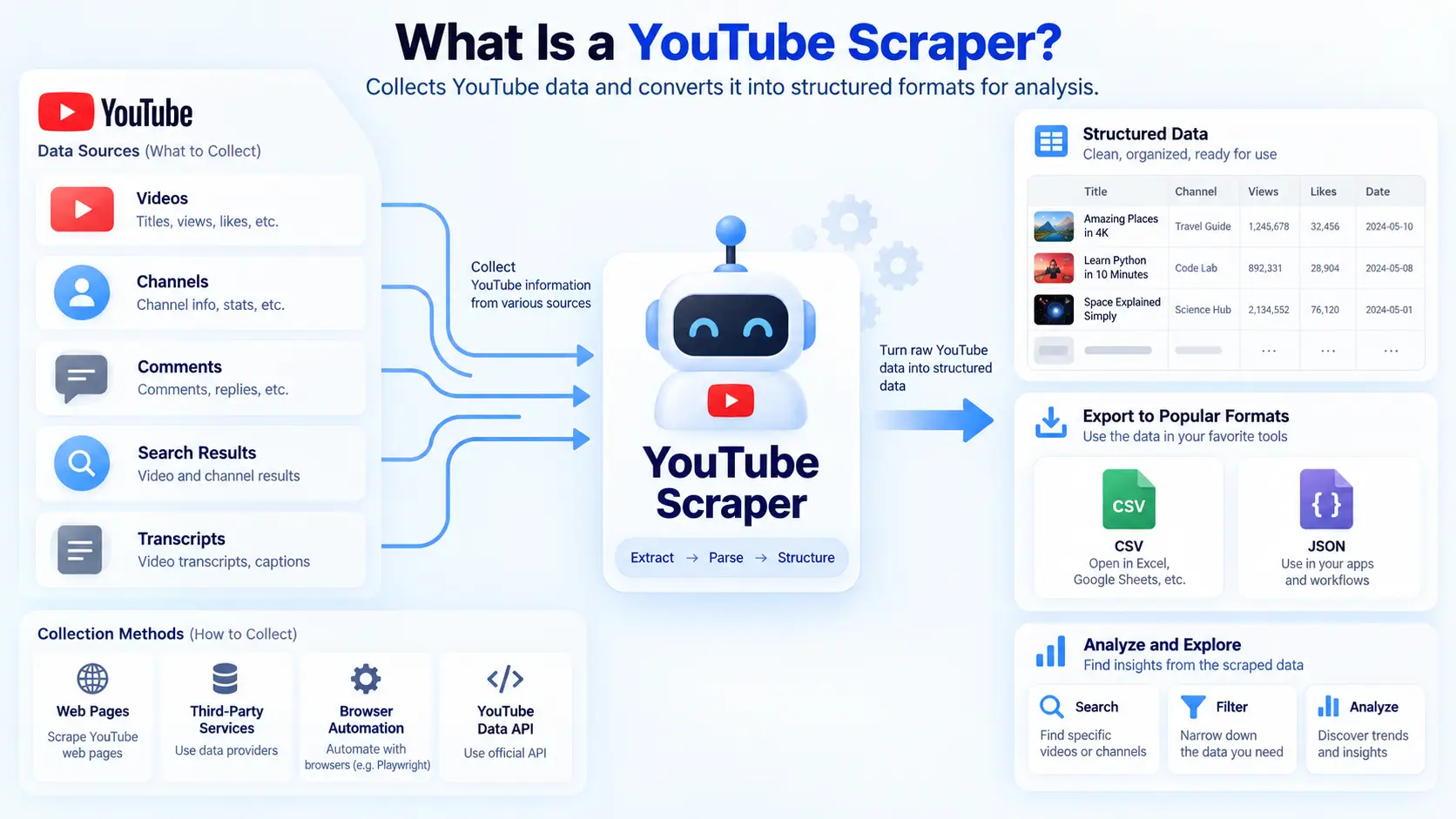
A YouTube Scraper is a tool or script that collects information related to YouTube videos, channels, comments, search results, or transcripts. The collected data is usually converted into a structured format so it can be searched, filtered, or analyzed. This can save a large amount of time when the project involves more data than a person could reasonably copy by hand.
Not every scraper works in the same way. Some tools read information from YouTube web pages, while others use third-party services or browser automation. The official YouTube Data API takes a different approach by giving developers documented access to supported YouTube resources.
How a YouTube Scraper Works
Most YouTube Scraper workflows begin with an input. That input might be a video URL, channel URL, playlist, keyword, or list of video IDs. The scraper then looks for specific fields, extracts the values, and saves them in a structured result.
Imagine that a marketing team wants to study 300 videos about AI writing tools. Opening each video manually would take hours, and the team could easily miss details or copy numbers incorrectly. A scraper can collect fields such as video title, channel name, publish date, views, likes, description, and video ID in one repeatable workflow.
Some YouTube scraping tools work through the website itself. Others use APIs to request structured data. The official YouTube Data API, for example, provides endpoints for videos, channels, playlists, comments, and comment threads. The videos.list method can return fields such as title, description, channel ID, tags, and statistics when those parts are requested.
The difference matters because page-based tools depend on how YouTube pages are built. If YouTube changes its page structure or internal data flow, a scraper may need to be updated. API-based methods usually return cleaner structured data, but they come with quotas, permissions, and platform rules.
What YouTube Data Can Be Scraped?
The type of data you can collect depends on the tool. For video research, common fields include video titles, descriptions, URLs, video IDs, channel names, publish dates, durations, views, likes, comment counts, tags, and categories. These fields can support content analysis, topic research, and competitor monitoring.
Comments are another common target. A YouTube comments scraper may collect comment text, usernames, dates, like counts, reply counts, and comment IDs. The official commentThreads.list endpoint can also return comment threads and supports pagination when more results are available.
This data can be useful in a real marketing project. For example, a software company could collect comments from several review videos about its own product and competing tools. The team could then search for repeated complaints such as high prices, difficult setup, missing features, or poor support, which may reveal product issues that are not obvious from view counts alone.
Transcripts can provide another layer of information. A YouTube transcript scraper can turn available captions into searchable text, which makes it easier to study what creators actually discuss inside a video. This can help with keyword research, topic discovery, competitor content analysis, and large-scale text classification.
Transcript access is less predictable than basic metadata. Some videos have no subtitles, some use auto-generated captions, and some transcript methods depend on unofficial interfaces. Copyright and permitted use should also be considered before storing or republishing large amounts of transcript text.
YouTube Scraper vs YouTube API
A YouTube Scraper and the YouTube Data API can sometimes collect similar information, but they are not the same type of tool. The official API provides documented access to supported YouTube resources and is usually easier to validate because the fields and request methods are clearly defined. It is a good starting point when your project only needs data that YouTube already exposes through its API.
Quota is one factor to consider. Google currently states that videos.list costs one quota unit per request, while commentThreads.list also costs one unit. Projects using the YouTube Data API generally receive a daily quota allocation, and some methods use far more units than simple list requests.
A third-party YouTube scraper API may be more convenient when you want a ready-made system that handles requests, retries, data parsing, and export. This can reduce development time, especially when the data needs to move directly into a database or analytics tool. The trade-off is that you depend on another provider's pricing, supported fields, and maintenance.
The best choice depends on the project rather than the tool name. If the official API already provides the video statistics you need, there may be no reason to build a separate scraper. If your workflow needs a different output structure, browser interaction, or another supported collection method, a third-party tool may be easier to manage.
Best YouTube Scraper Tools in 2026
There is no single YouTube Scraper that works best for every user. A marketer collecting comments from 20 videos has very different needs from a developer processing hundreds of thousands of records. The right choice depends on the amount of data, the type of data, your technical skills, the output format, and how often the task needs to run.
For most users, the main choice is between no-code tools, scraper APIs, and Python-based tools. Each option can work well when it matches the size and complexity of the project. It is usually better to test a small sample first instead of choosing a tool only because it claims to support very large jobs.
No-Code YouTube Scraping Tools
No-code YouTube scraping tools are useful for marketers, researchers, and content teams that do not want to build their own scripts. These tools usually provide a form or dashboard where users add video URLs, choose data fields, set limits, and run the task. The results can then be downloaded or sent to another service.
Apify's YouTube Comments Scraper is one example. Users can add one or more video URLs, limit the number of comments collected, sort comments, and export the results to formats such as JSON, CSV, or Excel. The tool currently collects information such as comment text, usernames, posting dates, like counts, and replies.
This setup can work well for audience research. Suppose an e-commerce brand wants to study comments under 40 product review videos. Instead of reading thousands of comments one by one, the team can collect them in one dataset and search for repeated product questions, complaints, or buying concerns.
Bright Data also provides a YouTube Scraper API that can be used through a control panel without building the full collection system from scratch. Its current product supports videos, channels, comments, and structured output in formats such as JSON, NDJSON, and CSV. The service currently advertises a free allowance of 5,000 records per month, although pricing and limits may change.
For people who want a broader browser-based data collection option, DICloak also provides an AI Crawler for web scraping. It allows users to provide a page and task instructions instead of building the entire workflow from code. DICloak's own documentation describes this feature as a no-code crawler that can organize extracted information into structured output.
YouTube Scraper APIs
A YouTube scraper API is often a better fit when collected data needs to move directly into another system. Instead of downloading a file manually, a developer can send a request, receive structured data, and store it in a database or analytics pipeline. This makes recurring jobs easier to automate.
The official YouTube Data API should be reviewed first. A developer could store a list of video IDs and use videos.list to request updated public information on a schedule. Another process could use commentThreads.list to collect comment threads for selected videos.
Third-party scraper APIs can reduce the amount of infrastructure a team needs to maintain. Bright Data's current YouTube Scraper API accepts target URLs and returns structured records, while also supporting API calls, webhooks, and cloud delivery. Its product page currently lists Python, Node.js, HTTP requests, and multiple delivery formats.
A scraper API is especially useful when the project runs repeatedly. For example, a brand-monitoring system could check selected YouTube channels every day and send new records into an internal dashboard. The developer still needs to validate the results, but the data collection step becomes easier to connect with the rest of the application.
Python YouTube Scrapers
Python is useful when you need more control over the collection and processing workflow. A Python YouTube scraper can be connected to a database, combined with text analysis, or scheduled to run at regular times. The main trade-off is that Python solutions usually require more maintenance than a managed service.
For transcript projects, youtube-transcript-api is a well-known example. Its current documentation says it can retrieve manual and automatically generated transcripts, work with different languages, translate supported transcripts, and return structured transcript data. It does not require the official YouTube Data API key for its basic transcript workflow.
The same project also gives an important warning. It uses an undocumented part of the YouTube web client, so there is no guarantee that the method will continue to work if YouTube changes the interface. That makes it useful for some projects, but it also means developers should expect occasional failures and updates.
Another popular technical tool is yt-dlp. It can extract a wide range of video information, but recent YouTube changes have made some workflows more complex. The yt-dlp project currently documents YouTube's increasing use of Proof of Origin, or PO Tokens, and notes that some formats and features may not work without them.
This is a useful reminder for anyone building a custom YouTube Scraper. A script that works today may not work forever, even if the code itself has not changed. YouTube can change page structures, request rules, token requirements, and internal endpoints, so maintenance should be part of the plan from the beginning.
How to Use a YouTube Scraper
A successful scraping project usually starts with a clear question, not a large list of URLs. If you do not know what you want to learn, it is easy to collect large amounts of data that never get used. Defining the goal first also makes it easier to choose the right YouTube Scraper and the right data fields.
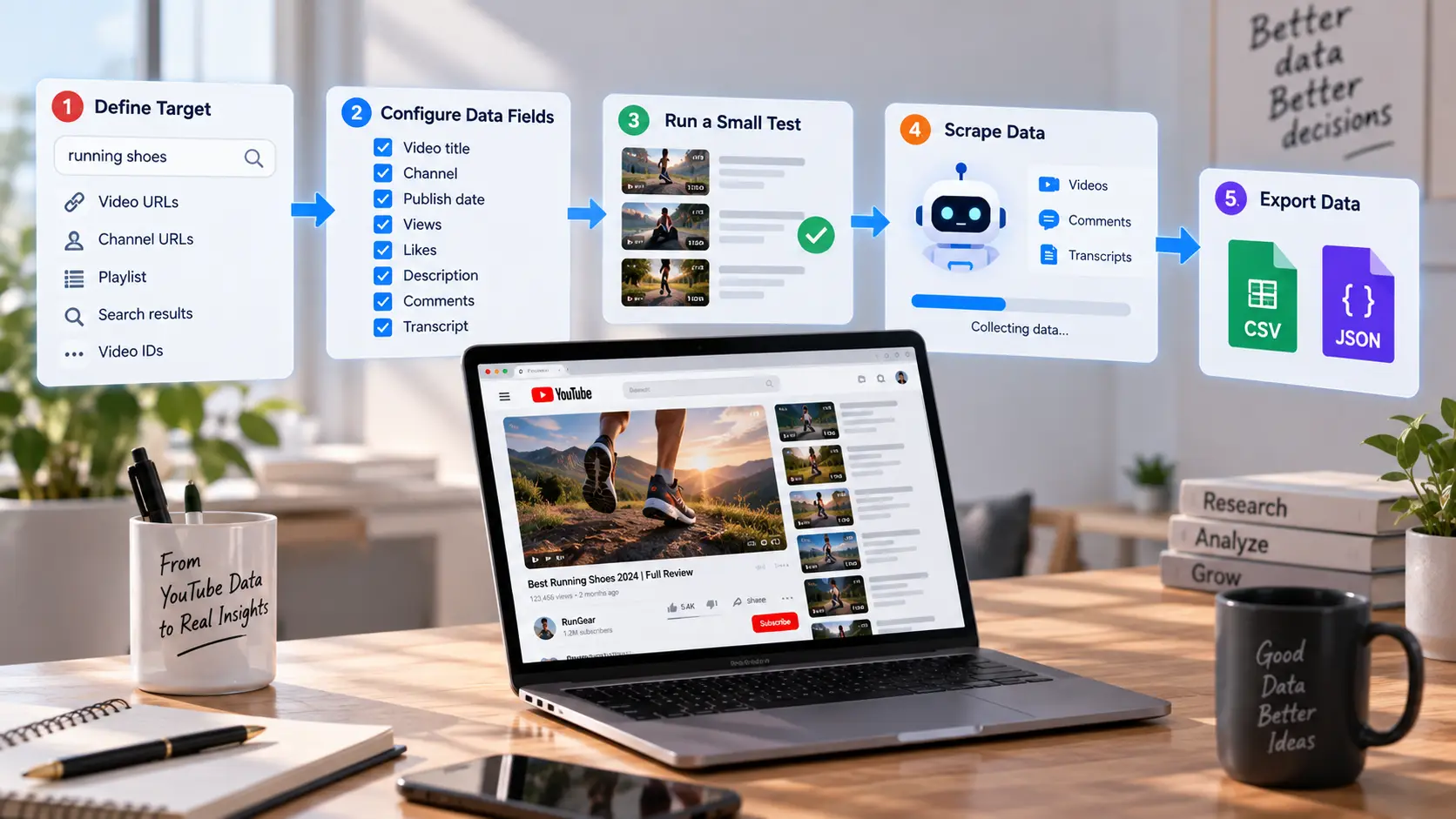
Start small even if your tool can process thousands of records. A small test makes it easier to catch missing fields, wrong formats, duplicate records, or unexpected results. Once the test data looks correct, you can increase the size of the job with much more confidence.
Set Up and Configure Your YouTube Scraper
The first step is to define the target. Imagine that you want to research YouTube videos about running shoes published during the past six months. You may begin with 100 video URLs, several channel URLs, or a list of video IDs collected from search results.
Next, decide what information is actually needed. If the goal is content research, video title, channel, publish date, views, likes, description, and URL may be enough. If the goal is customer research, you may also need comments, reply counts, or transcript text.
Run a small test before collecting everything. Ten videos are usually enough to see whether the fields are correct and whether any data is missing. Open a few original YouTube pages and compare the visible information with the scraped records before you trust the larger dataset.
This step may feel slow, but it prevents bigger problems later. If your date format is wrong on ten records, it is easy to fix. If the same problem appears after collecting 200,000 records, the cleanup becomes much more expensive.
Scrape YouTube Videos, Comments, and Transcripts
Video metadata is usually the easiest type of YouTube data to collect. The official videos.list method can return supported information through fields such as snippet, statistics, and contentDetails. This makes it useful for projects that compare video titles, dates, engagement numbers, and other public attributes.
Comments need more planning because popular videos can have thousands of responses. The official commentThreads.list endpoint supports pagination, and larger comment sections may require multiple requests. If you need individual replies, the comments.list endpoint can also be used for supported comment records.
A YouTube comments scraper can make this workflow easier when the goal is research rather than API development. For example, a marketing agency could collect comments from product review videos and then group them by common questions, positive reactions, and negative feedback. The analysis may reveal why viewers like one product and reject another.
Transcripts should normally be treated as a separate task. A YouTube transcript scraper can help convert available captions into structured text for keyword research, topic analysis, or internal research. However, users should check both transcript availability and permitted use before storing or reusing large amounts of copyrighted content.
Export YouTube Data to CSV or JSON
Once you scrape YouTube data, the output format should match what happens next. CSV works well when the data is flat and will be opened in Excel, Google Sheets, or another spreadsheet tool. It is easy to sort videos by date, views, channel, or engagement and share the file with non-technical team members.
JSON is often better for developers. It can keep nested information, which is helpful when one video contains several related fields or a comment has replies. JSON also fits naturally into APIs, databases, and automated processing pipelines.
Stable identifiers are important in both formats. A title can change, and two videos can have the same title, but a video ID gives you a more reliable key. The same idea applies to channel IDs and comment IDs when they are available.
It is also useful to save the collection date or timestamp. A video may have 25,000 views today and 80,000 views next month, so the number has little value without knowing when it was collected. Good YouTube data extraction keeps both the value and its context.
Common YouTube Scraper Problems and Risks
Even a strong YouTube Scraper can return incomplete results or stop working. Sometimes the scraper is broken, but sometimes the source data has changed or disappeared. Understanding the difference makes troubleshooting much faster.
Reliability is not only about keeping a script running. You also need to know whether the data is complete, current, and collected under the rules that apply to the platform and your project. This is especially important when the results will be used for business decisions.
Why YouTube Scrapers Stop Working
Page-based YouTube scraping tools depend on the structure of YouTube pages and internal requests. If YouTube changes how a value is loaded, a scraper may no longer find the same field. This can happen even when the URL and visible page look almost identical.
Unofficial libraries face a similar problem. The youtube-transcript-api project clearly states that it depends on an undocumented interface used by the YouTube web client. If YouTube changes that interface, the tool may temporarily stop working until the project is updated.
Technical changes can also affect video extraction tools. The yt-dlp project currently documents wider PO Token enforcement for some YouTube requests and warns that some features may not be available without the required token. This shows why scraping tools need regular updates instead of being treated as permanent scripts.
Not every missing result is a technical failure. A video may have become private, comments may be disabled, or subtitles may not exist. Before changing your code, check whether the original source still provides the information you expected.
How to Improve Scraping Accuracy and Stability
The simplest way to improve accuracy is to validate a small sample manually. Compare several scraped records with the original YouTube pages or official API responses. If the numbers or text do not match, find the reason before increasing the size of the job.
Keep the raw output as well as the cleaned version. Data processing can introduce errors of its own, especially when scripts change dates, remove duplicates, translate text, or combine several fields. Saving the original response gives you something to return to when a later step produces unexpected results.
Large jobs should also record failed targets instead of silently ignoring them. If you send 10,000 video IDs and receive 9,600 records, the missing 400 should be stored in a failure log. Otherwise, your final dataset may look complete even though an important group of videos is missing.
For recurring projects, separate collection from analysis. First collect and save the source data, then run cleaning, classification, sentiment analysis, or reporting as a second step. This makes it much easier to identify whether a problem came from the YouTube Scraper or from your own processing code.
YouTube Scraping Limits and Compliance
YouTube scraping has technical limits, but it also has policy limits. YouTube's API Developer Policies state that API clients must not directly or indirectly scrape YouTube applications or obtain scraped YouTube data. Developers using the official API must also follow YouTube's API Terms, privacy rules, security requirements, and data-handling policies.
Privacy deserves special attention when comments or user information are involved. YouTube's developer guidance says API clients should not harvest or store identifying user information without consent and must respect user privacy. Collecting only the fields that are actually needed can reduce both risk and unnecessary data storage.
For example, a sentiment study may only need comment text, date, and engagement information. It may not need to store a person's username for months. Asking whether each field is truly necessary is a simple way to build a cleaner research workflow.
Transcripts require similar care. Publicly visible captions are still content, and collecting text for internal topic analysis is different from copying full transcripts and republishing them elsewhere. A reliable YouTube Scraper workflow should consider technical accuracy, platform rules, privacy, and copyright together.
Improve YouTube Scraping with DICloak
For some teams, collecting the data is only one part of the problem. They may also need to manage different browser sessions, proxy settings, client projects, and automation scripts without mixing everything together. In these cases, browser organization can be as important as the scraper itself.
DICloak can act as a browser-management layer for approved data workflows. Its main value here is not replacing the YouTube Data API or changing YouTube's rules. It provides Browser Profiles, proxy configuration, and Local API tools that can help keep different browser-based projects organized.
If browser isolation is part of your research setup, this guide to an antidetect browser for web scraping explains how separate browser profiles can fit into larger data workflows. The same idea can be useful when several projects or team members need their own settings and sessions.
Separate Scraping Tasks with Browser Profiles
DICloak uses separate Browser Profiles to keep browser data and settings organized. Its Local API can list Browser Profiles and filter them by information such as group, proxy type, proxy host, exit IP, status, and platform. This gives teams a clearer way to separate one research project from another.
For example, a research team might use one Browser Profile for a competitor-analysis project and another for testing a browser-based data tool. A separate Profile could be assigned to a client project so cookies, sessions, and browser settings do not become mixed with unrelated work.
This approach is also useful when more than one person works on the same research process. Instead of opening every task inside one normal browser, each project can have its own labeled Profile and settings. The benefit is cleaner organization, not more aggressive data collection.

Configure Proxies for YouTube Scraping
DICloak supports different proxy modes at the Browser Profile level. Its current documentation lists No Proxy, Custom Proxy, Saved Proxies, and API extraction, while the Local API supports proxy types such as HTTP, HTTPS, and SOCKS5.
This can help teams keep network settings tied to the correct project. For example, one browser-based research task may use a company network connection, while another approved regional project uses a specific proxy setup. Keeping those settings inside separate Profiles makes accidental configuration changes easier to avoid.
For users who need more background, DICloak's content on proxy and web scraping workflows covers proxy-related topics such as scraping infrastructure and network performance. A proxy should still be treated as a network tool rather than a way to ignore platform limits.
The same rule applies to a YouTube Scraper. Changing the network path does not change YouTube's policies, copyright rules, or privacy obligations. The goal should be stable and organized infrastructure for permitted tasks.

Integrate DICloak with Python and APIs
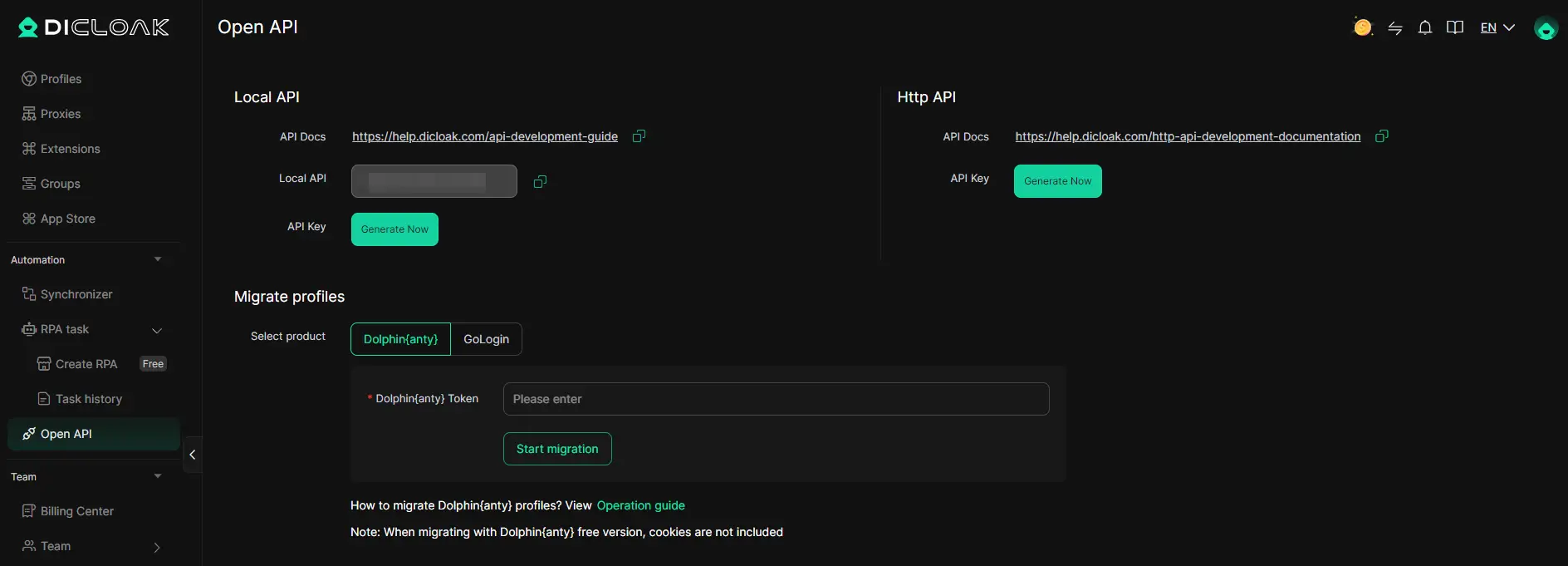
Technical teams can connect DICloak to their own automation through the Local Open API. The current development guide includes examples for Python with Playwright and ChromeDriver, Node.js with Puppeteer, and Java with ChromeDriver. It also documents actions such as listing Browser Profiles, opening them, connecting automation tools, interacting with browser windows, and closing sessions.
This can fit into a larger Python workflow when browser interaction is required. A script could request a specific Browser Profile through the Local API, open that Profile, connect Playwright, complete an approved browser task, save the result, and close the Profile. The data-processing part can then continue in Python without mixing browser management logic into every step.
DICloak's Browser Profile API and proxy interface also make it possible to read Profile and network configuration programmatically. That can help larger teams keep naming, grouping, proxy assignment, and automation rules consistent across many projects.
The most reliable setup is usually a layered one. Use the official YouTube Data API when it already provides the information you need, choose a suitable YouTube scraper API or other permitted tool when the project requires a different workflow, and use Browser Profiles only when browser-based work actually needs them. This keeps the process easier to test, easier to maintain, and much easier for a team to understand.
FAQs about YouTube Scraper
Q1: What is a YouTube Scraper?
A YouTube Scraper is a tool or script that collects public data from YouTube, such as video titles, descriptions, views, comments, channel information, publish dates, and available transcripts. The data can then be saved in formats like CSV or JSON for research, analysis, or reporting.
Q2: What data can a YouTube Scraper collect?
A YouTube Scraper can collect different types of data depending on the tool. Common examples include video metadata, channel information, comments, reply counts, search results, playlists, engagement data, and transcripts. Some YouTube scraping tools also allow users to select only the fields they need.
Q3: Is a YouTube Scraper the same as the YouTube Data API?
No. A YouTube Scraper may collect information from web pages, browser automation, or third-party scraping services, while the YouTube Data API provides official and documented access to supported YouTube data. If the information you need is available through the official API, it is usually worth checking that option first.
Q4: Can a YouTube Scraper collect comments and transcripts?
Yes, some YouTube Scraper tools can collect comments, replies, and available transcripts. A YouTube comments scraper can help with audience or sentiment research, while a YouTube transcript scraper can turn available captions into structured text. However, comments may be disabled and some videos may not have transcripts.
Q5: How do I choose the best YouTube Scraper in 2026?
Choose a YouTube Scraper based on the data you need, the number of videos you plan to process, your technical skills, and the output format you prefer. No-code tools are easier for beginners, scraper APIs work well for automated workflows, and Python tools offer more control. You should also consider data accuracy, maintenance, YouTube rules, and whether the tool can export data to CSV, JSON, or your database.
 Web Proxy Tools
 Free Tools
 Cookie Plugin
 UA Generator
 MAC Address Generator
 IP Generator
 IP Address List
 2FA Code Generator
 World Clock
 Anonymous Check
 WebRTC Leak Test
 UUID Generator
 Free Web Proxy Site
 Proxy Checker
 FB Ad Checker
 AI Web Scraping
 Free SMM Tools
 Twitter Shadowban Checker
 Instagram Name Checker
 UTM Generator
 Username Generator
 AI Hashtag Generator
 LinkedIn Headline Generator
 Social Media Image Resizer