Choosing an android emulator always starts with a simple but inconvenient task, to find an option that really works on your PC without constant lags, crashes and unexpected conflicts with drivers. Most popular solutions like Bluestacks, LDPlayer or Nox may look the same in reviews, but in practice, the difference manifests itself already at the installation stage: one does not start Google Play, another does not support the desired game, the third does not allow you to change the graphics settings at all.
But the most common miscalculation is to focus only on reviews or the rating "the best android emulator", without checking compatibility with specific applications and hardware. Here it is easy to run into a situation when, for example, an android emulator for PC like MEmu perfectly pulls office tasks, and for mobile games it becomes useless due to unstable operation with the accelerometer or the inability to set up controls.
In fact, if you just download any android emulator and hope for luck, you can lose more time and nerves than if you immediately understand the nuances: what parameters really affect performance, how to properly configure the profile, and what to do if the standard startup methods do not work. It is especially important to assess security risks in advance, emulators often require access to system resources, and this is the easiest way to make a mistake.
To understand how to choose a truly working option and not get unexpected restrictions, it is worth starting with the most basic comparison criteria.
What is an android emulator and why do you need it in 2026?
Android emulator is a program that runs the mobile version of Android directly on your computer. In fact, it makes a "virtual smartphone" out of your PC, allowing you to run Android apps and games without a physical phone. In 2026, the demand for such solutions has only grown: more and more tasks require working with several mobile accounts at the same time or testing apps on different versions of Android.
Basic functions and principles of operation of the android emulator
- Recreates the Android environment on Windows, Mac or Linux, simulating the operation of a real phone.
- Allows you to run mobile apps, games, instant messengers, and services directly from your PC, often with keyboard and mouse support.
- Allows you to quickly switch between different "virtual devices", saving time on manual resettings and configuration.
Who and when needs an android emulator
The most frequent users, gamers, developers, testing specialists, as well as marketers and affiliates working with mobile traffic. For example, if you need to quickly test the operation of an application on an outdated version of Android or massively launch advertising campaigns in mobile services, you can't do without an emulator. An important nuance here: not every emulator is equally stable or safe for different tasks, budget options often have failures, incompatibility with the necessary services, or difficulties with setting up a proxy. To be honest, if you plan to work with dozens of accounts or automate processes, you should choose not on the principle of "which is the first one", but taking into account the specifics of your scenarios and possible limitations.
Most of the limitations and subtleties pop up only after the first launch, so it's important to understand in advance not only the opportunities but also the pitfalls that you will have to face. The next section will help you figure out what risks and limitations there are when using emulators in 2026.
What are the risks and limitations when using android emulators?
Almost always, pitfalls with emulators pop up where they were least counted on, account blocks, malfunctions, data leaks. If you do not learn about the typical risks in advance, you can lose not only time, but also access to important information.
Why accounts can be blocked when working through an emulator
Platforms quickly recognize emulation if device fingerprints match template configurations or are often repeated. Even if the account is created manually, the mass appearance of similar digital fingerprints almost always leads to restrictions. Some services ban immediately, others only 1-2 days after suspicious activity.
Performance and compatibility limitations
The most common problem is the mismatch between system requirements and the real capabilities of the emulator. For example, on a laptop with 8 GB of RAM and integrated graphics, even the launch of a simple application can take minutes, and games do not start at all or slow down obscenely. Graphics are a different story: many emulators do not support hardware acceleration on old video cards, which is why the interface lags, and some functions become unavailable. There are situations when the controls work normally only with the mouse, and an attempt to configure the keys leads to crashes. A test run often does not give a complete picture, some bugs appear only during long-term operation or after a Windows update. If you install an android emulator for PC without taking into account such nuances, you can stumble upon a situation where half of the necessary applications do not start, and support does not solve anything.
Data security and privacy
- Downloading an emulator from an unknown site often ends with the installation of hidden software that is difficult to remove.
- When launched, the emulator requires access to the entire disk and microphone , if the application is not verified, it is a risk to personal data.
- Transferring logins, passwords, or payment information through an emulator can fall into the wrong hands if there are malicious modules in the system.
The most common scenario is that a person downloaded a "light version" from the forum, as a result, he got not only an emulator, but also a hidden miner or keylogger, which is not so easy to notice.
If you want to figure out which android emulator is really suitable for tasks without unnecessary risk, you should know in advance where failures occur most often and what you should beware of.
How to choose an android emulator for your tasks: what to pay attention to?
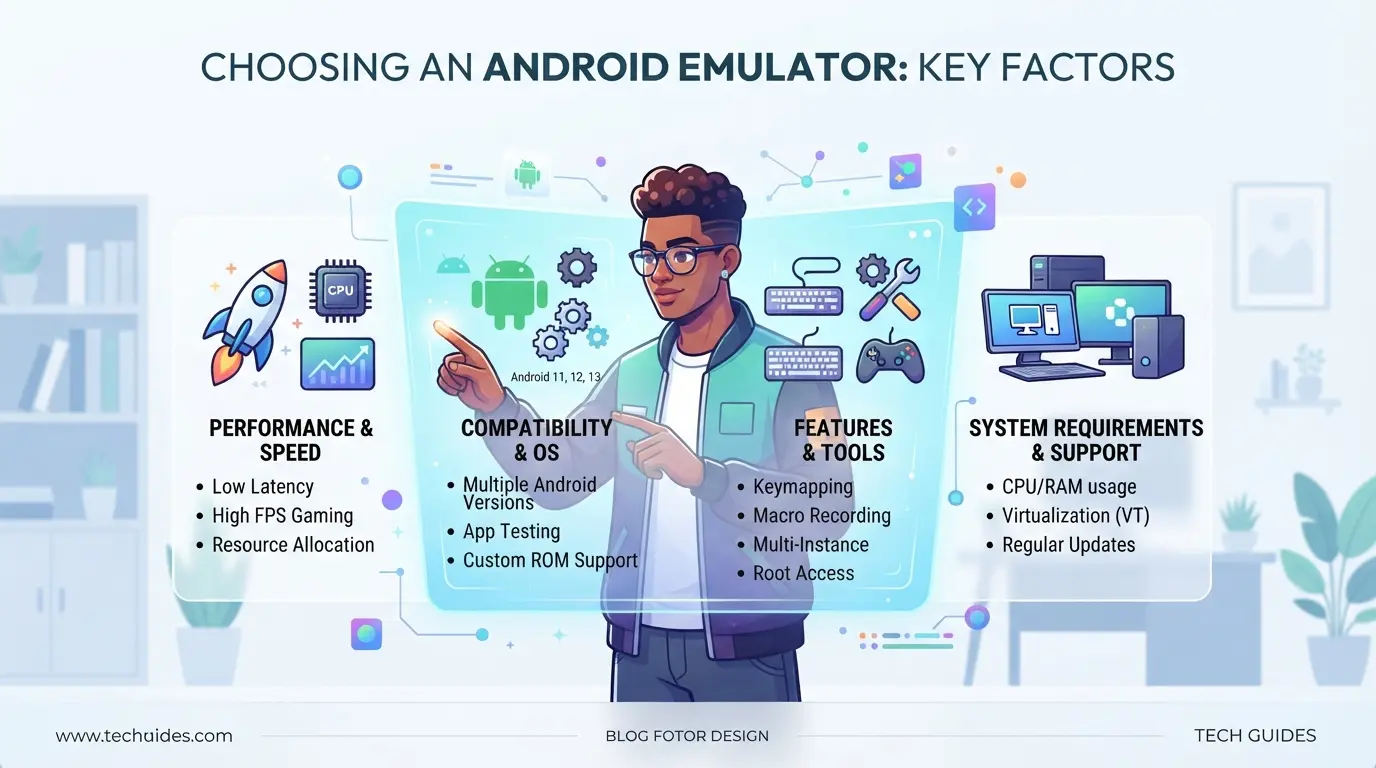
Not all emulators are created equal for different scenarios. Before you download the first option you come across, it's worth evaluating real-world tasks, running games, testing applications, automation, or working with multiple profiles. If you don't check the key parameters beforehand, you may encounter lag, incompatibility, or even security risks.
Selection criteria: performance, game support, stability
For gaming tasks, it is critical to check whether the emulator supports the desired version of Android and can work with an accelerometer, gamepad, or touch input. If automation or testing is planned, stability and the ability to flexibly configure profiles are important. Most of the problems arise when the chosen emulator does not pull the necessary applications or crashes in complex scenarios, so it is better to immediately check compatibility with specific games and test tools.
OS compatibility and hardware requirements
Make sure the emulator supports your operating system: Windows, Mac, or Linux, Check the minimum CPU and RAM requirements, Compare recommended specs: Often, you need at least 8GB of RAM and SSD to work properly
Security and availability of official updates
Download the emulator from unofficial sites, a direct path to infecting the system. It is better to choose options that have regular updates and a transparent history of changes. Without up-to-date patches, it is easy to run into vulnerabilities or compatibility problems with new applications.
Proxy support and flexible environment configuration
If you need to run anonymously, for example, to work with accounts or test geo-services, choose an emulator with the ability to configure proxies and environments.
- Check the IP change feature or proxy integration
- Make sure that you can change the parameters of the device: model, IMEI, region
- Enjoy the ability to create multiple independent profiles for parallel work
If you take into account these checklists, you will be able to choose an option that will not let you down at a critical moment and will allow you to proceed to installation without unnecessary surprises. The next step is to figure out how to properly install and configure the selected emulator on a PC.
Step-by-step instructions: how to install and configure an android emulator on a PC
Not every android emulator for PC runs the same way: even top-end builds may not start without the correct proxy setup or basic rights. Below, a working sequence of actions, where each step closes typical failures on the first installation.
Choosing and downloading an emulator
- Find the official website of the desired emulator (for example, BlueStacks, LDPlayer or NoxPlayer). Do not download from forums and "compilations", often unwanted software arrives along with the file.
- Make sure that you are downloading the latest version for your OS. Older builds often do not support new applications and may not run.
- After downloading, check the file for viruses through Virustotal, sometimes even "promoted" images come with surprises.
Installation and Basic Setup
- Run the installer as an administrator, otherwise the virtualization driver may not be installed.
- During installation, uncheck unnecessary boxes, third-party applications are not needed, they only load the system.
- After the first start, make sure that the emulator starts without critical errors. If "VT-x is disabled" appears, enable virtualization in the BIOS.
Configuring proxies and security settings
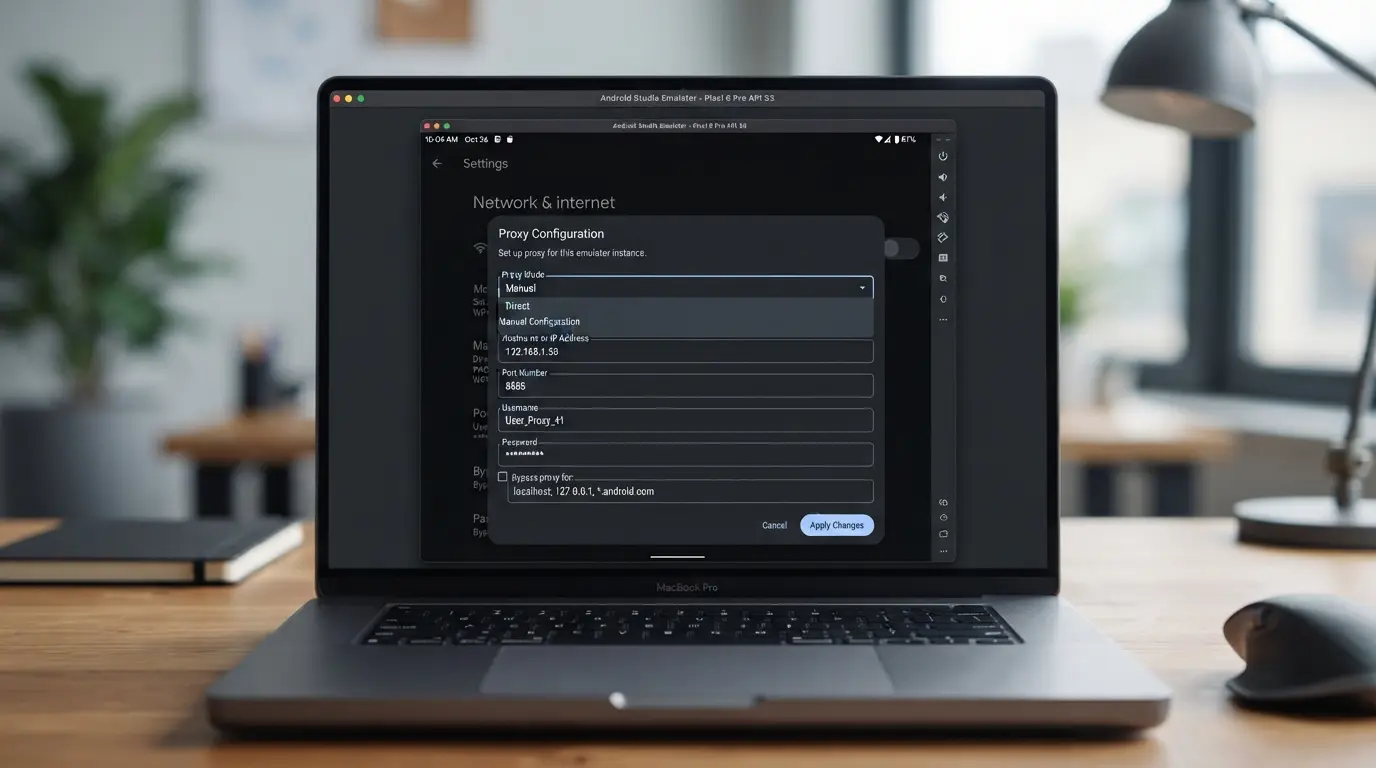
- In the emulator settings, open the "Network" or "Proxy" tab, here you can set a proxy for applications.
- Use only private proxies. Free ones are often blacklisted, which is why accounts are quickly banned.
- Disable Windows Shared Folders and Sync , this reduces the risk of accidental data leaks.
Installing Applications and Testing Operation
- Download the APK of the app you want only from official or trusted websites.
- Drag and drop the APK into the emulator window or use the built-in "App Center".
- Run the app and check if it works stably – sometimes old emulators don't pull new versions.
How to reduce the risks of blocking and increase anonymity when working with an android emulator
If you run services through an emulator without preparation, the platform will quickly notice suspicious activity and block the account , the reason is most often typical configuration and behavior errors that are easy to fix in advance.
Why platforms recognize emulators and how to avoid it
It will not work to simply copy the behavior of a "live" device: most emulators leave their fingerprints, for example, unique hardware parameters, lack of sensors or the same network settings. The most effective, do not leave typical traces and do not use default configs.
The role of proxies and unique digital fingerprints
If you launch multiple accounts with the same IP or template device fingerprint, the system will quickly link them.
- A typical problem: a mass ban or manual verification of accounts after 1-2 logins.
- It is safer for each account to use its own proxy and individual device settings.
Typical mistakes that lead to blocks
The main reason for mass blocks is the same type of actions from dozens of copies, especially if free proxies are used. At the same time, accounts are often banned within a day.
When to use separate profiles and anti-detect browsers
If you need long-lived accounts or plan mass work, you can't do without isolating profiles and unique parameters, this is the minimum level of protection against quick blocking.
How to organize secure work with multiple accounts through an android emulator and DICloak
If you run multiple accounts only through an emulator, even with different devices, isolation between them often suffers: settings, fingerprints, and the network overlap. For those who need to completely separate profiles and connect separate proxies for different accounts, for example, in affiliate marketing or SMM, DICloak solves this issue at the level of browser profiles: each profile is separate, device signals and network are configured separately, and the accounts themselves within the emulator remain under the control of the user.
Profile isolation and fingerprinting in DICloak
Operators can create separate browser profiles in DICloak and set unique parameters for each: operating system, language, time zone, screen resolution, font list, and canvas or WebGL key fingerprints. This allows you to work with different accounts so that their digital footprints do not overlap. Profiles are stored and configured separately: none of them affects the others, even if they are on the same platform. It is important to remember that the scope is limited to the browser profile, DICloak does not control applications or the emulator directly.

Configuring Your Own Proxy for Each Profile
For each profile in DICloak, you can manually specify your own proxy, HTTP, HTTPS, or SOCKS5. The user enters the address, port, login, and password, and then checks the connection: the system immediately shows from which IP the traffic will go and which region it corresponds to. This approach helps to avoid mass IP matches for different accounts and flexibly manage connections. DICloak does not provide proxies, all parameters are entered by the profile owner, and the setting itself does not affect the operation of applications in the emulator.

If basic isolation of profiles and proxies is still not enough, it is worth considering alternative approaches to working with accounts.
When an android emulator is not suitable: alternative solutions and scenarios
If the task requires an exact repetition of the behavior of a real device or stable operation with heavy applications, an android emulator will often fail. In such cases, it is worth considering other options so as not to waste time.
When to choose a physical device or a cloud service
| Scenario |
Emulator |
Physical Device |
Cloud service |
| Camera, Sensor, NFC Testing |
Limited |
Full Access |
Partially available |
| Launching resource-intensive games |
Depends on PC |
Stable |
Stable |
| Mobile Payment Verification |
Not supported |
Works |
Not always |
For complex tests and heavy games, the physical device gives maximum accuracy and fewer surprises.
Anti-detect browsers and profiles for complex tasks
When it is important not just to repeat the Android interface, but to achieve complete isolation, for example, to work with dozens of accounts or automation, it is easier to use anti-detect browsers and separate profiles. Linking with a proxy allows you to bypass restrictions that the android emulator for PC does not solve directly.
The next block will cover frequently asked questions about choosing and configuring emulators.
Frequently Asked Questions About Android Emulators
If you have any technical questions about android emulators, here are the short answers to what most often causes doubts among users.
Which emulator to choose for a low-end PC?
Table, popular options and minimum requirements:
| Emulator |
RAM (GB) |
CPU |
| LDPlayer |
2 |
Intel/AMD, 2 cores |
| MEmu |
2 |
Intel/AMD, 2 cores |
| BlueStacks |
4 |
Intel/AMD, 4 cores |
(Official sites: LDPlayer, MEmu, BlueStacks)
How do I update apps inside the emulator?
Updates happen through the built-in Google Play or manual installation of APKs. If the Play Market doesn't work, download the latest APK from a trusted site.
Why can't the emulator see all USB devices?
Often, the problem is with Windows permissions or driver incompatibility. Check that the device appears in Device Manager.
FAQs about android emulator
Is it possible to use an android emulator for banking apps?
Most banking apps don't work on emulators due to security measures. Even if the app runs, your data may not be protected. An android emulator does not provide the same level of protection as a real phone. It is recommended to use banking services only on physical devices.
What is the fastest android emulator for gaming in 2026?
For 2026, users often choose LDPlayer and BlueStacks X for gaming due to their high speed and stability. LDPlayer is especially popular among PUBG Mobile and Genshin Impact players. The best android emulator for gaming depends on your PC, but these two solutions most often receive positive reviews.
Is it safe to download emulators from unofficial sites?
Downloading android emulators from unknown sites is dangerous. You risk getting malware or trojans. Always choose official developer sites such as bluestacks.com or ldplayer.net. Check the website address and avoid suspicious links on the internet.
Can I run multiple emulators at the same time?
Yes, you can run multiple instances of emulators at the same time if your PC has enough RAM and CPU. Many emulators, such as NoxPlayer and LDPlayer, support multi-instances. Keep an eye on the system boot, if there are not enough resources, games and programs may slow down.
How to set up a proxy in an android emulator?
In most emulators, the proxy is configured through the network settings menu or using third-party apps inside the emulator. In BlueStacks, go to → network settings and enter the proxy parameters. In NoxPlayer, proxies can be set through the Android system settings or using special proxy applications.
Choosing the right tool for you depends on your needs and preferences, so it's worth trying out a few popular options and evaluating their functionality in practice. Start with the solution that seems the most convenient and meets your requirements. Try DICloak for free
 Web Proxy Tools
 Free Tools
 Cookie Plugin
 UA Generator
 MAC Address Generator
 IP Generator
 IP Address List
 2FA Code Generator
 World Clock
 Anonymous Check
 WebRTC Leak Test
 UUID Generator
 Free Web Proxy Site
 Proxy Checker
 FB Ad Checker
 AI Web Scraping
 Free SMM Tools
 Twitter Shadowban Checker
 Instagram Name Checker
 UTM Generator
 Username Generator
 AI Hashtag Generator
 LinkedIn Headline Generator
 Social Media Image Resizer