You log in to your Pinterest account from a fresh browser profile, maybe on a new device, maybe inside an antidetect tool, and get hit with a restriction notice almost instantly. Sometimes it’s just a warning; sometimes your Pinterest account is locked after new browser login, and you’re stuck in a loop of “verify your identity” popups. For operators running multiple projects or handling clients, a Pinterest account temporarily restricted after device change can derail your whole workflow.
The common advice is that using a new browser, or even a new profile, should keep accounts separated and safer. But that’s not what happens here. Instead, logging in from a different browser profile often triggers automated reviews, especially if browser signals and IP details don’t match Pinterest’s expectations. You might think careful prep, matching cookies, syncing location, or using a familiar user agent, should avoid the problem, but even small mismatches can flag your session.
What actually matters is how Pinterest’s systems compare your device fingerprint to your account’s history. Things like time zone, language, WebGL data, and proxy IP all leave patterns. If you skip aligning these or overlook a subtle mismatch, the platform can flag your login. The result: your Pinterest account flagged after logging in from different browser setups, sometimes with no way to appeal.
Understanding where most operators trip up with new profiles makes it easier to avoid getting your Pinterest account restricted after login from a new browser profile. Here’s what you need to check before your next login attempt.
Why Does Pinterest Restrict Accounts After Logging in from a New Browser Profile?
If your Pinterest account got restricted right after logging in from a new browser or device, it usually means the platform detected a mismatch between your login environment and the patterns linked to your account history. Even if your password is correct, Pinterest’s systems automatically flag logins that don’t fit the expected device fingerprint, location, or session behavior. The restriction kicks in because the platform sees your session as risky, not just unfamiliar.
How Pinterest Detects Unusual Login Activity
Pinterest relies on automated checks that compare new logins to past account activity. Here’s what typically triggers a review:
- Sudden changes in IP address or geolocation, especially if they shift to a different country or region
- Device fingerprints that don’t match previous logins, this includes browser type, operating system, and hardware signals
- Time zone, language, and WebGL data that differ from your usual patterns
These mismatches act as warning signs, leading to instant restrictions or forced verification.
Common Triggers for Immediate Restrictions
The most frequent cause is logging in from a browser profile that looks completely new to Pinterest. Imagine you’ve always used your phone, but now you log in from a desktop with a fresh profile and a proxy. The platform spots a device it’s never seen, a new IP address, and fingerprint signals that don’t line up. If you switch profiles or devices too often, the risk is even higher, Pinterest sees this as possible account sharing, automation, or a stolen login.
Here’s where operators run into trouble: they focus on matching the big items like IP or browser version but miss smaller details such as font lists or hardware concurrency. Pinterest combines these signals into a behavioral fingerprint. If the new environment doesn’t overlap with your past logins, the platform may lock your account right away, sometimes before you even finish loading the dashboard. The real risk isn’t just a new device, it’s the combination of subtle mismatches that flag your session as suspicious.
Restrictions can happen after a single login, especially if the platform sees a sudden jump in location or browser configuration. If this happens, you’ll face verification prompts or temporary locks, sometimes with no clear way to appeal. The next section covers what you’ll actually see when your account is restricted.
What Happens When Your Pinterest Account Is Restricted?
A restricted Pinterest account isn’t the same as a full suspension. You’ll lose access to key features but can still log in and view your profile. The main thing to watch: restrictions often block actions like posting or messaging, but your account isn’t gone, yet.
Types of Pinterest Account Restrictions
- Temporary restrictions usually last from a few hours to several days. These often follow logins from new browser setups or flagged devices.
- Permanent restrictions lock down major functions for good. You’ll see these after repeated mismatches or terms violations.
- Feature limitations include blocked pins, disabled messaging, follow bans, or comment locks. You can view boards, but actions are off-limits.
How to Tell If Your Account Is Restricted
You’ll spot a restriction by warning banners such as “Some features are temporarily unavailable” or “Your account has been restricted.” Unlike a suspension, you can still access your profile, saved pins, and settings. Try posting or following, if you get a pop-up error or your action doesn’t register, you’re under restriction. Sometimes the platform lets you browse but blocks all outbound actions. A full suspension, on the other hand, cuts off access entirely and usually triggers a login failure or a “This account does not exist” message. If you’re seeing partial lockouts but can still navigate your account, you’re dealing with a restriction.
The real challenge is that restrictions are often silent, no email, just a blocked feature. That’s why operators need to test each account function after logging in from a new browser or device. Missing these silent blocks can leave you thinking your workflow is safe when your Pinterest account is actually flagged after logging in from a different browser.
Understanding these signs makes it easier to spot risks early. Next, you’ll want to know what threats come with logging in from a new browser or device.
What Are the Main Risks of Logging in from a New Browser or Device?
The biggest reason accounts get flagged after a device or browser change is that platforms like Pinterest check for patterns, if your device, IP, or session data suddenly shifts, it signals possible account takeover or bot activity. Even a careful operator can get caught if the setup isn’t close enough to past logins.
Browser Fingerprint Mismatch
A browser fingerprint is a unique mix of your device’s settings, things like user agent, language, time zone, WebGL, and fonts. When you log in from a new browser or profile, these signals often change. Pinterest’s risk systems see a big mismatch and may freeze your account to prevent fraud.
IP Address and Location Changes
A sudden switch in IP address or location is one of the quickest ways to lose platform trust. If you usually log in from New York but next time show up from Singapore, even with the same credentials, Pinterest may view it as a hacked account or bot farm. Using proxies can help, but mismatched proxy locations, unreliable residential IPs, or rotating your IP too often will backfire. For example, logging in from an IP block known for automation tools, or changing your country twice in one day, often triggers a verification or lockout. If your account history shows one region but the login comes from another, the risk of restriction jumps sharply. Some users try to fix this by buying residential proxies, but if the region doesn’t match your profile’s past activity, the system can still flag you. Operators managing lots of accounts often hit this wall when they re-use proxies or forget to check the previous login’s location.
Cookie and Session Data Loss
Pinterest tracks session data and login cookies to tell if you’re the same user. Starting with a clean browser profile or clearing cookies wipes this history. Without those cookies, logging in looks like a first-time device, which often means extra verification or temporary restriction.
- No session cookies means Pinterest won’t recognize your device, expect to answer security questions or verify by email.
- A fresh profile skips saved device trust, increasing review risk.
- Old accounts with no recent cookie history often trigger a lock after login from a new browser.
Next up: see how to prep your environment so a new login won’t get flagged.
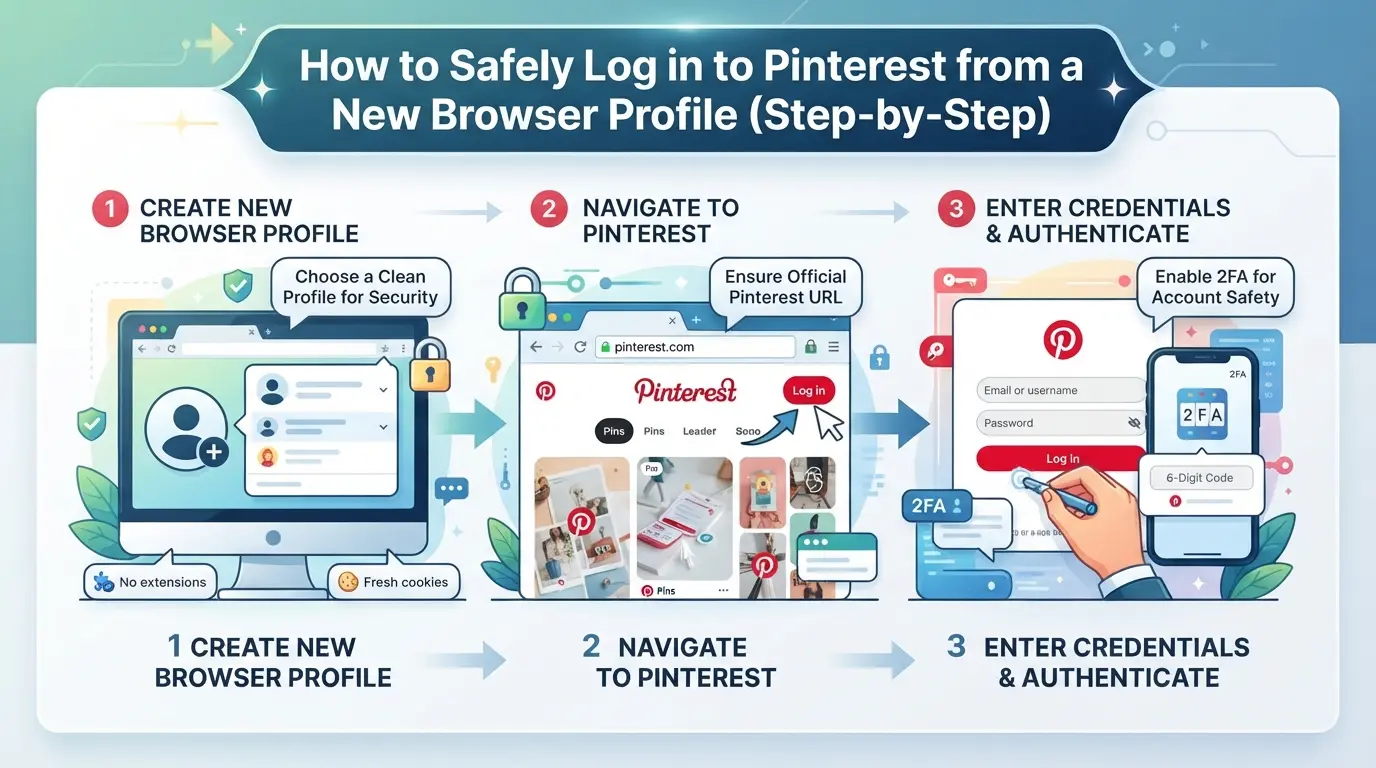
How to Safely Log in to Pinterest from a New Browser Profile (Step-by-Step)
Getting a Pinterest account restricted after login from a new browser profile usually comes down to mismatched details, fingerprints, network, or login habits, that don’t line up with your account’s usual pattern. Here’s a step-by-step workflow operators actually use to reduce the chance of an instant lock or review.
Prepare Your Browser Environment
- Clone your past environment if possible. Reuse cookies and session data from your last successful login. If you skip this, Pinterest will treat you as a brand-new device.
- Match browser details: Set your user agent, screen size, font list, and OS to resemble your last device. Mismatches in these signals often trigger security checks.
- Align time zone and language: Set both to match your previous logins. A sudden change in either is a classic red flag.
- Double-check WebGL and canvas data: If your hardware fingerprint changes, Pinterest may lock you out for extra verification.
Check and Configure Your Network Connection
- Use the same IP address or a location-matched proxy. Logging in from a new country or city, especially right after a device change, almost always lands you in review.
- Stick with one network per session. Switching Wi-Fi or proxies mid-login looks like account sharing.
- Avoid mobile hotspots or dynamic IPs unless your last login used the same. Sudden network changes signal risk.
Login Sequence and Verification
- Open the Pinterest login page and enter credentials slowly. Bots or rapid form fills are a dead giveaway.
- If prompted for email or phone verification, complete it promptly. Don’t switch devices or browsers during this step, Pinterest tracks the full chain.
- If you see a restriction or review message, stop. Don’t keep retrying; this stacks risk. Note the exact error for recovery.
What to Avoid During the First Login
- Don’t mass-follow, pin, or like posts right away. New environments with instant activity look suspicious.
- Avoid switching profiles or devices for at least 24 hours after a successful login. Frequent changes reset trust.
- Skip automation or scripts until the environment is “warmed up” with basic activity.
If your Pinterest account is flagged after logging in from a different browser, the next move is to carefully work through recovery steps, covered in the following section.
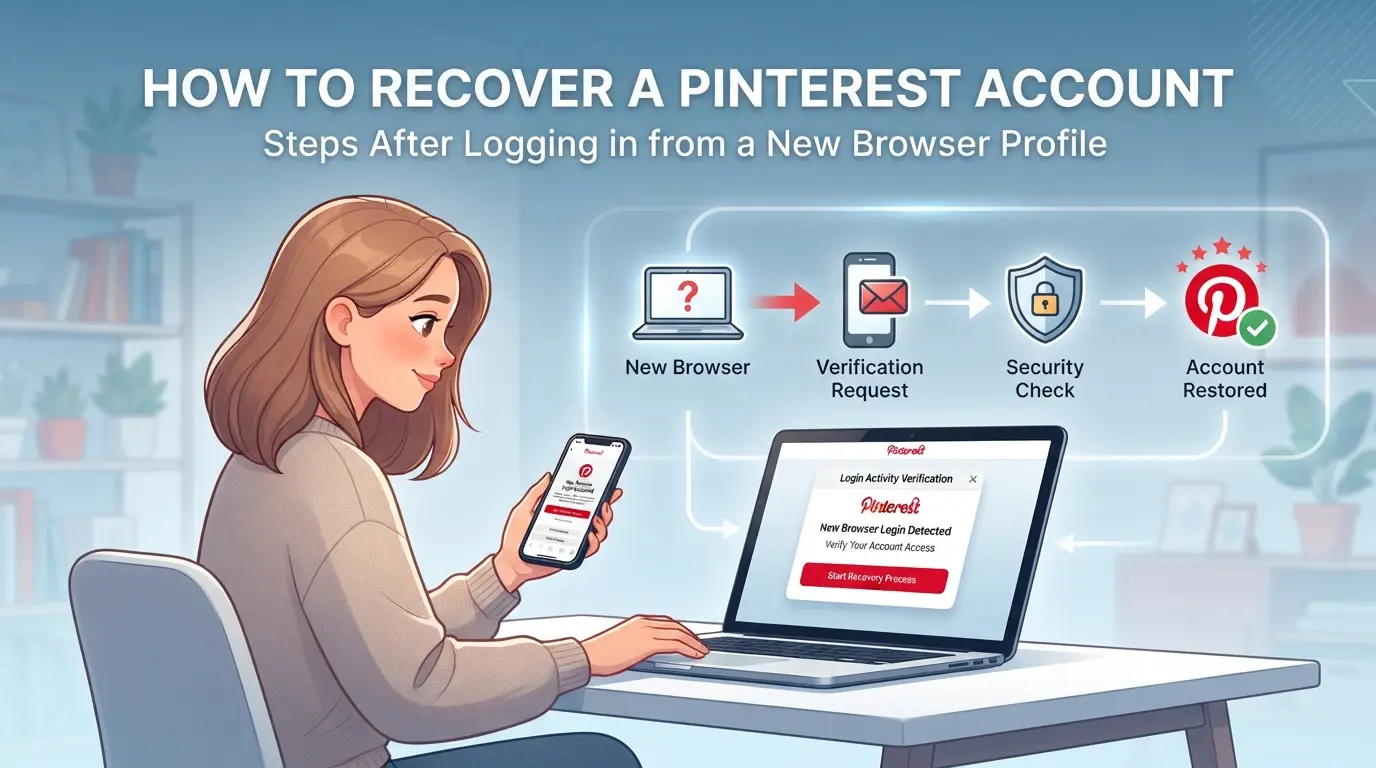
How to Recover a Pinterest Account Restricted After Logging in from a New Browser Profile
Getting locked out after a new browser profile login is common, most people see a warning or lose access within minutes. You can still get your Pinterest account back if you act quickly and follow the right steps.
Check Your Email for Restriction Notices
- Open your email inbox linked to your Pinterest account.
- Search for any new message from Pinterest, look for subjects like “Account restricted,” “Suspicious login detected,” or requests for verification.
- If you find a verification request, click the link or follow instructions right away. Delays can cause the link to expire.
- If you see no email after 10 minutes, check spam and promotions folders. Missing these can stall your recovery.
Submit an Official Appeal to Pinterest
- Go to the Pinterest Help Center.
- Choose “Login issues” or “Account access” as your problem type.
- Clearly state you were restricted after logging in from a new browser or device. Include the exact error message if possible.
- Attach any screenshots or emails from Pinterest, these help support understand your case faster.
Wait for Review and Avoid Further Suspicious Activity
- Most reviews take 24-72 hours, but weekend requests often push to Monday.
- Do not try to log in from other new browsers or devices while waiting. This can trigger more flags and slow down recovery.
- Check your account status daily, but avoid repeated login attempts, too many tries can lock you out longer.
What to Do If Your Appeal Is Denied
- Wait at least 48 hours before submitting a second appeal, multiple back-to-back requests can make support less responsive.
- If you’re denied twice and see no option to recover, consider creating a new Pinterest account with a new email.
- If your account was tied to business assets, document all denial messages for later review, this speeds up escalation if you contact support by phone.
How Social Media Teams Use DICloak to Isolate Pinterest Account Workflows
Teams handling multiple Pinterest accounts often run into restrictions after logging in from new browser profiles. If you also manage several accounts for clients or campaigns, separating each login environment becomes less a convenience and more a need. Instead of shuffling profiles in a single browser or risking cross-account signals, teams can use DICloak to keep browser storage, device fingerprint, and network configuration distinct for each account. This workflow doesn’t change Pinterest’s own restriction logic, it limits overlap and makes it easier to trace issues when a pinterest account is restricted after login from a new browser profile.
Separating Each Pinterest Account with a Unique Browser Profile and Fingerprint
Operators can create a new browser profile in DICloak for each Pinterest account. Each profile holds its own storage and lets you set fingerprint details such as time zone, language, WebGL, and screen size. This means if one account triggers a restriction, other sessions aren’t affected. The scope is limited to browser-profile access; it does not manage Pinterest accounts or change platform decisions. 
Configuring a User-Owned Proxy for Each Profile
For workflows that need a separate network path, operators can set up their own proxy (HTTP, HTTPS, or SOCKS5) per profile in DICloak. Before logging in, you can test that the proxy connects and shows the expected region or IP. This step is managed by the operator, DICloak does not supply proxies or monitor their use. 
Done right, this setup lets teams pinpoint where restrictions happen and avoid common mistakes tied to shared browser profiles.
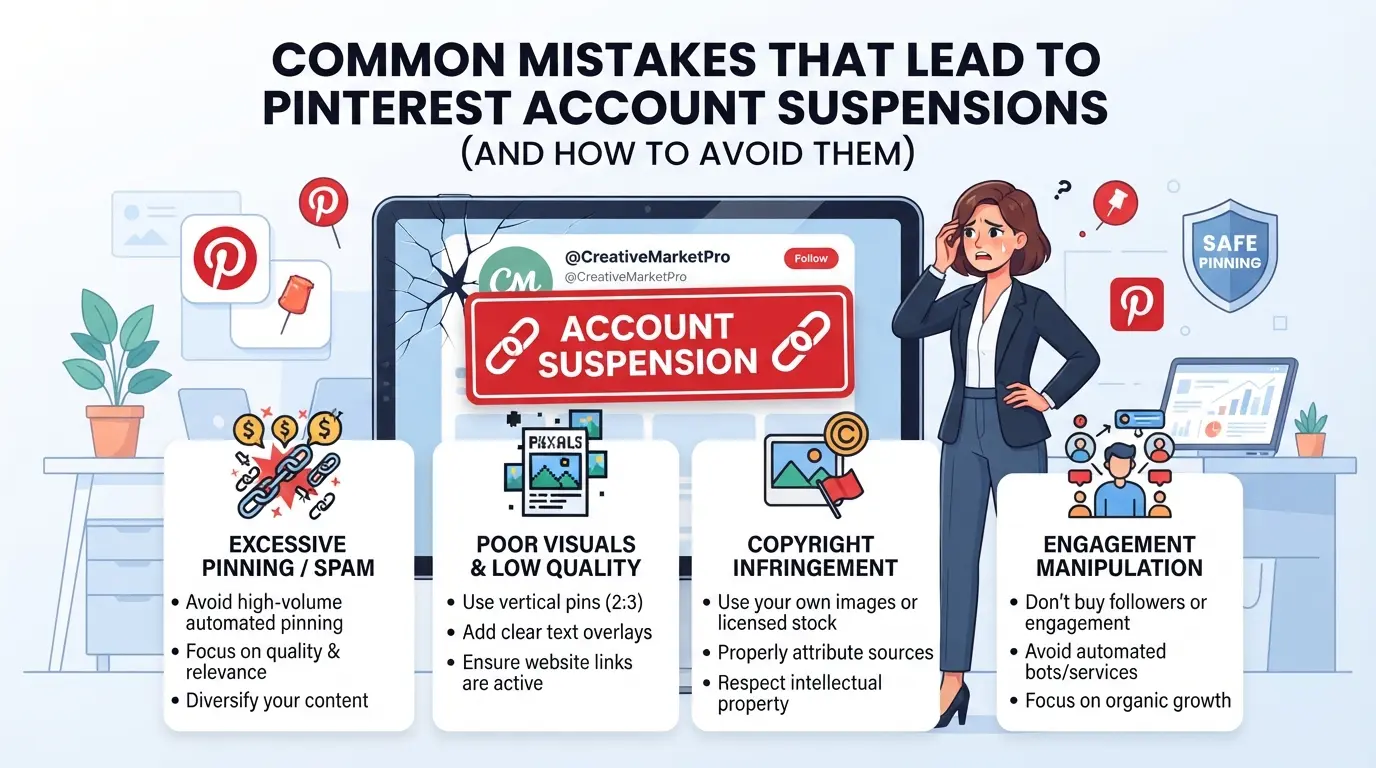
Common Mistakes That Lead to Pinterest Account Restrictions (and How to Avoid Them)
Switching devices or browsers too often almost always raises a red flag. Pinterest tracks your login history, if you log in from three locations in a week or switch browser fingerprints every day, their system sees it as suspicious. The fastest way to reduce risk is to keep your device, browser profile, and session settings consistent for each account.
Switching Devices or Browsers Too Often
Frequent changes look like account sharing or bot activity. Stick to one browser profile per Pinterest account, and avoid jumping between devices unless you have to.
Ignoring Verification Requests
- Respond to any email or in-app popups within 24 hours.
- Use the original device if asked for extra proof.
- Only click links from official Pinterest messages, fake prompts are common.
Using the Same IP for Multiple Accounts
Logging in with different accounts from one IP makes them easy to link. Use separate proxies or let each account stick to its own IP. If you share an IP, expect both accounts to get restricted.
Performing Bulk Actions Right After Login
A fresh session that posts, follows, or pins in bulk is a classic trigger. Checklist:
- Wait 10-15 minutes before starting any action.
- Spread out pins, follows, or posts over several hours.
- Avoid importing or exporting posts on the first login.
How to Prevent Future Pinterest Account Restrictions When Managing Multiple Accounts
Keep Device and Browser Profiles Consistent
Keep your time zone, language, OS, and device signals stable for each account. Pinterest flags unexpected changes, switching details too often triggers security holds.
Assign Separate Proxies to Each Account
- Use a unique proxy for every Pinterest account.
- Track which IP is assigned to which login.
- Never reuse the same IP across accounts, even for quick tests.
Respond Promptly to Pinterest Security Checks
Always verify your identity if Pinterest asks. If you’re locked out, act fast, delays make recovery harder and increase the chance of a permanent block.
Limit Risky Automation and Bulk Actions
- Warm up new accounts with low activity.
- Avoid mass posting or instant profile edits.
- Pause automation if you see warnings or captchas.
Frequently Asked Questions About pinterest account restricted after login from a new browser profile
Why does Pinterest restrict my account after logging in from a new browser profile?
Pinterest watches for sudden changes, like logging in from a new browser, device, or location. If it sees a login that doesn’t match your usual pattern, it may restrict your account. This helps prevent hacks and keeps your pins and personal details safe from unauthorized access.
How long does a Pinterest account restriction last after a new device login?
A Pinterest account restriction after logging in from a new browser profile can last from a few hours up to several days. Some temporary holds lift automatically, but if Pinterest needs you to verify your identity, you must follow their steps or submit an appeal for review.
Can I use proxies to avoid Pinterest account restrictions?
Proxies can help keep your IP address steady when logging in, which may reduce the risk of getting flagged. But if you change proxies often or use low-quality ones, Pinterest may still see your activity as suspicious and restrict your account for security reasons.
What should I do if my Pinterest account is restricted after logging in from a different browser?
First, check your email for any security alerts or instructions from Pinterest. You may need to verify your account using a code or answer some questions. If you can’t unlock it on your own, contact Pinterest support and submit an appeal to restore access.
Is it safe to manage multiple Pinterest accounts from one device?
It’s safer if each account uses a different browser profile, has its own device fingerprint, and connects through a private proxy. This makes it harder for Pinterest to link the accounts together, reducing the chances of your accounts being restricted or flagged.
If your access has been limited after logging in from a new browser setup, consider verifying your identity through the official channels or waiting out the temporary restriction period. For those who need more consistent privacy and smoother authentication across different platforms, exploring a dedicated browser profile manager can offer a safer and more reliable experience. Try DICloak For Free
 Web Proxy Tools
 Free Tools
 Cookie Plugin
 UA Generator
 MAC Address Generator
 IP Generator
 IP Address List
 2FA Code Generator
 World Clock
 Anonymous Check
 WebRTC Leak Test
 UUID Generator
 Free Web Proxy Site
 Proxy Checker
 FB Ad Checker
 AI Web Scraping
 Free SMM Tools
 Twitter Shadowban Checker
 Instagram Name Checker
 UTM Generator
 Username Generator
 AI Hashtag Generator
 LinkedIn Headline Generator
 Social Media Image Resizer