You try to pay on Etsy, but the checkout screen flashes red, your card gets declined, and the order doesn’t go through. Sometimes the message is vague: “payment failed,” “transaction not approved,” or just “esty payment declined.” You double-check your card, refresh, and nothing changes. It’s not just you, this problem crops up for buyers and sellers every week, often without a clear reason or fix.
What’s frustrating is how little the error tells you. One minute your bank says the card is fine, the next Etsy blocks the payment. Many users worry their account is flagged, or their bank has blocked them, but most times the root cause is hidden somewhere between platform settings, payment method quirks, or the checkout process itself. If you keep retrying without knowing what’s going on, you risk duplicate holds, confusion, or even temporary account restrictions.
The real issue is that Etsy’s payment system mixes several layers, card validation, billing address checks, fraud detection, and platform rules. Even small mismatches can trigger the “esty payment declined” error, making it hard to tell if it’s a one-off glitch or something you need to fix before placing another order. Knowing how each step works (and where it can fail) is what separates a quick fix from hours of wasted effort.
Here’s what actually causes etsy payment failed at checkout, and the fastest way to start troubleshooting.
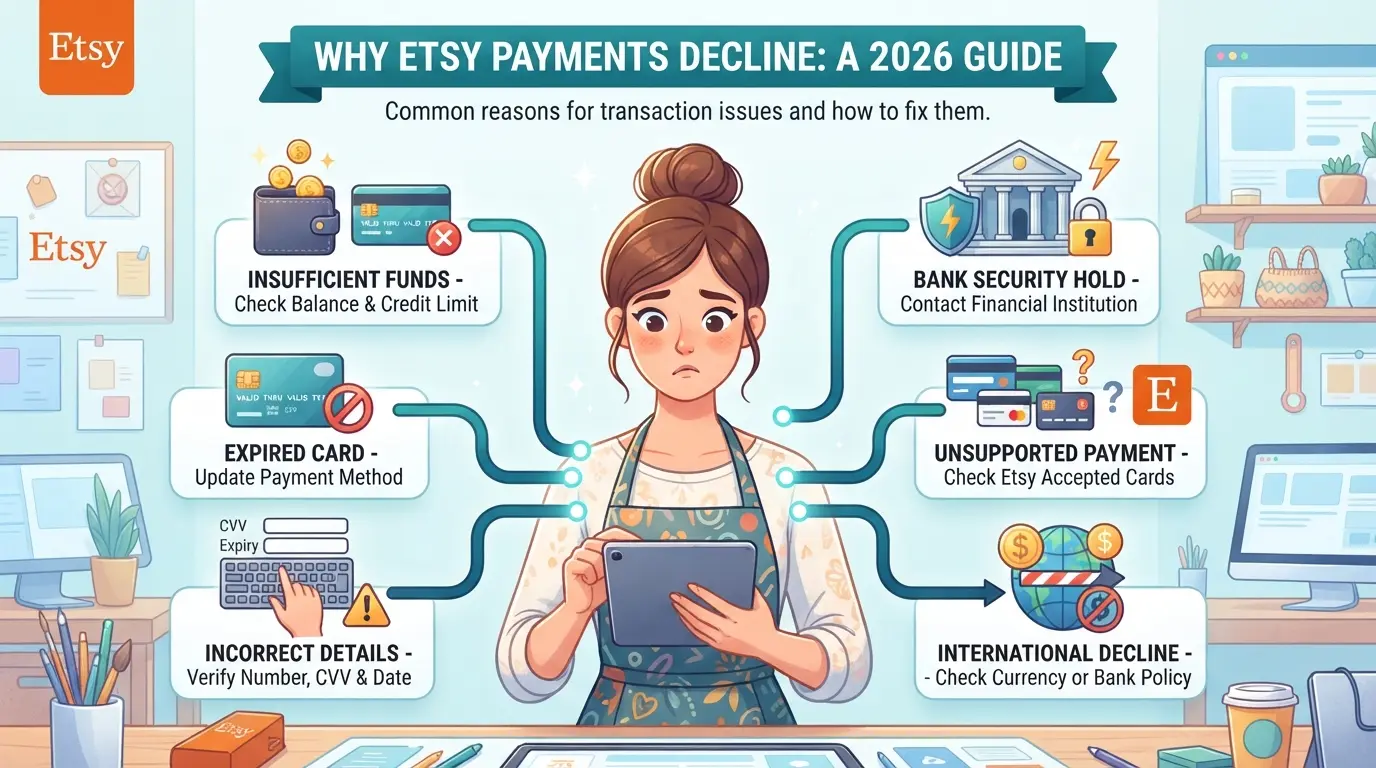
What Usually Causes an Etsy Payment to Be Declined in 2026?
Most payment declines on Etsy come from mismatched card details, bank security filters, or account-level flags. If your payment fails, it’s usually because one of these steps sees something off, whether it’s an expired card, a fraud warning, or a platform rule you didn’t know about. The fastest way to start fixing a payment decline is to pinpoint which layer triggered the block before you retry.
Card Issues: Expired, Insufficient Funds, or Blocked
A payment often gets declined because your card is expired, the balance is too low, or your bank flags the transaction as unfamiliar. If your card works elsewhere but not on Etsy, look for hidden holds or daily limits set by your bank. Sometimes, banks block purchases from new merchants or unusual locations without warning.
Bank Security and Fraud Checks
Banks have ramped up fraud detection since early 2026. Even small mismatches between your billing address and what’s on file can trigger a block. If you’re shopping from a new country, using a card for the first time, or the purchase amount is higher than your typical spend, the bank’s automated system may decide to stop the transaction. For example, a user in France tried to buy $300 worth of craft supplies with an American card and got declined, her bank flagged it as suspicious. If this happens, you’ll usually see a generic error at checkout. The problem is, retrying too many times can cause the bank to freeze your card temporarily. When you get a decline, check your banking app for alerts. If there’s no clear warning, call the bank, most releases can be handled in 10-15 minutes if you catch it early. But if you keep trying and trigger a fraud lock, you’ll spend hours waiting for manual review.
Etsy Platform or Account Problems
Sometimes Etsy itself blocks payments for reasons unrelated to your card or bank:
- Account isn’t fully verified (email, phone, or ID steps missing)
- You’ve hit a spending limit or triggered a risk flag (too many orders in a short window)
- Platform policy issues (restricted items, mismatched shipping info, or flagged past disputes)
If Etsy’s system declines a payment, you’ll often get a platform-specific error. In these cases, fixing your account settings or resolving any flagged issues is the only way forward.
Before retrying, confirm whether the error is from your card, bank, or Etsy account. That saves time and avoids duplicate holds or new restrictions, now you’re ready to walk through troubleshooting step by step.
How to Troubleshoot a Declined Etsy Payment: Step-by-Step Guide
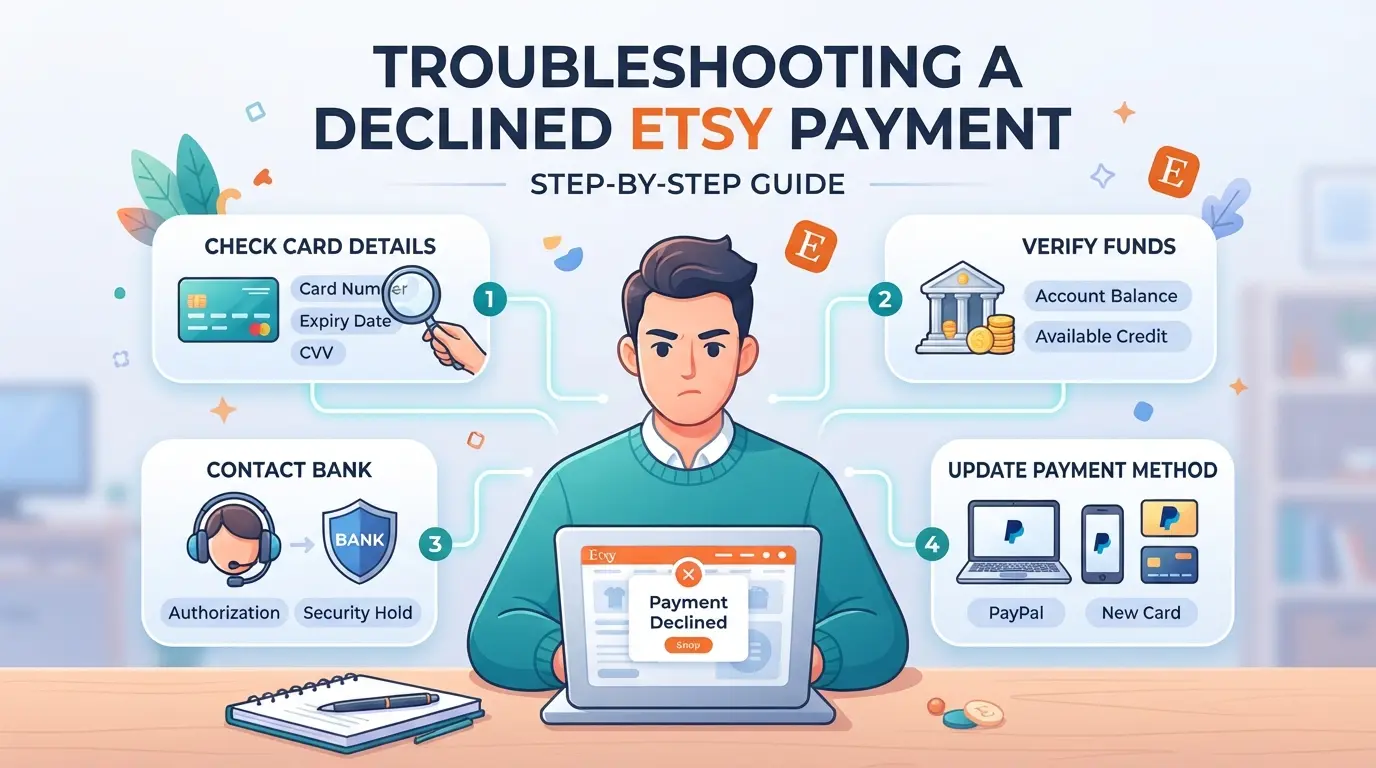
If your Etsy payment just failed, don’t keep clicking “retry”, fixing the problem starts with a quick check of the basics, then moving step by step through the possible causes. Here’s the process that actually works when you’re stuck at checkout.
Step 1: Double-Check Your Card Details and Balance
- Enter your card number, expiration date, and CVV again, one typo is all it takes for an instant decline.
- Open your banking app and check your current balance. Low funds or a daily spending limit will block the charge, even if the card works elsewhere.
- If your card has international or online restrictions, confirm they’re off. Some banks auto-block cross-border or “card not present” purchases.
Step 2: Contact Your Bank or Card Provider
- Call or message your bank’s fraud line and ask if they see a declined charge from Etsy. Sometimes a fraud system blocks the payment, but you won’t see a detailed reason on your end.
- If they confirm a block, ask them to whitelist Etsy for this card or transaction type. Banks often lift the block after a quick security check.
- Try the payment again within 15 minutes of your call, most banks reset their fraud flags in real time, but waiting too long can let new checks trigger again.
Step 3: Update or Change Your Payment Method on Etsy
- Go to your Etsy account’s payment settings and remove the problem card.
- Add your card information again, this clears any saved errors in Etsy’s cache.
- If the same error pops up, switch to PayPal or Apple Pay. These services avoid some card-specific blocks, especially if your main card keeps getting declined.
- Use a different card only if you’re sure the billing address and name match your Etsy account.
Step 4: Check for Account Restrictions or Verification Requests
- Look for any red banners or alert icons in your Etsy dashboard, these usually mean your account needs extra verification or has temporary restrictions.
- Open your Etsy inbox and check for messages about payment verification, suspicious activity, or account holds. These often land within minutes of a failed checkout.
- If Etsy is asking for ID, address confirmation, or a call-back, complete those steps before retrying payment, trying to pay again without clearing these can trigger more declines.
- If you see no alerts but still can’t pay, log out and back in, then retry. Session glitches can sometimes block payments even if everything else looks correct.
The trickiest part is figuring out whether the problem comes from your bank or Etsy’s side, if your card works on other sites but fails here, the next section explains what’s different about Etsy’s system and why some payments get blocked even when your card is fine elsewhere.
Why Some Etsy Payments Fail Even When Your Card Works Elsewhere
You might see your card work perfectly on Amazon, eBay, or food delivery sites, then run into a brick wall at Etsy checkout. That’s not just random luck. Etsy adds extra security checks that catch things your bank never flags, so a card that works everywhere else can still fail here.
Location, IP, and Device Mismatches
Etsy’s system is tuned for patterns, not just card validity. Here’s what triggers trouble:
- Using a device or browser you haven’t used with Etsy before, even if your card is fine elsewhere.
- Paying from a location that doesn’t match your usual login country, or your shipping address.
- Connecting from a network that looks suspicious, like public Wi-Fi or a proxy server.
If you switch devices or travel, Etsy can treat this as a possible account takeover. That alone can block the payment, even if everything else checks out.
Platform-Specific Fraud and Risk Policies
Etsy’s fraud engine doesn’t mirror your bank’s logic. It’s stricter about patterns that signal risk, especially around account history and payment behavior. For example, if your account was created recently, and you’re trying to pay with a card tied to a billing address in another country, Etsy’s risk team may flag this as high-risk, even if your bank approves the transaction.
A common scenario: you use a card saved to your account, but change your shipping address for a gift. Etsy sees the mismatch, and instead of letting the bank decide, blocks the payment at checkout. You’ll get a generic decline notice, but the real cause is platform-level risk, not a card problem.
That’s why retrying the same card often won’t help. The issue isn’t the card itself, it’s the signals around your session, device, and account profile. If you keep guessing, you risk hitting temporary blocks or having your account flagged for review. Up next, it’s worth seeing which mistakes trigger these declines most often and how to avoid repeating them.
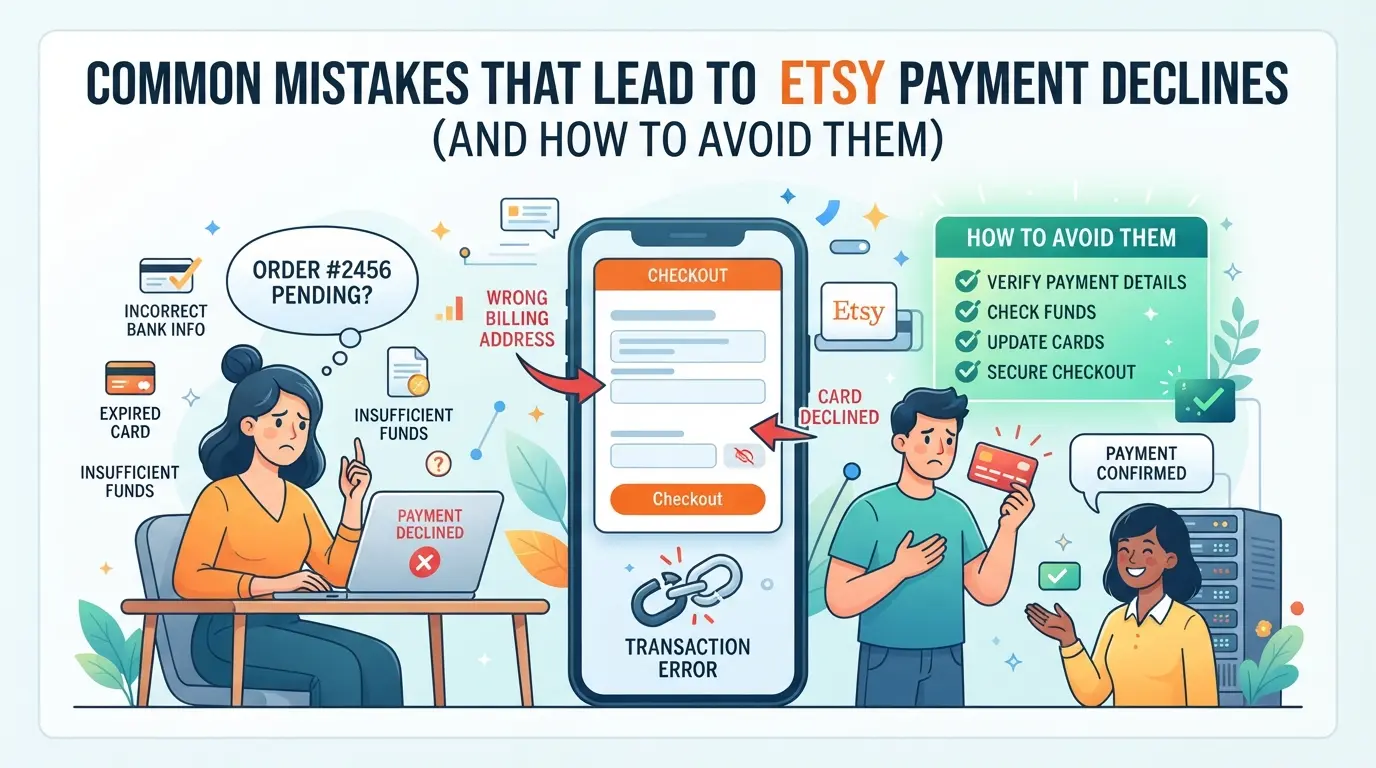
Common Mistakes That Lead to Etsy Payment Declines (And How to Avoid Them)
The quickest way to avoid repeat “esty payment declined” errors is to fix small mistakes before you check out, most failures come from preventable slip-ups.
Entering Incorrect Payment or Billing Information
Typos in your card number or billing address are still the top reason for failed Etsy payments. Even a single wrong digit or mismatched zip code can block the transaction. Double-check the card details and make sure your billing address matches what your bank has on file. If the shipping and billing addresses don’t match, Etsy’s system may flag the payment as risky, especially for international orders.
Using Unsupported or High-Risk Payment Methods
Some cards and banks just don’t work on Etsy. Prepaid cards are often rejected, virtual cards may fail at checkout, and banks from restricted regions can trigger instant declines.
- Check if your card is supported by Etsy (credit/debit from major networks).
- Avoid prepaid or virtual cards, these usually fail.
- Make sure your bank isn’t flagged by Etsy’s risk filters.
Ignoring Etsy Account Warnings or Verification Requests
Missing an email or delaying a required action is an easy way to get stuck. Etsy flags accounts that skip verification or ignore platform notices.
- Open all Etsy emails and notifications before paying.
- Complete any requested verification steps right away.
- Fix pending account issues (like address confirmation) before checkout.
Small mistakes can block your payment for days. Cleaning up these errors now makes the next section’s best practices much easier to apply.
How to Avoid Future Etsy Payment Declines: Best Practices for 2026
If you want your next Etsy payment to go through without issues, focus on the steps that actually prevent declines, not just quick fixes after the fact.
Keep Payment Information Up to Date
Expired or outdated cards are a top reason for failed checkouts. Go to your Etsy payment settings, double-check card numbers and billing addresses, and set a calendar alert for card expiration dates, missing a card update is the fastest way to trigger a decline. If you get a new card from your bank, update it in Etsy before trying to check out.
Use Consistent Devices and Networks When Checking Out
- Complete checkout from the same phone or computer you usually use for Etsy
- Avoid switching between public Wi-Fi and home internet during payment
- Don’t use proxy services unless you know how they affect payment reviews
Respond Promptly to Etsy or Bank Security Requests
If you get a verification text or email after a failed payment, act fast or your order may be canceled.
- Confirm identity requests from Etsy or your bank within 10 minutes
- Open your bank’s app to check for fraud alerts
- If asked for extra info, reply before retrying payment
Managing Multiple Etsy Accounts or Team Payments: Risks and Safer Workflows
Trying to run several Etsy accounts or let a team share payment duties sounds simple, but it’s the fastest way to trigger “esty payment declined” errors that don’t happen with solo use. If you skip the right safeguards, payment holds or sudden account reviews will hit when you least expect.
Why Multiple Accounts Can Trigger Payment Flags
Etsy tracks device IDs, IP addresses, and payment method fingerprints. If two accounts use the same card or log in from the same network, the risk jumps. Even copying cookies or switching devices too often can make the system link accounts, causing a chain of payment declines or temporary suspensions.
Best Practices for Teams Handling Etsy Payments
Sharing cards or letting anyone on the team pay from their own phone is a recipe for random holds or locked checkouts.
- If one person’s session crosses into another’s (same card, shared device), Etsy may freeze both accounts for review.
- Keep each account’s payment method, login environment, and device separate. Assign clear roles, avoid cross-use, and document who’s responsible for every transaction. This makes it easier to trace issues and reduces the chance of linked-account flags.
If you see a sudden “etsy payment failed” message after a handoff or a team member switches devices, pause all payments for 24 hours and review the login and payment history before retrying. This step alone can prevent a minor flag from turning into an account-wide freeze.
How E-Commerce Teams Can Safely Separate Etsy Account Payments and Workflows with DICloak
For sellers, agencies, or teams handling multiple Etsy or marketplace accounts, payment declines often come from the wrong environment setup, shared browser storage, mixed device signals, or accidental account overlap. If you manage more than one account, separating workflows is what keeps checkout errors, like “esty payment declined,” from snowballing into restrictions or confusion. DICloak gives operators a way to create isolated browser profiles, configure user-owned proxies, and set tight team permissions. The scope here is limited to browser-profile access and team control; it does not change the connected platform or payment system itself.
Isolate Each Account with Separate Browser Profiles and Fingerprint Settings
Operators can create a new browser profile in DICloak for each platform account and configure the profile’s fingerprint signals, such as time zone, screen resolution, interface language, and device memory. This setup keeps login sessions, cookies, and browser storage from crossing over between accounts. For example, a team managing multiple Etsy shops can set up one DICloak profile per shop, each with its own fingerprint configuration. The feature only affects browser profile separation; it does not guarantee platform acceptance or prevent account linkage.

Configure User-Owned Proxies for Each Profile
When an account workflow needs a consistent network layer, operators can assign a user-owned proxy to each profile in DICloak. You enter the proxy details, test the connection, and confirm the detected exit IP and time zone before starting that account session. For teams running several marketplace accounts, setting up distinct proxies per profile helps keep sessions independent. Proxy selection and management stay in your hands, DICloak only stores and applies the settings.

Team Permissions for Assigned Browser Profiles
Admins can organize team members into groups and limit access to specific browser profiles inside DICloak. For example, a staff member may only see and open the one Etsy account assigned to their group, reducing the risk of mixing up payment methods or sessions. Permissions cover actions inside DICloak; they do not replace platform-native controls.

If troubleshooting still leaves payments declined, the next section covers direct steps to resolve checkout errors.
What to Do If Your Etsy Payment Is Still Declined After Troubleshooting
If your Etsy payment is still declined after every fix, the next step is to document your attempts and prepare to contact support. This prevents wasted retries and speeds up resolution.
Contacting Etsy Support and Providing Documentation
- Gather screenshots of decline errors and payment receipts.
- List every troubleshooting step you tried, don’t skip details.
- Attach bank or card statements if Etsy asks for proof.
Considering Alternative Payment Methods or Accounts
Switching to a different card, PayPal, or partner may work, especially if your main card keeps failing. Trying a new account carries risk: Etsy’s system tracks device, IP, and billing info, so quick swaps can trigger extra verification or temporary holds. If all else fails, ask your bank if they blocked the charge before opening a new Etsy profile.
Frequently Asked Questions About esty payment declined
Why does Etsy keep declining my payment even after I fix my card?
Etsy may still decline your payment if their system flags your account for risk. This can happen if you switch devices, use a new IP address, or if your account has past payment issues. Even after updating your card, Etsy might block checkout if it thinks something looks suspicious or if your account has restrictions.
Can I use a prepaid or virtual card to pay on Etsy in 2026?
Etsy usually accepts prepaid and virtual cards, but many buyers run into problems. These cards sometimes get declined if they don’t have enough funds or if the bank blocks online or international use. Some virtual cards aren’t accepted because they don’t match billing info or lack 3D Secure support.
Will multiple failed payment attempts lock my Etsy account?
If you try several times and your payment keeps failing, Etsy might temporarily lock your account. This is to stop fraud. Too many declines in a row can trigger security measures, so wait before trying again or contact support to avoid getting locked out.
How can teams or agencies manage Etsy payments without triggering declines?
Teams should use separate staff accounts with proper permissions and avoid sharing logins. Always use the same device and IP when making payments. Make sure payment profiles are up to date, and don’t switch cards too often. These steps reduce the risk of etsy checkout declined errors.
Does using a proxy or different IP help with Etsy payment issues?
Using a proxy or changing your IP usually makes things worse, not better. Etsy watches for mismatched locations and may block payments as a fraud risk. Only use a proxy if you must, and make sure your billing address matches your payment details. This alone won’t fix etsy payment failed problems.
If your transaction doesn't go through, double-check your payment details, consider alternative payment methods, or reach out to your bank for assistance. Staying patient and methodical can help resolve the issue quickly so you can complete your purchase without unnecessary stress. Try DICloak For Free
 Web Proxy Tools
 Free Tools
 Cookie Plugin
 UA Generator
 MAC Address Generator
 IP Generator
 IP Address List
 2FA Code Generator
 World Clock
 Anonymous Check
 WebRTC Leak Test
 UUID Generator
 Free Web Proxy Site
 Proxy Checker
 FB Ad Checker
 AI Web Scraping
 Free SMM Tools
 Twitter Shadowban Checker
 Instagram Name Checker
 UTM Generator
 Username Generator
 AI Hashtag Generator
 LinkedIn Headline Generator
 Social Media Image Resizer