Seeing that dreaded “suspended” notice when you try to log into Instagram is incredibly frustrating, especially when it comes without any warning. If you rely on Instagram for work or manage accounts for clients, that feeling of panic is all too real. It can feel like the platform has locked you out without explaining what happened.
Having experienced more suspensions than I can count (and winning most of them back), I've learned firsthand what works and what doesn't. I created this guide to save you the headache and share my hard-learned knowledge.
This article will walk you through the real reasons Instagram account suspended, how to properly appeal the decision, and the smartest ways to prevent it from happening again.
Why Is My Instagram Account Suspended? 5 Common Reasons
Most of the time, Instagram account suspended happens because a rule was broken, even if it was accidental. The platform isn't always clear about what went wrong, but the cause usually falls into one of these common categories.
Violating Community Guidelines
Breaking Instagram's Community Guidelines is the most common reason for an Instagram account suspended. If your posts, stories, or comments cross the line, your account can be flagged. Sometimes, it’s something as simple as using a banned hashtag without realizing it. The more serious the violation, or the more times you repeat it, the higher the chance your suspension will become a permanent ban.
Common violations include:
- Posting harmful content: This includes hate speech, graphic violence, or spreading misinformation.
- Copyright violations: You can be suspended for posting content you don't own or have permission to share.
- Spamming: Repetitively posting the same comment, using sketchy engagement pods, or other spam-like activities are major red flags.
- Being a repeat offender: If you continuously post misleading or harmful content, Instagram will eventually restrict your account.
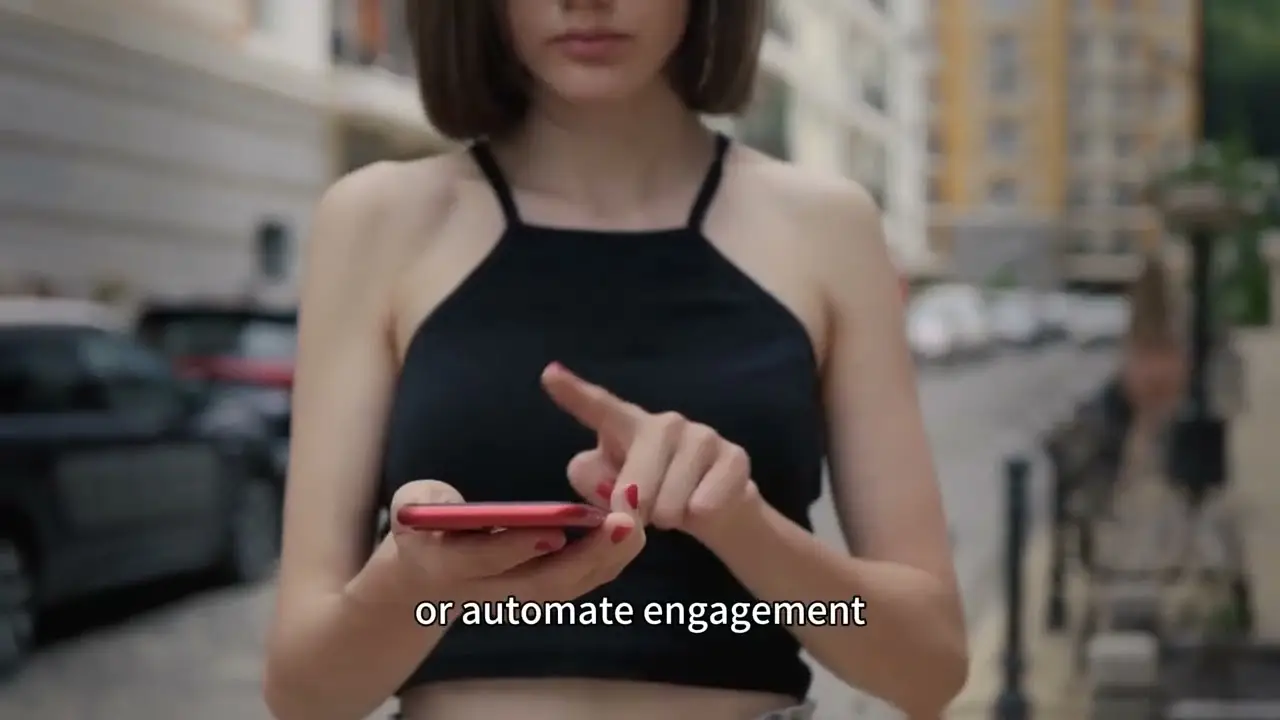
Instagram’s algorithm is designed to spot non-human behavior. Using automated tools to scrape data, mass-follow other users, or auto-comment will get your account flagged quickly. Even if your intentions are harmless, excessive manual activity—like following hundreds of accounts in a short period—can be mistaken for a spam bot.
To Instagram's algorithm, there's no difference between a human rapidly following 200 accounts and a script doing the same. It sees only the data pattern—high-volume, repetitive actions from a single IP address—and flags it as non-human.
Impersonating Another Person
Instagram has a zero-tolerance policy for impersonation. Creating an account pretending to be someone else, whether it's a celebrity or a parody account that goes too far, will lead to Instagram account suspended.
Sometimes, this isn't your fault. If your account gets hacked, the hacker might post content that triggers a "fraud and deception" suspension. In these cases, Instagram will lock the account and require you to verify your identity by submitting a selfie video or a photo of your government ID. If you ignore these requests, the account will be permanently deleted after 180 days.
An Error on Instagram’s Part
"Why is my Instagram account suspended when I didn’t do anything wrong?" This is a common and valid question. The truth is, sometimes Instagram just makes a mistake. The platform admits its decisions aren't always right; it even created the Oversight Board to review some of its most difficult content decisions.
The platform relies heavily on AI to monitor content, and these automated systems aren't perfect. They can misinterpret captions or accidentally flag innocent accounts, as seen during a large-scale crackdown in 2022 that affected many users.
Protecting Your Account's Safety
Not all Instagram account suspensions are punishments. Sometimes, Instagram will temporarily lock your account as a protective measure. If the system detects suspicious activity, like login attempts from a different country or multiple unrecognized devices, it may suspend the account to prevent a hacker from causing damage. If you ever receive a security alert about your Instagram account suspended, change your password immediately and enable two-factor authentication to keep your Instagram account secure and protected from future suspensions.

How Long Does an Instagram account suspended Last?
The duration of Instagram account suspended depends entirely on the violation.
- First-time or minor violations: For tripping a spam filter or a borderline post, you can expect a short suspension, typically lasting from a few hours to 48 hours.
- More serious or repeat violations: If you've been warned before or the violation was more significant, the suspension could be extended to 30 days.
- Major rule breaks: Severe violations like hate speech or repeated offenses can result in a permanent ban.
If you believe your Instagram account suspended was a mistake, you have the right to appeal the decision.
How to Appeal When Your Instagram account suspended
If you think your suspension was unfair, you can and should fight it. Here is a simple, step-by-step guide on how to appeal when your Instagram account suspended.
Step 1: Try to Log In
First, attempt to log into your account as you normally would. If your account is truly disabled, you will see a message like, “Your account has been disabled for violating our terms.” If you can still log in but find certain actions are limited (like following accounts), you may only have a temporary action block, not a full suspension.
Step 2: Submit an Official Appeal
If you are locked out, Instagram will usually provide an option on-screen to “Disagree with Decision” or “Appeal.” Click this button, fill out the required details, and explain why you believe the suspension was a mistake.
Keep your explanation short, professional, and to the point. You can use a template like this:
I believe Instagram suspended my account without any reason. I’ve always held up Instagram’s guidelines and haven’t done anything suspicious recently. I request you to review the decision and recover my account. Thank you.
Step 3: Verify Your Identity if Asked
For suspensions related to fraud or impersonation, Instagram may require extra proof to confirm you are the real account owner. This could include:
- A photo of you holding a piece of paper with a handwritten code.
- Business documents, like invoices or licenses, for a company account.
- A selfie video to prove you are a real person.
Do not ignore this step. If you fail to provide the requested verification, Instagram will delete your account after 180 days.
Step 4: Follow Up if You Don't Hear Back
Instagram support can be slow, so patience is key. However, if weeks go by with no response, it’s time to follow up. You can use the contact form in Instagram's Help Center or reply directly to any email you may have received from them regarding the suspension.
Step 5: Accept the Outcome
It's important to set realistic expectations. If you know you broke a major rule, your appeal is unlikely to succeed. However, if the suspension was a genuine mistake on Instagram's part, continue to follow up politely. Sometimes, persistence is what it takes to get your account back from an opaque system.
How to Avoid an Instagram account suspended
Shifting from a reactive to a proactive mindset is the key to long-term account safety. Here’s how to build a defensive strategy that keeps you off Instagram’s radar.
Follow Instagram’s Rules Diligently
Playing by the rules is the most effective way to keep your account safe. Instagram doesn't always give warnings before taking action.
- Read the rules: Take the time to read the Instagram Community Guidelines and Terms of Use.
- Fact-check your content: Avoid sharing misinformation or misleading posts.
- Keep it clean: Do not post nudity, hate speech, or graphic violence.
- Be cautious with hashtags: Using a banned hashtag, even accidentally, can flag your account.
- Avoid unauthorized tools: Do not use third-party apps or automation tools for likes, follows, or comments.
- Don't create fake accounts: Never create accounts pretending to be someone else.
Manage Multiple Accounts the Safe Way with DICloak
Remember the risks we mentioned earlier—bot-like behavior and security flags from multiple logins? For anyone managing more than one account, those risks are constant. Here's the professional-grade solution.
Logging into several accounts from the same device and IP address can look suspicious to Instagram's security system and trigger a spam flag. The solution is to use an antidetect browser like DICloak. This tool is designed to help you manage multiple accounts safely and avoid suspensions. With DICloak, you can:
- Run multiple accounts on one device without triggering security alerts.
- Give each account a unique browser fingerprint, making them appear to be on separate devices.
How to Use DICloak to Prevent Account Suspension
Using DICloak is the professional way to manage multiple accounts without looking like a bot or spammer. Here’s how to set it up.
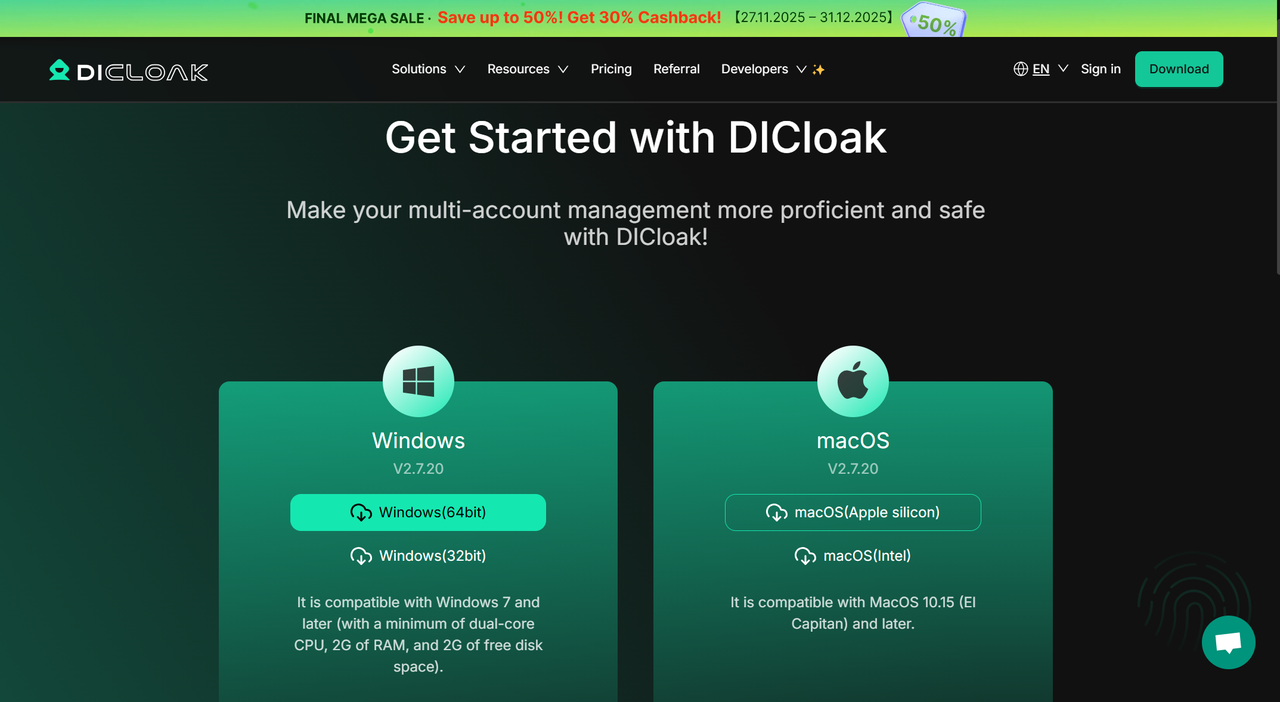
Step 1: Download & Set Up DICloak
First, download DICloak. After installing the application, sign up for an account.
Step 2: Create a Secure Browser Profile
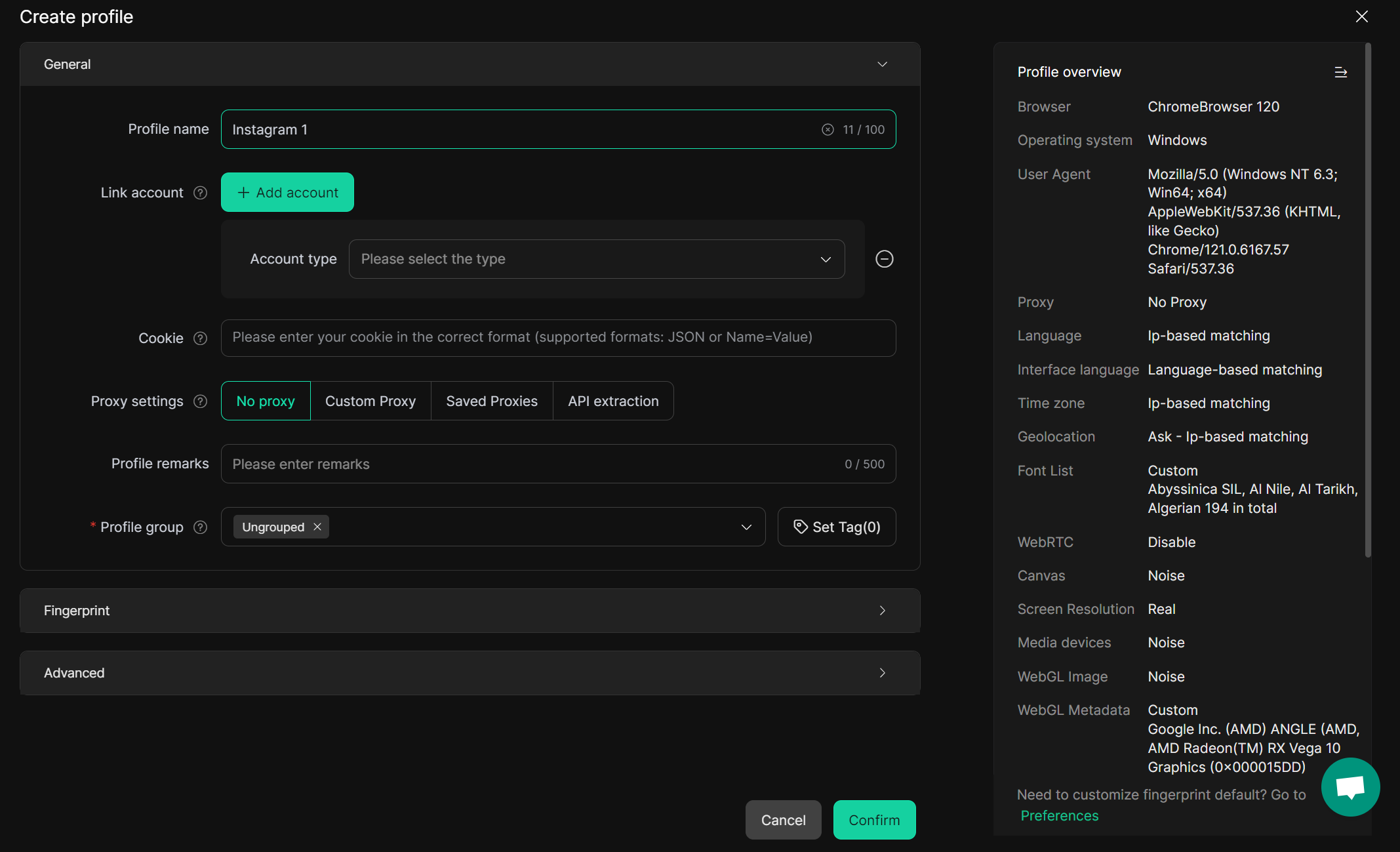
DICloak works by creating a unique digital identity, or "browser fingerprint," for each of your accounts. This makes it seem like each account is logging in from a completely different device. Give it a name (e.g., "Instagram 1") and customize proxy settings to assign it a unique IP address.
Step 3: Log In to Instagram Securely
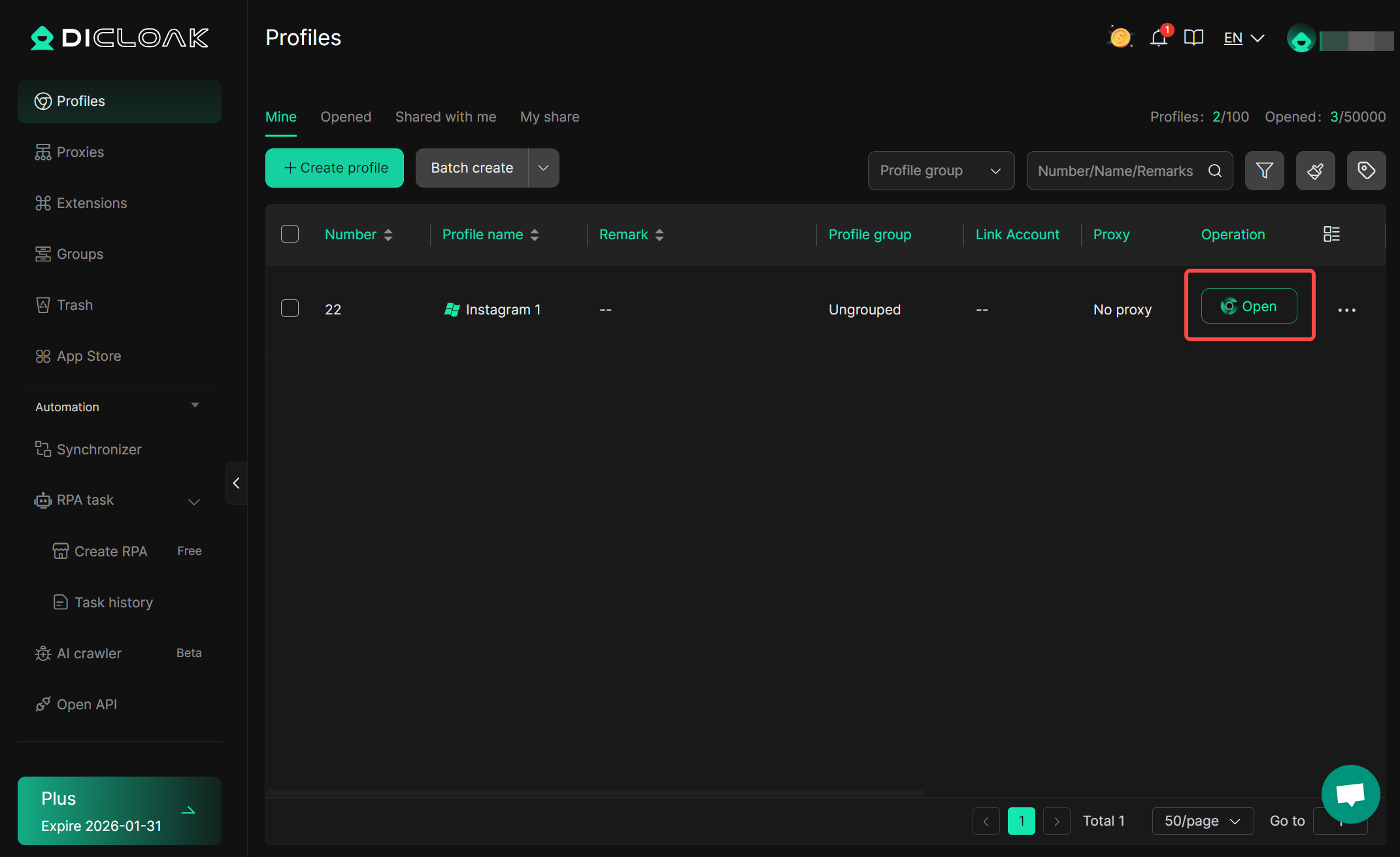
Click the “Open” button on your newly created profile. A secure, isolated browser window will open. In this window, navigate to Instagram and log in to your account as usual. DICloak will save your profile, so you won't have to enter passwords or 2FA codes every time.
Step 4: Scale Up Safely
To manage another account, simply repeat the process. Create a new profile and be sure to select a different IP. This process works because it makes each of your accounts appear to Instagram as a unique, legitimate user operating from a different device in a different location. By mimicking normal user behavior at scale, you eliminate the patterns that trigger automated suspensions.
Don't risk losing your accounts. Download and try DICloak for free to manage your Instagram profiles the safe way.
Frequently Asked Questions (FAQs)
How do I get my Instagram account suspended back?
Submit an appeal through the in-app notification or Instagram’s Help Center. Be prepared to complete any identity verification steps they request, such as submitting a photo ID.
Why was my Instagram account suspended for no reason?
Instagram's automated monitoring systems can sometimes make mistakes and flag innocent activity as suspicious. If you believe the suspension was an error, you should appeal the decision.
How long is an Instagram account suspended for?
Suspensions can last 24-48 hours for temporary issues, up to 30 days for repeat violations, and can be permanent for severe breaches of the Community Guidelines.
What should I do if Instagram account suspended?
Appeal the decision immediately through the Instagram Help Center. It is crucial to provide any requested identification to prove ownership and to follow up politely if you don't receive a response within a few weeks.
Is it safe to manage multiple Instagram accounts from one device?
Instagram permits a maximum of 5 accounts per device or email address. Exceeding this limit can trigger spam detection and lead to bans across all linked accounts. For safely managing more than five accounts, use a tool like the DICloak antidetect browser. It isolates each account with its own unique browser fingerprint and IP address, preventing them from being linked and flagged.
 Web Proxy Tools
 Free Tools
 Cookie Plugin
 UA Generator
 MAC Address Generator
 IP Generator
 IP Address List
 2FA Code Generator
 World Clock
 Anonymous Check
 WebRTC Leak Test
 UUID Generator
 Free Web Proxy Site
 Proxy Checker
 FB Ad Checker
 AI Web Scraping
 Free SMM Tools
 Twitter Shadowban Checker
 Instagram Name Checker
 UTM Generator
 Username Generator
 AI Hashtag Generator
 LinkedIn Headline Generator
 Social Media Image Resizer