U.S. digital advertising revenue reached nearly $295 billion in 2025, growing 13.9% year over year. As more brands, agencies, and affiliate marketers manage campaigns across Meta, Google Ads, and TikTok Ads, account environments have become more complex than ever. Managing one ad account is simple. Managing ten, twenty, or fifty accounts without creating account overlap is a different challenge.
Many advertisers focus on proxies and assume the job is done. But modern ad platforms evaluate more than IP addresses. Browser fingerprints, cookies, session history, device signals, and account behavior can all contribute to how accounts are evaluated. This is why proxies and fingerprint isolation are often used together. One helps separate network identity, while the other helps separate browser identity. Understanding how these two layers work together is becoming a core part of ad account management in 2026.
Can Ad Platforms Link Your Accounts Even If You Use Different Proxies?
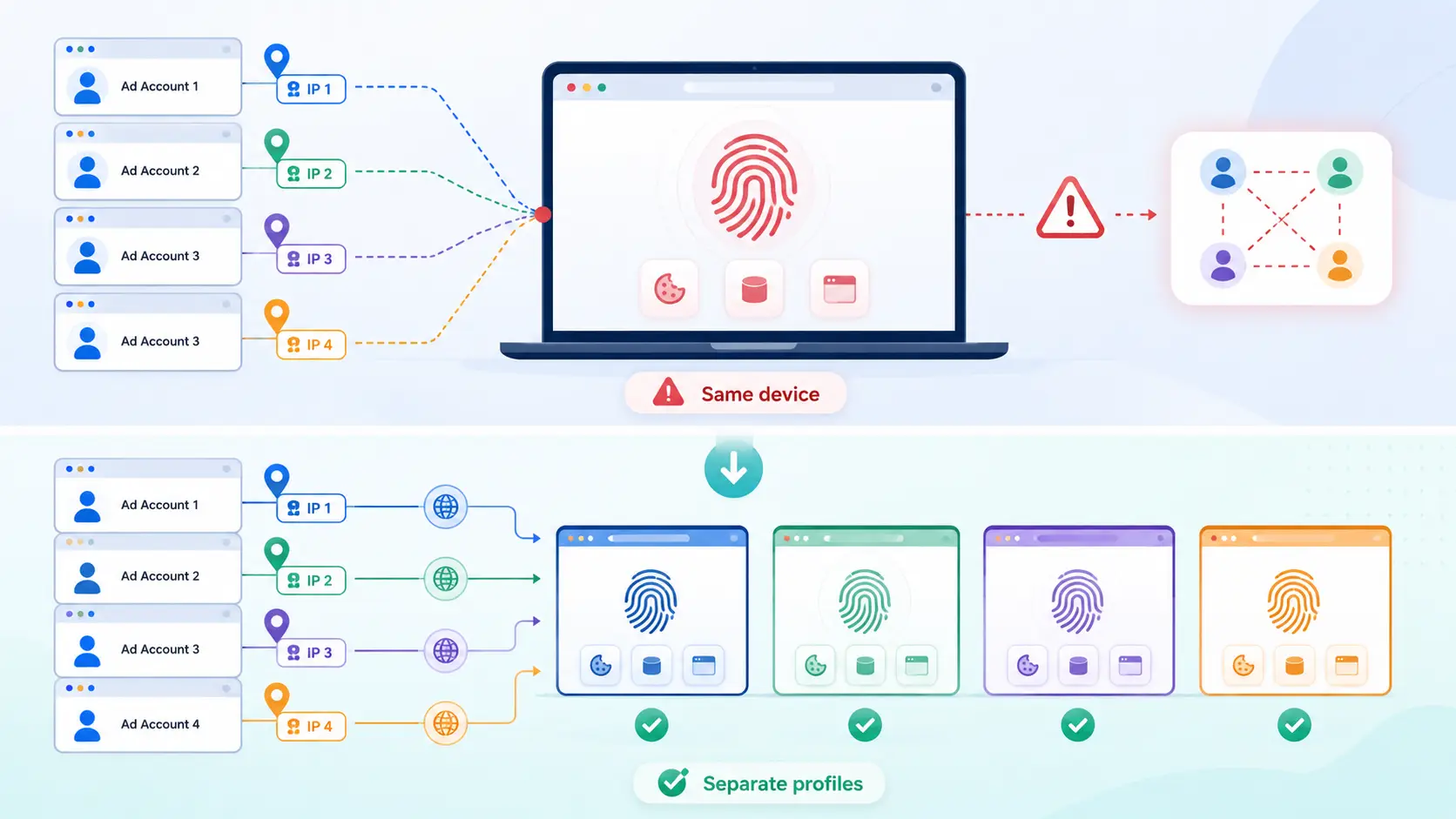
Yes. Different proxies separate IP addresses, but they do not separate browser fingerprints, cookies, device signals, or behavior patterns.
Many advertisers assume assigning a unique proxy to each account is enough. In reality, platforms may still detect connections through shared browser setups, time zones, or repeated login patterns. Here is a clear way to understand what each layer protects and what can still trigger account linking:
| Layer |
What It Helps Separate |
What Can Go Wrong If Missing |
| Proxy |
IP address, network location, region |
Multiple accounts may appear from the same network despite different IPs |
| Fingerprint isolation |
Browser profile, device signals, cookies, local storage |
Accounts may still look like they share the same device or environment |
| Session hygiene |
Login history, cookies, saved data |
Data from one account may leak into another or mix client environments |
| Behavior control |
Timing, clicks, account switching patterns |
Repeated or unnatural actions can make accounts look related |
Using only a proxy ignores device-level overlap. To reduce linking risks, each ad account should have a separate, stable environment where the proxy, browser profile, cookies, time zone, and workflow all make sense together.
Why Does Fingerprint Isolation Matter If Every Account Already Has Its Own IP?
Fingerprint isolation matters because an IP address only shows where an account connects from. It does not change the browser, device, cookies, storage, or other signals behind that connection. Different proxies can separate network identity, but they do not automatically create separate browser profiles.
Many advertisers make the same mistake. They assign a different proxy to each account and assume the setup is fully separated. But if all accounts use the same browser profile, they may still share device-level signals that make them look related.
What Parts of a Browser Fingerprint Can Reveal That Accounts Belong Together?
A browser fingerprint is built from signals such as screen size, fonts, time zone, language, browser version, WebGL, Canvas, and other device characteristics. One signal rarely matters on its own, but repeated overlap across many signals can make different accounts appear connected.
Modern ad platforms do not rely on a single signal. They compare network, browser, device, and session information to see whether the overall environment looks consistent. This is why fingerprint isolation is not about randomly changing settings. The goal is to create a stable browser profile where signals make sense together.
| Fingerprint Signal |
Why It Matters |
| Time zone and language |
Should generally fit the account's region |
| WebGL and Canvas |
Help describe device rendering behavior |
| Browser version and OS |
Contribute to environment consistency |
| Cookies and local storage |
May reveal shared account history |
Why Different IPs Do Not Automatically Mean Different Devices?
Different IPs separate network identity, but they do not separate device identity. A proxy can place one account in New York and another in Los Angeles, while both still use the same browser profile and device characteristics.
A cleaner setup keeps both layers aligned. The proxy, browser profile, language, time zone, and account history should fit together naturally instead of changing constantly.
How Shared Browser Environments Create Hidden Account Links?
Shared browser profiles can mix cookies, cache, local storage, extensions, and login sessions across accounts. This becomes even more difficult to manage when multiple team members use the same browser setup. Fingerprint isolation helps keep account environments separate. The goal is not to remove all risk, but to reduce unnecessary overlap between accounts that should remain independent.
What Happens When You Use Fingerprint Isolation Without a Proxy?
Fingerprint isolation can separate browser profiles, but it does not change the network an account connects from. If multiple accounts use isolated browser profiles while sharing the same IP address or network, they may still appear related at the network level.
Many advertisers focus on device separation and forget about network separation. They create different browser profiles for each account, but all accounts still connect through the same office Wi-Fi or company network. The browser profiles may look different, yet the accounts continue to share the same connection source.
Why Multiple Profiles on One Office Network Can Still Look Related
A separate browser profile can create a separate device environment, but it does not automatically create a separate network identity. If ten accounts are opened from ten isolated profiles on the same office connection, platforms may still see those accounts repeatedly appearing from the same location and IP range.
This does not mean every account will immediately face restrictions. However, when shared network signals are combined with other overlapping patterns, such as similar login times or account activity, the accounts may look more closely connected than intended.
How Shared IP Patterns Appear to Meta, Google, and TikTok
Different platforms evaluate account relationships differently, but they all have visibility into network-level signals. When many accounts regularly connect from the same IP address, office network, or internet provider, that shared network becomes part of the account's overall identity.
Network overlap alone is usually not the full picture. Platforms may also compare browser profiles, account history, login behavior, and location consistency. The more signals that point in the same direction, the easier it becomes to see accounts as related rather than independent.
For ad account management, the goal is not simply to create different browser profiles. The goal is to build account environments where both the device layer and the network layer are separated in a logical and consistent way.
Which Signals Matter Most for Ad Account Linking on Meta, Google Ads, and TikTok Ads?
Different ad platforms do not evaluate account relationships in exactly the same way. Most platforms look at a combination of network, device, account, and behavior signals, but they often place more weight on different parts of the overall picture.
How Meta Detects Connections Between Accounts
Meta often evaluates whether an account environment looks stable and consistent over time. If multiple ad accounts, Pages, or Business Managers are frequently accessed from similar environments, those relationships may become easier to identify. The platform can also see patterns in login behavior, browser profiles, and account activity rather than relying on a single signal.
For example, an agency may manage several client accounts from one computer. If those accounts regularly share the same browser setup, network patterns, or daily workflow, the environments may look more connected than intended. This is one reason advertisers often keep client accounts separated at both the browser and network levels.
Which Account Relationships Google Ads Looks at Most
Google Ads is not only connected to browser and network signals. It can also sit alongside other business assets, such as Google accounts, websites, analytics tools, conversion tracking setups, and payment profiles. Because of this, account relationships can sometimes extend beyond the browser profile itself.
A clean browser setup can help separate login environments, but it does not automatically separate business relationships. For example, two advertising accounts may use different browser profiles and different IP addresses, yet still share the same website, payment details, or tracking infrastructure. Advertisers should think about both technical separation and business asset separation when managing multiple accounts.
What Triggers TikTok Ads to Flag Accounts Quickly
TikTok Ads often places a strong focus on environment consistency and account behavior. Frequent changes in device setup, location, login patterns, or account activity can make an account appear less stable. This does not mean every change creates a problem, but constant changes can attract more attention than a steady environment.
A common example is switching regions too often. An account that regularly moves between different locations, browser profiles, and usage patterns may look less predictable than an account that follows a consistent workflow. For many advertisers, keeping the environment stable is often more effective than constantly changing settings.
The key takeaway is that Meta, Google Ads, and TikTok Ads may focus on different signals, but all three platforms benefit from consistency. A setup where the browser profile, network location, account history, and daily workflow fit together naturally is generally easier to manage than one that changes every day.
What Should a Safe Ad Account Environment Look Like?
A safe ad account environment is not built around one setting. It comes from keeping the browser profile, network location, account history, and daily workflow consistent with each other. When these signals fit together naturally, accounts are easier to manage and less likely to trigger unnecessary reviews.
Matching Location, Language, Time Zone, and Proxy Settings
One of the most common setup mistakes is creating an environment where the signals do not match. For example, an account may connect through a proxy in Germany while the browser uses a US time zone and a different language setting. Individually, these settings may not seem important, but together they can make the environment look inconsistent.
A cleaner setup keeps location-related settings aligned. If an account is meant to operate in a specific market, the proxy location, browser language, and time zone should generally support the same story. The goal is not to create a perfect profile. The goal is to avoid unnecessary contradictions between different signals.
Keeping Browser Profiles Independent From Each Other
Each ad account should have its own browser profile whenever possible. Sharing browser profiles across multiple accounts can mix cookies, cached files, saved sessions, and account history. Over time, this makes it harder to keep accounts separated.
This becomes even more important for agencies and teams. If different client accounts are regularly opened in the same browser profile, account data can become difficult to manage. Separate browser profiles help keep login sessions, account history, and daily workflows organized.
Why Session Consistency Matters More Than Constant Changes
Many advertisers assume that changing settings frequently makes accounts safer. In reality, constant changes can sometimes create more questions than a stable environment. A browser profile that changes locations, languages, devices, or login patterns every few days may look less predictable than one that stays consistent.
A stable environment helps build account history over time. If an account normally operates from one market and one browser setup, large and unnecessary changes should be avoided. Consistency is often more valuable than constantly trying new settings.
A Simple Pre-Login Checklist for New Ad Accounts
Before logging into a new ad account, it helps to review a few basic checks:
| Check |
What to Confirm |
| Proxy location |
Matches the target market |
| Time zone |
Fits the selected region |
| Language settings |
Consistent with account activity |
| Browser profile |
Dedicated to this account |
| Login history |
No unrelated accounts have used this environment |
| Recent changes |
No unnecessary location or setup changes |
A checklist like this will not remove all account risks. However, it can help catch simple mistakes before they become larger problems. Many account issues come from inconsistent environments rather than a single technical setting.
How to Manage Multiple Ad Accounts with DICloak?
Managing multiple ad accounts becomes challenging as more accounts, proxies, and team members are added. A clean setup keeps each account’s browser profile, network identity, and access permissions organized so accounts remain separate and consistent.
Many account issues come from workflow mistakes rather than missing proxies or fingerprint isolation. Teams may open the wrong account, reuse the wrong proxy, or lose track of which profile belongs to which client. When volume grows, proper organization is just as important as technical separation.
Creating Separate Browser Profiles for Different Ad Accounts
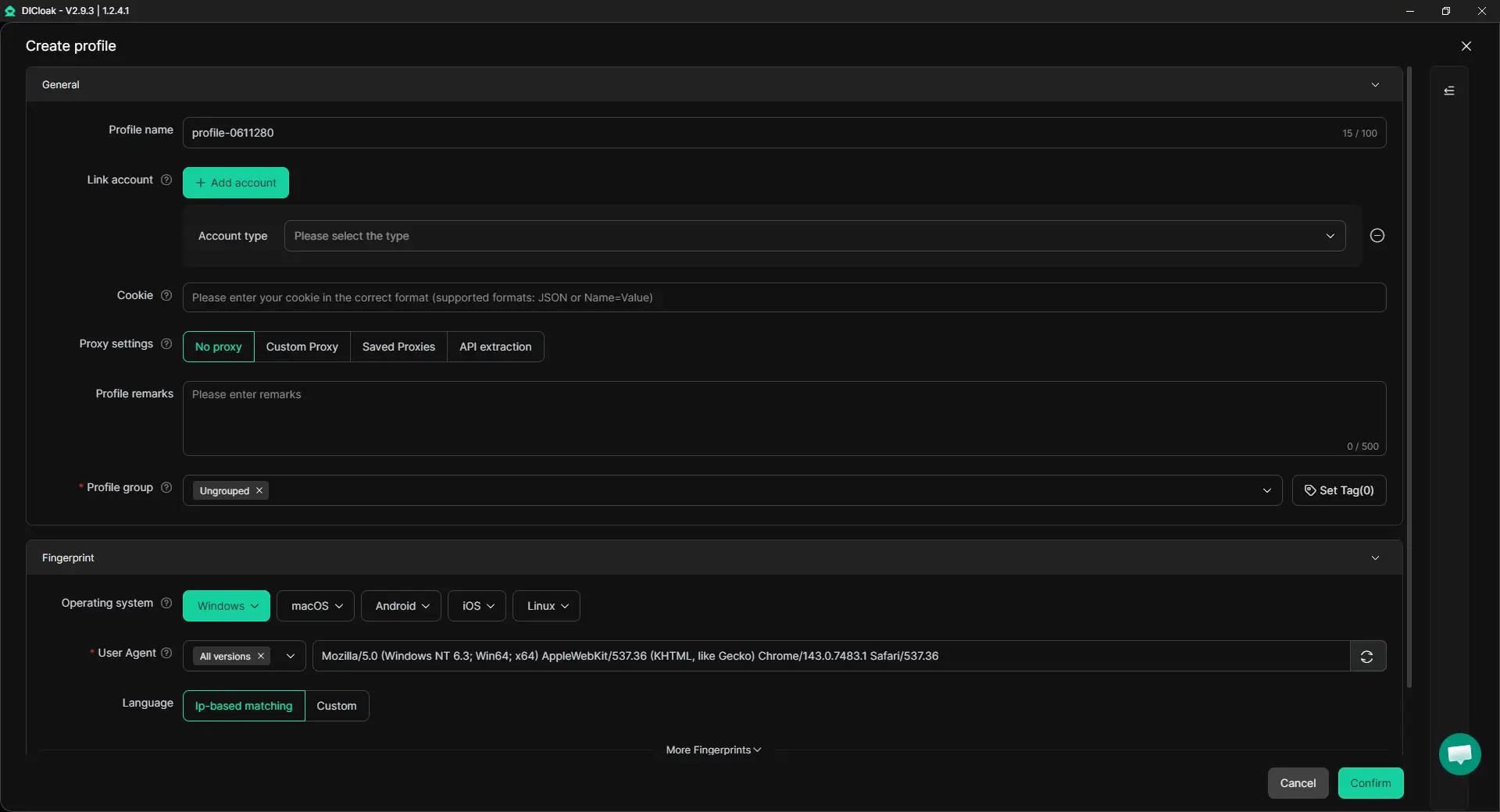
Proxies and fingerprint isolation work best when tied to a specific account environment. If a browser profile is shared across multiple ad accounts, cookies, login sessions, and browser settings can easily overlap.
With DICloak, users can create separate browser profiles for each ad account, client, or market. Each profile keeps its own environment, making fingerprint isolation effective and reducing the risk of cross-account contamination. Dedicated profiles also simplify troubleshooting when a single account faces a login challenge.
Assigning User-Configured Proxies to Individual Profiles
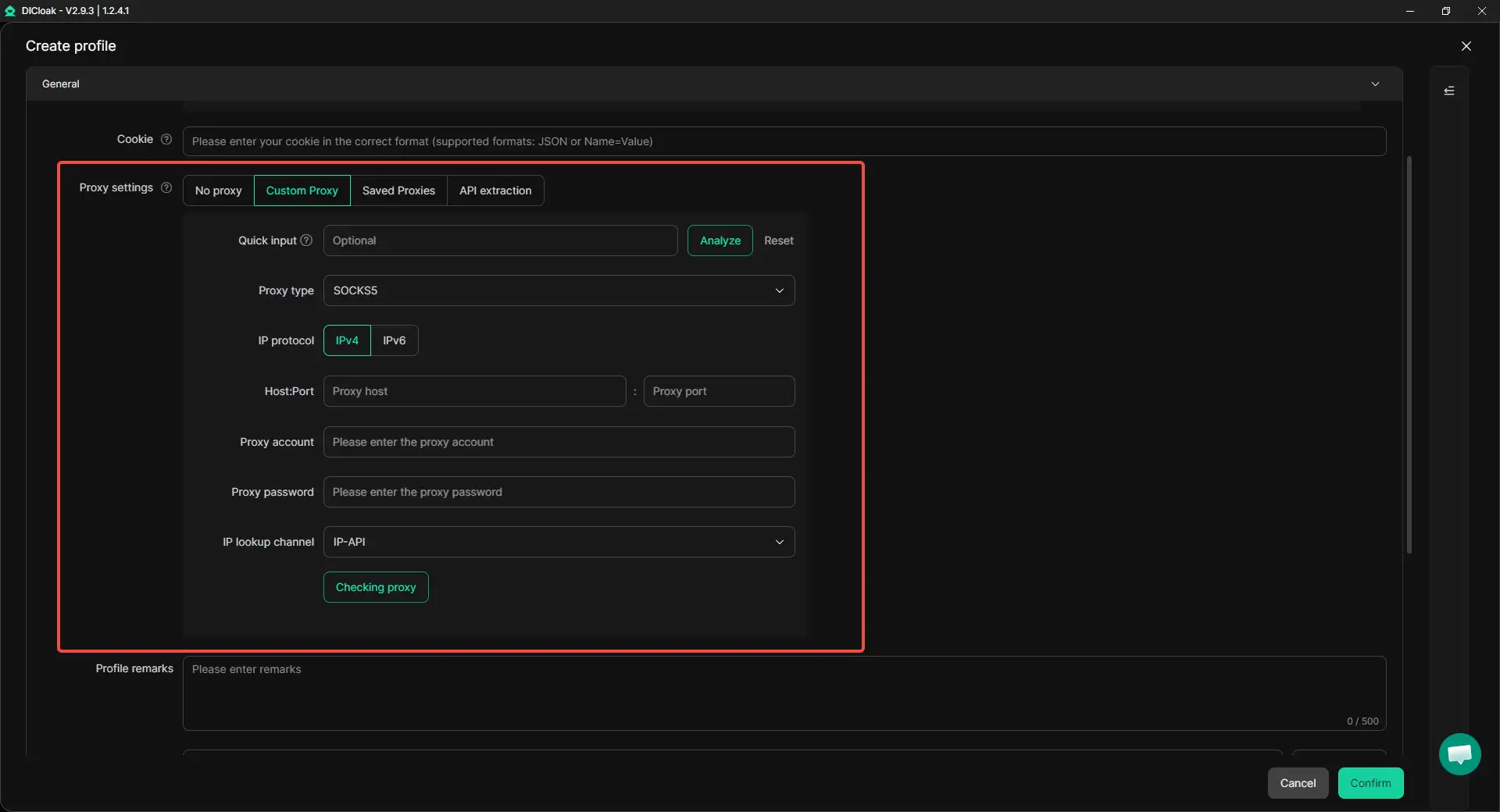
Fingerprint isolation alone is not enough. Network consistency matters too. If an ad account targets a specific market, its proxy, browser language, and time zone should match that location.
With DICloak, users can assign user-configured proxies to individual profiles, keeping the proxy and browser profile connected to the same account identity. DICloak can also verify the proxy before opening a profile, preventing the account from accessing the network with a failed or incorrect proxy. This reduces the risk of accidental exposure or unwanted account linking.
Managing Client Access Through Team Permissions Without Sharing Logins
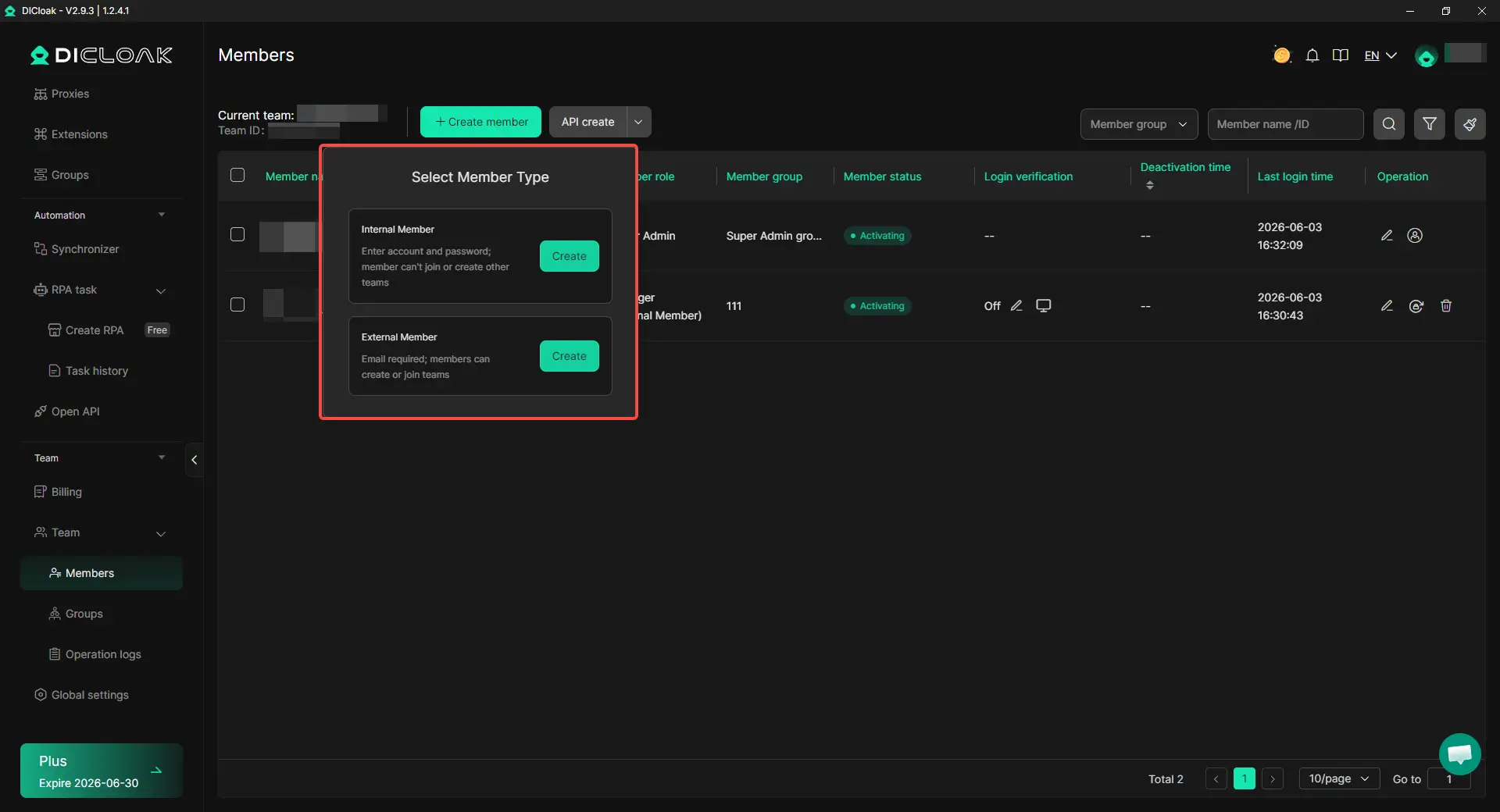
Team access can become a source of account confusion. Shared credentials make it difficult to track who opened which account or which environment was used.
A better workflow is to assign access based on roles. Media buyers, account managers, and assistants often need different levels of access. With DICloak, teams can control which members access which profiles, reducing mistakes while keeping work efficient. Role-based permissions also help maintain client account separation at scale.
FAQ About Proxies and Fingerprint Isolation for Ad Account Management
1. Can I manage multiple ad accounts using only proxies without fingerprint isolation?
Using only proxies separates network identity but does not change the browser or device environment. Platforms like Meta, Google Ads, and TikTok can still detect repeated device signals across accounts. To keep accounts truly independent, each account should run in its own isolated browser profile. An antidetect browser like DICloak allows each profile to have a unique fingerprint while using separate proxies, combining both layers to reduce account linking risk.
2. How often should I rotate proxies for multiple ad accounts?
Frequent proxy rotation can be counterproductive if the account environment lacks consistency. Rapid changes in IP location or region may trigger platform verification even when fingerprints differ. A better approach is to assign a stable, user-configured proxy to each account and rotate only when necessary. Tools like DICloak Antidetect Browser help maintain a consistent environment while still allowing controlled proxy updates.
3. Does sharing browser profiles among team members increase account linking risk?
Yes. When multiple accounts are accessed from the same browser profile, cookies, local storage, and session data can overlap, creating hidden connections. Teams can avoid this by giving each account its own profile. Using an antidetect browser like DICloak, teams can assign separate browser profiles for each client account while managing access permissions, keeping data isolated without sharing logins.
4. How do I know if my account environments are properly separated?
A properly separated environment keeps the proxy, browser fingerprint, time zone, language, and account session consistent for each account. Signs of poor separation include repeated verification prompts, unusual login alerts, or accounts showing similar activity patterns. By using an antidetect browser such as DICloak, advertisers can monitor and manage each profile independently, ensuring that network and device signals remain aligned for every account.
5. Can one account being flagged affect other accounts on the same machine?
Yes. If multiple accounts share a network or browser profile without proper isolation, one account’s flag or verification event can increase scrutiny for others. Using a tool like DICloak Antidetect Browser lets each ad account run in a separate profile with its own proxy and isolated fingerprint. This separation helps prevent cross-account contamination and reduces the risk of cascading restrictions.
Conclusion
Proxies and fingerprint isolation are both needed for ad account management because they protect different parts of an account environment. A proxy helps separate the network identity, while fingerprint isolation helps separate the browser, device signals, cookies, and session data. Using only one layer can still leave accounts connected through shared IP patterns, repeated browser traits, or inconsistent login behavior.
For teams managing multiple ad accounts in 2026, the safest workflow is not constant switching. It is stable separation. Each important account should have its own browser profile, user-configured proxy, matched time zone and language settings, and clear access control. This makes the account environment easier to manage, easier to troubleshoot, and less likely to create unnecessary cross-account overlap.
 Web Proxy Tools
 Free Tools
 Cookie Plugin
 UA Generator
 MAC Address Generator
 IP Generator
 IP Address List
 2FA Code Generator
 World Clock
 Anonymous Check
 WebRTC Leak Test
 UUID Generator
 Free Web Proxy Site
 Proxy Checker
 FB Ad Checker
 AI Web Scraping
 Free SMM Tools
 Twitter Shadowban Checker
 Instagram Name Checker
 UTM Generator
 Username Generator
 AI Hashtag Generator
 LinkedIn Headline Generator
 Social Media Image Resizer