Why is my Instagram account suspended? That’s probably the first thought that crosses your mind when you suddenly lose access, right? No prior warning email, no alert—just that frustrating "suspended" notification staring back at you.
I totally get the frustration, especially if Instagram is essential for your business or even worse, if you’re managing multiple customer profiles. It could impact your income, and trust me, that feeling is dreadful. What makes it even more infuriating is when Instagram doesn't clarify the reason behind the suspension.
Having dealt with my fair share of Instagram account suspensions (and successfully overturned most of them), I wanted to save you the hassle. So, I’ve put together this guide on Instagram account suspended scenarios.
This guide offers everything I've learned about Instagram account suspensions, including:
- The real reasons why Instagram suspends accounts (even when you feel completely innocent)
- How to challenge a suspended Instagram account and potentially regain access
- Effective strategies to prevent future suspensions, particularly if you manage multiple accounts
Let’s dive into the causes.

5 Common Reasons for Instagram Account Suspended
Typically, a Instagram account suspended happens when you've unknowingly violated one of Instagram's rules. The situation becomes more complicated because Instagram doesn’t always provide clear reasons for the suspension.
So, what exactly leads to an Instagram account suspended?
Here are the most common causes, so you can pinpoint what might have triggered yours.
1. Breach of Community Standards
Instagram enforces its Community Guidelines with zero tolerance.
If you post, share in Stories, or create Reels that go against their guidelines—even unintentionally—your Instagram account risks being flagged or even permanently shut down.
Sometimes, it's something as small as unknowingly using a prohibited hashtag. In other cases, it’s a misunderstanding of the rules, and you end up facing consequences.
The more serious or frequent the breach, the more likely that your suspended Instagram account will be permanently banned.
Here are some actions that can lead to an Instagram account suspended:
- Sharing hateful speech, violent content, or spreading misinformation is an immediate violation. Even if you think you're just expressing an opinion, Instagram may see it as harmful.
- Copyright violations are a significant issue. Using content you don’t own or have authorization for will quickly get your Instagram account suspended.
- Mass messaging or automated actions are strictly prohibited, whether it’s copying and pasting the same comment across numerous posts or participating in questionable interaction groups.
- Continuously uploading deceptive or harmful content may result in Instagram labeling you as a repeat offender, leading to stricter restrictions on your profile.
2. Data Harvesting or Automated Activity
If Instagram detects that your behavior isn’t human-like, you’re likely to face issues.
Using automated software for bulk following, mass data extraction, or sending out templated messages can cause your Instagram account to be flagged. Sometimes, even manually following many profiles in a short span can trigger a suspended Instagram account due to the system mistaking your actions for bot activity.
3. Misrepresentation
If Instagram suspects you’re impersonating someone else, your Instagram account suspended is inevitable. The platform does not tolerate impersonation, whether it’s pretending to be a celebrity or creating a satire account that crosses the line.
If someone reports you for impersonation, your account could be permanently disabled unless you prove your real identity.
In some cases, it’s not your fault. Hackers may have gained control of your account and posted under your name. If this happens, Instagram will secure your account until you can verify your identity.
In these situations, you might get a "fraud and deception" Instagram account suspended, and Instagram may ask you to submit a selfie video or government ID for verification.
If you fail to provide adequate proof or ignore these requests, your suspended Instagram account may be deleted after 180 days.
4. Instagram’s Oversight
Many users wonder, "Why is my Instagram account suspended when I haven’t done anything wrong?"
The reality is, sometimes Instagram makes mistakes. Instagram acknowledges that its decisions aren’t always perfect, which is why it created the Oversight Board to review complex and significant content moderation issues.
The system heavily relies on artificial intelligence to monitor content, and these AI systems are not flawless. They may wrongly flag innocent posts, misinterpret text, or accidentally suspend accounts during sweeping content purges. This occurred in 2022, for example, causing significant media attention.
5. Account Security
Instagram doesn’t just suspend accounts for violating rules; sometimes, it’s to protect your account.
If Instagram detects suspicious login attempts, such as attempts to access your profile from an unfamiliar location or devices, it may temporarily lock your account for your safety.
To avoid this, always pay attention to Instagram’s security alerts. If you get a notice about suspicious activity, take action immediately. Change your password and enable two-factor authentication right away. If Instagram suspects your account has been compromised, it may disable it temporarily to prevent further damage.
Duration of an Instagram Account Suspended
How long will your Instagram account suspended last? The truth is, it depends on your actions or what Instagram believes you did.
For most users, especially those who violate a rule for the first time, the Instagram account suspended period is usually short, typically ranging from a few hours to up to 48 hours. If your suspension was triggered by something minor, like triggering a spam detection mechanism or posting something that slightly crossed the line, you could be back online in no time.
However, if you’ve received prior warnings or if the violation was more serious, your Instagram account suspended could last up to 30 days. For repeat offenders or those who’ve violated major rules, Instagram might opt to permanently disable your account.
That said, if you believe the Instagram account suspended was a mistake, you do have the right to appeal the decision. Wondering how to appeal an Instagram account suspended situation? Here’s how you can go about it.
Contesting an Instagram Account Suspended: 5 Straightforward Methods
So, your Instagram account suspended—what’s next? The good news is that you can take action if you believe the suspension was unjustified or if the penalty seems too harsh.
Here’s how you can properly appeal an Instagram account suspended situation.
Step 1: Check Your Access
First, try to log in as usual. If your account has been completely deactivated, Instagram will show a message stating something like, “Your account has been disabled for violating our terms.”
If you see this, stay calm. It simply means you need to move on to the next step. However, if you’re able to sign in, you may have just faced a temporary restriction, such as being blocked from following accounts for a day.
Step 2: File an Official Appeal
If you’re locked out, Instagram typically provides an option labeled “Disagree with Decision” or “Appeal.”
Click on that option, enter your details, and clearly state why you believe the Instagram account suspended was incorrect.
Your explanation should be short and professional, such as:
“I believe my Instagram account suspended was done without a valid reason. I’ve followed Instagram’s guidelines and haven’t participated in any suspicious activities. I kindly request a review of this decision and the reinstatement of my profile. Thank you.”
Don’t forget to include any relevant details about your situation.
After submitting your appeal, be patient—Instagram may take several days to respond.
Step 3: Prove Your Identity (If Required)
If Instagram suspects fraudulent activity, such as someone using your account or you impersonating another user, they may ask for additional evidence. This could include:
- A photograph of yourself holding a handwritten code (make sure both your face and the code are clear).
- Business documents (for business profiles, such as receipts or permits).
- A video selfie (to confirm your identity as a unique individual).
If you don’t complete this step, Instagram will delete your account after 180 days, so it’s essential to address this promptly.
Step 4: Make Further Contact If There's No Response
Instagram’s support can be slow, so if you don’t hear back in a few days, reach out through other support channels.
You can reach out to them by completing this form or, if you've received an email from Instagram, simply respond to that message directly.
Step 5: Acknowledge the Final Decision
If Instagram upholds the suspension and you know you’ve violated their terms, there’s not much you can do. An apology won’t help if you’ve been caught engaging in spamming or sharing prohibited content.
However, if you truly believe the suspension was a mistake, continue to submit polite inquiries. Sometimes, consistent, respectful follow-ups can lead to a resolution.
How Long Does an Instagram Account Suspended Appeal Review Take?
If you're waiting for feedback on your Instagram account suspended situation, be prepared for a wait; the process can take some time.
Most appeal reviews for a suspended Instagram account are completed within a few days. However, if Instagram is dealing with a large volume of cases or if your situation is more complicated, you might find yourself waiting several weeks for a response. Instagram does not provide a specific or official timeframe for appeal reviews, so patience is key during this time.
While you're waiting, make sure to avoid submitting multiple appeals to Instagram. Doing so can actually delay the review process even further. Instead, submit one clear and concise appeal, and regularly check your email (including your junk or spam folder) for any updates.
Advice to Prevent Instagram Account Suspended
Nobody wants their Instagram account suspended, so here's how to avoid attracting Instagram's attention in the first place.
Adhere to Instagram’s Guidelines (As If Your Account Depends On It)
Instagram doesn’t always give advance warnings before suspending an account.
If you want to keep your Instagram account secure, the best way is to follow their established rules. This means:
- Carefully reading Instagram’s Community Guidelines.
- Verifying the information you post.
- Ensuring your content is appropriate—no nudity, hate speech, or extreme violence, even if you present it as a "joke."
- Be cautious with your hashtags. Certain tags are prohibited, and using them could flag your Instagram account suspended.
- Avoiding the use of automated software or third-party apps.
- Not creating fake profiles or impersonating others.
The list of rules is extensive, so again, take the time to review Instagram's Terms of Use (particularly section 4.2) and Meta's community standards.
Manage Multiple Accounts Securely
If you’re managing several Instagram accounts, take extra care.
Constantly signing in and out of multiple profiles, or using the same IP address for all accounts, can raise red flags for Instagram’s security systems. Rather than risk a suspended Instagram account, you might want to consider using an antidetect browser like DICloak.
Personally, I prefer DICloak to handle all my clients' accounts safely, without the risk of suspension. It allows you to:
- Manage multiple accounts on a single device without triggering security alerts.
- Assign unique device and browser fingerprints to each account, making Instagram treat them as separate, individual profiles.
By using this approach, you won’t appear as a bot or spammer, which is key to keeping your Instagram account suspended free. If you're curious about how to use DICloak, check out the next section for details.
Proactively Stop Instagram Account Suspended with DICloak
Why is my Instagram account suspended when I'm just trying to build my presence or manage multiple profiles? This is a common issue for businesses, as Instagram tends to scrutinize commercial accounts more closely.
Instagram's protective systems flag profiles that seem irregular, such as logging in from disparate locations or managing too many profiles from one hardware unit.
So, what course of action should you take if your work involves running several Instagram presences? You employ DICloak, as many others choose to do.
DICloak is an antidetect browser that assists you in administering accounts safely, thereby preventing suspensions before they materialize. Here’s the proper setup procedure.
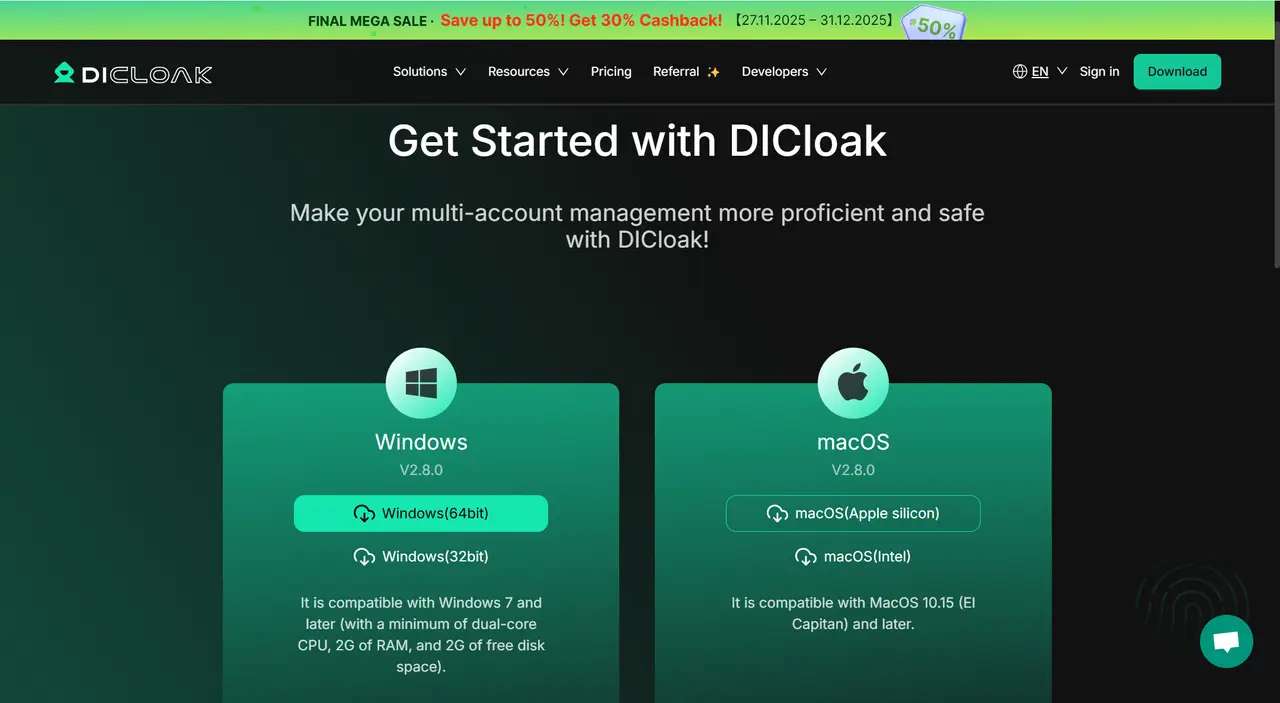
Step 1: Download DICloak
Initially, acquire DICloak from our official site. After installation, complete the sign-up process.
Step 2: Establish a Protected Browser Profile
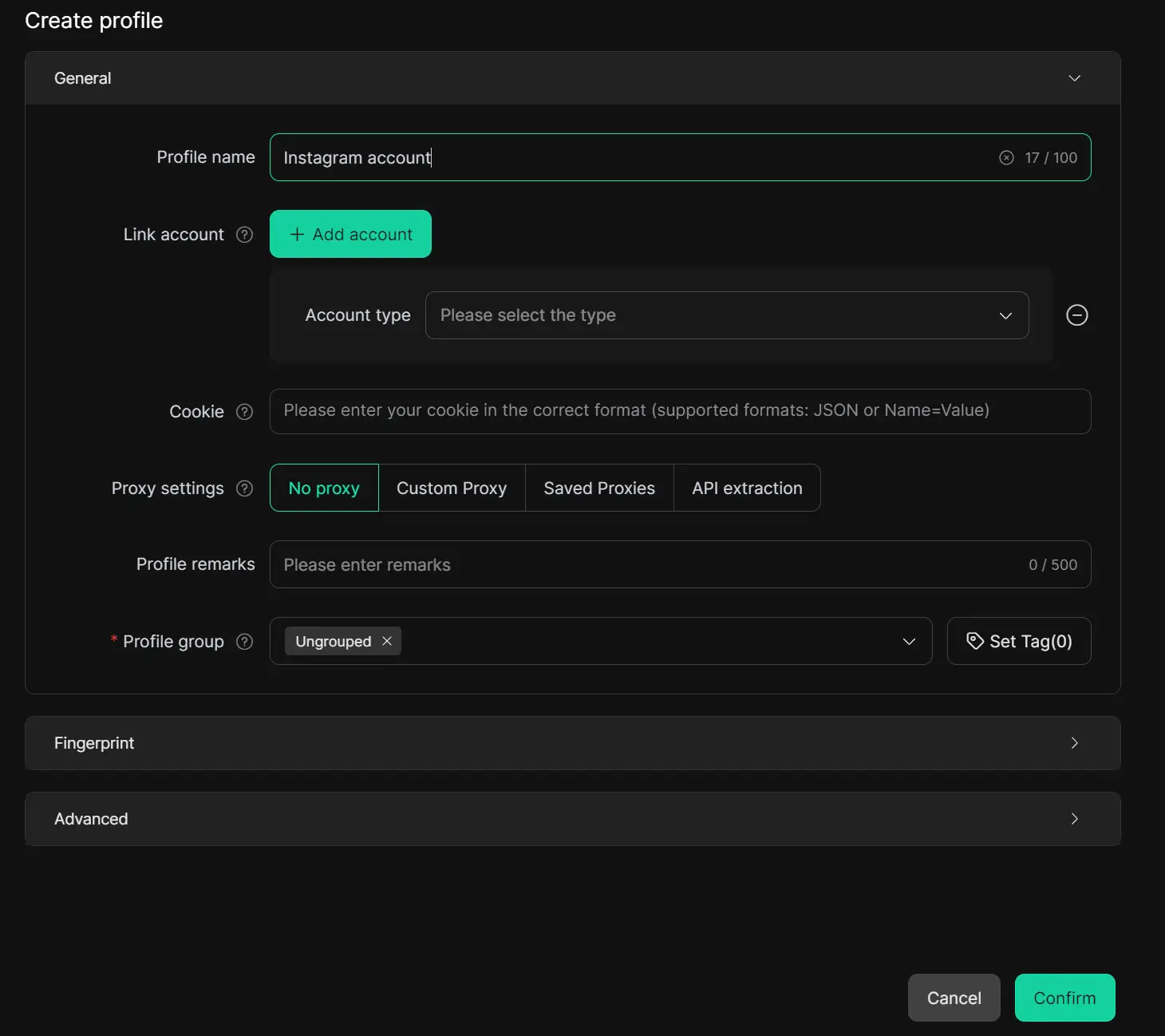
DICloak operates by equipping each Instagram account with its own unique browser identity, simulating logins from distinct hardware. Click "Create Profile" to set up a new browser profile specifically for your Instagram. Give it a clear name, like "Instagram account," personalize its fingerprint, and configure a proxy to enhance privacy and security.
Step 3: Sign In & Safeguard Your Profile
Click “Open” next to your newly created persona. A secure browser window will launch.
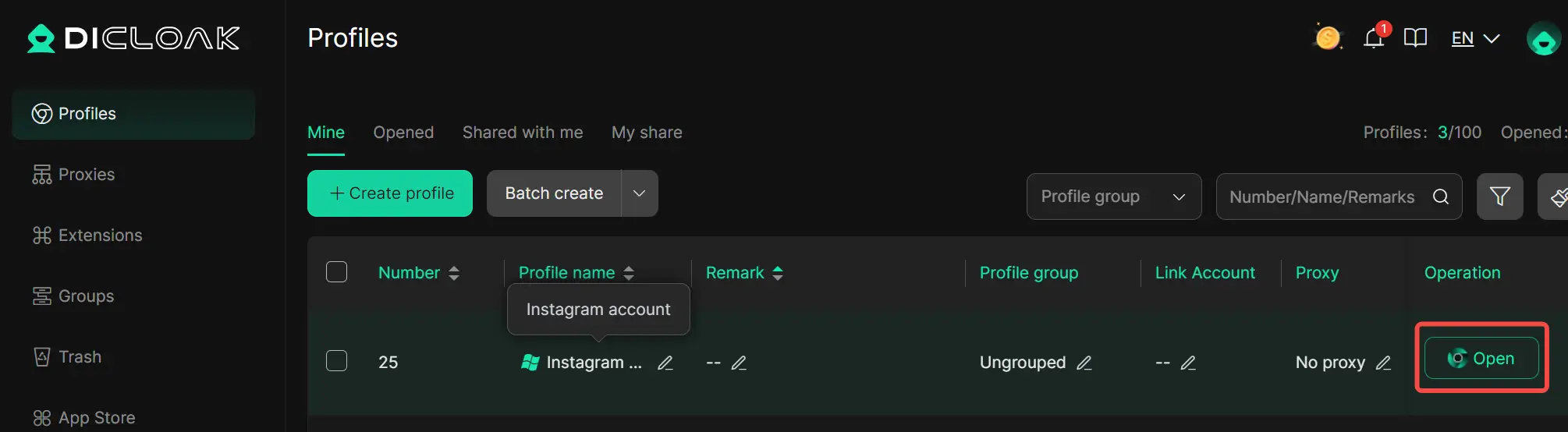
Navigate to Instagram and sign into your account as usual. DICloak retains your profile data, eliminating the recurring need for passwords or two-factor authentication.

Step 4: Expand Without Triggering Alerts
Require additional accounts? Simply repeat the preceding steps:
- Generate a distinct persona for every account (each utilizing a different IP).
- Label personas uniquely to prevent confusion (e.g., “Instagram 1”).
- Launch several personas concurrently. Your equipment capacity is the sole constraint here.
Because DICloak imitates genuine devices, Instagram will not associate your accounts or suspect automated activity. Say goodbye to abrupt account freezes.
Don’t gamble with another suspension. Manage your Instagram profiles securely using DICloak. Visit the DICloak website to explore more details and choose the plan that’s right for you. Start for free today and experience the power of secure, efficient, and scalable multi-account management!
Frequently Asked Questions (FAQs) About Instagram Account Suspended
How do I reactivate my suspended Instagram account?
To recover a suspended Instagram account, you can submit an appeal through Instagram's Help Center or via the notification displayed in the app. Be sure to provide detailed reasons explaining why the suspension might be an error and complete any necessary verification steps, such as submitting a government ID for confirmation.
Why does my Instagram account get suspended without apparent cause?
Instagram’s automated systems sometimes mistakenly flag routine actions as suspicious. If you believe that your Instagram account suspended was due to an error, submit an appeal to regain access to your profile.
What is the duration of an Instagram account suspension?
Short-term suspensions typically last between 24 and 48 hours. However, if you have multiple infractions, the suspension could last up to 30 days. Serious violations, such as spreading hate speech or impersonating others, may result in a permanent Instagram account suspended.
What action should I take if Instagram deactivates my account?
If Instagram disables your account, take immediate action by appealing through the Help Center. If required, verify your identity by submitting a photo or an official document. Avoid repeating any prohibited actions and follow up if you don’t receive a response within a few weeks.
Is it possible to manage several Instagram profiles on the same device without facing suspension risk?
Instagram allows up to 5 accounts per device or linked email address without triggering penalties. However, if you use the same IP address, shared device signatures, or IP ranges across more than 5 accounts, Instagram may flag your activity as spam, leading to bans across all related profiles. To securely manage multiple Instagram accounts, consider using DICloak.com. The DICloak antidetect browser protects your accounts by isolating browser profiles with unique fingerprints and IP addresses for each profile, ensuring safer management without triggering security alerts.
Conclusion
To avoid an Instagram account suspended, follow Instagram’s guidelines, be cautious when managing multiple profiles, and use tools like DICloak for secure account management. If your account is suspended, submit a clear appeal and verify your identity promptly to regain access. Stay proactive to keep your Instagram experience smooth.
 Web Proxy Tools
 Free Tools
 Cookie Plugin
 UA Generator
 MAC Address Generator
 IP Generator
 IP Address List
 2FA Code Generator
 World Clock
 Anonymous Check
 WebRTC Leak Test
 UUID Generator
 Free Web Proxy Site
 Proxy Checker
 FB Ad Checker
 AI Web Scraping
 Free SMM Tools
 Twitter Shadowban Checker
 Instagram Name Checker
 UTM Generator
 Username Generator
 AI Hashtag Generator
 LinkedIn Headline Generator
 Social Media Image Resizer