What Should a Business Post on Social Media?
If you are wondering what to post on social media for business, focus on content that is useful, believable, and easy to engage with. A strong feed should not be a stream of sales messages. It should help people learn something, see your product in action, hear from customers, and get to know the people behind your brand. This also fits current platform trends. Meta, for example, says Facebook is giving more reach to original content and reducing the reach of copied or lightly edited posts.

Educational Tips and How-To Content
Educational posts answer questions your customers already have. A skincare brand might explain how to layer two products. An accounting firm could post “3 Invoice Mistakes Small Businesses Make.” A SaaS company might show how to complete a common task in under a minute.
Keep each topic specific. “Marketing Tips” is easy to ignore, while “3 Things to Check Before Running Facebook Ads” tells readers exactly what they will learn. The same principle applies when writing engaging social media captions: clear hooks and useful details give people a stronger reason to keep reading. LinkedIn also says useful professional insights, industry knowledge, and practical advice are more valuable than posts that only try to sell a product.
Product Demos and Real-World Use Cases
People often understand a product faster when they see it being used. Instead of saying, “Our software makes teamwork easier,” show how a five-person team assigns a task, leaves feedback, and tracks its progress.
The same approach works for physical products. A luggage brand can show what fits inside a suitcase for a three-day trip. A cookware company can prepare a full meal using one pan. Product demos are also a practical part of social media marketing because they connect product features with problems customers actually need to solve.
A useful rule is problem → product in use → result. This keeps your business social media posts focused on what customers can actually do, rather than on a long list of features.
Customer Reviews and User-Generated Content
Customer content adds a different kind of proof because the message is not coming only from the brand. Reviews, customer photos, unboxing videos, and real use cases can all become useful social media content ideas for business.
Context makes these posts stronger. Instead of sharing only “Great product!”, a furniture brand could write: “Sarah needed a desk for a small apartment. Here is how our 100 cm model fits into her workspace.” The post now gives a real customer experience and answers a practical buying question at the same time.
TikTok also describes UGC-style testimonials from real customers as a strong form of social proof, especially when people explain their own experience naturally.
What to Post on Social Media for Different Business Goals
Knowing the main content types is only the first step. The next question is what to post on social media for business when you have a specific goal. A post made for brand awareness should look different from one designed to generate leads or build customer trust.
A simple rule helps: choose the goal first, then choose the post. This keeps your social media content focused instead of posting just to stay active.

Posts for Brand Awareness
If your goal is brand awareness, focus on content that helps new people notice and remember your business. You do not need to push for a sale in every post. A clear social media marketing strategy can help you decide which topics, formats, and platforms deserve the most attention.
Useful social media content ideas for business awareness include:
- Short videos that introduce a common problem
- Educational tips people may share
- Brand stories and behind-the-scenes clips
- Creator or employee content
- Original posts around topics your audience already follows
For example, a new meal-prep company could post a short video called “3 Reasons Your Lunch Leaves You Hungry by 3 PM.” The video teaches something useful while introducing the brand to people who may not know it yet.
Large brands use the same idea at a bigger scale. In 2026, e.l.f. Cosmetics used creator-led TikTok content as part of a full-funnel campaign. TikTok reported 143 million impressions and a 10.6% lift in awareness. Those results are specific to that campaign, but they show why recognizable stories and creator content can support discovery.
For awareness posts, pay more attention to reach, views, profile visits, and new followers than immediate sales.
Posts for Engagement
Awareness gets people to notice your brand. Engagement gives them a reason to respond. Good engagement posts invite a natural action, while strong social media captions can make the question, hook, or main idea easier to notice.
For example, a coffee brand could ask:
Which matters more in your morning coffee: strong flavor or a smooth taste?
A project management company could ask:
What takes more time in your team: assigning work or getting feedback?
Polls, questions, quick challenges, and “choose one” posts can all work well. But avoid asking for comments only to increase your numbers. The question should give you or your audience something useful.
This is important in 2026 because people are becoming more selective about what they interact with. Sprout Social reports that 66% of users say they are more selective about social media engagement than they were a year earlier.
So, when creating business social media posts for engagement, make the topic worth answering. Ten useful comments from the right customers can matter more than hundreds of empty reactions.
Posts for Customer Trust
Some social media marketing goals are harder to measure with one click. Trust is one of them, but it can affect whether someone chooses your business later. This becomes especially important for teams managing multiple social media accounts, since each brand or client account still needs a consistent voice and customer experience.
Trust-building posts should give people evidence. Useful examples include:
- Honest customer testimonials
- Detailed case studies
- Employee or expert insights
- Answers to common customer concerns
- Clear explanations of mistakes or product changes
- Real customer service responses
For example, imagine a software company had an outage. Deleting questions or staying silent may make customers more concerned. A better post could explain what happened, what was fixed, and what the team is changing to reduce the chance of the same issue happening again.
Customer proof also matters. LinkedIn research found that B2B marketers rated customer testimonials and independent expert validation as more useful trust signals during consideration than content produced only by the company.
The human side matters too. Sprout Social's 2026 research found that consumers want brands to prioritize human-created content, and 55% said they are more likely to trust brands that publish human-generated content. That preference is worth acting on when the copy arrives from someone else, whether it is a freelancer's caption or a creator's written testimonial. Running the text through a free AI checker returns a percentage likelihood instead of a yes-or-no verdict and colour-codes the segments that read machine-written, so you can see which lines need a rewrite before the post goes live. It cross-checks eight detectors and needs no account, which keeps it practical to run on every submission.
So when deciding what to post on social media for business, do not ask only, “Will this get likes?” Ask what the post is meant to achieve. Awareness content helps people discover you. Engagement posts start conversations. Lead posts create a clear next step. Trust content gives people reasons to believe you. A stronger social media plan usually needs all four, but not all at the same time.
What to Post on Different Social Media Platforms
Once you know your business goal, the next step is choosing the right format for each platform. The same post should not be copied everywhere without changes. When deciding what to post on social media for business, think about how people normally use each platform and what they expect to see there.

Instagram and TikTok
Instagram and TikTok are both strong choices for visual and short-form content. Product demos, quick tips, customer videos, behind-the-scenes clips, and short stories can work well on both.
For Instagram, businesses can mix:
- Reels for short videos and product demos
- Carousels for tips and step-by-step content
- Stories for quick updates, polls, and daily content
- Customer photos and UGC for social proof
Original content matters. Meta reported in early 2026 that 75% of Instagram recommendations in the U.S. were coming from original posts. This makes it more useful to create your own demonstrations, opinions, and stories instead of simply reposting popular content.
TikTok needs a slightly different approach. Content usually feels more natural and less polished. Try tutorials, real customer reviews, trends that fit your brand, and videos that show your product in use. TikTok's current Creative Center also lets businesses check trending hashtags, products, and high-performing creative ideas.
A good example is Sovereign Hill. After a behind-the-scenes candy-making video received strong engagement, the business turned the idea into a content series. TikTok reports that its account later gained 26,000 followers. The lesson is useful for smaller brands: when one format connects with your audience, build on it instead of changing direction every week.
Facebook
Facebook can support a wider mix of business social media posts. Short videos are useful for discovery, but businesses can also share customer stories, local updates, events, useful articles, questions, and product news.
For example, a local restaurant might post:
- A Reel showing a new dish being prepared
- Photos from a weekend event
- An update about holiday opening hours
- A customer story
- A question asking followers which dish should return next month
Original content is becoming more important here too. Meta says Facebook now gives more reach to original content while reducing the visibility of copied or lightly edited posts. It also reported that views and watch time for original Reels roughly doubled in the second half of 2025 compared with the same period in 2024.
This means your Facebook strategy does not need to depend on viral content from other pages. A simple video made inside your store or office may give customers a more useful reason to follow you.
LinkedIn
LinkedIn works best when your content helps people understand an industry, solve a work problem, or learn from professional experience.
Strong social media content ideas for business on LinkedIn include:
- Industry insights
- Practical business advice
- Customer case studies
- Company research or data
- Product updates with a clear use case
- Founder or employee expertise
- Lessons from a project or business decision
For example, a cybersecurity company could explain “3 access mistakes we often see in growing teams” instead of posting “Our security software is the best choice for your company.”
LinkedIn itself says members value professional news, industry insights, career tips, and business advice. It also warns that posts that only promote a product without adding useful insight may receive less recommendation beyond existing followers.
This is especially important for B2B brands. You can still talk about your product, but connect it to a real business problem. A product update becomes much stronger when you also explain who needs it, what problem it solves, and how it changes the workflow.
X
X is more suited to fast conversations and timely updates. Businesses can use it to react to industry news, announce launches, answer customers, share short opinions, and join relevant discussions.
Good posts might include:
- A quick reaction to new industry news
- A product or feature announcement
- A short tip
- A poll or question
- A customer support update
- A link to a new article with one clear takeaway
For example, instead of simply sharing a blog link, a marketing software company could write:
Most teams do not need more content. They need a better way to reuse the content they already have. Here are four examples we tested this month.
Then it can link to the full article.
X's business guidance recommends keeping organic posts concise and conversational. It also advises businesses to watch relevant trends, monitor brand mentions, reply to customers, and use clear calls to action when needed.
The key is not to create four completely different content strategies. Start with one useful idea, then adapt it. A customer case study could become an Instagram Reel, a TikTok story, a detailed LinkedIn post, a Facebook customer feature, and a short insight on X. This makes it easier to decide what to post on social media for business without repeating the exact same post on every platform.
How to Create Social Media Posts That Get Engagement
Once you know what to post on social media for business and which platform fits the content, the next step is making each post worth stopping for. Strong engagement usually starts with three things: a clear opening, the right visual format, and a topic that feels relevant to the audience.

Write Better Hooks and Calls to Action
The first line of a post should give people a reason to keep reading. Avoid slow openings such as “We are excited to announce…” unless the announcement itself is important.
A stronger hook leads with the problem, result, or useful idea.
For example:
- Instead of “Here are some email marketing tips,” try “Your email open rate may not be the real problem.”
- Instead of “Check out our new feature,” try “Still copying the same data between five accounts?”
- Instead of “Read our new report,” try “We reviewed 500 customer questions. These three came up most.”
LinkedIn's 2026 guidance makes a similar point. It recommends putting the most important idea in the opening line and keeping each post focused on one clear takeaway.
The call to action should also match the purpose of the post. You do not always need “Buy now.”
For engagement, try:
- “Which one do you use?”
- “What has worked for your team?”
- “Save this for your next campaign.”
- “See the full example.”
- “Try the checklist.”
LinkedIn also recommends ending posts with focused questions or invitations to share real experiences rather than vague requests for engagement.
Use Images, Videos, and Carousels
A good idea can be easier to understand when the format fits the message.
Short videos work well when you need to show an action. Use them for product demos, quick tutorials, before-and-after examples, or behind-the-scenes content.
Carousels are better when the reader needs to move through several steps. For example, a marketing agency could turn “5 Landing Page Problems That Hurt Conversions” into five simple slides rather than placing everything in one long caption.
Images still work when one visual can tell the story. Think of a customer result, a product example, an event photo, or a simple graphic with one useful point.
Meta reported in 2026 that video time spent on Facebook continued to grow and that Instagram was showing more original content in recommendations. This supports a simple rule: create visuals that add something new rather than reposting content people have already seen elsewhere.
When planning business social media posts, match the format to the idea:
- Show a process: use video.
- Explain several steps: use a carousel.
- Highlight one result: use an image.
- Start a discussion: a simple text post may be enough.
More visual content is not always better. The best format is the one that makes the message easier to understand.
Use Trends and Hashtags When They Fit
Trends can help a business reach a wider conversation, but only when the connection feels natural.
A bookkeeping company does not need to join every viral meme. A better approach is to look for trends that already relate to its audience, such as tax deadlines, new small-business rules, or common finance questions.
TikTok's Creative Center makes this easier. Businesses can filter trending hashtags by industry and time period, then check related videos, audience data, and regional popularity before deciding whether a trend is relevant.
Hashtags should follow the same rule. Use a few terms that describe the actual topic instead of adding a long list of broad tags.
For example, a post about ecommerce customer retention might use:
#EcommerceMarketing #CustomerRetention
rather than adding unrelated tags simply because they are popular.
The goal is relevance, not maximum reach. A smaller audience that cares about the topic is usually more useful than thousands of views from people who have no interest in the business.
That is an important part of deciding what to post on social media for business. Good engagement does not come from tricks alone. A clear hook earns attention, the right format makes the idea easier to consume, and relevant trends help the post enter conversations your audience already cares about.
How to Plan and Measure Your Social Media Content
Once you know what to post on social media for business, you need a simple system to keep it going. Good social media results rarely come from posting whenever you have a free moment. A basic calendar, a realistic posting schedule, and clear performance data can help you see what is actually working.

Build a Simple Content Calendar
A content calendar does not need to be complicated. It only needs to show what you will post, where you will post it, and when it will go live.
For example, a small ecommerce brand might plan:
- Monday: educational tip on LinkedIn
- Wednesday: product demo on Instagram
- Friday: customer story on Facebook
- Weekend: short behind-the-scenes video on TikTok
This makes it easier to balance different social media content ideas for business instead of realizing at the end of the week that every post was promotional.
A useful calendar can include the topic, platform, format, publish date, goal, and CTA. You can also leave a few open spaces for industry news or trends that appear during the week.
Scheduling tools can reduce the daily workload. TikTok's Business Suite, for example, includes a scheduler as well as analytics for followers, likes, profile visits, and video views.
The calendar should guide your team, not lock it in. If a customer question suddenly becomes popular or important news affects your industry, it may make sense to change the planned post.
Decide How Often to Post
There is no single posting frequency that works for every business. A company with a full social team can create more content than a small business with one person handling marketing.
Recent Buffer research suggests these starting ranges:
- Instagram: 3–5 posts per week
- TikTok: 2–5 posts per week
- LinkedIn: 2–5 posts per week
- Facebook: around 1–2 posts per day
- X: around 3–4 posts per day
These are guidelines, not rules. Buffer's 2026 study of more than 100,000 users also found that consistent posting was linked with much higher engagement. At the same time, it stresses that businesses should choose a schedule they can maintain without lowering content quality.
For a small business, posting three useful pieces each week may be better than trying to post twice a day and running out of meaningful ideas.
Start with a schedule your team can manage for one or two months. Then review the results. If engagement remains strong and you have enough quality content, test a higher frequency. If performance falls, adding more posts may not be the answer.
Track Engagement, Clicks, Leads, and Sales
Posting consistently is useful, but consistency alone does not tell you whether your business social media posts are helping the company.
Track metrics based on the goal of each post.
For awareness content, look at:
- Reach and impressions
- Video views
- Profile visits
- New followers
For engagement content, check comments, shares, saves, reactions, and engagement rate.
For traffic and lead content, focus more on link clicks, form submissions, demo requests, or email sign-ups. Sales-focused posts should eventually be connected to purchases, revenue, or another clear conversion.
LinkedIn Page Analytics, for example, lets businesses review content performance, followers, visitors, search appearances, and competitor data. TikTok has also expanded its measurement tools in 2026. Its Market Scope platform looks at how audiences move from awareness through consideration and conversion, while Attribution Analytics can help advertisers understand conversions that do not happen directly after the first click.
This matters because the post with the most likes is not always the most valuable one.
Imagine two LinkedIn posts:
- Post A gets 300 reactions but only 5 website visits.
- Post B gets 70 reactions, 40 website visits, and 6 demo requests.
If the goal is lead generation, Post B is clearly more useful even though it received less visible engagement.
Use these results to guide future decisions about what to post on social media for business. If tutorials get more saves, create more useful guides. If customer stories bring more leads, collect more real case examples. Planning gives your content direction, while measurement tells you what deserves to be repeated.
How DICloak Helps Manage Multiple Business Social Media Accounts
Planning what to post on social media for business becomes harder when a team manages several brand or client accounts at the same time. The challenge is no longer just content ideas. Teams also need to keep account sessions organized, control who can access each workspace, and reduce repeated manual work. This is where DICloak can support authorized multi-account workflows.
Keep Different Accounts in Separate Browser Profiles
DICloak lets teams create a separate browser Profile for each social media account or project. Each Profile keeps its own cookies, local storage, browser settings, and login session rather than mixing everything in one normal browser.
For example, a marketing agency could organize its Profiles like this:
- Instagram – Client A
- Facebook – Client A
- LinkedIn – Client B
- TikTok – Client C
This makes it easier for staff to open the correct workspace without repeatedly logging in and out or wondering which client account is active.
Profile Groups can also help when the number of accounts grows. A team can group Profiles by client, brand, market, or project and then assign access to the members responsible for that group.
The goal is simple: keep business accounts organized so the team can spend more time creating and publishing the right content.

Share Account Access With Team Members
Social media management is often a team job. A content writer may prepare posts, a social media manager may publish them, and another employee may handle replies.
Sending account passwords through chat or spreadsheets makes this workflow harder to control. With DICloak, an admin can share an assigned browser Profile with selected team members instead. The saved session and approved browser data can sync across devices when Data Sync is enabled.
Access can also be limited by role. DICloak allows admins to set member permissions, assign specific Profile Groups, and control which Profile fields members can see.
For example, an agency could give its Facebook specialist access only to the Profiles for the clients they manage. When that person's work changes, the admin can update or remove the access without reorganizing every other account.
This does not replace the official team features or access rules offered by each social platform. When a platform provides business roles and permissions, teams should still use them where appropriate. DICloak is most useful for organizing the browser profiles and account workflows around authorized business access.

Reduce Repetitive Tasks With Synchronizer and RPA
Managing several social accounts can involve a lot of repeated actions. Opening pages, entering similar information, or completing the same workflow across multiple Profiles can take time.
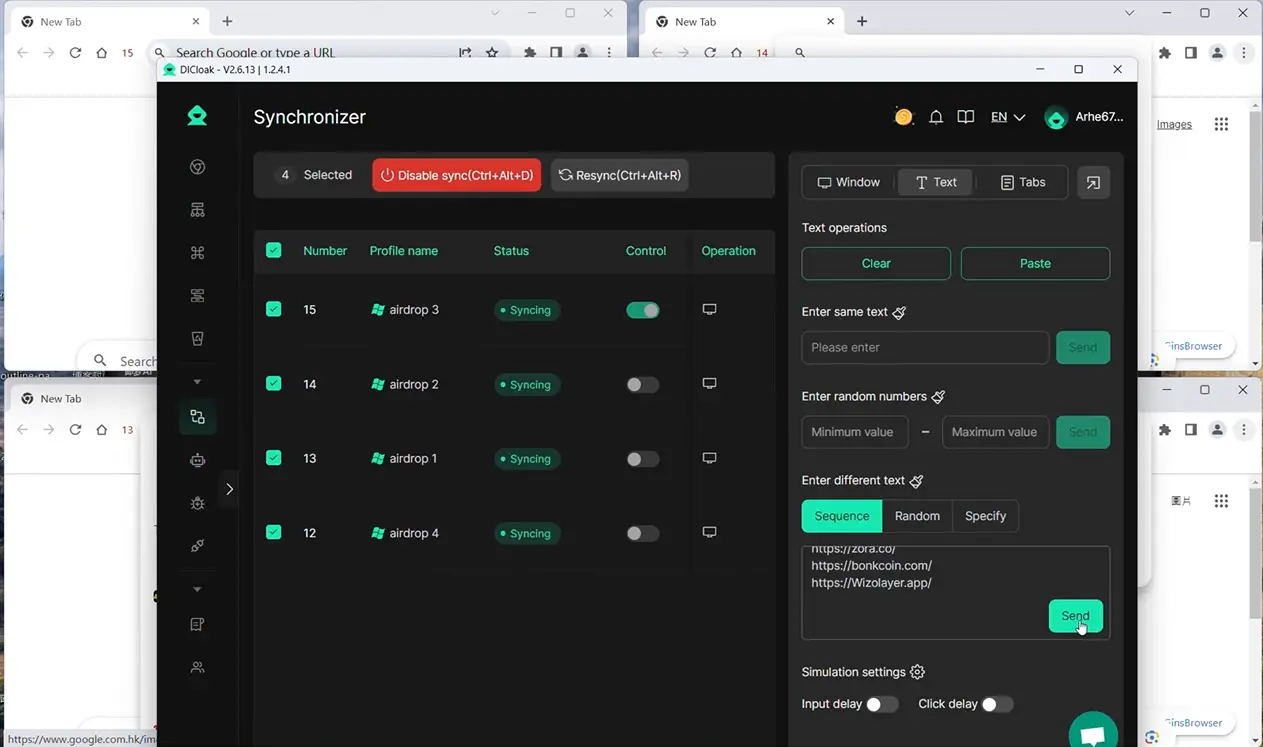
DICloak's Synchronizer lets users choose a main browser window and repeat actions such as clicks, keyboard input, scrolling, tab actions, and URL opening across selected Profiles.
For example, a social media team preparing several brand accounts could open the required Profiles together and use synchronized actions for parts of a workflow that are the same across them. Content and account-specific details can still be handled separately.
DICloak also provides RPA automation for repeat workflows. Its social media solution includes RPA templates and support for custom automation workflows, while its Help Center documents social-media-focused RPA tasks.
Automation should not mean posting the exact same content everywhere. The earlier sections of this guide still apply: an Instagram Reel, a LinkedIn post, and an X update should be adapted to the audience and platform.
The real benefit is removing unnecessary manual work around the content process. When Profiles, team access, and repeat tasks are easier to manage, businesses have more time to focus on what to post on social media for business and whether that content is actually helping customers.FAQ About Social Media Content for Businesses
Once your content plan and account workflow are in place, a few practical questions still come up. These answers can help you make better decisions about what to post on social media for business without making your strategy more complicated than it needs to be.
FAQ About Social Media Content for Businesses
These common questions can help you fine-tune what to post on social media for business and make your content plan easier to manage.
How Often Should I Post on Social Media for My Business?
There is no perfect posting frequency for every business. Buffer's 2026 research suggests about 3–5 posts per week on Instagram, 2–5 on TikTok, and 2–5 on LinkedIn, but these are only starting points. A smaller number of useful posts is better than posting often with weak content.
What Platforms Are Best for Small Businesses in 2026?
Choose platforms based on where your customers spend time. Instagram and TikTok work well for visual products and short videos, Facebook is useful for local businesses and communities, while LinkedIn is often a better fit for B2B companies. You do not need to manage every platform at once.
How Do I Know if My Audience Prefers Videos or Images?
Test both and compare your own results. Look at reach, comments, shares, saves, and clicks rather than assuming video will always perform better. Buffer's 2026 data found that Instagram carousels had higher engagement rates than Reels, while Reels generally reached more people, showing that the best format depends on your goal.
Can I Reuse Old Content on Social Media?
Yes, but it is better to repurpose strong content than simply repost it unchanged. For example, a useful blog post can become an Instagram carousel, a short TikTok video, or a LinkedIn post with one key takeaway. Update old facts, examples, or visuals before publishing it again.
How Do I Handle Negative Comments or Reviews?
Respond calmly and focus on solving the problem. If a customer shares a real concern, acknowledge it and explain the next step; move the conversation to a private channel if personal details are needed. Repeated complaints can also give you new social media content ideas for business, such as an FAQ, tutorial, or product update that answers the issue clearly.
 Web Proxy Tools
 Free Tools
 Cookie Plugin
 UA Generator
 MAC Address Generator
 IP Generator
 IP Address List
 2FA Code Generator
 World Clock
 Anonymous Check
 WebRTC Leak Test
 UUID Generator
 Free Web Proxy Site
 Proxy Checker
 FB Ad Checker
 AI Web Scraping
 Free SMM Tools
 Twitter Shadowban Checker
 Instagram Name Checker
 UTM Generator
 Username Generator
 AI Hashtag Generator
 LinkedIn Headline Generator
 Social Media Image Resizer