Joining a bitget affiliate program looks easy until you hit your first real snag: setting up accounts, handling payout risks, and keeping your links working on big traffic days. Many new partners jump in for the high commission but run into sudden account suspensions, payment holds, or banned ad campaigns, especially when running multiple profiles or testing offers across different channels.
Some guides claim you can just sign up and share a bitget referral link, but that’s not how things play out on a busy crypto exchange affiliate campaign. The real sticking points are anti-fraud checks, region restrictions, and losing your payout when Bitget’s compliance flags a mismatch. One wrong move, like reusing browser fingerprints or missing a compliance email, can freeze your earnings for weeks.
You need a plan that goes beyond “sign up and post links.” That means knowing the risks before launch, setting up the right account structure, and using workflows that won’t trigger Bitget’s risk controls. Skipping these details is what gets most new affiliates stuck at the payout step or blocked from scaling campaigns.
Before you join, see how the program actually works and what mistakes cost the most. The next section breaks down the risks that matter.
What to Check Before You Apply to the Bitget Affiliate Program
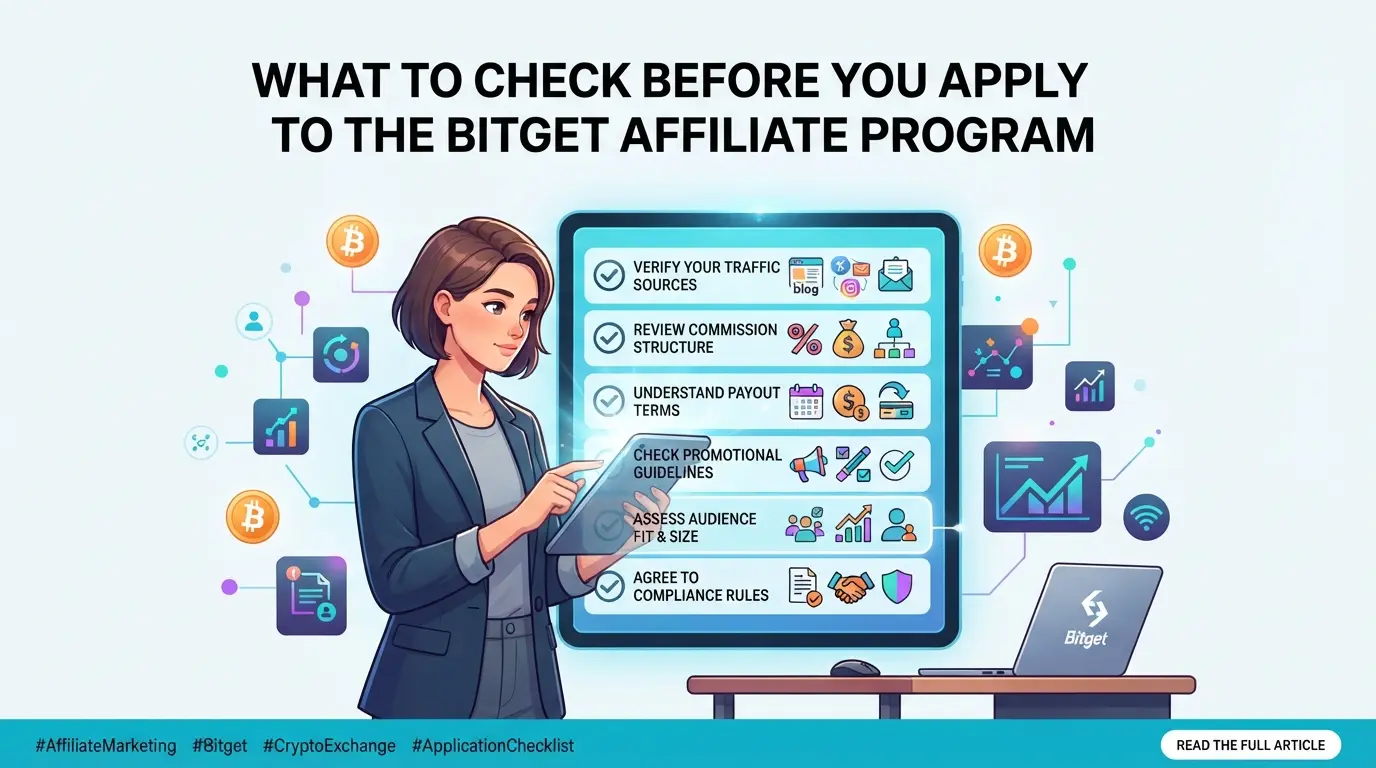
Getting into the bitget affiliate program sounds simple, but skipping the details here is what gets applicants rejected or limits your earnings later. Before moving ahead, check eligibility, have the right proofs, and know what Bitget will flag.
Who Is Eligible to Become a Bitget Affiliate?
Only apply if you have a real audience, Bitget usually looks for at least 1000 followers or active community members. Some countries are excluded by local law or platform policy, so use a current account location Bitget accepts. Previous fraud or ban history will block your application.
What Documents or Proofs Are Needed?
- Screenshot or links showing your social media, website, or community stats.
- Verified ID or business documents for KYC (know your customer) checks.
- Unique email and clean device/browser profile, Bitget runs compliance scans at signup.
Red Flags That Could Get Your Application Rejected
Bitget checks engagement closely. If you inflate numbers or link old banned accounts, your application will stall before review. Too many applicants overlook these tripwires.
- Fake or purchased followers; engagement rates below 1% are usually flagged.
- Any prior bans, restrictions, or failed KYC on Bitget, or other crypto exchanges.
- Multiple applications with the same device fingerprint or overlapping compliance data.
Missing these checks is how most affiliates end up locked out of payouts or suddenly restricted mid-campaign. In practice, the hardest applications aren't the ones with low numbers, but those where proof doesn't stand up to review or data doesn't match up, one gap and you're set aside without even a reason code.
The next section will show why so many new affiliates lose earnings or face account blocks soon after approval, and what signals Bitget’s system uses to detect risk.
Why Some Bitget Affiliates Lose Earnings or Get Restricted Fast
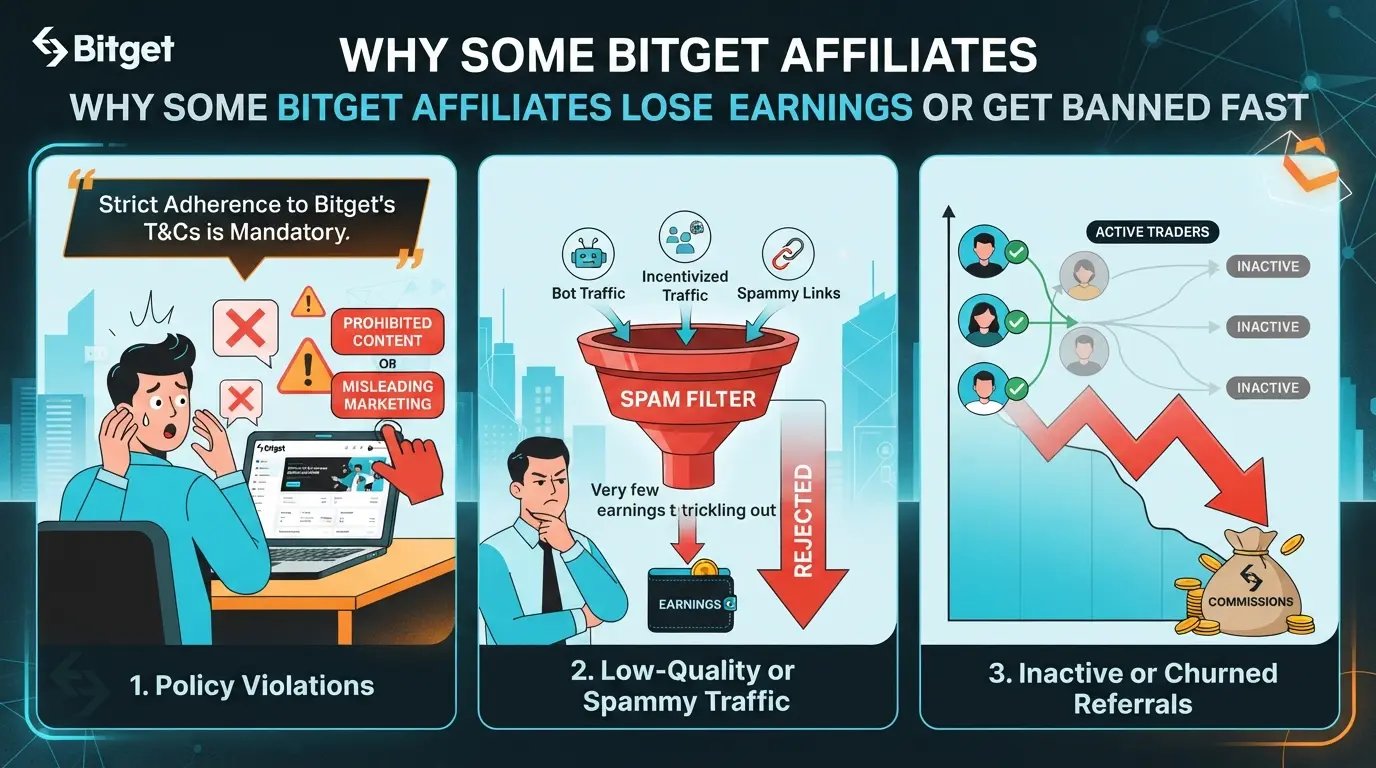
Most affiliates don’t lose their Bitget earnings because they failed the signup form. The real problems come from aggressive promotion, hidden account links, or missing compliance steps, any of these can freeze payouts or get you banned within days.
Prohibited Promotion Methods
Spam, fake clicks, or misleading offers kill your account fast. Bitget tracks incentivized signups and bot traffic, so one flagged campaign can wipe out all pending commissions.
Account Linking and Multi-Account Abuse
Bitget’s anti-fraud system checks for patterns in device fingerprints, IP addresses, cookies, and browser profiles. If you sign up multiple affiliate accounts from the same laptop or phone, even months apart, Bitget can spot the overlap and lock your dashboard. A common mistake: sharing a device with a housemate who runs their own crypto campaign. The system doesn’t care if you’re different people; linked fingerprints look like one operator trying to game the referral system. Even something simple, like pasting codes between incognito tabs or reusing profile pictures, is enough to trigger a manual review. Once flagged, you’ll see sudden payout holds, requests for extra verification, or a complete ban. If you want to scale up, using sloppy browser setups or forgetting to isolate each account often costs you everything you’ve earned. The hardest part is, Bitget rarely explains the trigger, so you only find out after the money’s gone.
Compliance and Regional Restrictions
- Pushing links in countries Bitget doesn’t support gets your affiliate account blocked, even if just one referral is from a blacklisted region.
- Ignoring KYC (know your customer) and AML (anti-money laundering) checks means you can lose all commissions if your traffic fails to verify.
- Using fake names, incomplete info, or not responding to compliance emails puts your payouts on permanent hold.
Missing or skipping these checks is usually where crypto affiliates lose the most: Bitget holds all pending earnings until you provide the right documents, and sometimes never releases them if the review fails.
If you want to keep earning, you need more than just traffic, you need airtight account hygiene and a clear compliance record. Next, see exactly how the payout process works and what steps you have to pass before money ever hits your wallet.
How Bitget Affiliate Commissions and Payouts Actually Work in 2026
Bitget affiliate commissions look simple on the landing page, but the reality is much stricter once your referrals start trading. The actual rules behind commission rates, payout timing, and clawbacks decide how much you keep. If you don’t check the details, you may lose weeks of earnings for reasons support won’t reverse.
Commission Rates and Tiers Explained
You earn a percentage of your referrals’ trading fees, usually between 10% and 40%. The exact rate depends on how many active traders you bring, your total volume, and sometimes which region your referrals come from. High-volume partners can negotiate special rates, but most start at the bottom tier.
How and When Are Payouts Processed?
Payouts aren’t instant. You need to meet a minimum threshold, often $50 or the equivalent in crypto, before you can withdraw. Payments are processed weekly or biweekly, but only after your referrals meet activity requirements. For example, if a new user signs up but never trades, you get nothing. Bitget lets you choose payout methods: most affiliates pick crypto (like USDT or BTC), but some regions allow bank transfers. If your account or referrals trigger a compliance check, payouts may freeze until the review ends. This can take days or even weeks when support is backlogged. Always track active referrals and pending commissions, missing a required KYC update or letting an inactive referral list grow can block you from reaching the payout minimum for months.
Common Reasons for Delayed or Lost Commissions
- Referral inactivity: If your signups don’t trade, commission is canceled.
- Invalid signups: Self-referrals or fake accounts get flagged and wiped.
- Policy violations: Breaching program rules (e.g., multi-accounting) leads to clawbacks and possible bans.
The payout system rewards real traders, not just clicks or signups. Most complaints about “missing earnings” trace back to these rules, not system bugs or payment delays. If you don’t check referral activity weekly, lost commissions usually stack up before you notice.
Knowing these mechanics makes it easier to plan campaigns that actually get paid. The next step: see how the application and approval process works so you don’t get stuck before your first payout.
What Steps to Follow to Apply and Get Approved as a Bitget Affiliate
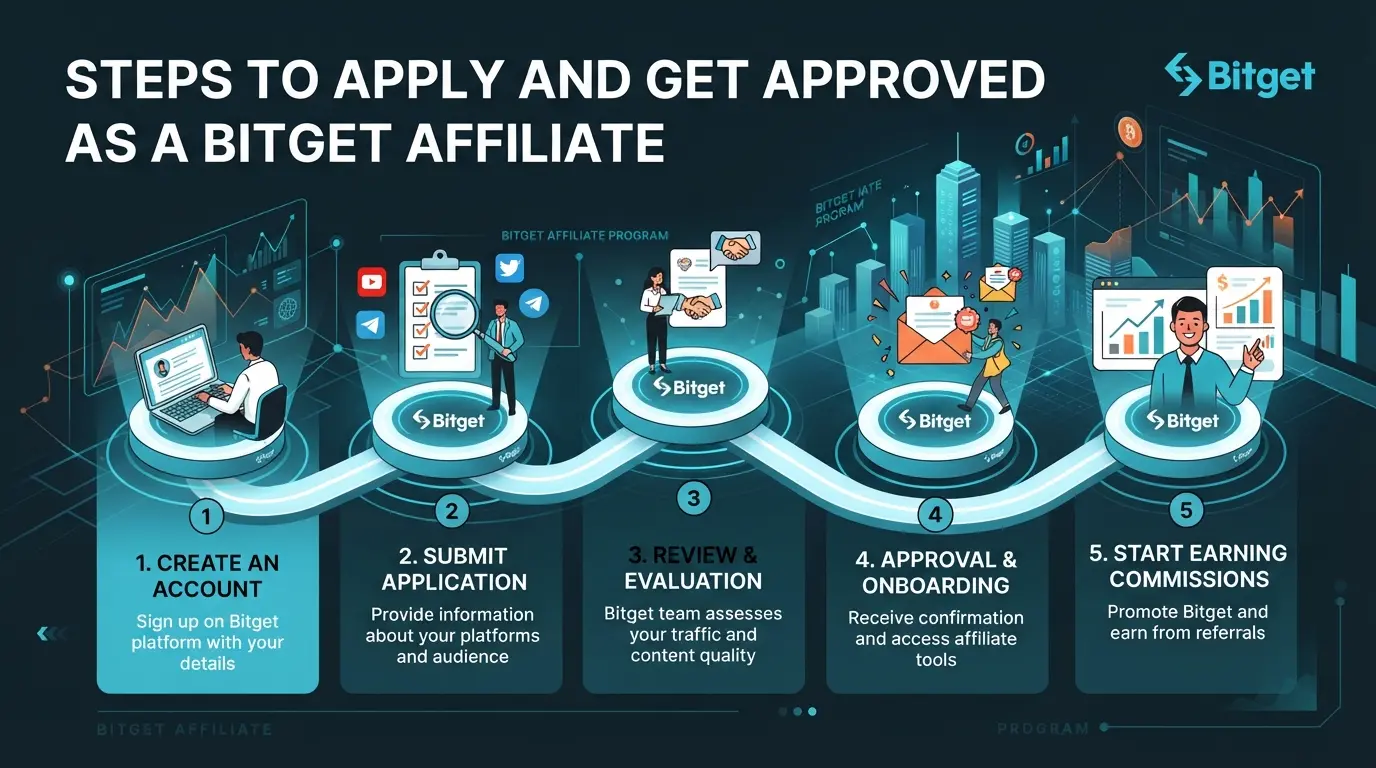
Getting approved is not just about filling a form, Bitget looks for proof you can send real traders and follow their rules. Here’s the practical sequence to apply without missing key checks.
Step 1: Prepare Your Application Materials
- Gather screenshots or links showing your audience reach, social channels, blogs, or trading groups.
- Make sure your promotion methods match Bitget’s compliance list. If you plan to use paid ads or multiple platforms, double-check the rules so you don’t get rejected for “prohibited channels.”
- Have your ID and business info ready. Missing documents can stall your application for days.
Step 2: Submit Your Application
- Go to the Bitget main site, scroll to the footer, and click “Affiliate.”
- Start the online application. Enter your contact info, planned promotion channels, and estimated user reach. If you skip the “traffic details” field, you’ll likely get flagged for manual review.
- Upload all required documents in the portal. Incomplete uploads mean your application just sits in the pending queue.
Step 3: Wait for Review and Respond to Requests
- Standard review takes 2-5 business days. If you apply Friday night, expect no answer before Tuesday.
- If Bitget emails for extra info, reply within 24 hours. Delays here almost always push your application to the bottom of the review pile.
- Watch for “further verification required” messages, this means compliance found a mismatch or needs to verify your audience is real.
Step 4: Start Promoting and Tracking Your Referrals
- Once approved, log in to your Bitget affiliate dashboard, your unique referral link is there.
- Share this link only through the channels you listed in your application. Using unapproved methods can get your payouts frozen.
- Track signups and conversions in the dashboard. Download reports weekly to catch any sudden drop-offs or suspicious spikes early.
Missing a compliance check now means starting over later. Next, you’ll see how to avoid account linking traps and multi-account risks when scaling your affiliate setup.
How to Avoid Account Linking and Multi-Account Risks as a Bitget Affiliate
Even if you follow the rules at signup, one careless overlap, like reusing a device or IP, can link accounts and get both your main and sub accounts restricted. Bitget’s system logs device fingerprints and cross-checks them between affiliate and regular user profiles.
What Triggers Account Linking Detection?
Bitget tracks your login IP, device type, browser fingerprint, and even mouse movement patterns. A single shared Wi-Fi network or recycled browser profile usually triggers a review or immediate freeze. One overlooked session link can cost your entire commission block.
Safer Practices for Teams and Agencies
Sharing devices or switching browser profiles between multiple program logins almost always gets accounts grouped and flagged.
- Mixing up traffic routes, for example, bouncing between different proxies, often leaves behind cookie trails that show up in Bitget’s logs.
- Stick to one profile per device and use consistent proxy settings, no overlap means much lower risk.
Warning Signs and What to Do If You’re Flagged
A blocked withdrawal, sudden “account under review” banner, or email from Bitget’s compliance team is your first sign. If this happens, freeze all activity, don’t try to switch browsers or IP. Prepare screenshots and a clean session log before responding to the appeal request.
Using DICloak for Multi-Account Browser Management in Crypto Affiliate Teams
Once teams set up safe access rules for the Bitget affiliate program, the next struggle is keeping each platform account’s browser profile isolated—especially as the team grows, switches roles, or handles accounts for both airdrop and farming projects. For operators who need to run multiple account sessions without crossing browser storage or network settings, DICloak supports this as a separate workflow.
Creating Isolated Browser Profiles with Custom Fingerprints
Operators can create a dedicated browser profile for each platform account, setting up fingerprint signals—like operating system, time zone, or screen size—so each session runs in its own environment. This approach keeps cookies, browser storage, and session data separated, letting teams assign profiles without overlap. The scope is limited to browser-profile access; it does not change the connected exchange account.

Configuring Proxies for Each Profile
When a workflow needs separate network routes, operators can add their own proxy to each DICloak profile and test the connection before logging in. For example, if a team handles exchange accounts tied to different regions, each profile can use a proxy that fits that region. Proxy selection and compliance stay with the operator; DICloak only applies the configured proxy to the chosen browser profile. Proxies need to be prepared by yourselves.

Bulk Operations for Efficient Profile Management
At scale, teams can select multiple profiles and edit, group, or export them in one batch—saving hours compared to handling each profile alone. Actions like updating fingerprint settings or switching assigned proxies across a set of profiles can be done together, but any mistake affects all selected profiles, so double-check before applying. Bulk profile operations are available on supported plans.

This setup keeps the browser side organized as teams weigh when running more accounts becomes inefficient or risky.
When Running Multiple Affiliate Accounts Becomes Too Risky or Inefficient
If you’re juggling too many accounts for the bitget affiliate program, the tipping point is clear, you spend more time dealing with bans, lost payouts, or troubleshooting than actually earning. That’s when the risk outweighs the reward.
Signs Your Workflow Is Too Complex or Risky
If you keep seeing banned accounts or missing commissions, your setup’s outgrown what you can control. Losing access to even one main account after a compliance check can wipe out weeks of work.
Safer Alternatives to Multi-Account Scaling
Pushing more accounts usually means higher risk and less sleep, not better results.
- If you get flagged, Bitget can block all linked payouts, not just one account.
- Build a real referral group or focus on higher-quality leads instead, one clean, compliant account often outperforms five risky ones.
Frequently Asked Questions About bitget affiliate
Is the Bitget affiliate program legal in my country?
Bitget affiliate program rules depend on where you live. Some countries ban crypto promotions or require extra registration. Before signing up, check your local laws and Bitget’s own compliance list. If your country is restricted, joining may lead to account suspension or loss of earnings.
Can I join the Bitget affiliate program without a large audience?
You don’t need thousands of followers, but Bitget asks for some influence, like a small crypto group or active social media. Minimums can change, so check Bitget’s latest requirements. Building a community helps boost your referral earnings and meet platform standards.
How many Bitget affiliate accounts can I operate safely?
Operating more than one account can break Bitget’s rules. If you do manage multiple profiles, keep them separate and avoid mixing referral links. Using profile isolation tools reduces risk but doesn’t guarantee safety. Always follow Bitget’s official guidelines to avoid bans.
What should I do if my Bitget affiliate commissions are missing?
First, check if your referral status is active and meets Bitget’s payout rules. Make sure you haven’t violated any policies, like fake signups or spam. If you still don’t see your commissions, contact Bitget’s support team with your account details for help.
Can I use proxies to manage Bitget affiliate accounts?
You can use proxies for Bitget affiliate management, but they must be set up correctly and comply with Bitget’s terms. Proxies help separate accounts, but misuse can trigger bans. Setup tools like DICloak make it easier to manage profiles, but you need to supply your own proxies.
If you’re considering venturing into affiliate marketing with crypto platforms, it’s important to weigh the features and terms that best align with your goals. Take time to research tools that simplify your promotional efforts and help you safeguard sensitive information as you grow your business. Try DICloak For Free
 Web Proxy Tools
 Free Tools
 Cookie Plugin
 UA Generator
 MAC Address Generator
 IP Generator
 IP Address List
 2FA Code Generator
 World Clock
 Anonymous Check
 WebRTC Leak Test
 UUID Generator
 Free Web Proxy Site
 Proxy Checker
 FB Ad Checker
 AI Web Scraping
 Free SMM Tools
 Twitter Shadowban Checker
 Instagram Name Checker
 UTM Generator
 Username Generator
 AI Hashtag Generator
 LinkedIn Headline Generator
 Social Media Image Resizer