Trying to set up web infrastructure, you’ll hit a common wall: you need to serve traffic from one public IP but want to control, filter, or split requests before they reach your real servers. Maybe you want to hide backend details, balance load, or block risky users. Search for solutions and the same question pops up, what is a reverse proxy and when does it actually make sense to use one?
At first glance, a reverse proxy just sounds like a traffic middleman. But the details matter. Set up wrong, and you might introduce new bottlenecks or even expose your internal network. “Reverse proxy vs forward proxy” is another point of confusion, forward proxies help users reach the internet, while reverse proxies sit in front of your server and help manage incoming requests.
The real decision isn’t just “how does a reverse proxy work” but whether you need one at all. Are you trying to shield backend IPs, enforce SSL, or cache content? Or just hoping for extra security? Skip the risk checklist and you’ll miss places where proxies can cause authentication headaches, slowdowns, or even let attackers sneak through if misconfigured.
So before you change your architecture, get clear on the basics. Here’s what actually happens when you put a reverse proxy in the mix.
What Is a Reverse Proxy and Why Do People Use It?
A reverse proxy sits in front of your backend servers and handles incoming client requests, forwarding them to the right internal service. If you want to control who can reach your servers, hide backend addresses, or manage traffic spikes, a reverse proxy is often the tool that makes this possible.
How a Reverse Proxy Sits Between Clients and Servers
At its core, a reverse proxy acts as an intermediary between outside users and your backend systems. Here’s what that setup actually means in practice:
- External clients send requests to the reverse proxy, not directly to your app servers.
- The proxy decides which backend server should handle each request, sometimes based on load, sometimes based on URL or headers.
- Responses from backend servers go back through the reverse proxy before reaching the client, masking internal IPs and structure.
Common Reasons to Use a Reverse Proxy in 2026
Most teams set up a reverse proxy to solve at least one of these problems: spreading traffic evenly (load balancing), blocking malicious requests or hiding internal details (security), or boosting speed by caching common assets (performance). For example, an e-commerce site might use one to distribute user traffic across ten backend servers and cache static images. If the proxy goes down, nobody gets through, even though the backend servers are fine, so it’s a single point of failure unless you run multiple proxies.
The real gain is control: reverse proxies let you decide how requests are handled, which servers get traffic, and what information the outside world can see. But that control comes with a price, misconfigured proxies can expose you to new risks, break authentication, or create hidden bottlenecks that are tough to diagnose. Teams often run into trouble when they assume “plug and play” will just work. For instance, SSL passthrough and header rewriting are common pain points. If the proxy strips or rewrites headers the backend expects, you might see login issues or failed API calls that are hard to trace.
Understanding this layer, where it sits, what it controls, and what can break, is the first step before you start wiring up configs or routing real traffic. Next, it’s time to look closer at what actually happens inside the request flow and how a reverse proxy routes data step by step.
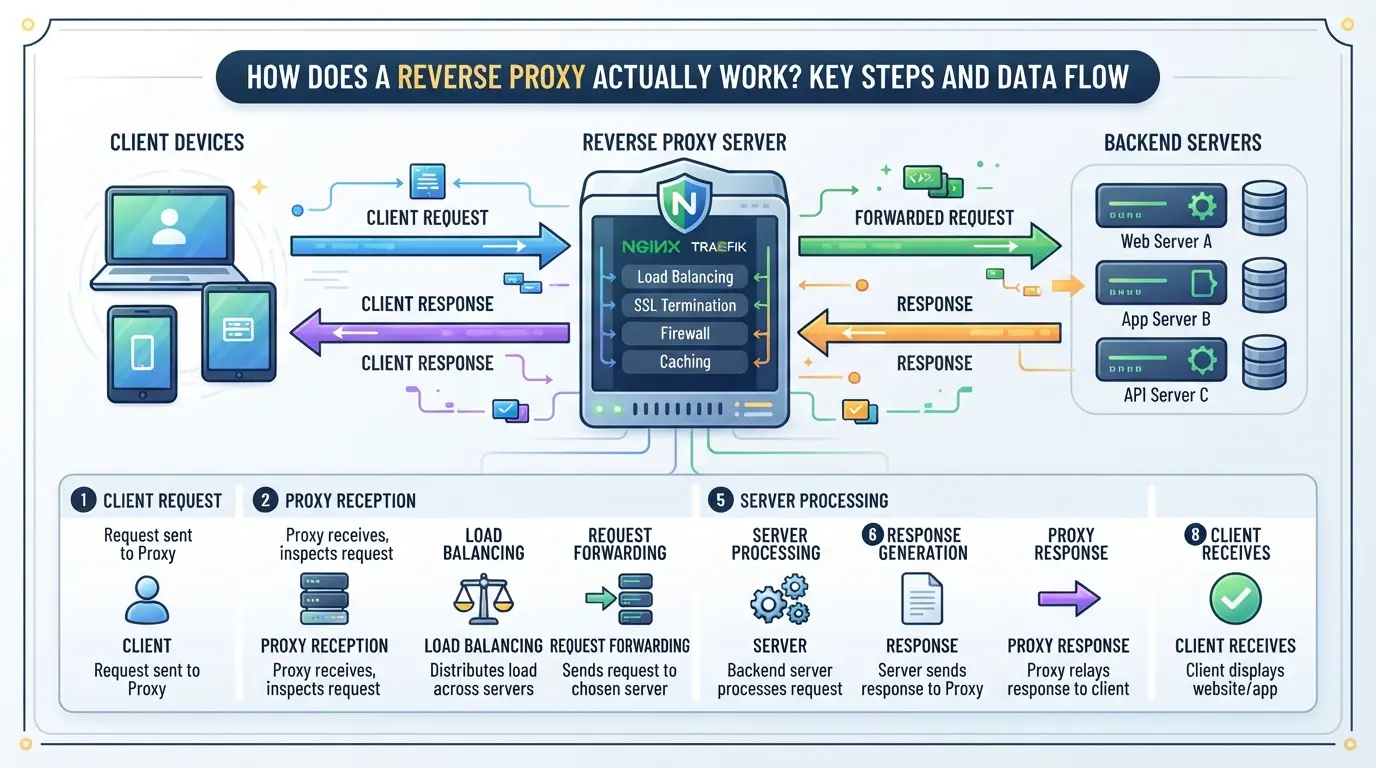
How Does a Reverse Proxy Actually Work? Key Steps and Data Flow
A reverse proxy sits between clients and backend servers, handling every request and response. Understanding how it actually processes data helps spot weak points and troubleshoot performance or security problems.
Request Handling: From Client to Backend Server
The client connects to the reverse proxy, not the backend server. The proxy inspects the request, applies rules (like routing or filtering), then forwards it to the right backend. If the backend is slow or fails, the proxy can retry, return an error, or send a cached version.
Header Management and Protocol Handling
Headers are where things get tricky, especially with real client IPs and advanced protocols. The proxy must set or rewrite headers like X-Forwarded-For to preserve the original client IP. Without this, logs and rate-limits may be useless, and security checks might miss real threats. For example, if a backend trusts the wrong header, a user can spoof their location or bypass geoblocking.
WebSockets and streaming introduce more edge cases. Not all proxies handle connection upgrades out of the box. Some drop long-lived connections or fail to forward streaming data correctly, leading to broken apps or silent data loss. If you’re proxying WebSockets, double-check both your proxy’s config and backend support, or you’ll see random disconnects and complaints that are hard to trace.
TLS Termination and Encryption Boundaries
- Terminating TLS at the proxy lets it decrypt and inspect traffic, but backend links may stay unencrypted, anyone on that internal network could snoop.
- Re-encrypting traffic from proxy to backend adds security, but also increases CPU load and latency, especially if using older hardware or many short-lived connections.
- If you misconfigure certificate validation or allow both HTTP and HTTPS to the backend, attackers might inject data or steal sessions in transit.
The way you handle TLS isn’t just about “checkbox security.” If a reverse proxy terminates TLS but fails to secure the backend link, internal threats or misrouted traffic can expose sensitive data. Many teams only discover this after a pentest or a real incident, by then, logs may be too vague to prove what happened.
Next up: reverse and forward proxies are often confused, but their placement and use cases are not the same. Understanding this difference is key before choosing your architecture.
What’s the Difference Between a Reverse Proxy and a Forward Proxy?
People often mix up reverse proxies with forward proxies, but the roles are nearly opposite. The core difference is about who sits behind the proxy and who controls what gets filtered or hidden. If you just need a simple way to explain “what is a reverse proxy” versus a forward proxy, look at the flow of traffic and who benefits in each setup.
Reverse Proxy vs Forward Proxy: Core Differences
| Feature |
Forward Proxy |
Reverse Proxy |
| Traffic Direction |
Outbound (client → internet) |
Inbound (internet → server) |
| Who Configures |
Client or organization’s users |
Server owner or site administrator |
| Main Goal |
Hide clients, filter outbound |
Protect servers, manage inbound |
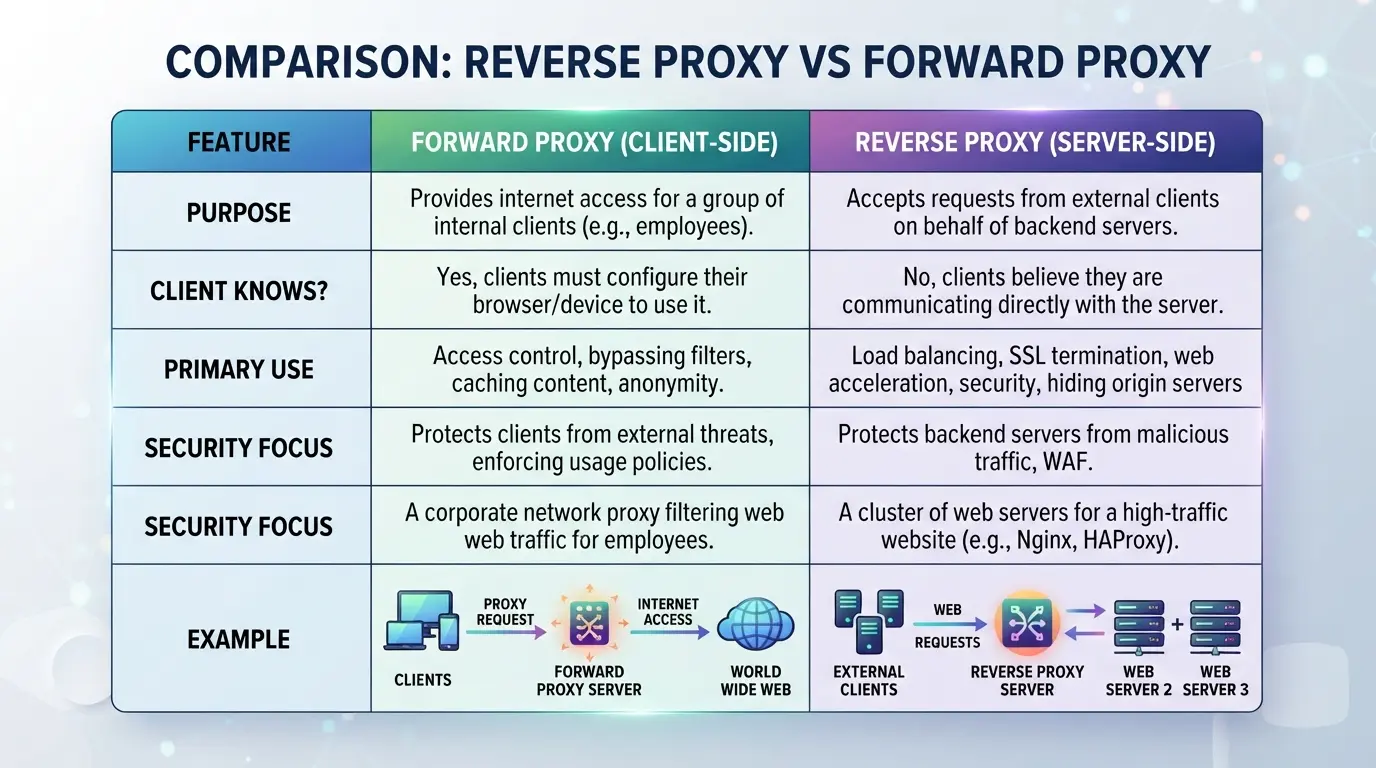
The most practical difference: a forward proxy hides the user, while a reverse proxy hides or protects the server.
Typical Use Cases for Each Type
Reverse proxies stand in front of web servers to control and filter all incoming traffic, often for load balancing or masking backend details. Forward proxies, on the other hand, are used by people or teams who want to hide their browsing, bypass filters, or pool outbound requests through one point.
Reverse proxies are the standard for public-facing sites and APIs, while forward proxies are common for user privacy, research, and restricted networks.
If you confuse the two, you might end up exposing your backend or failing to protect user privacy. The next step is knowing what can go wrong, misconfigurations here can introduce new risks you may not spot right away.
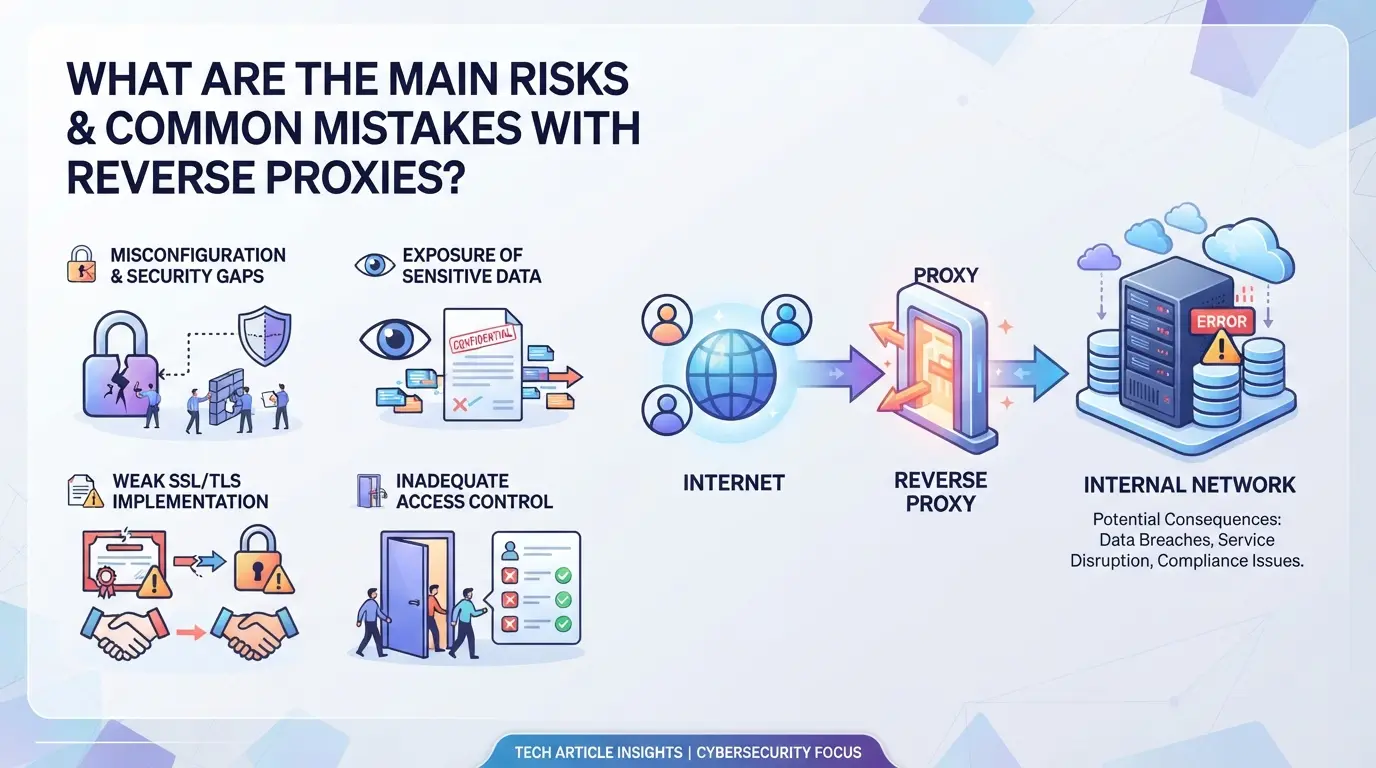
What Are the Main Risks and Common Mistakes with Reverse Proxies?
Missteps with reverse proxies often come down to misconfiguration, one unchecked setting can expose backend servers, break authentication, or leak private data. Here are the main issues you’ll actually face.
Security Risks: Exposure, Misrouting, and Data Leaks
Forgetting to block direct access to backend IPs means attackers can bypass your reverse proxy entirely. Improper header handling, like failing to strip or rewrite X-Forwarded-For, lets clients spoof their real IP or inject data. The most common mistake is assuming your proxy "hides" everything by default, when it often just shifts the attack surface.
Operational Pitfalls: Caching, Logging, and TLS
- Disable caching for login or admin pages to avoid leaking session data.
- Check that TLS certificates match each domain served by the proxy.
- Ensure access logs don't store sensitive info like cookies or tokens.
Troubleshooting Tips for Reverse Proxy Setups
Most 502 or 504 errors trace back to simple proxy misroutes or backend timeouts. Redirect loops usually mean your proxy is rewriting URLs incorrectly or forwarding the wrong headers.
- Confirm backend health and port matching.
- Double-check redirect rules, avoid infinite loops by setting clear path rewrites.
- Use a test client to trace the full request path, not just browser output.
How to Set Up and Configure a Reverse Proxy: Key Steps for 2026
Setting up a reverse proxy comes down to three decisions: pick the right tool, configure it securely, and test like something will break. Skip any piece and you risk downtime, leaks, or showing the world your backend server. Here’s the workflow most sysadmins use now.
Choosing the Right Reverse Proxy Software
- List your must-haves: HTTP/2, WebSocket support, rate limiting, or auto SSL. Decide if you need open-source like Nginx or commercial support from providers such as F5 or Cloudflare.
- Match software to your load: Nginx and HAProxy are common for high-traffic sites; Caddy is easier for quick SSL.
- Check for recent security updates and an active user community. If the project hasn’t shipped a patch in the last 12 months, keep looking.
- Consider plugin needs. Nginx and Caddy have strong plugin ecosystems, if you need deep customization, this matters.
Basic Configuration: Routing, SSL, and Headers
- Set up backend pools and routing rules, define which domain and path sends traffic where. A typo here can send users to the wrong app or expose internal services.
- Enable SSL/TLS with a valid certificate. Self-signed certs may trigger browser warnings or break APIs.
- Strip or rewrite headers as needed. Passing the wrong headers (like X-Forwarded-For) can reveal internal IPs.
Testing and Validating Your Reverse Proxy
- Run a connectivity test: try loading each site through the proxy and check for error codes. If you see 502 or 504 errors, double-check backend addresses.
- Use a tool like ssllabs.com to scan SSL setup, it will flag weak ciphers or expired certs.
- Inspect headers with curl or browser dev tools. If you see “Server: Nginx” on a route that shouldn’t expose the proxy, fix your config.
Ready for real account management? Next, see how teams handle multiple browser profiles and proxies in a production workflow.
How Teams Can Manage Multiple Platform Accounts with Isolated Browser Profiles and Proxies in DICloak
If you run multiple platform accounts and need each session fully separated, even after setting up a reverse proxy, browser-level isolation is still required. For teams handling affiliate, social, or e-commerce logins, DICloak gives you practical tools to keep account sessions apart and control the network identity for each workflow. The key is to treat each platform account as a separate environment, not just a new tab.
Creating Isolated Browser Profiles and Configuring Fingerprints
Operators can create a browser profile for every account workflow, making sure cookies, storage, and browsing history never cross. Each profile’s fingerprint settings, like OS, User Agent, timezone, and screen size, can be set independently, matching team policies for environment consistency. This lets teams keep every account session in its own browser sandbox during group operations. The scope here is limited to the browser-profile layer; it does not affect the server-side routing or reverse proxy setup.

Assigning and Testing User-Owned Proxies for Each Profile
Every profile can be assigned a user-provided proxy, letting operators control which network exit each session uses. Before starting work, users can run a built-in proxy check to see the current exit IP, location, and time zone, catching misconfigurations early. Admins stay in charge of proxy selection and rotation rules; DICloak doesn’t sell or bundle proxies, and the tool’s role ends at applying the user’s proxy setting for that profile.

Teams who need this level of separation often use these controls alongside reverse proxy setups, but the real question is whether you actually need both, or if that’s just extra overhead.
When Does Using a Reverse Proxy Make Sense, and When Is It Overkill?
You don’t always need a reverse proxy. If you’re running a small site with one server, adding this layer can actually make things more complicated and open up new risks. The real value kicks in when you’re managing multiple backends, need to centralize security, or want to control how users reach your service. So before you start looking up “what is a reverse proxy” and how to install one, get clear on what you’re actually solving.
Scenarios Where a Reverse Proxy Is Essential
- You need load balancing across several backend servers, traffic gets split, downtime drops, and scaling is easier.
- Centralized SSL/TLS termination: handle encryption in one place, rather than spread across every backend.
- Unified access control and firewall: apply security rules and block threats before they reach your internal apps.
When a Reverse Proxy Is Unnecessary or Adds Risk
For single-server setups, adding a reverse proxy can be overkill. You’re introducing another point of failure, if the proxy crashes, users can’t reach your site, even if your app is fine. There’s also extra maintenance: updating configs, patching vulnerabilities, and checking logs all take time. One common mistake is thinking a proxy alone makes your service safer. If you don’t lock down backend IPs, attackers might bypass the proxy and hit your app directly. Unless you have multiple backends or strict security needs, a simple web server is usually faster, easier to manage, and less likely to break under updates.
If you do decide to run a reverse proxy, expect extra troubleshooting, especially around SSL errors, header mismatches, and authentication issues. The next section covers the most common errors and how to fix them quickly.
Real-World Troubleshooting: Common Reverse Proxy Errors and How to Fix Them
Diagnosing 502, 504, and Connection Refused Errors
These errors nearly always mean the reverse proxy cannot reach your backend. Double-check backend health, confirm your proxy route matches the correct IP:port, and make sure a firewall isn’t blocking the connection. When routes are misconfigured, expect instant failures, usually a blank page or an error code, not a slow timeout.
Solving Redirect Loops and Header Issues
- Verify Host headers match backend expectations.
- Make sure X-Forwarded-Proto is set correctly for HTTP/HTTPS.
- Check for duplicate Location headers from backend or proxy.
Fixing Mixed Content and WebSocket Disconnects
Mixed content warnings signal SSL problems; WebSocket drops point to protocol handling mistakes.
- Confirm SSL certificates are valid on both proxy and backend.
- Check proxy supports WebSocket upgrade headers.
- Rewrite backend URLs to match front-end protocol.
Frequently Asked Questions About what is a reverse proxy
Is a reverse proxy the same as a load balancer?
A reverse proxy and a load balancer can overlap, but they are not the same. A reverse proxy forwards client requests to backend servers, often handling security and caching. A load balancer spreads traffic across multiple servers to improve speed and reliability. Many tools combine both functions, but their main goals are different.
Does a reverse proxy hide my backend servers completely?
A reverse proxy hides direct IP addresses and server details from users, making backend servers harder to find. However, backend information can still leak through misconfigured headers or error messages. Attackers might use advanced techniques to discover backend infrastructure, so extra security steps are important.
Can I use a reverse proxy for SSL offloading?
Yes, a reverse proxy can perform SSL offloading, also called SSL termination. This means it handles encryption and decryption, so backend servers only see unencrypted traffic. SSL offloading speeds up backend processing and simplifies certificate management, but backend data is less protected once decrypted by the proxy.
What are the most popular reverse proxy tools in 2026?
In 2026, leading open-source reverse proxies include NGINX, Apache HTTP Server, and HAProxy. Commercial options like F5 BIG-IP and AWS Elastic Load Balancer are widely used for enterprise needs. Caddy is gaining popularity for its automatic HTTPS support and easy setup.
How does a reverse proxy affect logging and analytics?
A reverse proxy changes how backend servers see client information. By default, the backend only sees the proxy’s IP address. To track real users, proxies often pass original client IPs in headers like X-Forwarded-For. This setup helps with accurate analytics but needs correct proxy configuration to avoid losing data.
Whether you're aiming to improve your website's security, improve traffic, or enable smooth scaling, evaluating a user-friendly solution can make a significant difference. Consider testing a platform that simplifies setup and management, letting you focus on your core objectives. Try DICloak For Free
 Web Proxy Tools
 Free Tools
 Cookie Plugin
 UA Generator
 MAC Address Generator
 IP Generator
 IP Address List
 2FA Code Generator
 World Clock
 Anonymous Check
 WebRTC Leak Test
 UUID Generator
 Free Web Proxy Site
 Proxy Checker
 FB Ad Checker
 AI Web Scraping
 Free SMM Tools
 Twitter Shadowban Checker
 Instagram Name Checker
 UTM Generator
 Username Generator
 AI Hashtag Generator
 LinkedIn Headline Generator
 Social Media Image Resizer