Shopify and Squarespace can both build an online store, but they are designed around different priorities. Shopify puts e-commerce first. Its main tools focus on products, inventory, orders, payments, fulfillment, and selling across several channels. Squarespace starts as a website builder and adds commerce to a system that also handles portfolios, blogs, services, memberships, and visual content.
This difference matters more than simply counting features. A growing retail brand may need Shopify's deeper commerce tools, while a photographer or consultant may prefer Squarespace because design and content matter just as much as selling. In this Shopify vs Squarespace comparison, we will look at pricing, ease of use, design, e-commerce, SEO, support, and the types of businesses each platform suits best.
Shopify vs Squarespace: Quick Comparison
Before looking at each feature in detail, this table shows the main difference between the two platforms.
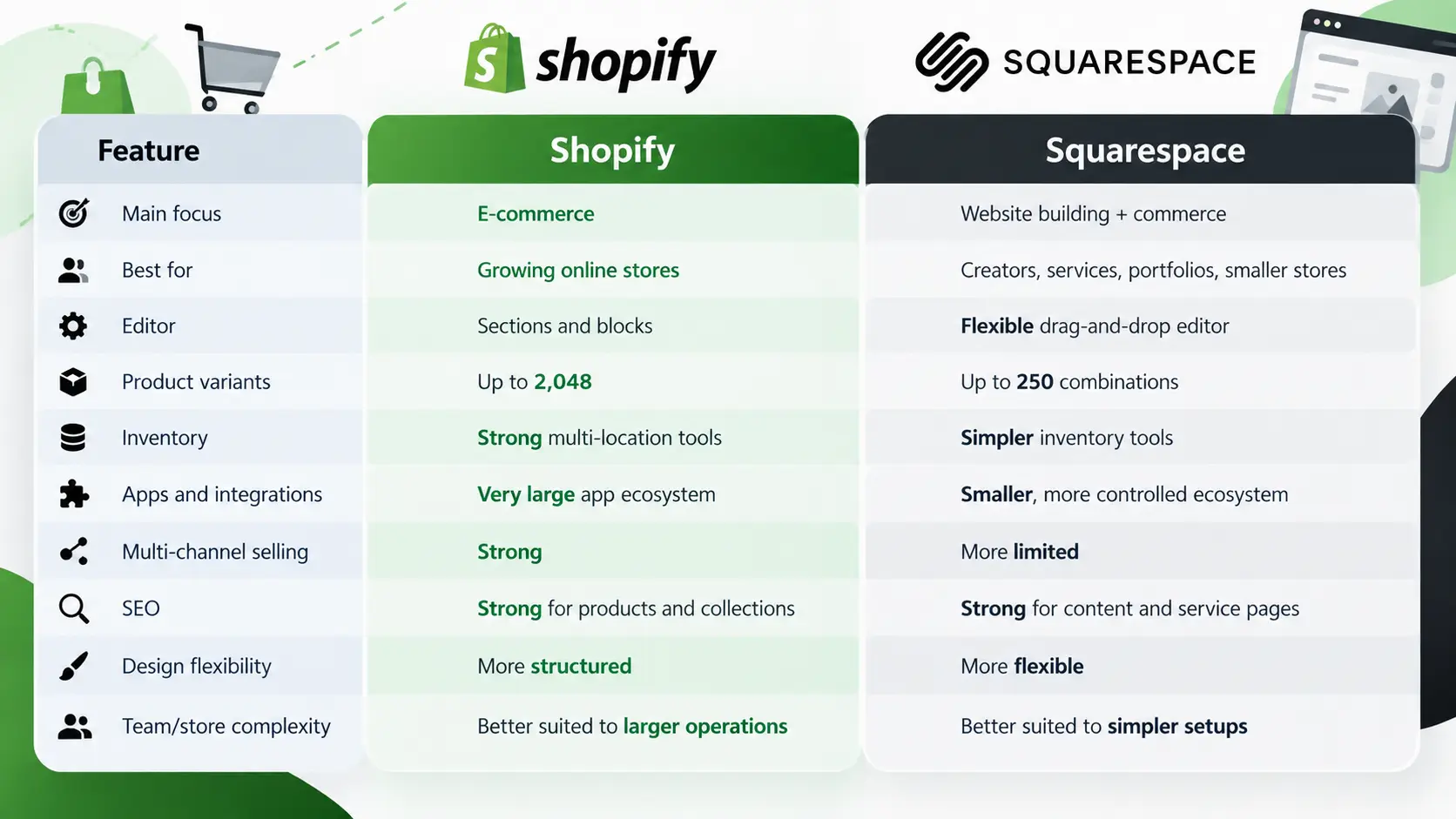
The basic difference is easy to understand. Shopify gives merchants more tools for running a complex store, while Squarespace gives users more freedom to combine selling with content, branding, and services. Cybernews makes a similar distinction in its 2026 comparison, describing Shopify as commerce-first and Squarespace as a broader website builder with e-commerce included.
Shopify vs Squarespace Pricing
Pricing can look simple at first, but the monthly subscription is only one part of the real cost. Payment processing, transaction fees, apps, themes, email tools, and other services can all change what you pay each month. This is why Shopify vs Squarespace pricing should be compared based on the type and size of the business, not only the cheapest plan.
Shopify Pricing
Shopify's main plans are Basic, Grow, Advanced, and Plus. The cost rises as businesses need more staff accounts, more advanced reporting, better international tools, and lower card processing rates. Shopify also supports a large app ecosystem, which gives stores more flexibility but can increase monthly costs as more paid apps are added.
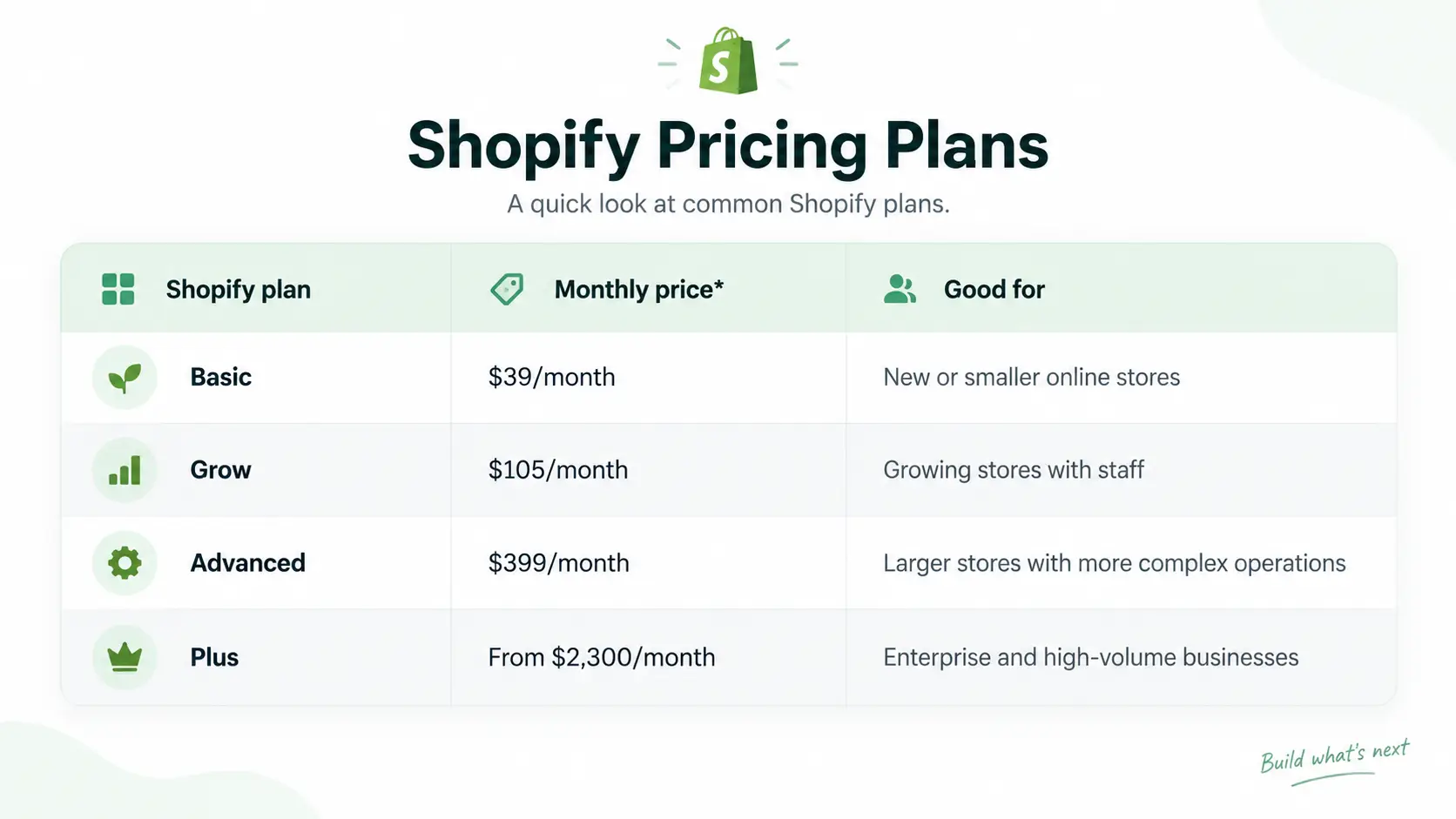
Monthly billing figures shown in Cybernews' August 2026 comparison. Annual billing can lower the effective monthly price.
Payment processing also matters. Shopify's U.S. online card rates become lower on higher plans, while stores using an outside payment provider may also face additional Shopify transaction fees. A store processing thousands of dollars each month should therefore calculate both the subscription price and the cost of taking payments.
Squarespace Pricing
Squarespace also offers four main plans: Basic, Core, Plus, and Advanced. Its lower plans are generally cheaper than Shopify's standard store plans, which can make Squarespace attractive to small businesses that do not need advanced inventory or multi-channel commerce. Squarespace also bundles more website-building features into the main platform, so some businesses may need fewer third-party tools.
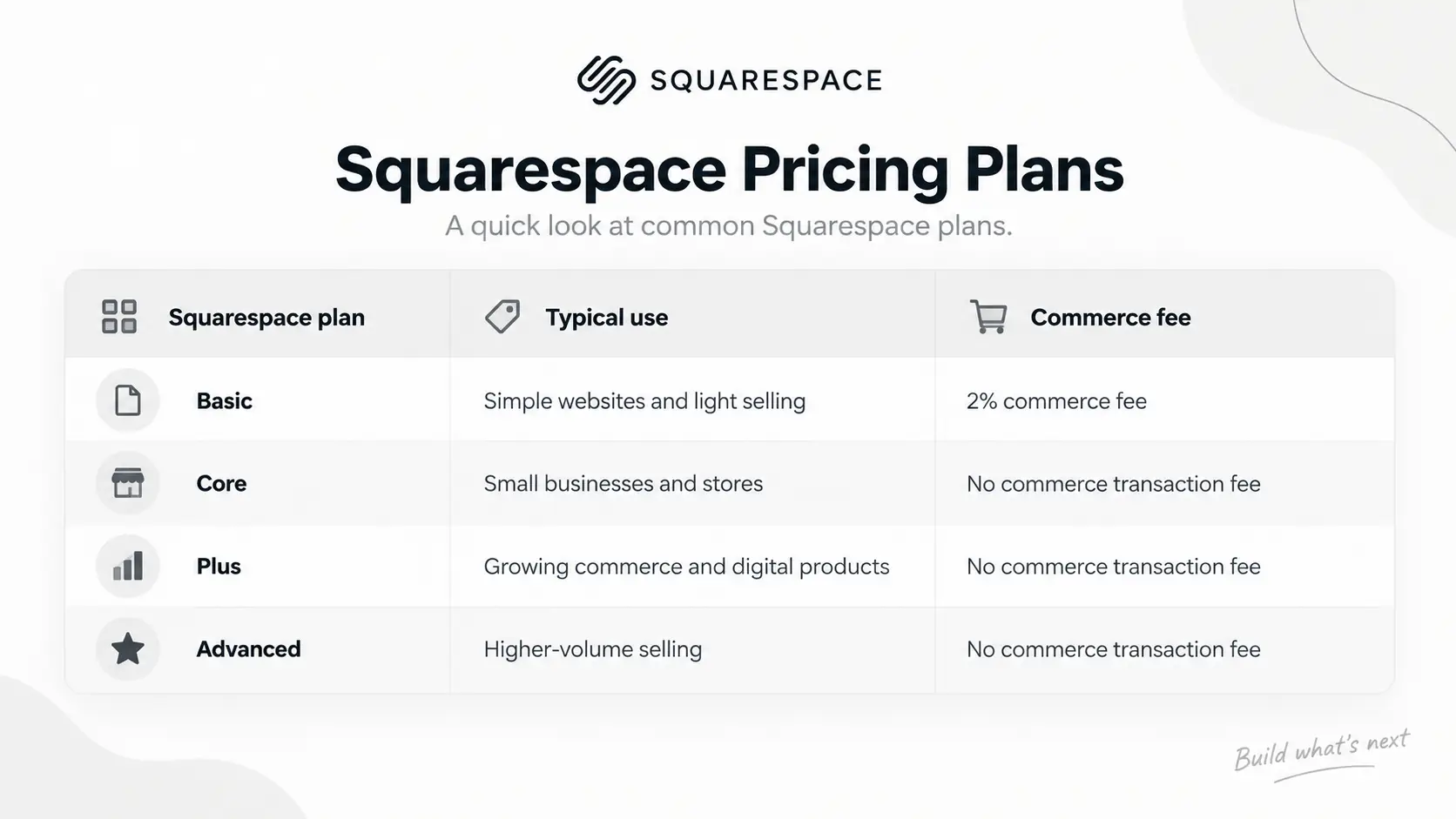
The lowest plan is not always the cheapest in practice. For example, if a store sells $3,000 of physical products each month, a 2% commerce transaction fee would equal $60 before card processing. Moving to a higher plan could cost less overall if it removes that fee.
For a small portfolio or service website with some selling, Squarespace can keep costs simpler. Shopify may become more expensive as apps are added, but that extra cost comes with a much larger range of commerce tools. Your original pricing section makes the same point: the cheapest subscription is not always the cheapest option once real sales and add-ons are included.
Shopify vs Squarespace: Ease of Use
Both platforms are designed for users who do not want to build a site from code. The main difference is what each platform expects you to do after logging in. Shopify guides users toward store tasks, while Squarespace guides users toward building pages and visual layouts.
Using Shopify
Shopify's setup process is centered on selling. New merchants are guided through adding products, customizing the storefront, configuring payments, and preparing the store for orders. Its editor uses sections and blocks, which keeps the page structure fairly controlled and makes it difficult to accidentally break an important store layout.
This structure can be useful for a retailer. A sneaker store may care more about product collections, product pages, discounts, reviews, and checkout than building a very unusual homepage. Shopify keeps these commerce elements easy to reach, although users who want complete design freedom may find the editor more restrictive.
Using Squarespace
Squarespace gives users more freedom to arrange content. Its drag-and-drop approach works well for pages that mix photography, text, forms, videos, services, and products. Cybernews found Squarespace more flexible for visual editing, while Shopify's structured sections were easier for users who wanted a simpler store-focused setup.
A wedding photographer is a good example. The homepage may need a large gallery, client reviews, an introduction, service packages, an inquiry form, and a few products such as presets or prints. Squarespace makes this type of page easier to build because the website is not forced to revolve around products.
Shopify vs Squarespace Templates and Design
Templates give businesses a starting point for branding and layout, but Shopify and Squarespace approach them differently. Shopify themes are mainly built around selling, while Squarespace templates tend to focus more on visual presentation and content.
| Design area |
Shopify |
Squarespace |
| Main strength |
Store-focused themes |
Visual customization |
| Editing style |
Structured sections |
Drag-and-drop layouts |
| Best for |
Product catalogs and conversion |
Portfolios, creators, service sites |
| Premium theme costs |
Often paid |
Core templates included |
| Customization |
More controlled |
More flexible |
Cybernews counted more than 1,200 Shopify themes in its 2026 comparison, although most were paid, while Squarespace offered a smaller collection with more design freedom. Shopify's themes are useful when the main goal is selling because product pages, collections, navigation, and promotional areas already follow a store-friendly structure.
Squarespace is stronger when visual identity is part of the product. A designer, restaurant, photographer, or creator can build pages that feel less like a standard store and more like a branded website. The right choice therefore depends less on which platform has more templates and more on whether you want a commerce-first layout or a content-first layout.
Shopify vs Squarespace for E-commerce
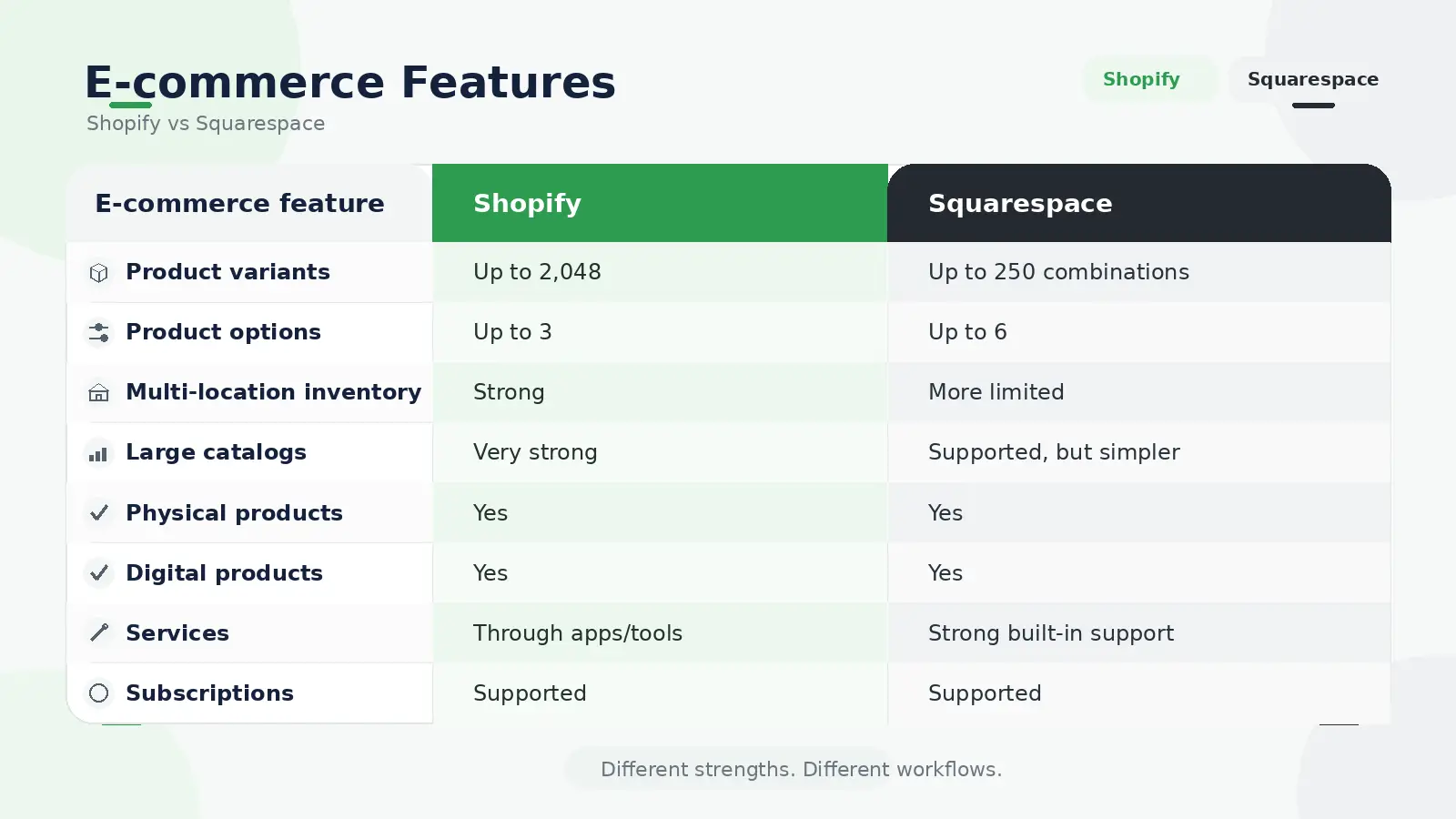
This is where the two platforms separate most clearly. Both can handle products, payments, stock, discounts, and orders, but Shopify gives businesses more room when the operation becomes complicated. Squarespace can still support a serious online store, but its system is usually simpler.
Products, Variants, and Inventory
Your original comparison highlights an important difference in product complexity. Shopify supports up to 2,048 variants for one product with up to three product options, while Squarespace allows up to six options and 250 variant combinations. Squarespace version 7.1 can still support large catalogs, but Shopify gives complex products more room.
Imagine a shoe company selling every model in several sizes, colors, and materials. Shopify can track each combination separately and manage inventory across multiple locations. That becomes useful when the business has warehouses, retail stores, pop-up locations, or fulfillment partners.
Squarespace is often enough for a business with a simpler catalog. A jewelry maker selling 80 products from one studio may not benefit much from Shopify's deeper inventory tools. In that case, Squarespace's simpler setup may actually reduce unnecessary work.
Payments and Order Management
Both platforms provide native payment options and support common third-party processors. Shopify Payments works closely with the Shopify checkout and store system, while Squarespace Payments is integrated into Squarespace commerce. Exact methods and rates depend on the merchant's country and plan.
Shopify has a stronger advantage once fulfillment becomes complex. Its tools are designed to connect inventory, orders, sales channels, shipping, and fulfillment as part of one commerce operation. Cybernews also found Shopify stronger in areas such as payments, fulfillment, marketing tools, and third-party apps.
Apps and Integrations
Shopify's app ecosystem is one of its biggest advantages. Stores can add tools for subscriptions, product reviews, bundles, shipping, loyalty programs, email marketing, analytics, automation, customer service, and many other tasks. This means a business can often add new capabilities without moving to another platform.
Squarespace uses a smaller extension ecosystem and relies more heavily on built-in features. That can be a benefit for smaller businesses because there are fewer tools to manage. A consultant or creator may prefer having most important features inside one platform instead of maintaining several paid apps.
Multi-Channel Selling
Shopify is also stronger when customers buy from several places. Merchants can connect social platforms, marketplaces, Google, and other channels while keeping product and order management inside Shopify. Your original article uses the example of a skincare brand expanding from its website to Instagram, TikTok, marketplaces, and a physical store, which shows why this becomes important as a business grows.
Squarespace supports social promotion and product syncing, but its system is more website-centered. For a creator who mainly sends Instagram followers back to a branded site, that may be all that is needed. For a retailer whose sales come from several platforms and warehouses, Shopify gives the operation more structure.
Shopify or Squarespace: Which Is Better for Your Business?
The easiest way to choose is to look at what your website needs to do most often. A platform with more features is not automatically better if most of those features will never be used.
Choosing between Shopify or Squarespace depends less on which platform has more features and more on how your business actually operates. Both can support online selling, but they are designed around different priorities. Shopify puts e-commerce at the center, while Squarespace combines commerce with website design, content, services, and personal branding.
A useful way to decide is to look at where most of your business activity happens. If products, inventory, orders, and sales channels drive most of your daily work, Shopify may fit your workflow better. If your website needs to support several goals at the same time, such as publishing content, presenting a portfolio, promoting services, and selling a smaller number of products, Squarespace may feel more natural.
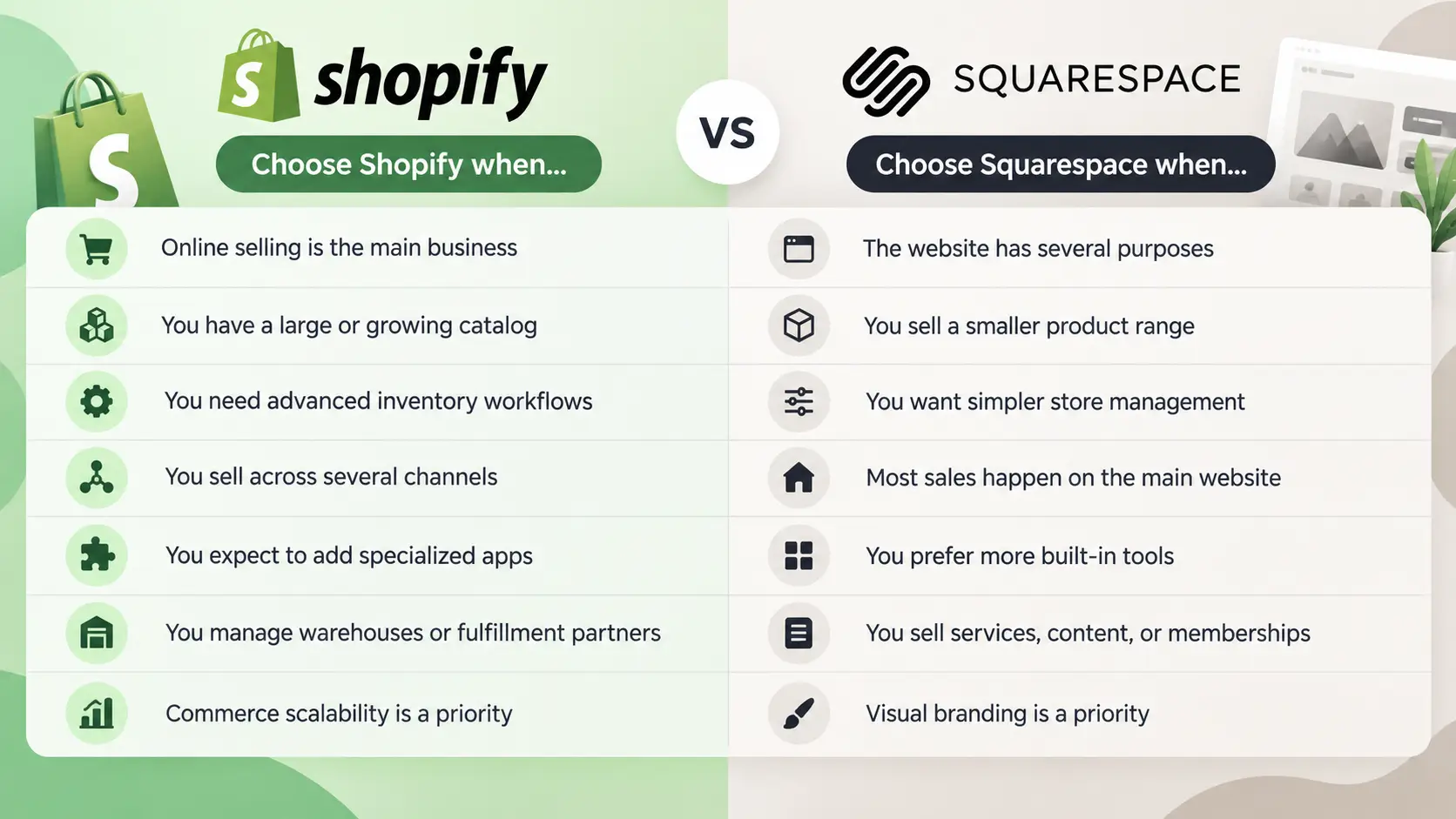
Choose Shopify When E-Commerce Is the Main Business
Shopify is a stronger fit when online selling is the core of the business rather than an extra feature. Businesses with a large or growing catalog can benefit from its product management, inventory tools, and wider range of commerce integrations. This becomes increasingly useful as the number of products, orders, and fulfillment requirements grows.
It also makes sense for businesses selling across several channels. A merchant may start with a website but later add social commerce, marketplaces, physical locations, or other sales channels. Shopify is designed to support this type of expansion and gives businesses more options to connect specialized apps when their workflow becomes more complex.
Inventory is another important factor. If you need to manage multiple locations, warehouses, or fulfillment partners, Shopify provides more room for advanced inventory workflows. This makes it better suited to businesses that expect operational complexity to increase as sales grow.
Shopify may therefore be the better choice if:
- Online selling is the main purpose of your business.
- You have a large or rapidly growing product catalog.
- You need more advanced inventory and fulfillment workflows.
- You sell through several channels.
- You expect to add specialized apps or integrations.
- You work with warehouses or fulfillment partners.
- Long-term commerce scalability is a major priority.
Choose Squarespace When Your Website Has Several Purposes
Squarespace is often a better fit when selling is only one part of the website. For example, a photographer may need a portfolio, service pages, a blog, appointment booking, and a small online shop. A consultant may publish articles, promote services, build a personal brand, and sell digital products from the same site.
In these situations, having strong built-in design and content tools can be more important than having the deepest commerce system. Squarespace offers a more visual website-building experience and can make it easier to keep different parts of the site consistent without depending on a large number of third-party apps.
It can also work well for businesses with a smaller product range and simpler store operations. If most sales happen directly through the main website and you do not need complicated inventory or multi-channel workflows, Squarespace may provide enough commerce functionality while keeping the overall setup easier to manage.
Squarespace may be the better choice if:
- Your website serves several purposes beyond selling.
- You have a smaller or simpler product range.
- You prefer straightforward store management.
- Most sales happen directly on your website.
- You want more functionality built into the platform.
- You sell services, content, memberships, or digital products.
- Visual branding and website presentation are major priorities.
Think About Where Your Business Is Going Next
Your current needs matter, but future growth matters too. A simple store today may eventually need more products, additional sales channels, warehouse management, or specialized integrations. In that case, Shopify can provide more room for operational growth.
On the other hand, growth does not always mean building a more complex e-commerce operation. Some businesses grow by adding more content, services, memberships, or brand-focused experiences. If that is closer to your plan, Squarespace may remain a better fit.
The Shopify vs Squarespace decision should therefore come down to the type of complexity you expect to manage. Choose Shopify when commerce complexity is likely to grow. Choose Squarespace when content, design, services, and commerce need to work together within a simpler website workflow.
Shopify vs Squarespace: Final Thoughts
The real Shopify vs Squarespace difference is not whether both platforms can sell products. They can. The more important question is how central e-commerce is to your business and how complex your operations may become over time. A small store with a limited catalog has very different needs from a business managing hundreds of products, multiple sales channels, several inventory locations, and a growing team.
Choose Shopify for Commerce-First Growth
Shopify is generally a better fit when selling products is the main purpose of the business. Its tools are built around products, orders, inventory, fulfillment, payments, and sales channels, which makes it easier to manage a growing e-commerce operation from one system.
This becomes especially useful as the business expands. A store may start with a small product range and later add more inventory locations, subscription products, international markets, social selling, marketplaces, or specialized apps. Shopify gives users more room to build these workflows without having to change the basic structure of the store.
For businesses running several storefronts or regional stores, operations can also become harder to organize. Teams may need to manage different sessions, accounts, and workflows at the same time. In these situations, a structured approach to managing multiple e-commerce accounts can help keep store activity separated and easier to manage.
The trade-off is that a more advanced commerce setup can also become more complex. Some features may depend on third-party apps, and larger stores may need to spend more time managing integrations, workflows, and operational settings. For businesses that expect this type of growth, however, that flexibility can be an advantage.
Choose Squarespace for Content, Design, and Simpler Selling
Squarespace makes more sense when e-commerce is only one part of a broader website. It is particularly useful for businesses that need to combine selling with content, services, portfolios, appointments, memberships, or personal branding.
For example, a photographer may want to showcase work, publish articles, accept bookings, and sell prints from the same site. A consultant might use a website to generate leads, promote services, publish educational content, and sell digital products. Squarespace keeps these different website functions closely connected through a visual editing system.
It can also be easier to manage when the store itself is relatively simple. If you have a smaller catalog, sell mainly through your website, and do not need advanced inventory or multi-channel workflows, Squarespace may provide enough commerce functionality without adding unnecessary complexity.
Think About Your Future Business Needs
The platform that works today should also make sense for where the business is going next. Switching platforms later may involve transferring products, rebuilding pages, reconnecting apps, updating redirects, moving customer data, and testing checkout and payment workflows.
If you expect your store to grow into a more complex e-commerce operation, Shopify may give you more room to expand. If growth is more likely to come from content, services, memberships, or stronger visual branding, Squarespace may continue to fit your workflow better.
The key is to think about the type of complexity you expect. A business adding more products, regional stores, or fulfillment locations may eventually need more structured multi-account e-commerce management, while a business adding landing pages, service offerings, or portfolio content may care more about design flexibility and content management.
Shopify or Squarespace: Which Should You Choose?
When comparing Shopify vs Squarespace, avoid choosing based only on which platform has the longest feature list. Instead, look at how your business operates day to day. Consider your catalog size, inventory requirements, sales channels, content needs, design priorities, integrations, and future growth plans.
Choose Shopify when commerce operations are the center of the business and you expect them to become more advanced. Choose Squarespace when you want a visually polished website where selling works alongside content, services, or personal branding. The stronger choice is the platform that matches your current workflow while still giving your business enough room to grow.
How DICloak Helps Manage Multiple Shopify and Squarespace Stores
Choosing between Shopify and Squarespace solves one question: where should you build your store? Running several stores creates a different challenge. You may need to keep multiple logins organized, use different network connections, and give team members access to only the stores they manage.
This is where an antidetect browser such as DICloak can help. Instead of opening every store in the same normal browser, users can create a separate Browser Profile for each Shopify or Squarespace store. Each Profile can keep its own browser data, proxy settings, and login session. DICloak also provides team controls for assigning those Profiles to different members.
Keep Store Sessions Isolated with Separate Browser Profiles
Managing several stores in one regular browser can become confusing. Cookies, saved logins, browser storage, and active sessions may all exist in the same browser.
DICloak separates this work into individual Browser Profiles. A team could create:
- one Profile for Shopify Store A;
- one Profile for Shopify Store B;
- one Profile for a Squarespace client store.
Each Profile keeps its own browser configuration and session data. DICloak's Data Sync can also sync selected data such as cookies, passwords, bookmarks, Local Storage, IndexedDB, and extension data across authorized devices.
Consider a small e-commerce agency managing six client stores. Without separate Profiles, a staff member may need to sign in and out of different accounts throughout the day. With DICloak, the agency can keep each client store inside its own Profile. When the employee opens the Profile for Client A, the related browser session and saved data stay with that Profile.
This does not change Shopify or Squarespace rules, and it does not guarantee that an account will avoid security checks or restrictions. Its main value is organization and browser-level separation. Store owners should still follow each platform's account, staff access, and security policies.

Assign Different Proxies to Different Store Profiles
Browser separation handles one part of the setup. Network connections are another.
DICloak allows a proxy to be configured for an individual Browser Profile. It supports custom proxy configurations, including HTTP, HTTPS, and SOCKS5 connections. If no proxy is added, Profiles use the local network connection instead.
For example, an agency may have one employee managing a U.S. Shopify store and another managing a separate regional store. Instead of manually changing proxy settings every time someone changes accounts, each store Profile can keep the proxy configuration assigned to it.
DICloak also introduced Proxy Groups in 2026. Users can organize proxies into groups and assign a selected proxy group to specific Profiles. This can make larger setups easier to manage when many Profiles need network connections from different groups or regions.
Users can also access PuraRoute Proxy inside DICloak through Proxies > PuraRoute Proxy. The integration offers Static IP and Dynamic IP options that can be connected to a Browser Profile. A static connection may make more sense when a store needs a stable network setup over time, while dynamic options fit workflows where IP rotation is needed.
A proxy should not be treated as a way to ignore platform rules. It is simply another part of keeping network settings organized across separate store Profiles.

Manage Team Access Across Multiple Stores More Efficiently
Multi-store management becomes harder when several people are involved. A store owner may need one employee to handle customer service, another to work on product listings, and an outside contractor to access only one client account.
DICloak lets teams organize Browser Profiles into Profile Groups and assign those groups to specific members. Member roles can also control what each person can view or manage. Current roles include Super Admin, Admin, Manager, and Staff, with different levels of access.
For example, an agency managing ten Shopify and Squarespace stores could create one Profile Group for each client. A staff member working on Client A could receive access to that client's Profiles without automatically receiving access to Client B's stores. Access can also be changed when responsibilities change.
Data Sync adds another useful layer for shared work. An admin can choose which browser data should sync across devices and can turn on Prevent Members from Overwriting Cloud Data. With this setting, only selected Member Groups can update the cloud copy of the Profile data. Other authorized members can still use the Profile without replacing the shared login state if they accidentally log out.
This setup is most useful when Shopify vs Squarespace is no longer the main issue because the business is already running several stores. Separate Browser Profiles, individual proxy settings, and controlled team access give teams a clearer way to organize daily multi-store work without mixing every account into the same browser session.

FAQs about Shopify vs Squarespace
Q1: Is Shopify or Squarespace better for beginners?
For beginners, Shopify vs Squarespace depends on what you want to build. Squarespace is often easier for a simple website, portfolio, or small store because its design tools are straightforward. Shopify may take a little more setup, but it is easier to manage once your main goal is selling products, tracking inventory, and handling orders.
Q2: Is Shopify vs Squarespace better for a small business?
The best choice in Shopify vs Squarespace for small business depends on how the business makes money. Shopify is usually a stronger fit for product-based businesses that expect to grow their online sales. Squarespace can work well for photographers, consultants, creators, restaurants, and service businesses that also want to sell a smaller number of products.
Q3: Can I switch from Squarespace to Shopify later?
Yes. You can move from Squarespace to Shopify, but the process may involve transferring products, customer data, images, domains, and URLs. You should also set up redirects for old pages to reduce broken links and possible SEO losses. If you are comparing Shopify vs Squarespace for a new business, it is still better to choose based on your long-term needs so you can avoid a major migration later.
Q4: Which is better for selling digital products, Shopify or Squarespace?
Both platforms can sell digital products, but they handle them differently. Squarespace works well for creators selling downloads, memberships, courses, or other digital content from a content-focused website. Shopify can also sell digital products and may be a better option if digital items are part of a larger e-commerce business. In a Shopify vs Squarespace comparison, the better choice depends on whether content or e-commerce is the main focus.
Q5: Can I manage multiple Shopify and Squarespace stores at the same time?
Yes, but managing several stores can become harder as the number of accounts grows. One option is to use separate browser Profiles for each store so cookies, login sessions, and browser data stay separated. An antidetect browser like DICloak can also let users assign different proxies and team access to different Profiles, which can make multi-store management more organized.
 Web Proxy Tools
 Free Tools
 Cookie Plugin
 UA Generator
 MAC Address Generator
 IP Generator
 IP Address List
 2FA Code Generator
 World Clock
 Anonymous Check
 WebRTC Leak Test
 UUID Generator
 Free Web Proxy Site
 Proxy Checker
 FB Ad Checker
 AI Web Scraping
 Free SMM Tools
 Twitter Shadowban Checker
 Instagram Name Checker
 UTM Generator
 Username Generator
 AI Hashtag Generator
 LinkedIn Headline Generator
 Social Media Image Resizer