Advertisers face a real choice every day: Meta Ads vs Google Ads isn’t just about picking a platform, it’s about how you reach people who actually buy. Both promise reach and targeting, but the way they handle audience data, campaign setup, and real-time feedback can change your results, especially when budgets are tight or clients demand performance.
Too many teams jump in thinking Google Ads rules search and Meta Ads dominates social, then ignore what happens when you try to scale, run multiple accounts, or test across channels. What matters isn’t just who sees the ad, but how you control spend, track conversions, and avoid the costly mistakes that come from missing platform quirks. The risk is real: one account suspension, mismatched tracking, or a failed experiment can set your campaign back weeks.
The practical angle is this, if you only compare Meta Ads and Google Ads by surface features, you’ll miss where the workflow breaks down. The real differences show up when you manage client accounts, adjust targeting mid-flight, or fight through the limits on automation and reporting. Agencies and solo advertisers alike need to know which platform fits their style, and when running both actually pays off. Meta Ads vs Google Ads is a comparison you can’t afford to rush.
To see where each platform stands in 2026, start with the basics: what sets Meta and Google apart for campaign setup and daily management.
What’s the Real Difference Between Meta Ads and Google Ads in 2026?
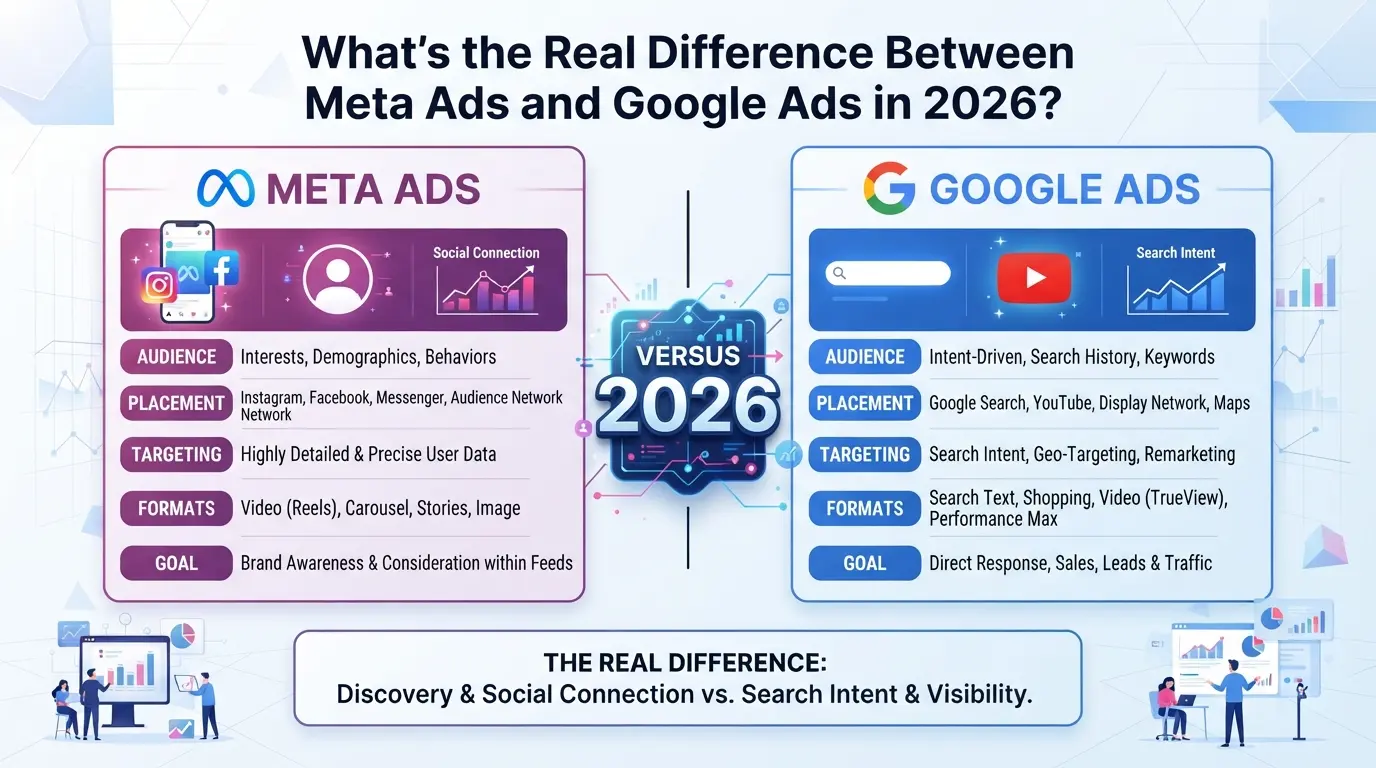
The core split between Meta Ads and Google Ads is how each platform reaches users. Meta Ads are built around audience and behavior, while Google Ads work through user intent and keywords. If you miss this, you risk pushing your campaign to the wrong crowd or wasting budget on clicks that never convert.
How Meta Ads Reach Users
Meta Ads target people based on who they are and what they do online. You set your audience by picking interests, behaviors, demographics, and even custom lists. Most placements appear directly in users’ social feeds, think Facebook, Instagram, and Messenger, while users are scrolling, not searching.
How Google Ads Reach Users
Google Ads hit people right when they’re searching for something specific. You set up campaigns by choosing keywords, so your ads only show when a user types in those terms. The main placements are search results, but you can also run display, video, or shopping ads across Google’s partner network. Here’s where mistakes often happen: if you run a search campaign with broad match keywords, you might get impressions from people who aren’t ready to buy, or aren’t even looking for your product. For example, bidding on “running shoes” can drain your budget on research clicks from curious browsers, while “buy men’s trail running shoes size 11” grabs users closer to purchase. The main tradeoff is control versus reach. Search intent gives you a sharper shot at leads, but you have to keep your keyword list tight and tune negatives, or spend gets out of hand. With display or video, you get scale, but conversions drop if your creative isn’t relevant or your exclusions are sloppy.
Why This Difference Matters for Advertisers
- Campaigns on Meta reach users earlier in the buying journey, great for awareness, weak for high-intent sales.
- Google Ads catch users further down the funnel, better fit for direct response or when you need measurable ROI.
- Choosing wrong means paying for impressions that never have a shot at converting.
Next up: how these differences shape which platform lines up with your business goals and the types of ads you actually need.
Which Platform Fits Your Business Goals and Ad Types?
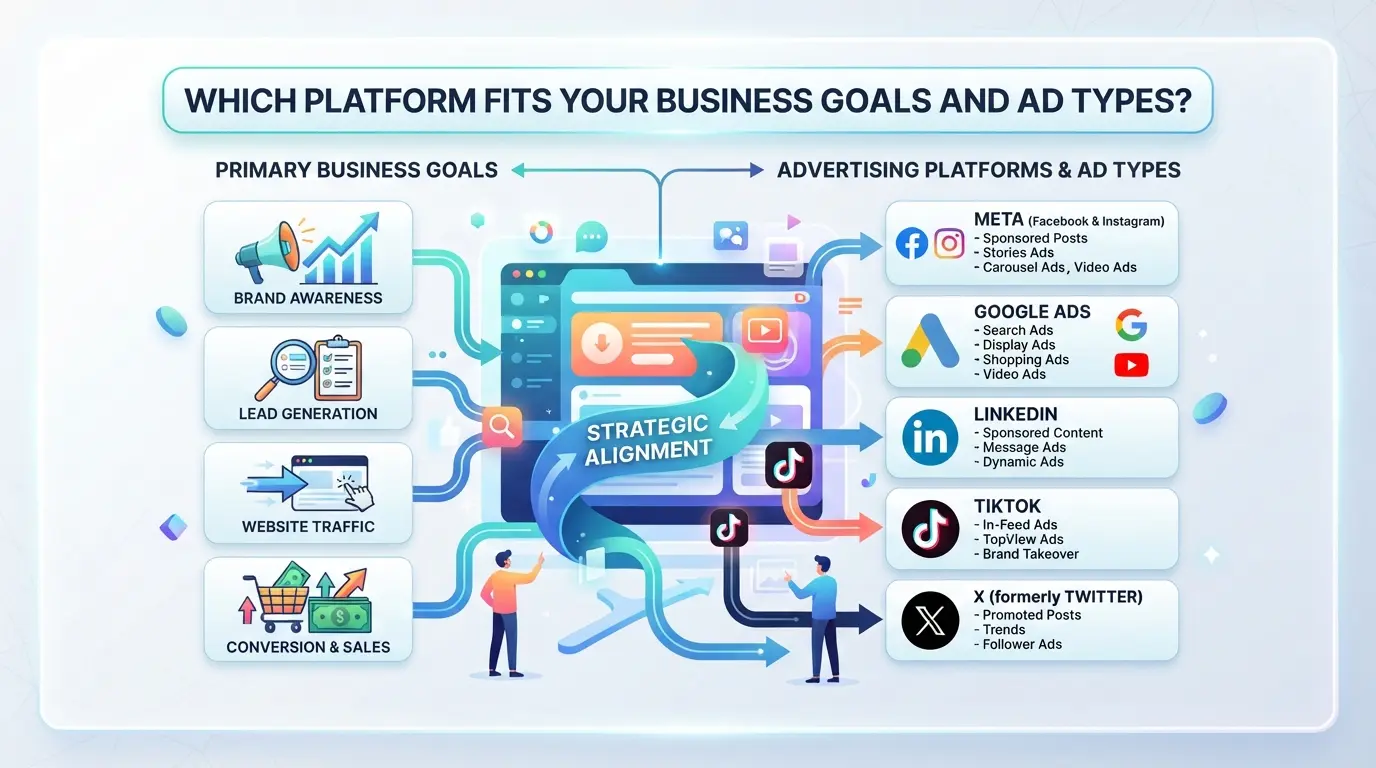
If you’re deciding between ad platforms, match your real goals, leads, sales, awareness, or local traffic, to what each system does best. Don’t just follow trends or pick by audience size; the right fit depends on your campaign’s aim and the type of results you want.
Best for Lead Generation and B2B
| Goal/Scenario |
Google Ads |
Meta Ads |
| High-intent leads |
Search and Performance Max campaigns target users searching for solutions; works well for B2B and complex services |
Lead forms and retargeting help nurture colder audiences, but intent is lower and demo requests often need more touchpoints |
| Cost per lead (CPL) |
Usually higher, but leads are warmer and convert at better rates |
Lower CPL on average, but more time and touchpoints needed to close quality leads |
Google Ads brings in users looking for a solution right now, if you need leads ready to talk, it’s often the safer starting point. Meta works better for building lists and nurturing contacts over time.
Best for Ecommerce and Direct Sales
Google’s Shopping ads push products to people already searching by name or type, so sales often happen faster. Meta’s catalog and carousel ads can drive impulse buys, especially for low-friction products, but tracking return on ad spend (ROAS) is trickier with longer buyer journeys.
Best for Brand Awareness and Local Reach
YouTube and Google Display Network give broad reach, but Meta’s community-building tools and precise geo-targeting usually win for local events, launches, or any campaign where you want people to talk and share. For pure exposure, both work, if you want conversation, Meta usually gets there faster.
When to Combine Both Platforms
Running both platforms covers more ground: Google catches users with active intent while Meta builds brand memory and retargets those who didn’t convert. If you only use one, you’ll miss segments, combining both often means you see better results and fewer wasted impressions. Mixing both platforms is usually the move when your goals include both short-term sales and longer-term brand growth.
The next risk: choosing a platform for the wrong goal or audience creates wasted spend and missed targets. The biggest mistakes usually happen when campaigns don’t match the platform’s strengths, so knowing where each shines helps you avoid budget drains from mismatched strategy.
What Are the Biggest Risks and Mistakes When Running Meta or Google Ads?
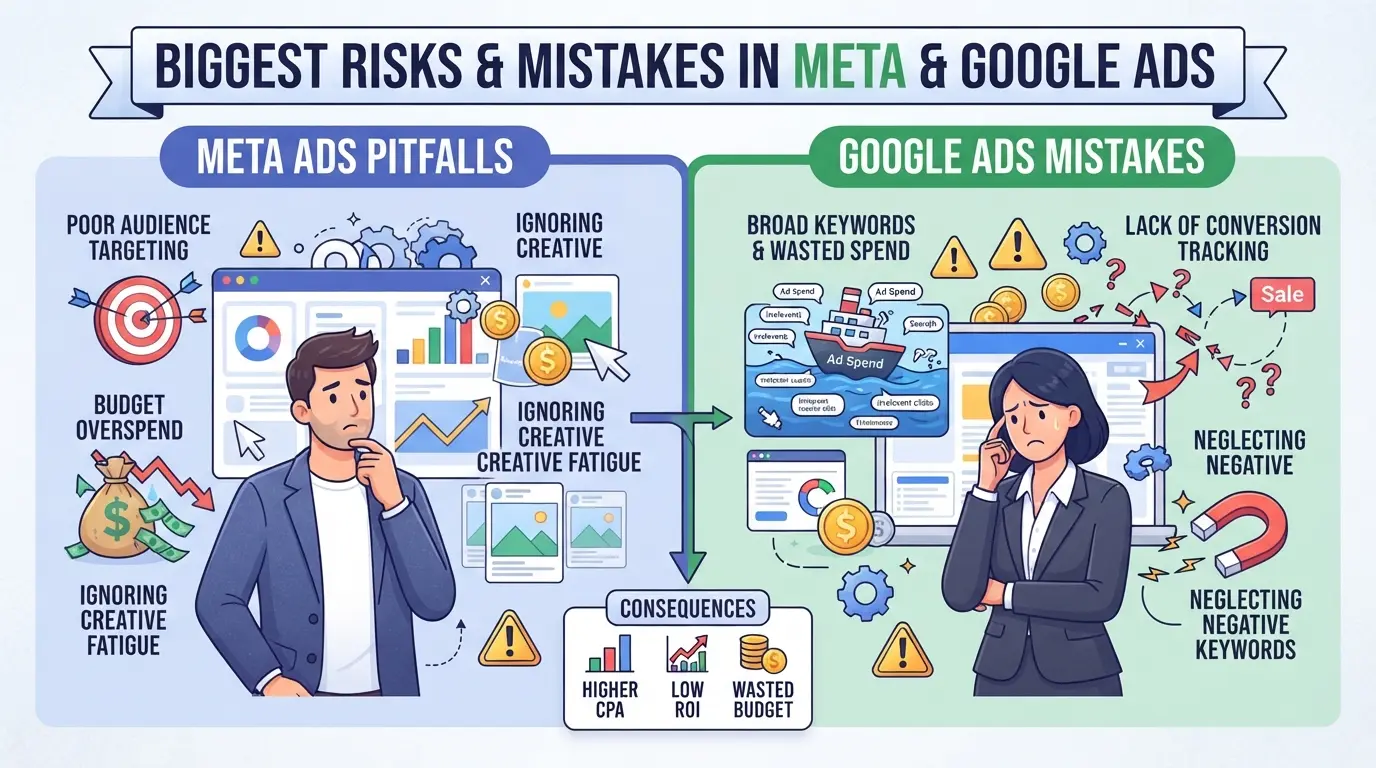
The biggest risks with Meta and Google Ads show up when accounts get flagged, ads get stuck in review, or money burns with little result. Here’s how problems usually start, and what to do about them.
Account Restrictions and Bans
Most bans happen for “suspicious activity” or policy mismatches. Meta’s systems flag rapid account switching, inconsistent payment info, or overlapping logins. Google is more likely to hit you for unclear business details or sudden spikes in spend. If you reuse browser sessions or share logins across teams, both platforms can lock you out with no warning, sometimes for weeks.
Ad Disapprovals and Policy Traps
- Double-check every creative for forbidden phrases or banned categories before launch.
- Use the built-in policy checker, don’t assume last month’s ads will still pass.
- Fix issues before requesting review; repeated violations can raise your account’s risk score.
Wasted Budget and Poor ROI
Sloppy targeting and missing exclusions drain budgets fast. Google punishes broad match with irrelevant clicks, while Meta pushes auto-targeting that can dilute audience quality. If you skip negative keywords or custom audiences, you’ll pay for junk traffic.
- Review search terms and placements weekly, pause anything low quality.
- Set clear daily caps, but track spend live to catch runaway costs.
- Exclude past converters or “dead leads” from retargeting to prevent wasted impressions.
These mistakes turn small errors into expensive problems. Getting targeting, compliance, and account hygiene right is the fastest way to stop wasted spend before it starts.
How Do Costs, ROI, and Performance Really Compare?
If you’re deciding between Meta Ads and Google Ads, the real question is which platform gets you more for your spend, and when. Costs, returns, and performance shift depending on your goals. It’s not just about who charges less; it’s about which channel fits your funnel and industry.
Cost Structures: CPC, CPM, and Budget Control
| Platform |
Typical CPC Range |
Typical CPM Range |
Budget Flexibility |
| Meta Ads |
$0.30–$1.50 |
$5–$15 |
Daily/minimum, easy to adjust mid-campaign |
| Google Ads |
$1.00–$3.00 |
$8–$25 |
Per campaign, tight control, but higher minimums in some niches |
For most industries, Meta Ads cost less per click, but Google Ads offer more granular control, especially for high-stakes search campaigns.
ROI and Funnel Stage Impact
Google Ads often deliver faster direct ROI for transactional search terms, while Meta Ads drive broader awareness and slower conversions. Attribution gets tricky, Meta’s conversion tracking relies on user behavior across platforms, so sales may take longer to show up.
Performance Benchmarks in 2026
Advertisers report higher conversion rates on Google Ads when targeting ready-to-buy users, but Meta Ads outperform for brand campaigns and top-of-funnel engagement. Choosing the right platform means matching your spend to where your customers actually take action, not just where costs look lower.
If you plan to manage multiple accounts or run cross-channel tests, understanding these differences will help you avoid wasted budget and spot performance gaps before they snowball. The next step: how to manage those accounts safely and efficiently.
How to Manage Multiple Meta and Google Ad Accounts More Safely and Efficiently
Running more than one Meta or Google ad account, especially as an agency or team, brings real risk. If two accounts share a browser fingerprint, storage, or network, you raise the chance of mass restriction. The headache isn’t just bans: it’s lost spend, reporting chaos, and time wasted chasing “unexplained” review holds. The safest way to handle multiple accounts is to keep each environment, network, and operator siloed. Here’s how experienced advertisers structure their workflow to avoid common traps.
Set Up Isolated Browser Profiles and Fingerprint Settings
Treat every ad account as its own “workspace.” That means using a dedicated browser profile for each Meta or Google Ads login. When you isolate browser storage and configure fingerprint settings, like system type, user agent, and time zone, your sessions don’t bleed into each other. For example, a team running three Google Ads accounts for different clients would set up three separate browser profiles, each with its own fingerprint. This setup blocks shared cookies and helps stop accidental cross-account tracking. Operators who skip this step often see cascading restrictions after a single account gets flagged. 
Configure Proxies for Each Profile
Each browser profile needs its own network path. Assign a user-provided proxy to every profile so that each account session comes from a separate IP and location. Before launching a Meta or Google Ads workflow, double-check that the correct proxy is active for the assigned profile. This is especially important for teams managing accounts for clients in different regions. If you forget to set a proxy or reuse the wrong one, you risk linking accounts, platforms notice when traffic originates from the same IP range. In practice, this step is just as vital as profile separation for keeping accounts alive. 
Control Team Access and Permissions
When more than one person touches accounts, missteps multiply. Limit access to only those who need to see or edit a profile. Assign permissions, such as view-only or edit rights, based on roles. For example, if a junior media buyer only needs to check ad spend, don’t give them edit access to high-risk accounts. One careless login from the wrong environment can tie accounts together or leak cookies. Proper access control means a stolen password or browser mix-up won’t sink your whole client roster. 
Building this separation into your routine keeps each ad account safer and makes troubleshooting much faster. Next, it’s time to look at what to check before deciding between Meta Ads, Google Ads, or both.
What to Check Before Choosing Meta Ads, Google Ads, or Both
Picking the right ad platform isn’t just about reach or cost. Before you commit to Meta, Google, or a mix, walk through these checks, the gaps you miss now can double your headaches next quarter.
Assess Your Audience and Funnel
- Map where your target customers spend their time, Facebook, Instagram, Search, or YouTube. If you get this wrong, even the best campaign will flop.
- List your main conversion actions. Meta drives awareness and engagement, while Google often pulls in bottom-funnel buyers. If your funnel leans on quick purchases, skipping search ads can cost you direct sales.
- Run a test campaign on both. Watch where your leads actually come from, not just where you expect. If one channel lags, check if it fits the buyer journey or just drains budget.
Review Policy and Compliance Risks
- Check each platform’s ad policy for your offer type. Meta bans more verticals; Google flags mismatched landing pages fast.
- Set up verified payment methods and business info, missing this step often blocks account approval or triggers a freeze.
Evaluate Team and Workflow Needs
If you plan to run more than a few accounts or share access, check these points early:
- Count how many people need to build or monitor campaigns at once.
- List which tasks require team-level permissions (editing, reporting, billing).
- Confirm whether your tool stack covers account isolation, permission controls, and secure session sharing, or you’ll run into access errors and audit headaches.
A careful self-check now keeps your ad setup from breaking once real spend kicks in.
When Managing Multiple Ad Accounts Requires a Safer Workflow: Using DICloak for Advertising Teams
If you operate more than one Meta or Google ad account, especially as part of an agency or distributed team, the risk of account mix-ups and accidental cross-linking rises fast. DICloak supports a safer workflow by letting teams separate browser profiles, configure proxies, and control profile access for each account. The scope stays at the browser profile and session level; platform-side actions remain unchanged.
Create Isolated Browser Profiles and Configure Fingerprints for Each Ad Account
Operators can create a separate browser profile for each ad account in DICloak, customizing key signals like OS, user agent, language, and time zone. Keeping each session isolated is what stops browser data and cookies from bleeding across campaigns.
Assign Unique Proxies to Each Profile for Reliable Network Separation
Teams can add a user-provided proxy to each profile, test the connection, and confirm that the assigned IP matches the desired location before starting work on a specific account.
Set Up Team Collaboration and Permissions for Account Access Control
Admins can set which members can view or operate each profile, limiting risky actions to trusted users and keeping access tied to real campaign roles.
Common Myths and Misconceptions About Meta Ads and Google Ads
Myth: One Platform Is Always Cheaper or Safer
Costs and account risk aren’t tied to just Meta Ads or Google Ads, what matters is how you set up your account, proxy, and workflow. A sloppy setup can turn any platform expensive or unsafe fast.
Myth: Automation or Tools Guarantee No Bans
No tool or automation can fully protect you from policy violations or simple mistakes, platforms monitor patterns and flag issues.
- Running scripts or bots can trigger bans if settings don’t match real user behavior.
- Safer move: Double-check manual steps and follow platform rules before scaling.
Myth: You Can Copy-Paste Strategies Across Platforms
Meta Ads and Google Ads reward different targeting, bidding, and creative styles. Relying on a single tactic means missing hidden limits, and risking wasted spend or account lockouts.
Frequently Asked Questions About Meta Ads vs Google Ads
Is it safe to run Meta Ads and Google Ads from the same device or browser?
Running both ad platforms from the same device or browser can risk unwanted account linkage, especially for users managing multiple accounts. Tracking cookies and browser fingerprints could connect your accounts, increasing the chance of restrictions or bans. For extra safety, use separate browsers or devices for each account to keep data isolated.
Can I use the same payment method for both Meta and Google ad accounts?
Both Meta and Google allow using the same payment method, but sharing cards across accounts may link your activity. This can be risky if you manage multiple clients or have accounts with different business entities. Best practice is to use unique payment methods for each account to minimize cross-account policy risks.
How long does it take to see results from Meta Ads vs Google Ads?
Google Ads often shows initial results within hours, especially for search campaigns. Meta Ads may take longer, up to a few days, because their system needs time to improve delivery. Factors like campaign budget, audience size, and ad quality affect how quickly you’ll see results with both platforms.
What are the signs my ad account is at risk of restriction or ban?
Warning signs include sudden drops in ad delivery, disapproved ads, or account review notices. Messages about policy violations or requests for ID verification are also red flags. If you notice these, pause ads, review your campaigns for compliance, and contact support to resolve issues before they escalate.
Do I need a tool like DICloak if I only run one ad account?
If you operate just one ad account on either Meta or Google, you likely don’t need specialized workflow tools. Advanced tools are designed for users managing multiple accounts or seeking extra privacy and control. For most single-account advertisers, the standard platform features are enough.
Assess your business goals, target audience, and budget to determine which advertising platform aligns best with your marketing strategy. Consider running small-scale tests on each to gather real performance data before committing to a larger investment. Try DICloak For Free
 Web Proxy Tools
 Free Tools
 Cookie Plugin
 UA Generator
 MAC Address Generator
 IP Generator
 IP Address List
 2FA Code Generator
 World Clock
 Anonymous Check
 WebRTC Leak Test
 UUID Generator
 Free Web Proxy Site
 Proxy Checker
 FB Ad Checker
 AI Web Scraping
 Free SMM Tools
 Twitter Shadowban Checker
 Instagram Name Checker
 UTM Generator
 Username Generator
 AI Hashtag Generator
 LinkedIn Headline Generator
 Social Media Image Resizer