Losing access to your Instagram account can be frustrating — especially if it is tied to your business, customers, or personal memories.
For some users, recovery is simple. A quick password reset via email or phone, and they are back in within minutes.
But for others, the process is far more complicated.
Over the past year, Instagram has tightened its security measures. More users are reporting recovery failures and verification loops — especially when they no longer have access to their original email or phone, or when their account was hacked and login details were changed.
The issue often is not that Instagram wants to keep you out. It is that the platform now relies heavily on device recognition, browser fingerprints, and login history. If your recovery attempt comes from an unfamiliar device or browser profile, Instagram may reject it or push you into endless verification steps.
This is where an anti-detect browser like DICloak can be useful. By creating isolated browser profiles that mimic your original device environment, DICloak helps you present a consistent digital identity during recovery — reducing the chance of triggering additional security checks.
Whether you forgot your password, lost access to your email, or had your account hacked, this guide walks you through every recovery option available in 2026.
Why Instagram Accounts Get Locked or Lost
Losing access to Instagram can feel scary, especially if the account is tied to your work, customers, or personal memories. Before you start instagram account recovery, it helps to know why the problem happened. The cause will decide your next step.
Common reasons for account lockouts or suspensions
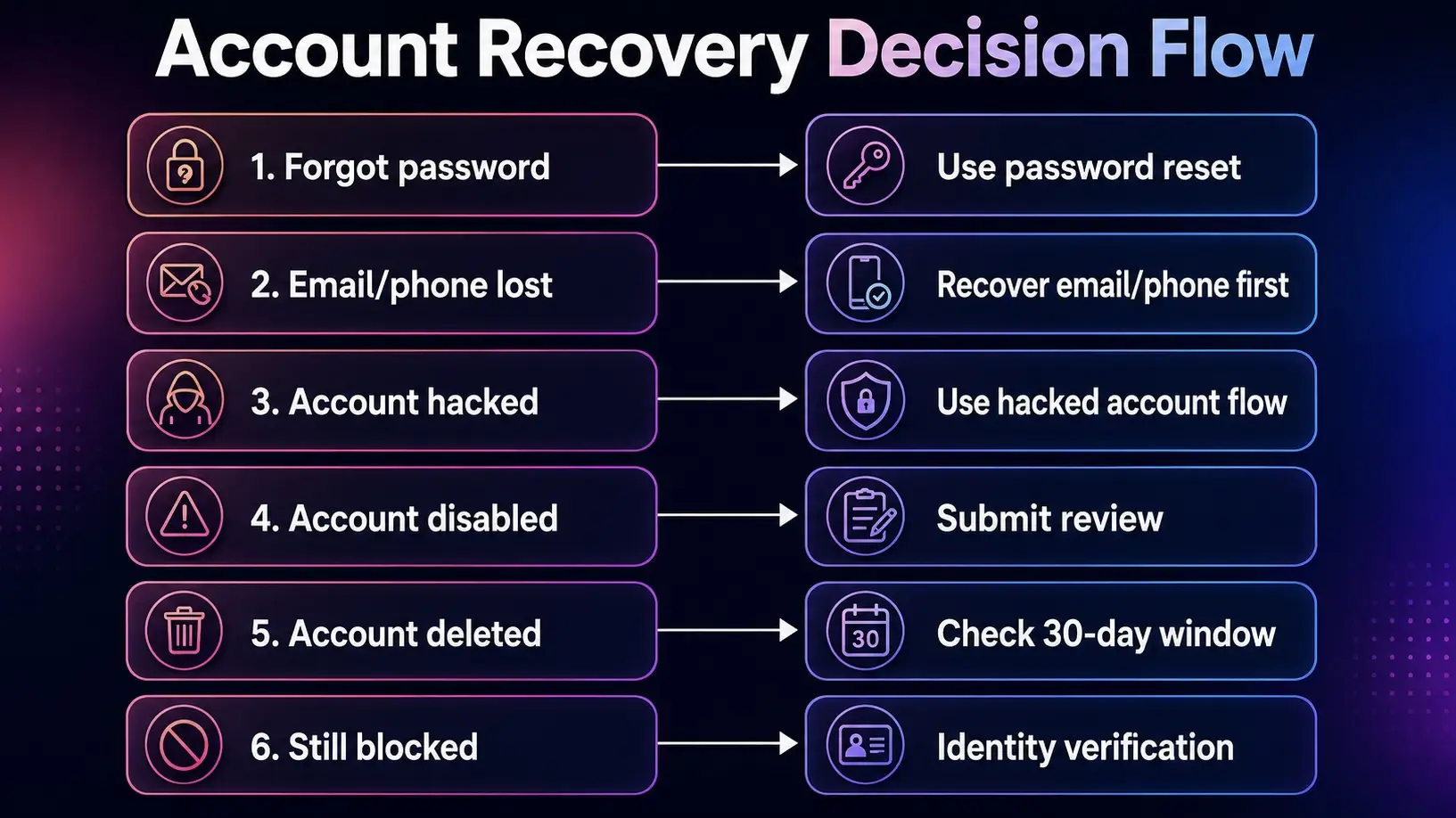
Many users lose access for simple reasons. They forget their password, lose access to their email, or no longer use the phone number linked to the account. In this case, the Instagram forgot password option is usually the first place to start.
Other users get locked out after unusual login activity. For example, Instagram may ask for extra checks if you log in from a new device, a new location, or too many times in a short period.
How hacking attempts lead to account compromise
A hacked account is different from a normal login issue. A hacker may change your email, phone number, username, or password. You may also see strange posts, messages, or follows.
For example, a small shop owner may wake up and find that their Instagram email was changed overnight. At that point, normal password reset may not work. They need to use Instagram’s hacked account recovery steps as soon as possible.
Missteps that can trigger account deactivation
Some accounts are disabled because Instagram believes they broke platform rules. This may happen after spam-like activity, fake engagement, unsafe automation, impersonation, or repeated content violations.
If you believe this was a mistake, do not send random emails or search for an “Instagram appeal email” from unknown sites. The safer path is to follow the appeal or review steps shown inside Instagram.
How to Recover Your Instagram Account if You Forgot Your Password
If your account was not hacked or disabled, the next step is often simple. In many cases, instagram account recovery starts with a password reset.
Using the "Forgot Password" feature effectively
Go to the login screen and tap Forgot password?. Then enter your username, email, or phone number. This Instagram forgot password step works best when you still control the linked email or phone.
For example, if Mia forgot her password but still has her Gmail, she can reset it in a few minutes.
What to do if you no longer have access to your email or phone
If the reset link goes to an old inbox or phone number, do not panic. First, try to recover that email or phone account. This may be faster than starting a new Instagram appeal.
Troubleshooting issues with recovery codes
Sometimes the code arrives late or does not arrive at all. Check your spam folder. Make sure your phone has signal. Also check that you entered the right username or email.
If you request too many codes, wait before trying again. Fast repeat attempts can make recovery harder.
Steps to Recover a Hacked Instagram Account
If the Instagram forgot password step does not work, your account may be hacked. This is when instagram account recovery needs to move faster.
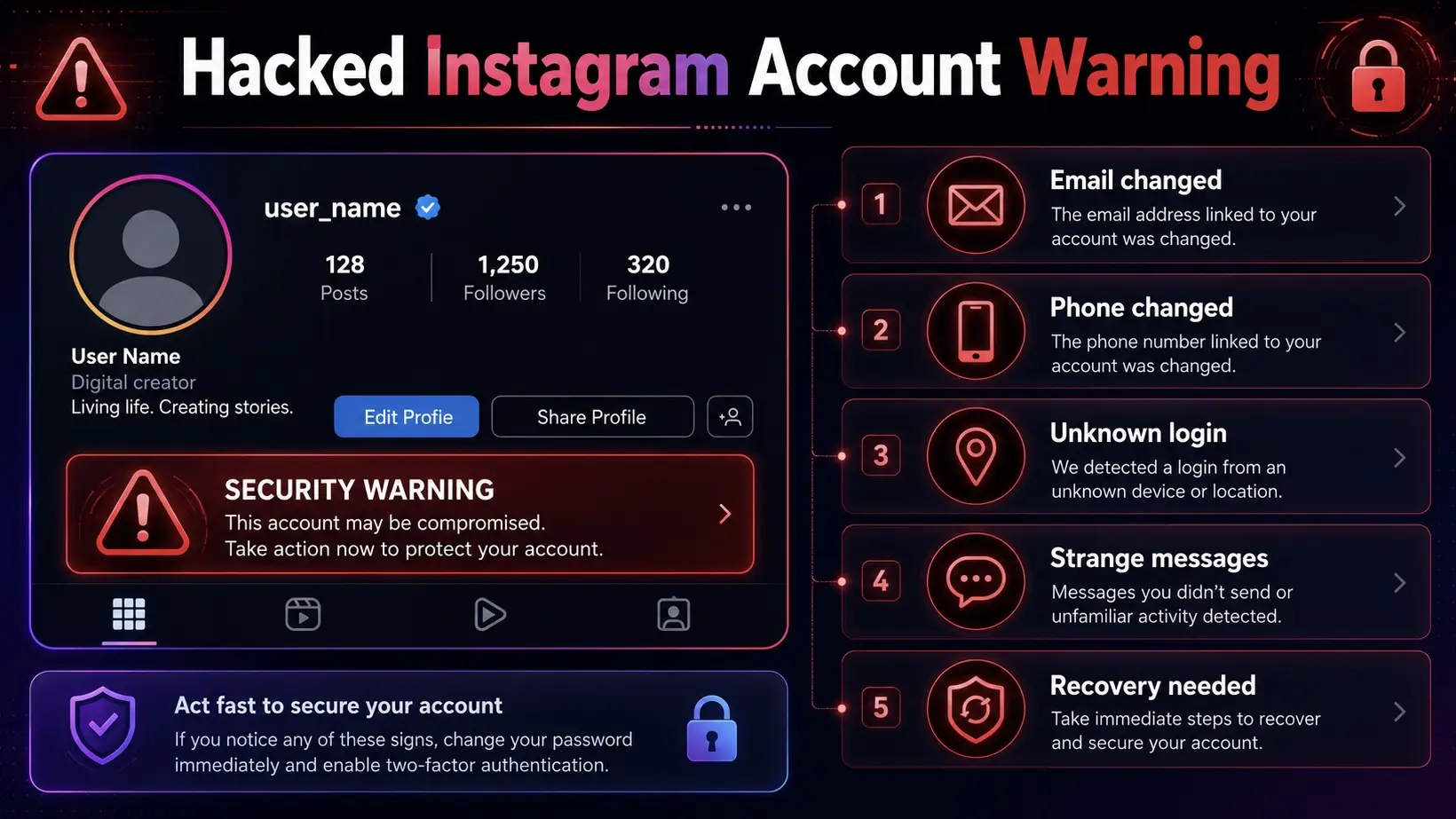
How to secure your account before starting recovery
First, secure your email account. Change its password. Turn on two-factor authentication if you can. A hacker may still control your Instagram if they control your email.
For example, if Jake’s Instagram was hacked through his Gmail, resetting Instagram alone would not solve the problem.
Reporting a hacked account to Instagram
Next, use Instagram’s official hacked account help flow. Do not trust people who ask for money to “recover” your account. Also avoid using a random Instagram appeal email from forums.
Instagram may ask you to confirm your identity or follow steps in the app.
How to regain access if the hacker changed your email or phone
If your email was changed, check your inbox for a message from Instagram. It may let you reverse the change.
If that does not work, choose the option that says you cannot access the email or phone. Then follow Instagram’s recovery steps.
What to Do If Your Instagram Account is Locked or Disabled
If recovery steps do not work, your account may be locked or disabled. This part of instagram account recovery is about proving the issue was a mistake.
| Account Status |
What It Means |
Can It Be Recovered? |
| Locked |
Instagram needs extra login checks |
Usually yes |
| Disabled |
Instagram believes rules were broken |
Maybe, with review |
| Deleted |
User requested account deletion |
Only before final deletion |
| Permanently deleted |
Deletion period has passed |
Usually no |
Understanding Instagram’s account suspension policies
Instagram may disable accounts that break its rules. This can include spam, fake activity, impersonation, or harmful content. Sometimes, normal users get caught by mistake.
For example, a creator may post many comments during a launch. Instagram may see it as spam.
How to submit an appeal for account reactivation
Try to log in first. If Instagram says your account is disabled, follow the on-screen steps to ask for a review.
What to include in your appeal for faster resolution
Keep your appeal short and calm. Say your username. Explain what happened. State that you believe the action was a mistake.
If this started after an Instagram forgot password issue or a hacked login, say that clearly.
How to Recover a Deleted Instagram Account
A deleted Instagram account is different from a locked or disabled one. A locked account may still exist. A disabled account may be reviewed. But a deleted account can only be restored if you act before the deletion period ends.
If you deleted your account by mistake, do not wait. Try to log in again as soon as possible.
Can permanently deleted accounts be restored?
In most cases, a permanently deleted account cannot be restored. Once Instagram finishes the deletion process, your username, photos, videos, and followers are no longer available. This is why the Instagram forgot password option will not work after final deletion — there is no account left to reset.
For example, if Emma deleted her account and waited more than a month before trying to log back in, she may not be able to recover it. At that point, creating a new account may be the only option.
Steps to recover accounts deleted by mistake
If you deleted your account by mistake, try logging in again right away using the same username, email, or phone number. If Instagram still allows cancellation, you may see steps to keep the account instead of deleting it.
For example, a small creator may delete an account after receiving negative comments. Two days later, they regret it. If the deletion period has not ended, logging back in may help them stop the process.
Stick to Instagram's own login screen, Help Center, and in-app recovery steps.
How long Instagram keeps deleted account data
Instagram says account deletion usually becomes final after 30 days. During this time, your account may not be visible, but you may still have a chance to cancel deletion by logging in again.
If your account was deleted by mistake, act fast. Start with the official login path. It gives you the best chance to complete instagram account recovery while the account may still be recoverable.
How to Verify Your Identity for Instagram Account Recovery
If the normal login link does not work, Instagram may ask you to prove your identity. This often happens when your email, phone number, or password was changed. At this stage, instagram account recovery is no longer just about resetting a password. Instagram needs to know that you are the real owner.
| Do This |
Avoid This |
| Record in bright light |
Recording in a dark room |
| Keep your face centered |
Wearing sunglasses or a mask |
| Follow each head movement slowly |
Moving too fast |
| Use the secure email you control |
Using an email you cannot access |
| Wait for Instagram’s reply |
Sending many requests at once |
How Instagram’s selfie video verification works
Instagram may ask you to record a short selfie video. You may need to turn your head in different directions. This helps Instagram check that you are a real person, not someone using a photo.
For example, if a creator has many face photos on their profile, the selfie video may help Instagram match the account owner. This is different from a simple Instagram forgot password reset.
What to do if your identity verification is rejected
A failed check does not always mean the account is gone. The video may be too dark, blurry, or unclear. Try again in a bright room. Remove hats, masks, sunglasses, and heavy filters. Keep your face centered and follow each step slowly.
Also check the secure email you gave Instagram. Updates may go there, not to your old account email.
Tips for passing the verification process successfully
Use the official Instagram recovery flow only. Do not send your ID, password, or private details to strangers.
If your email was hacked too, secure that email first. Then continue the recovery steps. This gives Instagram a clearer path to confirm your account.
If you are managing multiple Instagram accounts for work or business, using a consistent device environment matters beyond recovery. Tools like DICloak can help keep each account's browser profile and fingerprint stable — reducing the chance of triggering verification loops across multiple accounts. We will cover this in more detail later.
Securing Your Instagram Account After Recovery
Finishing instagram account recovery is a relief, but the work is not over. After you get back in, secure the account right away. This helps stop the same problem from happening again.
How to enable two-factor authentication
Turn on two-factor authentication in your Instagram security settings. This adds a second check when someone tries to log in from a new device. You can use an authentication app or SMS.
For example, if someone gets your password again, they may still be blocked because they do not have your login code.
Steps to review and remove suspicious devices
Next, check your login activity. Look for devices, cities, or dates you do not know. If you see a strange login, log it out.
Also change your password. Do not reuse the same password from your email or other apps. If your issue started with Instagram forgot password, make sure your new password is strong and unique.
Preventing future account compromises
Review connected apps and remove any tool you do not trust. Be careful with links that promise free followers, fast verification, or account recovery.
Do not send your password, ID, or private details to a random Instagram appeal email. Use Instagram’s official Help Center and in-app steps. A safe recovery should protect your account, not ask you to risk it again.
How to Contact Instagram Support for Account Recovery
If you have tried the basic steps but still cannot get in, you may need help from Instagram. At this point, instagram account recovery should stay inside official Instagram tools, not random websites.
Best ways to reach Instagram’s support team
Start with the login screen, the Instagram Help Center, Account Status, or Support Inbox. If your account was disabled, log in and follow the on-screen steps to request a review.
How to avoid scams while seeking help
Be careful with anyone who says they can recover your account fast for money. Real support will not ask for your password.
For example, if a creator posts “my account was hacked,” scammers may send fake recovery links. Do not click them.
What to expect during the recovery timeline
Recovery can take time. A simple Instagram forgot password case may be quick. A hacked or disabled account may need identity checks or review.
Check your email, spam folder, and in-app notices. Do not submit many requests at once. It may slow the process.
Earlier in this guide, we discussed common recovery obstacles like selfie verification failures, recovery code delays, and accounts being flagged for suspicious activity. Many of these issues are triggered by inconsistent device fingerprints or unfamiliar browser profiles.
After you finish instagram account recovery, the next goal is simple: do not lose the account again. A normal browser can make daily account work messy — you may log into the wrong account, mix cookies, share passwords unsafely, or lose track of who accessed what. These small mistakes can create big problems later.
This is where an anti-detect browser like DICloak delivers a concrete advantage. Instead of juggling logins or risking account flags, each Instagram account runs inside an isolated browser profile — with its own cookies, history, and digital fingerprint. Instagram sees each profile as a separate user on a unique device, which helps maintain consistent recovery environments and reduces verification loops when managing multiple accounts from one laptop.
DICloak does not replace Instagram's official recovery steps, such as password reset, identity checks, or in-app appeals. Instead, it helps you build a safer, more organized workspace once the account is back.
Keep Each Instagram Account in a Separate Browser Profile
One common pain point after account recovery is account mix-up. For example, an agency may manage five Instagram accounts from one laptop. If all accounts are opened in the same browser, cookies, sessions, and login habits can become hard to control.
With DICloak, you can create a separate browser profile for each Instagram account. Each profile keeps its own cookies, session, fingerprint settings, and proxy setup. This helps you keep client accounts, brand accounts, and personal accounts apart.
For a social media manager, this can reduce simple but costly mistakes. You know which profile belongs to which account. You do not need to log in and out all day. You also avoid mixing work accounts with your personal browser activity.
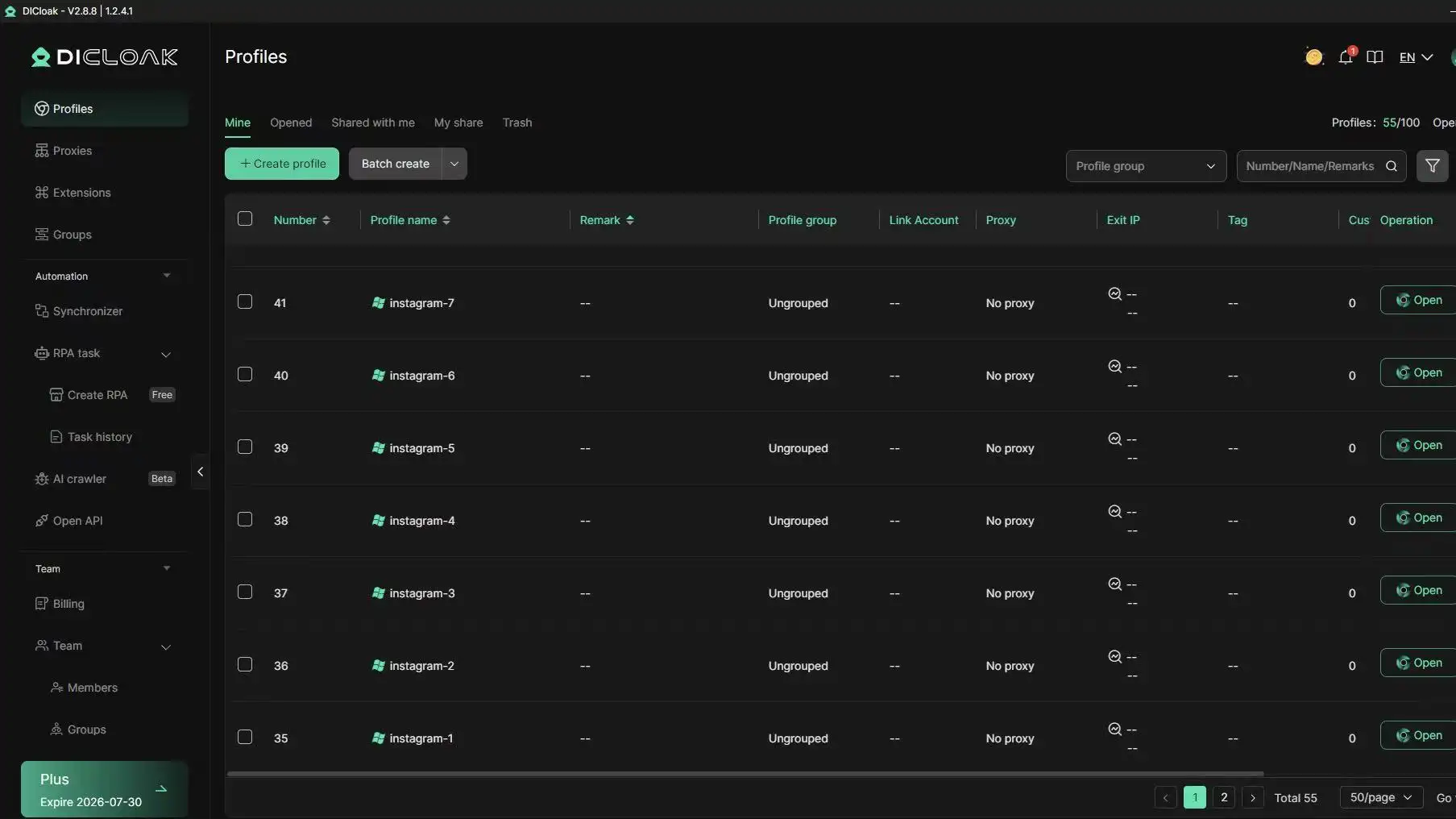
Manage Team Access Without Sharing Passwords Everywhere
Many Instagram recovery problems get worse because too many people have direct access to the same account. A designer, media buyer, assistant, and manager may all need to work on one Instagram page. But sharing the password in chats or spreadsheets is risky.
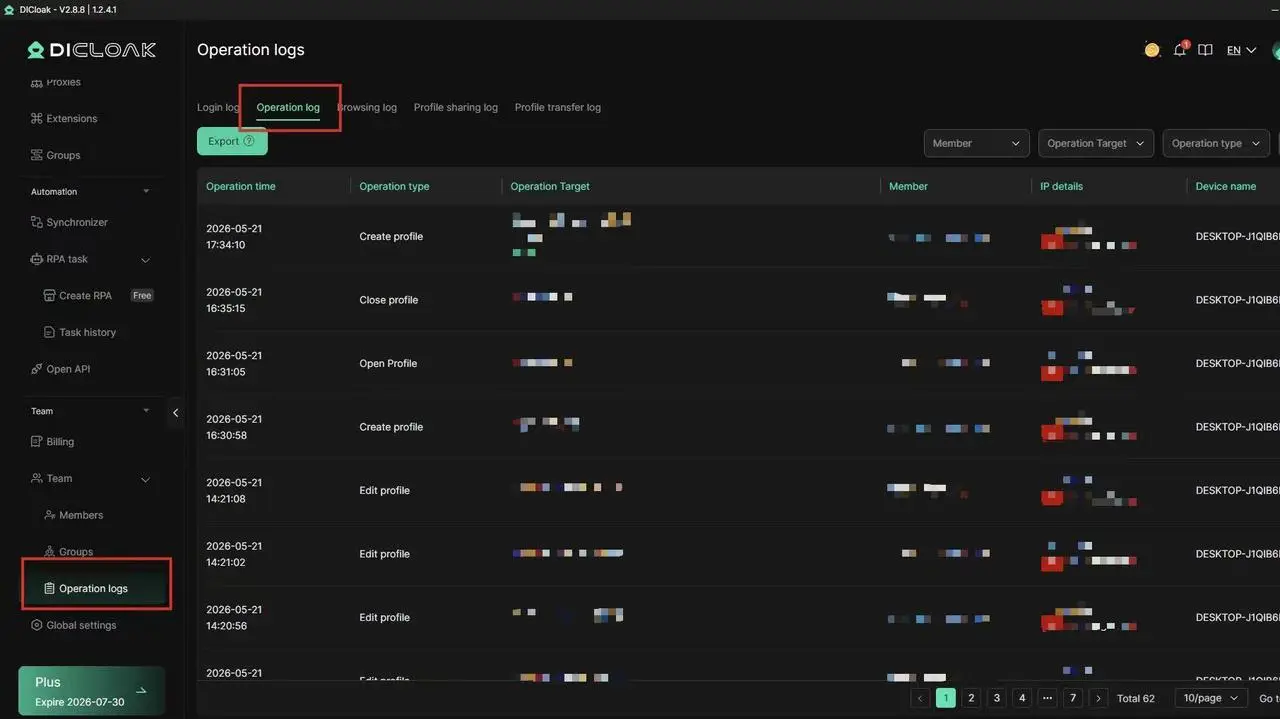
DICloak helps teams work with more control. You can share browser profiles with team members, set permissions, isolate data, and check operation logs. This is useful after a hacked account is recovered, because you can rebuild access in a cleaner way.
For example, if a small e-commerce team gets an Instagram account back after a hacked login, they can stop sending the password to every team member. Instead, they can assign access through managed browser profiles. This gives the team a clearer way to work and a better record of who did what.
Make Daily Instagram Operations More Stable
Recovery is only one part of account safety. Daily work matters too. If you often switch between accounts, repeat the same tasks, or manage many profiles, manual work can become tiring. Tired teams make mistakes.
DICloak supports bulk profile creation, profile import, RPA automation, and a multi-window synchronizer. These tools can help with repeated social media tasks, such as opening profiles, checking pages, or handling routine account work. Used carefully, they can save time and reduce human error.
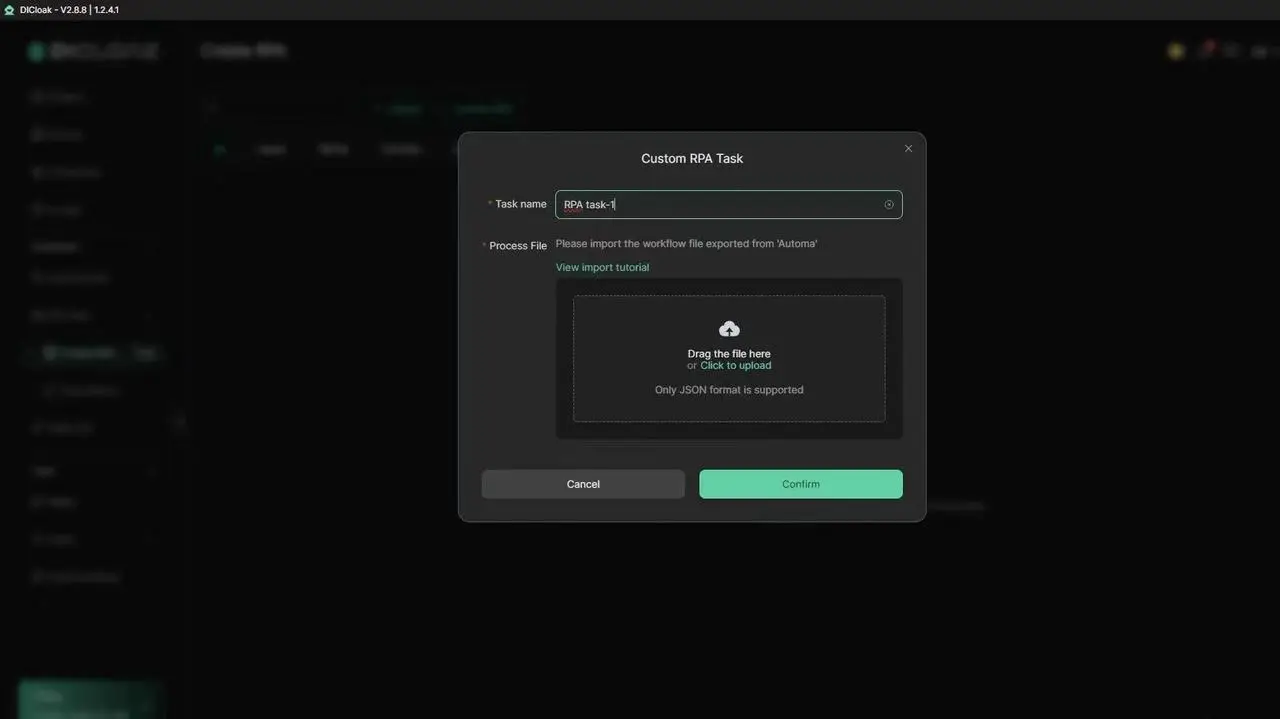
DICloak is built on a Chrome core and supports multiple operating system simulations, including Windows, Mac, iOS, Android, and Linux. It also supports major proxy protocols like HTTP, HTTPS, and SOCKS5.
If your business depends on Instagram, account recovery should not be the end of your safety plan. Use Instagram’s official Help Center for recovery. Avoid any random Instagram appeal email or paid recovery scam. Then use DICloak to manage recovered accounts with cleaner separation, safer team access, and better daily control.
Ready to keep your recovered Instagram accounts safer and better organized? Try DICloak For Free — all from one device.
Frequently Asked Questions about Instagram Account Recovery
1. What is the fastest way to start instagram account recovery?
The fastest way to start instagram account recovery is to use Instagram’s official login screen. Tap Forgot password? and enter your username, email, or phone number. If you still have access to your linked email or phone, you may get a reset link or code.
If the account was hacked, disabled, or deleted, a normal password reset may not work. In that case, follow the recovery steps shown inside Instagram. Do not trust random recovery links or people who ask for your password.
2. Can I recover my Instagram account without my email or phone number?
Yes, it may still be possible, but it can take more steps. During instagram account recovery, Instagram may ask you to confirm your identity. You may need to use a secure email, submit a selfie video, or follow in-app instructions.
Before you give up, try to recover access to your old email or phone number first. This can make the process much easier. If a hacker changed your email, check your inbox for a message from Instagram. It may let you reverse the change.
3. How do I recover a hacked Instagram account?
To recover a hacked account, secure your email first. Change your email password and turn on two-factor authentication. Then use Instagram’s official hacked account recovery flow.
A hacked account may show signs like a changed email, unknown posts, strange messages, or login alerts from places you do not know. Do not pay anyone who claims they can fix it fast. Safe instagram account recovery should happen through Instagram’s official tools, not outside services.
4. Can I recover a disabled Instagram account?
You may be able to recover a disabled Instagram account if Instagram allows you to request a review. Try to log in first. If Instagram says your account was disabled, follow the on-screen appeal steps.
In your appeal, keep the message short and clear. Include your username. Explain why you believe the disable action was a mistake. If the issue started after a hacked login or password reset problem, mention that. Avoid sending private details to a random “Instagram appeal email” found online.
5. How can I protect my account after instagram account recovery?
After instagram account recovery, secure the account right away. Change your password. Use a strong password that you do not use on other apps. Turn on two-factor authentication. Then check your login activity and remove devices you do not recognize.
You should also review connected apps. Remove any tool you do not trust. If you manage Instagram accounts for work, keep each account in a clean browser profile and avoid sharing passwords in chats. Recovery is only the first step. Long-term safety depends on better daily account habits.
Conclusion
Recovering an Instagram account in 2026 can be complex — especially if you no longer control your original email or phone, or if the account was hacked and your details were changed.
An anti-detect browser like DICloak is a safer way to manage recovered accounts, by keeping each Instagram profile in its own isolated browser profile with consistent fingerprints and device settings.
If you manage multiple Instagram accounts for work or business, it is worth considering as part of your long-term account safety strategy.
 Web Proxy Tools
 Free Tools
 Cookie Plugin
 UA Generator
 MAC Address Generator
 IP Generator
 IP Address List
 2FA Code Generator
 World Clock
 Anonymous Check
 WebRTC Leak Test
 UUID Generator
 Free Web Proxy Site
 Proxy Checker
 FB Ad Checker
 AI Web Scraping
 Free SMM Tools
 Twitter Shadowban Checker
 Instagram Name Checker
 UTM Generator
 Username Generator
 AI Hashtag Generator
 LinkedIn Headline Generator
 Social Media Image Resizer