Your script can run clean for 30 minutes, then fail with a wall of 429 Too Many Requests and 403 responses right when you need stable output. That pattern usually means your traffic looks too uniform: same IP range, same request rhythm, same fingerprint signals. A smart proxy fixes this by routing requests through a managed proxy pool and rotating exits based on target behavior, session rules, and health checks, not random switching.
The key point is simple: smart proxy tools are not just “more IPs.” They are control layers for reliability, safety, and lower blocking risk. If you handle web scraping, ad verification, market research, or multi-account operations, this changes how you design request flow. You will see where smart proxies outperform static proxy lists, where they add cost with no upside, and which setup choices reduce avoidable bans.
You will also get a practical setup path: proxy type selection, session strategy, retry logic, and account safety checks aligned with HTTP semantics, common bot defenses, and the core model of a proxy server. Start with how the routing logic actually works under load.
What Is a Smart Proxy and How Is It Different From a Regular Proxy?
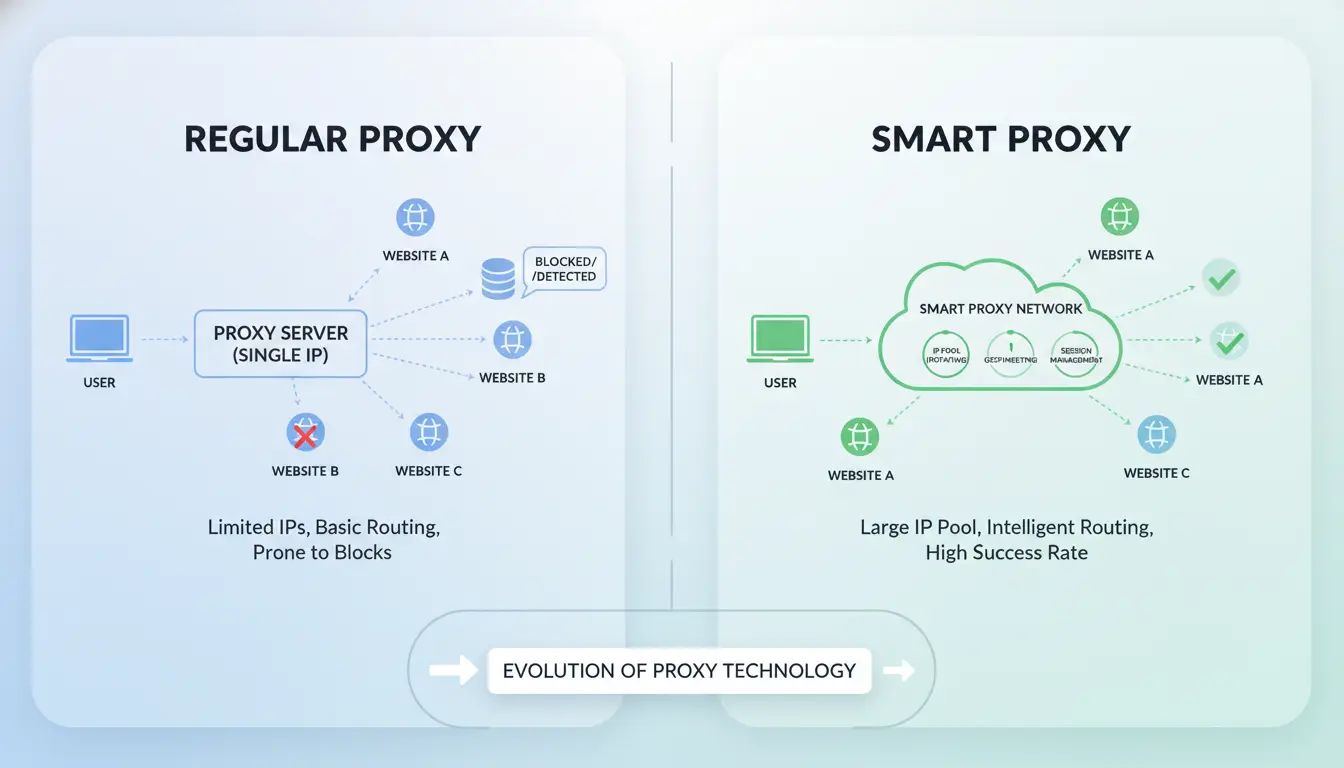
A smart proxy is a proxy layer that picks and switches exit IPs for you based on rules, target behavior, and live request results. A regular proxy usually gives you one fixed endpoint, so you handle switching and retries yourself. The core difference is automated routing under failure, not just access to more IPs.
What “smart” means in smart proxy routing
For each request, the system can choose an IP by country, ASN, session type, or target domain. If a target starts returning 403, 429, or timeout errors, routing rules can move traffic to a new IP pool or change retry timing. This fits the request/response model in HTTP Semantics (RFC 9110), where status codes guide client behavior.
Rule-based failover also reduces manual firefighting. Instead of editing proxy lists during incidents, you set policies once and let traffic shift automatically.
Smart proxy vs single-endpoint proxy
| Model |
IP handling |
Failure handling |
Daily maintenance |
Good fit |
| Smart proxy |
Auto selection/rotation by rule |
Automatic retries and pool switch |
Lower after setup |
Scraping, ad checks, multi-region tasks |
| Single-endpoint proxy |
One static IP until manually changed |
Manual retry and manual replacement |
Higher, ongoing |
Low-volume, stable target |
Comparison logic aligns with common bot defenses: fixed patterns get flagged faster, while controlled rotation lowers repeated fingerprints at one endpoint. A basic proxy server model still applies; smart routing adds control on top.
When a smart proxy is worth using
Use it when you send high request volume, need multiple countries, or run jobs where blocked retries create data gaps. It also helps in multi-account operations where IP consistency rules differ by account group.
A simple proxy is enough when traffic is light, one region is fine, and your target rarely blocks. In that case, extra routing logic adds cost and setup time without clear upside.
How Does a Smart Proxy Work Behind the Scenes?
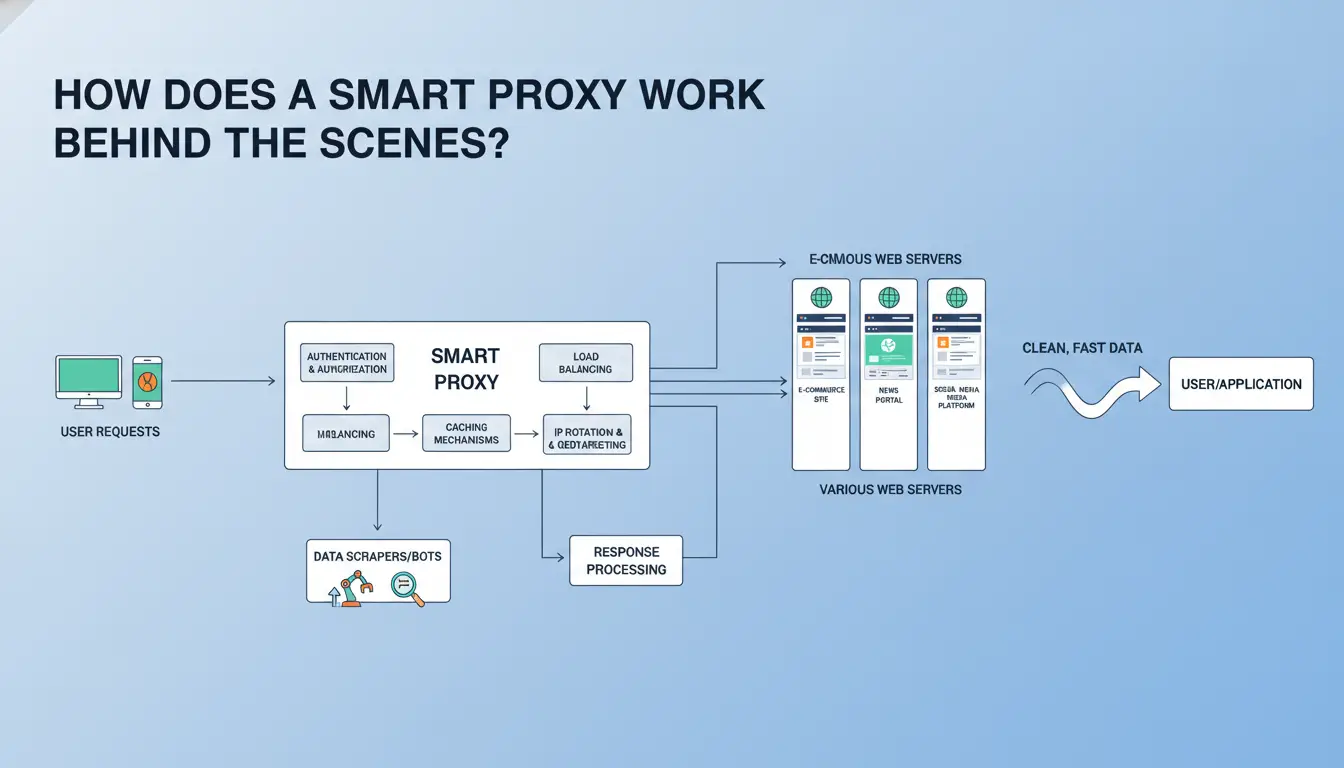
A smart proxy sits between your app and the target site, then makes routing choices on each request. The point is simple: fewer blind retries, cleaner sessions, and steadier success under load.
Request flow: client, gateway, IP pool, and target site
Your client sends a request to a proxy gateway with rules: country, session type, timeout, and retry limit. The gateway picks an IP from its pool, forwards the request, then returns the response.
Routing decisions happen at the gateway, not in your scraper code. That keeps logic in one place. You can map rules to request type, like search pages vs login pages.
Headers and cookies follow HTTP semantics. If the target sends 429 or 403, the gateway can retry with a new IP or hold the same session, based on your policy. Good setups treat retries as controlled logic, not random repeats.
Rotation models: sticky sessions vs per-request rotation
Use sticky sessions when a flow needs continuity, like cart steps or account actions. Use per-request rotation for broad data pulls where each request is independent.
| Model |
Best fit |
Main risk |
| Sticky session |
Login, checkout, multi-step forms |
Session gets blocked, all tied requests fail |
| Per-request rotation |
Search result scraping, ad checks |
Fingerprint mismatch if app state is not isolated |
Health checks, retries, and automatic fallback
Health checks remove weak IPs fast. Common signals: repeated timeouts, high 5xx rates, or bot challenges from systems like Cloudflare Bot Management.
Set a retry budget, such as 2-3 retries per request class, then stop. Add fallback pools by region and ASN type. If mobile IPs fail for one target, fail over to residential. This keeps speed and success balanced without guesswork.
What Should You Check Before Choosing a Smart Proxy Provider?
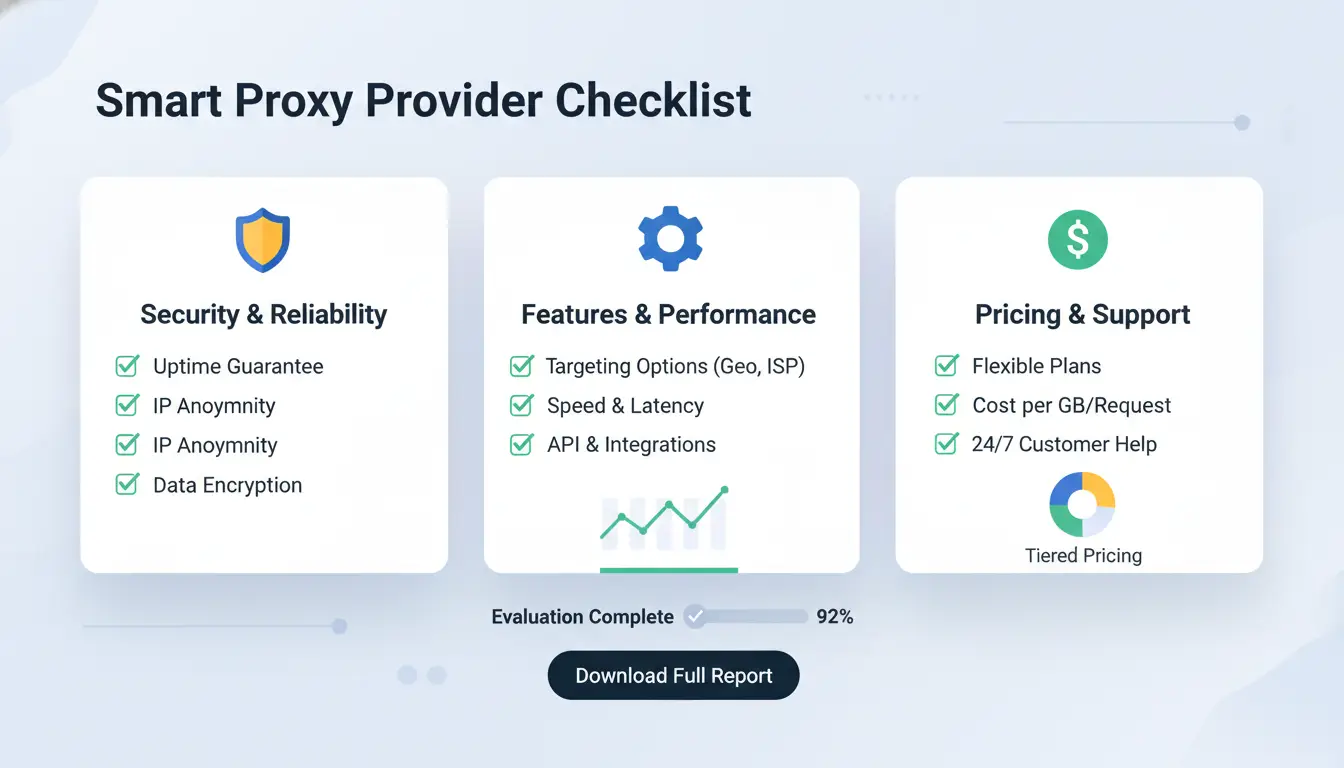
Ignore sales pages and test outcomes. Run a 24-hour pilot on your own targets, then check success rate, block rate, median latency, and failed retries. A provider is only useful if results stay stable under real load. If your block rate rises when concurrency doubles, that pool will fail at scale.
IP quality signals that actually matter
Ask for sample endpoints and inspect IP spread before purchase. You want diversity across ASNs and subnets, not just a large IP count. If 10,000 IPs sit in narrow ranges, detection systems can cluster them fast. Check geolocation with two public databases and compare city match rate. For reputation risk, test against known anti-bot setups such as Cloudflare bot controls. Also ask how abuse complaints are handled and how fast bad IPs are rotated out.
Coverage, protocols, and integration fit
Map provider coverage to your real jobs: city-level ad checks, country-level scraping, or account login flows. If you need city targeting, verify it with test queries, not docs. Confirm protocol support matches your stack: HTTP/HTTPS for standard clients, SOCKS5 for lower-level tooling. Validate session behavior and retry handling against HTTP semantics. If your team runs browser profiles, check whether sticky sessions and auth methods fit your automation and profile workflow.
Pricing logic: bandwidth, requests, concurrency, and hidden limits
Cheap plans can break your cost model when retries spike. Compare billing units and throttles before committing.
| Model |
Best fit |
Cost risk |
| GB-based |
Large payload scraping |
Expensive on media-heavy pages |
| Request-based |
Small API-like fetches |
Retry storms raise bill fast |
| Port/concurrency-based |
Stable long sessions |
Queue delays if cap is low |
Which Smart Proxy Type Fits Your Use Case Best?
Pick by failure cost, not by habit. If a blocked request breaks revenue or account access, pay for lower detection risk. If speed is the bottleneck, pay for throughput.
Residential vs datacenter smart proxy
| Type |
Detectability |
Speed |
Typical cost |
Best fit |
| Residential |
Lower (real ISP ranges) |
Medium |
Higher |
Login flows, ad checks, anti-bot targets |
| Datacenter |
Higher |
High |
Lower |
Large public-page crawling, fast monitoring |
A proxy server only routes traffic. Detection still depends on behavior patterns and request quality. Use residential only where blocks are expensive; use datacenter where retries are cheap.
Static IPs fit session tasks: account login, carts, and long checkouts. Keep one IP per session token. Rotating IPs fit broad crawling. Rotate per request or small batch, then retry with backoff rules aligned to HTTP semantics.
Common scenarios: scraping, ad verification, e-commerce checks, social workflows
Scraping: datacenter + rotation as default. Ad verification: residential + city targeting. E-commerce checks: split traffic; static for carts, rotating for price pages. Social workflows: residential + sticky sessions; review bot defenses signals before scaling. Use one smart proxy pool per risk level, not one pool for every task.
How Do You Set Up a Smart Proxy Correctly in 6 Practical Steps?
Use this path to move from raw credentials to stable traffic. The goal is simple: fewer blocks, faster recovery, and clean scaling. A smart proxy setup fails most often at session and retry design, not at proxy purchase.
Step 1–2: Define traffic goals and create routing rules
List each target site, request type, and daily volume before you send traffic. Split flows by job: search pages, product pages, login flows, and API calls. Assign geo rules per flow, not per project.
Set session duration by risk. Keep one session for login and cart actions; rotate sooner for public listing pages. Trigger rotation on events, not fixed time only: 403/429 spikes, captcha increase, or latency jump. This aligns with HTTP semantics and common bot defenses.
Step 3–4: Configure authentication, headers, and retry policy
Use one auth model per environment: username/password for dynamic workers, IP allowlist for fixed servers. Do not mix both unless you track ownership clearly.
Keep headers stable within a session. Random headers on every request can look fake. Set connect timeout (for example 5–10s), read timeout (15–30s), and capped retries (2–3). Use exponential backoff with jitter on 429/5xx. Do not retry 401/403 blindly; rotate identity or pause the route.
Step 5–6: Test with small batches and scale with metrics
Start with 100–300 requests per route. Track success rate, p95 latency, block rate, and cost per successful request. If success rate stays stable and block rate stays low for two test windows, increase traffic in 20% steps.
Set rollback rules before scaling: if block rate doubles, or latency crosses your cap, cut traffic and revert routing. You can use DICloak for team access control, profile isolation, and audit logs when multiple operators handle proxy configs.
How Can Teams Use Smart Proxies Safely Across Multiple Accounts and Devices?
Teams hit risk faster than solo operators. One person can keep session habits consistent. A team cannot, unless the workflow is locked down. With a smart proxy setup, routing is only one layer. Account safety depends on how people, browsers, and permissions are tied together.
Why team-based proxy usage creates extra risk
IP/profile mismatch is a common failure point. If Account A logs in from Proxy A on Monday, then opens from Proxy C with a different browser fingerprint on Tuesday, platforms can flag it as abnormal behavior. Fingerprint overlap is another issue. Two teammates reusing one browser profile can create near-identical signals across accounts.
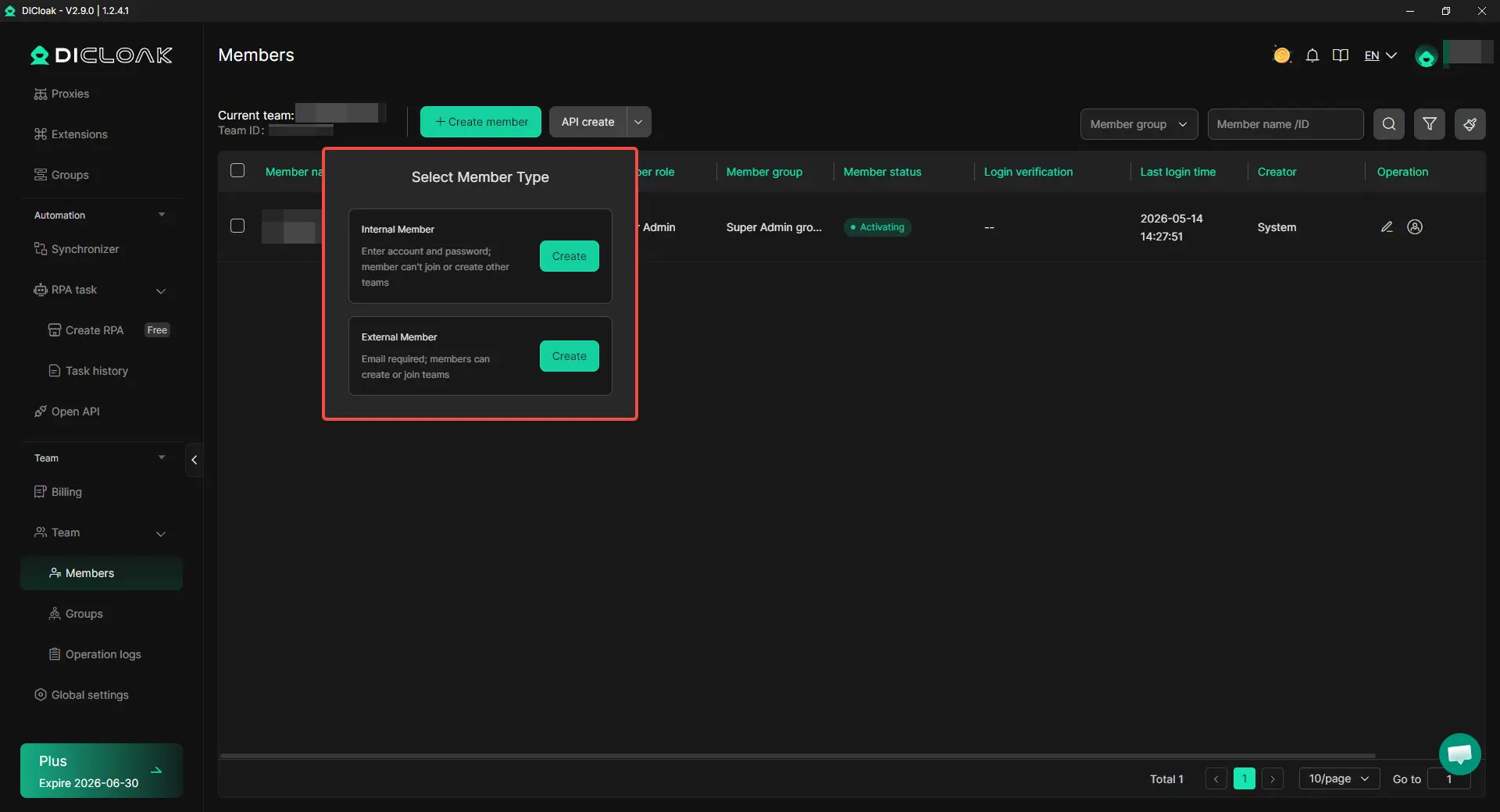
Permission sprawl creates silent damage. A teammate with broad access can open the wrong account, trigger wrong actions, or change recovery settings by mistake. Most account linkage problems come from inconsistent team behavior, not from proxy quality alone.
How DICloak improves smart proxy operations
You can use DICloak to isolate browser fingerprints per profile and bind each profile to an independent proxy. That keeps account identity stable across devices. You can also set role-based access, share only required profiles, and review action history through operation logs. This gives clear accountability when account events happen. For anti-bot context, this aligns with signals used by Cloudflare bot defenses and standard request behavior in HTTP semantics.
A practical workflow: profile templates, bulk launch, and RPA for repetitive tasks
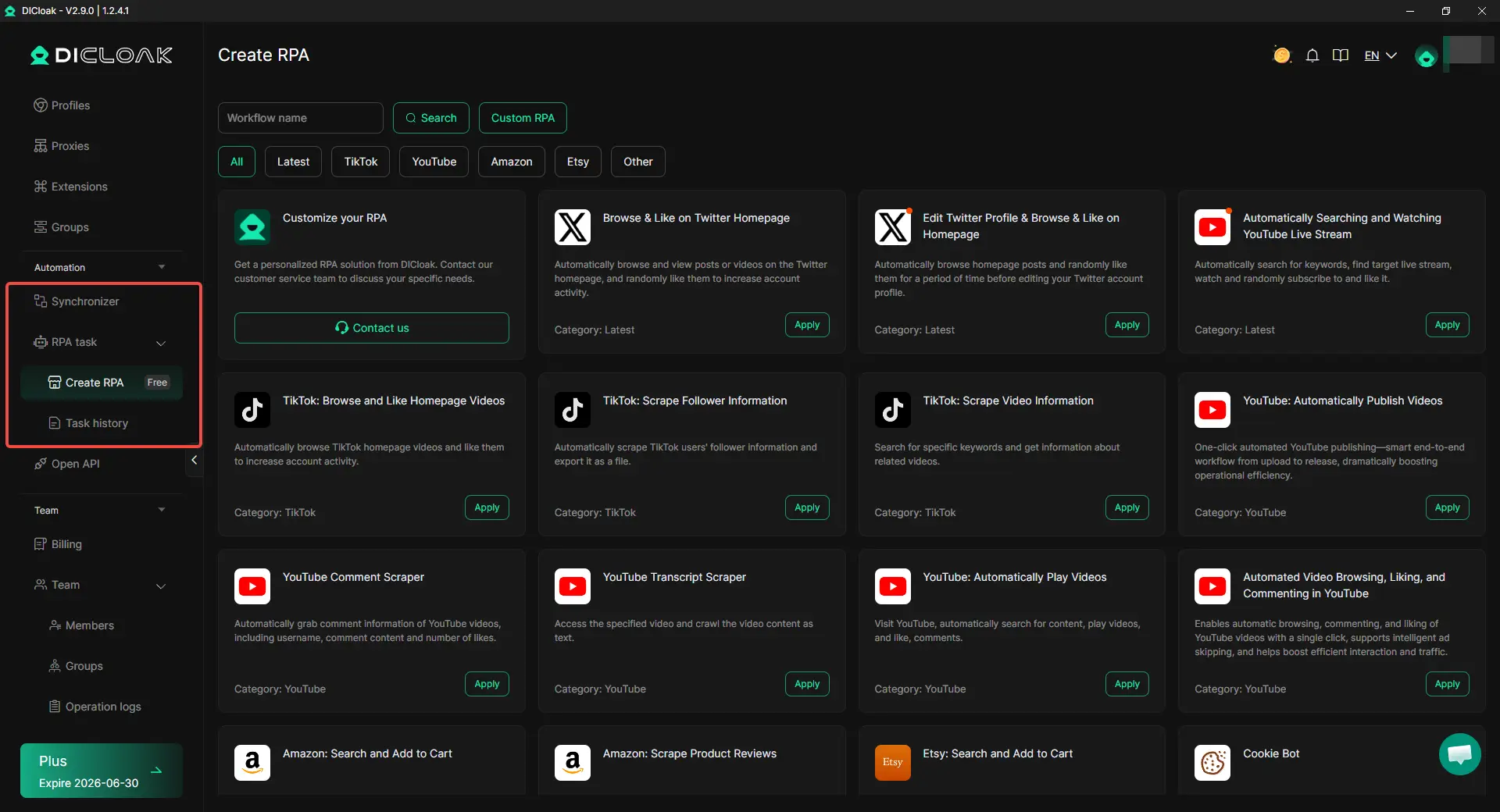
Build profile templates with fixed settings: user agent, timezone, language, and proxy binding. Then clone templates in bulk to reduce setup drift. Use batch launch for daily login windows so each teammate follows the same run pattern. Use RPA for repeat tasks like routine checks or status exports to cut manual misclicks.
Why Do Smart Proxies Fail, and How Do You Fix Common Issues Fast?
High block rate: causes and recovery steps
High blocks usually mean reused IP pools, fast rotation, or unnatural request rhythm. A smart proxy fails when identity signals conflict with behavior checks used by Cloudflare bot defenses. Slow rotation, keep stable sessions per task, and align headers with real browser traffic. Fix the pattern, not just the IP. You can use DICloak to map one account to one isolated browser profile, each with its own proxy, so shared fingerprints do not link accounts.

Slow performance and timeouts
Timeouts often come from region mismatch or overloaded proxy endpoints. Route traffic near the target site, reduce parallel requests, and set connect/read timeouts separately. Retry only idempotent requests per HTTP semantics. Tools like DICloak let you apply bulk profile changes and RPA steps, so session setup stays consistent and manual pacing mistakes drop.
Authentication and connection errors
Check username:password format, IP allowlist entries, and protocol match (HTTP, HTTPS, SOCKS5). If TLS or DNS fails, test direct resolution, then test through the proxy server path described in proxy server basics. Use DICloak team permissions and operation logs to trace who changed proxy credentials and when.
When Is a Smart Proxy the Wrong Choice?
A smart proxy is not always the right pick. If your traffic is small, your rules are strict, or your budget is tight, a simpler setup can do the job with fewer moving parts.
Low-volume tasks that do not need smart routing
If you run under a few thousand requests per day, static proxies often work fine. You can pin one IP per workflow, add basic retries, and keep logs clean.
| Situation |
Static proxies |
Smart routing |
| Daily request volume |
Low and stable |
Medium to high, bursty |
| IP rotation need |
Rare |
Frequent |
| Debug effort |
Lower |
Higher |
| Failure handling |
Manual but simple |
Automated, more setup |
For simple checks like one-region price monitoring, extra routing logic can add failure points. Keep your stack small until block rates rise in a clear pattern.
Budget and compliance constraints
Before scaling, estimate return in plain terms: extra proxy cost vs saved engineer time vs fewer blocked runs. If blocked requests are already low, added routing may not pay back.
Check rules before deployment. Review target site terms, your internal policy, and data handling limits. Align retries and request pacing with HTTP semantics and known bot defenses. If policy limits automation, stop there.
Decision checklist: adopt, defer, or hybrid approach
Use this quick test:
- Adopt now: block rate is high, traffic spikes, and manual rotation causes outages.
- Defer: low volume, stable success rate, and no team pain from current setup.
- Hybrid: keep static routes for stable targets, use smart proxy logic only on hard targets.
If you cannot measure block rate, retry success, and cost per successful run, defer rollout and run a 2-week pilot. For unclear cases, start small and compare against a plain proxy server baseline.
Frequently Asked Questions
Is a smart proxy legal to use?
A smart proxy is legal in some cases and restricted in others. Rules change by country, the kind of data you collect, and each website’s Terms of Service. Public product pages are often lower risk than personal data. For client work or sensitive projects, ask legal counsel and document your compliance steps.
Can beginners use a smart proxy without coding skills?
Yes. Many smart proxy services offer a web dashboard where you can choose target sites, regions, and rotation rules without writing code. Some include no-code integrations, browser extensions, and ready templates for common tasks. Start with a small test job, review logs, then expand once results and settings look stable.
How many smart proxy IPs do I need to start?
Start with a small pool, then scale based on real results. A pilot with 20–100 IPs is common for light scraping. If your target blocks fast or you need several countries, increase the pool sooner. Track block rate, CAPTCHA rate, and response times weekly, then add IPs only where pressure is highest.
Does a smart proxy always improve scraping success rates?
No. A smart proxy helps, but it cannot fix poor request behavior. Success also needs clean headers, human-like timing, correct session handling, and retry limits. If you send bursts with identical fingerprints, blocks still rise. Keep your proxy pool healthy by removing failing IPs and monitoring latency, timeout, and error trends.
What is the difference between smart proxy rotation and simple random rotation?
Smart proxy rotation uses rules and live health signals. It can keep sticky sessions, route by target domain, and fail over after bans or slow responses. Random rotation just picks any IP each request, ignoring context. That often breaks logins, raises CAPTCHA challenges, and wastes good IPs on the wrong tasks.
A smart proxy helps you route traffic more efficiently by adapting to network conditions, improving speed, reliability, and privacy without adding unnecessary complexity. Choosing the right provider and setup ensures you get consistent access, better performance for data-heavy tasks, and stronger control over how your requests are managed.
Try DICloak For Free
 Web Proxy Tools
 Free Tools
 Cookie Plugin
 UA Generator
 MAC Address Generator
 IP Generator
 IP Address List
 2FA Code Generator
 World Clock
 Anonymous Check
 WebRTC Leak Test
 UUID Generator
 Free Web Proxy Site
 Proxy Checker
 FB Ad Checker
 AI Web Scraping
 Free SMM Tools
 Twitter Shadowban Checker
 Instagram Name Checker
 UTM Generator
 Username Generator
 AI Hashtag Generator
 LinkedIn Headline Generator
 Social Media Image Resizer