Telegram has become one of the most popular platforms for online communities. Millions of people use it every day to follow topics like technology, crypto, education, gaming, and business. Because there are so many communities, many users want to Search Channels in Telegram to discover useful information or join niche groups.
At the same time, many people run into a common question: “Why can't I search channels on Telegram?”. This usually happens because Telegram organizes its communities in different ways. Some channels are public and searchable, while others are private and require invitation links.
Understanding how Telegram works will make it much easier to find the right communities. In this guide, you will learn how to Search Channels in Telegram, discover new channels, and organize Telegram research more efficiently.

Understanding Telegram Channels And Groups Before You Search Channels In Telegram
Before you start to Search Channels in Telegram, it is important to understand the two main types of communities on the platform: channels and groups.
Although they may look similar, they serve different purposes. Knowing the difference helps users find the right communities faster and explains why some results appear in search while others do not.
What Are Telegram Channels?
A Telegram channel is a broadcast space where admins publish messages to a large audience. Usually only admins can post content, while subscribers mainly read updates.
Channels are commonly used for:
- news updates
- tutorials
- industry insights
- announcements
For example, many tech creators run Telegram channels where they post daily AI tool updates. Followers subscribe and receive those updates in their Telegram feed.
Important features include:
- unlimited subscribers
- view counters on posts
- public usernames like
t.me/technews
Public channels can appear when users Search Channels in Telegram.
However, private channels do not appear in search results.
This explains the question:
“Why can't I search channels on Telegram?”
What Are Telegram Groups?
Telegram groups are designed for conversation. Members can send messages, share files, and reply to each other.
Groups are often used for:
- study groups
- fan communities
- support communities
- project discussions
Some groups support up to 200,000 members, allowing large communities to communicate in one place.
Key Differences Between Channels And Groups
Channels focus on broadcasting content, while groups focus on discussion.
Example:
A marketing expert may run:
- a channel for daily tips
- a group for community discussion
Understanding this difference helps users Search Channels in Telegram more effectively.
Methods To Search Channels In Telegram
Now let's explore practical ways to Search Channels in Telegram.
Common discovery methods include:
- Telegram built-in search
- search engines
- channel directories
- discovery bots
- invite links
Using Telegram Search To Search Channels In Telegram
Telegram’s search bar is the fastest way to Search Channels in Telegram.
Step-by-Step Guide
- Open Telegram
- Tap the search bar
- Enter a keyword
- Browse results
- Tap Join
Example searches:
- AI tools
- crypto news
- startup tips
If you cannot find a channel, users often ask:
“Why can't I search channels on Telegram?”
Often the channel is private.
Using Search Engines To Search Channels In Telegram
Search engines help widen the discovery process.
Try searches like:
- best Telegram channels about marketing
- Telegram groups about crypto
- Telegram channels about design
These searches usually lead to:
- Telegram directory pages
- blog recommendations
- forum collections
However, search engines often lead to summary pages, not the final channel.
You still need to check if the channel is active and relevant.
Using Bots To Search Channels In Telegram
Discovery bots can help users Search Channels in Telegram from inside the app. These bots are specifically designed to crawl and index public channels and groups across the platform, often uncovering communities that might not rank highly in Telegram's own search results.
Example bot: @SearcheeBot
Steps:
- Open Telegram
- Search for the bot by its username (e.g., @SearcheeBot)
- Start a chat with the bot and send the
/startcommand
- Enter a relevant keyword when prompted
- Browse the list of suggested channels and groups
Using a search bot is an efficient way to extend your reach beyond the basic search bar. It acts like a dedicated directory within Telegram, providing another layer of discovery. Remember that while bots can surface many options, you should still preview a channel's content and activity level before joining, just as you would with results from other methods.
Comparison Table: Best Ways To Search Channels In Telegram
| Method |
How It Works |
Best For |
Pros |
Limits |
| Telegram Search |
Search bar inside Telegram |
Quick public discovery |
Fast and simple |
Public only |
| Search Engines |
Google/Bing queries |
Curated lists, niches |
Finds more link sources |
Often summary pages |
| Channel Directories |
Category-based listings |
Topic browsing |
Organized discovery |
Can be outdated |
| Discovery Bots |
Bot-powered search |
Extra discovery inside Telegram |
Convenient |
Depends on bot database |
| Invite Links |
Direct link from admin |
Private communities |
Access private channels |
Not discoverable in search |
Best Keywords To Search Channels In Telegram
Using the right keywords can dramatically improve results when you Search Channels in Telegram. A simple pattern works well:
topic + “Telegram channel” or topic + “Telegram group”
| Goal |
Keyword Examples You Can Try |
| Find AI channels |
AI tools Telegram channel / AI news Telegram channel |
| Find crypto groups |
crypto trading Telegram group / bitcoin news Telegram channel |
| Find marketing channels |
digital marketing Telegram channel / growth hacking Telegram group |
| Find design channels |
design inspiration Telegram channel / UI UX Telegram group |
| Find local communities |
city name Telegram group / country name Telegram channel |
Tip: If results are too broad, add one more word like beginner, daily, signals, jobs, or free.
The keywords above work well for most public communities. In many cases, they are enough to help you Search Channels in Telegram inside the app or through Google.
But sometimes, even strong keywords do not bring the channel you want. That is when people ask, “Why can't I search channels on Telegram?” The channel may be private, new, or not easy to index with a simple search term.
In those situations, the next step is not “try one more keyword.” It is to use better discovery paths, collect a shortlist of candidate links, and then review them faster without losing track. The module below shows how to find these harder-to-find channels, and how to speed up evaluation using a profile-based workflow with DICloak.
How To Find Hidden Telegram Channels And Search Channels In Telegram Faster With DICloak Profiles
Some Telegram communities are hard to discover. They may not show up in Telegram search at all. This is a common reason people ask, “Why can't I search channels on Telegram?”
In most cases, the channel is private, very new, or the keywords do not match the channel name and description. The good news is that you can still find many of these channels. The real challenge comes next: reviewing them quickly once you have a long list of candidates.
Below is a strong two-part workflow: first, you find hidden channels, then you filter them faster using a profile-based setup.
Part 1: How To Find Hidden Telegram Channels
1) Use Google Instead Of Telegram Search
Google often indexes Telegram links that Telegram search does not show.
Use this pattern:
topic + Telegram channel site:t.me
Examples:
- AI tools Telegram channel site:t.me
- crypto news Telegram channel site:t.me
- design inspiration Telegram channel site:t.me
This method can surface public channels, invite pages, and channel usernames that are hard to find inside Telegram.
2) Use Telegram Directory Pages For Curated Lists
Directory pages can be helpful when you want a curated list instead of guessing keywords.
Use them to explore a topic category, then open channels one by one and verify:
- Is the channel still posting?
- Is the content focused?
- Is it mostly ads?
3) Follow Channel Networks
Many channels recommend other channels.
Check:
- pinned messages
- “recommended channels” posts
- cross-promotions
If you find one high-quality channel, you can often find five more from its recommendations.
4) Ask Inside Active Groups
If you are already in a strong group, ask members for channel suggestions.
Real users often share better channels than any directory. This is especially useful for local or region-specific communities.
Part 2: Search Channels In Telegram Faster With DICloak Profiles
Once you collect 20–50 candidate links, the bottleneck is not discovery anymore. It is verification. Opening channels one by one and switching tabs can get slow and messy.
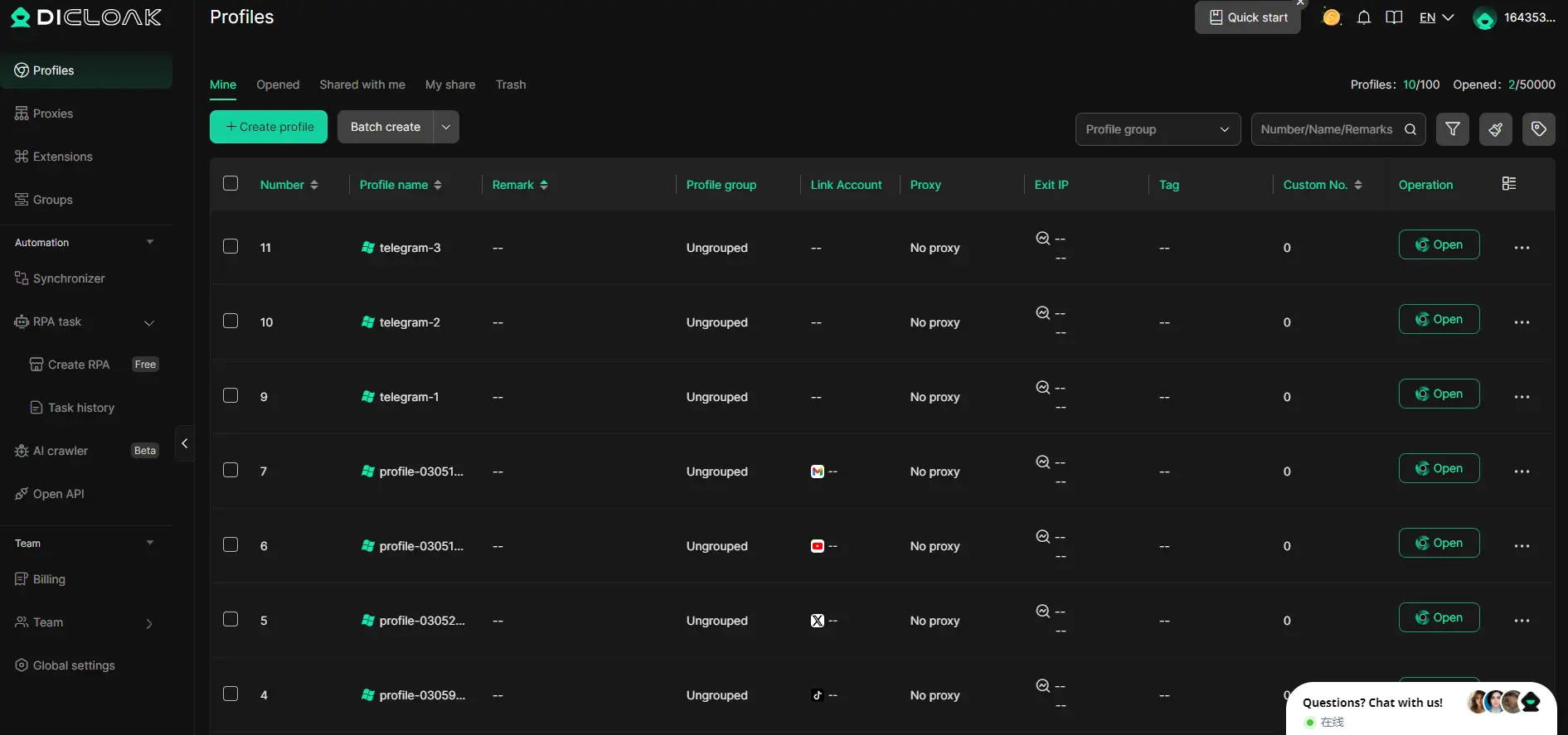
A cleaner approach is to use a profile-based workflow. With DICloak, you can create multiple isolated browser profiles so different Telegram Web sessions run independently on the same device. This makes it easier to review many channels in parallel without mixing sessions.
Step 1: Open Multiple Telegram Web Sessions
Create several profiles in DICloak and open Telegram Web in each one.
Example setup:
- Profile 1: AI channels
- Profile 2: crypto communities
- Profile 3: marketing research
Each profile stays separate, so your sessions stay clean and easier to manage.
Step 2: Compare Channels Side By Side
Open several candidate channels across different profiles and compare key signals faster:
- how often the channel posts
- whether the topic stays focused
- whether it is active or mostly promotional
This makes it easier to shortlist only the channels worth joining.
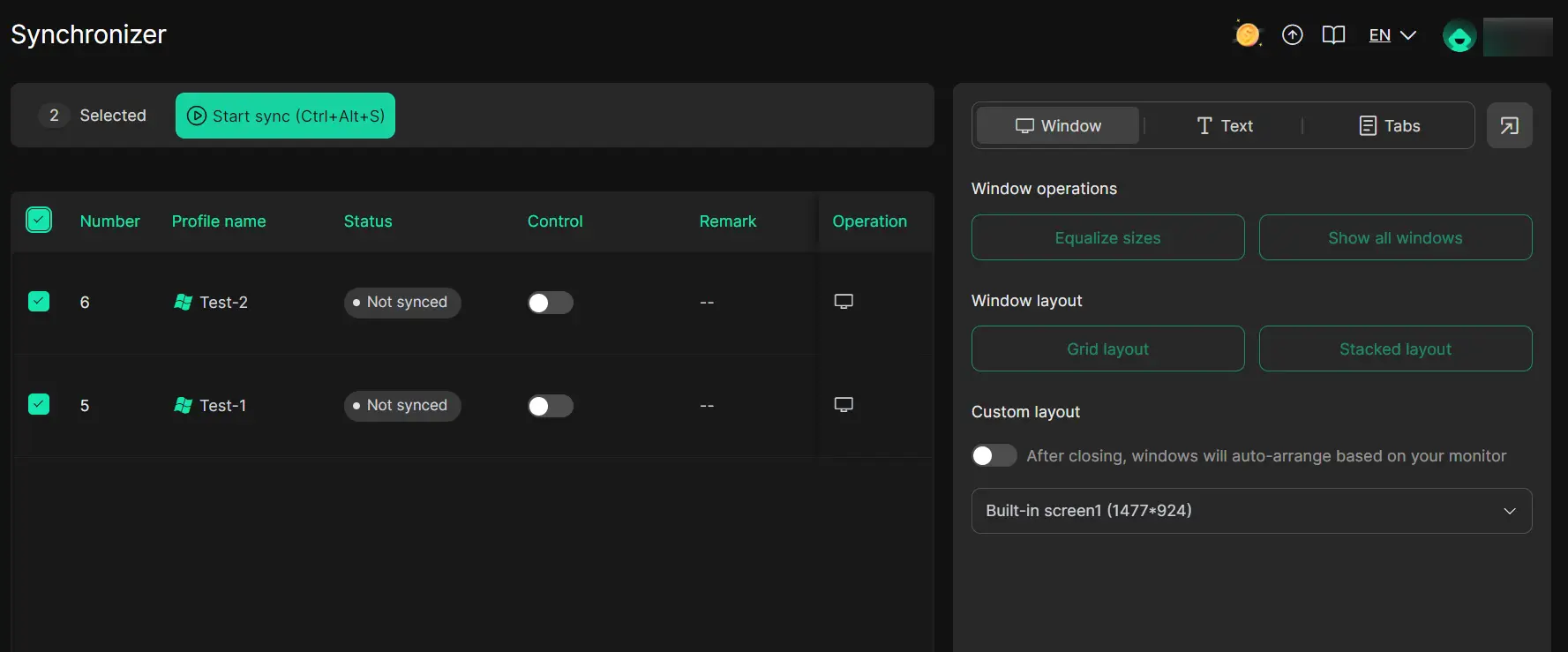
Step 3: Use Synchronizer To Speed Up Skimming
DICloak also includes a multi-window Synchronizer. It can mirror basic actions across multiple open profiles, such as scrolling and simple navigation.
For example, when you scroll one Telegram channel page, other open profiles can scroll too. This lets you skim recent posts across many channels with fewer repeated clicks.
Why This Combined Workflow Works
This approach upgrades your process from:
- “I can’t find the channel”
- “I found many links, but reviewing them takes forever”
to a cleaner system:
- find hidden channels with better discovery methods
- review many candidates quickly with separate profiles
- compare channels side by side and build a clear shortlist
If you often Search Channels in Telegram, this workflow saves time, reduces confusion, and helps you pick better communities with less effort.
Joining Channels After You Search Channels In Telegram
Most channels provide links like:
t.me/channelname
Steps:
- Open the link
- Preview the channel
- Tap Join
Private channels require invitation links.
FAQs About How To Search Channels In Telegram
How can I mute channel notifications?
If a channel sends too many updates, you can easily mute it. Open the channel, tap on its name at the top, and select "Mute Notifications." You can choose to mute for 1 hour, 8 hours, or indefinitely, allowing you to follow the channel without constant interruptions.
Is A Link Enough To Join A Channel?
Yes, for public channels, a link is all you need. Anyone with a link like t.me/channelnamecan open it, preview the content, and join directly. For private channels, however, you will require a valid invitation link to gain access. When you're evaluating many candidate channels, tools like DICloak can be helpful. You can open multiple invitation links in separate, clean browser profiles simultaneously to preview and compare channels side-by-side before deciding which ones to join.
Why can't I find certain channels when searching on Telegram?
This is a frequent issue, and it's usually not a bug. The primary reason is that the channel is likely set to private, meaning it won't appear in public search results. Other reasons include using keywords that don't match the channel's name or description, or the channel being very new and not yet indexed by Telegram's search. Sometimes, there's simply a delay in the search system updating.
Conclusion
Learning how to effectively search for Telegram channels unlocks access to a vast network of niche communities and real-time information streams. The key is to use a combination of methods: start with Telegram’s built-in search, broaden your reach with external search engines, explore curated directory lists, and utilize discovery bots within the app.
When you hit a wall and wonder why a channel isn't showing up, remember that privacy settings are often the culprit. For those harder-to-find communities, the techniques outlined above—like using specific Google search operators or leveraging channel networks—will help you discover more than what's on the surface. Furthermore, once you have a list of potential channels, the evaluation phase is crucial. This is where a tool like DICloak significantly streamlines the process. By allowing you to open and manage multiple Telegram Web sessions in isolated profiles and use its Synchronizer to skim content in parallel, it transforms a tedious, tab-heavy review into an efficient, organized workflow. By adopting this strategic approach to discovery and evaluation, you can efficiently build a curated list of channels that are truly valuable and relevant to your interests, making the most of everything Telegram has to offer.
 Web Proxy Tools
 Free Tools
 Cookie Plugin
 UA Generator
 MAC Address Generator
 IP Generator
 IP Address List
 2FA Code Generator
 World Clock
 Anonymous Check
 WebRTC Leak Test
 UUID Generator
 Free Web Proxy Site
 Proxy Checker
 FB Ad Checker
 AI Web Scraping
 Free SMM Tools
 Twitter Shadowban Checker
 Instagram Name Checker
 UTM Generator
 Username Generator
 AI Hashtag Generator
 LinkedIn Headline Generator
 Social Media Image Resizer